
Shopping Center WiFi: A Property Manager's Guide
This guide provides a comprehensive technical and commercial blueprint for deploying estate-wide WiFi across a shopping center. It covers three-tier network architecture, high-density RF design, CCPA/CPRA-compliant data capture, and retail media monetization strategies. Property managers, IT teams, and CTOs will find actionable deployment guidance alongside a clear ROI framework for transforming guest connectivity into a first-party data asset.
Video overview
Listen to this guide
View podcast transcript
Part of our core series: Multi-Tenant WiFi Guide →

Executive Summary
Deploying estate-wide WiFi across a retail property is no longer just an operational cost or a generic guest amenity. For the modern shopping center, a robust, high-density wireless network forms the foundation of a data-driven business strategy. By implementing a well-architected network, property managers and IT leaders can transform anonymous foot traffic into actionable first-party data, improving operational efficiency and creating new revenue streams through retail media monetization.
This guide outlines the technical architecture, deployment considerations and commercial case for enterprise-grade Guest WiFi in retail environments. It bridges the gap between complex network engineering and tangible business outcomes, giving IT managers, network architects and CTOs a blueprint for delivering a resilient, scalable and secure connectivity solution that supports both guest access and operational requirements. The same principles apply across adjacent sectors, including retail, hospitality and large public venues.
Technical Deep-Dive
Network Architecture and Topology
The architecture of a shopping center WiFi network must account for massive scale, high client density and a complex radio frequency environment. For any deployment of this size, the standard three-tier hierarchical model is essential.
 The Core Layer forms the high-speed backbone, providing redundant routing, firewall services and the internet uplink. This layer must support high throughput to handle peak traffic loads without creating bottlenecks. The Distribution Layer aggregates traffic from the access layer, applies QoS (Quality of Service) policies and routes traffic towards the core. It typically houses the RADIUS/AAA servers for authentication and the captive portal servers for guest onboarding. The Access Layer is the network edge where clients connect, comprising Power over Ethernet (PoE) switches and high-density WiFi access points distributed across retail areas, food courts and parking lots.
Wireless Standards and Frequencies
Modern deployments should standardize on WiFi 6 (802.11ax) or WiFi 6E, which deliver significant improvements in high-density environments through technologies such as OFDMA (Orthogonal Frequency-Division Multiple Access) and MU-MIMO. These standards allow APs to communicate with multiple devices simultaneously, drastically reducing latency in crowded areas such as food courts.
Dual-band (2.4 GHz and 5 GHz) or tri-band (adding 6 GHz) APs are required. While 2.4 GHz penetrates walls better and travels further, it is heavily congested. 5 GHz and 6 GHz offer wider channels and higher throughput but require denser AP placement. A well-designed network will actively steer dual-band-capable clients to the 5 GHz or 6 GHz bands (Band Steering) to optimize overall spectrum utilization.
Security and Compliance
Security is paramount, particularly when handling guest data and potentially integrating POS systems or operational technology (OT).
For guest access, implement a secure captive portal for onboarding. Use WPA3-Personal (SAE) where supported, or Open/Enhanced Open (OWE) for frictionless access. Critically, client isolation must be enabled at the AP level to prevent peer-to-peer communication between guest devices. For data privacy, data collection mechanisms must comply with CCPA/CPRA, CCPA or local data protection regulations. A robust Guest WiFi platform will manage consent explicitly during the onboarding process. For corporate/OT access, isolate operational traffic (for example HVAC sensors, security cameras, POS) onto dedicated VLANs and secure it with 802.1X authentication (WPA3-Enterprise).
Got questions about your specific setup?
Our team works with venue operators, IT managers, and network engineers across 80,000 venues. Book a 20-minute call and we will show you how others like you solved it.
Implementation Guide
Step 1: Site Survey and RF Planning
Predictive and active site surveys are the critical first step. Retail environments are dynamic; store layouts change, and seasonal displays can significantly alter RF propagation.
A predictive survey uses software tools to model the environment based on floor plans and building materials, providing an initial estimate of AP counts and placement. An active survey (AP-on-a-stick) physically tests AP coverage and interference on site. This is essential in shopping centers to account for variables such as glass storefronts, metal fixtures and existing tenant WiFi networks, all of which cause co-channel interference.
Step 2: Infrastructure Provisioning
Ensure the wired infrastructure can support the wireless demands. Run Cat6A cabling to all AP locations to support multi-gigabit throughput and higher PoE budgets (PoE+ or PoE++). Select access switches with a sufficient PoE budget to power all APs simultaneously, which is especially critical when deploying power-hungry WiFi 6/6E APs. A stable internet connection is essential; consider a dedicated leased line for guaranteed bandwidth and SLAs. For more information, see our guide: What is a leased line? Dedicated business internet.
Step 3: AP Placement and Configuration
In high-density areas such as food courts or event spaces, use directional-antenna APs to create smaller, focused micro-cells, increasing capacity without adding co-channel interference. In corridors and walkways, stagger AP placement to provide continuous coverage for roaming clients. Tune transmit power levels carefully; APs should not broadcast at maximum power, as this creates sticky clients - devices that refuse to roam to a closer AP - and increases interference.
Step 4: Captive Portal and Analytics Integration
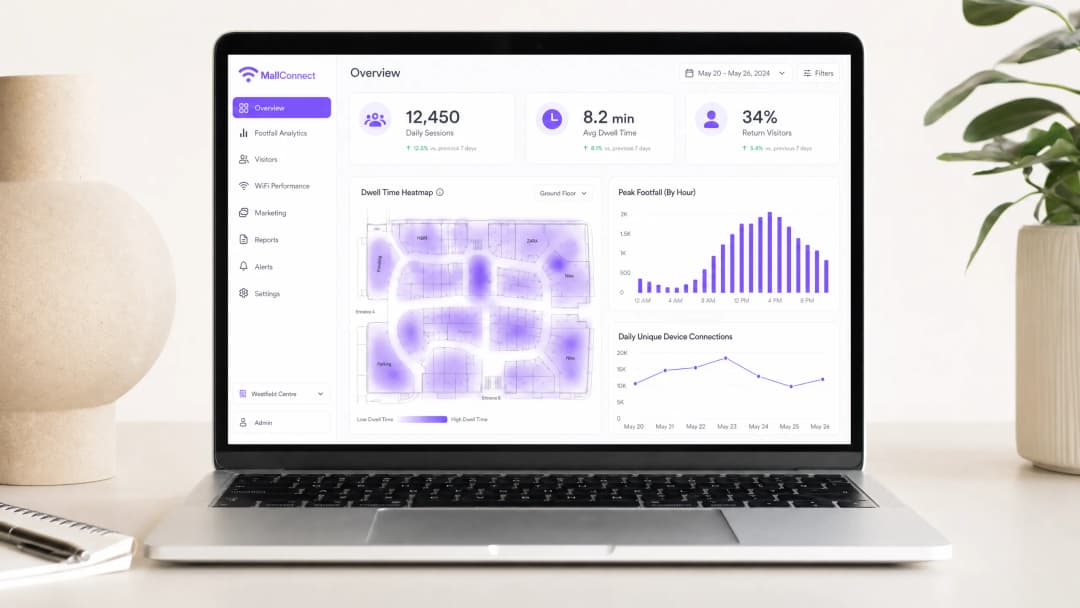
Integrate the network with a robust analytics platform. The captive portal is the gateway to data collection. Keep the onboarding process frictionless by offering social login, email registration or seamless authentication such as OpenRoaming. Once connected, the platform should begin aggregating location data, dwell times and return visit frequency. This transforms the network from a cost center into a marketing asset. Explore the capabilities of a comprehensive WiFi Analytics solution.
Best Practices
Segregate guest and corporate traffic: Always use VLANs to logically separate guest traffic from corporate and operational data. This is a fundamental security requirement, particularly in environments subject to PCI DSS compliance where payment card data may traverse the network.
Implement Band Steering: Actively steer dual-band-capable clients to the 5 GHz or 6 GHz bands, freeing up the congested 2.4 GHz spectrum for legacy devices and IoT sensors.
Optimize DHCP and DNS: High-turnover environments like shopping malls exhaust DHCP address pools quickly. Reduce DHCP lease times (for example, 1 or 2 hours) to recycle IP addresses efficiently. Ensure robust DNS infrastructure to handle high query volumes. Learn more about how to protect your network with robust DNS and security.
Monitor continuously: The RF environment is constantly changing. Use a Wireless Management System (WMS) to provide real-time visibility into client health, AP status and interference levels.
Troubleshooting and Risk Mitigation
Common Failure Modes
Co-Channel Interference (CCI) occurs when multiple APs operate on the same channel and can hear one another, forcing devices to wait for clear airtime and drastically reducing throughput. Mitigate this through careful channel planning, dynamic Radio Resource Management (RRM) and reduced AP transmit power.
Sticky clients are devices that remain connected to an AP even when a closer AP with a stronger signal is available. Implement a minimum RSSI threshold to gently disconnect weak-signal clients, forcing them to roam to an AP with a better signal.
DHCP pool exhaustion prevents users from connecting because the network has run out of IP addresses. Use larger subnets for guest networks (for example, /22 or /21) and reduce DHCP lease times.
Rogue APs are unauthorized access points connected to the network, posing a serious security risk. Enable a Wireless Intrusion Prevention System (WIPS) to automatically detect and contain rogue devices.
-
ROI and Business Impact
Data Collection and Analytics
A properly configured network captures both passive analytics (footfall, dwell time, movement patterns) and active analytics (demographic information and contact details acquired through the captive portal). This data gives venue operators granular insight into shopper behavior, enabling data-driven decisions on tenant placement, rent valuations and marketing effectiveness. The same data-driven approach detailed in our Zoo and Theme Park WiFi: A High-Footfall Venue Connectivity Guide is equally effective in high-traffic venues.
Retail Media Monetization
The captive portal is itself prime digital real estate. Property managers can monetize it by serving targeted advertising or sponsorships from retail tenants or third-party brands during the onboarding process. This turns the WiFi network into a direct revenue-generating channel.
Enhanced Customer Experience
Seamless connectivity enables indoor wayfinding, location-based offers and personalized communications. By integrating WiFi data with an existing CRM or loyalty program, venues can deliver highly targeted, context-aware experiences that increase engagement and boost spend per visit.
-
Key Definitions
Co-Channel Interference (CCI)
Occurs when multiple access points transmit on the same frequency channel and can 'hear' each other. Because WiFi is a half-duplex medium (only one device can talk at a time on a channel), CCI forces devices to wait, severely degrading network performance and throughput.
A primary cause of poor WiFi performance in dense retail environments where too many APs are deployed without proper channel planning or power management.
Band Steering
A network feature that detects dual-band capable clients and actively encourages or forces them to connect to the less congested 5 GHz or 6 GHz bands rather than the crowded 2.4 GHz band.
Essential for maximizing throughput and capacity in high-density areas like shopping mall food courts where the 2.4 GHz band is saturated.
Captive Portal
A web page that the user of a public-access network is obliged to view and interact with before internet access is granted. Typically used for authentication, accepting terms of service, and marketing data capture.
The primary mechanism for converting anonymous foot traffic into known contacts and gathering first-party data for marketing and analytics purposes.
Client Isolation
A security feature configured on the access point that prevents connected wireless clients from communicating directly with one another over the local network.
A mandatory security control for public guest networks to prevent peer-to-peer attacks and malware spread among shoppers' devices.
Dwell Time
The length of time a visitor spends within a specific defined area (zone) of the venue, calculated based on the presence of their WiFi-enabled device as detected by the access point infrastructure.
A key metric for venue operators to understand shopper engagement, value different retail zones, and measure the effectiveness of marketing campaigns and store layouts.
RSSI (Received Signal Strength Indicator)
A measurement of the power present in a received radio signal, expressed in dBm (decibels relative to one milliwatt). It indicates how well a device can 'hear' an access point.
Used in network design to determine AP placement and configured in minimum RSSI thresholds to force sticky clients to roam to a stronger access point.
OpenRoaming
A federation of WiFi networks that allows users to seamlessly and securely connect automatically across different venues without needing to repeatedly log in or use captive portals. Based on the Passpoint (802.11u) standard.
A modern approach to frictionless connectivity that improves the user experience while still allowing venues to maintain secure, authenticated connections and capture analytics data.
Power over Ethernet (PoE)
A technology standardized in IEEE 802.3af, 802.3at (PoE+), and 802.3bt (PoE++) that passes electric power along with data on twisted pair Ethernet cabling, allowing a single cable to provide both data connection and power to devices such as wireless access points.
Critical for deploying APs across a large retail portfolio, as it eliminates the need to install separate electrical outlets at every AP location, significantly reducing installation cost and complexity.
VLAN (Virtual Local Area Network)
A logical subdivision of a physical network that groups devices together regardless of their physical location. Traffic between VLANs requires routing through a Layer 3 device, providing logical isolation between network segments.
The fundamental mechanism for separating guest WiFi traffic from corporate, POS, and operational technology networks in a retail environment.
Worked Examples
A regional shopping center (approx. 50,000 sqm) is experiencing severe connectivity issues in its central food court during peak lunch hours. Users report being connected to WiFi but unable to load web pages. The current setup uses 4 standard omni-directional APs mounted on the 10-meter high ceiling.
- Conduct an active RF survey to confirm Co-Channel Interference (CCI) and capacity exhaustion. Validate that the APs are all operating on the same or overlapping channels, and measure the concurrent client count during peak hours.
- Replace the 4 omni-directional APs with 8-10 high-density APs utilizing directional (patch) antennas. Mount them lower where possible, or angle them to create focused micro-cells over specific seating areas.
- Implement strict Band Steering to force 5GHz/6GHz connections for all capable clients.
- Reduce transmit power on all food court APs to minimize cell overlap and reduce CCI.
- Verify DHCP pool size and reduce lease time to 30 minutes for this specific zone to prevent pool exhaustion.
- Validate backhaul capacity from the distribution switch to the core to ensure the wired network is not the bottleneck.
A luxury retail outlet center wants to implement a guest WiFi network to collect shopper demographics and build a marketing database. However, the IT team is concerned about CCPA/CPRA compliance and the security of the tenant POS networks.
- Network Segmentation: Create a dedicated, isolated VLAN specifically for guest WiFi traffic, completely separate from the corporate and POS VLANs. Route this guest VLAN directly to the internet firewall, bypassing all internal networks.
- Client Isolation: Enable Layer 2 client isolation on all guest APs to prevent devices from communicating with each other.
- Captive Portal Configuration: Implement a captive portal integrated with a compliant Guest WiFi platform such as Purple.
- Consent Management: Configure the portal to require explicit, opt-in consent for marketing communications and data processing, clearly linking to the privacy policy before granting access. Separate the marketing consent checkbox from the mandatory Terms of Service acceptance.
- Authentication: Offer social login or email registration to capture verified demographic data, and ensure all data is processed and stored in compliance with the CCPA/CPRA.
Practice Questions
Q1. Your marketing team wants to implement a new augmented reality (AR) indoor navigation app that relies heavily on the guest WiFi network. The current network was designed three years ago primarily for basic web browsing. What is the most critical technical assessment you must perform before launching the app, and what specific metrics should you measure?
Hint: Consider the difference between a network designed for coverage versus one designed for high throughput, low latency, and precise location accuracy.
View model answer
You must perform a capacity analysis and active site survey. The existing network was likely designed for coverage (basic connectivity). AR applications require high throughput (minimum 10 - 25 Mbps per active user), low latency (sub-20ms), and sufficient AP density for accurate location triangulation (typically APs within 30 - 50 feet of each user). Measure concurrent client counts per AP, average and peak throughput per user, RSSI variance across the property, and roaming event frequency. If the network cannot meet these thresholds, an AP densification project and upgrade to WiFi 6 will be required before the app launch.
Q2. A tenant in the shopping center complains that their wireless Point-of-Sale (POS) terminals frequently drop connections, especially during busy weekend hours. You observe that the tenant's AP is operating on channel 6 on the 2.4GHz band, and several nearby mall guest APs are also broadcasting on channel 6. What is the immediate recommended action, and what longer-term architectural change should be considered?
Hint: Think about how WiFi devices share airtime on the same frequency, and the implications of POS systems being on the same network as guest devices.
View model answer
The immediate action is to mitigate Co-Channel Interference. Coordinate a channel plan: if the POS terminals support 5GHz, migrate the tenant's AP to the 5GHz band immediately. If 2.4GHz is required, ensure the tenant's AP and surrounding mall APs use non-overlapping channels (1, 6, or 11) with no adjacent APs on the same channel. The longer-term architectural change is to ensure POS systems are on a dedicated, isolated VLAN with a separate SSID, completely segregated from the guest network. This also addresses PCI-DSS compliance requirements for cardholder data environments.
Q3. The property management team wants to monetize the guest WiFi by selling targeted ads on the captive portal. The legal team has flagged CCPA/CPRA concerns. How should the network architecture and onboarding flow be designed to satisfy both the commercial requirement and legal compliance?
Hint: Focus on the specific CCPA/CPRA requirements for consent, and how the captive portal flow must be structured to make consent freely given, specific, informed, and unambiguous.
View model answer
The onboarding flow must implement a two-stage consent model. Stage one presents the mandatory Terms of Service (required for network access). Stage two presents a clearly separate, optional opt-in checkbox for marketing communications and data processing for targeted advertising. These must not be pre-checked and must be independent of each other. The platform must log the timestamp, IP address, and specific consent given for each user. Users must be able to access, modify, or withdraw consent at any time via a self-service portal. Architecturally, all user data must be stored in a CCPA/CPRA-compliant data store, and the captive portal platform must provide a Data Processing Agreement (DPA). Only users who have explicitly opted in should be served targeted ads.
Continue reading in this series
How to deploy iPSK on Cisco Meraki, HPE Aruba and Ruckus
This hands-on reference guide shows how to deploy iPSK on Cisco Meraki, MPSK on HPE Aruba Central and DPSK on Ruckus SmartZone, with a short UniFi PPSK appendix. It focuses on key issuance, VLAN or policy placement, RADIUS decision flows and revocation tests that prove a deployment works in a live venue.
Bulk internet agreement vs managed WiFi: which model fits your building
A practical procurement reference for property, IT and operations leaders comparing resident-paid retail broadband, a bulk internet agreement and managed WiFi. It clarifies ownership, resident move-in, security, cost scope and contractual exit, using US bulk-internet framing and UK equivalents.
Apartment WiFi solutions: a comprehensive guide for businesses
This guide covers the architecture, deployment, and business case for apartment WiFi solutions in Build to Rent and multi-dwelling unit properties. It explains how Identity Pre-Shared Key (iPSK) technology creates secure, isolated network bubbles for each resident while supporting smart devices and IoT. Property developers, landlords, and BTR operators will find actionable deployment guidance, ROI data, and worked implementation scenarios.
Got questions about your specific setup?
Our team works with venue operators, IT managers, and network engineers across 80,000 venues. Book a 20-minute call and we will show you how others like you solved it.