SSID Airtime Overhead & Beacon Impact Calculator
Adjust your network parameters to calculate the exact percentage of airtime consumed by beacon management frames across your access points.
0.61% of Total Channel Airtime
Engineering Recommendation:
Your configuration has minimal airtime impact. No SSID consolidation required.
Want Zero SSID Overhead & Enterprise Passpoint/iPSK Security?
Eliminate SSID sprawl entirely by using Purple Cloud RADIUS and Passpoint. Consolidate Staff, Guests, and IoT devices onto dynamic role-assigned SSIDs across Cisco Meraki, Aruba, Ruckus, and Mist APs.
Cutting down the number of SSIDs on a network has quietly become a competitive sport. Spend an afternoon in any networking forum and you will find strong opinions, vendor rules of thumb, and the occasional heated argument about how many is too many. Some say keep it to three or four per radio. Some say modern access points handle plenty more without breaking a sweat. The guidance genuinely varies, because the honest answer depends on your deployment.
Here is our view. The airtime that beacons consume is real, but it only becomes a problem when you have a lot of access points overlapping on the same channel. If your APs are well spaced, with little co-channel overlap, you can run several SSIDs and stay perfectly safe. Before you rip anything out, map your co-channel overlap with a WiFi analyzer app, then put your own numbers into our beacon and SSID overhead calculator and see where you actually land.
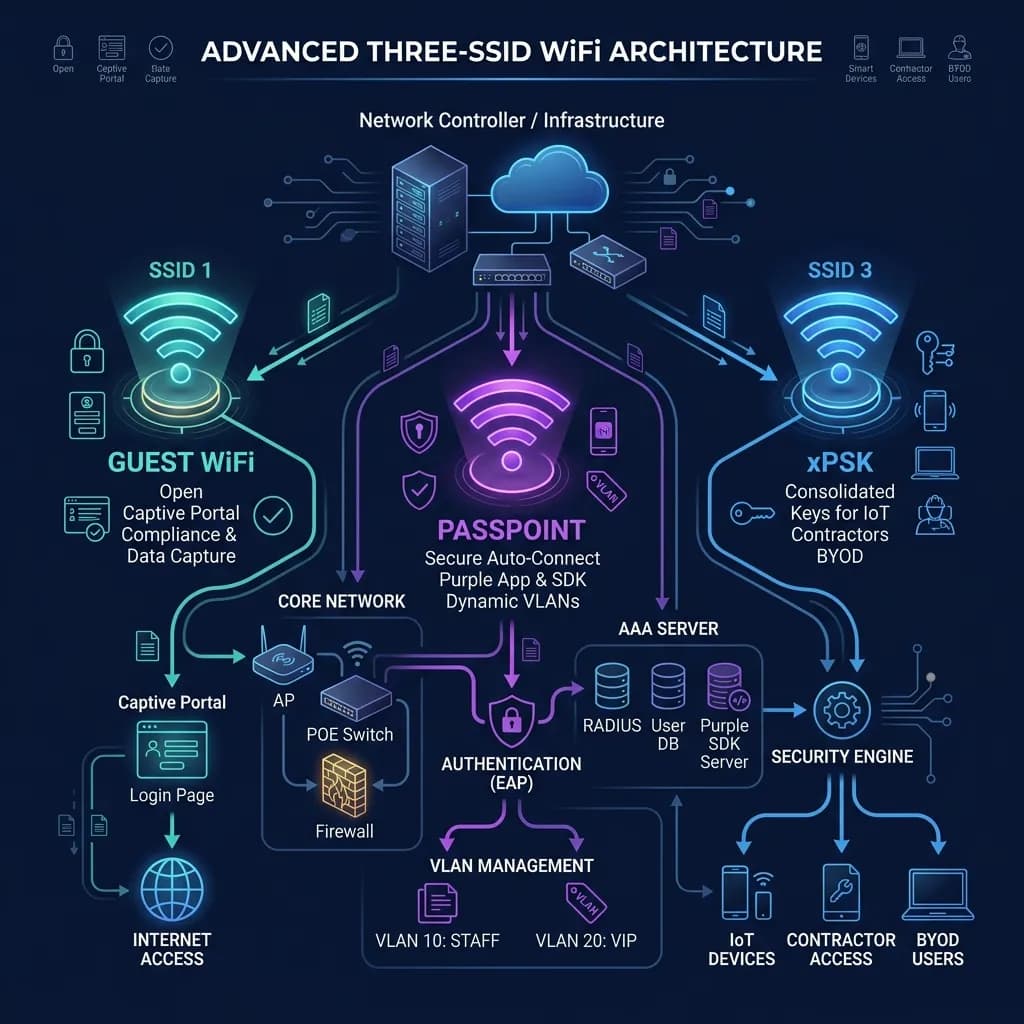
That said, we are also fans of tidiness. Even when the performance hit is negligible, an SSID list that has grown one network at a time is harder to document, harder to secure, and harder to hand to the next engineer. So if you do want to consolidate, here is the design we keep coming back to: three SSIDs, each mapped to a way of authenticating, with everything else handled by VLANs.
Where the airtime tax is real, and where it is not
Every SSID on every radio sends beacon frames many times a second, at the lowest mandatory basic rate, whether or not a single client is associated. That cost is per channel. One access point advertising a handful of SSIDs, on its own channel, is rarely an issue. The trouble starts when several access points sit on the same channel and hear each other: their beacons now compete for the same airtime, and the overhead stacks up across every SSID on every one of them.
So the real variable is co-channel overlap, not the raw SSID count. A dense deployment with lots of overlapping cells on 2.4 GHz, the basic rate left at 1 Mbps, and eight SSIDs can genuinely degrade throughput. A handful of well-separated APs running the same eight SSIDs may be completely fine. This is measurable rather than a matter of opinion: the overhead calculator takes your SSIDs per radio, beacon interval, and basic rate and returns the percentage of channel airtime your beacons consume. Under 2% is healthy, 2% to 6% is worth a look, and above 6% is where it starts to bite. Check yours before you decide there is a problem to solve.
The case for tidiness
Suppose the calculator tells you that you are well inside the healthy band. Is there still a reason to consolidate? We think so, and it has nothing to do with airtime. An SSID is an authentication boundary, not a segmentation boundary. When you spin up a new SSID for every new requirement, one for the registers, one for the printers, one for signage, one for contractors, you end up with a sprawling list where nobody is quite sure which network does what, which keys are still in use, or where a new device should go. Collapse it down to three, each tied to a clear way of proving identity, and the network starts to document itself. You separate registers from cameras from residents with VLANs and firewall policy, and you only run a separate SSID when a group of devices genuinely needs a different authentication method. There are only three of those.
SSID 1: open guest network with a captive portal
The first SSID is open, meaning any device can associate without entering a password. Instead, a traditional captive portal intercepts the connection and handles sign-in. This SSID is designed to either capture user data for marketing or to meet compliance and legal requirements in public venues.
This network must work for any device - even a guest phone the venue has never seen before - so the only requirement is a web browser. It is also where the marketing value resides: opted-in, CCPA/CPRA-compliant data captured at the point of connection. Purple runs this as Guest WiFi across more than 80,000 venues, keeping guest access on an isolated VLAN that cannot see the back office.
SSID 2: Passpoint-enabled network for automated access
The second SSID runs on Passpoint (Hotspot 2.0) and WPA2/3-Enterprise. This SSID enables a secure, cellular-like connection. Instead of manually entering credentials or finding a splash page, anyone with the Purple App, or an app containing the Purple SDK, connects automatically and securely as soon as they walk into the venue.
Everything else is handled by VLANs. When a device associates, the network authenticates the profile and assigns the device to the correct VLAN. It is not just for trusted guests or contractors; it is an automated, encrypted gateway for any user with a matching profile. Since it uses EAP-TLS or similar secure protocols, all traffic is encrypted over the air, protecting users from eavesdropping without requiring administrative overhead for credentials.
SSID 3: xPSK for IoT, contractors, and BYOD consolidation
The third SSID is a consolidated network for headless devices, contractors, and bring-your-own-device (BYOD) setups. It uses per-device pre-shared keys - often called xPSK (or iPSK, PPSK, DPSK depending on the vendor) - to map different groups of devices to their own isolated VLANs on a single SSID.
This network serves everything that cannot run a browser or do Passpoint. IoT sensors, card terminals, printers, and media screens get their own keys and land on isolated VLANs. Contractors or employees bringing their own devices receive a unique key that segments their traffic. This consolidates what would have been five or six separate SSIDs into one. If a key is compromised, you rotate that specific key without affecting the rest of the network.
How three SSIDs cover everything
Map any device in a venue to one of three questions and you have its home:
- Is it an untrusted guest needing data capture or compliance? Open guest SSID with captive portal.
- Does the user have the Purple App or your SDK-enabled app? Passpoint SSID with automated secure connection and VLAN mapping.
- Is it a headless IoT device, contractor, or BYOD user? Consolidated xPSK SSID with per-device keys.
Everything else is segmentation, and segmentation is a VLAN job. Voice, CCTV, payments, signage, building management, and per-tenant isolation all live as VLANs behind these three SSIDs, steered by RADIUS attributes or by the key the device presents. You keep every bit of separation you had with ten SSIDs, with a list short enough that the next engineer can understand it at a glance.
Does cutting SSIDs actually improve performance?
Sometimes, and mainly when co-channel overlap is high. If you have many access points sharing channels, dropping from eight or ten SSIDs to three reduces beacon frames proportionally on every overlapping radio, and raising the basic rate so beacons transmit faster compounds the saving. If your APs barely overlap, the gain is marginal and tidiness is the better reason to do it. Either way, run your before-and-after numbers through the overhead calculator so you are deciding on evidence rather than a rule of thumb.
What about guest, IoT, and staff all needing different security?
They do need different security, and that is exactly why there are three SSIDs rather than one. Each SSID is a distinct authentication method - open with portal, 802.11u Passpoint, and per-device key - which is the one thing that justifies a separate broadcast. Different trust levels within a method are handled by VLAN and firewall policy, not by adding more SSIDs. You get stricter isolation than the sprawling approach, because every boundary is enforced by identity or by key rather than by hoping nobody guessed the staff WiFi password.
The short version
Whether your SSID count is costing you airtime depends mostly on how much your access points overlap, so check the calculator before you assume the worst. But SSIDs are cheap to over-create and a tidy network is easier to run, so when you do consolidate, tie each SSID to a way of authenticating and push every other distinction down to the VLAN. Three is all a venue needs: open guest with a portal, Passpoint for automated secure access, and xPSK for IoT, contractors, and BYOD. It works across Cisco Meraki, HPE Aruba, Ruckus, Juniper Mist, Ubiquiti UniFi, and the rest, because if your access points speak RADIUS, Purple works with them.
Want a hand collapsing an overgrown SSID list without losing any segmentation? Speak to an expert and we will map your devices to the three networks that cover them.