

Asignación dinámica de VLAN con RADIUS: Segmentación de usuarios por rol
Esta guía ofrece una visión técnica completa sobre la implementación de la asignación dinámica de VLAN mediante atributos RADIUS. Detalla cómo los recintos empresariales pueden automatizar la segmentación de red para el personal, invitados y dispositivos IoT para mejorar la seguridad y reducir la carga de configuración manual.
🎧 Escucha esta guía
Ver transcripción
Resumen ejecutivo
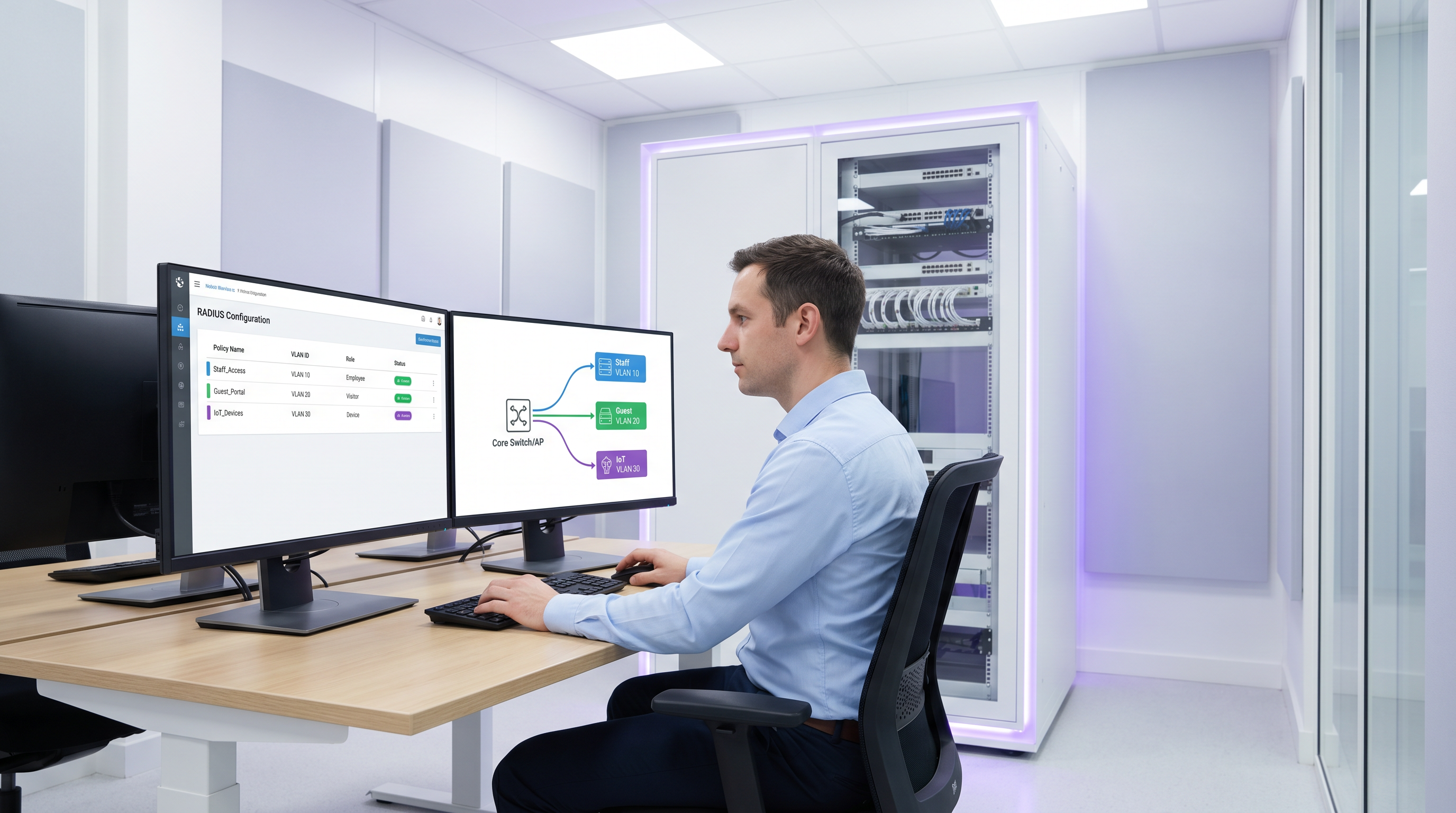
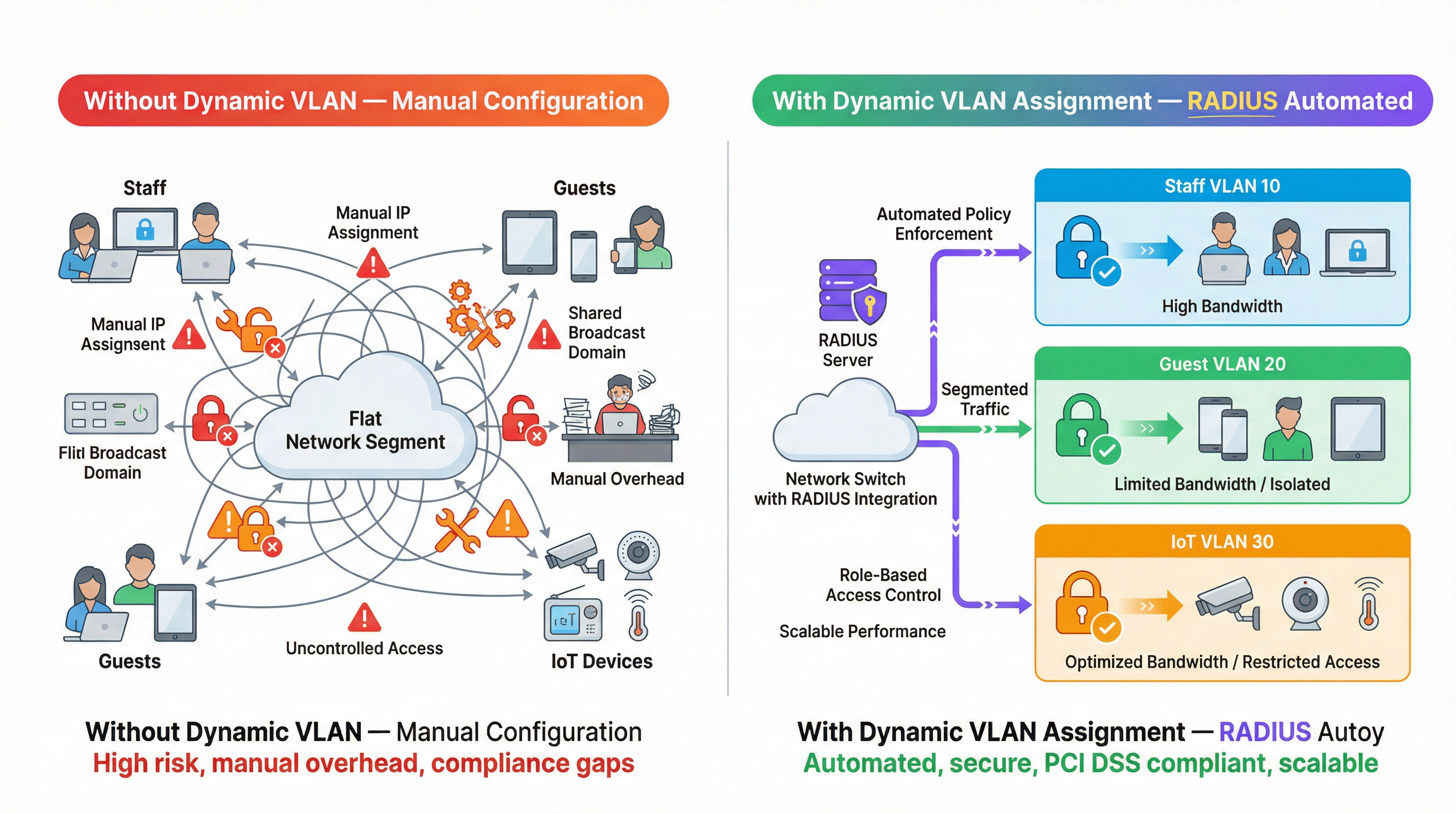
Para los operadores de múltiples recintos, gestionar la segmentación de red manualmente es un cuello de botella operativo significativo. A medida que el número de dispositivos conectados aumenta en entornos de hospitalidad, retail y sector público, depender de configuraciones de VLAN estáticas por puerto o transmitir docenas de SSID se vuelve insostenible. Esta guía explora cómo aprovechar la asignación dinámica de VLAN con RADIUS para segmentar automáticamente a usuarios y dispositivos por rol en el punto de autenticación. Al pasar atributos RADIUS específicos (como Tunnel-Pvt-Group-ID), los arquitectos de red pueden asignar dinámicamente a los usuarios a la VLAN correcta, aplicando políticas de seguridad estrictas, garantizando el cumplimiento de estándares como PCI DSS y reduciendo drásticamente la carga administrativa de TI.
Análisis técnico profundo
La asignación dinámica de VLAN se basa en el estándar IEEE 802.1X para el control de acceso a la red basado en puertos, combinado con un servidor RADIUS (Remote Authentication Dial-In User Service) para la autenticación, autorización y contabilidad (AAA) centralizada. Cuando un dispositivo cliente intenta conectarse a la red, el autenticador (normalmente un punto de acceso inalámbrico o un switch de red) actúa como intermediario, reenviando las credenciales del cliente al servidor RADIUS a través del Protocolo de Autenticación Extensible (EAP).
Si las credenciales son válidas, el servidor RADIUS responde con un mensaje Access-Accept. El mecanismo crítico para la asignación dinámica de VLAN es la inclusión de atributos RADIUS específicos del estándar IETF dentro de este paquete Access-Accept. Los tres atributos esenciales son:
- Tunnel-Type (Atributo 64): Debe establecerse en
VLAN(valor 13). - Tunnel-Medium-Type (Atributo 65): Debe establecerse en
IEEE-802(valor 6). - Tunnel-Private-Group-ID (Atributo 81): Contiene la cadena del ID de VLAN real (p. ej., "10", "20", "Guest_VLAN").
Cuando el autenticador recibe estos atributos, etiqueta dinámicamente el tráfico del usuario con el ID de VLAN especificado, ubicándolo en el segmento de red adecuado independientemente del puerto físico o SSID al que se haya conectado.
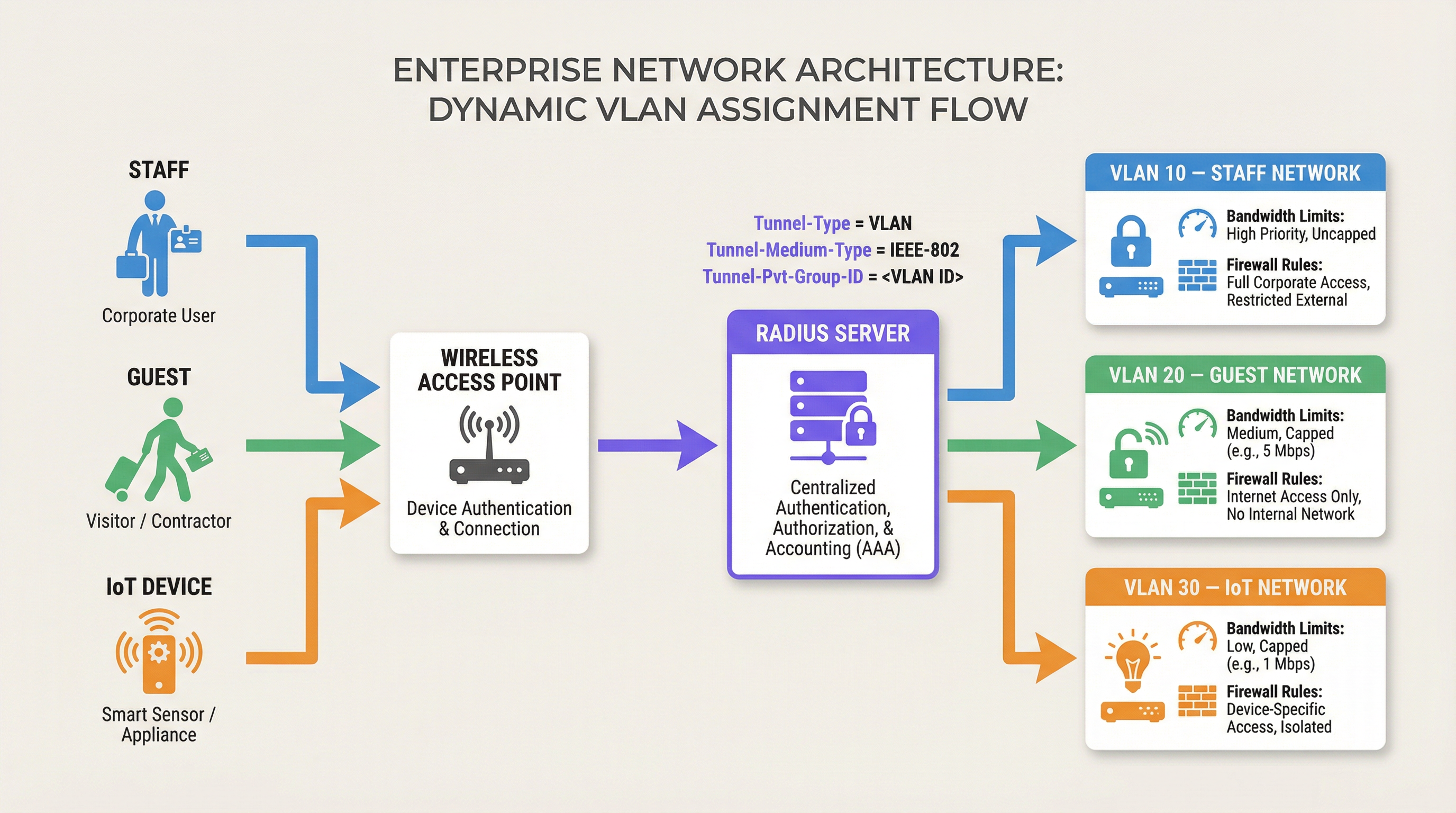
Esta arquitectura permite el control de acceso a la red basado en roles. Un solo SSID puede dar servicio de forma segura a múltiples grupos de usuarios distintos, colocándolos en segmentos de red aislados con sus propias reglas de firewall, límites de ancho de banda y políticas de enrutamiento. Por ejemplo, las soluciones de Guest WiFi de Purple a menudo se integran con RADIUS para garantizar que los invitados se ubiquen en una VLAN aislada, protegiendo los recursos internos.
Guía de implementación
Implementar la asignación dinámica de VLAN requiere configuración tanto en el servidor RADIUS como en la infraestructura de red (puntos de acceso o switches). Aunque la sintaxis exacta varía entre proveedores (p. ej., Cisco ISE, Aruba ClearPass, FreeRADIUS), los principios fundamentales siguen siendo los mismos.
Paso 1: Configuración del servidor RADIUS
Configure su servidor RADIUS para devolver los atributos requeridos basados en grupos de usuarios o perfiles de dispositivos. Por ejemplo, podría crear políticas que establezcan:
- Si el Grupo de Usuarios = "Staff", devolver Tunnel-Private-Group-ID = "10".
- Si el Grupo de Usuarios = "Contractors", devolver Tunnel-Private-Group-ID = "20".
- Si el Tipo de Dispositivo = "IoT Sensor" (vía MAC Authentication Bypass), devolver Tunnel-Private-Group-ID = "30".
Paso 2: Configuración del autenticador (puntos de acceso/switches)
Configure sus dispositivos de red para consultar al servidor RADIUS y procesar los atributos devueltos. Esto normalmente implica:
- Definir la dirección IP del servidor RADIUS y el secreto compartido.
- Habilitar la autenticación 802.1X en los SSID o puertos de switch pertinentes.
- Habilitar la asignación dinámica de VLAN (a veces llamada "AAA Override" o "asignación de VLAN por RADIUS").
Consideraciones específicas del proveedor
- Cisco: En las WLC, asegúrese de que "AAA Override" esté habilitado en la configuración de la WLAN. Para los switches, configure
authentication port-control autoydot1x pae authenticator. - Aruba: En ArubaOS, asegúrese de que el perfil AAA tenga configurado el "RADIUS Server" y que el grupo de servidores esté configurado para procesar reglas de servidor para la derivación de VLAN.
- Ubiquiti UniFi: En la aplicación UniFi Network, habilite "RADIUS MAC Authentication" o "WPA2/WPA3 Enterprise" y asegúrese de que "Enable RADIUS assigned VLAN" esté marcado en la configuración de red.
Mejores prácticas
Para garantizar una implementación robusta y escalable, siga estas recomendaciones estándar de la industria:
- Estandarizar los ID de VLAN globalmente: La nomenclatura inconsistente de VLAN entre sitios es un error común. Si la VLAN 10 es "Staff" en el sitio A pero "Guest" en el sitio B, la asignación dinámica causará caos. Establezca un esquema global de numeración de VLAN antes de implementar la asignación dinámica.
- Implementar mecanismos de respaldo: La indisponibilidad de RADIUS es un modo de falla crítico. Configure una "VLAN crítica" o "VLAN de respaldo" en sus puntos de acceso. Si el servidor RADIUS no está disponible, el AP debe colocar el dispositivo en una VLAN restringida que quizás solo permita el acceso a internet, manteniendo la conectividad sin comprometer la seguridad interna.
- Usar MAC Authentication Bypass (MAB) para dispositivos sin interfaz: Los dispositivos IoT como Sensors o termostatos inteligentes a menudo no pueden realizar la autenticación 802.1X. Use MAB para autenticar estos dispositivos basándose en su dirección MAC, asignándolos a una VLAN de IoT restringida.
- Aprovechar la analítica: Utilice plataformas como WiFi Analytics de Purple para monitorear las tendencias de autenticación, identificar anomalías y optimizar el rendimiento de la red basándose en los patrones de uso por rol.
Resolución de problemas y mitigación de riesgos
Al implementar la asignación dinámica de VLAN, prepárese para solucionar problemas comunes:
- Cliente ubicado en la VLAN predeterminada: Esto suele ocurrir si el servidor RADIUS no envía los atributos correctos, o si el autenticador no está configurado para procesarlos (p. ej., "AAA Override" está deshabilitado). Use capturas de paquetes para verificar el contenido del mensaje
Access-Accept. - Tiempos de espera de autenticación: Si los dispositivos no logran autenticarse, verifique la conectividad de red entre el autenticador y el servidor RADIUS. Verifique el secreto compartido y asegúrese de que el servidor RADIUS tenga el autenticador configurado como un cliente válido.
- Problemas de DHCP: Después de que un dispositivo se asigna dinámicamente a una VLAN, debe obtener una dirección IP para esa subred. Asegúrese de que el servidor DHCP esté configurado correctamente para todas las VLAN dinámicas y que las direcciones IP helper estén en su lugar si es necesario.
ROI e impacto empresarial
Implementar la asignación dinámica de VLAN ofrece un retorno de inversión significativo al reducir la carga de configuración manual y mitigar los riesgos de seguridad.
- Eficiencia operativa: Elimina la necesidad de configurar manualmente VLAN estáticas por puerto o transmitir múltiples SSID para diferentes grupos de usuarios, ahorrando a los equipos de TI horas de trabajo administrativo.
- Seguridad mejorada: Aplica un control de acceso estricto basado en roles, garantizando que los dispositivos comprometidos o los usuarios no autorizados estén aislados de los sistemas empresariales críticos. Esto es esencial para el cumplimiento de estándares como PCI DSS en entornos de Retail .
- Experiencia de usuario mejorada: Proporciona una experiencia de autenticación fluida para el personal y los invitados, ya que pueden conectarse a un solo SSID y recibir automáticamente los privilegios de acceso a la red adecuados.
Escuche nuestro podcast de informe técnico para obtener más información:
Para obtener más información sobre cómo asegurar su red, consulte nuestra guía sobre Autenticación 802.1X: Asegurando el acceso a la red en dispositivos modernos .
Términos clave y definiciones
Dynamic VLAN Assignment
The process of automatically assigning a device to a specific Virtual Local Area Network (VLAN) based on its identity or role during authentication, rather than its physical connection point.
Essential for scalable network segmentation in enterprise environments, eliminating the need for manual port configuration.
RADIUS (Remote Authentication Dial-In User Service)
A networking protocol that provides centralized Authentication, Authorization, and Accounting (AAA) management for users who connect and use a network service.
The core engine that evaluates credentials and dictates network policy, including VLAN assignment.
802.1X
An IEEE Standard for port-based Network Access Control (PNAC), providing an authentication mechanism to devices wishing to attach to a LAN or WLAN.
The framework that allows devices to securely transmit credentials to the network infrastructure before gaining access.
Tunnel-Private-Group-ID
RADIUS Attribute 81, used to specify the VLAN ID or VLAN name that the authenticator should assign to the user's session.
The specific data field in the RADIUS response that dictates the network segment.
MAC Authentication Bypass (MAB)
A technique used to authenticate devices that do not support 802.1X (like printers or IoT sensors) by using their MAC address as their identity.
Crucial for integrating headless devices into a dynamically segmented network architecture.
Authenticator
The network device (such as a wireless access point or switch) that facilitates the authentication process between the client and the RADIUS server.
The device responsible for enforcing the VLAN assignment policy returned by the RADIUS server.
Access-Accept
The RADIUS message sent to the authenticator indicating that the user's credentials are valid and access should be granted.
This packet carries the crucial VLAN assignment attributes.
AAA Override
A configuration setting on many authenticators (like Cisco WLCs) that allows the RADIUS server to override the default VLAN or policy configured on the device.
Must be enabled for dynamic VLAN assignment to function correctly.
Casos de éxito
A 500-room luxury hotel needs to segment its network for guests, staff, and IoT devices (smart thermostats and door locks). They currently broadcast 5 different SSIDs, causing significant co-channel interference and confusing guests. How can dynamic VLAN assignment solve this?
The hotel should consolidate to two SSIDs: 'Hotel_Guest' (Open/Captive Portal) and 'Hotel_Secure' (802.1X). For 'Hotel_Secure', staff authenticate using their corporate credentials. The RADIUS server verifies the credentials against Active Directory and returns Tunnel-Private-Group-ID = '10' (Staff VLAN). For IoT devices, which cannot use 802.1X, the network uses MAC Authentication Bypass (MAB). The RADIUS server recognizes the MAC addresses of the thermostats and locks, returning Tunnel-Private-Group-ID = '30' (IoT VLAN). Guests connect to 'Hotel_Guest' and are placed in VLAN 20 via standard captive portal workflows, potentially integrated with Purple's Hospitality solutions.
A large retail chain is deploying point-of-sale (POS) terminals across 50 locations. To comply with PCI DSS, these terminals must be strictly isolated from the corporate and guest networks. How can dynamic VLAN assignment ensure compliance even if a terminal is moved to a different port?
The IT team configures the network switches to require 802.1X authentication on all edge ports. The POS terminals are configured with certificates for EAP-TLS authentication. When a terminal connects to any port, it authenticates with the RADIUS server. The RADIUS server verifies the certificate and returns Tunnel-Private-Group-ID = '40' (PCI VLAN). The switch dynamically assigns the port to VLAN 40, applying strict ACLs that only allow communication with the payment processing gateways.
Análisis de escenarios
Q1. You are deploying dynamic VLAN assignment across a university campus. The RADIUS server is successfully sending the Access-Accept message with Tunnel-Private-Group-ID set to '50' for faculty members. However, faculty devices are still being placed in the default VLAN (VLAN 1) configured on the SSID. What is the most likely cause?
💡 Sugerencia:Check the configuration on the wireless access point or controller.
Mostrar enfoque recomendado
The most likely cause is that the authenticator (the Wireless LAN Controller or Access Point) does not have 'AAA Override' (or the equivalent setting, such as 'Enable RADIUS assigned VLAN') enabled for that specific SSID. Even if the RADIUS server sends the correct attributes, the authenticator will ignore them and use the default configuration unless explicitly instructed to process dynamic assignments.
Q2. A hospital needs to connect hundreds of new smart infusion pumps to the network. These devices do not support 802.1X supplicants. How can the IT team ensure these devices are automatically placed into a secure, isolated clinical IoT VLAN?
💡 Sugerencia:Consider how devices without 802.1X capabilities can be identified by the network.
Mostrar enfoque recomendado
The IT team should implement MAC Authentication Bypass (MAB). The MAC addresses of all infusion pumps must be added to the RADIUS server's database. When a pump connects to the network, the switch or AP will use its MAC address as the identity for authentication. The RADIUS server will recognize the MAC address and return an Access-Accept message containing the Tunnel-Private-Group-ID for the clinical IoT VLAN.
Q3. Your enterprise network relies heavily on dynamic VLAN assignment. During a scheduled maintenance window, the primary and secondary RADIUS servers become temporarily unreachable. What configuration must be in place to ensure business-critical devices maintain some level of connectivity?
💡 Sugerencia:Look for features related to authentication failure or fallback scenarios on the switch or AP.
Mostrar enfoque recomendado
The network infrastructure must be configured with a 'Critical VLAN' or 'Fallback VLAN'. When the authenticator detects that the RADIUS servers are dead (unreachable), it automatically places connecting devices into this pre-defined Critical VLAN. This VLAN should have strict ACLs applied, perhaps only allowing internet access or access to essential remediation services, ensuring basic connectivity without exposing the internal network.
Conclusiones clave
- ✓Dynamic VLAN assignment automates network segmentation based on user role or device identity.
- ✓It relies on 802.1X authentication and specific RADIUS attributes (Tunnel-Type, Tunnel-Medium-Type, Tunnel-Pvt-Group-ID).
- ✓This approach eliminates the need for manual port configuration and reduces SSID bloat.
- ✓MAC Authentication Bypass (MAB) is essential for segmenting headless IoT devices.
- ✓Global standardisation of VLAN IDs is critical for successful multi-site deployments.
- ✓Always configure fallback mechanisms (Critical VLAN) to handle RADIUS server outages.




