

Assegnazione dinamica VLAN con RADIUS: segmentazione degli utenti per ruolo
Questa guida fornisce una panoramica tecnica completa sull'implementazione dell'assegnazione dinamica VLAN tramite attributi RADIUS. Dettaglia come le strutture aziendali possano automatizzare la segmentazione della rete per personale, ospiti e dispositivi IoT per migliorare la sicurezza e ridurre il carico di lavoro della configurazione manuale.
🎧 Ascolta questa guida
Visualizza trascrizione
Sintesi operativa
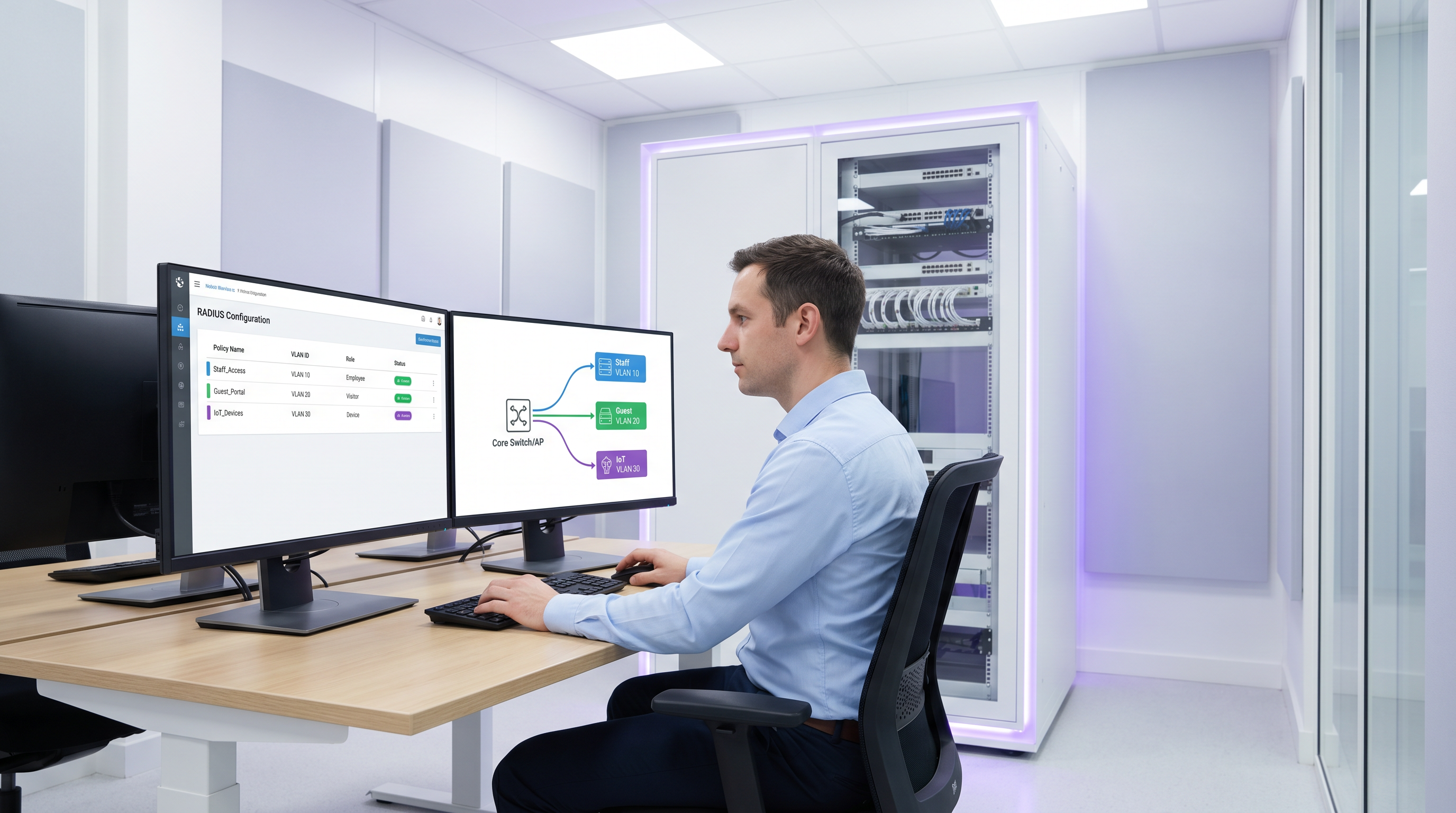
Per gli operatori multi-sede, la gestione manuale della segmentazione della rete rappresenta un collo di bottiglia operativo significativo. Con l'aumentare del numero di dispositivi connessi negli ambienti hospitality, retail e del settore pubblico, affidarsi a configurazioni VLAN statiche per porta o trasmettere decine di SSID diventa insostenibile. Questa guida esplora come sfruttare l'assegnazione dinamica VLAN con RADIUS per segmentare automaticamente utenti e dispositivi per ruolo al momento dell'autenticazione. Passando attributi RADIUS specifici (come Tunnel-Pvt-Group-ID), gli architetti di rete possono assegnare dinamicamente gli utenti alla VLAN corretta, applicando rigorose policy di sicurezza, garantendo la conformità a standard come PCI DSS e riducendo drasticamente il carico di lavoro IT manuale.
Approfondimento tecnico
L'assegnazione dinamica VLAN si basa sullo standard IEEE 802.1X per il controllo dell'accesso alla rete basato su porta, combinato con un server RADIUS (Remote Authentication Dial-In User Service) per l'autenticazione, l'autorizzazione e la contabilità (AAA) centralizzate. Quando un dispositivo client tenta di connettersi alla rete, l'autenticatore (solitamente un Access Point wireless o uno switch di rete) funge da intermediario, inoltrando le credenziali del client al server RADIUS tramite l'Extensible Authentication Protocol (EAP).
Se le credenziali sono valide, il server RADIUS risponde con un messaggio Access-Accept. Il meccanismo critico per l'assegnazione dinamica VLAN è l'inclusione di specifici attributi RADIUS standard IETF all'interno di questo pacchetto Access-Accept. I tre attributi essenziali sono:
- Tunnel-Type (Attributo 64): Deve essere impostato su
VLAN(valore 13). - Tunnel-Medium-Type (Attributo 65): Deve essere impostato su
IEEE-802(valore 6). - Tunnel-Private-Group-ID (Attributo 81): Contiene la stringa dell'ID VLAN effettivo (ad es. "10", "20", "Guest_VLAN").
Quando l'autenticatore riceve questi attributi, tagga dinamicamente il traffico dell'utente con l'ID VLAN specificato, inserendolo nel segmento di rete appropriato indipendentemente dalla porta fisica o dall'SSID a cui si è connesso.
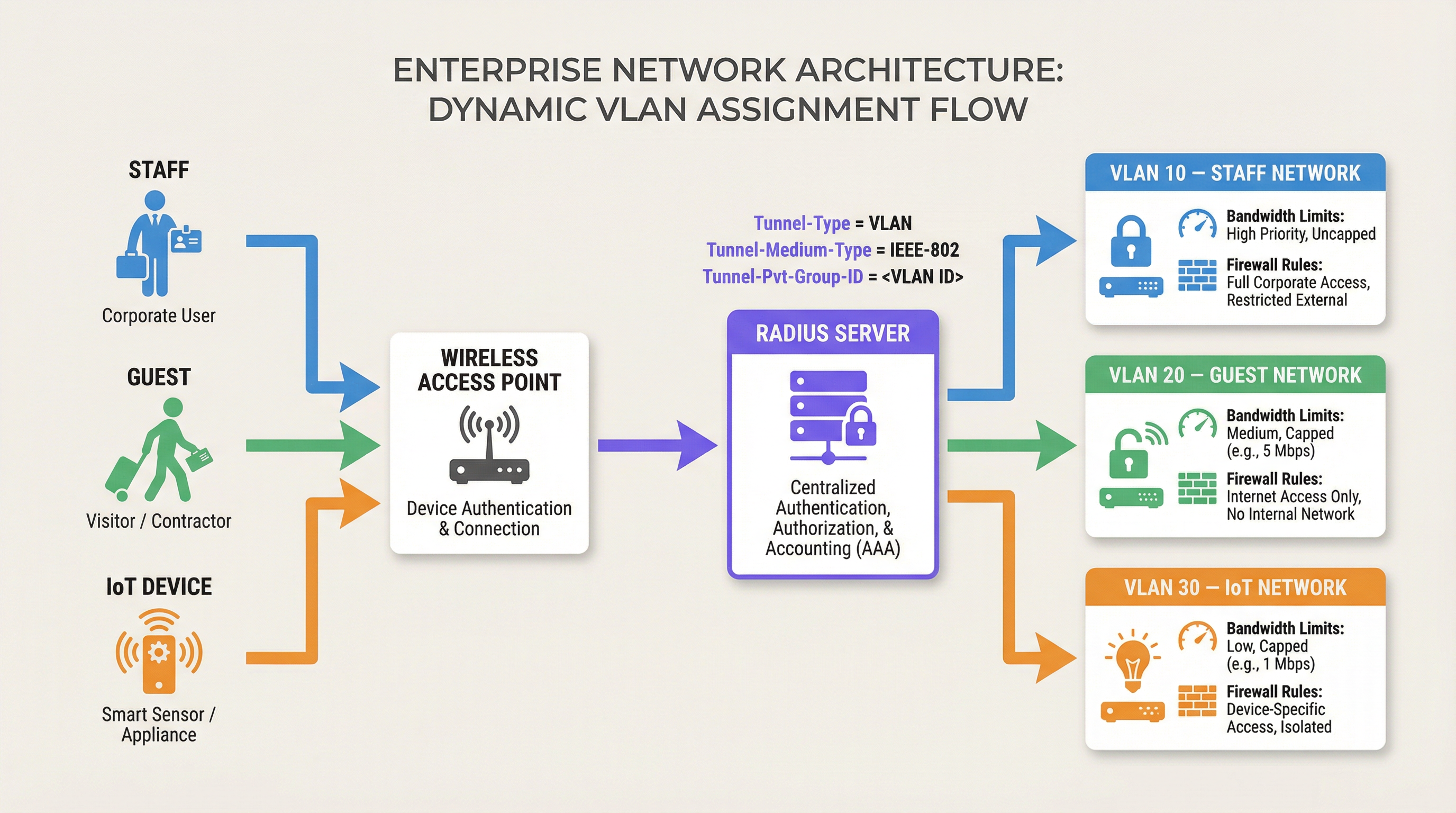
Questa architettura consente il controllo dell'accesso alla rete basato sui ruoli. Un singolo SSID può servire in modo sicuro più gruppi di utenti distinti, inserendoli in segmenti di rete isolati con le proprie regole firewall, limiti di larghezza di banda e policy di routing. Ad esempio, le soluzioni Guest WiFi di Purple si integrano spesso con RADIUS per garantire che gli ospiti siano inseriti in una VLAN isolata, proteggendo le risorse interne.
Guida all'implementazione
L'implementazione dell'assegnazione dinamica VLAN richiede la configurazione sia sul server RADIUS che sull'infrastruttura di rete (Access Point o Switch). Sebbene la sintassi esatta vari tra i fornitori (ad es. Cisco ISE, Aruba ClearPass, FreeRADIUS), i principi fondamentali rimangono coerenti.
Passaggio 1: Configurazione del server RADIUS
Configura il tuo server RADIUS per restituire gli attributi richiesti in base ai gruppi di utenti o ai profili dei dispositivi. Ad esempio, potresti creare policy che stabiliscono:
- Se Gruppo utenti = "Staff", restituisci Tunnel-Private-Group-ID = "10".
- Se Gruppo utenti = "Collaboratori", restituisci Tunnel-Private-Group-ID = "20".
- Se Tipo di dispositivo = "IoT Sensor" (tramite MAC Authentication Bypass), restituisci Tunnel-Private-Group-ID = "30".
Passaggio 2: Configurazione dell'autenticatore (Access Point/Switch)
Configura i tuoi dispositivi di rete per interrogare il server RADIUS e processare gli attributi restituiti. Ciò comporta in genere:
- Definizione dell'indirizzo IP del server RADIUS e della chiave segreta condivisa.
- Abilitazione dell'autenticazione 802.1X sugli SSID o sulle porte dello switch pertinenti.
- Abilitazione dell'assegnazione dinamica VLAN (talvolta chiamata "AAA Override" o "RADIUS VLAN assignment").
Considerazioni specifiche per fornitore
- Cisco: Sui WLC, assicurati che "AAA Override" sia abilitato nella configurazione WLAN. Per gli switch, configura
authentication port-control autoedot1x pae authenticator. - Aruba: In ArubaOS, assicurati che il profilo AAA abbia "RADIUS Server" configurato e che il gruppo di server sia impostato per elaborare le regole del server per la derivazione della VLAN.
- Ubiquiti UniFi: Nell'applicazione UniFi Network, abilita "RADIUS MAC Authentication" o "WPA2/WPA3 Enterprise" e assicurati che "Enable RADIUS assigned VLAN" sia selezionato nelle impostazioni di rete.
Best Practice
Per garantire un'implementazione robusta e scalabile, attieniti alle seguenti raccomandazioni standard del settore:
- Standardizzare gli ID VLAN a livello globale: La denominazione incoerente delle VLAN tra i siti è un grosso errore. Se la VLAN 10 è "Staff" nel sito A ma "Guest" nel sito B, l'assegnazione dinamica causerà il caos. Stabilisci uno schema di numerazione VLAN globale prima di implementare l'assegnazione dinamica.
- Implementare meccanismi di fallback: L'indisponibilità di RADIUS è una modalità di guasto critica. Configura una "VLAN critica" o una "VLAN di fallback" sui tuoi access point. Se il server RADIUS non è raggiungibile, l'AP dovrebbe inserire il dispositivo in una VLAN limitata che consenta magari solo l'accesso a Internet, mantenendo la connettività senza compromettere la sicurezza interna.
- Utilizzare MAC Authentication Bypass (MAB) per dispositivi headless: I dispositivi IoT come i Sensori o i termostati intelligenti spesso non possono eseguire l'autenticazione 802.1X. Utilizza MAB per autenticare questi dispositivi in base al loro indirizzo MAC, assegnandoli a una VLAN IoT protetta.
- Sfruttare gli Analytics: Utilizza piattaforme come WiFi Analytics di Purple per monitorare le tendenze di autenticazione, identificare anomalie e ottimizzare le prestazioni della rete in base ai modelli di utilizzo basati sui ruoli.
Risoluzione dei problemi e mitigazione dei rischi
Quando si implementa l'assegnazione dinamica VLAN, prepararsi a risolvere i problemi comuni:
- Client inserito nella VLAN predefinita: Ciò accade solitamente se il server RADIUS non invia gli attributi corretti o se l'autenticatore non è configurato per elaborarli (ad es. "AAA Override" è disabilitato). Utilizza le acquisizioni di pacchetti per verificare il contenuto del messaggio
Access-Accept. - Timeout di autenticazione: Se i dispositivi non riescono ad autenticarsi, controlla la connettività di rete tra l'autenticatore e il server RADIUS. Verifica la chiave segreta condivisa e assicurati che il server RADIUS abbia l'autenticatore configurato come client valido.
- Problemi DHCP: Dopo che un dispositivo è stato assegnato dinamicamente a una VLAN, deve ottenere un indirizzo IP per quella sottorete. Assicurati che il server DHCP sia configurato correttamente per tutte le VLAN dinamiche e che gli indirizzi IP helper siano presenti se necessario.
ROI e impatto aziendale
L'implementazione dell'assegnazione dinamica VLAN offre un significativo ritorno sull'investimento riducendo il carico di lavoro della configurazione manuale e mitigando i rischi per la sicurezza.
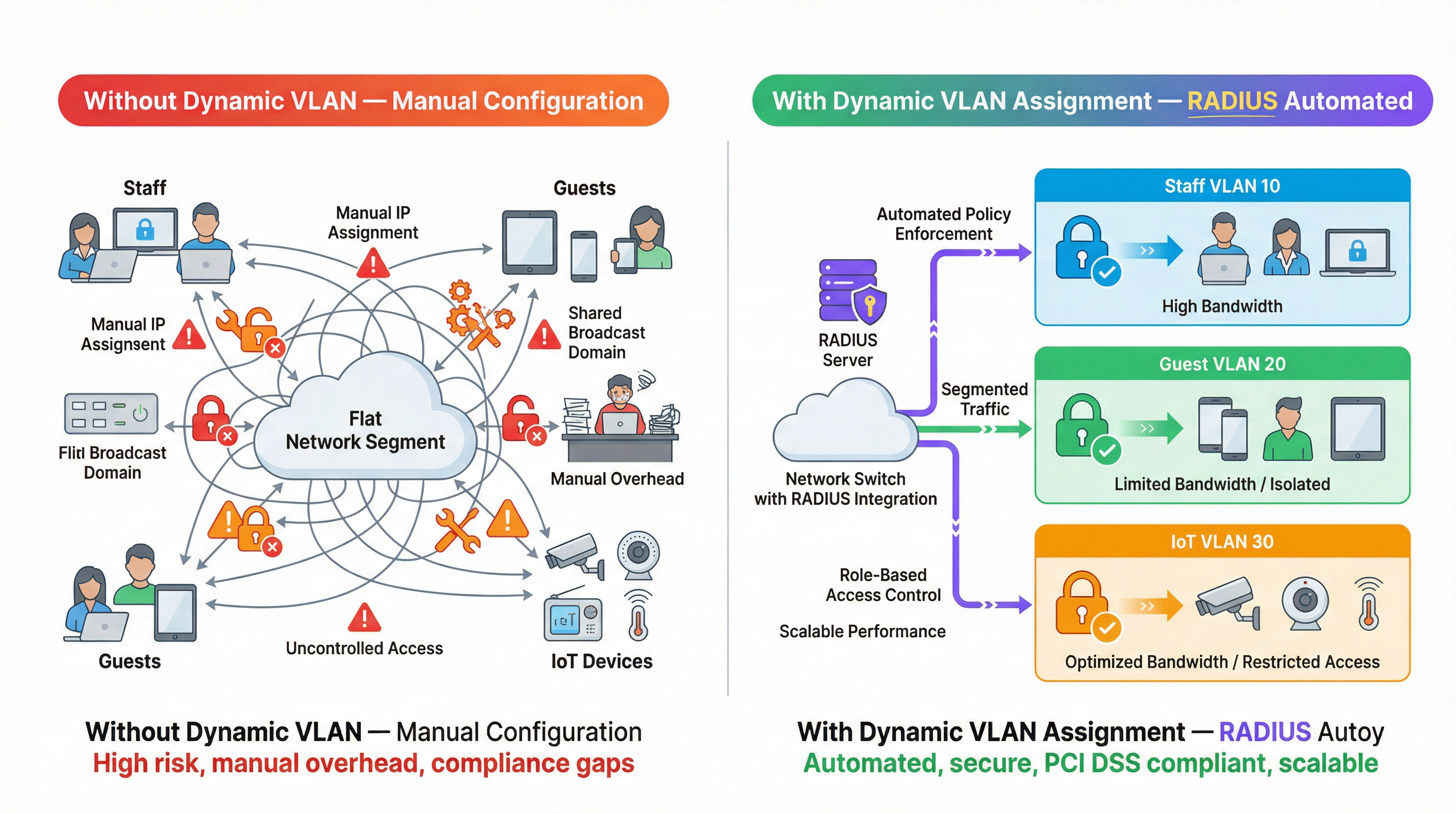
- Efficienza operativa: Elimina la necessità di configurare manualmente VLAN statiche per porta o di trasmettere più SSID per diversi gruppi di utenti, facendo risparmiare ai team IT ore di lavoro amministrativo.
- Sicurezza migliorata: Applica un rigoroso controllo degli accessi basato sui ruoli, garantendo che i dispositivi compromessi o gli utenti non autorizzati siano isolati dai sistemi aziendali critici. Ciò è essenziale per la conformità a standard come PCI DSS negli ambienti Retail .
- Esperienza utente migliorata: Fornisce un'esperienza di autenticazione fluida per il personale e gli ospiti, poiché possono connettersi a un singolo SSID e ricevere automaticamente i privilegi di accesso alla rete appropriati.
Ascolta il nostro podcast di briefing tecnico per ulteriori approfondimenti:
Per ulteriori informazioni sulla protezione della rete, consulta la nostra guida su Autenticazione 802.1X: protezione dell'accesso alla rete sui dispositivi moderni .
Termini chiave e definizioni
Dynamic VLAN Assignment
The process of automatically assigning a device to a specific Virtual Local Area Network (VLAN) based on its identity or role during authentication, rather than its physical connection point.
Essential for scalable network segmentation in enterprise environments, eliminating the need for manual port configuration.
RADIUS (Remote Authentication Dial-In User Service)
A networking protocol that provides centralized Authentication, Authorization, and Accounting (AAA) management for users who connect and use a network service.
The core engine that evaluates credentials and dictates network policy, including VLAN assignment.
802.1X
An IEEE Standard for port-based Network Access Control (PNAC), providing an authentication mechanism to devices wishing to attach to a LAN or WLAN.
The framework that allows devices to securely transmit credentials to the network infrastructure before gaining access.
Tunnel-Private-Group-ID
RADIUS Attribute 81, used to specify the VLAN ID or VLAN name that the authenticator should assign to the user's session.
The specific data field in the RADIUS response that dictates the network segment.
MAC Authentication Bypass (MAB)
A technique used to authenticate devices that do not support 802.1X (like printers or IoT sensors) by using their MAC address as their identity.
Crucial for integrating headless devices into a dynamically segmented network architecture.
Authenticator
The network device (such as a wireless access point or switch) that facilitates the authentication process between the client and the RADIUS server.
The device responsible for enforcing the VLAN assignment policy returned by the RADIUS server.
Access-Accept
The RADIUS message sent to the authenticator indicating that the user's credentials are valid and access should be granted.
This packet carries the crucial VLAN assignment attributes.
AAA Override
A configuration setting on many authenticators (like Cisco WLCs) that allows the RADIUS server to override the default VLAN or policy configured on the device.
Must be enabled for dynamic VLAN assignment to function correctly.
Casi di studio
A 500-room luxury hotel needs to segment its network for guests, staff, and IoT devices (smart thermostats and door locks). They currently broadcast 5 different SSIDs, causing significant co-channel interference and confusing guests. How can dynamic VLAN assignment solve this?
The hotel should consolidate to two SSIDs: 'Hotel_Guest' (Open/Captive Portal) and 'Hotel_Secure' (802.1X). For 'Hotel_Secure', staff authenticate using their corporate credentials. The RADIUS server verifies the credentials against Active Directory and returns Tunnel-Private-Group-ID = '10' (Staff VLAN). For IoT devices, which cannot use 802.1X, the network uses MAC Authentication Bypass (MAB). The RADIUS server recognizes the MAC addresses of the thermostats and locks, returning Tunnel-Private-Group-ID = '30' (IoT VLAN). Guests connect to 'Hotel_Guest' and are placed in VLAN 20 via standard captive portal workflows, potentially integrated with Purple's Hospitality solutions.
A large retail chain is deploying point-of-sale (POS) terminals across 50 locations. To comply with PCI DSS, these terminals must be strictly isolated from the corporate and guest networks. How can dynamic VLAN assignment ensure compliance even if a terminal is moved to a different port?
The IT team configures the network switches to require 802.1X authentication on all edge ports. The POS terminals are configured with certificates for EAP-TLS authentication. When a terminal connects to any port, it authenticates with the RADIUS server. The RADIUS server verifies the certificate and returns Tunnel-Private-Group-ID = '40' (PCI VLAN). The switch dynamically assigns the port to VLAN 40, applying strict ACLs that only allow communication with the payment processing gateways.
Analisi degli scenari
Q1. You are deploying dynamic VLAN assignment across a university campus. The RADIUS server is successfully sending the Access-Accept message with Tunnel-Private-Group-ID set to '50' for faculty members. However, faculty devices are still being placed in the default VLAN (VLAN 1) configured on the SSID. What is the most likely cause?
💡 Suggerimento:Check the configuration on the wireless access point or controller.
Mostra l'approccio consigliato
The most likely cause is that the authenticator (the Wireless LAN Controller or Access Point) does not have 'AAA Override' (or the equivalent setting, such as 'Enable RADIUS assigned VLAN') enabled for that specific SSID. Even if the RADIUS server sends the correct attributes, the authenticator will ignore them and use the default configuration unless explicitly instructed to process dynamic assignments.
Q2. A hospital needs to connect hundreds of new smart infusion pumps to the network. These devices do not support 802.1X supplicants. How can the IT team ensure these devices are automatically placed into a secure, isolated clinical IoT VLAN?
💡 Suggerimento:Consider how devices without 802.1X capabilities can be identified by the network.
Mostra l'approccio consigliato
The IT team should implement MAC Authentication Bypass (MAB). The MAC addresses of all infusion pumps must be added to the RADIUS server's database. When a pump connects to the network, the switch or AP will use its MAC address as the identity for authentication. The RADIUS server will recognize the MAC address and return an Access-Accept message containing the Tunnel-Private-Group-ID for the clinical IoT VLAN.
Q3. Your enterprise network relies heavily on dynamic VLAN assignment. During a scheduled maintenance window, the primary and secondary RADIUS servers become temporarily unreachable. What configuration must be in place to ensure business-critical devices maintain some level of connectivity?
💡 Suggerimento:Look for features related to authentication failure or fallback scenarios on the switch or AP.
Mostra l'approccio consigliato
The network infrastructure must be configured with a 'Critical VLAN' or 'Fallback VLAN'. When the authenticator detects that the RADIUS servers are dead (unreachable), it automatically places connecting devices into this pre-defined Critical VLAN. This VLAN should have strict ACLs applied, perhaps only allowing internet access or access to essential remediation services, ensuring basic connectivity without exposing the internal network.
Punti chiave
- ✓Dynamic VLAN assignment automates network segmentation based on user role or device identity.
- ✓It relies on 802.1X authentication and specific RADIUS attributes (Tunnel-Type, Tunnel-Medium-Type, Tunnel-Pvt-Group-ID).
- ✓This approach eliminates the need for manual port configuration and reduces SSID bloat.
- ✓MAC Authentication Bypass (MAB) is essential for segmenting headless IoT devices.
- ✓Global standardisation of VLAN IDs is critical for successful multi-site deployments.
- ✓Always configure fallback mechanisms (Critical VLAN) to handle RADIUS server outages.




