

RADIUS सह डायनॅमिक VLAN असाइनमेंट: भूमिकेनुसार वापरकर्त्यांचे वर्गीकरण
हे मार्गदर्शक RADIUS ॲट्रिब्युट्स वापरून डायनॅमिक VLAN असाइनमेंट लागू करण्याबद्दल सर्वसमावेशक तांत्रिक विहंगावलोकन प्रदान करते. सुरक्षा वाढवण्यासाठी आणि मॅन्युअल कॉन्फिगरेशनचा भार कमी करण्यासाठी एंटरप्राइझ ठिकाणे कर्मचारी, पाहुणे आणि IoT उपकरणांसाठी नेटवर्क वर्गीकरण कसे स्वयंचलित करू शकतात याचे तपशील यात दिले आहेत.
🎧 हे मार्गदर्शक ऐका
ट्रान्सक्रिप्ट पहा
कार्यकारी सारांश
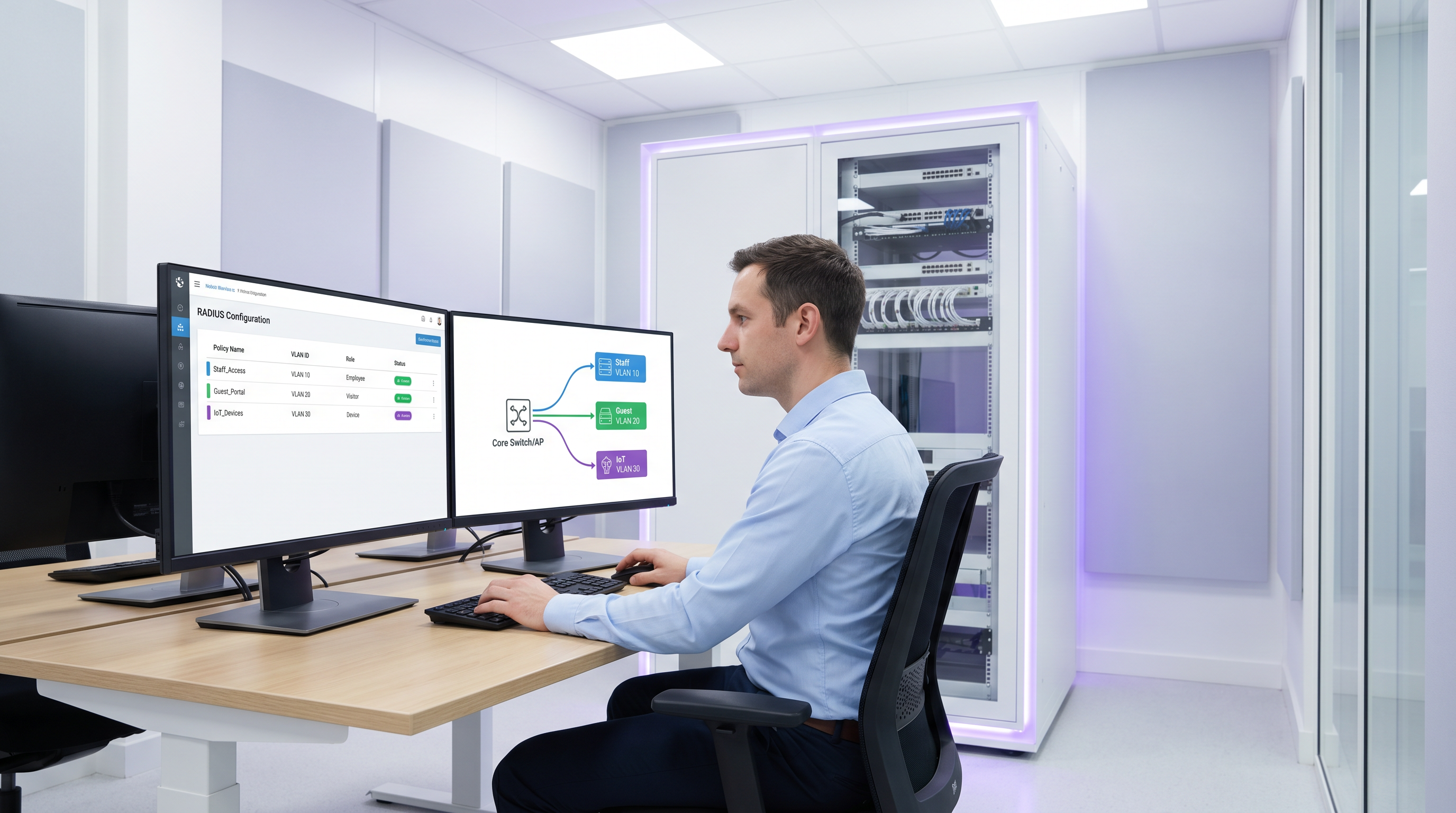
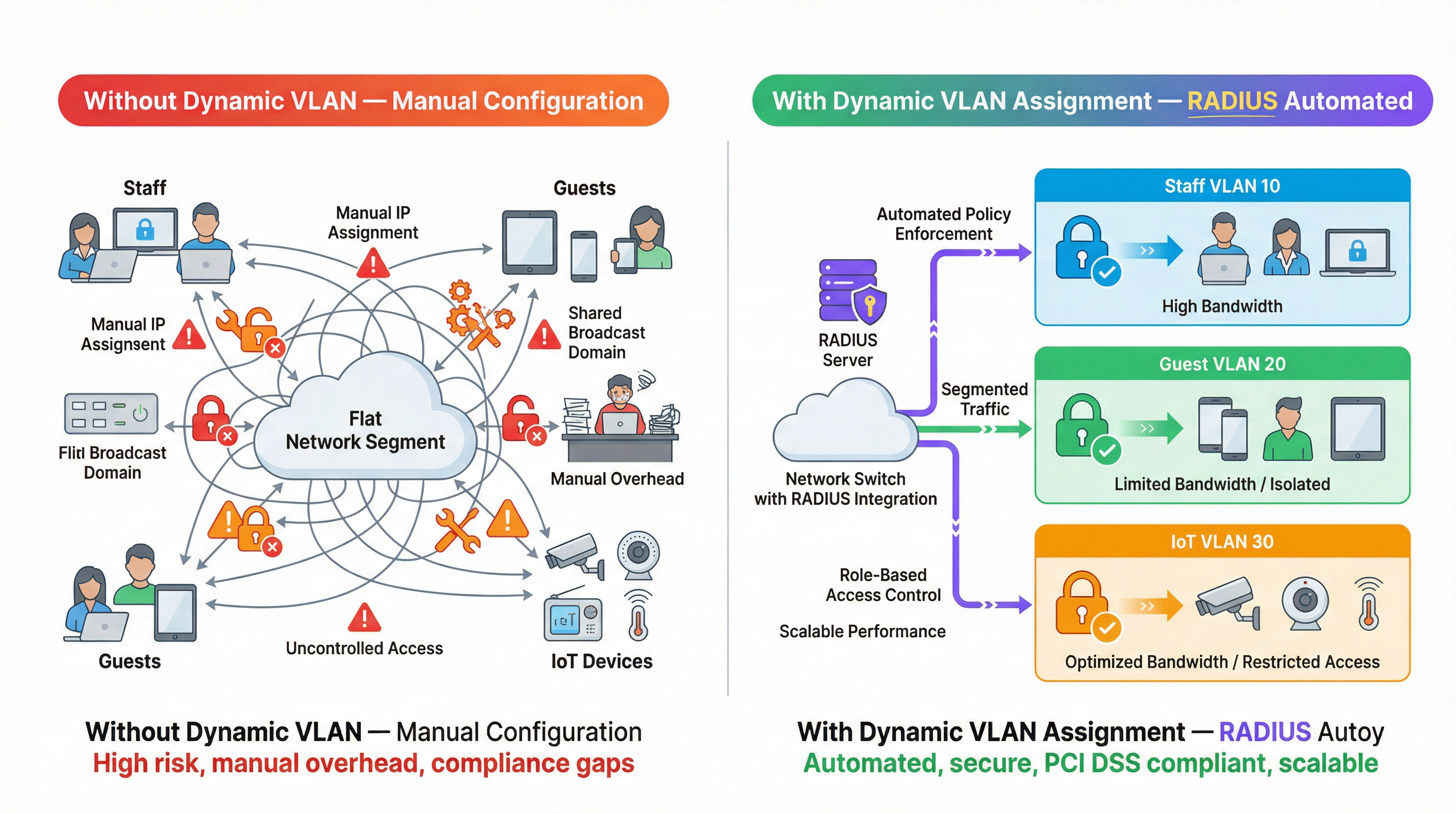
मल्टि-व्हेन्यू ऑपरेटर्ससाठी, नेटवर्क वर्गीकरण मॅन्युअली व्यवस्थापित करणे हा एक मोठा ऑपरेशनल अडथळा आहे. हॉस्पिटॅलिटी, रिटेल आणि सार्वजनिक क्षेत्रातील वातावरणात कनेक्ट केलेल्या उपकरणांची संख्या वाढत असताना, प्रति पोर्ट स्टॅटिक VLAN कॉन्फिगरेशनवर अवलंबून राहणे किंवा डझनभर SSID ब्रॉडकास्ट करणे शाश्वत राहत नाही. हे मार्गदर्शक ऑथेंटिकेशनच्या वेळी भूमिकेनुसार वापरकर्ते आणि उपकरणांचे स्वयंचलितपणे वर्गीकरण करण्यासाठी RADIUS सह डायनॅमिक VLAN असाइनमेंटचा कसा लाभ घ्यावा हे शोधते. विशिष्ट RADIUS ॲट्रिब्युट्स (जसे की Tunnel-Pvt-Group-ID) पास करून, नेटवर्क आर्किटेक्ट्स वापरकर्त्यांना योग्य VLAN मध्ये डायनॅमिकरित्या नियुक्त करू शकतात, कडक सुरक्षा धोरणे लागू करू शकतात, PCI DSS सारख्या मानकांचे अनुपालन सुनिश्चित करू शकतात आणि मॅन्युअल IT ओव्हरहेड मोठ्या प्रमाणात कमी करू शकतात.
तांत्रिक सखोल माहिती
डायनॅमिक VLAN असाइनमेंट पोर्ट-आधारित नेटवर्क ॲक्सेस कंट्रोलसाठी IEEE 802.1X मानकावर आणि केंद्रीकृत ऑथेंटिकेशन, ऑथोरायझेशन आणि अकाउंटिंग (AAA) साठी RADIUS (Remote Authentication Dial-In User Service) सर्व्हरवर अवलंबून असते. जेव्हा एखादे क्लायंट डिव्हाइस नेटवर्कशी कनेक्ट करण्याचा प्रयत्न करते, तेव्हा ऑथेंटिकेटर (सहसा वायरलेस ॲक्सेस पॉइंट किंवा नेटवर्क स्विच) मध्यस्थ म्हणून काम करतो आणि क्लायंटची क्रेडेन्शियल्स Extensible Authentication Protocol (EAP) द्वारे RADIUS सर्व्हरकडे पाठवतो.
जर क्रेडेन्शियल्स वैध असतील, तर RADIUS सर्व्हर Access-Accept मेसेजसह प्रतिसाद देतो. डायनॅमिक VLAN असाइनमेंटसाठी महत्त्वाची यंत्रणा म्हणजे या Access-Accept पॅकेटमध्ये विशिष्ट IETF मानक RADIUS ॲट्रिब्युट्सचा समावेश करणे. तीन आवश्यक ॲट्रिब्युट्स खालीलप्रमाणे आहेत:
- Tunnel-Type (Attribute 64): हे
VLAN(व्हॅल्यू 13) वर सेट केलेले असावे. - Tunnel-Medium-Type (Attribute 65): हे
IEEE-802(व्हॅल्यू 6) वर सेट केलेले असावे. - Tunnel-Private-Group-ID (Attribute 81): यामध्ये प्रत्यक्ष VLAN ID स्ट्रिंग असते (उदा., "10", "20", "Guest_VLAN").
जेव्हा ऑथेंटिकेटरला हे ॲट्रिब्युट्स मिळतात, तेव्हा तो वापरकर्त्याच्या ट्रॅफिकला निर्दिष्ट VLAN ID सह डायनॅमिकरित्या टॅग करतो, ज्यामुळे ते ज्या फिजिकल पोर्ट किंवा SSID शी कनेक्ट झाले आहेत त्याकडे दुर्लक्ष करून त्यांना योग्य नेटवर्क सेगमेंटमध्ये ठेवले जाते.
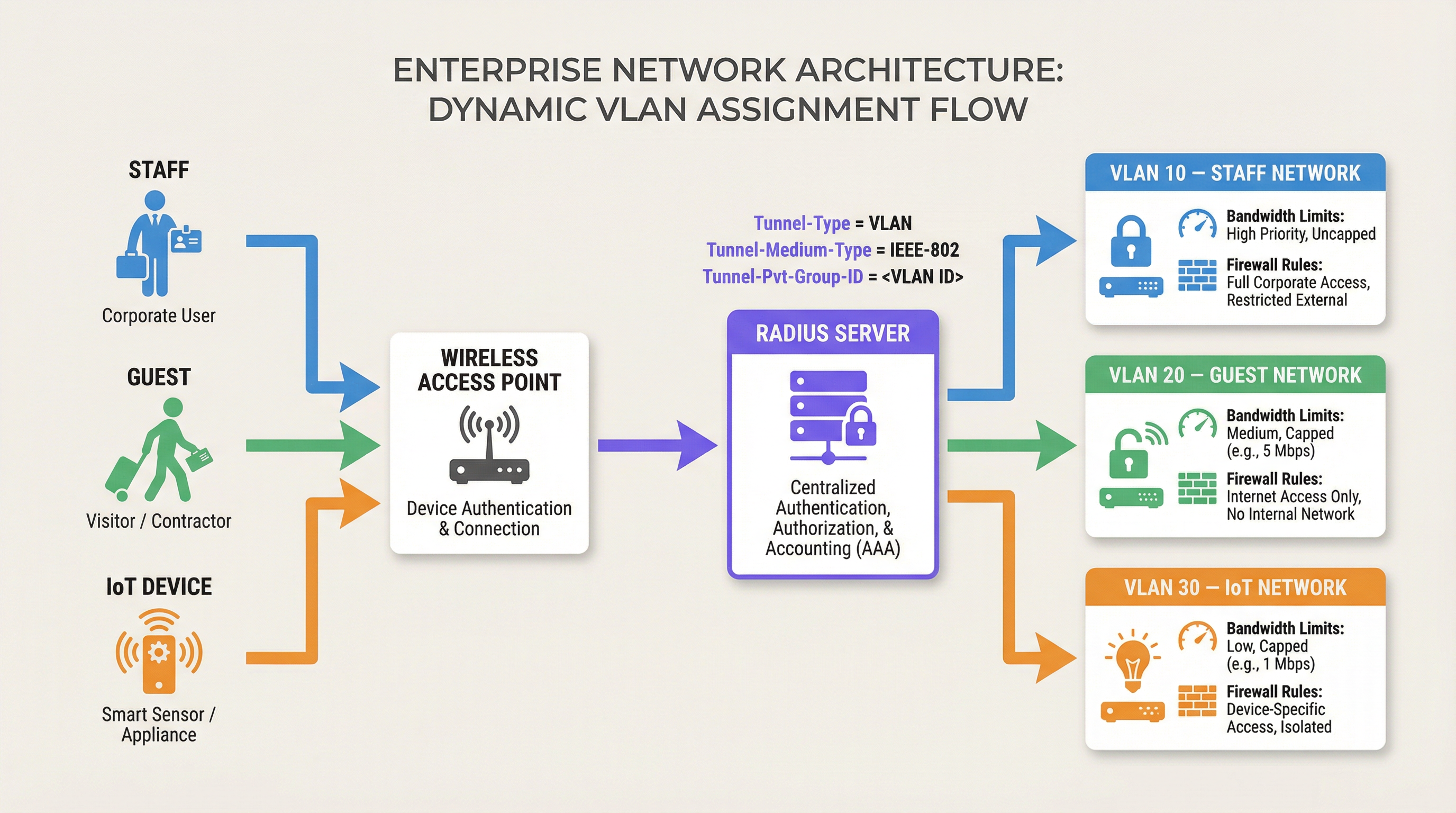
हे आर्किटेक्चर भूमिका-आधारित नेटवर्क ॲक्सेस कंट्रोल सक्षम करते. एकच SSID सुरक्षितपणे अनेक भिन्न वापरकर्ता गटांना सेवा देऊ शकतो, त्यांना त्यांच्या स्वतःच्या फायरवॉल नियम, बँडविड्थ मर्यादा आणि राउटिंग धोरणांसह वेगळ्या नेटवर्क सेगमेंटमध्ये ठेवू शकतो. उदाहरणार्थ, Purple चे Guest WiFi सोल्यूशन्स अनेकदा पाहुण्यांना वेगळ्या VLAN वर ठेवले जाईल याची खात्री करण्यासाठी RADIUS सह एकत्रित होतात, ज्यामुळे अंतर्गत संसाधनांचे संरक्षण होते.
अंमलबजावणी मार्गदर्शक
डायनॅमिक VLAN असाइनमेंट तैनात करण्यासाठी RADIUS सर्व्हर आणि नेटवर्क इन्फ्रास्ट्रक्चर (ॲक्सेस पॉइंट्स किंवा स्विचेस) दोन्हीवर कॉन्फिगरेशन आवश्यक आहे. जरी अचूक सिंटॅक्स व्हेंडर्सनुसार (उदा., Cisco ISE, Aruba ClearPass, FreeRADIUS) बदलत असला, तरी मूळ तत्त्वे सारखीच राहतात.
पायरी 1: RADIUS सर्व्हर कॉन्फिगरेशन
वापरकर्ता गट किंवा डिव्हाइस प्रोफाइलवर आधारित आवश्यक ॲट्रिब्युट्स परत करण्यासाठी तुमचा RADIUS सर्व्हर कॉन्फिगर करा. उदाहरणार्थ, तुम्ही अशी धोरणे तयार करू शकता:
- जर वापरकर्ता गट = "Staff", तर Tunnel-Private-Group-ID = "10" परत करा.
- जर वापरकर्ता गट = "Contractors", तर Tunnel-Private-Group-ID = "20" परत करा.
- जर डिव्हाइस प्रकार = "IoT Sensor" (MAC ऑथेंटिकेशन बायपासद्वारे), तर Tunnel-Private-Group-ID = "30" परत करा.
पायरी 2: ऑथेंटिकेटर कॉन्फिगरेशन (ॲक्सेस पॉइंट्स/स्विचेस)
RADIUS सर्व्हरला क्वेरी करण्यासाठी आणि परत आलेले ॲट्रिब्युट्स प्रोसेस करण्यासाठी तुमची नेटवर्क उपकरणे कॉन्फिगर करा. यामध्ये सहसा खालील गोष्टींचा समावेश होतो:
- RADIUS सर्व्हर IP ॲड्रेस आणि शेअर केलेले गुपित (shared secret) परिभाषित करणे.
- संबंधित SSID किंवा स्विच पोर्टवर 802.1X ऑथेंटिकेशन सक्षम करणे.
- डायनॅमिक VLAN असाइनमेंट सक्षम करणे (कधीकधी याला "AAA Override" किंवा "RADIUS VLAN assignment" म्हटले जाते).
व्हेंडर-विशिष्ट बाबी
- Cisco: WLCs वर, WLAN कॉन्फिगरेशनवर "AAA Override" सक्षम असल्याची खात्री करा. स्विचेससाठी,
authentication port-control autoआणिdot1x pae authenticatorकॉन्फिगर करा. - Aruba: ArubaOS मध्ये, AAA प्रोफाइलमध्ये "RADIUS Server" कॉन्फिगर केले आहे आणि सर्व्हर ग्रुप VLAN डेरिव्हेशनसाठी सर्व्हर नियम प्रोसेस करण्यासाठी सेट केला आहे याची खात्री करा.
- Ubiquiti UniFi: UniFi नेटवर्क ॲप्लिकेशनमध्ये, "RADIUS MAC Authentication" किंवा "WPA2/WPA3 Enterprise" सक्षम करा आणि नेटवर्क सेटिंग्जमध्ये "Enable RADIUS assigned VLAN" चेक केले असल्याची खात्री करा.
सर्वोत्तम पद्धती
एक मजबूत आणि स्केलेबल उपयोजन सुनिश्चित करण्यासाठी, खालील उद्योग-मानक शिफारसींचे पालन करा:
- जागतिक स्तरावर VLAN IDs प्रमाणित करा: सर्व साइट्सवर विसंगत VLAN नेमिंग ही एक मोठी त्रुटी आहे. जर साइट A वर VLAN 10 "Staff" असेल पण साइट B वर "Guest" असेल, तर डायनॅमिक असाइनमेंटमुळे गोंधळ होईल. डायनॅमिक असाइनमेंट लागू करण्यापूर्वी जागतिक VLAN नंबरिंग योजना स्थापित करा.
- फॉलबॅक यंत्रणा लागू करा: RADIUS अनुपलब्धता हा एक गंभीर बिघाड असू शकतो. तुमच्या ॲक्सेस पॉइंट्सवर "क्रिटिकल VLAN" किंवा "फॉलबॅक VLAN" कॉन्फिगर करा. जर RADIUS सर्व्हरपर्यंत पोहोचता येत नसेल, तर AP ने डिव्हाइसला अशा मर्यादित VLAN मध्ये टाकावे जे कदाचित फक्त इंटरनेट ॲक्सेसला अनुमती देते, ज्यामुळे अंतर्गत सुरक्षेशी तडजोड न करता कनेक्टिव्हिटी राखली जाते.
- हेडलेस उपकरणांसाठी MAC ऑथेंटिकेशन बायपास (MAB) वापरा: Sensors किंवा स्मार्ट थर्मोस्टॅट्स सारखी IoT उपकरणे अनेकदा 802.1X ऑथेंटिकेशन करू शकत नाहीत. या उपकरणांना त्यांच्या MAC ॲड्रेसवर आधारित ऑथेंटिकेट करण्यासाठी MAB वापरा, त्यांना लॉक-डाउन केलेल्या IoT VLAN मध्ये नियुक्त करा.
- ॲनालिटिक्सचा लाभ घ्या: ऑथेंटिकेशन ट्रेंडचे निरीक्षण करण्यासाठी, विसंगती ओळखण्यासाठी आणि भूमिका-आधारित वापर पॅटर्नवर आधारित नेटवर्क कार्यप्रदर्शन ऑप्टिमाइझ करण्यासाठी Purple च्या WiFi Analytics सारख्या प्लॅटफॉर्मचा वापर करा.
ट्रबलशूटिंग आणि जोखीम कमी करणे
डायनॅमिक VLAN असाइनमेंट लागू करताना, सामान्य समस्यांचे निवारण करण्यासाठी तयार रहा:
- क्लायंट डिफॉल्ट VLAN मध्ये ठेवला जाणे: हे सहसा घडते जर RADIUS सर्व्हर योग्य ॲट्रिब्युट्स पाठवण्यात अयशस्वी झाला किंवा ऑथेंटिकेटर त्यांना प्रोसेस करण्यासाठी कॉन्फिगर केलेला नसेल (उदा., "AAA Override" अक्षम आहे).
Access-Acceptमेसेजमधील मजकूर तपासण्यासाठी पॅकेट कॅप्चर वापरा. - ऑथेंटिकेशन टाइमआउट्स: जर उपकरणे ऑथेंटिकेट करण्यात अयशस्वी ठरली, तर ऑथेंटिकेटर आणि RADIUS सर्व्हरमधील नेटवर्क कनेक्टिव्हिटी तपासा. शेअर केलेले गुपित (shared secret) तपासा आणि RADIUS सर्व्हरमध्ये ऑथेंटिकेटर वैध क्लायंट म्हणून कॉन्फिगर केला असल्याची खात्री करा.
- DHCP समस्या: डिव्हाइसला डायनॅमिकरित्या VLAN नियुक्त केल्यानंतर, त्याने त्या सबनेटसाठी IP ॲड्रेस मिळवणे आवश्यक आहे. सर्व डायनॅमिक VLAN साठी DHCP सर्व्हर योग्यरित्या कॉन्फिगर केला आहे आणि आवश्यक असल्यास IP हेल्पर ॲड्रेस जागेवर आहेत याची खात्री करा.
ROI आणि व्यवसायावर होणारा परिणाम
डायनॅमिक VLAN असाइनमेंट लागू केल्याने मॅन्युअल कॉन्फिगरेशन ओव्हरहेड कमी होऊन आणि सुरक्षा जोखीम कमी होऊन गुंतवणुकीवर लक्षणीय परतावा (ROI) मिळतो.
- ऑपरेशनल कार्यक्षमता: प्रति पोर्ट मॅन्युअली स्टॅटिक VLAN कॉन्फिगर करण्याची किंवा वेगवेगळ्या वापरकर्ता गटांसाठी एकाधिक SSID ब्रॉडकास्ट करण्याची आवश्यकता काढून टाकते, ज्यामुळे IT टीमचे प्रशासकीय कामाचे तास वाचतात.
- वाढलेली सुरक्षा: कडक भूमिका-आधारित ॲक्सेस कंट्रोल लागू करते, ज्यामुळे तडजोड केलेली उपकरणे किंवा अनधिकृत वापरकर्ते गंभीर व्यवसाय प्रणालींपासून वेगळे राहतील याची खात्री होते. Retail वातावरणात PCI DSS सारख्या मानकांच्या अनुपालनासाठी हे आवश्यक आहे.
- सुधारलेला वापरकर्ता अनुभव: कर्मचारी आणि पाहुण्यांसाठी एक अखंड ऑथेंटिकेशन अनुभव प्रदान करते, कारण ते एकाच SSID शी कनेक्ट होऊ शकतात आणि स्वयंचलितपणे योग्य नेटवर्क ॲक्सेस विशेषाधिकार प्राप्त करू शकतात.
अधिक माहितीसाठी आमचे तांत्रिक ब्रीफिंग पॉडकास्ट ऐका:
तुमचे नेटवर्क सुरक्षित करण्याबद्दल अधिक माहितीसाठी, आमचे 802.1X Authentication: Securing Network Access on Modern Devices वरील मार्गदर्शक पहा.
महत्त्वाच्या संज्ञा आणि व्याख्या
Dynamic VLAN Assignment
The process of automatically assigning a device to a specific Virtual Local Area Network (VLAN) based on its identity or role during authentication, rather than its physical connection point.
Essential for scalable network segmentation in enterprise environments, eliminating the need for manual port configuration.
RADIUS (Remote Authentication Dial-In User Service)
A networking protocol that provides centralized Authentication, Authorization, and Accounting (AAA) management for users who connect and use a network service.
The core engine that evaluates credentials and dictates network policy, including VLAN assignment.
802.1X
An IEEE Standard for port-based Network Access Control (PNAC), providing an authentication mechanism to devices wishing to attach to a LAN or WLAN.
The framework that allows devices to securely transmit credentials to the network infrastructure before gaining access.
Tunnel-Private-Group-ID
RADIUS Attribute 81, used to specify the VLAN ID or VLAN name that the authenticator should assign to the user's session.
The specific data field in the RADIUS response that dictates the network segment.
MAC Authentication Bypass (MAB)
A technique used to authenticate devices that do not support 802.1X (like printers or IoT sensors) by using their MAC address as their identity.
Crucial for integrating headless devices into a dynamically segmented network architecture.
Authenticator
The network device (such as a wireless access point or switch) that facilitates the authentication process between the client and the RADIUS server.
The device responsible for enforcing the VLAN assignment policy returned by the RADIUS server.
Access-Accept
The RADIUS message sent to the authenticator indicating that the user's credentials are valid and access should be granted.
This packet carries the crucial VLAN assignment attributes.
AAA Override
A configuration setting on many authenticators (like Cisco WLCs) that allows the RADIUS server to override the default VLAN or policy configured on the device.
Must be enabled for dynamic VLAN assignment to function correctly.
केस स्टडीज
A 500-room luxury hotel needs to segment its network for guests, staff, and IoT devices (smart thermostats and door locks). They currently broadcast 5 different SSIDs, causing significant co-channel interference and confusing guests. How can dynamic VLAN assignment solve this?
The hotel should consolidate to two SSIDs: 'Hotel_Guest' (Open/Captive Portal) and 'Hotel_Secure' (802.1X). For 'Hotel_Secure', staff authenticate using their corporate credentials. The RADIUS server verifies the credentials against Active Directory and returns Tunnel-Private-Group-ID = '10' (Staff VLAN). For IoT devices, which cannot use 802.1X, the network uses MAC Authentication Bypass (MAB). The RADIUS server recognizes the MAC addresses of the thermostats and locks, returning Tunnel-Private-Group-ID = '30' (IoT VLAN). Guests connect to 'Hotel_Guest' and are placed in VLAN 20 via standard captive portal workflows, potentially integrated with Purple's Hospitality solutions.
A large retail chain is deploying point-of-sale (POS) terminals across 50 locations. To comply with PCI DSS, these terminals must be strictly isolated from the corporate and guest networks. How can dynamic VLAN assignment ensure compliance even if a terminal is moved to a different port?
The IT team configures the network switches to require 802.1X authentication on all edge ports. The POS terminals are configured with certificates for EAP-TLS authentication. When a terminal connects to any port, it authenticates with the RADIUS server. The RADIUS server verifies the certificate and returns Tunnel-Private-Group-ID = '40' (PCI VLAN). The switch dynamically assigns the port to VLAN 40, applying strict ACLs that only allow communication with the payment processing gateways.
परिस्थिती विश्लेषण
Q1. You are deploying dynamic VLAN assignment across a university campus. The RADIUS server is successfully sending the Access-Accept message with Tunnel-Private-Group-ID set to '50' for faculty members. However, faculty devices are still being placed in the default VLAN (VLAN 1) configured on the SSID. What is the most likely cause?
💡 संकेत:Check the configuration on the wireless access point or controller.
शिफारस केलेला दृष्टिकोन दाखवा
The most likely cause is that the authenticator (the Wireless LAN Controller or Access Point) does not have 'AAA Override' (or the equivalent setting, such as 'Enable RADIUS assigned VLAN') enabled for that specific SSID. Even if the RADIUS server sends the correct attributes, the authenticator will ignore them and use the default configuration unless explicitly instructed to process dynamic assignments.
Q2. A hospital needs to connect hundreds of new smart infusion pumps to the network. These devices do not support 802.1X supplicants. How can the IT team ensure these devices are automatically placed into a secure, isolated clinical IoT VLAN?
💡 संकेत:Consider how devices without 802.1X capabilities can be identified by the network.
शिफारस केलेला दृष्टिकोन दाखवा
The IT team should implement MAC Authentication Bypass (MAB). The MAC addresses of all infusion pumps must be added to the RADIUS server's database. When a pump connects to the network, the switch or AP will use its MAC address as the identity for authentication. The RADIUS server will recognize the MAC address and return an Access-Accept message containing the Tunnel-Private-Group-ID for the clinical IoT VLAN.
Q3. Your enterprise network relies heavily on dynamic VLAN assignment. During a scheduled maintenance window, the primary and secondary RADIUS servers become temporarily unreachable. What configuration must be in place to ensure business-critical devices maintain some level of connectivity?
💡 संकेत:Look for features related to authentication failure or fallback scenarios on the switch or AP.
शिफारस केलेला दृष्टिकोन दाखवा
The network infrastructure must be configured with a 'Critical VLAN' or 'Fallback VLAN'. When the authenticator detects that the RADIUS servers are dead (unreachable), it automatically places connecting devices into this pre-defined Critical VLAN. This VLAN should have strict ACLs applied, perhaps only allowing internet access or access to essential remediation services, ensuring basic connectivity without exposing the internal network.
महत्त्वाचे निष्कर्ष
- ✓Dynamic VLAN assignment automates network segmentation based on user role or device identity.
- ✓It relies on 802.1X authentication and specific RADIUS attributes (Tunnel-Type, Tunnel-Medium-Type, Tunnel-Pvt-Group-ID).
- ✓This approach eliminates the need for manual port configuration and reduces SSID bloat.
- ✓MAC Authentication Bypass (MAB) is essential for segmenting headless IoT devices.
- ✓Global standardisation of VLAN IDs is critical for successful multi-site deployments.
- ✓Always configure fallback mechanisms (Critical VLAN) to handle RADIUS server outages.




