

Atribuição Dinâmica de VLAN com RADIUS: Segmentando Usuários por Função
Este guia fornece uma visão técnica abrangente da implementação da atribuição dinâmica de VLAN usando atributos RADIUS. Ele detalha como locais corporativos podem automatizar a segmentação de rede para funcionários, convidados e dispositivos IoT para aumentar a segurança e reduzir a carga de configuração manual.
🎧 Ouça este Guia
Ver Transcrição
Resumo Executivo
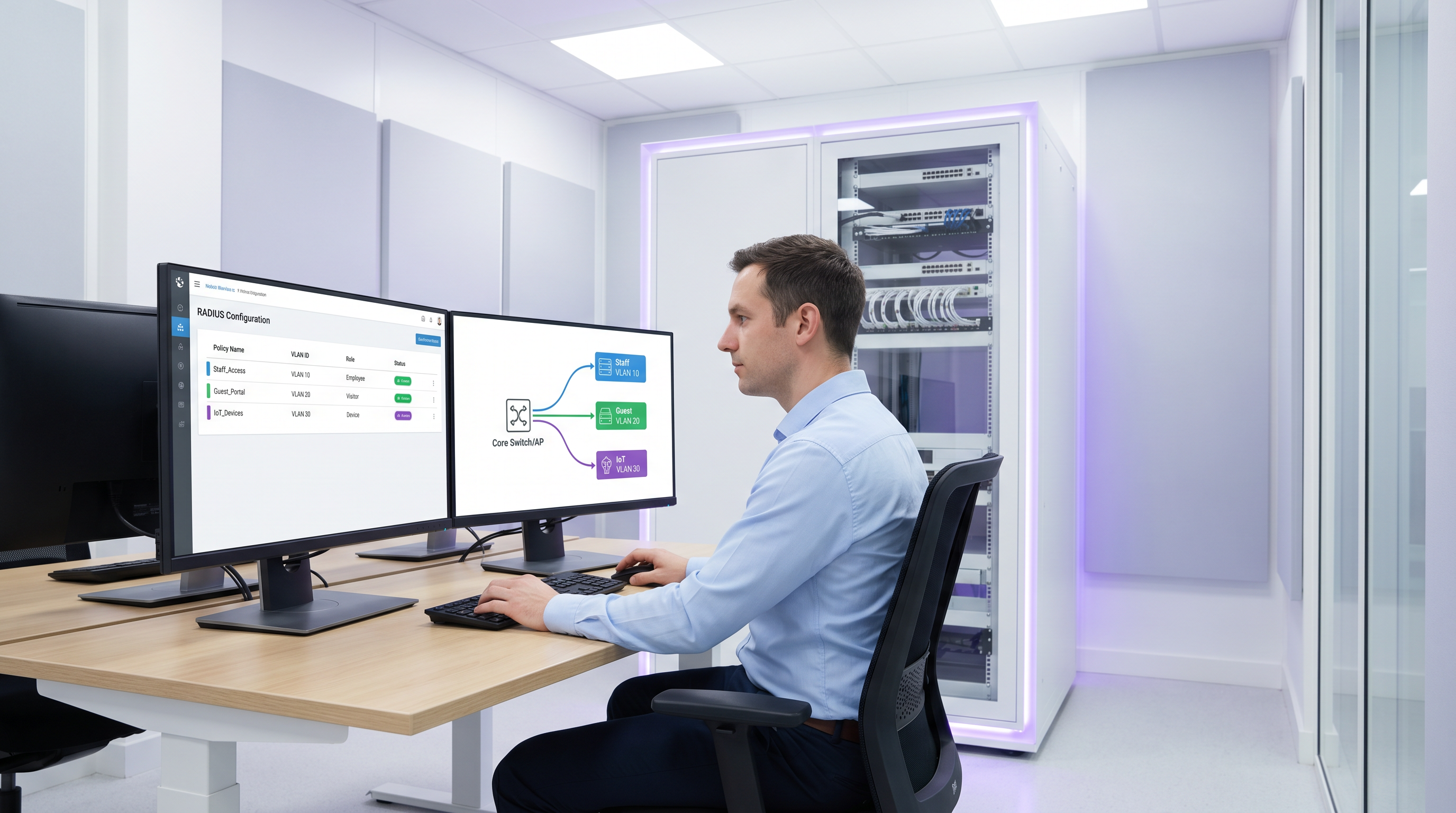
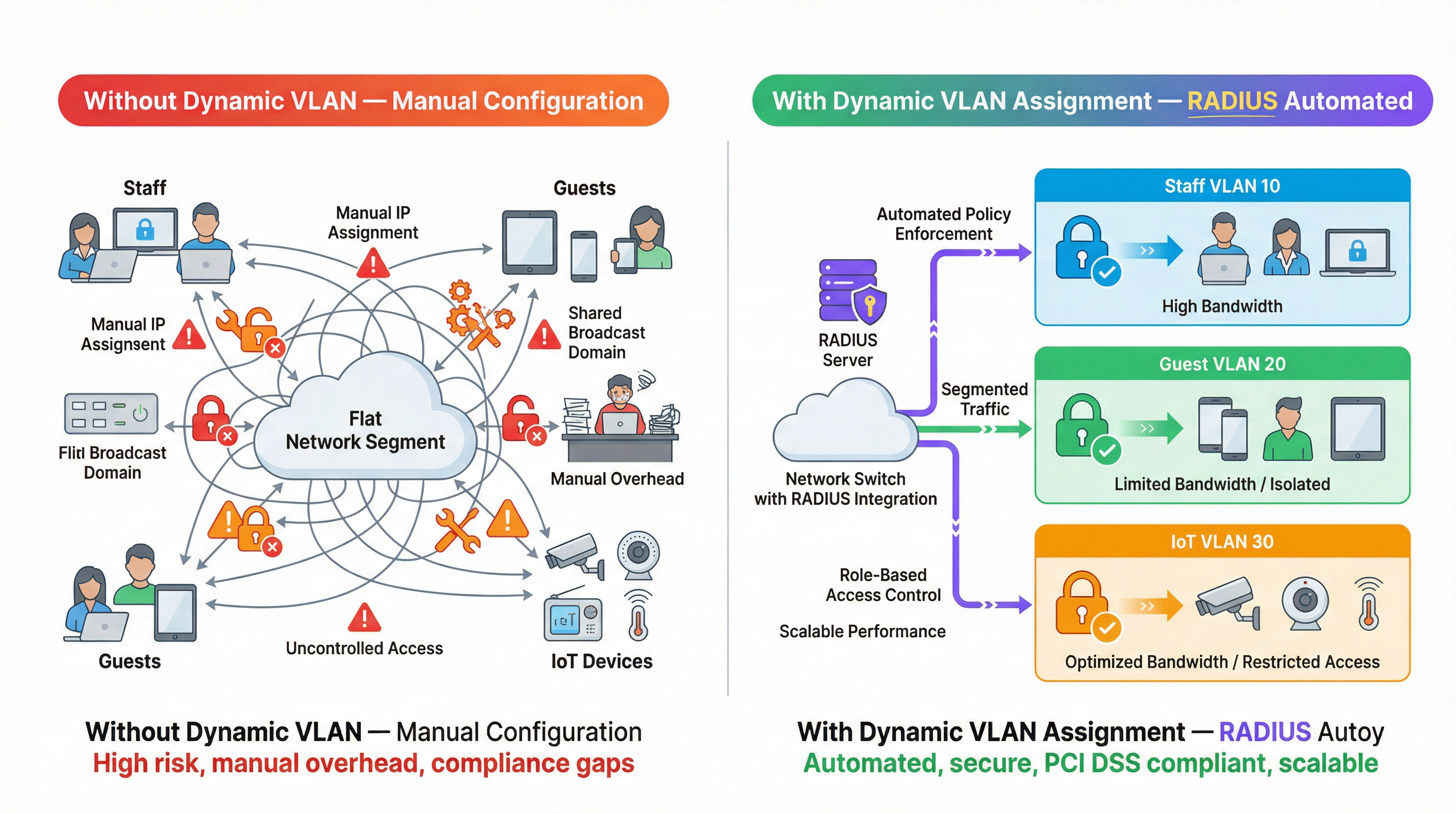
Para operadores de múltiplos locais, gerenciar a segmentação de rede manualmente é um gargalo operacional significativo. À medida que o número de dispositivos conectados aumenta em ambientes de hospitalidade, varejo e setor público, depender de configurações de VLAN estáticas por porta ou transmitir dezenas de SSIDs torna-se insustentável. Este guia explora como aproveitar a atribuição dinâmica de VLAN com RADIUS para segmentar automaticamente usuários e dispositivos por função no momento da autenticação. Ao passar atributos RADIUS específicos (como Tunnel-Pvt-Group-ID), os arquitetos de rede podem atribuir usuários dinamicamente à VLAN correta, aplicando políticas de segurança rigorosas, garantindo a conformidade com padrões como PCI DSS e reduzindo drasticamente a carga de trabalho manual de TI.
Aprofundamento Técnico
A atribuição dinâmica de VLAN depende do padrão IEEE 802.1X para controle de acesso à rede baseado em porta, combinado com um servidor RADIUS (Remote Authentication Dial-In User Service) para autenticação, autorização e contabilização (AAA) centralizadas. Quando um dispositivo cliente tenta se conectar à rede, o autenticador (geralmente um Ponto de Acesso Sem Fio ou um switch de rede) atua como um intermediário, encaminhando as credenciais do cliente para o servidor RADIUS por meio do Protocolo de Autenticação Extensível (EAP).
Se as credenciais forem válidas, o servidor RADIUS responde com uma mensagem Access-Accept. O mecanismo crítico para a atribuição dinâmica de VLAN é a inclusão de atributos RADIUS específicos do padrão IETF dentro deste pacote Access-Accept. Os três atributos essenciais são:
- Tunnel-Type (Atributo 64): Deve ser definido como
VLAN(valor 13). - Tunnel-Medium-Type (Atributo 65): Deve ser definido como
IEEE-802(valor 6). - Tunnel-Private-Group-ID (Atributo 81): Contém a string real do ID da VLAN (ex: "10", "20", "Guest_VLAN").
Quando o autenticador recebe esses atributos, ele marca dinamicamente o tráfego do usuário com o ID da VLAN especificado, colocando-o no segmento de rede apropriado, independentemente da porta física ou SSID ao qual se conectou.
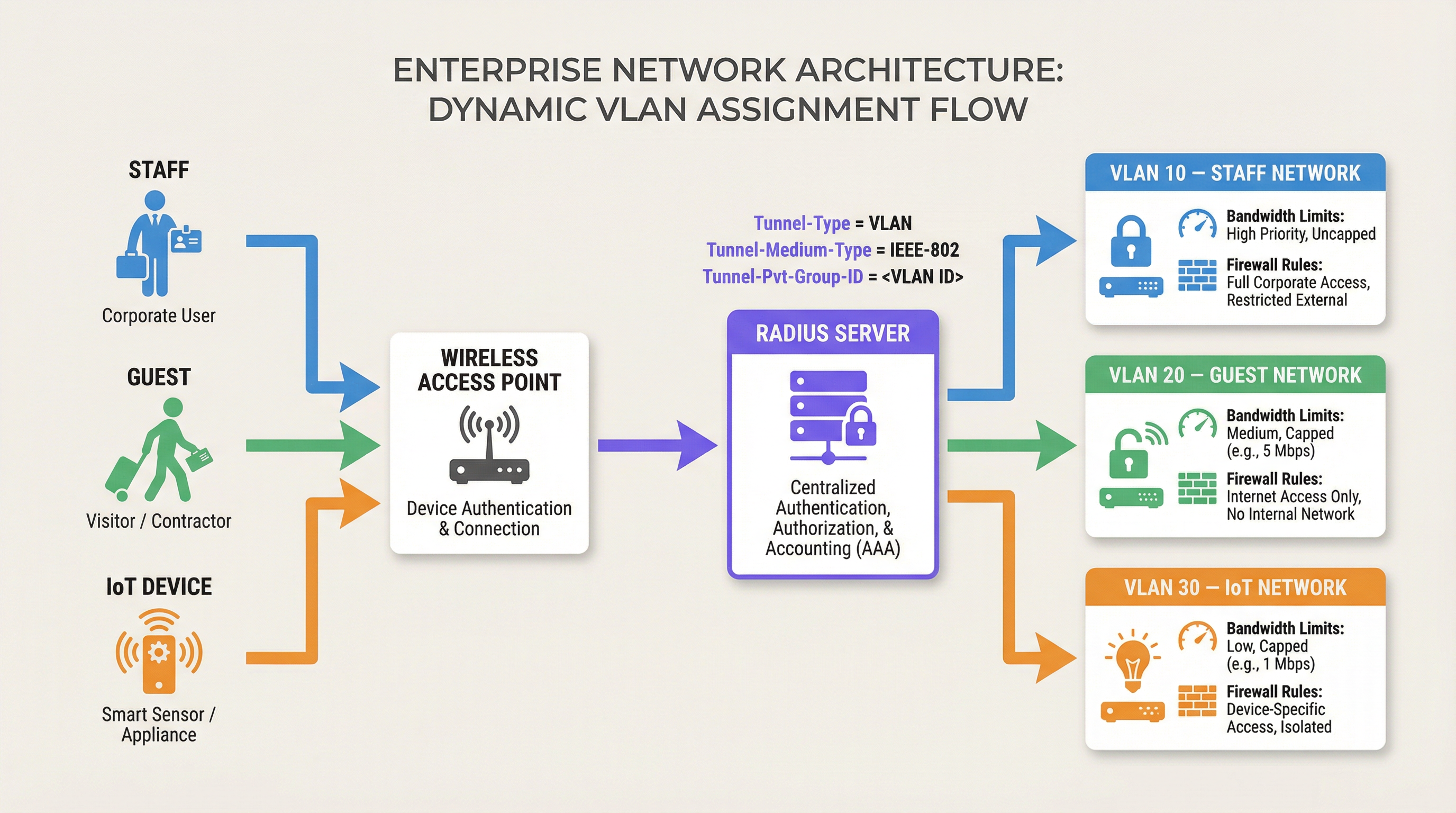
Esta arquitetura permite o controle de acesso à rede baseado em funções. Um único SSID pode atender com segurança a vários grupos de usuários distintos, colocando-os em segmentos de rede isolados com suas próprias regras de firewall, limites de largura de banda e políticas de roteamento. Por exemplo, as soluções de Guest WiFi da Purple geralmente se integram ao RADIUS para garantir que os convidados sejam colocados em uma VLAN isolada, protegendo os recursos internos.
Guia de Implementação
A implantação da atribuição dinâmica de VLAN requer configuração tanto no servidor RADIUS quanto na infraestrutura de rede (Pontos de Acesso ou Switches). Embora a sintaxe exata varie entre os fornecedores (ex: Cisco ISE, Aruba ClearPass, FreeRADIUS), os princípios fundamentais permanecem consistentes.
Passo 1: Configuração do Servidor RADIUS
Configure seu servidor RADIUS para retornar os atributos necessários com base em grupos de usuários ou perfis de dispositivos. Por exemplo, você pode criar políticas que estabeleçam:
- Se Grupo de Usuários = "Staff", retornar Tunnel-Private-Group-ID = "10".
- Se Grupo de Usuários = "Contractors", retornar Tunnel-Private-Group-ID = "20".
- Se Tipo de Dispositivo = "IoT Sensor" (via Bypass de Autenticação MAC), retornar Tunnel-Private-Group-ID = "30".
Passo 2: Configuração do Autenticador (Pontos de Acesso/Switches)
Configure seus dispositivos de rede para consultar o servidor RADIUS e processar os atributos retornados. Isso normalmente envolve:
- Definir o endereço IP do servidor RADIUS e o segredo compartilhado.
- Habilitar a autenticação 802.1X nos SSIDs ou portas de switch relevantes.
- Habilitar a atribuição dinâmica de VLAN (às vezes chamada de "AAA Override" ou "RADIUS VLAN assignment").
Considerações Específicas do Fornecedor
- Cisco: Em WLCs, certifique-se de que o "AAA Override" esteja habilitado na configuração da WLAN. Para switches, configure
authentication port-control autoedot1x pae authenticator. - Aruba: No ArubaOS, certifique-se de que o perfil AAA tenha o "RADIUS Server" configurado e que o grupo de servidores esteja definido para processar regras de servidor para derivação de VLAN.
- Ubiquiti UniFi: No aplicativo UniFi Network, habilite "RADIUS MAC Authentication" ou "WPA2/WPA3 Enterprise" e certifique-se de que "Enable RADIUS assigned VLAN" esteja marcado nas configurações de rede.
Melhores Práticas
Para garantir uma implantação robusta e escalável, siga estas recomendações padrão do setor:
- Padronize IDs de VLAN Globalmente: A nomenclatura inconsistente de VLAN entre sites é uma grande armadilha. Se a VLAN 10 for "Staff" no site A, mas "Guest" no site B, a atribuição dinâmica causará caos. Estabeleça um esquema global de numeração de VLAN antes de implementar a atribuição dinâmica.
- Implemente Mecanismos de Fallback: A indisponibilidade do RADIUS é um modo de falha crítico. Configure uma "VLAN crítica" ou "VLAN de fallback" em seus pontos de acesso. Se o servidor RADIUS estiver inacessível, o AP deve colocar o dispositivo em uma VLAN restrita que talvez permita apenas acesso à internet, mantendo a conectividade sem comprometer a segurança interna.
- Use Bypass de Autenticação MAC (MAB) para Dispositivos sem Interface (Headless): Dispositivos IoT como Sensores ou termostatos inteligentes muitas vezes não conseguem realizar a autenticação 802.1X. Use MAB para autenticar esses dispositivos com base em seu endereço MAC, atribuindo-os a uma VLAN de IoT bloqueada.
- Aproveite o Analytics: Use plataformas como o WiFi Analytics da Purple para monitorar tendências de autenticação, identificar anomalias e otimizar o desempenho da rede com base em padrões de uso baseados em funções.
Solução de Problemas e Mitigação de Riscos
Ao implementar a atribuição dinâmica de VLAN, esteja preparado para solucionar problemas comuns:
- Cliente Colocado na VLAN Padrão: Isso geralmente ocorre se o servidor RADIUS falhar ao enviar os atributos corretos ou se o autenticador não estiver configurado para processá-los (ex: "AAA Override" desabilitado). Use capturas de pacotes para verificar o conteúdo da mensagem
Access-Accept. - Timeouts de Autenticação: Se os dispositivos falharem na autenticação, verifique a conectividade de rede entre o autenticador e o servidor RADIUS. Verifique o segredo compartilhado e garanta que o servidor RADIUS tenha o autenticador configurado como um cliente válido.
- Problemas de DHCP: Após um dispositivo ser atribuído dinamicamente a uma VLAN, ele deve obter um endereço IP para essa sub-rede. Certifique-se de que o servidor DHCP esteja configurado corretamente para todas as VLANs dinâmicas e que os endereços IP helper estejam configurados, se necessário.
ROI e Impacto nos Negócios
A implementação da atribuição dinâmica de VLAN oferece um retorno sobre o investimento significativo, reduzindo a carga de configuração manual e mitigando riscos de segurança.
- Eficiência Operacional: Elimina a necessidade de configurar manualmente VLANs estáticas por porta ou transmitir múltiplos SSIDs para diferentes grupos de usuários, economizando horas de trabalho administrativo das equipes de TI.
- Segurança Aprimorada: Aplica um controle de acesso rigoroso baseado em funções, garantindo que dispositivos comprometidos ou usuários não autorizados sejam isolados dos sistemas de negócios críticos. Isso é essencial para a conformidade com padrões como PCI DSS em ambientes de Varejo .
- Experiência do Usuário Aprimorada: Oferece uma experiência de autenticação contínua para funcionários e convidados, pois eles podem se conectar a um único SSID e receber automaticamente os privilégios de acesso à rede apropriados.
Ouça nosso podcast de briefing técnico para mais insights:
Para mais informações sobre como proteger sua rede, consulte nosso guia sobre Autenticação 802.1X: Protegendo o Acesso à Rede em Dispositivos Modernos .
Termos-Chave e Definições
Dynamic VLAN Assignment
The process of automatically assigning a device to a specific Virtual Local Area Network (VLAN) based on its identity or role during authentication, rather than its physical connection point.
Essential for scalable network segmentation in enterprise environments, eliminating the need for manual port configuration.
RADIUS (Remote Authentication Dial-In User Service)
A networking protocol that provides centralized Authentication, Authorization, and Accounting (AAA) management for users who connect and use a network service.
The core engine that evaluates credentials and dictates network policy, including VLAN assignment.
802.1X
An IEEE Standard for port-based Network Access Control (PNAC), providing an authentication mechanism to devices wishing to attach to a LAN or WLAN.
The framework that allows devices to securely transmit credentials to the network infrastructure before gaining access.
Tunnel-Private-Group-ID
RADIUS Attribute 81, used to specify the VLAN ID or VLAN name that the authenticator should assign to the user's session.
The specific data field in the RADIUS response that dictates the network segment.
MAC Authentication Bypass (MAB)
A technique used to authenticate devices that do not support 802.1X (like printers or IoT sensors) by using their MAC address as their identity.
Crucial for integrating headless devices into a dynamically segmented network architecture.
Authenticator
The network device (such as a wireless access point or switch) that facilitates the authentication process between the client and the RADIUS server.
The device responsible for enforcing the VLAN assignment policy returned by the RADIUS server.
Access-Accept
The RADIUS message sent to the authenticator indicating that the user's credentials are valid and access should be granted.
This packet carries the crucial VLAN assignment attributes.
AAA Override
A configuration setting on many authenticators (like Cisco WLCs) that allows the RADIUS server to override the default VLAN or policy configured on the device.
Must be enabled for dynamic VLAN assignment to function correctly.
Estudos de Caso
A 500-room luxury hotel needs to segment its network for guests, staff, and IoT devices (smart thermostats and door locks). They currently broadcast 5 different SSIDs, causing significant co-channel interference and confusing guests. How can dynamic VLAN assignment solve this?
The hotel should consolidate to two SSIDs: 'Hotel_Guest' (Open/Captive Portal) and 'Hotel_Secure' (802.1X). For 'Hotel_Secure', staff authenticate using their corporate credentials. The RADIUS server verifies the credentials against Active Directory and returns Tunnel-Private-Group-ID = '10' (Staff VLAN). For IoT devices, which cannot use 802.1X, the network uses MAC Authentication Bypass (MAB). The RADIUS server recognizes the MAC addresses of the thermostats and locks, returning Tunnel-Private-Group-ID = '30' (IoT VLAN). Guests connect to 'Hotel_Guest' and are placed in VLAN 20 via standard captive portal workflows, potentially integrated with Purple's Hospitality solutions.
A large retail chain is deploying point-of-sale (POS) terminals across 50 locations. To comply with PCI DSS, these terminals must be strictly isolated from the corporate and guest networks. How can dynamic VLAN assignment ensure compliance even if a terminal is moved to a different port?
The IT team configures the network switches to require 802.1X authentication on all edge ports. The POS terminals are configured with certificates for EAP-TLS authentication. When a terminal connects to any port, it authenticates with the RADIUS server. The RADIUS server verifies the certificate and returns Tunnel-Private-Group-ID = '40' (PCI VLAN). The switch dynamically assigns the port to VLAN 40, applying strict ACLs that only allow communication with the payment processing gateways.
Análise de Cenário
Q1. You are deploying dynamic VLAN assignment across a university campus. The RADIUS server is successfully sending the Access-Accept message with Tunnel-Private-Group-ID set to '50' for faculty members. However, faculty devices are still being placed in the default VLAN (VLAN 1) configured on the SSID. What is the most likely cause?
💡 Dica:Check the configuration on the wireless access point or controller.
Mostrar Abordagem Recomendada
The most likely cause is that the authenticator (the Wireless LAN Controller or Access Point) does not have 'AAA Override' (or the equivalent setting, such as 'Enable RADIUS assigned VLAN') enabled for that specific SSID. Even if the RADIUS server sends the correct attributes, the authenticator will ignore them and use the default configuration unless explicitly instructed to process dynamic assignments.
Q2. A hospital needs to connect hundreds of new smart infusion pumps to the network. These devices do not support 802.1X supplicants. How can the IT team ensure these devices are automatically placed into a secure, isolated clinical IoT VLAN?
💡 Dica:Consider how devices without 802.1X capabilities can be identified by the network.
Mostrar Abordagem Recomendada
The IT team should implement MAC Authentication Bypass (MAB). The MAC addresses of all infusion pumps must be added to the RADIUS server's database. When a pump connects to the network, the switch or AP will use its MAC address as the identity for authentication. The RADIUS server will recognize the MAC address and return an Access-Accept message containing the Tunnel-Private-Group-ID for the clinical IoT VLAN.
Q3. Your enterprise network relies heavily on dynamic VLAN assignment. During a scheduled maintenance window, the primary and secondary RADIUS servers become temporarily unreachable. What configuration must be in place to ensure business-critical devices maintain some level of connectivity?
💡 Dica:Look for features related to authentication failure or fallback scenarios on the switch or AP.
Mostrar Abordagem Recomendada
The network infrastructure must be configured with a 'Critical VLAN' or 'Fallback VLAN'. When the authenticator detects that the RADIUS servers are dead (unreachable), it automatically places connecting devices into this pre-defined Critical VLAN. This VLAN should have strict ACLs applied, perhaps only allowing internet access or access to essential remediation services, ensuring basic connectivity without exposing the internal network.
Principais Conclusões
- ✓Dynamic VLAN assignment automates network segmentation based on user role or device identity.
- ✓It relies on 802.1X authentication and specific RADIUS attributes (Tunnel-Type, Tunnel-Medium-Type, Tunnel-Pvt-Group-ID).
- ✓This approach eliminates the need for manual port configuration and reduces SSID bloat.
- ✓MAC Authentication Bypass (MAB) is essential for segmenting headless IoT devices.
- ✓Global standardisation of VLAN IDs is critical for successful multi-site deployments.
- ✓Always configure fallback mechanisms (Critical VLAN) to handle RADIUS server outages.




