

Redes basadas en la identidad: Qué son y por qué son importantes
This guide provides a comprehensive technical reference on Identity-Based Networking (IBN) — what it is, how it works, and why it is a critical investment for any organisation managing large, diverse user populations across hotels, retail chains, stadiums, and public-sector venues. It covers the core IEEE 802.1X architecture, Purple's cloud-native implementation, real-world deployment scenarios, and a clear ROI framework to support procurement decisions.
🎧 Escucha esta guía
Ver transcripción
Resumen ejecutivo
Las redes basadas en la identidad (IBN, por sus siglas en inglés) representan un cambio fundamental en la gestión del acceso a la red, pasando de un modelo estático basado en puertos a uno dinámico centrado en el usuario. En una red tradicional, los derechos de acceso están vinculados a puertos físicos o direcciones MAC, lo que crea un entorno rígido e inseguro. Las IBN vinculan los privilegios de acceso a la red a la identidad verificada de un usuario. Esto significa que, independientemente de cómo o dónde se conecte un usuario (a través de Wi-Fi, Ethernet o VPN), su acceso a los recursos de la red está determinado por quién es, no por el dispositivo que utiliza ni por dónde se conecta.
Para las organizaciones que gestionan bases de usuarios grandes y diversas en entornos como hoteles, cadenas de tiendas minoristas y estadios, esto marca un antes y un después. Permite una postura de seguridad Zero Trust (Confianza Cero) por defecto, donde cada usuario y dispositivo debe ser autenticado y autorizado antes de obtener acceso. Esto simplifica drásticamente la segmentación de la red, mejora la seguridad al contener las amenazas y agiliza el cumplimiento de normativas como PCI DSS y GDPR.
Para un CTO, las IBN ofrecen un ROI significativo al reducir la carga administrativa que supone gestionar VLAN complejas y listas de control de acceso (ACL), mitigando el riesgo de brechas de seguridad y proporcionando una visibilidad profunda de los patrones de uso de la red que pueden fundamentar la estrategia empresarial. La implementación de IBN de Purple aprovecha la infraestructura existente y se integra a la perfección con proveedores de identidad en la nube para ofrecer una capa de acceso escalable, resiliente e inteligente, ideal para la empresa moderna.

Análisis técnico detallado
De puertos a personas: El cambio arquitectónico central
Las redes tradicionales, reliquia de una época en la que los dispositivos eran estáticos y los usuarios estaban atados a sus escritorios, operan bajo un principio de confianza implícita dentro de un perímetro de red. Se confía en un dispositivo autenticado, y su punto de conexión física (un puerto de switch) dicta su acceso a la red. Este modelo está plagado de desafíos en la era moderna del BYOD (Trae tu propio dispositivo), el IoT y las fuerzas de trabajo móviles.
Las redes basadas en la identidad (IBN), a menudo implementadas mediante el estándar IEEE 802.1X, invierten fundamentalmente este modelo. Desvinculan al usuario del puerto físico y convierten la identidad en el nuevo perímetro. Los componentes centrales de una arquitectura IBN son:
Suplicante (Supplicant): El dispositivo cliente (por ejemplo, laptop, smartphone) que solicita acceso a la red. Ejecuta un software que se comunica con el autenticador. Los sistemas operativos modernos (Windows, macOS, iOS y Android) incluyen un suplicante 802.1X nativo, por lo que no se requiere la instalación de software adicional para los usuarios finales.
Autenticador (Authenticator): El dispositivo de acceso a la red, como un punto de acceso inalámbrico (WAP) o un switch Ethernet. Actúa como un guardián, bloqueando o permitiendo el tráfico del suplicante. El autenticador mantiene el puerto en un estado no autorizado hasta que recibe instrucciones explícitas del servidor de autenticación.
Servidor de autenticación (AS): Por lo general, un servidor RADIUS (Remote Authentication Dial-In User Service). Este servidor es la capa de inteligencia de la operación. Recibe las credenciales del suplicante desde el autenticador, las valida frente a un almacén de identidades (por ejemplo, Azure Active Directory, Google Workspace, una base de datos local) y devuelve una decisión de autorización que incluye una política de red específica.
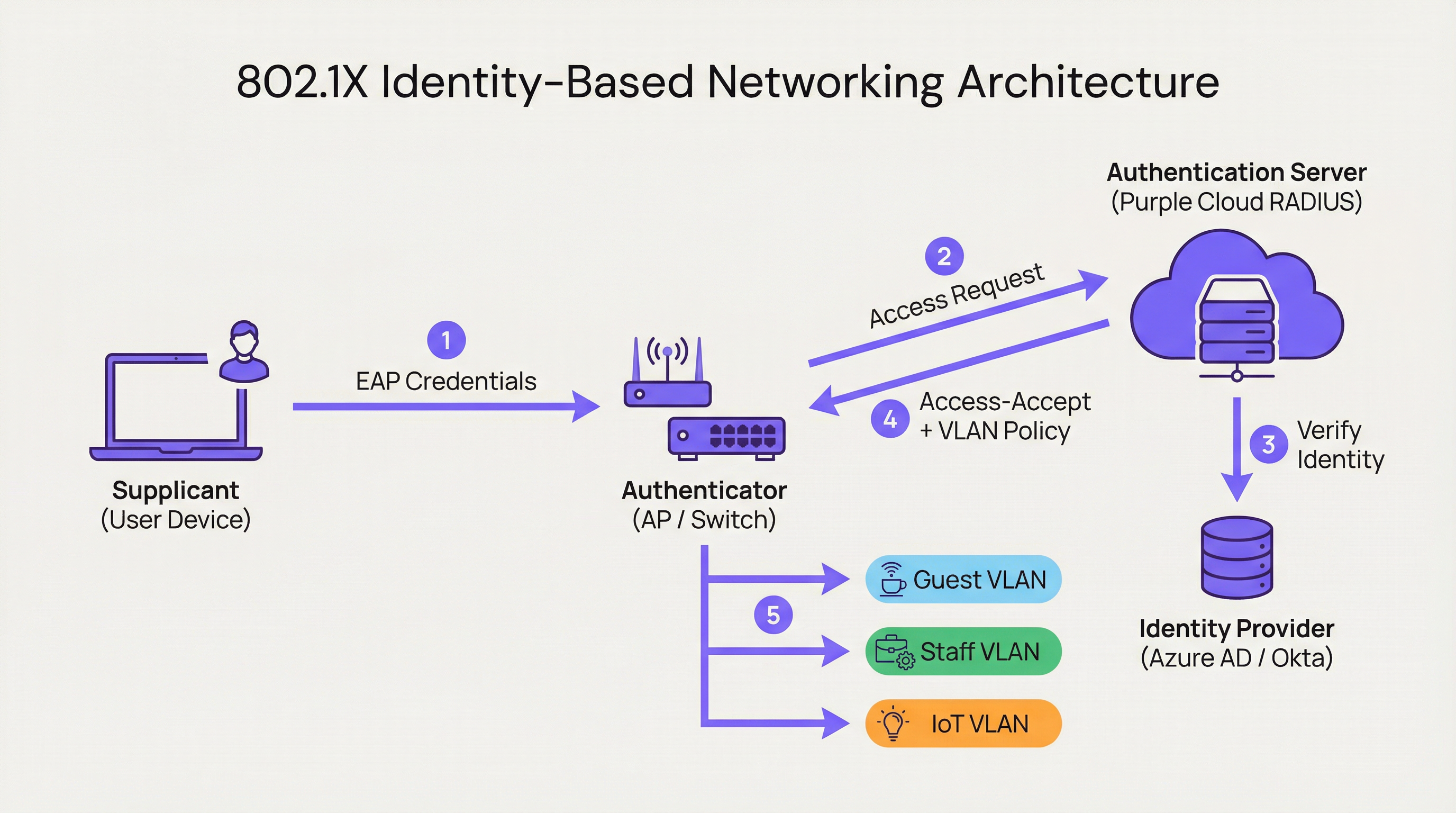
Cuando un usuario se conecta, el autenticador coloca el puerto en un estado no autorizado, bloqueando todo el tráfico excepto los paquetes de autenticación 802.1X. El suplicante proporciona sus credenciales, que el autenticador reenvía al servidor de autenticación. El AS verifica la identidad y, basándose en políticas predefinidas, instruye al autenticador sobre qué hacer. Esta instrucción no es simplemente un permitir o denegar binario; puede incluir asignación dinámica de VLAN, perfiles de calidad de servicio (QoS), tiempos de espera de sesión y reglas de firewall específicas. Un usuario corporativo podría ser asignado a la CORP_VLAN con acceso a servidores internos, mientras que un invitado es asignado a la GUEST_VLAN con acceso exclusivo a internet, desde el mismo SSID o puerto físico.
Cómo implementa Purple las IBN
La plataforma de Purple actúa como un servidor de autenticación nativo de la nube y un motor de políticas, diseñado para las complejidades de los grandes recintos públicos. Nuestro enfoque se centra en abstraer la complejidad de la configuración de RADIUS y 802.1X.
RADIUS nativo de la nube: Eliminamos la necesidad de servidores de autenticación locales (on-premises), proporcionando un servicio distribuido globalmente y de alta disponibilidad que escala bajo demanda. No hay servidores que montar en racks, ni firmware que parchear, ni un único punto de fallo.
Integración con proveedores de identidad (IdP): Nos conectamos a la perfección con los principales IdP, incluyendo Azure AD, Okta y Google Workspace. Esto permite a las organizaciones utilizar su única fuente de verdad existente para la identidad, garantizando que cuando se deshabilita la cuenta de un empleado, su acceso a la red se revoca al instante.
Motor de políticas dinámico: Nuestra intuitiva consola de gestión permite a los administradores de TI crear políticas de acceso granulares basadas en atributos de usuario como la pertenencia a grupos, el rol y el departamento. Una política podría establecer: "Todos los usuarios del grupo 'Retail-Staff' que se conecten al SSID 'Staff-WiFi' entre las 9 a. m. y las 5 p. m. serán asignados a la 'POS_VLAN' con un límite de ancho de banda de 10 Mbps".
Asignación dinámica de VLAN: Esta es una piedra angular de nuestra implementación de IBN. En lugar de configurar manualmente las VLAN en cada puerto del switch, la red asigna dinámicamente a un usuario a la VLAN correcta en función de su identidad. Esto supone una enorme ganancia de eficiencia operativa y una mejora significativa de la seguridad.

Guía de implementación
Implementar IBN con Purple es un proceso estructurado diseñado para minimizar las interrupciones y maximizar la seguridad desde el primer día.
Paso 1: Auditoría de la infraestructura de red
Antes de la implementación, verifique que su hardware de red (switches y puntos de acceso) sea compatible con IEEE 802.1X. La mayoría de los equipos de nivel empresarial fabricados en la última década lo son. Esto incluye proveedores como Cisco, Meraki, Aruba y Ruckus. Asegúrese de que todo el firmware esté actualizado, ya que las versiones más antiguas pueden tener vulnerabilidades 802.1X conocidas.
Paso 2: Definir roles de usuario y políticas de acceso
Esta es la fase más crítica. Trabaje con las partes interesadas de RR. HH., operaciones y la dirección para clasificar a todos los usuarios de la red en roles distintos. Ejemplos comunes incluyen Personal corporativo (acceso total a recursos internos), Usuarios invitados (acceso exclusivo a internet a través de un Captive Portal), Contratistas (acceso por tiempo limitado a aplicaciones específicas) y Dispositivos IoT (acceso altamente restringido a una VLAN dedicada, comunicándose solo con su servidor de gestión específico). Para cada rol, defina explícitamente el nivel de acceso requerido.
Paso 3: Configurar Purple como el servidor de autenticación
En su controlador de red (como Meraki Dashboard o Aruba Central), configure un nuevo perfil RADIUS que apunte a los endpoints de autenticación de Purple con un secreto compartido. Esto establece la relación de confianza entre su hardware de red y la nube de Purple. La documentación de incorporación de Purple proporciona guías de configuración paso a paso para los principales proveedores de hardware.
Paso 4: Despliegue gradual y pruebas
No intente una migración abrupta. Comience con un grupo piloto de usuarios o un área específica de su recinto, como un solo piso o una tienda minorista no crítica. Cree un nuevo SSID dedicado para la prueba de IBN. Incorpore a los usuarios piloto y pruebe todos los roles definidos. Valide que los usuarios se estén asignando a las VLAN correctas y que los permisos de acceso se apliquen correctamente. Es fundamental probar los modos de fallo: ¿qué sucede si el servidor RADIUS es inalcanzable? Configure el hardware para una postura de fallo cerrado (fail-closed).
Paso 5: Despliegue completo y desmantelamiento de sistemas heredados
Una vez que el piloto sea exitoso, expanda el despliegue a toda la organización. Desarrolle un plan de comunicación claro para guiar a los usuarios a través del proceso único de conexión a la nueva red segura. Una vez que todos los usuarios hayan migrado, desmantele los antiguos SSID inseguros y las configuraciones de puertos.
Mejores prácticas
Aprovechar WPA3-Enterprise: Siempre que sea compatible, utilice WPA3-Enterprise junto con 802.1X. Ofrece mejoras de seguridad significativas sobre WPA2, incluyendo protección para tramas de gestión (802.11w) y algoritmos de cifrado más fuertes.
Autenticación basada en certificados: Para los dispositivos corporativos, vaya más allá de las credenciales de nombre de usuario y contraseña (EAP-PEAP) e implemente la autenticación basada en certificados (EAP-TLS). Este es el estándar de oro para la seguridad 802.1X, ya que mitiga los riesgos de phishing y simplifica la experiencia del usuario al eliminar las solicitudes de contraseña.
Centralizar la identidad: Mantenga una única fuente de verdad autoritativa para la identidad del usuario. Esto evita la dispersión de identidades y garantiza que cuando un empleado abandona la organización, su acceso a la red se revoca al instante en la fuente.
Revisión periódica de políticas: Los roles de usuario y los requisitos de acceso cambian. Realice revisiones trimestrales de sus políticas de IBN para asegurarse de que sigan alineadas con las necesidades del negocio y los principios de seguridad. Elimine los roles no utilizados y restrinja las reglas permisivas.
| Mejor práctica | Estándar / Referencia | Prioridad |
|---|---|---|
| WPA3-Enterprise | IEEE 802.11ax, Wi-Fi Alliance | Alta |
| Autenticación por certificado (EAP-TLS) | RFC 5216 | Alta |
| Segmentación dinámica de VLAN | IEEE 802.1Q | Crítica |
| Identidad centralizada (IdP) | NIST SP 800-63 | Crítica |
| Política RADIUS de fallo cerrado | CIS Benchmark | Alta |
| Revisión trimestral de políticas | ISO 27001 | Media |
Solución de problemas y mitigación de riesgos
Modo de fallo: Servidor RADIUS inalcanzable
Si el autenticador no puede comunicarse con la nube de Purple, el comportamiento predeterminado del hardware puede ser de fallo abierto (permitir todo el acceso) o fallo cerrado (denegar todo el acceso). Configure su hardware para una postura de fallo cerrado para obtener la máxima seguridad. La infraestructura geodistribuida de Purple hace que las interrupciones prolongadas sean muy improbables, pero la defensa en profundidad es esencial. Considere configurar un respaldo RADIUS local para la infraestructura crítica.
Modo de fallo: Políticas mal configuradas
Una política mal redactada puede otorgar privilegios excesivos o denegar el acceso legítimo. Utilice un entorno de pruebas (staging) o un grupo piloto para probar cada cambio de política antes de implementarlo en producción. El simulador de políticas de Purple le permite probar el nivel de acceso esperado de un usuario antes de confirmar un cambio.
Riesgo: Complejidad de la incorporación (Onboarding)
El proceso de conexión inicial para los usuarios puede ser complejo, especialmente con el despliegue de certificados. Proporcione guías claras paso a paso con capturas de pantalla y ofrezca soporte de mesa de ayuda (helpdesk) durante el período de transición. Considere implementar una herramienta de incorporación como el Network Access Manager de Purple para automatizar el proceso de configuración de dispositivos.
Riesgo: Dispositivos heredados sin soporte 802.1X
No todos los dispositivos (en particular el hardware IoT más antiguo, las impresoras y los equipos médicos) son compatibles con 802.1X. Utilice la omisión de autenticación MAC (MAB) para estos dispositivos, registrando previamente sus direcciones MAC y asignándolos a VLAN aisladas y altamente restringidas con reglas de firewall estrictas.
ROI e impacto empresarial
El caso de negocio para las IBN se basa en tres pilares: reducción de costos, mitigación de riesgos y habilitación del negocio.
Reducción de costos: El principal ahorro es operativo. La automatización de la gestión de VLAN y ACL reduce drásticamente las horas-hombre requeridas para la administración de la red. La asignación dinámica de VLAN puede reducir el tiempo de aprovisionamiento de la red en más de un 85 %, según puntos de referencia independientes de operaciones de red. Esto libera al personal de TI para que se centre en iniciativas estratégicas en lugar del mantenimiento rutinario.
Mitigación de riesgos: El costo de una brecha de datos es sustancial (el informe Cost of a Data Breach de IBM sitúa sistemáticamente el promedio mundial por encima de los 4 millones de dólares). Al implementar un modelo Zero Trust y la microsegmentación, las IBN reducen significativamente la superficie de ataque. Si el dispositivo de un usuario se ve comprometido, la brecha se contiene dentro de su segmento de red específico y limitado. Esto es fundamental para el cumplimiento de PCI DSS en el comercio minorista y el cumplimiento de GDPR en las organizaciones del sector público.
Habilitación del negocio: Las IBN proporcionan datos valiosos sobre quién utiliza la red, dónde se encuentran y qué están haciendo. Esta inteligencia es inestimable para las operaciones del recinto. Un hotel puede comprender los patrones de movimiento de los huéspedes, un minorista puede analizar la afluencia en diferentes departamentos y un estadio puede optimizar la dotación de personal en función de la densidad de la multitud en tiempo real. Esto transforma la red de un centro de costos a un activo empresarial estratégico.
| Dimensión del ROI | Métrica | Resultado típico |
|---|---|---|
| Eficiencia operativa | Horas de administración de TI ahorradas por semana | Reducción del 40-60 % |
| Postura de seguridad | Reducción de la superficie de ataque | Significativa mediante microsegmentación |
| Cumplimiento | Tiempo de preparación de auditorías | Reducido mediante registro automatizado |
| Inteligencia empresarial | Tasa de captura de datos de huéspedes | Aumentada mediante la integración del Captive Portal |
| Productividad del personal | Tiempo de aprovisionamiento de la red | Reducción de más del 85 % |
Términos clave y definiciones
Identity-Based Networking (IBN)
An approach to network administration where access to network resources is granted based on the authenticated identity of a user or device, rather than its physical connection point or IP address.
IT teams use IBN to create more secure and flexible networks that can handle BYOD, IoT, and mobile users safely. It is the foundational technology for a Zero Trust network architecture.
IEEE 802.1X
An IEEE standard for Port-Based Network Access Control (PNAC). It provides an authentication mechanism to devices wishing to attach to a LAN or WLAN, using the EAP framework to carry authentication credentials.
This is the primary technical standard that underpins most IBN deployments. Network hardware must support 802.1X to be compatible with an identity-driven access model.
RADIUS
Remote Authentication Dial-In User Service. A networking protocol that provides centralised Authentication, Authorisation, and Accounting (AAA) management for users who connect and use a network service.
The RADIUS server is the brain of an IBN system. It makes the decisions about who gets access and what level of access they receive. Purple provides this as a cloud-native service, eliminating the need for on-premises RADIUS infrastructure.
Dynamic VLAN Assignment
The ability of a network to assign a user to a specific Virtual LAN (VLAN) based on their authenticated identity, regardless of the physical port or SSID they connect to.
This is a key operational benefit of IBN. It automates the process of network segmentation, saving significant administrative time and reducing the risk of misconfiguration that leads to security incidents.
Supplicant
The software on a client device (such as a laptop or smartphone) that provides credentials to the network authenticator as part of the 802.1X authentication process.
Modern operating systems (Windows, macOS, iOS, Android) have a built-in 802.1X supplicant, so end users do not need to install any special software to connect to an IBN-secured network.
EAP (Extensible Authentication Protocol)
An authentication framework that provides a common way for supplicants and authentication servers to negotiate an authentication method. Common EAP types include EAP-TLS (certificate-based) and EAP-PEAP (password-based).
IT teams choose an EAP type based on their desired balance of security and usability. EAP-TLS is the most secure option and is recommended for corporate devices; EAP-PEAP is simpler to deploy but relies on password security.
MAC Authentication Bypass (MAB)
A technique that allows devices without 802.1X supplicant support to be authenticated on an IBN network by pre-registering their hardware MAC address with the authentication server.
MAB is a pragmatic solution for IoT devices, printers, and legacy hardware that cannot participate in 802.1X. It is less secure than full 802.1X authentication and should be combined with strict VLAN isolation and firewall rules.
Zero Trust
A security model based on the principle of 'never trust, always verify.' It requires that all users, whether inside or outside the organisation's network, be authenticated, authorised, and continuously validated before being granted access to applications and data.
IBN is a foundational technology for implementing a Zero Trust architecture. It ensures that the principle of 'always verify' is applied right at the network edge, before any traffic is allowed to flow.
WPA3-Enterprise
The latest generation of the Wi-Fi Protected Access security protocol for enterprise networks. It mandates the use of 802.1X authentication and offers stronger encryption (192-bit security mode) and protection for management frames.
IT teams should target WPA3-Enterprise for all new deployments and hardware refreshes. It provides a significant security uplift over WPA2-Enterprise, particularly in high-density public environments.
Casos de éxito
A 500-room luxury hotel needs to provide secure, differentiated Wi-Fi access for guests, conference attendees, staff, and back-of-house IoT devices (minibars, smart locks). They currently use a single, shared WPA2-Personal password for everyone, which is a major security and compliance risk.
Role Definition: Define four distinct roles: Guest, Conference, Staff, and IoT.
Policy Creation in Purple:
- Guest: Authenticate via captive portal with room number and surname. Assign to Guest_VLAN with a 20 Mbps bandwidth cap and client isolation enabled to prevent peer-to-peer attacks.
- Conference: Authenticate via a shared, time-limited credential provided by the event organiser. Assign to Conference_VLAN with a 50 Mbps cap, allowing communication between devices within the same conference group.
- Staff: Authenticate via Azure AD credentials. Assign to Staff_VLAN with access to the Property Management System (PMS) and internal servers only.
- IoT: Authenticate using MAC Authentication Bypass (MAB) with a pre-registered list of device MAC addresses. Assign to IoT_VLAN, which has no internet access and can only communicate with the IoT management platform.
Network Configuration: Configure hotel APs to use Purple's cloud RADIUS. Create a single SSID, Hotel_WiFi, using WPA2/WPA3-Enterprise.
Rollout: Pilot the new SSID in a single wing of the hotel before full deployment. Validate each role before expanding.
A retail chain with 150 stores wants to replace its aging guest Wi-Fi and provide secure network access for corporate staff, store associates using handheld scanners, and third-party vendors (merchandisers). They need to achieve and maintain PCI DSS compliance.
Role Definition: Define four roles: Corporate, Store_Associate, Vendor, and Guest.
Policy Creation in Purple:
- Corporate: Authenticate via Okta credentials. Assign to CORP_VLAN with full network access.
- Store_Associate: Authenticate handheld scanners via EAP-TLS (device certificates issued by the company CA). Assign to POS_VLAN, which is fully segmented from all other network traffic and only has access to the payment processing gateway and inventory server. This is the critical control for PCI DSS compliance.
- Vendor: Authenticate via a self-service portal where they register for time-limited access (e.g., 8 hours). Assign to Vendor_VLAN with internet-only access.
- Guest: Authenticate via a social login (Facebook, Google) or email on a branded captive portal. Assign to Guest_VLAN with client isolation.
Network Configuration: Deploy Meraki APs in all stores, managed centrally via Meraki Dashboard. Configure the Retail_Secure SSID to point to Purple for authentication. Centralise all policy management in Purple.
Measurement: Use Purple's analytics to track guest engagement, dwell times, and repeat visits, providing valuable data to the marketing team and demonstrating the commercial value of the Wi-Fi investment.
Análisis de escenarios
Q1. A large conference centre is hosting a high-profile tech event with 5,000 attendees, 200 event staff, and a dedicated live-streaming production crew requiring guaranteed bandwidth. How would you design the IBN policy to serve all three groups from a single network infrastructure?
💡 Sugerencia:Consider the distinct requirements of each group: attendees need basic internet access, staff need access to event management systems, and the production crew needs guaranteed, high-priority bandwidth with no contention.
Mostrar enfoque recomendado
Define three distinct roles. Attendees authenticate via a simple captive portal (email address or event registration code). Place them on a Public_VLAN with a strict per-client bandwidth limit (e.g., 5 Mbps) and client isolation enabled to prevent peer-to-peer attacks and ensure fair bandwidth distribution. Event Staff authenticate using pre-shared credentials managed by the event organiser. Place them on a Staff_VLAN with a higher bandwidth limit (e.g., 25 Mbps) and access to event management systems. Production Crew is the most critical group. Authenticate their equipment using EAP-TLS certificates for maximum security. Place them on a dedicated Production_VLAN with the highest QoS priority (DSCP EF marking) and no bandwidth restrictions. This VLAN must be completely isolated from all other traffic to guarantee performance for the live stream. Use Purple's policy engine to set session timeouts for attendee credentials that align with the event schedule.
Q2. Your CFO is questioning the investment in an IBN solution, arguing that the existing WPA2-Personal passwords 'work fine.' How do you construct a compelling business case focused on ROI?
💡 Sugerencia:Translate the technical benefits — security, automation, compliance — into financial terms: cost savings, risk reduction, and revenue enablement.
Mostrar enfoque recomendado
The business case has three parts. First, Operational Savings: calculate the weekly hours your IT team spends on manual network changes (MAC whitelisting, VLAN updates, ACL changes, password resets). Show how automating this with IBN frees up that time for strategic projects. Even recovering five hours per week at a fully-loaded cost of £50/hour represents £13,000 per year in recovered productivity. Second, Risk Reduction: reference industry data on the average cost of a data breach. Frame IBN as an insurance policy that significantly lowers the probability of such an event by implementing micro-segmentation and Zero Trust principles. Third, Compliance Costs: if subject to PCI DSS or GDPR, highlight the cost of failing an audit or the scale of potential regulatory fines (up to 4% of global annual turnover under GDPR). Position IBN as a key enabler for compliance, directly reducing that financial risk.
Q3. You are deploying IBN in a hospital. A critical piece of medical equipment — an MRI scanner — does not support 802.1X. How do you securely connect it to the network while maintaining your Zero Trust posture?
💡 Sugerencia:The device cannot authenticate itself using standard 802.1X. How can the network authenticate it on its behalf, and what compensating controls are needed?
Mostrar enfoque recomendado
This is a classic use case for MAC Authentication Bypass (MAB). Register the MRI scanner's MAC address in the Purple platform and associate it with a Medical_Device access profile. When the switch detects that MAC address, it queries Purple, which instructs the switch to place the device into a highly restricted Medical_VLAN. This VLAN must have a strict firewall policy (implemented at the network layer) that only permits the MRI machine to communicate with its dedicated imaging server on specific ports, and blocks all other traffic. This provides a secure, albeit less ideal, alternative to 802.1X for legacy or non-supplicant devices. Document this as a known exception in your security risk register, and schedule a hardware refresh to a 802.1X-capable model at the next available opportunity. The compensating control of strict VLAN isolation and firewall rules is the key to maintaining your Zero Trust posture.
Conclusiones clave
- ✓Identity-Based Networking (IBN) ties network access to verified user identity, not physical ports or MAC addresses.
- ✓It is a core component of a modern Zero Trust security strategy, operating on the principle of 'never trust, always verify.'
- ✓Key enabling technologies are IEEE 802.1X, RADIUS, EAP, and dynamic VLAN assignment.
- ✓IBN dramatically simplifies network administration by automating VLAN and access rule management.
- ✓It delivers measurable ROI through reduced operational costs, mitigated breach risk, and enhanced regulatory compliance (PCI DSS, GDPR).
- ✓Purple provides a cloud-native RADIUS platform that integrates with existing IdPs (Azure AD, Okta) to implement IBN at scale without on-premises infrastructure.
- ✓Deployment should follow a phased approach: audit infrastructure, define roles, configure Purple, pilot test, then roll out fully.




