

Identity-Based Networking: cos'è e perché è importante
This guide provides a comprehensive technical reference on Identity-Based Networking (IBN) — what it is, how it works, and why it is a critical investment for any organisation managing large, diverse user populations across hotels, retail chains, stadiums, and public-sector venues. It covers the core IEEE 802.1X architecture, Purple's cloud-native implementation, real-world deployment scenarios, and a clear ROI framework to support procurement decisions.
🎧 Ascolta questa guida
Visualizza trascrizione
Executive Summary
L'Identity-Based Networking (IBN) rappresenta un cambiamento fondamentale nella gestione dell'accesso alla rete, passando da un modello statico basato sulle porte a uno dinamico incentrato sull'utente. In una rete tradizionale, i diritti di accesso sono legati a porte fisiche o indirizzi MAC, creando un ambiente rigido e poco sicuro. L'IBN lega i privilegi di accesso alla rete all'identità verificata di un utente. Ciò significa che, indipendentemente da come o dove un utente si connetta (tramite Wi-Fi, Ethernet o VPN), il suo accesso alle risorse di rete è determinato da chi è, non dal dispositivo che sta utilizzando o da dove si sta collegando.
Per le organizzazioni che gestiscono basi di utenti ampie ed eterogenee in ambienti come hotel, catene di negozi e stadi, questo rappresenta un punto di svolta. Abilita una postura di sicurezza Zero Trust di default, in cui ogni utente e dispositivo deve essere autenticato e autorizzato prima di ottenere l'accesso. Questo semplifica drasticamente la segmentazione della rete, migliora la sicurezza contenendo le minacce e ottimizza la conformità a normative come PCI DSS e GDPR.
Per un CTO, l'IBN offre un ROI significativo riducendo il carico amministrativo legato alla gestione di VLAN e liste di controllo degli accessi (ACL) complesse, mitigando il rischio di violazioni della sicurezza e fornendo una profonda visibilità sui modelli di utilizzo della rete in grado di orientare la strategia aziendale. L'implementazione dell'IBN di Purple sfrutta l'infrastruttura esistente e si integra perfettamente con i provider di identità cloud per offrire un livello di accesso scalabile, resiliente e intelligente, adatto alle aziende moderne.

Approfondimento tecnico
Dalle porte alle persone: il cambiamento architetturale principale
Il networking tradizionale, retaggio di un'epoca in cui i dispositivi erano statici e gli utenti vincolati alle scrivanie, opera su un principio di fiducia implicita all'interno di un perimetro di rete. Un dispositivo autenticato è considerato attendibile e il suo punto di connessione fisica (una porta dello switch) ne determina l'accesso alla rete. Questo modello è pieno di sfide nell'era moderna del BYOD (Bring Your Own Device), dell'IoT e della forza lavoro mobile.
L'Identity-Based Networking (IBN), spesso implementato utilizzando lo standard IEEE 802.1X, inverte radicalmente questo modello. Svincola l'utente dalla porta fisica e rende l'identità il nuovo perimetro. I componenti principali di un'architettura IBN sono:
Supplicant: il dispositivo client (es. laptop, smartphone) che richiede l'accesso alla rete. Esegue un software che comunica con l'authenticator. I sistemi operativi moderni (Windows, macOS, iOS e Android) includono un supplicant 802.1X nativo, pertanto non è richiesta l'installazione di software aggiuntivo per gli utenti finali.
Authenticator: il dispositivo di accesso alla rete, come un Wireless Access Point (WAP) o uno switch Ethernet. Agisce da gatekeeper, bloccando o consentendo il traffico dal supplicant. L'authenticator mantiene la porta in uno stato non autorizzato finché non riceve istruzioni esplicite dal server di autenticazione.
Authentication Server (AS): in genere un server RADIUS (Remote Authentication Dial-In User Service). Questo server rappresenta il livello di intelligenza dell'operazione. Riceve le credenziali del supplicant dall'authenticator, le convalida rispetto a un archivio di identità (es. Azure Active Directory, Google Workspace, un database locale) e restituisce una decisione di autorizzazione che include una specifica policy di rete.
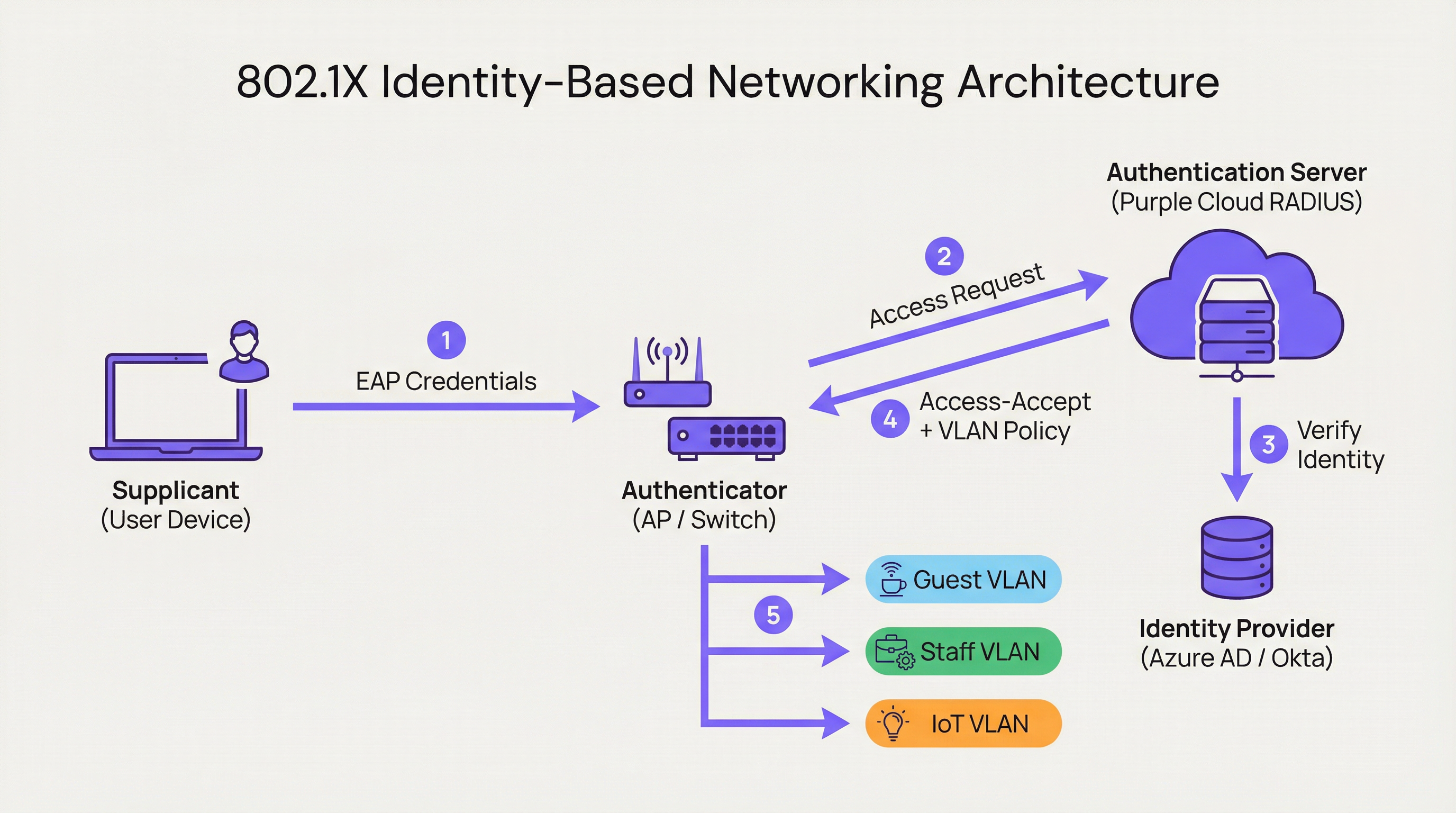
Quando un utente si connette, l'authenticator pone la porta in uno stato non autorizzato, bloccando tutto il traffico ad eccezione dei pacchetti di autenticazione 802.1X. Il supplicant fornisce le proprie credenziali, che l'authenticator inoltra all'Authentication Server. L'AS verifica l'identità e, in base a policy predefinite, istruisce l'authenticator sul da farsi. Questa istruzione non è un semplice consenti o nega binario; può includere l'assegnazione dinamica della VLAN, profili di Quality of Service (QoS), timeout di sessione e regole firewall specifiche. Un utente aziendale potrebbe essere inserito nella CORP_VLAN con accesso ai server interni, mentre un ospite viene inserito nella GUEST_VLAN con accesso esclusivo a Internet, dallo stesso SSID o dalla stessa porta fisica.
Come Purple implementa l'IBN
La piattaforma di Purple funge da Authentication Server cloud-native e motore di policy, progettata per le complessità dei grandi spazi pubblici. Il nostro approccio si concentra sull'astrazione della complessità della configurazione RADIUS e 802.1X.
RADIUS Cloud-Native: eliminiamo la necessità di server di autenticazione on-premise, fornendo un servizio distribuito a livello globale, ad alta disponibilità e scalabile su richiesta. Non ci sono server da installare a rack, nessun firmware da aggiornare e nessun singolo punto di guasto.
Integrazione con Identity Provider (IdP): ci connettiamo perfettamente con i principali IdP, tra cui Azure AD, Okta e Google Workspace. Ciò consente alle organizzazioni di utilizzare la propria singola fonte di verità esistente per le identità, garantendo che quando l'account di un dipendente viene disabilitato, il suo accesso alla rete venga revocato all'istante.
Motore di policy dinamico: la nostra intuitiva console di gestione consente ai manager IT di creare policy di accesso granulari basate su attributi utente come appartenenza a gruppi, ruolo e dipartimento. Una policy potrebbe stabilire: "Tutti gli utenti del gruppo 'Retail-Staff' che si connettono all'SSID 'Staff-WiFi' tra le 9:00 e le 17:00 vengono assegnati alla 'POS_VLAN' con un limite di larghezza di banda di 10 Mbps."
Assegnazione dinamica delle VLAN: questo è un pilastro della nostra implementazione IBN. Invece di configurare manualmente le VLAN su ogni porta dello switch, la rete assegna dinamicamente un utente alla VLAN corretta in base alla sua identità. Si tratta di un enorme guadagno in termini di efficienza operativa e di un significativo miglioramento della sicurezza.

Guida all'implementazione
L'implementazione dell'IBN con Purple è un processo strutturato, progettato per ridurre al minimo le interruzioni e massimizzare la sicurezza fin dal primo giorno.
Fase 1: Audit dell'infrastruttura di rete
Prima dell'implementazione, verifica che l'hardware di rete (switch e access point) supporti lo standard IEEE 802.1X. La maggior parte delle apparecchiature di livello enterprise prodotte nell'ultimo decennio lo supporta. Ciò include vendor come Cisco, Meraki, Aruba e Ruckus. Assicurati che tutti i firmware siano aggiornati, poiché le versioni più vecchie possono presentare vulnerabilità 802.1X note.
Fase 2: Definizione dei ruoli utente e delle policy di accesso
Questa è la fase più critica. Collabora con gli stakeholder delle risorse umane, delle operations e del management per classificare tutti gli utenti della rete in ruoli distinti. Esempi comuni includono Personale aziendale (accesso completo alle risorse interne), Utenti ospiti (accesso esclusivo a Internet tramite un Captive Portal), Collaboratori esterni (accesso limitato nel tempo ad applicazioni specifiche) e Dispositivi IoT (accesso altamente limitato a una VLAN dedicata, con comunicazione esclusiva verso il proprio server di gestione specifico). Per ogni ruolo, definisci esplicitamente il livello di accesso richiesto.
Fase 3: Configurazione di Purple come Authentication Server
Nel tuo controller di rete (come Meraki Dashboard o Aruba Central), configura un nuovo profilo RADIUS che punti agli endpoint di autenticazione di Purple con un segreto condiviso. Questo stabilisce la relazione di fiducia tra l'hardware di rete e il cloud di Purple. La documentazione di onboarding di Purple fornisce guide di configurazione passo-passo per tutti i principali vendor hardware.
Fase 4: Implementazione graduale e test
Non tentare una migrazione immediata e totale. Inizia con un gruppo pilota di utenti o un'area specifica della tua sede, come un singolo piano o un punto vendita non critico. Crea un nuovo SSID dedicato per il test IBN. Esegui l'onboarding degli utenti pilota e testa tutti i ruoli definiti. Convalida che gli utenti vengano assegnati alle VLAN corrette e che i permessi di accesso siano applicati correttamente. È fondamentale testare le modalità di guasto: cosa succede se il server RADIUS è irraggiungibile? Configura l'hardware per una postura fail-closed.
Fase 5: Implementazione completa e dismissione dei sistemi legacy
Una volta che il progetto pilota ha avuto successo, espandi l'implementazione all'intera organizzazione. Sviluppa un piano di comunicazione chiaro per guidare gli utenti attraverso il processo una tantum di connessione alla nuova rete sicura. Una volta migrati tutti gli utenti, dismetti i vecchi SSID non sicuri e le configurazioni delle porte.
Best Practice
Sfruttare WPA3-Enterprise: ove supportato, utilizza WPA3-Enterprise in combinazione con 802.1X. Offre miglioramenti significativi in termini di sicurezza rispetto a WPA2, inclusa la protezione per i management frame (802.11w) e algoritmi di crittografia più robusti.
Autenticazione basata su certificati: per i dispositivi aziendali, vai oltre le credenziali con nome utente e password (EAP-PEAP) e implementa l'autenticazione basata su certificati (EAP-TLS). Questo è il gold standard per la sicurezza 802.1X, poiché mitiga i rischi di phishing e semplifica l'esperienza utente eliminando le richieste di password.
Centralizzare le identità: mantieni un'unica fonte di verità autorevole per l'identità degli utenti. Questo previene la dispersione delle identità e garantisce che, quando un dipendente lascia l'organizzazione, il suo accesso alla rete venga revocato istantaneamente alla fonte.
Revisione regolare delle policy: i ruoli degli utenti e i requisiti di accesso cambiano. Conduci revisioni trimestrali delle tue policy IBN per assicurarti che siano ancora in linea con le esigenze aziendali e i principi di sicurezza. Elimina i ruoli inutilizzati e restringi le regole troppo permissive.
| Best Practice | Standard / Riferimento | Priorità |
|---|---|---|
| WPA3-Enterprise | IEEE 802.11ax, Wi-Fi Alliance | Alta |
| Autenticazione con certificato (EAP-TLS) | RFC 5216 | Alta |
| Segmentazione dinamica delle VLAN | IEEE 802.1Q | Critica |
| Identità centralizzata (IdP) | NIST SP 800-63 | Critica |
| Policy RADIUS Fail-Closed | CIS Benchmark | Alta |
| Revisione trimestrale delle policy | ISO 27001 | Media |
Risoluzione dei problemi e mitigazione dei rischi
Modalità di guasto: Server RADIUS irraggiungibile
Se l'authenticator non riesce a raggiungere il cloud di Purple, il comportamento predefinito dell'hardware potrebbe essere fail-open (consentire tutti gli accessi) o fail-closed (negare tutti gli accessi). Configura l'hardware per una postura fail-closed per la massima sicurezza. L'infrastruttura geodistribuita di Purple rende altamente improbabili interruzioni prolungate, ma la difesa in profondità è essenziale. Prendi in considerazione la configurazione di un fallback RADIUS locale per le infrastrutture critiche.
Modalità di guasto: Policy configurate in modo errato
Una policy scritta male può concedere privilegi eccessivi o negare accessi legittimi. Utilizza un ambiente di staging o un gruppo pilota per testare ogni modifica alle policy prima di implementarla in produzione. Il simulatore di policy di Purple consente di testare il livello di accesso previsto per un utente prima di confermare una modifica.
Rischio: Complessità di onboarding
Il processo di connessione iniziale per gli utenti può essere complesso, specialmente con la distribuzione dei certificati. Fornisci guide chiare e passo-passo con screenshot e offri supporto helpdesk durante il periodo di transizione. Valuta l'implementazione di uno strumento di onboarding come il Network Access Manager di Purple per automatizzare il processo di configurazione dei dispositivi.
Rischio: Dispositivi legacy senza supporto 802.1X
Non tutti i dispositivi (in particolare hardware IoT più vecchi, stampanti e apparecchiature mediche) supportano 802.1X. Utilizza il MAC Authentication Bypass (MAB) per questi dispositivi, preregistrando i loro indirizzi MAC e assegnandoli a VLAN isolate e altamente limitate con rigide regole firewall.
ROI e impatto sul business
Il business case per l'IBN si basa su tre pilastri: riduzione dei costi, mitigazione dei rischi e abilitazione del business.
Riduzione dei costi: il risparmio principale è operativo. L'automazione della gestione di VLAN e ACL riduce drasticamente le ore di lavoro necessarie per l'amministrazione della rete. L'assegnazione dinamica delle VLAN può ridurre i tempi di provisioning della rete di oltre l'85%, secondo benchmark indipendenti sulle operazioni di rete. Ciò libera il personale IT, consentendogli di concentrarsi su iniziative strategiche anziché sulla manutenzione di routine.
Mitigazione dei rischi: il costo di una violazione dei dati è notevole (il Cost of a Data Breach Report di IBM colloca costantemente la media globale sopra i 4 milioni di dollari). Implementando un modello Zero Trust e la micro-segmentazione, l'IBN riduce significativamente la superficie di attacco. Se il dispositivo di un utente viene compromesso, la violazione è contenuta all'interno del suo segmento di rete specifico e limitato. Questo è fondamentale per la conformità PCI DSS nel retail e per la conformità GDPR nelle organizzazioni del settore pubblico.
Abilitazione del business: l'IBN fornisce dati preziosi su chi sta utilizzando la rete, dove si trova e cosa sta facendo. Questa intelligence ha un valore inestimabile per le operazioni all'interno delle sedi. Un hotel può comprendere i modelli di movimento degli ospiti, un rivenditore può analizzare l'affluenza nei diversi reparti e uno stadio può ottimizzare il personale in base alla densità della folla in tempo reale. Questo trasforma la rete da un centro di costo a un asset aziendale strategico.
| Dimensione del ROI | Metrica | Risultato tipico |
|---|---|---|
| Efficienza operativa | Ore di amministrazione IT risparmiate a settimana | Riduzione del 40-60% |
| Postura di sicurezza | Riduzione della superficie di attacco | Significativa tramite micro-segmentazione |
| Conformità | Tempo di preparazione agli audit | Ridotto tramite logging automatizzato |
| Business Intelligence | Tasso di acquisizione dei dati degli ospiti | Aumentato tramite integrazione con Captive Portal |
| Produttività del personale | Tempo di provisioning della rete | Riduzione dell'85%+ |
Termini chiave e definizioni
Identity-Based Networking (IBN)
An approach to network administration where access to network resources is granted based on the authenticated identity of a user or device, rather than its physical connection point or IP address.
IT teams use IBN to create more secure and flexible networks that can handle BYOD, IoT, and mobile users safely. It is the foundational technology for a Zero Trust network architecture.
IEEE 802.1X
An IEEE standard for Port-Based Network Access Control (PNAC). It provides an authentication mechanism to devices wishing to attach to a LAN or WLAN, using the EAP framework to carry authentication credentials.
This is the primary technical standard that underpins most IBN deployments. Network hardware must support 802.1X to be compatible with an identity-driven access model.
RADIUS
Remote Authentication Dial-In User Service. A networking protocol that provides centralised Authentication, Authorisation, and Accounting (AAA) management for users who connect and use a network service.
The RADIUS server is the brain of an IBN system. It makes the decisions about who gets access and what level of access they receive. Purple provides this as a cloud-native service, eliminating the need for on-premises RADIUS infrastructure.
Dynamic VLAN Assignment
The ability of a network to assign a user to a specific Virtual LAN (VLAN) based on their authenticated identity, regardless of the physical port or SSID they connect to.
This is a key operational benefit of IBN. It automates the process of network segmentation, saving significant administrative time and reducing the risk of misconfiguration that leads to security incidents.
Supplicant
The software on a client device (such as a laptop or smartphone) that provides credentials to the network authenticator as part of the 802.1X authentication process.
Modern operating systems (Windows, macOS, iOS, Android) have a built-in 802.1X supplicant, so end users do not need to install any special software to connect to an IBN-secured network.
EAP (Extensible Authentication Protocol)
An authentication framework that provides a common way for supplicants and authentication servers to negotiate an authentication method. Common EAP types include EAP-TLS (certificate-based) and EAP-PEAP (password-based).
IT teams choose an EAP type based on their desired balance of security and usability. EAP-TLS is the most secure option and is recommended for corporate devices; EAP-PEAP is simpler to deploy but relies on password security.
MAC Authentication Bypass (MAB)
A technique that allows devices without 802.1X supplicant support to be authenticated on an IBN network by pre-registering their hardware MAC address with the authentication server.
MAB is a pragmatic solution for IoT devices, printers, and legacy hardware that cannot participate in 802.1X. It is less secure than full 802.1X authentication and should be combined with strict VLAN isolation and firewall rules.
Zero Trust
A security model based on the principle of 'never trust, always verify.' It requires that all users, whether inside or outside the organisation's network, be authenticated, authorised, and continuously validated before being granted access to applications and data.
IBN is a foundational technology for implementing a Zero Trust architecture. It ensures that the principle of 'always verify' is applied right at the network edge, before any traffic is allowed to flow.
WPA3-Enterprise
The latest generation of the Wi-Fi Protected Access security protocol for enterprise networks. It mandates the use of 802.1X authentication and offers stronger encryption (192-bit security mode) and protection for management frames.
IT teams should target WPA3-Enterprise for all new deployments and hardware refreshes. It provides a significant security uplift over WPA2-Enterprise, particularly in high-density public environments.
Casi di studio
A 500-room luxury hotel needs to provide secure, differentiated Wi-Fi access for guests, conference attendees, staff, and back-of-house IoT devices (minibars, smart locks). They currently use a single, shared WPA2-Personal password for everyone, which is a major security and compliance risk.
Role Definition: Define four distinct roles: Guest, Conference, Staff, and IoT.
Policy Creation in Purple:
- Guest: Authenticate via captive portal with room number and surname. Assign to Guest_VLAN with a 20 Mbps bandwidth cap and client isolation enabled to prevent peer-to-peer attacks.
- Conference: Authenticate via a shared, time-limited credential provided by the event organiser. Assign to Conference_VLAN with a 50 Mbps cap, allowing communication between devices within the same conference group.
- Staff: Authenticate via Azure AD credentials. Assign to Staff_VLAN with access to the Property Management System (PMS) and internal servers only.
- IoT: Authenticate using MAC Authentication Bypass (MAB) with a pre-registered list of device MAC addresses. Assign to IoT_VLAN, which has no internet access and can only communicate with the IoT management platform.
Network Configuration: Configure hotel APs to use Purple's cloud RADIUS. Create a single SSID, Hotel_WiFi, using WPA2/WPA3-Enterprise.
Rollout: Pilot the new SSID in a single wing of the hotel before full deployment. Validate each role before expanding.
A retail chain with 150 stores wants to replace its aging guest Wi-Fi and provide secure network access for corporate staff, store associates using handheld scanners, and third-party vendors (merchandisers). They need to achieve and maintain PCI DSS compliance.
Role Definition: Define four roles: Corporate, Store_Associate, Vendor, and Guest.
Policy Creation in Purple:
- Corporate: Authenticate via Okta credentials. Assign to CORP_VLAN with full network access.
- Store_Associate: Authenticate handheld scanners via EAP-TLS (device certificates issued by the company CA). Assign to POS_VLAN, which is fully segmented from all other network traffic and only has access to the payment processing gateway and inventory server. This is the critical control for PCI DSS compliance.
- Vendor: Authenticate via a self-service portal where they register for time-limited access (e.g., 8 hours). Assign to Vendor_VLAN with internet-only access.
- Guest: Authenticate via a social login (Facebook, Google) or email on a branded captive portal. Assign to Guest_VLAN with client isolation.
Network Configuration: Deploy Meraki APs in all stores, managed centrally via Meraki Dashboard. Configure the Retail_Secure SSID to point to Purple for authentication. Centralise all policy management in Purple.
Measurement: Use Purple's analytics to track guest engagement, dwell times, and repeat visits, providing valuable data to the marketing team and demonstrating the commercial value of the Wi-Fi investment.
Analisi degli scenari
Q1. A large conference centre is hosting a high-profile tech event with 5,000 attendees, 200 event staff, and a dedicated live-streaming production crew requiring guaranteed bandwidth. How would you design the IBN policy to serve all three groups from a single network infrastructure?
💡 Suggerimento:Consider the distinct requirements of each group: attendees need basic internet access, staff need access to event management systems, and the production crew needs guaranteed, high-priority bandwidth with no contention.
Mostra l'approccio consigliato
Define three distinct roles. Attendees authenticate via a simple captive portal (email address or event registration code). Place them on a Public_VLAN with a strict per-client bandwidth limit (e.g., 5 Mbps) and client isolation enabled to prevent peer-to-peer attacks and ensure fair bandwidth distribution. Event Staff authenticate using pre-shared credentials managed by the event organiser. Place them on a Staff_VLAN with a higher bandwidth limit (e.g., 25 Mbps) and access to event management systems. Production Crew is the most critical group. Authenticate their equipment using EAP-TLS certificates for maximum security. Place them on a dedicated Production_VLAN with the highest QoS priority (DSCP EF marking) and no bandwidth restrictions. This VLAN must be completely isolated from all other traffic to guarantee performance for the live stream. Use Purple's policy engine to set session timeouts for attendee credentials that align with the event schedule.
Q2. Your CFO is questioning the investment in an IBN solution, arguing that the existing WPA2-Personal passwords 'work fine.' How do you construct a compelling business case focused on ROI?
💡 Suggerimento:Translate the technical benefits — security, automation, compliance — into financial terms: cost savings, risk reduction, and revenue enablement.
Mostra l'approccio consigliato
The business case has three parts. First, Operational Savings: calculate the weekly hours your IT team spends on manual network changes (MAC whitelisting, VLAN updates, ACL changes, password resets). Show how automating this with IBN frees up that time for strategic projects. Even recovering five hours per week at a fully-loaded cost of £50/hour represents £13,000 per year in recovered productivity. Second, Risk Reduction: reference industry data on the average cost of a data breach. Frame IBN as an insurance policy that significantly lowers the probability of such an event by implementing micro-segmentation and Zero Trust principles. Third, Compliance Costs: if subject to PCI DSS or GDPR, highlight the cost of failing an audit or the scale of potential regulatory fines (up to 4% of global annual turnover under GDPR). Position IBN as a key enabler for compliance, directly reducing that financial risk.
Q3. You are deploying IBN in a hospital. A critical piece of medical equipment — an MRI scanner — does not support 802.1X. How do you securely connect it to the network while maintaining your Zero Trust posture?
💡 Suggerimento:The device cannot authenticate itself using standard 802.1X. How can the network authenticate it on its behalf, and what compensating controls are needed?
Mostra l'approccio consigliato
This is a classic use case for MAC Authentication Bypass (MAB). Register the MRI scanner's MAC address in the Purple platform and associate it with a Medical_Device access profile. When the switch detects that MAC address, it queries Purple, which instructs the switch to place the device into a highly restricted Medical_VLAN. This VLAN must have a strict firewall policy (implemented at the network layer) that only permits the MRI machine to communicate with its dedicated imaging server on specific ports, and blocks all other traffic. This provides a secure, albeit less ideal, alternative to 802.1X for legacy or non-supplicant devices. Document this as a known exception in your security risk register, and schedule a hardware refresh to a 802.1X-capable model at the next available opportunity. The compensating control of strict VLAN isolation and firewall rules is the key to maintaining your Zero Trust posture.
Punti chiave
- ✓Identity-Based Networking (IBN) ties network access to verified user identity, not physical ports or MAC addresses.
- ✓It is a core component of a modern Zero Trust security strategy, operating on the principle of 'never trust, always verify.'
- ✓Key enabling technologies are IEEE 802.1X, RADIUS, EAP, and dynamic VLAN assignment.
- ✓IBN dramatically simplifies network administration by automating VLAN and access rule management.
- ✓It delivers measurable ROI through reduced operational costs, mitigated breach risk, and enhanced regulatory compliance (PCI DSS, GDPR).
- ✓Purple provides a cloud-native RADIUS platform that integrates with existing IdPs (Azure AD, Okta) to implement IBN at scale without on-premises infrastructure.
- ✓Deployment should follow a phased approach: audit infrastructure, define roles, configure Purple, pilot test, then roll out fully.




