

Explicación de IPSK: Claves precompartidas de identidad para acceso WiFi
This guide provides IT managers, network architects, and venue operations directors with a definitive technical reference on Identity Pre-Shared Keys (IPSK) for WiFi access — explaining the architecture, comparing it against standard PSK and 802.1X Enterprise, and delivering actionable deployment guidance for hospitality, retail, events, and public-sector environments. It addresses the critical operational challenge of providing secure, individually-managed WiFi access across mixed-device fleets — including IoT and headless devices — without the infrastructure overhead of a full 802.1X deployment. Purple's platform is positioned as the orchestration layer that automates IPSK key lifecycle management at scale.
🎧 Escucha esta guía
Ver transcripción

Resumen ejecutivo
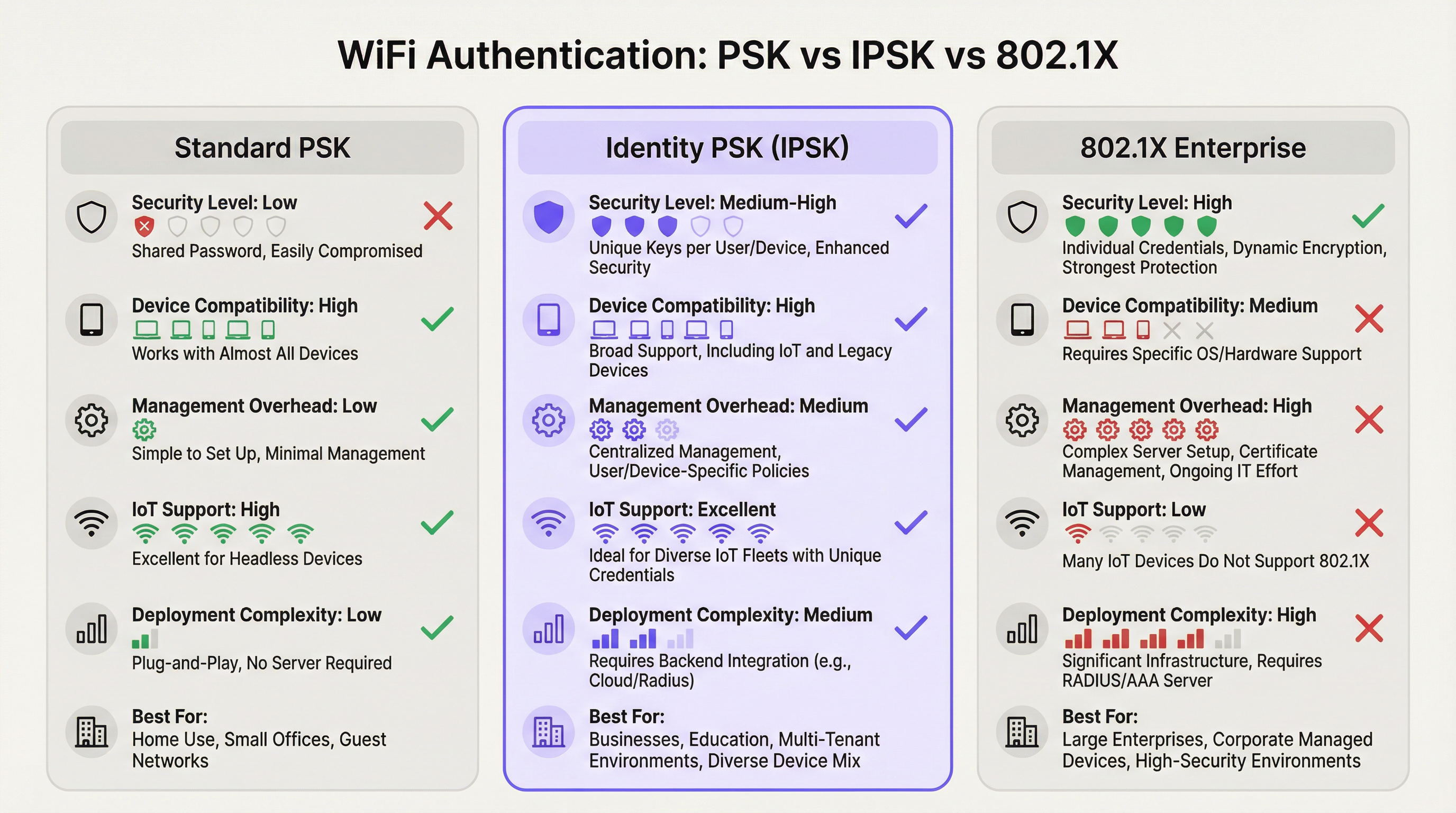
La autenticación WiFi mediante Identity Pre-Shared Key (IPSK) resuelve la constante tensión entre la seguridad de la red y la simplicidad operativa en entornos multiusuario y con múltiples dispositivos. Mientras que el estándar WPA2-Personal (PSK compartido) ofrece facilidad de uso pero nula responsabilidad individual, y WPA2/WPA3-Enterprise (802.1X) proporciona un control granular pero excluye a una proporción significativa de dispositivos modernos, IPSK ocupa un punto medio pragmático: cada usuario o dispositivo recibe una clave criptográfica única, todos se conectan al mismo SSID y la aplicación de políticas por conexión se realiza a través de RADIUS.
Para los operadores de recintos (hoteles, cadenas minoristas, centros de conferencias y edificios del sector público), IPSK es cada vez más la arquitectura predeterminada para el WiFi de invitados y empleados. Elimina la carga operativa de la gestión de contraseñas compartidas, es compatible con toda la gama de dispositivos de consumo e IoT, y proporciona la capacidad de auditoría necesaria para los marcos de cumplimiento de PCI DSS y GDPR. Al combinarse con una plataforma automatizada de gestión del ciclo de vida como Purple, IPSK escala desde un hotel boutique de 50 habitaciones hasta un estadio con 10,000 asientos sin un aumento proporcional en los gastos generales de TI.
La decisión de implementar IPSK debe basarse en tres criterios: una flota de dispositivos mixta que incluya terminales sin interfaz (headless) o IoT; el requisito de revocación de acceso individual sin interrupciones en toda la red; y una base de usuarios que espera una experiencia de conexión sin fricciones, similar a la de su hogar. Si se cumplen los tres, IPSK es la arquitectura correcta.
Análisis técnico detallado
La arquitectura de autenticación
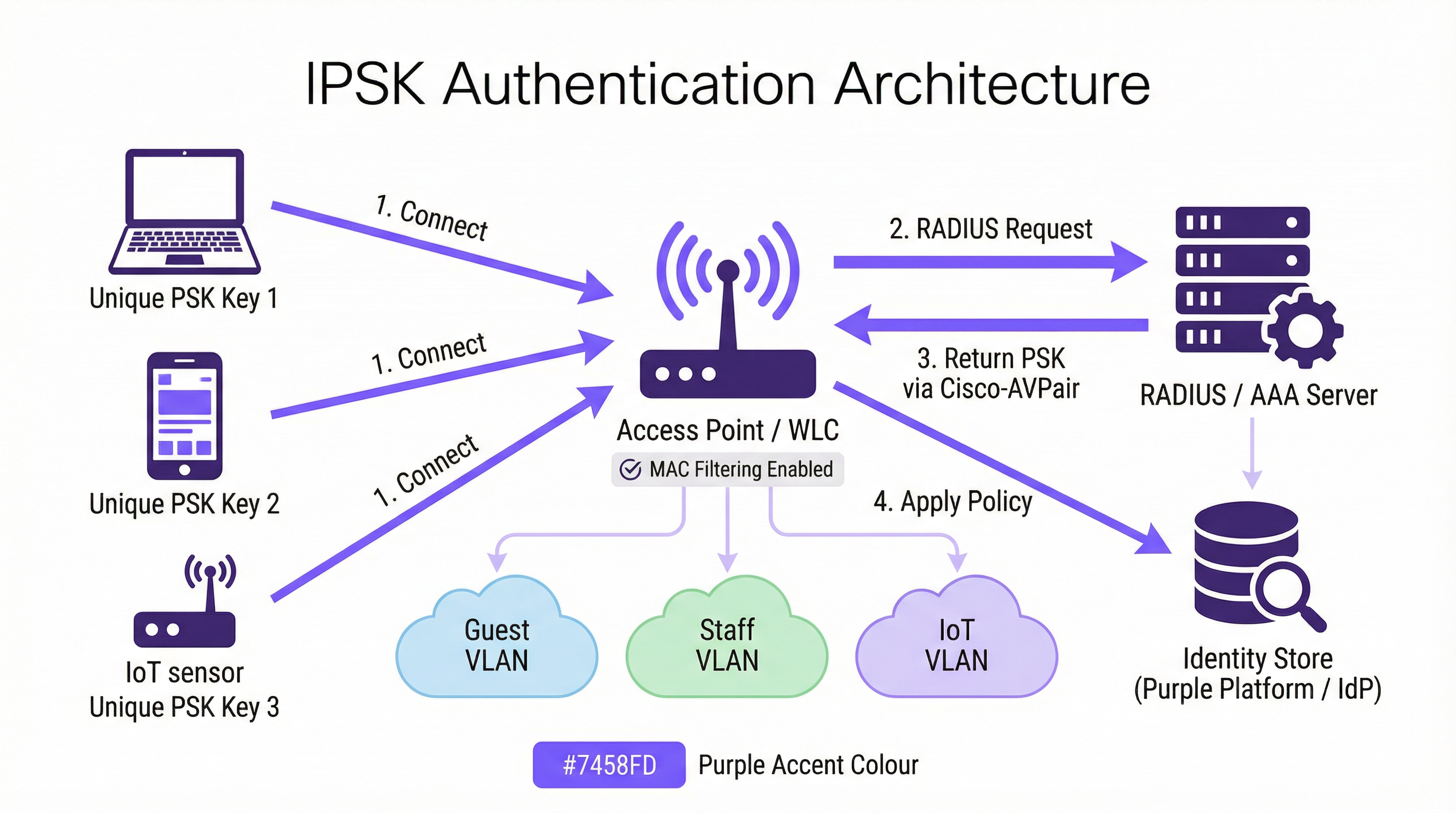
IPSK opera dentro del marco de seguridad WPA2-Personal, pero lo complementa con una capa de identidad respaldada por RADIUS. El flujo de autenticación procede de la siguiente manera: cuando un dispositivo cliente inicia una asociación con un SSID habilitado para IPSK, el controlador de LAN inalámbrica (WLC), o el punto de acceso en implementaciones sin controlador, captura la dirección MAC del dispositivo y la reenvía a un servidor RADIUS configurado como parte de una omisión de autenticación MAC (MAB) o una solicitud 802.1X estándar. El servidor RADIUS consulta su almacén de identidades, localiza el registro asociado a esa dirección MAC y devuelve una respuesta Access-Accept que contiene un par atributo-valor (AVP) de Cisco, específicamente cisco-av-pair = psk-mode=ascii y cisco-av-pair = psk=<unique_passphrase>. El WLC extrae esta frase de contraseña por dispositivo y la utiliza para validar el protocolo de enlace (handshake) de cuatro vías WPA2 que presentó el cliente. Si la frase de contraseña coincide, la asociación se completa y el dispositivo se coloca en su VLAN asignada con sus políticas de acceso y ancho de banda correspondientes.
Esta arquitectura significa que el dispositivo cliente nunca necesita saber que está utilizando IPSK en lugar del PSK estándar. La experiencia del usuario es idéntica: ingresar una frase de contraseña y conectarse. La inteligencia reside completamente en el lado del servidor.
Implementaciones de proveedores
Los tres principales proveedores de redes inalámbricas empresariales implementan PSK basado en identidad bajo diferentes nombres de productos, aunque la arquitectura funcional es consistente:
| Proveedor | Nombre del producto | Formato de atributo RADIUS |
|---|---|---|
| Cisco | iPSK (Identity PSK) | cisco-av-pair = psk=<passphrase> |
| Aruba / HPE | MPSK (Multi-PSK) | Aruba-MPSK-Passphrase |
| Ruckus / CommScope | DPSK (Dynamic PSK) | Motor DPSK propietario o RADIUS |
| Meraki | IPSK con RADIUS | Formato AVP estándar de Cisco |
Las cuatro implementaciones admiten la asignación de VLAN y la entrega de políticas de QoS a través de atributos RADIUS, lo que permite la segmentación de red por dispositivo desde un único SSID.
Redes de área privada y aislamiento de capa 2
Una capacidad definitoria de IPSK en implementaciones multi-inquilino es la red de área privada (PAN). Debido a que el tráfico de cada dispositivo está encriptado con una clave única, el aislamiento de capa 2 entre usuarios es inherente a la arquitectura. Un huésped en la habitación 412 no puede ver ni interactuar con los dispositivos de un huésped en la habitación 413, aunque ambos estén conectados al mismo SSID Hotel-Guest. Esta es una mejora de seguridad fundamental en comparación con las redes PSK compartidas, donde todos los dispositivos comparten el mismo dominio de difusión y un atacante decidido puede interceptar tráfico no encriptado.
En combinación con la reflexión mDNS (una función disponible en la mayoría de los controladores de nivel empresarial), IPSK permite el descubrimiento de dispositivos dentro del propio segmento privado del usuario. Un huésped puede transmitir contenido multimedia a su propio Chromecast o imprimir en su impresora portátil sin exponer esos dispositivos a la red en general. Este es el modelo de conectividad "como en casa" que los operadores hoteleros utilizan cada vez más como diferenciador.
Compatibilidad con WPA3
WPA3-SAE (Autenticación simultánea de iguales) reemplaza el protocolo de enlace de cuatro vías de WPA2 con un intercambio de claves Dragonfly, lo que cambia la forma en que se validan las claves por dispositivo. La mayoría de los controladores modernos admiten IPSK en modo de transición WPA2/WPA3, lo que proporciona compatibilidad con versiones anteriores para dispositivos heredados y, al mismo tiempo, permite que los clientes compatibles con WPA3 se beneficien de un protocolo de enlace más sólido. Un SSID exclusivo de WPA3 con IPSK requiere soporte de firmware del controlador que ya está disponible en las plataformas Cisco Catalyst 9800, Aruba CX y Ruckus One a partir de 2025.
Contexto de los estándares IEEE
IPSK opera dentro del estándar de LAN inalámbrica IEEE 802.11 y aprovecha el marco de autenticación IEEE 802.1X para su comunicación RADIUS, aunque el mecanismo de autenticación del lado del cliente sea PSK en lugar de EAP. El protocolo RADIUS en sí está definido en RFC 2865 y RFC 2868. El formato AVP de Cisco utilizado para entregar frases de contraseña por dispositivo es una extensión del proveedor al conjunto de atributos RADIUS estándar, razón por la cual IPSK no es una especificación IEEE formalmente estandarizada: es una capacidad implementada por el proveedor construida sobre protocolos estandarizados.
Guía de implementación
Fase 1: Evaluación de la infraestructura
Antes de configurar un solo punto de acceso, realice una evaluación exhaustiva de la infraestructura que cubra cuatro áreas. Primero, confirme que su controlador inalámbrico sea compatible con IPSK (verifique los requisitos de la versión de firmware para su plataforma específica). Segundo, evalúe su infraestructura RADIUS: ¿tiene un servidor RADIUS existente (Cisco ISE, Microsoft NPS, FreeRADIUS) o utilizará un servicio RADIUS basado en la nube? Tercero, identifique a su proveedor de identidad (IdP) (Microsoft Entra ID, Okta, Google Workspace) y confirme la conectividad de la API para el aprovisionamiento automatizado de claves. Cuarto, audite su flota de dispositivos para identificar cualquier dispositivo heredado que pueda tener problemas de aleatorización de MAC o un comportamiento no estándar en el protocolo de enlace WPA2.
Fase 2: Configuración de RADIUS
Configure su servidor RADIUS con los siguientes elementos. Cree un almacén de identidades: una base de datos de direcciones MAC asignadas a frases de contraseña únicas y asignaciones de VLAN. Para la implementación en un hotel, este almacén se completa dinámicamente a través de la integración con el PMS; para una implementación minorista, a través del sistema de recursos humanos o la integración de MDM. Cree perfiles de autorización que devuelvan los atributos AVP de Cisco adecuados (psk-mode y psk-password) junto con los atributos de asignación de VLAN (Tunnel-Type = VLAN, Tunnel-Medium-Type = 802, Tunnel-Private-Group-ID = <VLAN_ID>). Configure reglas de políticas que vinculen las solicitudes de direcciones MAC entrantes con el perfil de autorización correcto.
Fase 3: Configuración del WLC/Controlador
En el controlador inalámbrico, cree el SSID de IPSK con seguridad WPA2-PSK y filtrado MAC habilitado. Configure el servidor RADIUS como el servidor de autenticación para este SSID y habilite la anulación AAA (AAA Override) para permitir que las asignaciones de VLAN devueltas por RADIUS anulen la VLAN predeterminada del SSID. Establezca un PSK predeterminado en el SSID: esto actúa como respaldo para los dispositivos que no se encuentran en el almacén de identidades de RADIUS, y debe ser una frase de contraseña segura generada aleatoriamente que no se distribuya a los usuarios. Habilite las tramas de administración protegidas (PMF) para mejorar la postura de seguridad.
Fase 4: Automatización del ciclo de vida de las claves
La gestión manual de claves no es escalable. Para cualquier implementación que supere un puñado de dispositivos, automatice todo el ciclo de vida de las claves mediante una plataforma de orquestación. La plataforma de Purple se integra con su IdP y PMS para aprovisionar claves durante la incorporación (onboarding) y revocarlas durante la desvinculación (offboarding), sin requerir intervención manual de TI. El flujo de trabajo de aprovisionamiento debe incluir: generación de claves (criptográficamente aleatorias, mínimo 12 caracteres), distribución de claves (por correo electrónico, SMS o material impreso) y registro de claves en el almacén de identidades de RADIUS. El flujo de trabajo de desvinculación debe incluir: revocación inmediata de la clave en el almacén de RADIUS, confirmación de que el dispositivo se ha desasociado y entrada en el registro de auditoría para fines de cumplimiento.
Fase 5: Mitigación de la aleatorización de MAC
Configure su SSID para incluir una política de red que solicite a los clientes que utilicen su dirección MAC permanente. En iOS, esto se logra desactivando la "Dirección Wi-Fi privada" para la red específica en la configuración de WiFi del dispositivo, un paso que se puede comunicar a los usuarios durante la incorporación. Para los dispositivos administrados inscritos en MDM, envíe un perfil de configuración de WiFi que establezca DisableAssociationMACRandomization = true. Para los dispositivos no administrados, incluya una guía sobre la aleatorización de MAC en las comunicaciones de incorporación de usuarios.
Mejores prácticas
Exija la unicidad de las claves y una entropía mínima. Cada frase de contraseña de IPSK debe ser criptográficamente aleatoria y tener un mínimo de 12 caracteres, combinando letras mayúsculas y minúsculas, números y símbolos. Evite palabras de diccionario, patrones secuenciales o cualquier derivación de información identificable por el usuario. El motor de generación de claves de Purple produce frases de contraseña que cumplen con los requisitos de entropía de NIST SP 800-63B de forma predeterminada.
Segmente por función, no solo por usuario. Utilice la capacidad de asignación de VLAN de IPSK para aplicar la segmentación de la red por función del dispositivo. Los dispositivos IoT (termostatos, sensores, cerraduras inteligentes) deben estar en una VLAN de IoT dedicada con acceso restringido a Internet y sin movimiento lateral a otras VLAN. Los dispositivos de invitados deben estar en una VLAN de invitados solo con acceso a Internet. Los dispositivos del personal deben estar en una VLAN de personal con acceso a los recursos internos adecuados para su función. Esta segmentación es un requisito de PCI DSS para cualquier red que transmita datos de tarjetas de pago.
Implemente redundancia del servidor RADIUS. Configure un mínimo de dos servidores RADIUS (primario y secundario) con conmutación por error (failover) automática en el WLC. Pruebe el comportamiento de la conmutación por error trimestralmente. Considere un servicio RADIUS alojado en la nube para implementaciones donde la redundancia del servidor local no sea operativamente viable.
Audite el uso de claves con regularidad. Los registros de contabilidad de RADIUS proporcionan un historial completo de qué direcciones MAC se autenticaron, cuándo y desde qué punto de acceso. Revise estos registros mensualmente en busca de anomalías: dispositivos que se autentican en horarios inusuales, dispositivos que aparecen en múltiples VLAN o fallas de autenticación que pueden indicar un intento de fuerza bruta. El panel de análisis de Purple muestra estos patrones automáticamente.
Alinee la rotación de claves con los eventos del ciclo de vida del usuario. Las claves deben rotarse en los límites naturales del ciclo de vida: al final de la estadía de un huésped, a la terminación de un contrato de trabajo o a la conclusión de un evento. No implemente la rotación de claves basada en el tiempo en un cronograma fijo (por ejemplo, cada 90 días) sin un mecanismo de rotación automatizado; la rotación manual a escala es propensa a errores y crea brechas de seguridad.
Documente su arquitectura IPSK para fines de cumplimiento. El Requisito 1.3 de PCI DSS exige la documentación de todas las conexiones de red y controles de segmentación. Mantenga un diagrama de red actualizado que muestre la configuración del SSID de IPSK, las asignaciones de VLAN, la topología del servidor RADIUS y los puntos de integración del almacén de identidades. Esta documentación es necesaria para las evaluaciones de PCI DSS y es una buena práctica para los Registros de actividades de procesamiento del Artículo 30 del GDPR.
Solución de problemas y mitigación de riesgos
Fallas de autenticación
La causa más común de falla en la autenticación IPSK es una discrepancia en la dirección MAC entre el dispositivo que se presenta al WLC y la dirección MAC registrada en el almacén de identidades de RADIUS. Esto casi siempre se debe a la aleatorización de la dirección MAC. Verifique la dirección MAC del dispositivo utilizando los registros de asociación de clientes del WLC y compárela con el almacén de identidades de RADIUS. Si el dispositivo presenta una MAC aleatoria, guíe al usuario para que desactive la dirección privada para la red, o implemente un portal de preinscripción que capture la dirección MAC permanente del dispositivo antes del primer intento de conexión.
La segunda falla más común es un AVP de Cisco incorrecto o faltante en el perfil de autorización RADIUS. Verifique que el formato AVP coincida con la sintaxis esperada de su controlador (cisco-av-pair = psk-mode=ascii seguido de cisco-av-pair = psk=<passphrase>) y que la anulación AAA (AAA Override) esté habilitada en el SSID.
Indisponibilidad del servidor RADIUS
Si no se puede acceder al servidor RADIUS, el WLC recurrirá al PSK predeterminado configurado en el SSID. Este PSK predeterminado debe tratarse únicamente como un mecanismo de acceso de emergencia y no debe distribuirse a los usuarios. Supervise la disponibilidad del servidor RADIUS con sus herramientas estándar de monitoreo de infraestructura y configure alertas para eventos de tiempo de espera de RADIUS en el WLC.
Compatibilidad de dispositivos IoT
Algunos dispositivos IoT heredados implementan un comportamiento no estándar en el protocolo de enlace WPA2 que puede causar fallas de autenticación intermitentes con IPSK. Si un tipo de dispositivo específico falla constantemente, pruébelo de forma aislada en un SSID de PSK estándar para confirmar la capacidad básica de WPA2 del dispositivo. Si el dispositivo no es compatible con WPA2-PSK en absoluto, debe conectarse a través de un puerto cableado o un SSID heredado dedicado con el aislamiento de red adecuado.
Compromiso de claves
Si un dispositivo se pierde, es robado o se sospecha que ha sido comprometido, revoque su clave IPSK de inmediato en el almacén de identidades de RADIUS. El WLC desasociará el dispositivo en su próximo intento de reautenticación (generalmente en cuestión de minutos). Genere una nueva clave para el dispositivo de reemplazo del usuario y aprovisiónela a través del flujo de trabajo de incorporación estándar. Documente el incidente en su registro de incidentes de seguridad para fines de cumplimiento.
ROI e impacto comercial
Resultados cuantificables
El caso de negocio para IPSK sobre PSK compartido es convincente en tres dimensiones. La primera es la reducción de costos operativos. En un hotel de 200 habitaciones que opera con un modelo de PSK compartido, el equipo de recepción atiende un promedio de 15 a 20 solicitudes de soporte relacionadas con WiFi por día: restablecimientos de contraseñas, problemas de conexión de dispositivos, tiempos de espera del Captive Portal. IPSK con incorporación automatizada reduce esto a casi cero, liberando al personal de recepción para actividades que generan ingresos. En una estimación conservadora de 10 minutos por interacción de soporte y un costo de personal de £15 por hora, un hotel de 200 habitaciones ahorra aproximadamente entre £750 y £1,000 por mes en costos laborales directos.
La segunda dimensión es evitar los costos de incidentes de seguridad. Una vulneración de la red de PSK compartido (donde un actor malintencionado obtiene acceso a la contraseña compartida) puede exponer a todos los dispositivos de la red a la interceptación de tráfico y ataques de movimiento lateral. El costo promedio de una filtración de datos en el sector hotelero, según el Informe sobre el costo de una filtración de datos de IBM, supera los £3.5 millones cuando se incluyen multas regulatorias, costos de remediación y daños a la reputación. El aislamiento por dispositivo de IPSK significa que una clave comprometida expone solo a un dispositivo, no a toda la red.
La tercera dimensión es la satisfacción de los huéspedes y el impacto en los ingresos. En el sector hotelero, la calidad del WiFi se cita constantemente como uno de los tres factores principales en las reseñas en línea. Las propiedades que pasan del WiFi basado en Captive Portal a IPSK reportan mejoras medibles en las puntuaciones de las reseñas relacionadas con el WiFi, con las correspondientes mejoras en las calificaciones generales de la propiedad. Una mejora de un punto en la puntuación de TripAdvisor de un hotel se correlaciona con un aumento promedio del 11% en los ingresos por habitación disponible (RevPAR), según la investigación sobre hotelería de la Universidad de Cornell.
Costo total de propiedad
La comparación del TCO entre IPSK y 802.1X Enterprise favorece significativamente a IPSK para entornos de recintos. Una implementación completa de 802.1X requiere una infraestructura PKI, herramientas de gestión de certificados y procesos continuos de renovación de certificados, lo que generalmente agrega entre £15,000 y £40,000 en costos de implementación inicial y entre £5,000 y £15,000 en mantenimiento anual para un recinto de tamaño mediano. IPSK requiere un servidor RADIUS (a menudo ya presente en la infraestructura) y una plataforma de orquestación como Purple. Para las organizaciones que no cuentan con un servidor RADIUS existente, los servicios RADIUS alojados en la nube están disponibles desde £200 a £500 por mes, lo que hace que IPSK sea accesible incluso para operadores de recintos más pequeños.

Esta guía es publicada por Purple, la plataforma de inteligencia WiFi empresarial. Para una revisión de la arquitectura técnica y una evaluación de la implementación de IPSK, comuníquese con el equipo de soluciones de Purple en purple.ai .
Términos clave y definiciones
IPSK (Identity Pre-Shared Key)
A WiFi authentication mechanism that assigns a unique WPA2 passphrase to each individual user or device, while all devices connect to the same SSID. The unique key is delivered to the Wireless LAN Controller by a RADIUS server at the time of authentication, enabling per-device policy enforcement without requiring 802.1X certificate infrastructure.
IT teams encounter IPSK when evaluating authentication options for mixed-device environments — hotels, retail, events — where 802.1X is too complex and shared PSK is too insecure. It is the recommended architecture for guest and staff WiFi in multi-tenant venue environments.
RADIUS (Remote Authentication Dial-In User Service)
A networking protocol (RFC 2865) that provides centralised Authentication, Authorisation, and Accounting (AAA) management for users connecting to a network. In IPSK deployments, the RADIUS server is the intelligence layer that maps device MAC addresses to unique passphrases and network policies.
IT teams interact with RADIUS when configuring the authentication backend for IPSK. Common RADIUS server implementations include Cisco ISE, Microsoft NPS, FreeRADIUS, and cloud-hosted services. RADIUS availability is critical to IPSK operation — if the RADIUS server is unreachable, new device authentications will fail.
MAC Authentication Bypass (MAB)
An authentication mechanism that uses a device's MAC address as its identity credential, rather than requiring the device to present a username/password or certificate. IPSK leverages MAB to identify devices at the point of RADIUS lookup, enabling headless devices with no user interface to authenticate based solely on their hardware address.
IT teams use MAB in IPSK deployments to support IoT devices, smart TVs, gaming consoles, and other headless endpoints that cannot present user credentials. MAB is the mechanism that makes IPSK compatible with 100% of WiFi-capable devices.
Cisco Attribute-Value Pair (AVP)
A vendor-specific RADIUS attribute format used by Cisco (and compatible) wireless controllers to exchange configuration parameters between the RADIUS server and the WLC. In IPSK deployments, the AVPs `cisco-av-pair = psk-mode=ascii` and `cisco-av-pair = psk=<passphrase>` deliver the per-device unique passphrase from the RADIUS server to the WLC.
IT teams need to understand AVP syntax when configuring RADIUS authorisation profiles for IPSK. Incorrect AVP formatting is the most common cause of IPSK authentication failures during initial deployment.
Private Area Network (PAN)
A virtual network segment created around a specific user's devices within a shared WiFi infrastructure. In IPSK deployments, each user's unique key creates cryptographic isolation from other users on the same SSID, while mDNS reflection allows the user's own devices to discover each other within their private segment.
IT teams deploy PAN capability in hospitality and multi-tenant residential environments to provide guests or residents with a home-like device ecosystem — casting, printing, gaming — without exposing their devices to other users on the shared infrastructure.
WPA2-SAE / WPA3 (Simultaneous Authentication of Equals)
The authentication handshake mechanism introduced in WPA3 that replaces the WPA2 four-way handshake with a Dragonfly key exchange, providing stronger resistance to offline dictionary attacks. WPA3-SAE changes how per-device keys are validated in IPSK deployments and requires specific controller firmware support.
IT teams evaluating WPA3 migration need to confirm their controller's IPSK support in WPA3 or transition mode. As of 2025, Cisco Catalyst 9800, Aruba CX, and Ruckus One platforms support IPSK in WPA2/WPA3 transition mode, enabling gradual migration without breaking legacy device compatibility.
AAA Override
A WLC configuration setting that allows RADIUS-returned attributes — including VLAN assignment, QoS policy, and ACLs — to override the SSID's default configuration on a per-client basis. AAA Override must be enabled on the SSID for IPSK's per-device VLAN assignment to function correctly.
IT teams must enable AAA Override when configuring IPSK SSIDs. Without it, all devices connecting to the SSID will be placed on the SSID's default VLAN regardless of what the RADIUS server returns, negating the segmentation benefits of IPSK.
MAC Address Randomisation
A privacy feature in modern operating systems (iOS 14+, Android 10+, Windows 11) that causes devices to present a randomly generated MAC address when scanning for or connecting to WiFi networks, rather than their permanent hardware MAC address. This feature is designed to prevent device tracking across networks but creates a conflict with IPSK's MAC-based identity lookup.
IT teams must address MAC randomisation in every IPSK deployment plan. The mitigation strategy depends on the device management model: MDM configuration profiles for managed devices, and user-facing guidance (disable Private Wi-Fi Address for the specific network) for unmanaged personal devices.
Key Lifecycle Management
The operational process of provisioning, distributing, rotating, and revoking cryptographic keys throughout their useful life. In IPSK deployments, key lifecycle management encompasses the automated generation of unique passphrases at user onboarding, their delivery to users, their registration in the RADIUS identity store, and their immediate revocation when the user's access should be terminated.
IT teams and venue operations directors must treat key lifecycle management as a core operational process, not an afterthought. Unrevoked keys — belonging to former guests, ex-employees, or decommissioned devices — represent an ongoing security risk. Automation via a platform such as Purple is the only viable approach at scale.
Casos de éxito
A 350-room full-service hotel is running a shared WPA2-PSK network across all guest floors, the lobby, restaurant, and conference facilities. The network password is printed on key card folders and changed quarterly. Guests regularly complain that their Chromecasts and smart speakers cannot connect, and the front desk fields 20+ WiFi support calls per day. The IT manager needs to modernise the WiFi architecture without replacing the existing Cisco Catalyst 9800 controller infrastructure. What is the recommended approach?
The recommended architecture is IPSK with Purple platform orchestration integrated with the hotel's Property Management System (PMS). The deployment proceeds in five stages.
Stage 1 — Infrastructure preparation: Confirm Cisco Catalyst 9800 firmware is at 17.3 or later (required for full iPSK support). Deploy or configure a RADIUS server — Cisco ISE or a cloud-hosted RADIUS service — with the hotel's PMS as the upstream identity source. Configure the RADIUS authorisation profile to return cisco-av-pair = psk-mode=ascii and cisco-av-pair = psk=<unique_key> along with VLAN assignment attributes for Guest VLAN (internet-only) and Conference VLAN (with access to AV systems).
Stage 2 — SSID configuration: Create a single Hotel-Guest SSID with WPA2-PSK security, MAC filtering enabled, and AAA Override enabled. Set a strong default PSK (not distributed to users) as the fallback. Enable mDNS reflection to support Chromecast and AirPlay within each guest's private segment.
Stage 3 — PMS integration: Configure Purple's platform to receive check-in events from the PMS via API. On check-in, Purple generates a unique 16-character alphanumeric passphrase, registers it in the RADIUS identity store against the guest's registered device MAC addresses, and triggers delivery via the hotel's chosen channel — email, SMS, or printed on the key card folder. On check-out, Purple automatically revokes the key.
Stage 4 — MAC randomisation handling: Include a one-step instruction in the guest WiFi welcome communication: 'To connect your smart TV or streaming device, please disable Private Wi-Fi Address for the Hotel-Guest network in your device settings.' For guests connecting smartphones, the randomised MAC issue is resolved by the device presenting its permanent MAC after the first manual connection.
Stage 5 — Staff WiFi: Create a separate Hotel-Staff SSID using the same IPSK architecture, with keys provisioned via integration with the hotel's HR system. Staff keys are tied to employee records and automatically revoked on termination.
Expected outcomes: WiFi support calls reduced by 85% within 30 days of deployment. Guest Chromecast and smart device connectivity issues eliminated. Network security posture improved — no shared password to leak or rotate. PCI DSS compliance for the conference centre's payment processing network maintained through VLAN segmentation.
A national retail chain with 85 stores is running a mixed network environment: each store has WPA2-PSK WiFi for staff handhelds and tablets, a separate open guest WiFi network, and wired POS terminals. The IT security team has flagged that the shared staff WiFi password is the same across all 85 stores and has not been changed in 18 months. A recent PCI DSS assessment identified the staff WiFi as a compliance risk due to lack of individual authentication. The CTO wants a solution that improves security posture, maintains PCI DSS compliance, and can be deployed across all 85 stores within a single quarter without requiring store-level IT resources.
The recommended architecture is a centralised IPSK deployment managed through Purple's platform, with keys provisioned via integration with the retailer's existing Microsoft Entra ID (Azure AD) directory.
Architecture design: Deploy a single Staff-WiFi SSID across all 85 stores using IPSK. Each store's access points connect to a centralised cloud-managed WLC (Cisco Meraki or Aruba Central) or to store-level controllers managed from a central NOC. A cloud-hosted RADIUS service — configured with Microsoft Entra ID as the identity source — handles authentication for all stores from a single management plane.
Key provisioning: Purple's platform monitors Entra ID group membership. When a staff member is added to the RetailStaff-WiFi security group, Purple automatically generates a unique IPSK passphrase, registers it in the RADIUS identity store, and delivers it to the staff member via their corporate email. When a staff member leaves or is removed from the group — triggered by the HR offboarding workflow — Purple immediately revokes the key across all stores simultaneously.
PCI DSS compliance: The IPSK architecture, combined with VLAN segmentation (staff devices on VLAN 20, POS terminals on VLAN 30 with no wireless access, guest WiFi on VLAN 40), provides the network segmentation required by PCI DSS Requirement 1.3. Each staff member's unique key provides the individual authentication audit trail required by PCI DSS Requirement 8.2. Document the architecture in the network segmentation diagram for the QSA.
Deployment at scale: The centralised management architecture means store-level deployment requires only access point firmware updates and SSID reconfiguration — tasks that can be pushed remotely via the cloud management platform. No store-level IT resources are required. Target deployment timeline: 85 stores in 8 weeks, with a phased rollout of 10-12 stores per week.
Expected outcomes: Shared password eliminated across all 85 stores. Individual staff authentication audit trail established for PCI DSS compliance. Key revocation time reduced from days (manual password change across 85 stores) to seconds (automated RADIUS revocation). Estimated reduction in IT helpdesk tickets related to WiFi access: 60%.
Análisis de escenarios
Q1. A 500-bed student accommodation provider is evaluating WiFi authentication options for their new development. The student population brings an average of 7 devices each — smartphones, laptops, gaming consoles, smart speakers, and tablets. The operator wants individual access control (so that access can be revoked if a student's tenancy ends early), seamless device connectivity (including gaming consoles and Chromecasts), and a management overhead that can be handled by a two-person IT team. Which authentication architecture should they deploy, and what are the key configuration requirements?
💡 Sugerencia:Consider the device fleet composition — specifically the proportion of headless devices — and the operational capacity of the IT team when evaluating 802.1X versus IPSK.
Mostrar enfoque recomendado
IPSK is the correct architecture for this deployment. The presence of gaming consoles and smart speakers in the device fleet immediately eliminates 802.1X as a viable option — these headless devices cannot support certificate-based authentication. Standard PSK is eliminated by the individual access control requirement. IPSK satisfies all three criteria: it supports 100% of the device fleet, enables individual key revocation when a tenancy ends, and — with automated lifecycle management via Purple integrated with the accommodation's tenancy management system — can be operated by a two-person IT team. Key configuration requirements: single SSID with IPSK, RADIUS server with tenancy system integration, mDNS reflection enabled for Private Area Networks (allowing students to use their own Chromecasts and printers within their private segment), MAC randomisation guidance included in the student onboarding pack, and automated key revocation triggered by tenancy end date in the management system.
Q2. An IT security manager at a conference centre is preparing for a major three-day industry event with 2,000 registered attendees. The event requires: secure WiFi for attendees (with access revoked after the event ends), a separate secure network for exhibitors with access to the venue's AV systems, and a dedicated network for the event management team with access to internal booking systems. The venue's existing infrastructure is Aruba-based. What IPSK architecture would you recommend, and how would you handle key provisioning at scale?
💡 Sugerencia:Focus on the key provisioning workflow for 2,000 attendees — how keys are generated, distributed, and revoked — and how VLAN segmentation achieves the three-network requirement from a single physical infrastructure.
Mostrar enfoque recomendado
Deploy three logical network segments from a single physical infrastructure using Aruba MPSK (Aruba's implementation of IPSK). Create one SSID — Event-WiFi — with MPSK enabled. The RADIUS authorisation profiles return different VLAN assignments based on the user's registration category: attendees on VLAN 10 (internet-only), exhibitors on VLAN 20 (internet plus AV systems), event management on VLAN 30 (internet plus internal booking systems). For key provisioning at scale: integrate Purple's platform with the event registration system. At registration, each attendee receives a unique MPSK passphrase via email confirmation, along with a QR code for easy device configuration. Exhibitors receive their keys via the exhibitor portal at least 48 hours before the event. Event management keys are provisioned via the venue's HR/staff system. At event end, Purple triggers bulk revocation of all attendee and exhibitor keys simultaneously. The event management keys remain active until manually revoked. This architecture eliminates the need for a captive portal (which would be impractical for 2,000 attendees), provides individual audit trails for all connections, and achieves the three-network segmentation requirement without creating three separate SSIDs.
Q3. A regional NHS trust is deploying WiFi across a new outpatient facility. The network must support: clinical staff with managed Windows laptops (enrolled in Intune MDM); nurses and allied health professionals with personal smartphones (BYOD); medical IoT devices including infusion pumps, patient monitors, and fall detection sensors; and a patient guest WiFi network. The trust's information governance team has flagged that all clinical data must remain on an isolated network segment, and that the IoT medical devices must be on a dedicated segment with no internet access. What authentication architecture would you recommend for each user/device category?
💡 Sugerencia:This scenario requires a hybrid architecture — not all user categories are best served by the same authentication mechanism. Consider which categories warrant 802.1X and which are better served by IPSK.
Mostrar enfoque recomendado
This scenario requires a hybrid authentication architecture. Clinical staff on managed Windows laptops should use WPA3-Enterprise with 802.1X (EAP-TLS with certificates deployed via Intune MDM) — these are fully managed endpoints where the certificate infrastructure is already in place and the stronger security posture is warranted for clinical data access. BYOD smartphones for nursing and AHP staff should use IPSK — these are unmanaged personal devices where certificate deployment is not operationally viable, but individual access control and VLAN assignment (to a clinical staff VLAN with access to clinical applications but not raw clinical data) is required. Medical IoT devices should use IPSK with MAC-based authentication — these headless devices cannot support any user-interactive authentication, and IPSK places them on a dedicated IoT VLAN with no internet access and no lateral movement to other VLANs. Patient guest WiFi should use a separate SSID with a captive portal for consent capture (required for GDPR compliance) and standard PSK or IPSK depending on the trust's guest data collection requirements. The IPSK components (BYOD staff and IoT devices) should be managed through Purple's platform with integration to the trust's Active Directory for staff key lifecycle management and a dedicated IoT device registry for medical device key management.
Conclusiones clave
- ✓IPSK assigns a unique WPA2 passphrase to every user or device on a shared SSID, delivering per-device security and policy enforcement without the certificate infrastructure required by 802.1X Enterprise.
- ✓The authentication flow relies on RADIUS: the WLC forwards the device's MAC address to the RADIUS server, which returns the unique passphrase via Cisco Attribute-Value Pairs, enabling the WLC to validate the device's connection and assign it to the correct VLAN.
- ✓IPSK is the correct architecture when three conditions are simultaneously present: a mixed or unmanaged device fleet (including IoT/headless devices), a requirement for individual access revocation, and a user base that cannot or should not be asked to configure certificates.
- ✓Key lifecycle automation is non-negotiable at scale — integrate IPSK with your identity provider (Microsoft Entra ID, Okta) or property management system to provision and revoke keys automatically at onboarding and offboarding events.
- ✓MAC address randomisation in iOS 14+, Android 10+, and Windows 11 is the most common source of IPSK deployment failures — plan for it explicitly with MDM configuration profiles for managed devices and user-facing guidance for personal devices.
- ✓The business case for IPSK over shared PSK is compelling: reduced helpdesk overhead, improved security incident containment (compromised key affects one device, not the entire network), and measurable improvements in guest satisfaction scores in hospitality environments.
- ✓Purple's platform provides the orchestration layer that makes IPSK operationally viable at scale — automating key generation, distribution, lifecycle management, and compliance reporting across hotel, retail, events, and public-sector deployments.




