

IPSK spiegato: Identity Pre-Shared Key per l'accesso WiFi
This guide provides IT managers, network architects, and venue operations directors with a definitive technical reference on Identity Pre-Shared Keys (IPSK) for WiFi access — explaining the architecture, comparing it against standard PSK and 802.1X Enterprise, and delivering actionable deployment guidance for hospitality, retail, events, and public-sector environments. It addresses the critical operational challenge of providing secure, individually-managed WiFi access across mixed-device fleets — including IoT and headless devices — without the infrastructure overhead of a full 802.1X deployment. Purple's platform is positioned as the orchestration layer that automates IPSK key lifecycle management at scale.
🎧 Ascolta questa guida
Visualizza trascrizione

Executive Summary
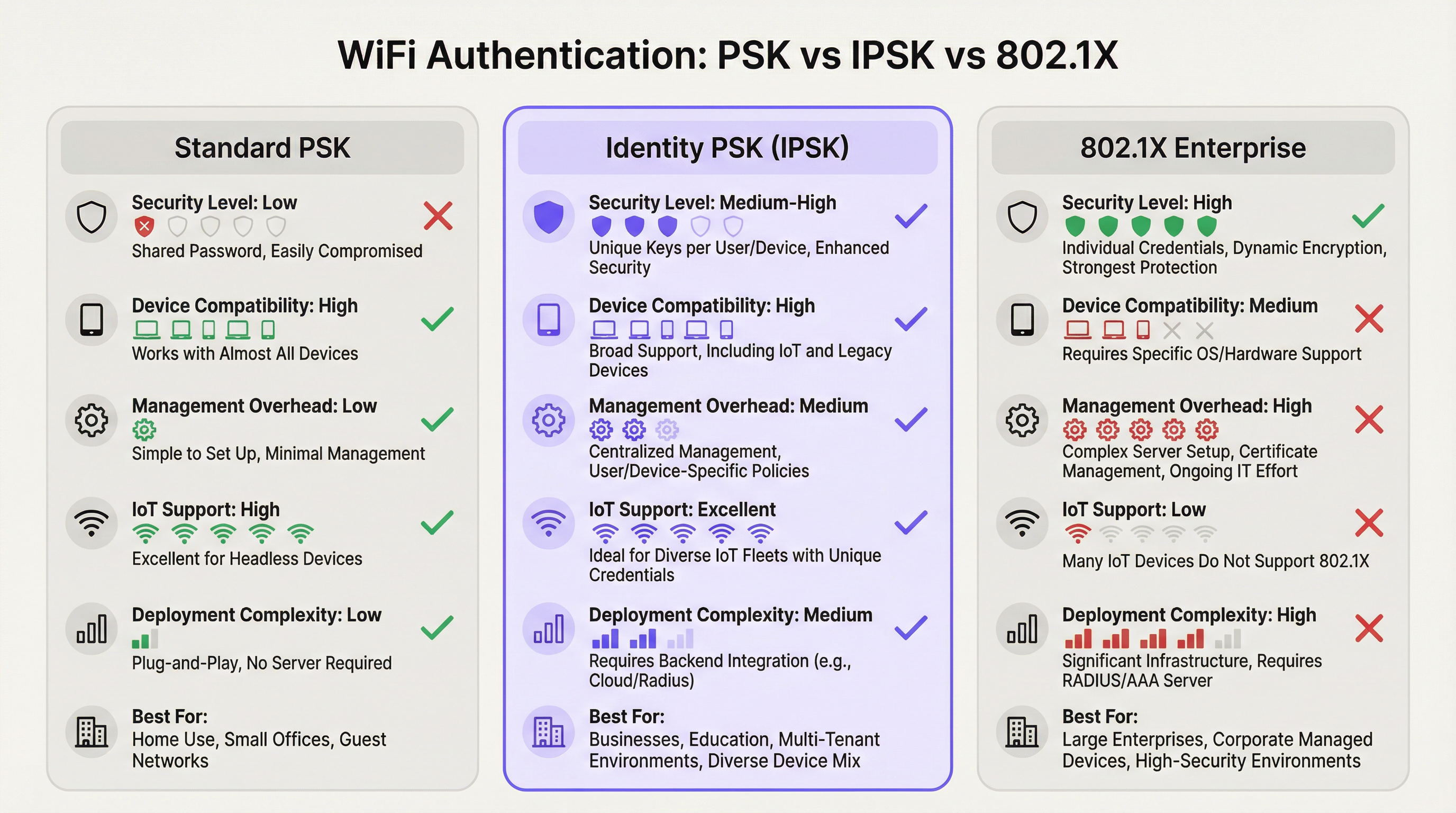
L'autenticazione WiFi tramite Identity Pre-Shared Key (IPSK) risolve l'annosa tensione tra sicurezza di rete e semplicità operativa in ambienti multiutente e con dispositivi misti. Laddove lo standard WPA2-Personal (PSK condivisa) offre facilità d'uso ma nessuna responsabilità individuale, e il WPA2/WPA3-Enterprise (802.1X) fornisce un controllo granulare ma esclude una percentuale significativa di dispositivi moderni, l'IPSK occupa una posizione intermedia pragmatica: ogni utente o dispositivo riceve una chiave crittografica univoca, tutti si connettono allo stesso SSID, con l'applicazione delle policy per singola connessione fornita tramite RADIUS.
Per i gestori di strutture — hotel, catene di vendita al dettaglio, centri congressi ed edifici del settore pubblico — l'IPSK è sempre più l'architettura predefinita per il WiFi sia per gli ospiti che per il personale. Elimina l'onere operativo della gestione delle password condivise, supporta l'intero spettro di dispositivi consumer e IoT e fornisce la verificabilità richiesta dai framework di conformità PCI DSS e GDPR. Se combinato con una piattaforma di gestione automatizzata del ciclo di vita come Purple, l'IPSK scala da un boutique hotel di 50 camere a uno stadio da 10.000 posti senza aumenti proporzionali dei costi generali IT.
La decisione di implementare l'IPSK dovrebbe essere guidata da tre criteri: un parco dispositivi misto che include endpoint headless o IoT; la necessità di revocare l'accesso individuale senza interruzioni a livello di rete; e una base di utenti che si aspetta un'esperienza di connessione fluida, simile a quella domestica. Se tutti e tre i requisiti sono soddisfatti, l'IPSK è l'architettura corretta.
Approfondimento tecnico
L'architettura di autenticazione
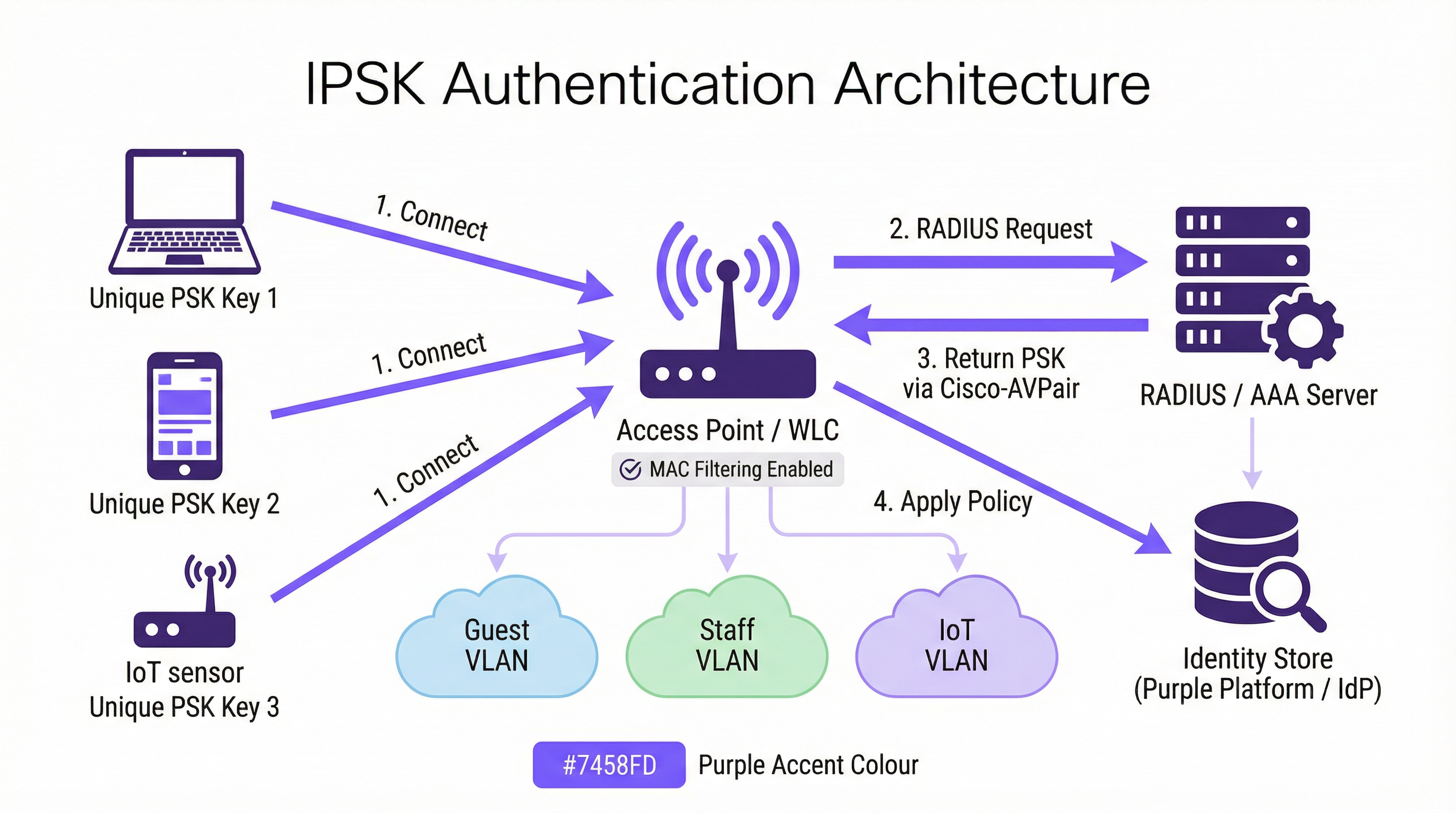
L'IPSK opera all'interno del framework di sicurezza WPA2-Personal, ma lo integra con un livello di identità supportato da RADIUS. Il flusso di autenticazione procede come segue. Quando un dispositivo client avvia un'associazione con un SSID abilitato per IPSK, il Wireless LAN Controller (WLC) — o l'access point nelle implementazioni senza controller — acquisisce l'indirizzo MAC del dispositivo e lo inoltra a un server RADIUS configurato come parte di un MAC Authentication Bypass (MAB) o di una richiesta 802.1X standard. Il server RADIUS interroga il proprio archivio di identità, individua il record associato a quell'indirizzo MAC e restituisce una risposta Access-Accept contenente un Cisco Attribute-Value Pair (AVP) — nello specifico cisco-av-pair = psk-mode=ascii e cisco-av-pair = psk=<unique_passphrase>. Il WLC estrae questa passphrase per singolo dispositivo e la utilizza per convalidare l'handshake WPA2 a quattro vie presentato dal client. Se la passphrase corrisponde, l'associazione viene completata e il dispositivo viene inserito nella VLAN assegnata con le relative policy di accesso e larghezza di banda.
Questa architettura fa sì che il dispositivo client non debba mai sapere di utilizzare l'IPSK anziché la PSK standard. L'esperienza utente è identica: inserire una passphrase, connettersi. L'intelligenza è interamente lato server.
Implementazioni dei vendor
I tre principali vendor di reti wireless enterprise implementano ciascuno la PSK basata sull'identità con nomi di prodotto diversi, sebbene l'architettura funzionale sia coerente:
| Vendor | Nome del prodotto | Formato dell'attributo RADIUS |
|---|---|---|
| Cisco | iPSK (Identity PSK) | cisco-av-pair = psk=<passphrase> |
| Aruba / HPE | MPSK (Multi-PSK) | Aruba-MPSK-Passphrase |
| Ruckus / CommScope | DPSK (Dynamic PSK) | Motore DPSK proprietario o RADIUS |
| Meraki | IPSK con RADIUS | Formato AVP Cisco standard |
Tutte e quattro le implementazioni supportano l'assegnazione di VLAN e la distribuzione di policy QoS tramite attributi RADIUS, consentendo la segmentazione della rete per singolo dispositivo da un unico SSID.
Private Area Network e isolamento Layer 2
Una capacità distintiva dell'IPSK nelle implementazioni multi-tenant è la Private Area Network (PAN). Poiché il traffico di ogni dispositivo è crittografato con una chiave univoca, l'isolamento Layer 2 tra gli utenti è intrinseco all'architettura. Un ospite nella Camera 412 non può vedere o interagire con i dispositivi di un ospite nella Camera 413, anche se entrambi sono connessi allo stesso SSID Hotel-Guest. Si tratta di un miglioramento fondamentale della sicurezza rispetto alle reti con PSK condivisa, in cui tutti i dispositivi condividono lo stesso dominio di broadcast e un utente malintenzionato determinato può intercettare il traffico non crittografato.
In combinazione con la riflessione mDNS — una funzionalità disponibile sulla maggior parte dei controller di livello enterprise — l'IPSK consente il rilevamento dei dispositivi all'interno del segmento privato dell'utente. Un ospite può trasmettere contenuti multimediali al proprio Chromecast o stampare sulla propria stampante portatile senza esporre tali dispositivi alla rete più ampia. Questo è il modello di connettività "come a casa" che gli operatori dell'ospitalità utilizzano sempre più come elemento di differenziazione.
Compatibilità WPA3
Il WPA3-SAE (Simultaneous Authentication of Equals) sostituisce l'handshake a quattro vie del WPA2 con uno scambio di chiavi Dragonfly, che modifica il modo in cui vengono convalidate le chiavi per singolo dispositivo. La maggior parte dei controller moderni supporta l'IPSK in modalità di transizione WPA2/WPA3, fornendo retrocompatibilità per i dispositivi legacy e consentendo al contempo ai client compatibili con WPA3 di beneficiare di un handshake più robusto. Un SSID esclusivamente WPA3 con IPSK richiede il supporto del firmware del controller, ora disponibile sulle piattaforme Cisco Catalyst 9800, Aruba CX e Ruckus One a partire dal 2025.
Contesto degli standard IEEE
L'IPSK opera all'interno dello standard LAN wireless IEEE 802.11 e sfrutta il framework di autenticazione IEEE 802.1X per la sua comunicazione RADIUS, anche se il meccanismo di autenticazione lato client è PSK anziché EAP. Il protocollo RADIUS stesso è definito nelle RFC 2865 e RFC 2868. Il formato AVP Cisco utilizzato per distribuire le passphrase per singolo dispositivo è un'estensione del vendor al set di attributi RADIUS standard, motivo per cui l'IPSK non è una specifica IEEE formalmente standardizzata: è una funzionalità implementata dal vendor e basata su protocolli standardizzati.
Guida all'implementazione
Fase 1: Valutazione dell'infrastruttura
Prima di configurare un singolo access point, conduci una valutazione approfondita dell'infrastruttura che copra quattro aree. In primo luogo, conferma che il tuo controller wireless supporti l'IPSK: verifica i requisiti della versione del firmware per la tua piattaforma specifica. In secondo luogo, valuta la tua infrastruttura RADIUS: disponi di un server RADIUS esistente (Cisco ISE, Microsoft NPS, FreeRADIUS) o utilizzerai un servizio RADIUS basato su cloud? In terzo luogo, identifica il tuo provider di identità (IdP) — Microsoft Entra ID, Okta, Google Workspace — e conferma la connettività API per il provisioning automatizzato delle chiavi. In quarto luogo, controlla il tuo parco dispositivi per identificare eventuali dispositivi legacy che potrebbero presentare problemi di randomizzazione del MAC o comportamenti non standard nell'handshake WPA2.
Fase 2: Configurazione RADIUS
Configura il tuo server RADIUS con i seguenti elementi. Crea un archivio di identità: un database di indirizzi MAC mappati a passphrase univoche e assegnazioni VLAN. Per l'implementazione in un hotel, questo archivio viene popolato dinamicamente tramite l'integrazione PMS; per un'implementazione nel retail, tramite il sistema HR o l'integrazione MDM. Crea profili di autorizzazione che restituiscano gli attributi AVP Cisco appropriati (psk-mode e psk-password) insieme agli attributi di assegnazione VLAN (Tunnel-Type = VLAN, Tunnel-Medium-Type = 802, Tunnel-Private-Group-ID = <VLAN_ID>). Configura regole di policy che associno le richieste di indirizzi MAC in entrata al profilo di autorizzazione corretto.
Fase 3: Configurazione WLC/Controller
Sul controller wireless, crea l'SSID IPSK con sicurezza WPA2-PSK e filtraggio MAC abilitato. Configura il server RADIUS come server di autenticazione per questo SSID e abilita l'AAA Override per consentire alle assegnazioni VLAN restituite da RADIUS di sovrascrivere la VLAN predefinita dell'SSID. Imposta una PSK predefinita sull'SSID: questa funge da fallback per i dispositivi non trovati nell'archivio di identità RADIUS e dovrebbe essere una passphrase complessa, generata casualmente, che non viene distribuita agli utenti. Abilita i Protected Management Frames (PMF) per migliorare il livello di sicurezza.
Fase 4: Automazione del ciclo di vita delle chiavi
La gestione manuale delle chiavi non è scalabile. Per qualsiasi implementazione che superi una manciata di dispositivi, automatizza l'intero ciclo di vita delle chiavi utilizzando una piattaforma di orchestrazione. La piattaforma di Purple si integra con il tuo IdP e PMS per eseguire il provisioning delle chiavi in fase di onboarding e revocarle in fase di offboarding, senza richiedere alcun intervento manuale da parte dell'IT. Il flusso di lavoro di provisioning dovrebbe includere: generazione della chiave (crittograficamente casuale, minimo 12 caratteri), distribuzione della chiave (tramite e-mail, SMS o materiale stampato) e registrazione della chiave nell'archivio di identità RADIUS. Il flusso di lavoro di offboarding dovrebbe includere: revoca immediata della chiave nell'archivio RADIUS, conferma che il dispositivo è stato disassociato e registrazione nel log di audit per scopi di conformità.
Fase 5: Mitigazione della randomizzazione del MAC
Configura il tuo SSID per includere una policy di rete che richieda ai client di utilizzare il loro indirizzo MAC permanente. Su iOS, questo si ottiene disabilitando "Indirizzo Wi-Fi privato" per la rete specifica nelle impostazioni WiFi del dispositivo: un passaggio che può essere comunicato agli utenti durante l'onboarding. Per i dispositivi gestiti registrati in MDM, esegui il push di un profilo di configurazione WiFi che imposti DisableAssociationMACRandomization = true. Per i dispositivi non gestiti, includi linee guida sulla randomizzazione del MAC nelle comunicazioni di onboarding degli utenti.
Best Practice
Imponi l'univocità delle chiavi e l'entropia minima. Ogni passphrase IPSK dovrebbe essere crittograficamente casuale e di almeno 12 caratteri, combinando lettere maiuscole e minuscole, numeri e simboli. Evita parole del dizionario, sequenze o qualsiasi derivazione da informazioni identificabili dall'utente. Il motore di generazione delle chiavi di Purple produce passphrase che soddisfano per impostazione predefinita i requisiti di entropia NIST SP 800-63B.
Segmenta per funzione, non solo per utente. Utilizza la capacità di assegnazione VLAN dell'IPSK per applicare la segmentazione della rete in base alla funzione del dispositivo. I dispositivi IoT — termostati, sensori, serrature intelligenti — dovrebbero trovarsi su una VLAN IoT dedicata con accesso a Internet limitato e nessun movimento laterale verso altre VLAN. I dispositivi degli ospiti dovrebbero trovarsi su una VLAN per gli ospiti con solo accesso a Internet. I dispositivi del personale dovrebbero trovarsi su una VLAN per il personale con accesso alle risorse interne appropriate al loro ruolo. Questa segmentazione è un requisito PCI DSS per qualsiasi rete che trasporta dati di carte di pagamento.
Implementa la ridondanza del server RADIUS. Configura un minimo di due server RADIUS — primario e secondario — con failover automatico sul WLC. Testa il comportamento di failover trimestralmente. Prendi in considerazione un servizio RADIUS ospitato nel cloud per le implementazioni in cui la ridondanza del server on-premise non è operativamente praticabile.
Controlla regolarmente l'utilizzo delle chiavi. I log di accounting RADIUS forniscono un record completo di quali indirizzi MAC si sono autenticati, quando e da quale access point. Esamina questi log mensilmente per individuare eventuali anomalie: dispositivi che si autenticano in orari insoliti, dispositivi che compaiono su più VLAN o errori di autenticazione che potrebbero indicare un tentativo di forza bruta. La dashboard di analisi di Purple fa emergere automaticamente questi pattern.
Allinea la rotazione delle chiavi agli eventi del ciclo di vita dell'utente. Le chiavi dovrebbero essere ruotate ai limiti naturali del ciclo di vita: alla fine del soggiorno di un ospite, alla risoluzione di un contratto di lavoro, alla conclusione di un evento. Non implementare la rotazione delle chiavi basata sul tempo con una pianificazione fissa (ad es. ogni 90 giorni) senza un meccanismo di rotazione automatizzato: la rotazione manuale su larga scala è soggetta a errori e crea lacune nella sicurezza.
Documenta la tua architettura IPSK per scopi di conformità. Il Requisito 1.3 del PCI DSS richiede la documentazione di tutte le connessioni di rete e dei controlli di segmentazione. Mantieni un diagramma di rete aggiornato che mostri la configurazione dell'SSID IPSK, le assegnazioni VLAN, la topologia del server RADIUS e i punti di integrazione dell'archivio di identità. Questa documentazione è richiesta per le valutazioni PCI DSS ed è una buona pratica per i Registri delle attività di trattamento previsti dall'Articolo 30 del GDPR.
Risoluzione dei problemi e mitigazione dei rischi
Errori di autenticazione
La causa più comune di errore di autenticazione IPSK è una mancata corrispondenza dell'indirizzo MAC tra il dispositivo che si presenta al WLC e l'indirizzo MAC registrato nell'archivio di identità RADIUS. Questo è quasi sempre causato dalla randomizzazione dell'indirizzo MAC. Verifica l'indirizzo MAC del dispositivo utilizzando i log di associazione client del WLC e confrontalo con l'archivio di identità RADIUS. Se il dispositivo presenta un MAC randomizzato, guida l'utente nella disabilitazione dell'indirizzo privato per la rete, oppure implementa un portale di pre-registrazione che acquisisca l'indirizzo MAC permanente del dispositivo prima del primo tentativo di connessione.
Il secondo errore più comune è un AVP Cisco errato o mancante nel profilo di autorizzazione RADIUS. Verifica che il formato AVP corrisponda alla sintassi prevista dal tuo controller — cisco-av-pair = psk-mode=ascii seguito da cisco-av-pair = psk=<passphrase> — e che l'AAA Override sia abilitato sull'SSID.
Indisponibilità del server RADIUS
Se il server RADIUS non è raggiungibile, il WLC ripiegherà sulla PSK predefinita configurata sull'SSID. Questa PSK predefinita dovrebbe essere considerata solo come un meccanismo di accesso di emergenza e non dovrebbe essere distribuita agli utenti. Monitora la disponibilità del server RADIUS con i tuoi strumenti standard di monitoraggio dell'infrastruttura e configura avvisi per gli eventi di timeout RADIUS sul WLC.
Compatibilità dei dispositivi IoT
Alcuni dispositivi IoT legacy implementano un comportamento non standard dell'handshake WPA2 che può causare errori di autenticazione intermittenti con l'IPSK. Se un tipo di dispositivo specifico fallisce costantemente, testalo in isolamento su un SSID PSK standard per confermare la capacità WPA2 di base del dispositivo. Se il dispositivo non è in grado di supportare affatto il WPA2-PSK, dovrebbe essere connesso tramite una porta cablata o un SSID legacy dedicato con un adeguato isolamento di rete.
Compromissione della chiave
Se un dispositivo viene smarrito, rubato o si sospetta che sia stato compromesso, revoca immediatamente la sua chiave IPSK nell'archivio di identità RADIUS. Il WLC disassocerà il dispositivo al successivo tentativo di riautenticazione (in genere entro pochi minuti). Genera una nuova chiave per il dispositivo sostitutivo dell'utente ed eseguine il provisioning tramite il flusso di lavoro di onboarding standard. Documenta l'incidente nel tuo log degli incidenti di sicurezza per scopi di conformità.
ROI e impatto sul business
Risultati quantificabili
Il business case a favore dell'IPSK rispetto alla PSK condivisa è convincente in tre dimensioni. La prima è la riduzione dei costi operativi. In un hotel di 200 camere che opera su un modello PSK condiviso, il team della reception gestisce in media 15-20 richieste di supporto relative al WiFi al giorno: reimpostazione della password, problemi di connessione dei dispositivi, timeout del Captive Portal. L'IPSK con onboarding automatizzato riduce questo numero quasi a zero, liberando il personale della reception per attività che generano entrate. Con una stima prudente di 10 minuti per interazione di supporto e un costo del personale di 15 £ all'ora, un hotel di 200 camere risparmia circa 750-1.000 £ al mese in costi diretti di manodopera.
La seconda dimensione è l'elusione dei costi degli incidenti di sicurezza. Una violazione della rete con PSK condivisa — in cui un attore malintenzionato ottiene l'accesso alla password condivisa — può esporre tutti i dispositivi sulla rete all'intercettazione del traffico e ad attacchi di movimento laterale. Il costo medio di una violazione dei dati nel settore dell'ospitalità, secondo il Cost of a Data Breach Report di IBM, supera i 3,5 milioni di sterline se si includono sanzioni normative, costi di riparazione e danni alla reputazione. L'isolamento per singolo dispositivo dell'IPSK fa sì che una chiave compromessa esponga solo un dispositivo, non l'intera rete.
La terza dimensione è la soddisfazione degli ospiti e l'impatto sui ricavi. Nel settore dell'ospitalità, la qualità del WiFi è costantemente citata come uno dei tre fattori principali nelle recensioni online. Le strutture che passano dal WiFi basato su Captive Portal all'IPSK segnalano miglioramenti misurabili nei punteggi delle recensioni relative al WiFi, con corrispondenti miglioramenti nelle valutazioni complessive della struttura. Un miglioramento di un punto nel punteggio TripAdvisor di un hotel è correlato a un aumento medio dell'11% dei ricavi per camera disponibile (RevPAR), secondo la ricerca sull'ospitalità della Cornell University.
Total Cost of Ownership
Il confronto del TCO tra IPSK e 802.1X Enterprise favorisce in modo significativo l'IPSK per gli ambienti delle strutture. Un'implementazione 802.1X completa richiede un'infrastruttura PKI, strumenti di gestione dei certificati e processi continui di rinnovo dei certificati: in genere si aggiungono 15.000-40.000 £ di costi di implementazione iniziali e 5.000-15.000 £ di manutenzione annuale per una struttura di medie dimensioni. L'IPSK richiede un server RADIUS (spesso già presente nell'infrastruttura) e una piattaforma di orchestrazione come Purple. Per le organizzazioni sprovviste di un server RADIUS esistente, i servizi RADIUS ospitati nel cloud sono disponibili a partire da 200-500 £ al mese, rendendo l'IPSK accessibile anche agli operatori di strutture più piccole.

Questa guida è pubblicata da Purple, la piattaforma di intelligence WiFi di livello enterprise. Per una revisione dell'architettura tecnica e una valutazione dell'implementazione IPSK, contatta il team di soluzioni di Purple su purple.ai .
Termini chiave e definizioni
IPSK (Identity Pre-Shared Key)
A WiFi authentication mechanism that assigns a unique WPA2 passphrase to each individual user or device, while all devices connect to the same SSID. The unique key is delivered to the Wireless LAN Controller by a RADIUS server at the time of authentication, enabling per-device policy enforcement without requiring 802.1X certificate infrastructure.
IT teams encounter IPSK when evaluating authentication options for mixed-device environments — hotels, retail, events — where 802.1X is too complex and shared PSK is too insecure. It is the recommended architecture for guest and staff WiFi in multi-tenant venue environments.
RADIUS (Remote Authentication Dial-In User Service)
A networking protocol (RFC 2865) that provides centralised Authentication, Authorisation, and Accounting (AAA) management for users connecting to a network. In IPSK deployments, the RADIUS server is the intelligence layer that maps device MAC addresses to unique passphrases and network policies.
IT teams interact with RADIUS when configuring the authentication backend for IPSK. Common RADIUS server implementations include Cisco ISE, Microsoft NPS, FreeRADIUS, and cloud-hosted services. RADIUS availability is critical to IPSK operation — if the RADIUS server is unreachable, new device authentications will fail.
MAC Authentication Bypass (MAB)
An authentication mechanism that uses a device's MAC address as its identity credential, rather than requiring the device to present a username/password or certificate. IPSK leverages MAB to identify devices at the point of RADIUS lookup, enabling headless devices with no user interface to authenticate based solely on their hardware address.
IT teams use MAB in IPSK deployments to support IoT devices, smart TVs, gaming consoles, and other headless endpoints that cannot present user credentials. MAB is the mechanism that makes IPSK compatible with 100% of WiFi-capable devices.
Cisco Attribute-Value Pair (AVP)
A vendor-specific RADIUS attribute format used by Cisco (and compatible) wireless controllers to exchange configuration parameters between the RADIUS server and the WLC. In IPSK deployments, the AVPs `cisco-av-pair = psk-mode=ascii` and `cisco-av-pair = psk=<passphrase>` deliver the per-device unique passphrase from the RADIUS server to the WLC.
IT teams need to understand AVP syntax when configuring RADIUS authorisation profiles for IPSK. Incorrect AVP formatting is the most common cause of IPSK authentication failures during initial deployment.
Private Area Network (PAN)
A virtual network segment created around a specific user's devices within a shared WiFi infrastructure. In IPSK deployments, each user's unique key creates cryptographic isolation from other users on the same SSID, while mDNS reflection allows the user's own devices to discover each other within their private segment.
IT teams deploy PAN capability in hospitality and multi-tenant residential environments to provide guests or residents with a home-like device ecosystem — casting, printing, gaming — without exposing their devices to other users on the shared infrastructure.
WPA2-SAE / WPA3 (Simultaneous Authentication of Equals)
The authentication handshake mechanism introduced in WPA3 that replaces the WPA2 four-way handshake with a Dragonfly key exchange, providing stronger resistance to offline dictionary attacks. WPA3-SAE changes how per-device keys are validated in IPSK deployments and requires specific controller firmware support.
IT teams evaluating WPA3 migration need to confirm their controller's IPSK support in WPA3 or transition mode. As of 2025, Cisco Catalyst 9800, Aruba CX, and Ruckus One platforms support IPSK in WPA2/WPA3 transition mode, enabling gradual migration without breaking legacy device compatibility.
AAA Override
A WLC configuration setting that allows RADIUS-returned attributes — including VLAN assignment, QoS policy, and ACLs — to override the SSID's default configuration on a per-client basis. AAA Override must be enabled on the SSID for IPSK's per-device VLAN assignment to function correctly.
IT teams must enable AAA Override when configuring IPSK SSIDs. Without it, all devices connecting to the SSID will be placed on the SSID's default VLAN regardless of what the RADIUS server returns, negating the segmentation benefits of IPSK.
MAC Address Randomisation
A privacy feature in modern operating systems (iOS 14+, Android 10+, Windows 11) that causes devices to present a randomly generated MAC address when scanning for or connecting to WiFi networks, rather than their permanent hardware MAC address. This feature is designed to prevent device tracking across networks but creates a conflict with IPSK's MAC-based identity lookup.
IT teams must address MAC randomisation in every IPSK deployment plan. The mitigation strategy depends on the device management model: MDM configuration profiles for managed devices, and user-facing guidance (disable Private Wi-Fi Address for the specific network) for unmanaged personal devices.
Key Lifecycle Management
The operational process of provisioning, distributing, rotating, and revoking cryptographic keys throughout their useful life. In IPSK deployments, key lifecycle management encompasses the automated generation of unique passphrases at user onboarding, their delivery to users, their registration in the RADIUS identity store, and their immediate revocation when the user's access should be terminated.
IT teams and venue operations directors must treat key lifecycle management as a core operational process, not an afterthought. Unrevoked keys — belonging to former guests, ex-employees, or decommissioned devices — represent an ongoing security risk. Automation via a platform such as Purple is the only viable approach at scale.
Casi di studio
A 350-room full-service hotel is running a shared WPA2-PSK network across all guest floors, the lobby, restaurant, and conference facilities. The network password is printed on key card folders and changed quarterly. Guests regularly complain that their Chromecasts and smart speakers cannot connect, and the front desk fields 20+ WiFi support calls per day. The IT manager needs to modernise the WiFi architecture without replacing the existing Cisco Catalyst 9800 controller infrastructure. What is the recommended approach?
The recommended architecture is IPSK with Purple platform orchestration integrated with the hotel's Property Management System (PMS). The deployment proceeds in five stages.
Stage 1 — Infrastructure preparation: Confirm Cisco Catalyst 9800 firmware is at 17.3 or later (required for full iPSK support). Deploy or configure a RADIUS server — Cisco ISE or a cloud-hosted RADIUS service — with the hotel's PMS as the upstream identity source. Configure the RADIUS authorisation profile to return cisco-av-pair = psk-mode=ascii and cisco-av-pair = psk=<unique_key> along with VLAN assignment attributes for Guest VLAN (internet-only) and Conference VLAN (with access to AV systems).
Stage 2 — SSID configuration: Create a single Hotel-Guest SSID with WPA2-PSK security, MAC filtering enabled, and AAA Override enabled. Set a strong default PSK (not distributed to users) as the fallback. Enable mDNS reflection to support Chromecast and AirPlay within each guest's private segment.
Stage 3 — PMS integration: Configure Purple's platform to receive check-in events from the PMS via API. On check-in, Purple generates a unique 16-character alphanumeric passphrase, registers it in the RADIUS identity store against the guest's registered device MAC addresses, and triggers delivery via the hotel's chosen channel — email, SMS, or printed on the key card folder. On check-out, Purple automatically revokes the key.
Stage 4 — MAC randomisation handling: Include a one-step instruction in the guest WiFi welcome communication: 'To connect your smart TV or streaming device, please disable Private Wi-Fi Address for the Hotel-Guest network in your device settings.' For guests connecting smartphones, the randomised MAC issue is resolved by the device presenting its permanent MAC after the first manual connection.
Stage 5 — Staff WiFi: Create a separate Hotel-Staff SSID using the same IPSK architecture, with keys provisioned via integration with the hotel's HR system. Staff keys are tied to employee records and automatically revoked on termination.
Expected outcomes: WiFi support calls reduced by 85% within 30 days of deployment. Guest Chromecast and smart device connectivity issues eliminated. Network security posture improved — no shared password to leak or rotate. PCI DSS compliance for the conference centre's payment processing network maintained through VLAN segmentation.
A national retail chain with 85 stores is running a mixed network environment: each store has WPA2-PSK WiFi for staff handhelds and tablets, a separate open guest WiFi network, and wired POS terminals. The IT security team has flagged that the shared staff WiFi password is the same across all 85 stores and has not been changed in 18 months. A recent PCI DSS assessment identified the staff WiFi as a compliance risk due to lack of individual authentication. The CTO wants a solution that improves security posture, maintains PCI DSS compliance, and can be deployed across all 85 stores within a single quarter without requiring store-level IT resources.
The recommended architecture is a centralised IPSK deployment managed through Purple's platform, with keys provisioned via integration with the retailer's existing Microsoft Entra ID (Azure AD) directory.
Architecture design: Deploy a single Staff-WiFi SSID across all 85 stores using IPSK. Each store's access points connect to a centralised cloud-managed WLC (Cisco Meraki or Aruba Central) or to store-level controllers managed from a central NOC. A cloud-hosted RADIUS service — configured with Microsoft Entra ID as the identity source — handles authentication for all stores from a single management plane.
Key provisioning: Purple's platform monitors Entra ID group membership. When a staff member is added to the RetailStaff-WiFi security group, Purple automatically generates a unique IPSK passphrase, registers it in the RADIUS identity store, and delivers it to the staff member via their corporate email. When a staff member leaves or is removed from the group — triggered by the HR offboarding workflow — Purple immediately revokes the key across all stores simultaneously.
PCI DSS compliance: The IPSK architecture, combined with VLAN segmentation (staff devices on VLAN 20, POS terminals on VLAN 30 with no wireless access, guest WiFi on VLAN 40), provides the network segmentation required by PCI DSS Requirement 1.3. Each staff member's unique key provides the individual authentication audit trail required by PCI DSS Requirement 8.2. Document the architecture in the network segmentation diagram for the QSA.
Deployment at scale: The centralised management architecture means store-level deployment requires only access point firmware updates and SSID reconfiguration — tasks that can be pushed remotely via the cloud management platform. No store-level IT resources are required. Target deployment timeline: 85 stores in 8 weeks, with a phased rollout of 10-12 stores per week.
Expected outcomes: Shared password eliminated across all 85 stores. Individual staff authentication audit trail established for PCI DSS compliance. Key revocation time reduced from days (manual password change across 85 stores) to seconds (automated RADIUS revocation). Estimated reduction in IT helpdesk tickets related to WiFi access: 60%.
Analisi degli scenari
Q1. A 500-bed student accommodation provider is evaluating WiFi authentication options for their new development. The student population brings an average of 7 devices each — smartphones, laptops, gaming consoles, smart speakers, and tablets. The operator wants individual access control (so that access can be revoked if a student's tenancy ends early), seamless device connectivity (including gaming consoles and Chromecasts), and a management overhead that can be handled by a two-person IT team. Which authentication architecture should they deploy, and what are the key configuration requirements?
💡 Suggerimento:Consider the device fleet composition — specifically the proportion of headless devices — and the operational capacity of the IT team when evaluating 802.1X versus IPSK.
Mostra l'approccio consigliato
IPSK is the correct architecture for this deployment. The presence of gaming consoles and smart speakers in the device fleet immediately eliminates 802.1X as a viable option — these headless devices cannot support certificate-based authentication. Standard PSK is eliminated by the individual access control requirement. IPSK satisfies all three criteria: it supports 100% of the device fleet, enables individual key revocation when a tenancy ends, and — with automated lifecycle management via Purple integrated with the accommodation's tenancy management system — can be operated by a two-person IT team. Key configuration requirements: single SSID with IPSK, RADIUS server with tenancy system integration, mDNS reflection enabled for Private Area Networks (allowing students to use their own Chromecasts and printers within their private segment), MAC randomisation guidance included in the student onboarding pack, and automated key revocation triggered by tenancy end date in the management system.
Q2. An IT security manager at a conference centre is preparing for a major three-day industry event with 2,000 registered attendees. The event requires: secure WiFi for attendees (with access revoked after the event ends), a separate secure network for exhibitors with access to the venue's AV systems, and a dedicated network for the event management team with access to internal booking systems. The venue's existing infrastructure is Aruba-based. What IPSK architecture would you recommend, and how would you handle key provisioning at scale?
💡 Suggerimento:Focus on the key provisioning workflow for 2,000 attendees — how keys are generated, distributed, and revoked — and how VLAN segmentation achieves the three-network requirement from a single physical infrastructure.
Mostra l'approccio consigliato
Deploy three logical network segments from a single physical infrastructure using Aruba MPSK (Aruba's implementation of IPSK). Create one SSID — Event-WiFi — with MPSK enabled. The RADIUS authorisation profiles return different VLAN assignments based on the user's registration category: attendees on VLAN 10 (internet-only), exhibitors on VLAN 20 (internet plus AV systems), event management on VLAN 30 (internet plus internal booking systems). For key provisioning at scale: integrate Purple's platform with the event registration system. At registration, each attendee receives a unique MPSK passphrase via email confirmation, along with a QR code for easy device configuration. Exhibitors receive their keys via the exhibitor portal at least 48 hours before the event. Event management keys are provisioned via the venue's HR/staff system. At event end, Purple triggers bulk revocation of all attendee and exhibitor keys simultaneously. The event management keys remain active until manually revoked. This architecture eliminates the need for a captive portal (which would be impractical for 2,000 attendees), provides individual audit trails for all connections, and achieves the three-network segmentation requirement without creating three separate SSIDs.
Q3. A regional NHS trust is deploying WiFi across a new outpatient facility. The network must support: clinical staff with managed Windows laptops (enrolled in Intune MDM); nurses and allied health professionals with personal smartphones (BYOD); medical IoT devices including infusion pumps, patient monitors, and fall detection sensors; and a patient guest WiFi network. The trust's information governance team has flagged that all clinical data must remain on an isolated network segment, and that the IoT medical devices must be on a dedicated segment with no internet access. What authentication architecture would you recommend for each user/device category?
💡 Suggerimento:This scenario requires a hybrid architecture — not all user categories are best served by the same authentication mechanism. Consider which categories warrant 802.1X and which are better served by IPSK.
Mostra l'approccio consigliato
This scenario requires a hybrid authentication architecture. Clinical staff on managed Windows laptops should use WPA3-Enterprise with 802.1X (EAP-TLS with certificates deployed via Intune MDM) — these are fully managed endpoints where the certificate infrastructure is already in place and the stronger security posture is warranted for clinical data access. BYOD smartphones for nursing and AHP staff should use IPSK — these are unmanaged personal devices where certificate deployment is not operationally viable, but individual access control and VLAN assignment (to a clinical staff VLAN with access to clinical applications but not raw clinical data) is required. Medical IoT devices should use IPSK with MAC-based authentication — these headless devices cannot support any user-interactive authentication, and IPSK places them on a dedicated IoT VLAN with no internet access and no lateral movement to other VLANs. Patient guest WiFi should use a separate SSID with a captive portal for consent capture (required for GDPR compliance) and standard PSK or IPSK depending on the trust's guest data collection requirements. The IPSK components (BYOD staff and IoT devices) should be managed through Purple's platform with integration to the trust's Active Directory for staff key lifecycle management and a dedicated IoT device registry for medical device key management.
Punti chiave
- ✓IPSK assigns a unique WPA2 passphrase to every user or device on a shared SSID, delivering per-device security and policy enforcement without the certificate infrastructure required by 802.1X Enterprise.
- ✓The authentication flow relies on RADIUS: the WLC forwards the device's MAC address to the RADIUS server, which returns the unique passphrase via Cisco Attribute-Value Pairs, enabling the WLC to validate the device's connection and assign it to the correct VLAN.
- ✓IPSK is the correct architecture when three conditions are simultaneously present: a mixed or unmanaged device fleet (including IoT/headless devices), a requirement for individual access revocation, and a user base that cannot or should not be asked to configure certificates.
- ✓Key lifecycle automation is non-negotiable at scale — integrate IPSK with your identity provider (Microsoft Entra ID, Okta) or property management system to provision and revoke keys automatically at onboarding and offboarding events.
- ✓MAC address randomisation in iOS 14+, Android 10+, and Windows 11 is the most common source of IPSK deployment failures — plan for it explicitly with MDM configuration profiles for managed devices and user-facing guidance for personal devices.
- ✓The business case for IPSK over shared PSK is compelling: reduced helpdesk overhead, improved security incident containment (compromised key affects one device, not the entire network), and measurable improvements in guest satisfaction scores in hospitality environments.
- ✓Purple's platform provides the orchestration layer that makes IPSK operationally viable at scale — automating key generation, distribution, lifecycle management, and compliance reporting across hotel, retail, events, and public-sector deployments.




