

IPSK Explicado: Chaves Pré-Compartilhadas de Identidade para Acesso WiFi
This guide provides IT managers, network architects, and venue operations directors with a definitive technical reference on Identity Pre-Shared Keys (IPSK) for WiFi access — explaining the architecture, comparing it against standard PSK and 802.1X Enterprise, and delivering actionable deployment guidance for hospitality, retail, events, and public-sector environments. It addresses the critical operational challenge of providing secure, individually-managed WiFi access across mixed-device fleets — including IoT and headless devices — without the infrastructure overhead of a full 802.1X deployment. Purple's platform is positioned as the orchestration layer that automates IPSK key lifecycle management at scale.
🎧 Ouça este Guia
Ver Transcrição

Resumo Executivo
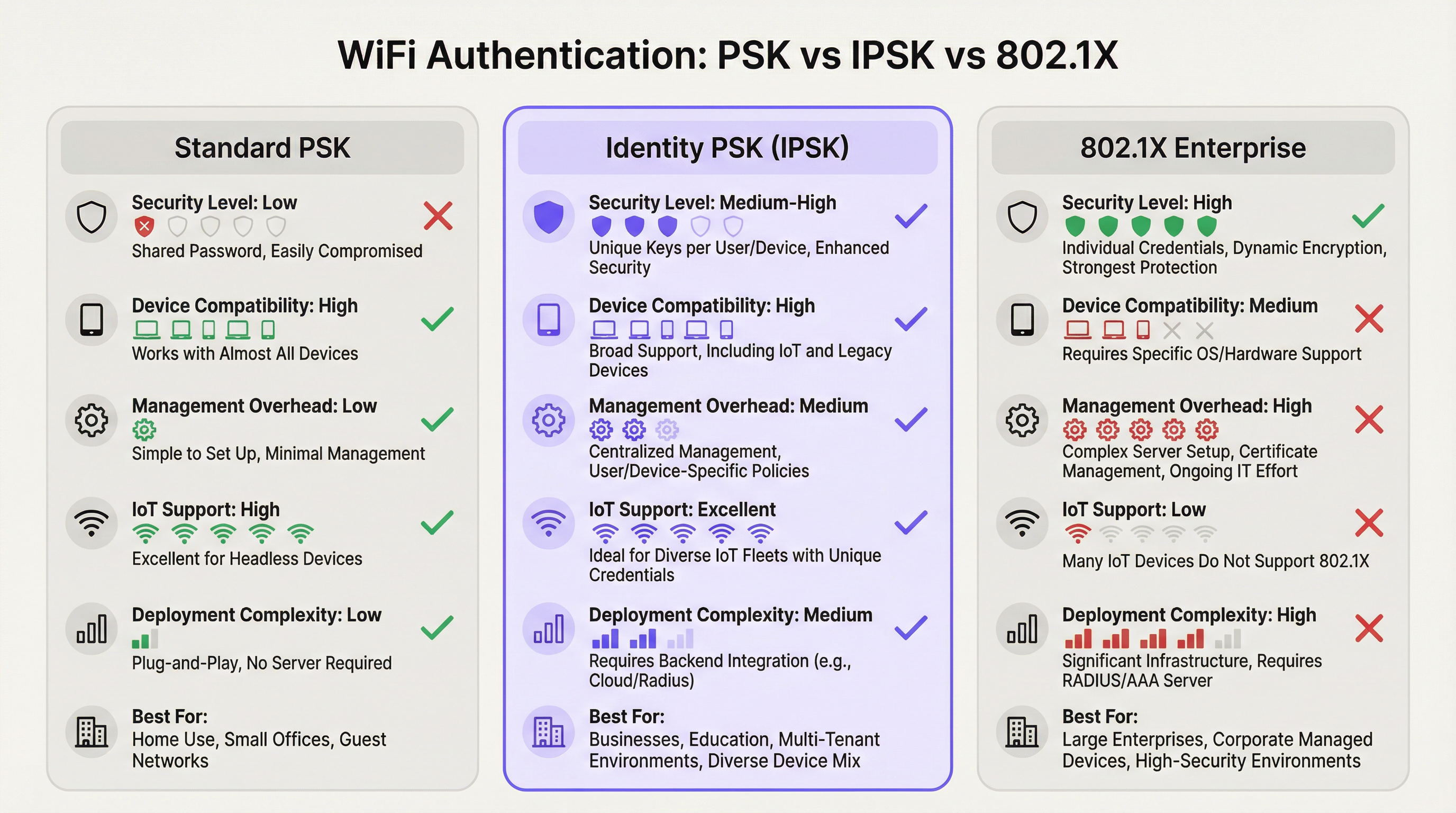
A autenticação WiFi Identity Pre-Shared Key (IPSK) resolve a antiga tensão entre segurança de rede e simplicidade operacional em ambientes multiusuário e com múltiplos dispositivos. Enquanto o WPA2-Personal padrão (PSK compartilhado) oferece facilidade de uso, mas nenhuma responsabilidade individual, e o WPA2/WPA3-Enterprise (802.1X) oferece controle granular, mas exclui uma proporção significativa de dispositivos modernos, o IPSK ocupa um meio-termo pragmático: cada usuário ou dispositivo recebe uma chave criptográfica exclusiva, todos se conectando ao mesmo SSID, com a aplicação de políticas por conexão fornecida via RADIUS.
Para operadores de locais — hotéis, redes de varejo, centros de conferências e edifícios do setor público — o IPSK é cada vez mais a arquitetura padrão para o WiFi de visitantes e funcionários. Ele elimina a carga operacional do gerenciamento de senhas compartilhadas, suporta todo o espectro de dispositivos de consumo e IoT, e fornece a auditabilidade necessária para os frameworks de conformidade PCI DSS e GDPR. Quando combinado com uma plataforma automatizada de gerenciamento de ciclo de vida como a Purple, o IPSK escala de um hotel boutique de 50 quartos para um estádio de 10.000 lugares sem aumentos proporcionais na sobrecarga de TI.
A decisão de implantar o IPSK deve ser orientada por três critérios: um parque de dispositivos misto que inclui endpoints headless ou IoT; a necessidade de revogação de acesso individual sem interrupção em toda a rede; e uma base de usuários que espera uma experiência de conexão sem atritos, semelhante à de casa. Se todos os três se aplicarem, o IPSK é a arquitetura correta.
Aprofundamento Técnico
A Arquitetura de Autenticação
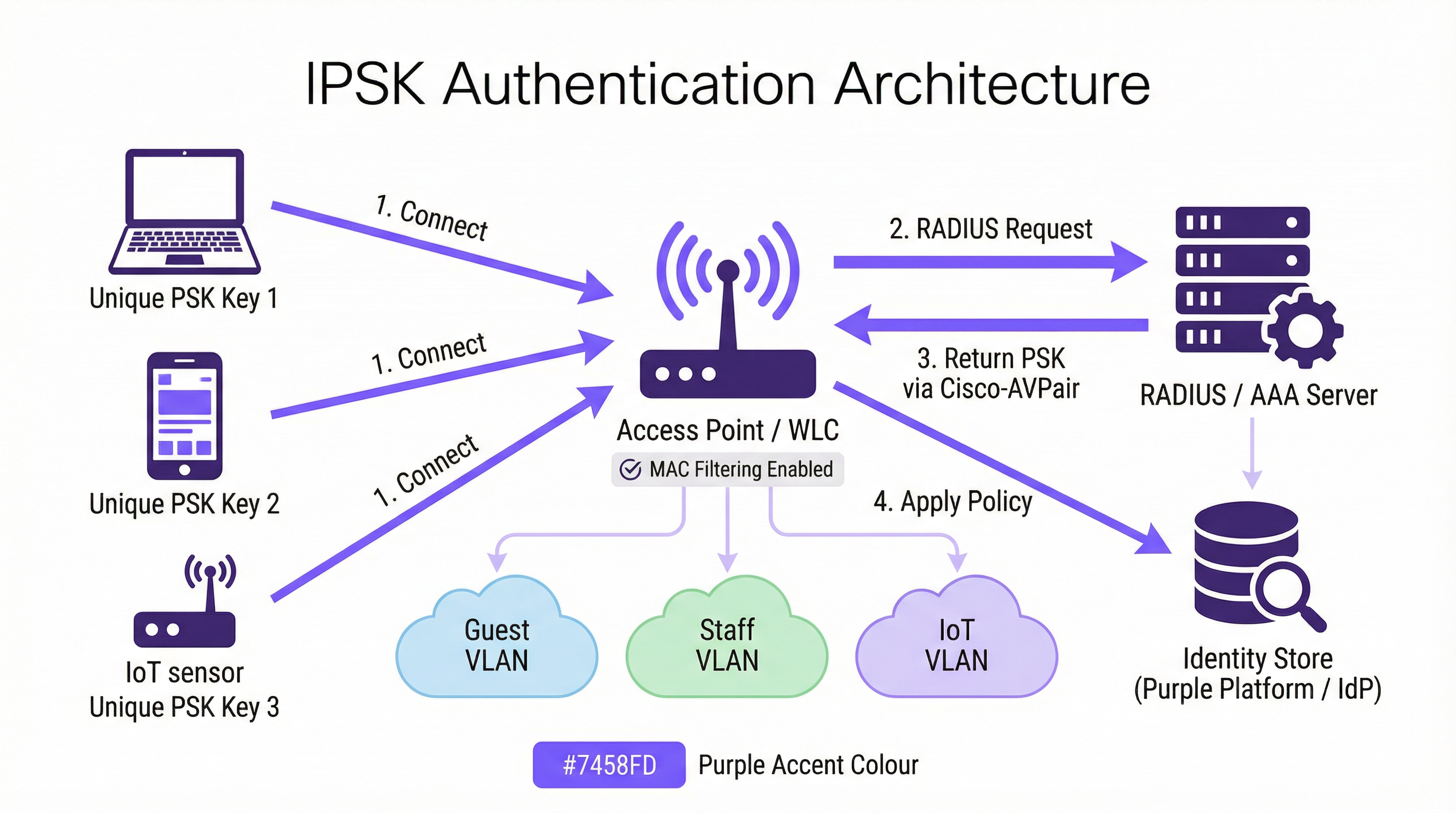
O IPSK opera dentro do framework de segurança WPA2-Personal, mas o aprimora com uma camada de identidade baseada em RADIUS. O fluxo de autenticação ocorre da seguinte forma. Quando um dispositivo cliente inicia uma associação com um SSID habilitado para IPSK, a Wireless LAN Controller (WLC) — ou ponto de acesso em implantações sem controladora — captura o endereço MAC do dispositivo e o encaminha para um servidor RADIUS configurado como parte de um MAC Authentication Bypass (MAB) ou solicitação 802.1X padrão. O servidor RADIUS consulta seu armazenamento de identidades, localiza o registro associado àquele endereço MAC e retorna uma resposta Access-Accept contendo um Cisco Attribute-Value Pair (AVP) — especificamente cisco-av-pair = psk-mode=ascii e cisco-av-pair = psk=<unique_passphrase>. A WLC extrai essa senha por dispositivo e a usa para validar o handshake WPA2 de quatro vias que o cliente apresentou. Se a senha corresponder, a associação é concluída e o dispositivo é colocado em sua VLAN designada com suas políticas de acesso e largura de banda atribuídas.
Essa arquitetura significa que o dispositivo cliente nunca precisa saber que está usando IPSK em vez do PSK padrão. A experiência do usuário é idêntica: insira uma senha, conecte-se. A inteligência é totalmente do lado do servidor.
Implementações de Fornecedores
Os três principais fornecedores de redes sem fio corporativas implementam o PSK baseado em identidade sob diferentes nomes de produtos, embora a arquitetura funcional seja consistente:
| Fornecedor | Nome do Produto | Formato do Atributo RADIUS |
|---|---|---|
| Cisco | iPSK (Identity PSK) | cisco-av-pair = psk=<passphrase> |
| Aruba / HPE | MPSK (Multi-PSK) | Aruba-MPSK-Passphrase |
| Ruckus / CommScope | DPSK (Dynamic PSK) | Motor DPSK proprietário ou RADIUS |
| Meraki | IPSK com RADIUS | Formato AVP padrão da Cisco |
Todas as quatro implementações suportam atribuição de VLAN e entrega de políticas de QoS via atributos RADIUS, permitindo a segmentação de rede por dispositivo a partir de um único SSID.
Redes de Área Privada e Isolamento de Camada 2
Uma capacidade definidora do IPSK em implantações multilocatário é a Private Area Network (PAN). Como o tráfego de cada dispositivo é criptografado com uma chave exclusiva, o isolamento de Camada 2 entre os usuários é inerente à arquitetura. Um hóspede no Quarto 412 não pode ver ou interagir com os dispositivos de um hóspede no Quarto 413, mesmo que ambos estejam conectados ao mesmo SSID Hotel-Guest. Esta é uma melhoria de segurança fundamental em relação às redes PSK compartilhadas, onde todos os dispositivos compartilham o mesmo domínio de broadcast e um invasor determinado pode interceptar tráfego não criptografado.
Combinado com a reflexão mDNS — um recurso disponível na maioria das controladoras de nível corporativo — o IPSK permite a descoberta de dispositivos dentro do próprio segmento privado do usuário. Um hóspede pode transmitir mídia para seu próprio Chromecast ou imprimir em sua impressora portátil sem expor esses dispositivos à rede mais ampla. Este é o modelo de conectividade "casa longe de casa" que os operadores de hospitalidade usam cada vez mais como um diferencial.
Compatibilidade com WPA3
O WPA3-SAE (Simultaneous Authentication of Equals) substitui o handshake de quatro vias do WPA2 por uma troca de chaves Dragonfly, o que muda a forma como as chaves por dispositivo são validadas. A maioria das controladoras modernas suporta IPSK no modo de transição WPA2/WPA3, fornecendo compatibilidade com versões anteriores para dispositivos legados, ao mesmo tempo em que permite que clientes compatíveis com WPA3 se beneficiem do handshake mais forte. Um SSID puramente WPA3 com IPSK requer suporte de firmware da controladora que agora está disponível nas plataformas Cisco Catalyst 9800, Aruba CX e Ruckus One a partir de 2025.
Contexto dos Padrões IEEE
O IPSK opera dentro do padrão de LAN sem fio IEEE 802.11 e aproveita o framework de autenticação IEEE 802.1X para sua comunicação RADIUS, mesmo que o mecanismo de autenticação do lado do cliente seja PSK em vez de EAP. O próprio protocolo RADIUS é definido na RFC 2865 e RFC 2868. O formato AVP da Cisco usado para fornecer senhas por dispositivo é uma extensão do fornecedor ao conjunto de atributos RADIUS padrão, e é por isso que o IPSK não é uma especificação IEEE formalmente padronizada — é uma capacidade implementada pelo fornecedor construída sobre protocolos padronizados.
Guia de Implementação
Fase 1: Avaliação da Infraestrutura
Antes de configurar um único ponto de acesso, conduza uma avaliação completa da infraestrutura cobrindo quatro áreas. Primeiro, confirme se sua controladora sem fio suporta IPSK — verifique os requisitos de versão de firmware para sua plataforma específica. Segundo, avalie sua infraestrutura RADIUS: você tem um servidor RADIUS existente (Cisco ISE, Microsoft NPS, FreeRADIUS) ou usará um serviço RADIUS baseado em nuvem? Terceiro, identifique seu provedor de identidade (IdP) — Microsoft Entra ID, Okta, Google Workspace — e confirme a conectividade da API para o provisionamento automatizado de chaves. Quarto, audite seu parque de dispositivos para identificar quaisquer dispositivos legados que possam ter problemas de randomização de MAC ou comportamento de handshake WPA2 fora do padrão.
Fase 2: Configuração do RADIUS
Configure seu servidor RADIUS com os seguintes elementos. Crie um armazenamento de identidades — um banco de dados de endereços MAC mapeados para senhas exclusivas e atribuições de VLAN. Para uma implantação em hotel, esse armazenamento é preenchido dinamicamente via integração com o PMS; para uma implantação no varejo, via sistema de RH ou integração MDM. Crie perfis de autorização que retornem os atributos Cisco AVP apropriados (psk-mode e psk-password) juntamente com os atributos de atribuição de VLAN (Tunnel-Type = VLAN, Tunnel-Medium-Type = 802, Tunnel-Private-Group-ID = <VLAN_ID>). Configure regras de política que correspondam às solicitações de endereço MAC recebidas ao perfil de autorização correto.
Fase 3: Configuração da WLC/Controladora
Na controladora sem fio, crie o SSID IPSK com segurança WPA2-PSK e filtragem de MAC habilitada. Configure o servidor RADIUS como o servidor de autenticação para este SSID e habilite o AAA Override para permitir que as atribuições de VLAN retornadas pelo RADIUS substituam a VLAN padrão do SSID. Defina um PSK padrão no SSID — isso atua como um fallback para dispositivos não encontrados no armazenamento de identidades RADIUS e deve ser uma senha forte, gerada aleatoriamente, que não seja distribuída aos usuários. Habilite Protected Management Frames (PMF) para melhorar a postura de segurança.
Fase 4: Automação do Ciclo de Vida das Chaves
O gerenciamento manual de chaves não é escalável. Para qualquer implantação além de um punhado de dispositivos, automatize todo o ciclo de vida das chaves usando uma plataforma de orquestração. A plataforma da Purple se integra ao seu IdP e PMS para provisionar chaves no onboarding e revogá-las no offboarding, sem a necessidade de intervenção manual da TI. O fluxo de trabalho de provisionamento deve incluir: geração de chaves (criptograficamente aleatórias, mínimo de 12 caracteres), distribuição de chaves (via e-mail, SMS ou material impresso) e registro de chaves no armazenamento de identidades RADIUS. O fluxo de trabalho de offboarding deve incluir: revogação imediata da chave no armazenamento RADIUS, confirmação de que o dispositivo foi desassociado e entrada no log de auditoria para fins de conformidade.
Fase 5: Mitigação da Randomização de MAC
Configure seu SSID para incluir uma política de rede que solicite aos clientes o uso de seu endereço MAC permanente. No iOS, isso é alcançado desativando o "Endereço Wi-Fi Privado" para a rede específica nas configurações de WiFi do dispositivo — uma etapa que pode ser comunicada aos usuários durante o onboarding. Para dispositivos gerenciados inscritos no MDM, envie um perfil de configuração de WiFi que defina DisableAssociationMACRandomization = true. Para dispositivos não gerenciados, inclua orientações sobre randomização de MAC em suas comunicações de onboarding de usuários.
Melhores Práticas
Imponha a exclusividade da chave e a entropia mínima. Cada senha IPSK deve ser criptograficamente aleatória e ter no mínimo 12 caracteres, combinando letras maiúsculas e minúsculas, números e símbolos. Evite palavras de dicionário, padrões sequenciais ou qualquer derivação de informações identificáveis pelo usuário. O mecanismo de geração de chaves da Purple produz senhas que atendem aos requisitos de entropia do NIST SP 800-63B por padrão.
Segmente por função, não apenas por usuário. Use a capacidade de atribuição de VLAN do IPSK para impor a segmentação de rede por função do dispositivo. Dispositivos IoT — termostatos, sensores, fechaduras inteligentes — devem estar em uma VLAN IoT dedicada com acesso restrito à internet e sem movimento lateral para outras VLANs. Dispositivos de visitantes devem estar em uma VLAN de visitantes apenas com acesso à internet. Dispositivos de funcionários devem estar em uma VLAN de funcionários com acesso a recursos internos apropriados à sua função. Essa segmentação é um requisito do PCI DSS para qualquer rede que transporte dados de cartão de pagamento.
Implemente redundância de servidor RADIUS. Configure no mínimo dois servidores RADIUS — primário e secundário — com failover automático na WLC. Teste o comportamento de failover trimestralmente. Considere um serviço RADIUS hospedado na nuvem para implantações onde a redundância de servidor local não é operacionalmente viável.
Audite o uso de chaves regularmente. Os logs de accounting do RADIUS fornecem um registro completo de quais endereços MAC foram autenticados, quando e a partir de qual ponto de acesso. Revise esses logs mensalmente em busca de anomalias — dispositivos autenticando em horários incomuns, dispositivos aparecendo em várias VLANs ou falhas de autenticação que possam indicar uma tentativa de força bruta. O painel de analytics da Purple destaca esses padrões automaticamente.
Alinhe a rotação de chaves com os eventos do ciclo de vida do usuário. As chaves devem ser rotacionadas nos limites naturais do ciclo de vida: no final da estadia de um hóspede, no término de um contrato de trabalho, na conclusão de um evento. Não implemente a rotação de chaves baseada em tempo em um cronograma fixo (por exemplo, a cada 90 dias) sem um mecanismo de rotação automatizado — a rotação manual em escala é propensa a erros e cria lacunas de segurança.
Documente sua arquitetura IPSK para fins de conformidade. O Requisito 1.3 do PCI DSS exige a documentação de todas as conexões de rede e controles de segmentação. Mantenha um diagrama de rede atualizado que mostre a configuração do SSID IPSK, atribuições de VLAN, topologia do servidor RADIUS e os pontos de integração do armazenamento de identidades. Esta documentação é necessária para avaliações do PCI DSS e é uma boa prática para os Registros de Atividades de Processamento do Artigo 30 do GDPR.
Solução de Problemas e Mitigação de Riscos
Falhas de Autenticação
A causa mais comum de falha de autenticação IPSK é uma incompatibilidade de endereço MAC entre o dispositivo que se apresenta à WLC e o endereço MAC registrado no armazenamento de identidades RADIUS. Isso quase sempre é causado pela randomização de endereço MAC. Verifique o endereço MAC do dispositivo usando os logs de associação de clientes da WLC e compare-o com o armazenamento de identidades RADIUS. Se o dispositivo estiver apresentando um MAC randomizado, oriente o usuário a desativar o endereço privado para a rede ou implemente um portal de pré-registro que capture o endereço MAC permanente do dispositivo antes da primeira tentativa de conexão.
A segunda falha mais comum é um Cisco AVP incorreto ou ausente no perfil de autorização RADIUS. Verifique se o formato do AVP corresponde à sintaxe esperada pela sua controladora — cisco-av-pair = psk-mode=ascii seguido por cisco-av-pair = psk=<passphrase> — e se o AAA Override está habilitado no SSID.
Indisponibilidade do Servidor RADIUS
Se o servidor RADIUS estiver inacessível, a WLC fará o fallback para o PSK padrão configurado no SSID. Este PSK padrão deve ser tratado apenas como um mecanismo de acesso de emergência e não deve ser distribuído aos usuários. Monitore a disponibilidade do servidor RADIUS com suas ferramentas padrão de monitoramento de infraestrutura e configure alertas para eventos de timeout do RADIUS na WLC.
Compatibilidade de Dispositivos IoT
Alguns dispositivos IoT legados implementam um comportamento de handshake WPA2 fora do padrão que pode causar falhas intermitentes de autenticação com o IPSK. Se um tipo de dispositivo específico estiver falhando consistentemente, teste-o isoladamente em um SSID PSK padrão para confirmar a capacidade WPA2 básica do dispositivo. Se o dispositivo não suportar WPA2-PSK de forma alguma, ele deve ser conectado por meio de uma porta com fio ou um SSID legado dedicado com isolamento de rede apropriado.
Comprometimento de Chave
Se um dispositivo for perdido, roubado ou houver suspeita de comprometimento, revogue sua chave IPSK imediatamente no armazenamento de identidades RADIUS. A WLC desassociará o dispositivo em sua próxima tentativa de reautenticação (geralmente em minutos). Gere uma nova chave para o dispositivo de substituição do usuário e provisione-a por meio do fluxo de trabalho de onboarding padrão. Documente o incidente em seu log de incidentes de segurança para fins de conformidade.
ROI e Impacto nos Negócios
Resultados Quantificáveis
O business case do IPSK em relação ao PSK compartilhado é atraente em três dimensões. A primeira é a redução de custos operacionais. Em um hotel de 200 quartos operando em um modelo de PSK compartilhado, a equipe da recepção atende a uma média de 15 a 20 solicitações de suporte relacionadas ao WiFi por dia — redefinições de senha, problemas de conexão de dispositivos, timeouts de Captive Portal. O IPSK com onboarding automatizado reduz isso a quase zero, liberando a equipe da recepção para atividades geradoras de receita. Em uma estimativa conservadora de 10 minutos por interação de suporte e um custo de equipe de £15 por hora, um hotel de 200 quartos economiza aproximadamente £750 a £1.000 por mês em custos diretos de mão de obra.
A segunda dimensão é evitar custos com incidentes de segurança. Uma violação de rede PSK compartilhada — onde um agente mal-intencionado obtém acesso à senha compartilhada — pode expor todos os dispositivos na rede à interceptação de tráfego e ataques de movimento lateral. O custo médio de uma violação de dados no setor de hospitalidade, de acordo com o relatório Cost of a Data Breach da IBM, excede £3,5 milhões quando multas regulatórias, custos de remediação e danos à reputação são incluídos. O isolamento por dispositivo do IPSK significa que uma chave comprometida expõe apenas um dispositivo, não a rede inteira.
A terceira dimensão é a satisfação do hóspede e o impacto na receita. No setor de hospitalidade, a qualidade do WiFi é consistentemente citada como um dos três principais fatores em avaliações online. Propriedades que mudam do WiFi baseado em Captive Portal para o IPSK relatam melhorias mensuráveis nas pontuações de avaliação relacionadas ao WiFi, com melhorias correspondentes nas classificações gerais da propriedade. Uma melhoria de um ponto na pontuação do TripAdvisor de um hotel correlaciona-se com um aumento médio de 11% na receita por quarto disponível (RevPAR), de acordo com a pesquisa de hospitalidade da Universidade de Cornell.
Custo Total de Propriedade
A comparação de TCO entre o IPSK e o 802.1X Enterprise favorece significativamente o IPSK para ambientes de locais físicos. Uma implantação completa do 802.1X requer uma infraestrutura PKI, ferramentas de gerenciamento de certificados e processos contínuos de renovação de certificados — normalmente adicionando £15.000 a £40.000 em custos iniciais de implantação e £5.000 a £15.000 em manutenção anual para um local de médio porte. O IPSK requer um servidor RADIUS (frequentemente já presente na infraestrutura) e uma plataforma de orquestração como a Purple. Para organizações sem um servidor RADIUS existente, serviços RADIUS hospedados na nuvem estão disponíveis a partir de £200 a £500 por mês, tornando o IPSK acessível até mesmo para operadores de locais menores.

Este guia é publicado pela Purple, a plataforma de inteligência de WiFi corporativo. Para uma revisão da arquitetura técnica e avaliação de implantação do IPSK, entre em contato com a equipe de soluções da Purple em purple.ai .
Termos-Chave e Definições
IPSK (Identity Pre-Shared Key)
A WiFi authentication mechanism that assigns a unique WPA2 passphrase to each individual user or device, while all devices connect to the same SSID. The unique key is delivered to the Wireless LAN Controller by a RADIUS server at the time of authentication, enabling per-device policy enforcement without requiring 802.1X certificate infrastructure.
IT teams encounter IPSK when evaluating authentication options for mixed-device environments — hotels, retail, events — where 802.1X is too complex and shared PSK is too insecure. It is the recommended architecture for guest and staff WiFi in multi-tenant venue environments.
RADIUS (Remote Authentication Dial-In User Service)
A networking protocol (RFC 2865) that provides centralised Authentication, Authorisation, and Accounting (AAA) management for users connecting to a network. In IPSK deployments, the RADIUS server is the intelligence layer that maps device MAC addresses to unique passphrases and network policies.
IT teams interact with RADIUS when configuring the authentication backend for IPSK. Common RADIUS server implementations include Cisco ISE, Microsoft NPS, FreeRADIUS, and cloud-hosted services. RADIUS availability is critical to IPSK operation — if the RADIUS server is unreachable, new device authentications will fail.
MAC Authentication Bypass (MAB)
An authentication mechanism that uses a device's MAC address as its identity credential, rather than requiring the device to present a username/password or certificate. IPSK leverages MAB to identify devices at the point of RADIUS lookup, enabling headless devices with no user interface to authenticate based solely on their hardware address.
IT teams use MAB in IPSK deployments to support IoT devices, smart TVs, gaming consoles, and other headless endpoints that cannot present user credentials. MAB is the mechanism that makes IPSK compatible with 100% of WiFi-capable devices.
Cisco Attribute-Value Pair (AVP)
A vendor-specific RADIUS attribute format used by Cisco (and compatible) wireless controllers to exchange configuration parameters between the RADIUS server and the WLC. In IPSK deployments, the AVPs `cisco-av-pair = psk-mode=ascii` and `cisco-av-pair = psk=<passphrase>` deliver the per-device unique passphrase from the RADIUS server to the WLC.
IT teams need to understand AVP syntax when configuring RADIUS authorisation profiles for IPSK. Incorrect AVP formatting is the most common cause of IPSK authentication failures during initial deployment.
Private Area Network (PAN)
A virtual network segment created around a specific user's devices within a shared WiFi infrastructure. In IPSK deployments, each user's unique key creates cryptographic isolation from other users on the same SSID, while mDNS reflection allows the user's own devices to discover each other within their private segment.
IT teams deploy PAN capability in hospitality and multi-tenant residential environments to provide guests or residents with a home-like device ecosystem — casting, printing, gaming — without exposing their devices to other users on the shared infrastructure.
WPA2-SAE / WPA3 (Simultaneous Authentication of Equals)
The authentication handshake mechanism introduced in WPA3 that replaces the WPA2 four-way handshake with a Dragonfly key exchange, providing stronger resistance to offline dictionary attacks. WPA3-SAE changes how per-device keys are validated in IPSK deployments and requires specific controller firmware support.
IT teams evaluating WPA3 migration need to confirm their controller's IPSK support in WPA3 or transition mode. As of 2025, Cisco Catalyst 9800, Aruba CX, and Ruckus One platforms support IPSK in WPA2/WPA3 transition mode, enabling gradual migration without breaking legacy device compatibility.
AAA Override
A WLC configuration setting that allows RADIUS-returned attributes — including VLAN assignment, QoS policy, and ACLs — to override the SSID's default configuration on a per-client basis. AAA Override must be enabled on the SSID for IPSK's per-device VLAN assignment to function correctly.
IT teams must enable AAA Override when configuring IPSK SSIDs. Without it, all devices connecting to the SSID will be placed on the SSID's default VLAN regardless of what the RADIUS server returns, negating the segmentation benefits of IPSK.
MAC Address Randomisation
A privacy feature in modern operating systems (iOS 14+, Android 10+, Windows 11) that causes devices to present a randomly generated MAC address when scanning for or connecting to WiFi networks, rather than their permanent hardware MAC address. This feature is designed to prevent device tracking across networks but creates a conflict with IPSK's MAC-based identity lookup.
IT teams must address MAC randomisation in every IPSK deployment plan. The mitigation strategy depends on the device management model: MDM configuration profiles for managed devices, and user-facing guidance (disable Private Wi-Fi Address for the specific network) for unmanaged personal devices.
Key Lifecycle Management
The operational process of provisioning, distributing, rotating, and revoking cryptographic keys throughout their useful life. In IPSK deployments, key lifecycle management encompasses the automated generation of unique passphrases at user onboarding, their delivery to users, their registration in the RADIUS identity store, and their immediate revocation when the user's access should be terminated.
IT teams and venue operations directors must treat key lifecycle management as a core operational process, not an afterthought. Unrevoked keys — belonging to former guests, ex-employees, or decommissioned devices — represent an ongoing security risk. Automation via a platform such as Purple is the only viable approach at scale.
Estudos de Caso
A 350-room full-service hotel is running a shared WPA2-PSK network across all guest floors, the lobby, restaurant, and conference facilities. The network password is printed on key card folders and changed quarterly. Guests regularly complain that their Chromecasts and smart speakers cannot connect, and the front desk fields 20+ WiFi support calls per day. The IT manager needs to modernise the WiFi architecture without replacing the existing Cisco Catalyst 9800 controller infrastructure. What is the recommended approach?
The recommended architecture is IPSK with Purple platform orchestration integrated with the hotel's Property Management System (PMS). The deployment proceeds in five stages.
Stage 1 — Infrastructure preparation: Confirm Cisco Catalyst 9800 firmware is at 17.3 or later (required for full iPSK support). Deploy or configure a RADIUS server — Cisco ISE or a cloud-hosted RADIUS service — with the hotel's PMS as the upstream identity source. Configure the RADIUS authorisation profile to return cisco-av-pair = psk-mode=ascii and cisco-av-pair = psk=<unique_key> along with VLAN assignment attributes for Guest VLAN (internet-only) and Conference VLAN (with access to AV systems).
Stage 2 — SSID configuration: Create a single Hotel-Guest SSID with WPA2-PSK security, MAC filtering enabled, and AAA Override enabled. Set a strong default PSK (not distributed to users) as the fallback. Enable mDNS reflection to support Chromecast and AirPlay within each guest's private segment.
Stage 3 — PMS integration: Configure Purple's platform to receive check-in events from the PMS via API. On check-in, Purple generates a unique 16-character alphanumeric passphrase, registers it in the RADIUS identity store against the guest's registered device MAC addresses, and triggers delivery via the hotel's chosen channel — email, SMS, or printed on the key card folder. On check-out, Purple automatically revokes the key.
Stage 4 — MAC randomisation handling: Include a one-step instruction in the guest WiFi welcome communication: 'To connect your smart TV or streaming device, please disable Private Wi-Fi Address for the Hotel-Guest network in your device settings.' For guests connecting smartphones, the randomised MAC issue is resolved by the device presenting its permanent MAC after the first manual connection.
Stage 5 — Staff WiFi: Create a separate Hotel-Staff SSID using the same IPSK architecture, with keys provisioned via integration with the hotel's HR system. Staff keys are tied to employee records and automatically revoked on termination.
Expected outcomes: WiFi support calls reduced by 85% within 30 days of deployment. Guest Chromecast and smart device connectivity issues eliminated. Network security posture improved — no shared password to leak or rotate. PCI DSS compliance for the conference centre's payment processing network maintained through VLAN segmentation.
A national retail chain with 85 stores is running a mixed network environment: each store has WPA2-PSK WiFi for staff handhelds and tablets, a separate open guest WiFi network, and wired POS terminals. The IT security team has flagged that the shared staff WiFi password is the same across all 85 stores and has not been changed in 18 months. A recent PCI DSS assessment identified the staff WiFi as a compliance risk due to lack of individual authentication. The CTO wants a solution that improves security posture, maintains PCI DSS compliance, and can be deployed across all 85 stores within a single quarter without requiring store-level IT resources.
The recommended architecture is a centralised IPSK deployment managed through Purple's platform, with keys provisioned via integration with the retailer's existing Microsoft Entra ID (Azure AD) directory.
Architecture design: Deploy a single Staff-WiFi SSID across all 85 stores using IPSK. Each store's access points connect to a centralised cloud-managed WLC (Cisco Meraki or Aruba Central) or to store-level controllers managed from a central NOC. A cloud-hosted RADIUS service — configured with Microsoft Entra ID as the identity source — handles authentication for all stores from a single management plane.
Key provisioning: Purple's platform monitors Entra ID group membership. When a staff member is added to the RetailStaff-WiFi security group, Purple automatically generates a unique IPSK passphrase, registers it in the RADIUS identity store, and delivers it to the staff member via their corporate email. When a staff member leaves or is removed from the group — triggered by the HR offboarding workflow — Purple immediately revokes the key across all stores simultaneously.
PCI DSS compliance: The IPSK architecture, combined with VLAN segmentation (staff devices on VLAN 20, POS terminals on VLAN 30 with no wireless access, guest WiFi on VLAN 40), provides the network segmentation required by PCI DSS Requirement 1.3. Each staff member's unique key provides the individual authentication audit trail required by PCI DSS Requirement 8.2. Document the architecture in the network segmentation diagram for the QSA.
Deployment at scale: The centralised management architecture means store-level deployment requires only access point firmware updates and SSID reconfiguration — tasks that can be pushed remotely via the cloud management platform. No store-level IT resources are required. Target deployment timeline: 85 stores in 8 weeks, with a phased rollout of 10-12 stores per week.
Expected outcomes: Shared password eliminated across all 85 stores. Individual staff authentication audit trail established for PCI DSS compliance. Key revocation time reduced from days (manual password change across 85 stores) to seconds (automated RADIUS revocation). Estimated reduction in IT helpdesk tickets related to WiFi access: 60%.
Análise de Cenário
Q1. A 500-bed student accommodation provider is evaluating WiFi authentication options for their new development. The student population brings an average of 7 devices each — smartphones, laptops, gaming consoles, smart speakers, and tablets. The operator wants individual access control (so that access can be revoked if a student's tenancy ends early), seamless device connectivity (including gaming consoles and Chromecasts), and a management overhead that can be handled by a two-person IT team. Which authentication architecture should they deploy, and what are the key configuration requirements?
💡 Dica:Consider the device fleet composition — specifically the proportion of headless devices — and the operational capacity of the IT team when evaluating 802.1X versus IPSK.
Mostrar Abordagem Recomendada
IPSK is the correct architecture for this deployment. The presence of gaming consoles and smart speakers in the device fleet immediately eliminates 802.1X as a viable option — these headless devices cannot support certificate-based authentication. Standard PSK is eliminated by the individual access control requirement. IPSK satisfies all three criteria: it supports 100% of the device fleet, enables individual key revocation when a tenancy ends, and — with automated lifecycle management via Purple integrated with the accommodation's tenancy management system — can be operated by a two-person IT team. Key configuration requirements: single SSID with IPSK, RADIUS server with tenancy system integration, mDNS reflection enabled for Private Area Networks (allowing students to use their own Chromecasts and printers within their private segment), MAC randomisation guidance included in the student onboarding pack, and automated key revocation triggered by tenancy end date in the management system.
Q2. An IT security manager at a conference centre is preparing for a major three-day industry event with 2,000 registered attendees. The event requires: secure WiFi for attendees (with access revoked after the event ends), a separate secure network for exhibitors with access to the venue's AV systems, and a dedicated network for the event management team with access to internal booking systems. The venue's existing infrastructure is Aruba-based. What IPSK architecture would you recommend, and how would you handle key provisioning at scale?
💡 Dica:Focus on the key provisioning workflow for 2,000 attendees — how keys are generated, distributed, and revoked — and how VLAN segmentation achieves the three-network requirement from a single physical infrastructure.
Mostrar Abordagem Recomendada
Deploy three logical network segments from a single physical infrastructure using Aruba MPSK (Aruba's implementation of IPSK). Create one SSID — Event-WiFi — with MPSK enabled. The RADIUS authorisation profiles return different VLAN assignments based on the user's registration category: attendees on VLAN 10 (internet-only), exhibitors on VLAN 20 (internet plus AV systems), event management on VLAN 30 (internet plus internal booking systems). For key provisioning at scale: integrate Purple's platform with the event registration system. At registration, each attendee receives a unique MPSK passphrase via email confirmation, along with a QR code for easy device configuration. Exhibitors receive their keys via the exhibitor portal at least 48 hours before the event. Event management keys are provisioned via the venue's HR/staff system. At event end, Purple triggers bulk revocation of all attendee and exhibitor keys simultaneously. The event management keys remain active until manually revoked. This architecture eliminates the need for a captive portal (which would be impractical for 2,000 attendees), provides individual audit trails for all connections, and achieves the three-network segmentation requirement without creating three separate SSIDs.
Q3. A regional NHS trust is deploying WiFi across a new outpatient facility. The network must support: clinical staff with managed Windows laptops (enrolled in Intune MDM); nurses and allied health professionals with personal smartphones (BYOD); medical IoT devices including infusion pumps, patient monitors, and fall detection sensors; and a patient guest WiFi network. The trust's information governance team has flagged that all clinical data must remain on an isolated network segment, and that the IoT medical devices must be on a dedicated segment with no internet access. What authentication architecture would you recommend for each user/device category?
💡 Dica:This scenario requires a hybrid architecture — not all user categories are best served by the same authentication mechanism. Consider which categories warrant 802.1X and which are better served by IPSK.
Mostrar Abordagem Recomendada
This scenario requires a hybrid authentication architecture. Clinical staff on managed Windows laptops should use WPA3-Enterprise with 802.1X (EAP-TLS with certificates deployed via Intune MDM) — these are fully managed endpoints where the certificate infrastructure is already in place and the stronger security posture is warranted for clinical data access. BYOD smartphones for nursing and AHP staff should use IPSK — these are unmanaged personal devices where certificate deployment is not operationally viable, but individual access control and VLAN assignment (to a clinical staff VLAN with access to clinical applications but not raw clinical data) is required. Medical IoT devices should use IPSK with MAC-based authentication — these headless devices cannot support any user-interactive authentication, and IPSK places them on a dedicated IoT VLAN with no internet access and no lateral movement to other VLANs. Patient guest WiFi should use a separate SSID with a captive portal for consent capture (required for GDPR compliance) and standard PSK or IPSK depending on the trust's guest data collection requirements. The IPSK components (BYOD staff and IoT devices) should be managed through Purple's platform with integration to the trust's Active Directory for staff key lifecycle management and a dedicated IoT device registry for medical device key management.
Principais Conclusões
- ✓IPSK assigns a unique WPA2 passphrase to every user or device on a shared SSID, delivering per-device security and policy enforcement without the certificate infrastructure required by 802.1X Enterprise.
- ✓The authentication flow relies on RADIUS: the WLC forwards the device's MAC address to the RADIUS server, which returns the unique passphrase via Cisco Attribute-Value Pairs, enabling the WLC to validate the device's connection and assign it to the correct VLAN.
- ✓IPSK is the correct architecture when three conditions are simultaneously present: a mixed or unmanaged device fleet (including IoT/headless devices), a requirement for individual access revocation, and a user base that cannot or should not be asked to configure certificates.
- ✓Key lifecycle automation is non-negotiable at scale — integrate IPSK with your identity provider (Microsoft Entra ID, Okta) or property management system to provision and revoke keys automatically at onboarding and offboarding events.
- ✓MAC address randomisation in iOS 14+, Android 10+, and Windows 11 is the most common source of IPSK deployment failures — plan for it explicitly with MDM configuration profiles for managed devices and user-facing guidance for personal devices.
- ✓The business case for IPSK over shared PSK is compelling: reduced helpdesk overhead, improved security incident containment (compromised key affects one device, not the entire network), and measurable improvements in guest satisfaction scores in hospitality environments.
- ✓Purple's platform provides the orchestration layer that makes IPSK operationally viable at scale — automating key generation, distribution, lifecycle management, and compliance reporting across hotel, retail, events, and public-sector deployments.




