

IPSK की व्याख्या: WiFi एक्सेस के लिए आइडेंटिटी प्री-शेयर्ड कीज़ (Identity Pre-Shared Keys)
This guide provides IT managers, network architects, and venue operations directors with a definitive technical reference on Identity Pre-Shared Keys (IPSK) for WiFi access — explaining the architecture, comparing it against standard PSK and 802.1X Enterprise, and delivering actionable deployment guidance for hospitality, retail, events, and public-sector environments. It addresses the critical operational challenge of providing secure, individually-managed WiFi access across mixed-device fleets — including IoT and headless devices — without the infrastructure overhead of a full 802.1X deployment. Purple's platform is positioned as the orchestration layer that automates IPSK key lifecycle management at scale.
🎧 इस गाइड को सुनें
ट्रांसक्रिप्ट देखें

कार्यकारी सारांश (Executive Summary)
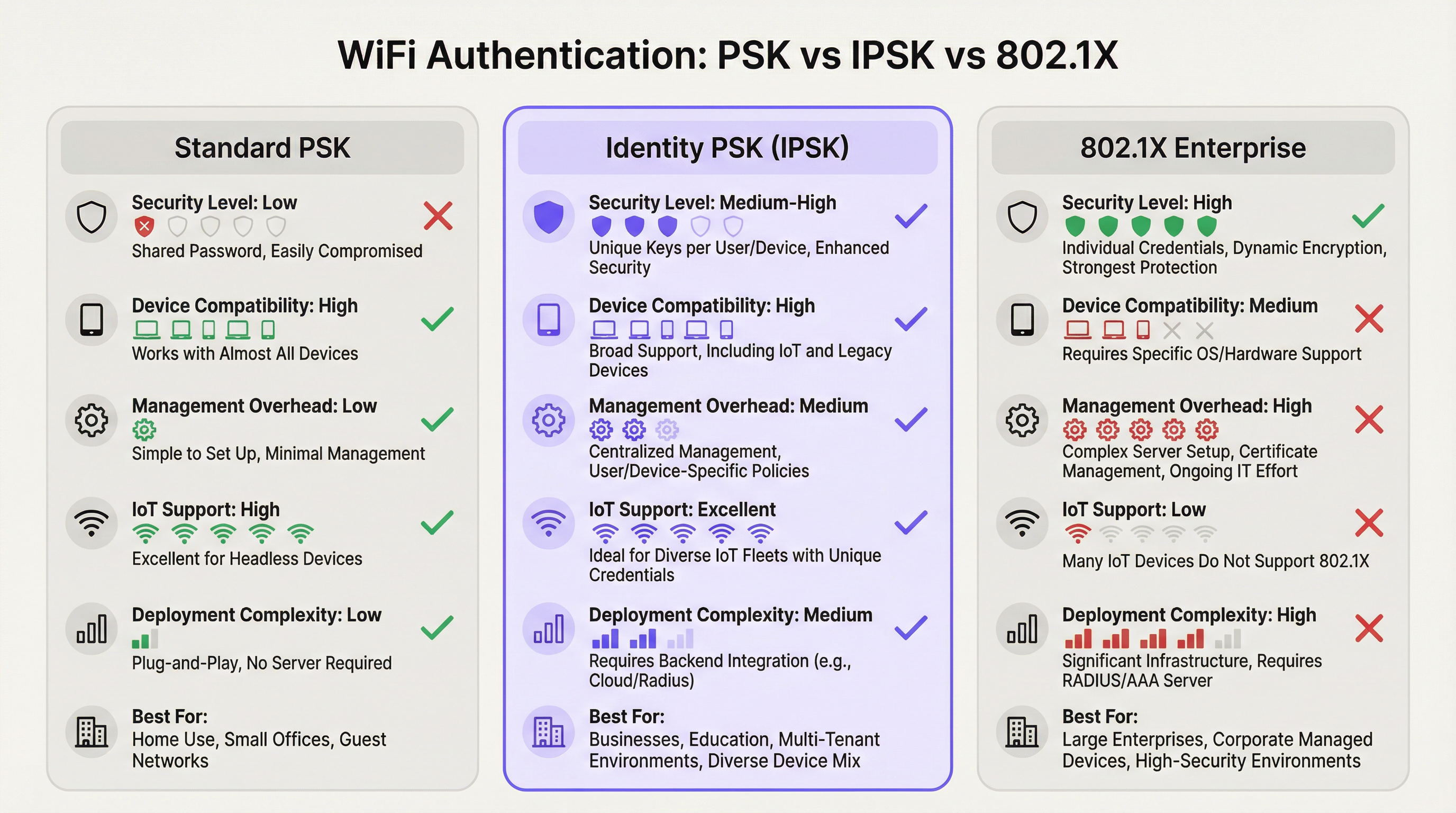
आइडेंटिटी प्री-शेयर्ड की (IPSK) WiFi ऑथेंटिकेशन मल्टी-यूज़र, मिक्स्ड-डिवाइस वातावरण में नेटवर्क सुरक्षा और परिचालन सरलता के बीच लंबे समय से चले आ रहे तनाव को हल करता है। जहाँ मानक WPA2-Personal (शेयर्ड PSK) उपयोग में आसानी प्रदान करता है लेकिन व्यक्तिगत जवाबदेही शून्य होती है, और WPA2/WPA3-Enterprise (802.1X) विस्तृत नियंत्रण प्रदान करता है लेकिन आधुनिक उपकरणों के एक महत्वपूर्ण हिस्से को बाहर कर देता है, वहीं IPSK एक व्यावहारिक मध्य मार्ग अपनाता है: प्रत्येक उपयोगकर्ता या उपकरण को एक विशिष्ट क्रिप्टोग्राफ़िक की (key) प्राप्त होती है, सभी एक ही SSID से जुड़ते हैं, और RADIUS के माध्यम से प्रति-कनेक्शन पॉलिसी लागू की जाती है।
वेन्यू ऑपरेटरों — होटलों, रिटेल चेन, सम्मेलन केंद्रों और सार्वजनिक क्षेत्र के भवनों — के लिए, IPSK तेजी से गेस्ट और स्टाफ WiFi दोनों के लिए डिफ़ॉल्ट आर्किटेक्चर बनता जा रहा है। यह शेयर्ड-पासवर्ड प्रबंधन के परिचालन बोझ को समाप्त करता है, उपभोक्ता और IoT उपकरणों के पूर्ण स्पेक्ट्रम का समर्थन करता है, और PCI DSS और GDPR अनुपालन फ्रेमवर्क के लिए आवश्यक ऑडिटेबिलिटी प्रदान करता है। जब इसे Purple जैसे स्वचालित जीवनचक्र प्रबंधन (lifecycle management) प्लेटफ़ॉर्म के साथ जोड़ा जाता है, तो IPSK IT ओवरहेड में आनुपातिक वृद्धि के बिना 50 कमरों वाले बुटीक होटल से लेकर 10,000 सीटों वाले स्टेडियम तक स्केल कर सकता है।
IPSK को तैनात करने का निर्णय तीन मानदंडों पर आधारित होना चाहिए: एक मिक्स्ड-डिवाइस फ्लीट जिसमें हेडलेस या IoT एंडपॉइंट शामिल हों; नेटवर्क-व्यापी व्यवधान के बिना व्यक्तिगत एक्सेस रद्द करने की आवश्यकता; और एक ऐसा उपयोगकर्ता आधार जो घर्षण रहित (frictionless), घर-जैसी कनेक्शन सुविधा की अपेक्षा करता हो। यदि ये तीनों लागू होते हैं, तो IPSK सही आर्किटेक्चर है।
तकनीकी डीप-डाइव
ऑथेंटिकेशन आर्किटेक्चर
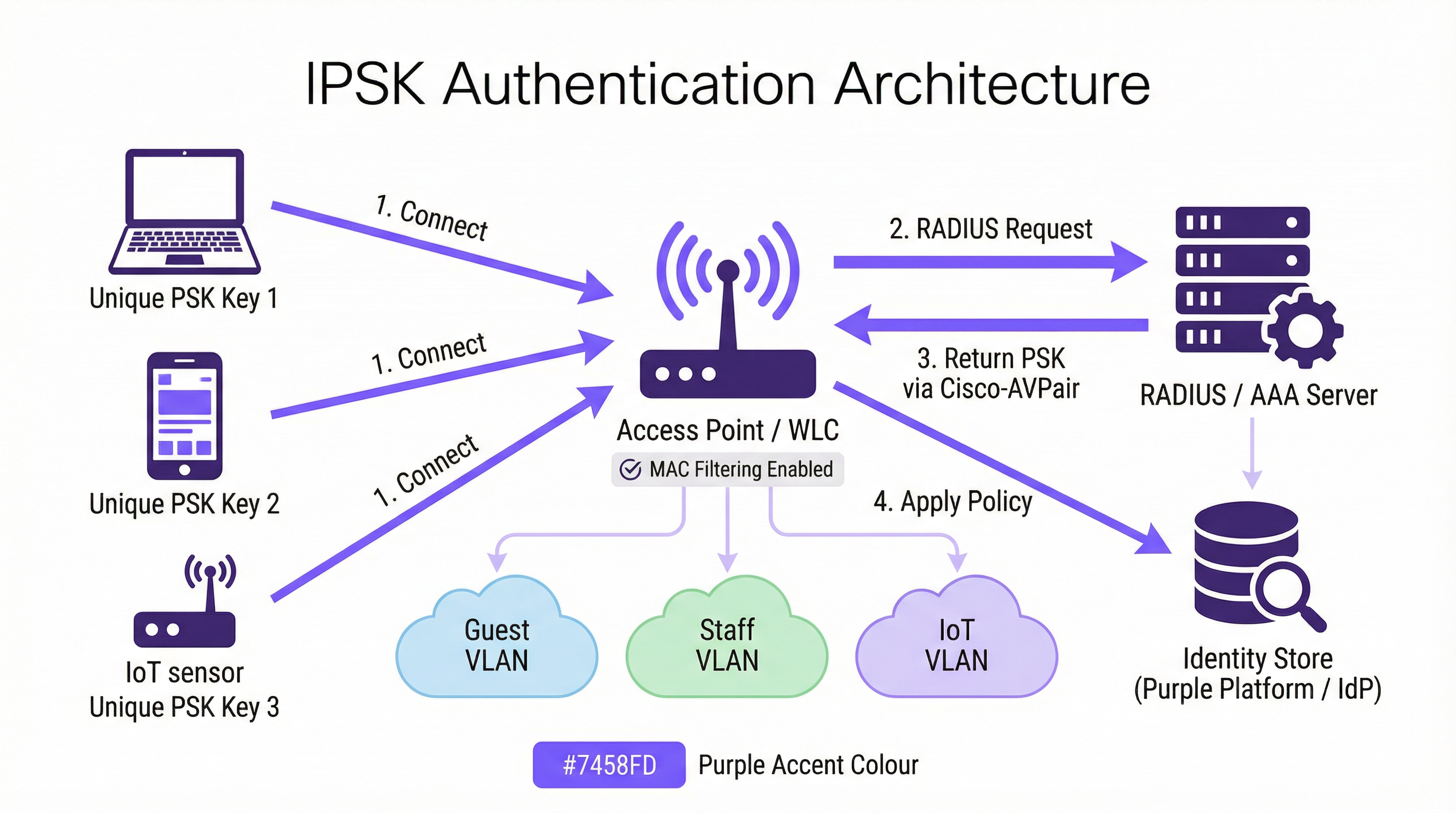
IPSK WPA2-Personal सुरक्षा फ्रेमवर्क के भीतर काम करता है लेकिन इसे RADIUS-समर्थित आइडेंटिटी लेयर के साथ बढ़ाता है। ऑथेंटिकेशन फ्लो इस प्रकार आगे बढ़ता है। जब कोई क्लाइंट डिवाइस IPSK-सक्षम SSID के साथ जुड़ना शुरू करता है, तो वायरलेस LAN कंट्रोलर (WLC) — या कंट्रोलर-रहित परिनियोजन में एक्सेस पॉइंट — डिवाइस का MAC एड्रेस कैप्चर करता है और इसे MAC ऑथेंटिकेशन बायपास (MAB) या मानक 802.1X अनुरोध के हिस्से के रूप में कॉन्फ़िगर किए गए RADIUS सर्वर को अग्रेषित करता है। RADIUS सर्वर अपने आइडेंटिटी स्टोर से पूछताछ करता है, उस MAC एड्रेस से जुड़े रिकॉर्ड का पता लगाता है, और एक Access-Accept प्रतिक्रिया देता है जिसमें Cisco एट्रिब्यूट-वैल्यू पेयर (AVP) शामिल होता है — विशेष रूप से cisco-av-pair = psk-mode=ascii और cisco-av-pair = psk=<unique_passphrase>। WLC इस प्रति-डिवाइस पासफ़्रेज़ को निकालता है और इसका उपयोग क्लाइंट द्वारा प्रस्तुत चार-तरफ़ा WPA2 हैंडशेक को मान्य करने के लिए करता है। यदि पासफ़्रेज़ मेल खाता है, तो जुड़ाव पूरा हो जाता है और डिवाइस को उसकी निर्धारित बैंडविड्थ और एक्सेस नीतियों के साथ उसके असाइन किए गए VLAN पर रखा जाता है।
इस आर्किटेक्चर का अर्थ है कि क्लाइंट डिवाइस को कभी यह जानने की आवश्यकता नहीं होती कि वह मानक PSK के बजाय IPSK का उपयोग कर रहा है। उपयोगकर्ता अनुभव बिल्कुल समान है: एक पासफ़्रेज़ दर्ज करें, कनेक्ट करें। इंटेलिजेंस पूरी तरह से सर्वर-साइड है।
वेंडर इम्प्लीमेंटेशन
तीन प्रमुख एंटरप्राइज़ वायरलेस वेंडर अलग-अलग उत्पाद नामों के तहत आइडेंटिटी-आधारित PSK लागू करते हैं, हालाँकि कार्यात्मक आर्किटेक्चर सुसंगत है:
| वेंडर (Vendor) | उत्पाद का नाम (Product Name) | RADIUS एट्रिब्यूट फॉर्मेट |
|---|---|---|
| Cisco | iPSK (Identity PSK) | cisco-av-pair = psk=<passphrase> |
| Aruba / HPE | MPSK (Multi-PSK) | Aruba-MPSK-Passphrase |
| Ruckus / CommScope | DPSK (Dynamic PSK) | प्रोपराइटरी DPSK इंजन या RADIUS |
| Meraki | IPSK with RADIUS | मानक Cisco AVP फॉर्मेट |
सभी चार इम्प्लीमेंटेशन RADIUS एट्रिब्यूट्स के माध्यम से VLAN असाइनमेंट और QoS पॉलिसी डिलीवरी का समर्थन करते हैं, जो एक ही SSID से प्रति-डिवाइस नेटवर्क सेगमेंटेशन को सक्षम करते हैं।
प्राइवेट एरिया नेटवर्क और लेयर 2 आइसोलेशन
मल्टी-टेनेंट परिनियोजन में IPSK की एक परिभाषित क्षमता प्राइवेट एरिया नेटवर्क (PAN) है। चूँकि प्रत्येक डिवाइस का ट्रैफ़िक एक विशिष्ट की (key) के साथ एन्क्रिप्ट किया गया है, इसलिए उपयोगकर्ताओं के बीच लेयर 2 आइसोलेशन आर्किटेक्चर में अंतर्निहित है। कमरा 412 का कोई अतिथि कमरा 413 के अतिथि के उपकरणों को नहीं देख सकता है या उनके साथ इंटरैक्ट नहीं कर सकता है, भले ही दोनों एक ही Hotel-Guest SSID से जुड़े हों। यह शेयर्ड-PSK नेटवर्क की तुलना में एक बुनियादी सुरक्षा सुधार है, जहाँ सभी उपकरण समान ब्रॉडकास्ट डोमेन साझा करते हैं और एक दृढ़ हमलावर अनएन्क्रिप्टेड ट्रैफ़िक को इंटरसेप्ट कर सकता है।
mDNS रिफ्लेक्शन के साथ संयुक्त — जो अधिकांश एंटरप्राइज़-ग्रेड कंट्रोलर्स पर उपलब्ध एक सुविधा है — IPSK उपयोगकर्ता के अपने निजी सेगमेंट के भीतर डिवाइस डिस्कवरी को सक्षम बनाता है। एक अतिथि व्यापक नेटवर्क पर उन उपकरणों को उजागर किए बिना अपने स्वयं के Chromecast पर मीडिया कास्ट कर सकता है या अपने पोर्टेबल प्रिंटर पर प्रिंट कर सकता है। यह "घर-से-दूर-घर" (home-away-from-home) कनेक्टिविटी मॉडल है जिसे हॉस्पिटैलिटी ऑपरेटर तेजी से एक विभेदक (differentiator) के रूप में उपयोग करते हैं।
WPA3 संगतता (Compatibility)
WPA3-SAE (Simultaneous Authentication of Equals) WPA2 चार-तरफ़ा हैंडशेक को ड्रैगनफ्लाई की एक्सचेंज (Dragonfly key exchange) से बदल देता है, जो यह बदलता है कि प्रति-डिवाइस कीज़ को कैसे मान्य किया जाता है। अधिकांश आधुनिक कंट्रोलर WPA2/WPA3 ट्रांज़िशन मोड में IPSK का समर्थन करते हैं, जो लिगेसी उपकरणों के लिए बैकवर्ड संगतता प्रदान करते हैं जबकि WPA3-सक्षम क्लाइंट्स को मजबूत हैंडशेक से लाभ उठाने की अनुमति देते हैं। IPSK के साथ एक शुद्ध WPA3-ओनली SSID के लिए कंट्रोलर फर्मवेयर समर्थन की आवश्यकता होती है जो अब 2025 तक Cisco Catalyst 9800, Aruba CX, और Ruckus One प्लेटफ़ॉर्म पर उपलब्ध है।
IEEE मानक संदर्भ
IPSK IEEE 802.11 वायरलेस LAN मानक के भीतर काम करता है और अपने RADIUS संचार के लिए IEEE 802.1X ऑथेंटिकेशन फ्रेमवर्क का लाभ उठाता है, भले ही क्लाइंट-साइड ऑथेंटिकेशन तंत्र EAP के बजाय PSK हो। RADIUS प्रोटोकॉल स्वयं RFC 2865 और RFC 2868 में परिभाषित है। प्रति-डिवाइस पासफ़्रेज़ देने के लिए उपयोग किया जाने वाला Cisco AVP फॉर्मेट मानक RADIUS एट्रिब्यूट सेट का एक वेंडर एक्सटेंशन है, यही कारण है कि IPSK औपचारिक रूप से मानकीकृत IEEE विनिर्देश नहीं है — यह मानकीकृत प्रोटोकॉल के शीर्ष पर निर्मित एक वेंडर-कार्यान्वित क्षमता है।
इम्प्लीमेंटेशन गाइड
चरण 1: इंफ्रास्ट्रक्चर असेसमेंट
एक भी एक्सेस पॉइंट कॉन्फ़िगर करने से पहले, चार क्षेत्रों को कवर करते हुए एक संपूर्ण इंफ्रास्ट्रक्चर असेसमेंट करें। पहला, पुष्टि करें कि आपका वायरलेस कंट्रोलर IPSK का समर्थन करता है — अपने विशिष्ट प्लेटफ़ॉर्म के लिए फर्मवेयर संस्करण आवश्यकताओं की जाँच करें। दूसरा, अपने RADIUS इंफ्रास्ट्रक्चर का मूल्यांकन करें: क्या आपके पास मौजूदा RADIUS सर्वर (Cisco ISE, Microsoft NPS, FreeRADIUS) है, या क्या आप क्लाउड-आधारित RADIUS सेवा का उपयोग करेंगे? तीसरा, अपने आइडेंटिटी प्रोवाइडर (IdP) — Microsoft Entra ID, Okta, Google Workspace — की पहचान करें और स्वचालित की (key) प्रोविज़निंग के लिए API कनेक्टिविटी की पुष्टि करें। चौथा, किसी भी लिगेसी डिवाइस की पहचान करने के लिए अपने डिवाइस फ्लीट का ऑडिट करें जिनमें MAC रैंडमाइज़ेशन समस्याएँ या गैर-मानक WPA2 हैंडशेक व्यवहार हो सकता है।
चरण 2: RADIUS कॉन्फ़िगरेशन
निम्नलिखित तत्वों के साथ अपने RADIUS सर्वर को कॉन्फ़िगर करें। एक आइडेंटिटी स्टोर बनाएँ — MAC एड्रेस का एक डेटाबेस जो विशिष्ट पासफ़्रेज़ और VLAN असाइनमेंट से मैप किया गया हो। होटल परिनियोजन के लिए, यह स्टोर PMS एकीकरण के माध्यम से गतिशील रूप से पॉप्युलेट किया जाता है; रिटेल परिनियोजन के लिए, HR सिस्टम या MDM एकीकरण के माध्यम से। ऑथराइज़ेशन प्रोफ़ाइल बनाएँ जो VLAN असाइनमेंट एट्रिब्यूट्स (Tunnel-Type = VLAN, Tunnel-Medium-Type = 802, Tunnel-Private-Group-ID = <VLAN_ID>) के साथ उपयुक्त Cisco AVP एट्रिब्यूट्स (psk-mode और psk-password) लौटाते हैं। पॉलिसी नियम कॉन्फ़िगर करें जो आने वाले MAC एड्रेस अनुरोधों को सही ऑथराइज़ेशन प्रोफ़ाइल से मिलाते हैं।
चरण 3: WLC/कंट्रोलर कॉन्फ़िगरेशन
वायरलेस कंट्रोलर पर, WPA2-PSK सुरक्षा और MAC फ़िल्टरिंग सक्षम के साथ IPSK SSID बनाएँ। इस SSID के लिए RADIUS सर्वर को ऑथेंटिकेशन सर्वर के रूप में कॉन्फ़िगर करें और RADIUS-लौटाए गए VLAN असाइनमेंट को SSID के डिफ़ॉल्ट VLAN को ओवरराइड करने की अनुमति देने के लिए AAA Override सक्षम करें। SSID पर एक डिफ़ॉल्ट PSK सेट करें — यह RADIUS आइडेंटिटी स्टोर में नहीं पाए जाने वाले उपकरणों के लिए फ़ॉलबैक के रूप में कार्य करता है, और यह एक मजबूत, बेतरतीब ढंग से उत्पन्न पासफ़्रेज़ होना चाहिए जो उपयोगकर्ताओं को वितरित नहीं किया जाता है। बेहतर सुरक्षा स्थिति के लिए प्रोटेक्टेड मैनेजमेंट फ्रेम्स (PMF) सक्षम करें।
चरण 4: की (Key) लाइफसाइकिल ऑटोमेशन
मैन्युअल की (key) प्रबंधन स्केल नहीं करता है। मुट्ठी भर उपकरणों से परे किसी भी परिनियोजन के लिए, ऑर्केस्ट्रेशन प्लेटफ़ॉर्म का उपयोग करके पूर्ण की (key) जीवनचक्र को स्वचालित करें। Purple का प्लेटफ़ॉर्म आपके IdP और PMS के साथ एकीकृत होता है ताकि ऑनबोर्डिंग पर कीज़ (keys) का प्रावधान किया जा सके और ऑफ़बोर्डिंग पर उन्हें रद्द किया जा सके, जिसमें किसी मैन्युअल IT हस्तक्षेप की आवश्यकता नहीं होती है। प्रोविज़निंग वर्कफ़्लो में शामिल होना चाहिए: की (key) जनरेशन (क्रिप्टोग्राफ़िक रूप से रैंडम, न्यूनतम 12 वर्ण), की (key) वितरण (ईमेल, SMS, या मुद्रित सामग्री के माध्यम से), और RADIUS आइडेंटिटी स्टोर में की (key) पंजीकरण। ऑफ़बोर्डिंग वर्कफ़्लो में शामिल होना चाहिए: RADIUS स्टोर में तत्काल की (key) रद्दीकरण, इस बात की पुष्टि कि डिवाइस को अलग कर दिया गया है, और अनुपालन उद्देश्यों के लिए ऑडिट लॉग प्रविष्टि।
चरण 5: MAC रैंडमाइज़ेशन मिटिगेशन
अपने SSID को एक नेटवर्क पॉलिसी शामिल करने के लिए कॉन्फ़िगर करें जो क्लाइंट्स से उनके स्थायी MAC एड्रेस का उपयोग करने का अनुरोध करती है। iOS पर, यह डिवाइस की WiFi सेटिंग्स में विशिष्ट नेटवर्क के लिए "Private Wi-Fi Address" को अक्षम करके प्राप्त किया जाता है — एक ऐसा कदम जिसे ऑनबोर्डिंग के दौरान उपयोगकर्ताओं को सूचित किया जा सकता है। MDM में नामांकित प्रबंधित उपकरणों के लिए, एक WiFi कॉन्फ़िगरेशन प्रोफ़ाइल पुश करें जो DisableAssociationMACRandomization = true सेट करती है। अप्रबंधित उपकरणों के लिए, अपने उपयोगकर्ता ऑनबोर्डिंग संचार में MAC रैंडमाइज़ेशन मार्गदर्शन शामिल करें।
सर्वोत्तम प्रथाएँ (Best Practices)
की (key) विशिष्टता और न्यूनतम एन्ट्रापी लागू करें। प्रत्येक IPSK पासफ़्रेज़ क्रिप्टोग्राफ़िक रूप से रैंडम और न्यूनतम 12 वर्णों का होना चाहिए, जिसमें अपर और लोअर केस अक्षर, अंक और प्रतीक शामिल हों। डिक्शनरी के शब्दों, अनुक्रमिक पैटर्न, या उपयोगकर्ता-पहचान योग्य जानकारी से किसी भी व्युत्पत्ति से बचें। Purple का की (key) जनरेशन इंजन ऐसे पासफ़्रेज़ तैयार करता है जो डिफ़ॉल्ट रूप से NIST SP 800-63B एन्ट्रापी आवश्यकताओं को पूरा करते हैं。
केवल उपयोगकर्ता द्वारा नहीं, बल्कि फ़ंक्शन द्वारा सेगमेंट करें। डिवाइस फ़ंक्शन द्वारा नेटवर्क सेगमेंटेशन लागू करने के लिए IPSK की VLAN असाइनमेंट क्षमता का उपयोग करें। IoT उपकरण — थर्मोस्टैट्स, सेंसर, स्मार्ट लॉक — प्रतिबंधित इंटरनेट एक्सेस और अन्य VLANs में कोई लेटरल मूवमेंट न होने के साथ एक समर्पित IoT VLAN पर होने चाहिए। गेस्ट डिवाइस केवल इंटरनेट एक्सेस के साथ गेस्ट VLAN पर होने चाहिए। स्टाफ डिवाइस उनकी भूमिका के लिए उपयुक्त आंतरिक संसाधनों तक पहुंच के साथ स्टाफ VLAN पर होने चाहिए। यह सेगमेंटेशन पेमेंट कार्ड डेटा ले जाने वाले किसी भी नेटवर्क के लिए PCI DSS आवश्यकता है।
RADIUS सर्वर रिडंडेंसी लागू करें। WLC पर स्वचालित फ़ेलओवर के साथ कम से कम दो RADIUS सर्वर — प्राथमिक और द्वितीयक — कॉन्फ़िगर करें। त्रैमासिक रूप से फ़ेलओवर व्यवहार का परीक्षण करें। उन परिनियोजनों के लिए क्लाउड-होस्टेड RADIUS सेवा पर विचार करें जहाँ ऑन-प्रिमाइसेस सर्वर रिडंडेंसी परिचालन रूप से व्यवहार्य नहीं है।
की (key) उपयोग का नियमित रूप से ऑडिट करें। RADIUS अकाउंटिंग लॉग इस बात का पूरा रिकॉर्ड प्रदान करते हैं कि किन MAC एड्रेस ने कब और किस एक्सेस पॉइंट से ऑथेंटिकेट किया। विसंगतियों के लिए मासिक रूप से इन लॉग्स की समीक्षा करें — असामान्य घंटों में ऑथेंटिकेट करने वाले उपकरण, कई VLANs पर दिखाई देने वाले उपकरण, या ऑथेंटिकेशन विफलताएँ जो ब्रूट-फ़ोर्स प्रयास का संकेत दे सकती हैं। Purple का एनालिटिक्स डैशबोर्ड इन पैटर्न्स को स्वचालित रूप से सामने लाता है।
उपयोगकर्ता जीवनचक्र की घटनाओं के साथ की (key) रोटेशन को संरेखित करें। कीज़ (Keys) को प्राकृतिक जीवनचक्र सीमाओं पर रोटेट किया जाना चाहिए: अतिथि के ठहरने के अंत में, रोजगार अनुबंध की समाप्ति पर, किसी कार्यक्रम के समापन पर। स्वचालित रोटेशन तंत्र के बिना एक निश्चित शेड्यूल (उदा., हर 90 दिन) पर समय-आधारित की (key) रोटेशन लागू न करें — बड़े पैमाने पर मैन्युअल रोटेशन त्रुटि-प्रवण है और सुरक्षा अंतराल बनाता है।
अनुपालन उद्देश्यों के लिए अपने IPSK आर्किटेक्चर का दस्तावेजीकरण करें। PCI DSS आवश्यकता 1.3 के लिए सभी नेटवर्क कनेक्शन और सेगमेंटेशन नियंत्रणों के दस्तावेज़ीकरण की आवश्यकता होती है। एक वर्तमान नेटवर्क आरेख बनाए रखें जो IPSK SSID कॉन्फ़िगरेशन, VLAN असाइनमेंट, RADIUS सर्वर टोपोलॉजी और आइडेंटिटी स्टोर एकीकरण बिंदुओं को दर्शाता हो। यह दस्तावेज़ीकरण PCI DSS आकलन के लिए आवश्यक है और GDPR अनुच्छेद 30 प्रसंस्करण गतिविधियों के रिकॉर्ड (Records of Processing Activities) के लिए एक अच्छा अभ्यास है।
समस्या निवारण और जोखिम न्यूनीकरण (Troubleshooting & Risk Mitigation)
ऑथेंटिकेशन विफलताएँ
IPSK ऑथेंटिकेशन विफलता का सबसे आम कारण WLC को प्रस्तुत करने वाले डिवाइस और RADIUS आइडेंटिटी स्टोर में पंजीकृत MAC एड्रेस के बीच MAC एड्रेस का बेमेल होना है। यह लगभग हमेशा MAC एड्रेस रैंडमाइज़ेशन के कारण होता है। WLC के क्लाइंट एसोसिएशन लॉग का उपयोग करके डिवाइस के MAC एड्रेस को सत्यापित करें और इसकी तुलना RADIUS आइडेंटिटी स्टोर से करें। यदि डिवाइस एक रैंडमाइज़्ड MAC प्रस्तुत कर रहा है, तो उपयोगकर्ता को नेटवर्क के लिए निजी पते (private address) को अक्षम करने के लिए मार्गदर्शन करें, या एक पूर्व-पंजीकरण पोर्टल लागू करें जो पहले कनेक्शन प्रयास से पहले डिवाइस के स्थायी MAC एड्रेस को कैप्चर करता है।
दूसरी सबसे आम विफलता RADIUS ऑथराइज़ेशन प्रोफ़ाइल में गलत या गायब Cisco AVP है। सत्यापित करें कि AVP फॉर्मेट आपके कंट्रोलर के अपेक्षित सिंटैक्स से मेल खाता है — cisco-av-pair = psk-mode=ascii जिसके बाद cisco-av-pair = psk=<passphrase> — और यह कि SSID पर AAA Override सक्षम है।
RADIUS सर्वर अनुपलब्धता
यदि RADIUS सर्वर अगम्य (unreachable) है, तो WLC SSID पर कॉन्फ़िगर किए गए डिफ़ॉल्ट PSK पर वापस आ जाएगा। इस डिफ़ॉल्ट PSK को केवल एक आपातकालीन एक्सेस तंत्र के रूप में माना जाना चाहिए और इसे उपयोगकर्ताओं को वितरित नहीं किया जाना चाहिए। अपने मानक इंफ्रास्ट्रक्चर मॉनिटरिंग टूलिंग के साथ RADIUS सर्वर की उपलब्धता की निगरानी करें और WLC पर RADIUS टाइमआउट घटनाओं के लिए अलर्ट कॉन्फ़िगर करें।
IoT डिवाइस संगतता
कुछ लिगेसी IoT उपकरण गैर-मानक WPA2 हैंडशेक व्यवहार लागू करते हैं जो IPSK के साथ रुक-रुक कर ऑथेंटिकेशन विफलताओं का कारण बन सकते हैं। यदि कोई विशिष्ट डिवाइस प्रकार लगातार विफल हो रहा है, तो डिवाइस की बुनियादी WPA2 क्षमता की पुष्टि करने के लिए इसे एक मानक PSK SSID पर अलग से जांचें। यदि डिवाइस WPA2-PSK का बिल्कुल भी समर्थन नहीं कर सकता है, तो इसे वायर्ड पोर्ट या उपयुक्त नेटवर्क आइसोलेशन के साथ एक समर्पित लिगेसी SSID के माध्यम से जोड़ा जाना चाहिए।
की (Key) कॉम्प्रोमाइज़
यदि कोई उपकरण खो जाता है, चोरी हो जाता है, या उसके कॉम्प्रोमाइज़ होने का संदेह है, तो RADIUS आइडेंटिटी स्टोर में उसकी IPSK की (key) को तुरंत रद्द करें। WLC अपने अगले री-ऑथेंटिकेशन प्रयास (आमतौर पर मिनटों के भीतर) पर डिवाइस को अलग कर देगा। उपयोगकर्ता के प्रतिस्थापन उपकरण के लिए एक नई की (key) जनरेट करें और इसे मानक ऑनबोर्डिंग वर्कफ़्लो के माध्यम से प्रावधान करें। अनुपालन उद्देश्यों के लिए अपनी सुरक्षा घटना लॉग में घटना का दस्तावेजीकरण करें।
ROI और व्यावसायिक प्रभाव
मात्रात्मक परिणाम (Quantifiable Outcomes)
शेयर्ड PSK की तुलना में IPSK के लिए व्यावसायिक मामला तीन आयामों में सम्मोहक है। पहला परिचालन लागत में कमी है। शेयर्ड PSK मॉडल पर काम करने वाले 200 कमरों वाले होटल में, फ्रंट डेस्क टीम प्रतिदिन औसतन 15-20 WiFi-संबंधित समर्थन अनुरोधों को संभालती है — पासवर्ड रीसेट, डिवाइस कनेक्शन समस्याएँ, Captive Portal टाइमआउट। स्वचालित ऑनबोर्डिंग के साथ IPSK इसे लगभग शून्य कर देता है, जिससे फ्रंट डेस्क के कर्मचारी राजस्व-सृजन गतिविधियों के लिए मुक्त हो जाते हैं। प्रति समर्थन इंटरैक्शन 10 मिनट के रूढ़िवादी अनुमान और £15 प्रति घंटे की स्टाफ लागत पर, 200 कमरों वाला होटल प्रत्यक्ष श्रम लागत में प्रति माह लगभग £750-£1,000 बचाता है।
दूसरा आयाम सुरक्षा घटना लागत से बचाव है। एक शेयर्ड PSK नेटवर्क ब्रीच — जहाँ एक दुर्भावनापूर्ण अभिनेता साझा पासवर्ड तक पहुँच प्राप्त करता है — नेटवर्क के सभी उपकरणों को ट्रैफ़िक इंटरसेप्शन और लेटरल मूवमेंट हमलों के लिए उजागर कर सकता है। IBM की कॉस्ट ऑफ़ ए डेटा ब्रीच रिपोर्ट के अनुसार, हॉस्पिटैलिटी क्षेत्र में डेटा ब्रीच की औसत लागत £3.5 मिलियन से अधिक है, जब विनियामक जुर्माना, उपचारात्मक लागत और प्रतिष्ठा की क्षति शामिल होती है। IPSK के प्रति-डिवाइस आइसोलेशन का अर्थ है कि एक कॉम्प्रोमाइज़्ड की (key) केवल एक डिवाइस को उजागर करती है, पूरे नेटवर्क को नहीं।
तीसरा आयाम अतिथि संतुष्टि और राजस्व प्रभाव है। हॉस्पिटैलिटी क्षेत्र में, ऑनलाइन समीक्षाओं में WiFi गुणवत्ता को लगातार शीर्ष-तीन कारकों के रूप में उद्धृत किया जाता है। जो संपत्तियां Captive Portal-आधारित WiFi से IPSK पर जाती हैं, वे समग्र संपत्ति रेटिंग में संबंधित सुधारों के साथ, WiFi-संबंधित समीक्षा स्कोर में मापने योग्य सुधार की रिपोर्ट करती हैं। कॉर्नेल विश्वविद्यालय के हॉस्पिटैलिटी शोध के अनुसार, होटल के TripAdvisor स्कोर में एक-बिंदु का सुधार प्रति उपलब्ध कमरे (RevPAR) के राजस्व में औसतन 11% की वृद्धि के साथ सहसंबंधित है।
स्वामित्व की कुल लागत (Total Cost of Ownership)
IPSK और 802.1X Enterprise के बीच TCO तुलना वेन्यू वातावरण के लिए IPSK का काफी पक्ष लेती है। एक पूर्ण 802.1X परिनियोजन के लिए PKI इंफ्रास्ट्रक्चर, प्रमाणपत्र प्रबंधन टूलिंग और चल रही प्रमाणपत्र नवीनीकरण प्रक्रियाओं की आवश्यकता होती है — जो आमतौर पर एक मध्यम आकार के वेन्यू के लिए प्रारंभिक परिनियोजन लागत में £15,000-£40,000 और वार्षिक रखरखाव में £5,000-£15,000 जोड़ते हैं। IPSK के लिए एक RADIUS सर्वर (अक्सर इंफ्रास्ट्रक्चर में पहले से मौजूद) और Purple जैसे ऑर्केस्ट्रेशन प्लेटफ़ॉर्म की आवश्यकता होती है। मौजूदा RADIUS सर्वर के बिना संगठनों के लिए, क्लाउड-होस्टेड RADIUS सेवाएँ £200-£500 प्रति माह से उपलब्ध हैं, जिससे IPSK छोटे वेन्यू ऑपरेटरों के लिए भी सुलभ हो जाता है।

यह गाइड एंटरप्राइज़ WiFi इंटेलिजेंस प्लेटफ़ॉर्म, Purple द्वारा प्रकाशित की गई है। तकनीकी आर्किटेक्चर समीक्षा और IPSK परिनियोजन मूल्यांकन के लिए, purple.ai पर Purple की समाधान टीम से संपर्क करें।
मुख्य शब्द और परिभाषाएं
IPSK (Identity Pre-Shared Key)
A WiFi authentication mechanism that assigns a unique WPA2 passphrase to each individual user or device, while all devices connect to the same SSID. The unique key is delivered to the Wireless LAN Controller by a RADIUS server at the time of authentication, enabling per-device policy enforcement without requiring 802.1X certificate infrastructure.
IT teams encounter IPSK when evaluating authentication options for mixed-device environments — hotels, retail, events — where 802.1X is too complex and shared PSK is too insecure. It is the recommended architecture for guest and staff WiFi in multi-tenant venue environments.
RADIUS (Remote Authentication Dial-In User Service)
A networking protocol (RFC 2865) that provides centralised Authentication, Authorisation, and Accounting (AAA) management for users connecting to a network. In IPSK deployments, the RADIUS server is the intelligence layer that maps device MAC addresses to unique passphrases and network policies.
IT teams interact with RADIUS when configuring the authentication backend for IPSK. Common RADIUS server implementations include Cisco ISE, Microsoft NPS, FreeRADIUS, and cloud-hosted services. RADIUS availability is critical to IPSK operation — if the RADIUS server is unreachable, new device authentications will fail.
MAC Authentication Bypass (MAB)
An authentication mechanism that uses a device's MAC address as its identity credential, rather than requiring the device to present a username/password or certificate. IPSK leverages MAB to identify devices at the point of RADIUS lookup, enabling headless devices with no user interface to authenticate based solely on their hardware address.
IT teams use MAB in IPSK deployments to support IoT devices, smart TVs, gaming consoles, and other headless endpoints that cannot present user credentials. MAB is the mechanism that makes IPSK compatible with 100% of WiFi-capable devices.
Cisco Attribute-Value Pair (AVP)
A vendor-specific RADIUS attribute format used by Cisco (and compatible) wireless controllers to exchange configuration parameters between the RADIUS server and the WLC. In IPSK deployments, the AVPs `cisco-av-pair = psk-mode=ascii` and `cisco-av-pair = psk=<passphrase>` deliver the per-device unique passphrase from the RADIUS server to the WLC.
IT teams need to understand AVP syntax when configuring RADIUS authorisation profiles for IPSK. Incorrect AVP formatting is the most common cause of IPSK authentication failures during initial deployment.
Private Area Network (PAN)
A virtual network segment created around a specific user's devices within a shared WiFi infrastructure. In IPSK deployments, each user's unique key creates cryptographic isolation from other users on the same SSID, while mDNS reflection allows the user's own devices to discover each other within their private segment.
IT teams deploy PAN capability in hospitality and multi-tenant residential environments to provide guests or residents with a home-like device ecosystem — casting, printing, gaming — without exposing their devices to other users on the shared infrastructure.
WPA2-SAE / WPA3 (Simultaneous Authentication of Equals)
The authentication handshake mechanism introduced in WPA3 that replaces the WPA2 four-way handshake with a Dragonfly key exchange, providing stronger resistance to offline dictionary attacks. WPA3-SAE changes how per-device keys are validated in IPSK deployments and requires specific controller firmware support.
IT teams evaluating WPA3 migration need to confirm their controller's IPSK support in WPA3 or transition mode. As of 2025, Cisco Catalyst 9800, Aruba CX, and Ruckus One platforms support IPSK in WPA2/WPA3 transition mode, enabling gradual migration without breaking legacy device compatibility.
AAA Override
A WLC configuration setting that allows RADIUS-returned attributes — including VLAN assignment, QoS policy, and ACLs — to override the SSID's default configuration on a per-client basis. AAA Override must be enabled on the SSID for IPSK's per-device VLAN assignment to function correctly.
IT teams must enable AAA Override when configuring IPSK SSIDs. Without it, all devices connecting to the SSID will be placed on the SSID's default VLAN regardless of what the RADIUS server returns, negating the segmentation benefits of IPSK.
MAC Address Randomisation
A privacy feature in modern operating systems (iOS 14+, Android 10+, Windows 11) that causes devices to present a randomly generated MAC address when scanning for or connecting to WiFi networks, rather than their permanent hardware MAC address. This feature is designed to prevent device tracking across networks but creates a conflict with IPSK's MAC-based identity lookup.
IT teams must address MAC randomisation in every IPSK deployment plan. The mitigation strategy depends on the device management model: MDM configuration profiles for managed devices, and user-facing guidance (disable Private Wi-Fi Address for the specific network) for unmanaged personal devices.
Key Lifecycle Management
The operational process of provisioning, distributing, rotating, and revoking cryptographic keys throughout their useful life. In IPSK deployments, key lifecycle management encompasses the automated generation of unique passphrases at user onboarding, their delivery to users, their registration in the RADIUS identity store, and their immediate revocation when the user's access should be terminated.
IT teams and venue operations directors must treat key lifecycle management as a core operational process, not an afterthought. Unrevoked keys — belonging to former guests, ex-employees, or decommissioned devices — represent an ongoing security risk. Automation via a platform such as Purple is the only viable approach at scale.
केस स्टडीज
A 350-room full-service hotel is running a shared WPA2-PSK network across all guest floors, the lobby, restaurant, and conference facilities. The network password is printed on key card folders and changed quarterly. Guests regularly complain that their Chromecasts and smart speakers cannot connect, and the front desk fields 20+ WiFi support calls per day. The IT manager needs to modernise the WiFi architecture without replacing the existing Cisco Catalyst 9800 controller infrastructure. What is the recommended approach?
The recommended architecture is IPSK with Purple platform orchestration integrated with the hotel's Property Management System (PMS). The deployment proceeds in five stages.
Stage 1 — Infrastructure preparation: Confirm Cisco Catalyst 9800 firmware is at 17.3 or later (required for full iPSK support). Deploy or configure a RADIUS server — Cisco ISE or a cloud-hosted RADIUS service — with the hotel's PMS as the upstream identity source. Configure the RADIUS authorisation profile to return cisco-av-pair = psk-mode=ascii and cisco-av-pair = psk=<unique_key> along with VLAN assignment attributes for Guest VLAN (internet-only) and Conference VLAN (with access to AV systems).
Stage 2 — SSID configuration: Create a single Hotel-Guest SSID with WPA2-PSK security, MAC filtering enabled, and AAA Override enabled. Set a strong default PSK (not distributed to users) as the fallback. Enable mDNS reflection to support Chromecast and AirPlay within each guest's private segment.
Stage 3 — PMS integration: Configure Purple's platform to receive check-in events from the PMS via API. On check-in, Purple generates a unique 16-character alphanumeric passphrase, registers it in the RADIUS identity store against the guest's registered device MAC addresses, and triggers delivery via the hotel's chosen channel — email, SMS, or printed on the key card folder. On check-out, Purple automatically revokes the key.
Stage 4 — MAC randomisation handling: Include a one-step instruction in the guest WiFi welcome communication: 'To connect your smart TV or streaming device, please disable Private Wi-Fi Address for the Hotel-Guest network in your device settings.' For guests connecting smartphones, the randomised MAC issue is resolved by the device presenting its permanent MAC after the first manual connection.
Stage 5 — Staff WiFi: Create a separate Hotel-Staff SSID using the same IPSK architecture, with keys provisioned via integration with the hotel's HR system. Staff keys are tied to employee records and automatically revoked on termination.
Expected outcomes: WiFi support calls reduced by 85% within 30 days of deployment. Guest Chromecast and smart device connectivity issues eliminated. Network security posture improved — no shared password to leak or rotate. PCI DSS compliance for the conference centre's payment processing network maintained through VLAN segmentation.
A national retail chain with 85 stores is running a mixed network environment: each store has WPA2-PSK WiFi for staff handhelds and tablets, a separate open guest WiFi network, and wired POS terminals. The IT security team has flagged that the shared staff WiFi password is the same across all 85 stores and has not been changed in 18 months. A recent PCI DSS assessment identified the staff WiFi as a compliance risk due to lack of individual authentication. The CTO wants a solution that improves security posture, maintains PCI DSS compliance, and can be deployed across all 85 stores within a single quarter without requiring store-level IT resources.
The recommended architecture is a centralised IPSK deployment managed through Purple's platform, with keys provisioned via integration with the retailer's existing Microsoft Entra ID (Azure AD) directory.
Architecture design: Deploy a single Staff-WiFi SSID across all 85 stores using IPSK. Each store's access points connect to a centralised cloud-managed WLC (Cisco Meraki or Aruba Central) or to store-level controllers managed from a central NOC. A cloud-hosted RADIUS service — configured with Microsoft Entra ID as the identity source — handles authentication for all stores from a single management plane.
Key provisioning: Purple's platform monitors Entra ID group membership. When a staff member is added to the RetailStaff-WiFi security group, Purple automatically generates a unique IPSK passphrase, registers it in the RADIUS identity store, and delivers it to the staff member via their corporate email. When a staff member leaves or is removed from the group — triggered by the HR offboarding workflow — Purple immediately revokes the key across all stores simultaneously.
PCI DSS compliance: The IPSK architecture, combined with VLAN segmentation (staff devices on VLAN 20, POS terminals on VLAN 30 with no wireless access, guest WiFi on VLAN 40), provides the network segmentation required by PCI DSS Requirement 1.3. Each staff member's unique key provides the individual authentication audit trail required by PCI DSS Requirement 8.2. Document the architecture in the network segmentation diagram for the QSA.
Deployment at scale: The centralised management architecture means store-level deployment requires only access point firmware updates and SSID reconfiguration — tasks that can be pushed remotely via the cloud management platform. No store-level IT resources are required. Target deployment timeline: 85 stores in 8 weeks, with a phased rollout of 10-12 stores per week.
Expected outcomes: Shared password eliminated across all 85 stores. Individual staff authentication audit trail established for PCI DSS compliance. Key revocation time reduced from days (manual password change across 85 stores) to seconds (automated RADIUS revocation). Estimated reduction in IT helpdesk tickets related to WiFi access: 60%.
परिदृश्य विश्लेषण
Q1. A 500-bed student accommodation provider is evaluating WiFi authentication options for their new development. The student population brings an average of 7 devices each — smartphones, laptops, gaming consoles, smart speakers, and tablets. The operator wants individual access control (so that access can be revoked if a student's tenancy ends early), seamless device connectivity (including gaming consoles and Chromecasts), and a management overhead that can be handled by a two-person IT team. Which authentication architecture should they deploy, and what are the key configuration requirements?
💡 संकेत:Consider the device fleet composition — specifically the proportion of headless devices — and the operational capacity of the IT team when evaluating 802.1X versus IPSK.
अनुशंसित दृष्टिकोण दिखाएं
IPSK is the correct architecture for this deployment. The presence of gaming consoles and smart speakers in the device fleet immediately eliminates 802.1X as a viable option — these headless devices cannot support certificate-based authentication. Standard PSK is eliminated by the individual access control requirement. IPSK satisfies all three criteria: it supports 100% of the device fleet, enables individual key revocation when a tenancy ends, and — with automated lifecycle management via Purple integrated with the accommodation's tenancy management system — can be operated by a two-person IT team. Key configuration requirements: single SSID with IPSK, RADIUS server with tenancy system integration, mDNS reflection enabled for Private Area Networks (allowing students to use their own Chromecasts and printers within their private segment), MAC randomisation guidance included in the student onboarding pack, and automated key revocation triggered by tenancy end date in the management system.
Q2. An IT security manager at a conference centre is preparing for a major three-day industry event with 2,000 registered attendees. The event requires: secure WiFi for attendees (with access revoked after the event ends), a separate secure network for exhibitors with access to the venue's AV systems, and a dedicated network for the event management team with access to internal booking systems. The venue's existing infrastructure is Aruba-based. What IPSK architecture would you recommend, and how would you handle key provisioning at scale?
💡 संकेत:Focus on the key provisioning workflow for 2,000 attendees — how keys are generated, distributed, and revoked — and how VLAN segmentation achieves the three-network requirement from a single physical infrastructure.
अनुशंसित दृष्टिकोण दिखाएं
Deploy three logical network segments from a single physical infrastructure using Aruba MPSK (Aruba's implementation of IPSK). Create one SSID — Event-WiFi — with MPSK enabled. The RADIUS authorisation profiles return different VLAN assignments based on the user's registration category: attendees on VLAN 10 (internet-only), exhibitors on VLAN 20 (internet plus AV systems), event management on VLAN 30 (internet plus internal booking systems). For key provisioning at scale: integrate Purple's platform with the event registration system. At registration, each attendee receives a unique MPSK passphrase via email confirmation, along with a QR code for easy device configuration. Exhibitors receive their keys via the exhibitor portal at least 48 hours before the event. Event management keys are provisioned via the venue's HR/staff system. At event end, Purple triggers bulk revocation of all attendee and exhibitor keys simultaneously. The event management keys remain active until manually revoked. This architecture eliminates the need for a captive portal (which would be impractical for 2,000 attendees), provides individual audit trails for all connections, and achieves the three-network segmentation requirement without creating three separate SSIDs.
Q3. A regional NHS trust is deploying WiFi across a new outpatient facility. The network must support: clinical staff with managed Windows laptops (enrolled in Intune MDM); nurses and allied health professionals with personal smartphones (BYOD); medical IoT devices including infusion pumps, patient monitors, and fall detection sensors; and a patient guest WiFi network. The trust's information governance team has flagged that all clinical data must remain on an isolated network segment, and that the IoT medical devices must be on a dedicated segment with no internet access. What authentication architecture would you recommend for each user/device category?
💡 संकेत:This scenario requires a hybrid architecture — not all user categories are best served by the same authentication mechanism. Consider which categories warrant 802.1X and which are better served by IPSK.
अनुशंसित दृष्टिकोण दिखाएं
This scenario requires a hybrid authentication architecture. Clinical staff on managed Windows laptops should use WPA3-Enterprise with 802.1X (EAP-TLS with certificates deployed via Intune MDM) — these are fully managed endpoints where the certificate infrastructure is already in place and the stronger security posture is warranted for clinical data access. BYOD smartphones for nursing and AHP staff should use IPSK — these are unmanaged personal devices where certificate deployment is not operationally viable, but individual access control and VLAN assignment (to a clinical staff VLAN with access to clinical applications but not raw clinical data) is required. Medical IoT devices should use IPSK with MAC-based authentication — these headless devices cannot support any user-interactive authentication, and IPSK places them on a dedicated IoT VLAN with no internet access and no lateral movement to other VLANs. Patient guest WiFi should use a separate SSID with a captive portal for consent capture (required for GDPR compliance) and standard PSK or IPSK depending on the trust's guest data collection requirements. The IPSK components (BYOD staff and IoT devices) should be managed through Purple's platform with integration to the trust's Active Directory for staff key lifecycle management and a dedicated IoT device registry for medical device key management.
मुख्य निष्कर्ष
- ✓IPSK assigns a unique WPA2 passphrase to every user or device on a shared SSID, delivering per-device security and policy enforcement without the certificate infrastructure required by 802.1X Enterprise.
- ✓The authentication flow relies on RADIUS: the WLC forwards the device's MAC address to the RADIUS server, which returns the unique passphrase via Cisco Attribute-Value Pairs, enabling the WLC to validate the device's connection and assign it to the correct VLAN.
- ✓IPSK is the correct architecture when three conditions are simultaneously present: a mixed or unmanaged device fleet (including IoT/headless devices), a requirement for individual access revocation, and a user base that cannot or should not be asked to configure certificates.
- ✓Key lifecycle automation is non-negotiable at scale — integrate IPSK with your identity provider (Microsoft Entra ID, Okta) or property management system to provision and revoke keys automatically at onboarding and offboarding events.
- ✓MAC address randomisation in iOS 14+, Android 10+, and Windows 11 is the most common source of IPSK deployment failures — plan for it explicitly with MDM configuration profiles for managed devices and user-facing guidance for personal devices.
- ✓The business case for IPSK over shared PSK is compelling: reduced helpdesk overhead, improved security incident containment (compromised key affects one device, not the entire network), and measurable improvements in guest satisfaction scores in hospitality environments.
- ✓Purple's platform provides the orchestration layer that makes IPSK operationally viable at scale — automating key generation, distribution, lifecycle management, and compliance reporting across hotel, retail, events, and public-sector deployments.




