

Okta y RADIUS: Extendiendo su proveedor de identidad a la autenticación WiFi
Esta guía proporciona una referencia técnica completa para administradores de TI en organizaciones centradas en Okta que desean extender su proveedor de identidad en la nube a la autenticación WiFi mediante el agente RADIUS de Okta. Cubre la arquitectura de autenticación completa, las compensaciones en la aplicación de MFA, la asignación dinámica de VLAN mediante el mapeo de atributos RADIUS y la decisión crítica entre EAP-TTLS basado en contraseñas y EAP-TLS basado en certificados. Los operadores de recintos y los equipos de TI empresariales encontrarán orientación de implementación práctica, casos de estudio reales de hotelería y retail, y un marco claro para integrar Okta RADIUS junto con soluciones dedicadas de WiFi para invitados.
🎧 Escucha esta guía
Ver transcripción

Resumen ejecutivo
Para los equipos de TI empresariales que gestionan recintos distribuidos —desde cadenas hoteleras hasta estadios—, unificar el control de acceso a la red con un proveedor de identidad en la nube es un paso crítico hacia el Zero Trust. El agente RADIUS de Okta cierra la brecha entre la identidad en la nube moderna y la infraestructura WiFi 802.1X tradicional, lo que permite a las organizaciones retirar los servidores RADIUS locales heredados y la infraestructura de Active Directory para la autenticación de red.
Esta guía detalla cómo implementar el agente RADIUS de Okta para la autenticación WiFi empresarial, cubriendo la arquitectura de proxy, los mecanismos de aplicación de MFA y las compensaciones entre EAP-TTLS basado en contraseñas y EAP-TLS basado en certificados. También proporciona orientación práctica sobre el mapeo de membresías de grupos de Okta a atributos RADIUS para la asignación dinámica de VLAN, una capacidad que respalda directamente los requisitos de segmentación de red de PCI DSS. Al integrar Okta para la autenticación del personal junto con soluciones de Guest WiFi , los operadores de recintos pueden lograr una capa de acceso unificada, segura y en cumplimiento sin duplicar la infraestructura de identidad.
Inmersión técnica profunda
Cómo funciona el agente RADIUS de Okta
El agente RADIUS de Okta es un servicio de sistema ligero que actúa como un proxy entre los servidores de acceso a la red (NAS) —como los puntos de acceso inalámbricos (WAP) o los controladores de LAN inalámbrica (WLC)— y la nube de Okta. Normalmente se implementa en un servidor Windows o Linux local o dentro de una VPC en la nube, y se gestiona por completo desde la consola de administración de Okta tras la instalación inicial.
El flujo de autenticación sigue un modelo de proxy 802.1X estándar. El dispositivo de un usuario (el suplicante) se conecta a un SSID empresarial y presenta credenciales. El WAP o WLC (el autenticador) reenvía un Access-Request de RADIUS al agente RADIUS de Okta a través del puerto UDP 1812. El agente tuneliza de forma segura esta solicitud a la nube de Okta a través de una llamada a la API HTTPS, donde el motor de políticas de Okta evalúa las credenciales frente a su directorio de usuarios y cualquier política de inicio de sesión configurada. Si la autenticación tiene éxito, el agente devuelve un mensaje Access-Accept de RADIUS al autenticador, incluyendo opcionalmente atributos RADIUS para la autorización, como la asignación de VLAN. Si se requiere MFA, el agente envía un Access-Challenge de RADIUS de vuelta al cliente, solicitando un segundo factor antes de que se devuelva la decisión final.
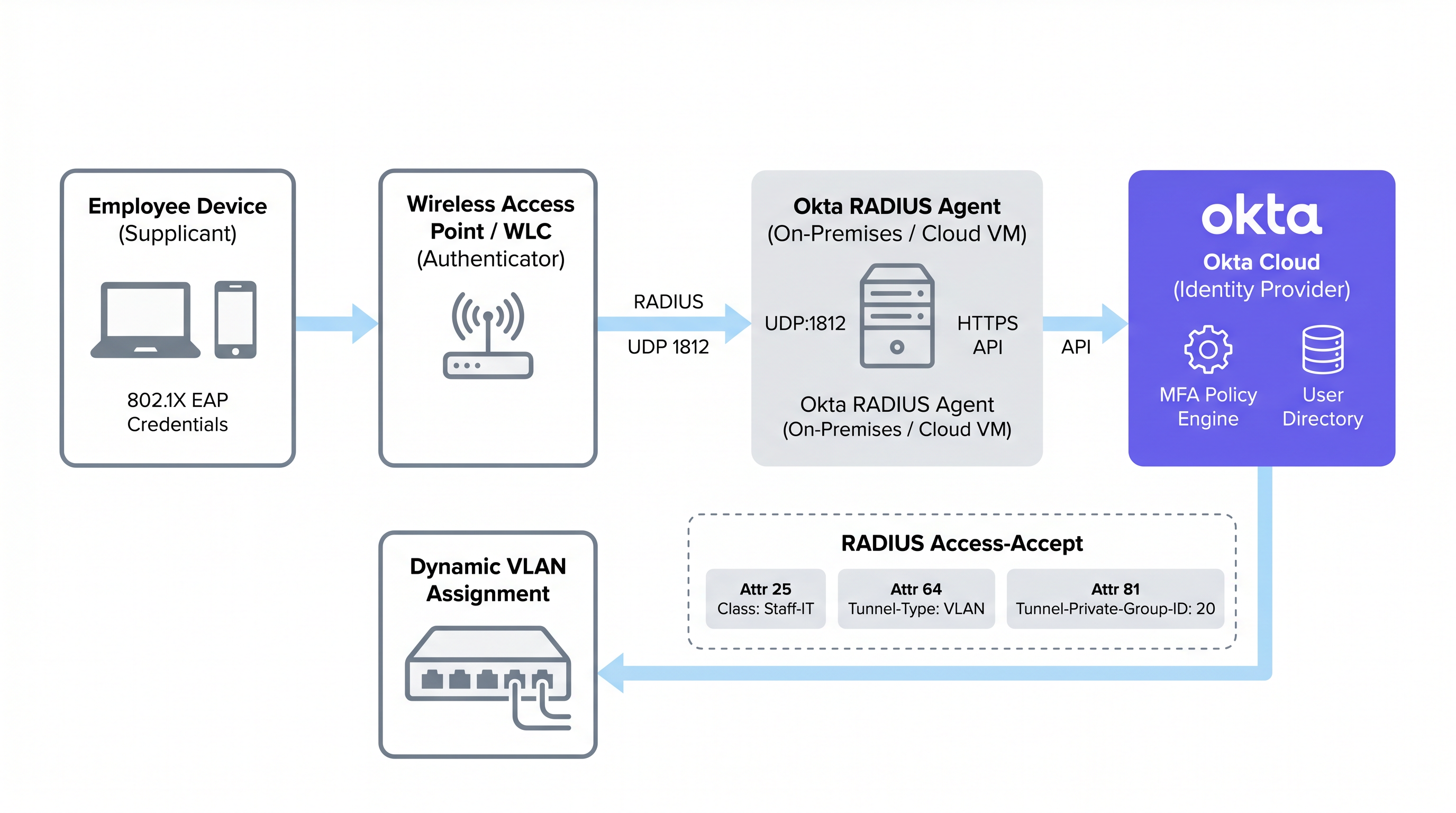
Este modelo de proxy significa que el agente RADIUS de Okta no necesita almacenar las credenciales de los usuarios localmente. Toda la lógica de autenticación, la evaluación de políticas y el registro de auditoría ocurren en la nube de Okta, lo que brinda a los administradores un panel de control único para la gobernanza de la identidad tanto en las aplicaciones en la nube como en el acceso a la red.
Protocolos EAP compatibles y limitaciones críticas
Una restricción arquitectónica fundamental del agente RADIUS de Okta es su dependencia del Protocolo de Autenticación de Contraseña (PAP) para la autenticación primaria. Aunque PAP transmite contraseñas en texto plano en la capa interna, estas se encapsulan y protegen mediante el túnel TLS externo del Protocolo de Autenticación Extensible (EAP). Los protocolos externos compatibles son EAP-TTLS (con PAP como método interno) y EAP-GTC. Para una comparación más profunda de los métodos EAP, consulte la guía de referencia Comparativa de métodos EAP: PEAP, EAP-TLS, EAP-TTLS y EAP-FAST .
Fundamentalmente, PEAP-MSCHAPv2 no es compatible. Este es el protocolo 802.1X predeterminado para clientes Windows y muchos entornos empresariales heredados. Las organizaciones que migran desde una configuración RADIUS tradicional de NPS/Active Directory deben reconfigurar sus suplicantes de cliente para usar EAP-TTLS con PAP, un cambio que normalmente requiere un perfil inalámbrico enviado a través de MDM o políticas de grupo. No tener esto en cuenta es la causa más común de implementaciones fallidas de RADIUS de Okta.
EAP-TLS, que se basa completamente en la autenticación mutua basada en certificados, tampoco es compatible de forma nativa con el agente RADIUS de Okta. Las organizaciones que requieren EAP-TLS deben implementar una PKI dedicada o una solución RADIUS en la nube que se integre con Okta como IdP a través de SAML u OIDC, en lugar de usar el agente RADIUS de Okta directamente.
Aplicación de MFA en conexiones WiFi
El agente RADIUS de Okta admite MFA para el acceso WiFi, pero introduce desafíos en la experiencia del usuario que deben considerarse cuidadosamente antes de la implementación. Cuando se activa una política de MFA, el agente envía un Access-Challenge de RADIUS al cliente. Okta admite varios factores para las aplicaciones RADIUS:
| Factor de MFA | PAP | EAP-TTLS | Notas |
|---|---|---|---|
| Okta Verify Push | Compatible | Compatible | Enviado fuera de banda; el usuario toca Aprobar en el móvil |
| TOTP (Okta Verify / Google Auth) | Compatible | Compatible | El usuario añade el OTP a la contraseña (ej. Pass123,456789) |
| SMS / Email / Voz | Compatible | Compatible | El usuario envía primero la cadena de activación (SMS, EMAIL, CALL) |
| Duo Push / SMS / Passcode | Compatible | Compatible | Código de acceso de Duo solo para EAP-TTLS |
| YubiKey / U2F / Windows Hello | No compatible | No compatible | Tokens de hardware incompatibles con el protocolo RADIUS |
La restricción práctica es el roaming. En entornos de Hotelería , la tableta de un empleado de limpieza puede realizar roaming entre puntos de acceso docenas de veces por turno, activando la reautenticación cada vez. Requerir la aprobación de una notificación push en cada roaming es operativamente insostenible. Para el WiFi del personal general, se suelen preferir políticas de contraseñas sólidas combinadas con la confianza del dispositivo de Okta y las políticas de zona de red en lugar de solicitudes de MFA activas. El MFA en WiFi debe reservarse para SSIDs administrativos o escenarios de acceso de alto privilegio.
Autenticación basada en contraseñas frente a autenticación basada en certificadosa través del agente Okta RADIUS) y EAP-TLS basado en certificados es una de las decisiones más trascendentales en un despliegue de WiFi empresarial. Las compensaciones no se limitan a la seguridad; involucran la complejidad del despliegue, la madurez de la gestión de dispositivos y la carga operativa.
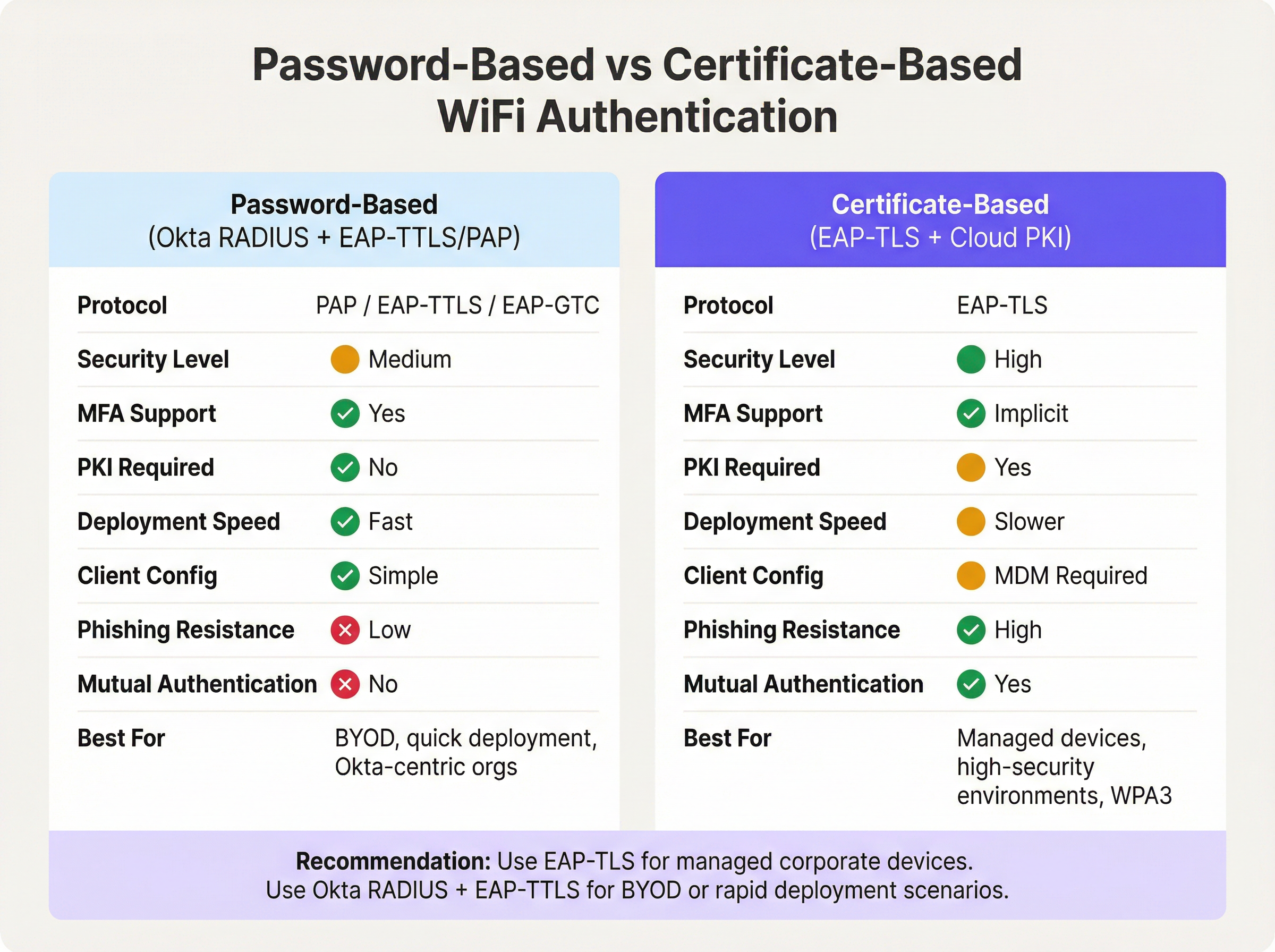
La autenticación basada en contraseñas a través del agente Okta RADIUS ofrece una ruta rápida hacia la identidad unificada. Si su organización ya gestiona usuarios en Okta, el despliegue puede completarse en horas en lugar de semanas. No hay PKI que construir, ni certificados que distribuir, ni dependencia de MDM. La desventaja es que las contraseñas siguen siendo la credencial principal, y la ausencia de autenticación mutua significa que el cliente no puede verificar criptográficamente la identidad de la red, un vector para ataques de gemelo malvado en entornos de alto riesgo.
EAP-TLS basado en certificados elimina por completo las contraseñas de la ecuación de autenticación WiFi. El cliente presenta un certificado de dispositivo y el servidor RADIUS presenta un certificado de servidor, proporcionando autenticación mutua. Este es el enfoque recomendado para IEEE 802.1X en redes WPA3-Enterprise, particularmente en entornos sujetos a PCI DSS o NCSC Cyber Essentials Plus. El requisito previo es una PKI funcional, ya sea un despliegue local de Microsoft ADCS o un servicio de PKI en la nube, y una plataforma MDM capaz de distribuir certificados a todos los puntos finales gestionados. Para entornos de Retail con cientos de dispositivos de punto de venta gestionados, esta inversión está bien justificada. Para entornos con gran cantidad de BYOD o despliegues rápidos, Okta RADIUS con EAP-TTLS es la opción pragmática.
Mapeo de atributos RADIUS para la asignación dinámica de VLAN
La asignación dinámica de VLAN es donde la integración de Okta RADIUS ofrece su valor operativo más tangible. Al mapear la pertenencia a grupos de Okta con los atributos RADIUS, los administradores de red pueden aplicar la segmentación de red basada en roles sin mantener políticas de VLAN separadas por dispositivo o por ubicación.
Okta pasa los datos de pertenencia a grupos en el mensaje Access-Accept de RADIUS utilizando uno de tres atributos, configurables en la Configuración Avanzada de RADIUS de la aplicación Okta:
- Atributo 11 (Filter-Id): Un atributo de cadena que contiene el nombre del grupo. Ampliamente compatible entre proveedores.
- Atributo 25 (Class): Un atributo opaco utilizado para la autorización. Compatible con Cisco ISE, Aruba ClearPass y Fortinet.
- Atributo 26 (Vendor-Specific): Permite subatributos específicos del proveedor para un control más granular.
El controlador de red (WLC, dispositivo NAC) recibe el nombre del grupo de Okta en el atributo seleccionado y lo mapea a los atributos de túnel RADIUS estándar requeridos para la asignación de VLAN:
| Atributo RADIUS | Valor | Propósito |
|---|---|---|
| 64 (Tunnel-Type) | 13 (VLAN) | Especifica el tunelizado de VLAN |
| 65 (Tunnel-Medium-Type) | 6 (802) | Especifica el medio IEEE 802 |
| 81 (Tunnel-Private-Group-ID) | p. ej., 40 |
El ID de la VLAN de destino |
Por ejemplo, un usuario en el grupo de Okta Retail-POS-Staff tendría Class: Retail-POS-Staff devuelto en el Access-Accept. La política del WLC mapearía esto a Tunnel-Private-Group-ID: 40, colocando el dispositivo en la VLAN 40, la red POS aislada. Un usuario en Store-Management sería colocado en la VLAN 50. Esta lógica se aplica en el borde de la red, no en Okta, pero es impulsada enteramente por la pertenencia a grupos de Okta.
Guía de implementación
Paso 1: Desplegar el agente Okta RADIUS (Alta disponibilidad)
Despliegue el agente Okta RADIUS en un mínimo de dos servidores, ya sea de forma local o en una VPC en la nube, para garantizar la alta disponibilidad. Los despliegues de un solo agente son un riesgo crítico: si el servidor no está disponible para parches o experimenta una falla, toda la autenticación WiFi 802.1X fallará en toda la infraestructura. Configure su WLC o dispositivo NAC para equilibrar la carga de las solicitudes RADIUS entre ambos agentes.
Durante la instalación, el agente solicitará un inicio de sesión de administrador de Okta para autorizar el agente y vincularlo al tenant de Okta. Una vez autorizado, el agente aparece en la Consola de Administración de Okta en Settings > Downloads > RADIUS Agent Status, donde se puede monitorear el estado de salud y la conectividad.
Paso 2: Configurar la aplicación RADIUS en Okta
- En la Consola de Administración de Okta, navegue a Applications > Applications y busque en el catálogo de aplicaciones RADIUS Application.
- Agregue la aplicación, asígnele un nombre descriptivo (p. ej.,
Corporate-WiFi-Staff) y haga clic en Next. - En la pestaña Sign On, configure el RADIUS Port (predeterminado 1812) y genere un Shared Secret sólido, generado aleatoriamente, de al menos 32 caracteres.
- En Advanced RADIUS Settings, habilite Accept password and security token in the same login request si tiene la intención de admitir TOTP adjunto a las contraseñas.
- Opcionalmente, habilite Permit Automatic Push for Okta Verify Enrolled Users para un MFA basado en push sin interrupciones.
- Asigne la aplicación a los grupos de Okta pertinentes que representan a su personal.
Paso 3: Configurar la asignación de VLAN basada en grupos
- En la configuración de Sign On de la aplicación RADIUS, haga clic en Edit en la sección Advanced RADIUS Settings.
- Marque Include groups in RADIUS response.
- Seleccione el atributo RADIUS: se recomienda 25 Class para entornos Aruba y Cisco; 11 Filter-Id para Fortinet y otros.
- Agregue los nombres de grupos de Okta específicos para incluir (p. ej.,
Retail-POS-Staff,Store-Management,IT-Admins). - En su WLC o dispositivo NAC, cree políticas de cumplimiento que mapeen cada nombre de grupo a los atributos de túnel VLAN correspondientes.
Paso 4: Configurar los suplicantes de cliente
Debido a que PEAP-MSCHAPv2 no es compatible, los dispositivos cliente deben configurarse para usar EAP-TTLS con PAP como método interno. Despliegue un perfil de red inalámbrica a través de su plataforma MDM (p. ej., Microsoft Intune, Jamf Pro) o mediante Objetos de Política de Grupo (GPO) para dispositivos unidos al dominio de Windows. El perfil debe especifique:
- SSID: El nombre de su SSID empresarial
- Seguridad: WPA2-Enterprise o WPA3-Enterprise
- Método EAP: EAP-TTLS
- Autenticación interna: PAP
- Validación de certificado de servidor: Habilitado (anclar al CN del certificado de servidor de su agente RADIUS)
Paso 5: Configurar los tiempos de espera de RADIUS
Aumente el tiempo de espera de RADIUS en su WLC del valor predeterminado de 3-5 segundos a 30-60 segundos. Esto es crítico si se utilizan notificaciones push de MFA, ya que el usuario debe tener tiempo suficiente para aprobar la notificación en su dispositivo antes de que el WLC abandone el intento de autenticación.
Mejores prácticas
Implementar Okta RADIUS para la autenticación WiFi es sencillo, pero varias mejores prácticas operativas separan una implementación de producción resiliente de una prueba de concepto frágil.
Segmente el tráfico de invitados y del personal a nivel de SSID. Okta RADIUS es una herramienta de identidad para la fuerza laboral. Para el acceso de visitantes e invitados, implemente una solución de Captive Portal dedicada. Esto evita que los costos de licencia de Okta escalen con el volumen de invitados y garantiza una clara separación de funciones. Los clientes empresariales de Purple pueden implementar Guest WiFi en un SSID independiente mientras utilizan Okta RADIUS para la autenticación del personal en la misma infraestructura física.
Utilice un dispositivo NAC para entornos de políticas complejos. Si su entorno requiere acceso condicional basado en la postura del dispositivo, filtrado de direcciones MAC o estado del certificado junto con la identidad del usuario, implemente un dispositivo NAC intermedio (Aruba ClearPass, Cisco ISE o Portnox) para actuar como proxy de las solicitudes al agente Okta RADIUS. El dispositivo NAC puede enriquecer la respuesta RADIUS con atributos de túnel adicionales que el agente de Okta por sí solo no puede generar.
Monitoree a través del Registro del sistema de Okta. Cada evento de autenticación (éxito, falla, desafío MFA y tipo de factor) se registra en el Registro del sistema de Okta. Configure el flujo de registros a su SIEM para alertas en tiempo real sobre anomalías de autenticación. Esto es particularmente valioso para organizaciones de Salud y del sector público sujetas a requisitos de auditoría.
Rote los secretos compartidos de forma programada. El secreto compartido entre la aplicación Okta RADIUS y su NAS es una credencial de seguridad crítica. Implemente un programa de rotación (se recomienda trimestralmente) y actualice tanto la aplicación Okta como la configuración del WLC/NAC simultáneamente.
Restrinja las direcciones de servicio RADIUS. En la configuración del agente Okta RADIUS, restrinja qué direcciones IP tienen permitido enviar solicitudes RADIUS. Esto evita que dispositivos NAS no autorizados intenten autenticarse contra su inquilino de Okta.
Para obtener orientación sobre el contexto más amplio de la arquitectura de red, consulte Los beneficios principales de SD WAN para las empresas modernas y Definición de puntos de acceso inalámbricos: su guía definitiva para 2026 .
Resolución de problemas y mitigación de riesgos
La siguiente tabla resume los modos de falla más comunes encontrados en las implementaciones de WiFi con Okta RADIUS y sus mitigaciones recomendadas.
| Modo de falla | Causa raíz | Mitigación |
|---|---|---|
| Tiempos de espera de autenticación | El tiempo de espera de RADIUS en el WLC es demasiado corto para la respuesta de la API de Okta o MFA | Aumentar el tiempo de espera de RADIUS en el WLC a 30-60 segundos |
| Clientes de Windows rechazados | Windows usa por defecto PEAP-MSCHAPv2, que Okta RADIUS rechaza | Implementar el perfil inalámbrico EAP-TTLS/PAP mediante MDM o GPO |
| Usuarios en la VLAN incorrecta | Discrepancia en el nombre del grupo de Okta o falta de atributos de túnel en el WLC | Verificar que el WLC asocie Class/Filter-Id a Tunnel-Private-Group-ID; revisar el Registro del sistema de Okta |
| Agente inalcanzable | Servidor fuera de línea, token de API expirado o firewall bloqueando HTTPS hacia Okta | Implementar agentes redundantes; monitorear el estado del agente en la Consola de administración de Okta; verificar HTTPS de salida |
| Push de MFA no entregado | Usuario no inscrito en Okta Verify o dispositivo móvil fuera de línea | Aplicar política de inscripción en Okta Verify; considerar TOTP como alternativa |
| Errores de validación de certificado | El cliente no puede validar el certificado del servidor RADIUS | Anclar el CN del certificado del servidor en el perfil inalámbrico del cliente; asegurar que la cadena de CA sea de confianza |
| Atributos de VLAN no enviados | El grupo de Okta no está incluido en la configuración de respuesta RADIUS | Verificar que el grupo figure en la Configuración avanzada de RADIUS; confirmar que el usuario sea miembro del grupo en Okta |
Para entornos de Transporte y del sector público donde el tiempo de actividad de la red es de misión crítica, implemente un monitoreo sintético que pruebe periódicamente la autenticación RADIUS de extremo a extremo y alerte sobre fallas antes de que los usuarios se vean afectados.
ROI e impacto empresarial
El caso de negocio para la autenticación WiFi con Okta RADIUS se basa en tres pilares: eficiencia operativa, mejora de la postura de seguridad y preparación para el cumplimiento.
Eficiencia operativa. Consolidar la autenticación WiFi en Okta elimina la necesidad de mantener una infraestructura RADIUS local independiente (servidores NPS, AD local) en cada sede o sitio. Para una cadena hotelera con 50 propiedades, esto puede representar una reducción significativa en los costos de infraestructura por sitio y en los gastos generales de soporte de TI. El aprovisionamiento y desaprovisionamiento de usuarios se vuelven procesos atómicos: agregar un usuario al grupo de Okta correcto otorga simultáneamente acceso a la aplicación y a la VLAN de WiFi correspondiente. Cuando un empleado se va, la desactivación de su cuenta de Okta revoca inmediatamente el acceso WiFi en todos los sitios.
Postura de seguridad. Reemplazar las contraseñas WiFi PSK compartidas con la autenticación 802.1X por usuario elimina el intercambio de credenciales, un vector común para amenazas internas y acceso no autorizado. Combinado con la asignación dinámica de VLAN, esto refuerza el principio de privilegio mínimo en la capa de red. El Registro del sistema de Okta proporciona un rastro de auditoría completo y a prueba de manipulaciones de cada evento de autenticación WiFi, lo cual es esencial para la respuesta a incidentes.
Preparación para el cumplimiento. El requisito 8.3 de PCI DSS 4.0 exige MFA para todo acceso administrativo que no sea por consola. El requisito 1.3 exige la segmentación de red entre el entorno de datos de los titulares de tarjetas y otras redes. Okta RADIUS con asignación de VLAN basada en gruposEsta implementación aborda directamente ambos requisitos. Para el cumplimiento de GDPR, el Okta System Log proporciona los registros de acceso necesarios para demostrar los controles técnicos adecuados sobre los sistemas de procesamiento de datos personales. Para los establecimientos que implementan Soluciones Modernas de WiFi para la Hospitalidad , este enfoque unificado de identidad y acceso a la red es cada vez más un requisito previo para las adquisiciones empresariales.
Las organizaciones que han completado esta integración suelen informar una reducción en los tickets de soporte de TI relacionados con WiFi (menos solicitudes de restablecimiento de contraseña, menos incidentes de configuración incorrecta de VLAN) y una mejora medible en las puntuaciones de las auditorías de seguridad. La inversión en la implementación y configuración del agente Okta RADIUS —que suele medirse en días en lugar de semanas para una implementación en un solo sitio— ofrece ahorros operativos continuos que se acumulan en propiedades distribuidas.
Términos clave y definiciones
Okta RADIUS Agent
A lightweight on-premises or cloud-hosted proxy service that translates RADIUS authentication requests from network infrastructure (access points, WLCs) into Okta API calls, enabling the Okta cloud to serve as the authentication backend for 802.1X WiFi.
IT teams encounter this when deploying enterprise WiFi authentication backed by Okta. It is the critical bridge component between legacy RADIUS-based network infrastructure and modern cloud identity.
802.1X
An IEEE standard for port-based Network Access Control (NAC) that defines an authentication framework for wired and wireless networks. It uses the Extensible Authentication Protocol (EAP) to carry authentication credentials between the supplicant (device), authenticator (AP/switch), and authentication server (RADIUS).
802.1X is the foundation of enterprise WiFi security. Any deployment using WPA2-Enterprise or WPA3-Enterprise is using 802.1X. IT teams must understand the three-party model (supplicant, authenticator, authentication server) to troubleshoot connectivity issues.
EAP-TTLS (Extensible Authentication Protocol - Tunnelled Transport Layer Security)
An EAP method that establishes a TLS tunnel using only a server-side certificate, then carries a simpler inner authentication protocol (such as PAP) inside the tunnel. This protects the inner credentials from eavesdropping while requiring only server-side certificate infrastructure.
EAP-TTLS with PAP is the recommended protocol for Okta RADIUS WiFi authentication. It is more secure than bare PAP but does not require client-side certificates, making it practical for BYOD and mixed-device environments.
EAP-TLS (Extensible Authentication Protocol - Transport Layer Security)
An EAP method that uses mutual certificate-based authentication — both the client and the server present digital certificates. It is the most secure 802.1X method, providing phishing-resistant, password-free authentication.
EAP-TLS is the gold standard for managed corporate device environments. It requires a PKI infrastructure and MDM for certificate distribution. The Okta RADIUS agent does not natively support EAP-TLS; a dedicated cloud PKI or RADIUS service is required.
PAP (Password Authentication Protocol)
A simple authentication protocol that transmits usernames and passwords in plaintext. In the context of 802.1X, PAP is used as the inner authentication method inside an EAP-TTLS tunnel, where the outer TLS layer provides encryption.
PAP is the primary authentication mechanism supported by the Okta RADIUS agent. IT teams must understand that PAP alone is insecure, but PAP inside EAP-TTLS is acceptable for enterprise WiFi when the server certificate is properly validated.
Dynamic VLAN Assignment
A network access control technique where a RADIUS server returns VLAN assignment attributes in the Access-Accept message, causing the wireless controller or switch to place the authenticated client on a specific VLAN based on their identity or group membership, rather than a static per-SSID VLAN.
Dynamic VLAN assignment is essential for network segmentation in multi-role environments (e.g., separating POS terminals from general staff devices). It is configured by returning RADIUS attributes 64, 65, and 81 in the Access-Accept message.
RADIUS Attribute 25 (Class)
A standard RADIUS attribute used to pass arbitrary authorisation data from the authentication server to the NAS. Okta uses this attribute to return Okta group membership information to the wireless controller, which can then use it for VLAN assignment or access policy decisions.
IT teams configuring Okta group-based VLAN assignment will configure the WLC to read the Class attribute value and map it to a VLAN ID. The exact attribute to use (11, 25, or 26) depends on the WLC vendor's documentation.
NAS (Network Access Server)
In RADIUS terminology, the NAS is the network device that receives the user's connection request and forwards it to the RADIUS server for authentication. In WiFi deployments, the NAS is typically the wireless access point or wireless LAN controller.
The NAS is the authenticator in the 802.1X model. IT teams must configure the NAS with the RADIUS server IP address, port, and shared secret. The NAS IP address should be whitelisted in the Okta RADIUS agent's service address filtering configuration.
Shared Secret
A pre-shared password used to authenticate RADIUS messages between the NAS (WLC/AP) and the RADIUS server (Okta RADIUS agent). It is used to compute a Message-Authenticator hash that verifies the integrity of RADIUS packets.
The shared secret must be identical on both the Okta RADIUS application configuration and the WLC/NAC RADIUS server entry. It should be at least 32 characters, randomly generated, and rotated on a regular schedule. A mismatch is a common cause of RADIUS authentication failures.
MFA Challenge (RADIUS Access-Challenge)
A RADIUS message type sent by the authentication server to the NAS when additional authentication factors are required. The NAS relays the challenge to the client, which must respond with the appropriate factor (e.g., OTP, push approval) before authentication can complete.
The Access-Challenge mechanism is how Okta enforces MFA over RADIUS. IT teams must ensure the WLC supports the challenge-response exchange and that the RADIUS timeout is long enough for the user to complete the MFA step.
Casos de éxito
A 150-property hotel chain currently uses on-premises NPS servers at each property for 802.1X staff WiFi authentication. Each NPS server is joined to a local Active Directory domain. The IT team wants to centralise identity management in Okta and eliminate the per-property NPS infrastructure. How should they approach the migration?
The recommended approach is a phased migration using the Okta RADIUS agent deployed in a centralised cloud VPC rather than at each property. Phase 1: Deploy two Okta RADIUS agent instances in a cloud VPC (e.g., AWS or Azure) in the same region as the majority of properties. Configure the agents to listen on UDP 1812. Phase 2: For each property, add the Okta RADIUS agent IPs as secondary RADIUS servers on the WLC, keeping the existing NPS as primary. This allows parallel operation and testing without disrupting live authentication. Phase 3: Migrate users from local AD to Okta. Use Okta's AD agent to sync existing accounts initially, then progressively move to Okta as the authoritative source. Phase 4: For each property, configure the WLC to use EAP-TTLS/PAP and push the new wireless profile to staff devices via MDM. Phase 5: Once all devices are confirmed on EAP-TTLS, switch the WLC RADIUS priority to the Okta agents as primary and decommission the NPS servers. Configure Okta groups (Front-Desk, Housekeeping, F&B, Management, IT-Admins) and enable group-based VLAN assignment using Attribute 25 (Class). Map each group to the appropriate VLAN on the WLC. Increase WLC RADIUS timeout to 45 seconds to accommodate Okta API latency.
A national retail chain with 320 stores needs to achieve PCI DSS 4.0 compliance for its staff WiFi. Store associates use handheld devices for inventory management, and a separate set of devices handles point-of-sale transactions. The chain uses Okta for all workforce identity. How do they implement VLAN segmentation using Okta RADIUS to satisfy PCI DSS network segmentation requirements?
Create three Okta groups: POS-Staff (for employees who operate POS terminals), Inventory-Staff (for warehouse and shop floor associates), and Store-Management. In the Okta RADIUS application, enable 'Include groups in RADIUS response' and select Attribute 25 (Class). Add all three groups to the response configuration. On the wireless controller at each store (or centrally via a cloud WLC), create three enforcement policies: (1) If Class = POS-Staff, assign Tunnel-Private-Group-ID = 40 (the POS VLAN, which is in scope for PCI DSS and has firewall rules restricting access to only the payment processor). (2) If Class = Inventory-Staff, assign Tunnel-Private-Group-ID = 50 (the inventory VLAN, out of PCI scope). (3) If Class = Store-Management, assign Tunnel-Private-Group-ID = 60 (the management VLAN with access to store management systems). Devices connecting with credentials of a user in the POS-Staff group are automatically placed on VLAN 40. If a store associate's role changes, updating their Okta group membership immediately changes their VLAN assignment on next connection — no WLC reconfiguration required. Document the Okta group-to-VLAN mapping in the network segmentation diagram for the PCI DSS QSA audit.
Análisis de escenarios
Q1. A mid-size conference centre uses Okta for all staff identity management. They want to deploy 802.1X WiFi for staff using their existing Cisco Meraki access points. Their Windows laptops are managed via Microsoft Intune. The IT manager wants to enforce Okta Verify push MFA for all WiFi connections. What are the three most critical configuration steps they must complete, and what is the most likely failure mode if they skip any of them?
💡 Sugerencia:Consider the EAP protocol compatibility between Okta RADIUS and Windows defaults, the RADIUS timeout setting, and the client wireless profile configuration.
Mostrar enfoque recomendado
The three critical steps are: (1) Deploy a wireless profile via Intune that configures Windows clients to use EAP-TTLS with PAP as the inner method — Windows defaults to PEAP-MSCHAPv2, which the Okta RADIUS agent does not support, causing all authentication attempts to be rejected. (2) Increase the Cisco Meraki RADIUS timeout from the default 5 seconds to at least 45-60 seconds — without this, the authentication request will time out before the user can approve the Okta Verify push notification. (3) Enable 'Permit Automatic Push for Okta Verify Enrolled Users' in the Okta RADIUS application's Advanced RADIUS Settings — without this, users may be prompted to manually select their MFA factor rather than receiving an automatic push. The most likely failure mode if step 1 is skipped is a complete authentication failure for all Windows devices. If step 2 is skipped, authentication will intermittently fail for users who take more than 5 seconds to approve the push. If step 3 is skipped, users will experience a confusing challenge prompt rather than a seamless push notification.
Q2. A large retail chain's security team has flagged that their current Okta RADIUS WiFi deployment uses a single RADIUS agent server. During a recent patching window, the server was offline for 45 minutes, causing WiFi authentication to fail across all 80 stores. What architectural changes should the IT team implement to prevent this, and what are the two deployment options for the agents?
💡 Sugerencia:Consider both the agent deployment topology and the WLC configuration required to support redundancy.
Mostrar enfoque recomendado
The IT team should deploy a minimum of two Okta RADIUS agent instances and configure the WLC at each store to use both agents. There are two deployment options: Option A (Centralised Cloud VMs) — deploy both agents in a cloud VPC (e.g., AWS or Azure), ideally in different availability zones. The WLC at each store points to both cloud IPs, with one as primary and one as secondary (or with load balancing enabled). This minimises per-site infrastructure but introduces WAN dependency. Option B (On-Premises Redundant Pair) — deploy two agent servers at a central data centre or co-location facility, with the WLC using RADIUS failover. On the WLC, configure the primary RADIUS server as Agent 1 and the secondary as Agent 2, with a failover timeout of 3-5 seconds. Enable 'Dead Server Detection' if supported by the WLC vendor. Additionally, the IT team should configure health monitoring in the Okta Admin Console and set up alerting if an agent goes offline. For stores with local servers, a local agent can serve as a tertiary fallback for resilience against WAN outages.
Q3. An enterprise organisation is evaluating whether to use the Okta RADIUS agent with EAP-TTLS/PAP or to invest in a cloud PKI solution for EAP-TLS for their corporate WiFi. They have 2,000 managed Windows and macOS devices enrolled in Microsoft Intune, and they are subject to PCI DSS 4.0. What is the recommended approach and what is the primary security justification?
💡 Sugerencia:Consider the PCI DSS requirements, the device management maturity (all devices are MDM-enrolled), and the security properties of each authentication method.
Mostrar enfoque recomendado
The recommended approach is to invest in EAP-TLS with a cloud PKI solution. The primary security justification is mutual authentication: EAP-TLS requires both the client and the RADIUS server to present digital certificates, meaning the device cryptographically proves its identity to the network and the network proves its identity to the device. This eliminates the risk of evil twin attacks (where a rogue AP impersonates the corporate SSID) and removes passwords from the WiFi authentication equation entirely, eliminating credential theft and phishing as attack vectors. For PCI DSS 4.0, EAP-TLS satisfies Requirement 8.3 (MFA for non-console admin access) implicitly through certificate-based authentication, and it supports WPA3-Enterprise 192-bit mode (Requirement 4.2.1 for strong cryptography). The prerequisite — all 2,000 devices enrolled in Intune — is already met, making certificate distribution via Intune SCEP profiles straightforward. The Okta RADIUS agent with EAP-TTLS/PAP would be an acceptable interim solution during the PKI build-out, but given the PCI DSS scope and the fully managed device estate, EAP-TLS is the correct long-term architecture. The additional investment in a cloud PKI service (typically $3-8 per device per year) is justified by the security uplift and reduced credential management overhead.
Conclusiones clave
- ✓The Okta RADIUS agent proxies 802.1X WiFi authentication requests from network infrastructure to the Okta cloud via HTTPS, enabling cloud identity to govern network access without on-premises directory servers.
- ✓The agent supports EAP-TTLS with PAP and EAP-GTC, but does NOT support PEAP-MSCHAPv2 (the Windows default) or EAP-TLS — client supplicants must be reconfigured via MDM or GPO before deployment.
- ✓MFA on WiFi is technically supported (Okta Verify push, TOTP, SMS) but requires increasing the WLC RADIUS timeout to 30-60 seconds; it is best reserved for administrative SSIDs rather than general staff WiFi due to roaming friction.
- ✓Dynamic VLAN assignment is achieved by enabling 'Include groups in RADIUS response' in Okta and mapping the returned Class (Attribute 25) or Filter-Id (Attribute 11) to VLAN tunnel attributes (64, 65, 81) on the WLC or NAC appliance.
- ✓Always deploy a minimum of two Okta RADIUS agent instances for high availability — a single agent is a critical single point of failure for all WiFi authentication across the estate.
- ✓For fully managed device environments subject to PCI DSS or high-security requirements, EAP-TLS with a cloud PKI is the superior long-term architecture; Okta RADIUS with EAP-TTLS/PAP is the pragmatic choice for BYOD or rapid deployment scenarios.
- ✓Okta RADIUS is a workforce identity tool — deploy a dedicated guest WiFi captive portal solution for visitor access to avoid Okta licence scaling costs and maintain clean separation between staff and guest network access.




