

Okta e RADIUS: Estendendo seu Provedor de Identidade para a Autenticação WiFi
This guide provides a comprehensive technical reference for IT administrators at Okta-centric organisations who want to extend their cloud identity provider to WiFi authentication using the Okta RADIUS agent. It covers the full authentication architecture, MFA enforcement trade-offs, dynamic VLAN assignment via RADIUS attribute mapping, and the critical decision between password-based EAP-TTLS and certificate-based EAP-TLS. Venue operators and enterprise IT teams will find actionable deployment guidance, real-world case studies from hospitality and retail, and a clear framework for integrating Okta RADIUS alongside dedicated guest WiFi solutions.
🎧 Ouça este Guia
Ver Transcrição

Resumo Executivo
Para equipes de TI corporativas que gerenciam locais distribuídos — de redes de hotéis a estádios —, unificar o controle de acesso à rede com um provedor de identidade em nuvem é um passo fundamental em direção ao Zero Trust. O agente Okta RADIUS preenche a lacuna entre a identidade em nuvem moderna e a infraestrutura WiFi 802.1X tradicional, permitindo que as organizações descontinuem servidores RADIUS locais legados e a infraestrutura do Active Directory para autenticação de rede.
Este guia detalha como implantar o agente Okta RADIUS para autenticação WiFi corporativa, abordando a arquitetura de proxy, os mecanismos de aplicação de MFA e as compensações entre o EAP-TTLS baseado em senha e o EAP-TLS baseado em certificado. Ele também fornece orientações práticas sobre o mapeamento de associações de grupos do Okta para atributos RADIUS visando a atribuição dinâmica de VLAN — um recurso que apoia diretamente os requisitos de segmentação de rede do PCI DSS. Ao integrar o Okta para a autenticação de funcionários em conjunto com soluções de Guest WiFi , os operadores de locais podem alcançar uma camada de acesso unificada, segura e em conformidade, sem duplicar a infraestrutura de identidade.
Análise Técnica Aprofundada
Como Funciona o Agente Okta RADIUS
O agente Okta RADIUS é um serviço de sistema leve que atua como um proxy entre os Servidores de Acesso à Rede (NAS) — como pontos de acesso sem fio (WAPs) ou controladores de LAN sem fio (WLCs) — e a nuvem da Okta. Ele geralmente é implantado em um servidor Windows ou Linux local ou em uma VPC na nuvem, e é gerenciado inteiramente a partir do Okta Admin Console após a instalação inicial.
O fluxo de autenticação segue um modelo de proxy 802.1X padrão. O dispositivo de um usuário (o suplicante) se conecta a um SSID corporativo e apresenta as credenciais. O WAP ou WLC (o autenticador) encaminha um Access-Request RADIUS para o agente Okta RADIUS pela porta UDP 1812. O agente encapsula essa solicitação com segurança para a nuvem da Okta por meio de uma chamada de API HTTPS, onde o mecanismo de políticas da Okta avalia as credenciais em relação ao seu diretório de usuários e a quaisquer políticas de login configuradas. Se a autenticação for bem-sucedida, o agente retornará uma mensagem Access-Accept RADIUS ao autenticador, incluindo opcionalmente atributos RADIUS para autorização, como a atribuição de VLAN. Se a MFA for necessária, o agente enviará um Access-Challenge RADIUS de volta ao cliente, solicitando um segundo fator antes que a decisão final seja retornada.
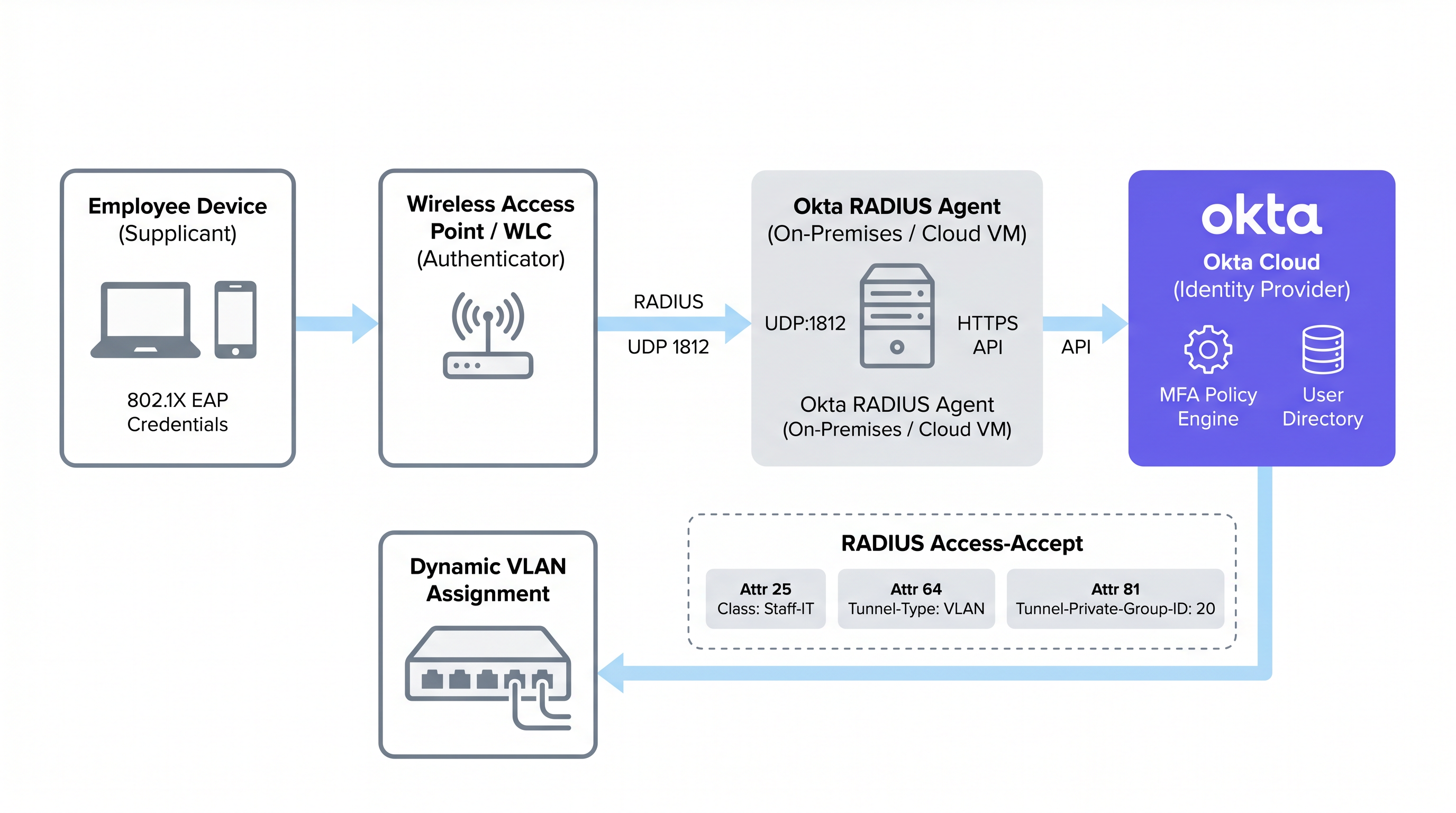
Esse modelo de proxy significa que o agente Okta RADIUS não precisa armazenar credenciais de usuários localmente. Toda a lógica de autenticação, avaliação de políticas e registro de auditoria ocorrem na nuvem da Okta, oferecendo aos administradores um painel único para a governança de identidade em aplicativos em nuvem e acesso à rede.
Protocolos EAP Suportados e Limitações Críticas
Uma restrição arquitetônica fundamental do agente Okta RADIUS é sua dependência do Password Authentication Protocol (PAP) para a autenticação primária. Embora o PAP transmita senhas em texto simples na camada interna, isso é encapsulado e protegido pelo túnel TLS externo do Extensible Authentication Protocol (EAP). Os protocolos externos suportados são EAP-TTLS (com PAP como método interno) e EAP-GTC. Para uma comparação mais profunda dos métodos EAP, consulte o guia de referência Comparativo de métodos EAP: PEAP, EAP-TLS, EAP-TTLS e EAP-FAST .
Criticamente, o PEAP-MSCHAPv2 não é suportado. Este é o protocolo 802.1X padrão para clientes Windows e muitos ambientes corporativos legados. As organizações que migram de uma configuração tradicional de RADIUS com NPS/Active Directory devem reconfigurar seus suplicantes de clientes para usar EAP-TTLS com PAP — uma mudança que normalmente requer um perfil sem fio enviado via MDM ou Política de Grupo (GPO). Não levar isso em consideração é a causa mais comum de falhas em implantações do Okta RADIUS.
O EAP-TLS, que depende inteiramente da autenticação mútua baseada em certificados, também não é suportado nativamente pelo agente Okta RADIUS. As organizações que exigem EAP-TLS devem implantar uma PKI dedicada ou uma solução RADIUS em nuvem que se integre ao Okta como o IdP via SAML ou OIDC, em vez de usar o agente Okta RADIUS diretamente.
Aplicando MFA em Conexões WiFi
O agente Okta RADIUS suporta MFA para acesso WiFi, mas introduz desafios na experiência do usuário que devem ser cuidadosamente considerados antes da implantação. Quando uma política de MFA é acionada, o agente envia um Access-Challenge RADIUS ao cliente. A Okta suporta vários fatores para aplicativos RADIUS:
| Fator MFA | PAP | EAP-TTLS | Notas |
|---|---|---|---|
| Okta Verify Push | Suportado | Suportado | Enviado fora de banda; o usuário toca em Aprovar no celular |
| TOTP (Okta Verify / Google Auth) | Suportado | Suportado | O usuário anexa o OTP à senha (ex.: Pass123,456789) |
| SMS / E-mail / Voz | Suportado | Suportado | O usuário envia a string de acionamento (SMS, EMAIL, CALL) primeiro |
| Duo Push / SMS / Passcode | Suportado | Suportado | Passcode do Duo apenas para EAP-TTLS |
| YubiKey / U2F / Windows Hello | Não Suportado | Não Suportado | Tokens de hardware incompatíveis com o protocolo RADIUS |
A restrição prática é o roaming. Em ambientes de Hospitalidade , o tablet de uma camareira pode alternar entre pontos de acesso dezenas de vezes por turno, acionando a reautenticação a cada vez. Exigir a aprovação de uma notificação push a cada roaming é operacionalmente insustentável. Para o WiFi geral da equipe, políticas de senhas fortes combinadas com as políticas de confiança de dispositivos e zonas de rede da Okta geralmente são preferíveis a solicitações ativas de MFA. A MFA no WiFi deve ser reservada para SSIDs administrativos ou cenários de acesso com altos privilégios.
Autenticação Baseada em Senha vs. Baseada em Certificado
A escolha entre o RADIUS baseado em senha (via agente Okta RADIUS) e o EAP-TLS baseado em certificado é uma das decisões mais importantes em uma implantação de WiFi corporativo. As compensações não se resumem apenas à segurança; elas envolvem a complexidade da implantação, a maturidade do gerenciamento de dispositivos e a sobrecarga operacional.
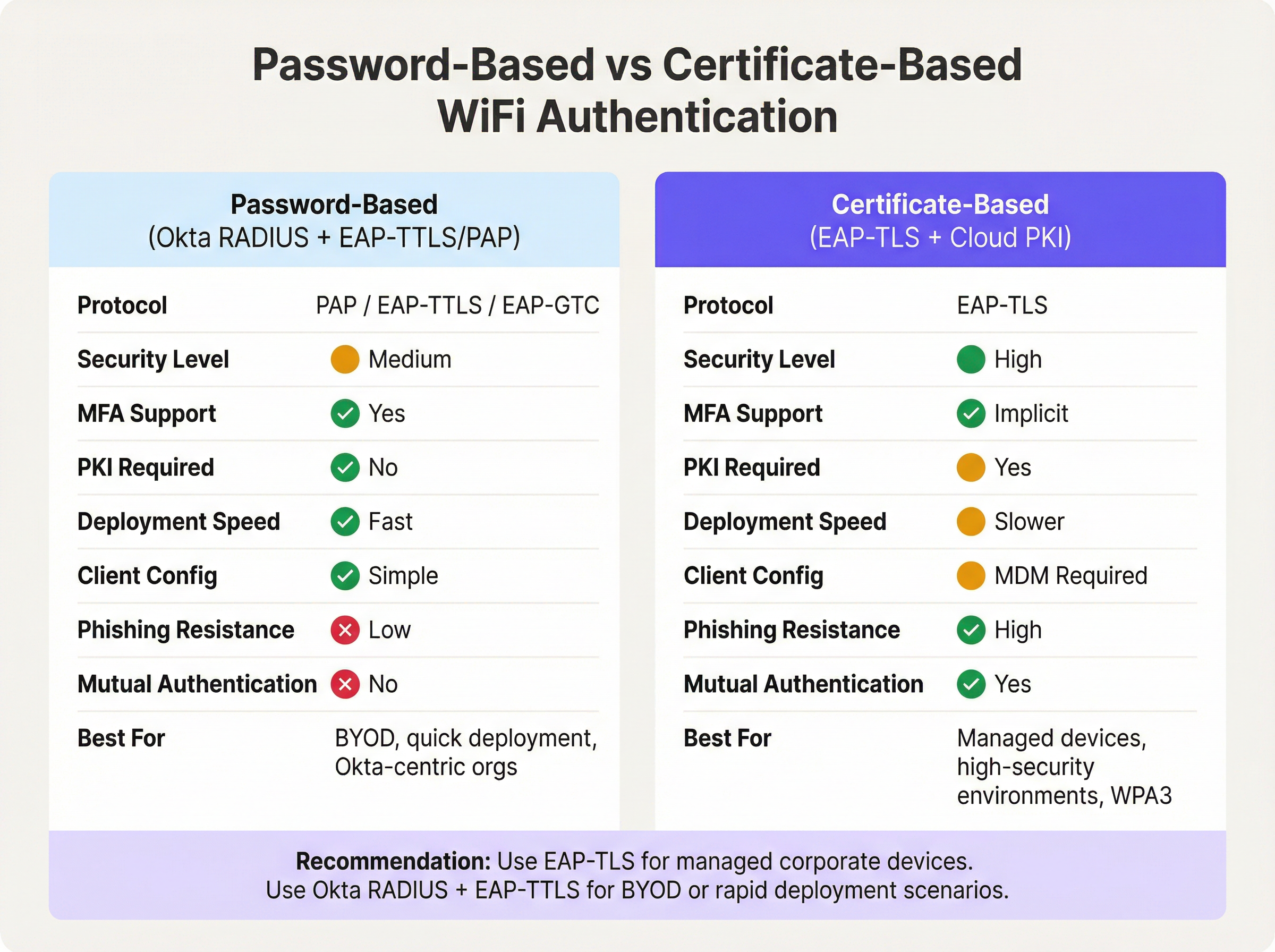
A autenticação baseada em senha via agente Okta RADIUS oferece um caminho rápido para a identidade unificada. Se a sua organização já gerencia usuários no Okta, a implantação pode ser concluída em horas, em vez de semanas. Não há PKI para construir, nem certificados para distribuir e nenhuma dependência de MDM. A desvantagem é que as senhas continuam sendo a credencial principal, e a ausência de autenticação mútua significa que o cliente não pode verificar criptograficamente a identidade da rede — um vetor para ataques de evil twin em ambientes de alto risco.
O EAP-TLS baseado em certificado elimina totalmente as senhas da equação de autenticação WiFi. O cliente apresenta um certificado de dispositivo e o servidor RADIUS apresenta um certificado de servidor, fornecendo autenticação mútua. Esta é a abordagem recomendada para IEEE 802.1X em redes WPA3-Enterprise, particularmente em ambientes sujeitos ao PCI DSS ou NCSC Cyber Essentials Plus. O pré-requisito é uma PKI em funcionamento — seja uma implantação local do Microsoft ADCS ou um serviço de PKI em nuvem — e uma plataforma MDM capaz de distribuir certificados para todos os endpoints gerenciados. Para ambientes de Varejo com centenas de dispositivos de ponto de venda gerenciados, esse investimento é bem justificado. Para ambientes com forte presença de BYOD ou implantações rápidas, o Okta RADIUS com EAP-TTLS é a escolha pragmática.
Mapeamento de Atributos RADIUS para Atribuição Dinâmica de VLAN
A atribuição dinâmica de VLAN é onde a integração do Okta RADIUS entrega seu valor operacional mais tangível. Ao mapear a associação de grupos do Okta para atributos RADIUS, os administradores de rede podem aplicar a segmentação de rede baseada em funções sem manter políticas de VLAN separadas por dispositivo ou por local.
A Okta transmite os dados de associação de grupo na mensagem Access-Accept RADIUS usando um de três atributos, configuráveis nas Configurações Avançadas de RADIUS do aplicativo Okta:
- Atributo 11 (Filter-Id): Um atributo de string contendo o nome do grupo. Amplamente suportado por diversos fornecedores.
- Atributo 25 (Class): Um atributo opaco usado para autorização. Suportado por Cisco ISE, Aruba ClearPass e Fortinet.
- Atributo 26 (Vendor-Specific): Permite subatributos específicos do fornecedor para um controle mais granular.
O controlador de rede (WLC, appliance NAC) recebe o nome do grupo Okta no atributo escolhido e o mapeia para os atributos de túnel RADIUS padrão necessários para a atribuição de VLAN:
| Atributo RADIUS | Valor | Propósito |
|---|---|---|
| 64 (Tunnel-Type) | 13 (VLAN) | Especifica o tunelamento de VLAN |
| 65 (Tunnel-Medium-Type) | 6 (802) | Especifica o meio IEEE 802 |
| 81 (Tunnel-Private-Group-ID) | ex.: 40 |
O ID da VLAN de destino |
Por exemplo, um usuário no grupo Okta Retail-POS-Staff teria Class: Retail-POS-Staff retornado no Access-Accept. A política do WLC mapearia isso para Tunnel-Private-Group-ID: 40, colocando o dispositivo na VLAN 40 — a rede POS isolada. Um usuário em Store-Management seria colocado na VLAN 50. Essa lógica é aplicada na borda da rede, não no Okta, mas é impulsionada inteiramente pela associação de grupo do Okta.
Guia de Implantação
Passo 1: Implantar o Agente Okta RADIUS (Alta Disponibilidade)
Implante o agente Okta RADIUS em no mínimo dois servidores — seja localmente ou em uma VPC na nuvem — para garantir alta disponibilidade. Implantações com um único agente representam um risco crítico: se o servidor estiver indisponível para atualizações ou sofrer uma falha, toda a autenticação WiFi 802.1X falhará em toda a infraestrutura. Configure seu WLC ou appliance NAC para balancear a carga das solicitações RADIUS entre ambos os agentes.
Durante a instalação, o agente solicitará um login de administrador do Okta para autorizar o agente e vinculá-lo ao tenant do Okta. Uma vez autorizado, o agente aparece no Okta Admin Console em Settings > Downloads > RADIUS Agent Status, onde a integridade e a conectividade podem ser monitoradas.
Passo 2: Configurar o Aplicativo RADIUS no Okta
- No Okta Admin Console, navegue até Applications > Applications e pesquise no catálogo de aplicativos por RADIUS Application.
- Adicione o aplicativo, atribua a ele um nome descritivo (ex.:
Corporate-WiFi-Staff) e clique em Next. - Na aba Sign On, configure a RADIUS Port (padrão 1812) e gere um Shared Secret forte e aleatório de pelo menos 32 caracteres.
- Em Advanced RADIUS Settings, ative Accept password and security token in the same login request se você pretende suportar TOTP anexado a senhas.
- Opcionalmente, ative Permit Automatic Push for Okta Verify Enrolled Users para uma MFA baseada em push contínua.
- Atribua o aplicativo aos grupos relevantes do Okta que representam sua equipe.
Passo 3: Configurar a Atribuição de VLAN Baseada em Grupo
- Nas configurações de Sign On do aplicativo RADIUS, clique em Edit na seção Advanced RADIUS Settings.
- Marque Include groups in RADIUS response.
- Selecione o atributo RADIUS: 25 Class é recomendado para ambientes Aruba e Cisco; 11 Filter-Id para Fortinet e outros.
- Adicione os nomes específicos dos grupos do Okta a serem incluídos (ex.:
Retail-POS-Staff,Store-Management,IT-Admins). - No seu WLC ou appliance NAC, crie políticas de aplicação que mapeiem cada nome de grupo para os atributos de túnel de VLAN correspondentes.
Passo 4: Configurar Suplicantes de Clientes
Como o PEAP-MSCHAPv2 não é suportado, os dispositivos clientes devem ser configurados para usar EAP-TTLS com PAP como método interno. Implante um perfil de rede sem fio por meio de sua plataforma MDM (ex.: Microsoft Intune, Jamf Pro) ou via Objetos de Política de Grupo (GPO) para dispositivos Windows ingressados no domínio. O perfil deve especificar:
- SSID: O nome do seu SSID corporativo
- Segurança: WPA2-Enterprise ou WPA3-Enterprise
- Método EAP: EAP-TTLS
- Autenticação Interna: PAP
- Validação de Certificado do Servidor: Ativada (fixar no CN do certificado do servidor do seu agente RADIUS)
Passo 5: Definir Tempos Limite do RADIUS
Aumente o tempo limite (timeout) do RADIUS no seu WLC do padrão de 3 a 5 segundos para 30 a 60 segundos. Isso é crítico se as notificações push de MFA estiverem em uso, pois o usuário deve ter tempo suficiente para aprovar a notificação em seu dispositivo antes que o WLC abandone a tentativa de autenticação.
Melhores Práticas
A implantação do Okta RADIUS para autenticação WiFi é simples, mas várias melhores práticas operacionais separam uma implantação de produção resiliente de uma prova de conceito frágil.
Segmente o tráfego de convidados e funcionários no nível do SSID. O Okta RADIUS é uma ferramenta de identidade da força de trabalho. Para o acesso de visitantes e convidados, implante uma solução dedicada de Captive Portal. Isso evita que os custos de licença da Okta aumentem com o volume de convidados e garante uma separação clara de responsabilidades. Clientes corporativos da Purple podem implantar o Guest WiFi em um SSID separado enquanto usam o Okta RADIUS para a autenticação de funcionários na mesma infraestrutura física.
Use um appliance NAC para ambientes de políticas complexas. Se o seu ambiente exigir acesso condicional com base na postura do dispositivo, filtragem de endereço MAC ou status do certificado juntamente com a identidade do usuário, implante um appliance NAC intermediário (Aruba ClearPass, Cisco ISE ou Portnox) para atuar como proxy das solicitações para o agente Okta RADIUS. O appliance NAC pode enriquecer a resposta RADIUS com atributos de túnel adicionais que o agente Okta sozinho não consegue gerar.
Monitore por meio do Okta System Log. Cada evento de autenticação — sucesso, falha, desafio de MFA e tipo de fator — é registrado no Okta System Log. Configure o streaming de logs para o seu SIEM para alertas em tempo real sobre anomalias de autenticação. Isso é particularmente valioso para organizações de Saúde e do setor público sujeitas a requisitos de auditoria.
Alterne os segredos compartilhados de forma programada. O segredo compartilhado (shared secret) entre o aplicativo Okta RADIUS e o seu NAS é uma credencial de segurança crítica. Implemente um cronograma de rotação (recomenda-se trimestralmente) e atualize tanto o aplicativo Okta quanto a configuração do WLC/NAC simultaneamente.
Restrinja os endereços do serviço RADIUS. Na configuração do agente Okta RADIUS, restrinja quais endereços IP têm permissão para enviar solicitações RADIUS. Isso impede que dispositivos NAS não autorizados tentem se autenticar no seu tenant do Okta.
Para orientações sobre o contexto mais amplo da arquitetura de rede, consulte Os Principais Benefícios da SD-WAN para Empresas Modernas e Definição de Pontos de Acesso Sem Fio: Seu Guia Definitivo para 2026 .
Solução de Problemas e Mitigação de Riscos
A tabela a seguir resume os modos de falha mais comuns encontrados em implantações de WiFi com Okta RADIUS e suas mitigações recomendadas.
| Modo de Falha | Causa Raiz | Mitigação |
|---|---|---|
| Timeouts de Autenticação | Tempo limite do RADIUS no WLC muito curto para a API da Okta ou resposta de MFA | Aumentar o tempo limite do RADIUS no WLC para 30 a 60 segundos |
| Clientes Windows Rejeitados | O Windows usa PEAP-MSCHAPv2 por padrão, o qual o Okta RADIUS rejeita | Enviar perfil sem fio EAP-TTLS/PAP via MDM ou GPO |
| Usuários na VLAN Errada | Incompatibilidade no nome do grupo Okta ou atributos de túnel ausentes no WLC | Verificar se o WLC mapeia Class/Filter-Id para Tunnel-Private-Group-ID; verificar o Okta System Log |
| Agente Inacessível | Servidor offline, token de API expirado ou firewall bloqueando HTTPS para a Okta | Implantar agentes redundantes; monitorar o status do agente no Okta Admin Console; verificar o HTTPS de saída |
| Push de MFA Não Entregue | Usuário não inscrito no Okta Verify ou dispositivo móvel offline | Aplicar política de inscrição no Okta Verify; considerar TOTP como alternativa |
| Erros de Validação de Certificado | O cliente não consegue validar o certificado do servidor RADIUS | Fixar o CN do certificado do servidor no perfil sem fio do cliente; garantir que a cadeia da CA seja confiável |
| Atributos de VLAN Não Enviados | Grupo Okta não incluído na configuração de resposta RADIUS | Verificar se o grupo está listado em Advanced RADIUS Settings; confirmar se o usuário é membro do grupo no Okta |
Para ambientes de Transporte e do setor público onde o tempo de atividade da rede é de missão crítica, implemente um monitoramento sintético que teste periodicamente a autenticação RADIUS de ponta a ponta e alerte sobre falhas antes que os usuários sejam impactados.
ROI e Impacto nos Negócios
O caso de negócios para a autenticação WiFi com Okta RADIUS baseia-se em três pilares: eficiência operacional, melhoria da postura de segurança e prontidão para conformidade.
Eficiência Operacional. Consolidar a autenticação WiFi no Okta elimina a necessidade de manter uma infraestrutura RADIUS local separada (servidores NPS, AD local) em cada local ou site. Para uma rede de hotéis com 50 propriedades, isso pode representar uma redução significativa nos custos de infraestrutura por local e nas despesas gerais de suporte de TI. O provisionamento e desprovisionamento de usuários tornam-se atômicos: adicionar um usuário ao grupo Okta correto concede acesso ao aplicativo e o acesso apropriado à VLAN do WiFi simultaneamente. Quando um funcionário sai, a desativação de sua conta Okta revoga imediatamente o acesso WiFi em todos os locais.
Postura de Segurança. Substituir as senhas WiFi PSK compartilhadas pela autenticação 802.1X por usuário elimina o compartilhamento de credenciais, um vetor comum para ameaças internas e acesso não autorizado. Combinado com a atribuição dinâmica de VLAN, isso aplica o princípio do menor privilégio na camada de rede. O Okta System Log fornece uma trilha de auditoria completa e à prova de adulteração de cada evento de autenticação WiFi, o que é essencial para a resposta a incidentes.
Prontidão para Conformidade. O Requisito 8.3 do PCI DSS 4.0 exige MFA para todo acesso administrativo fora do console. O Requisito 1.3 exige a segmentação de rede entre o ambiente de dados do titular do cartão e outras redes. O Okta RADIUS com atribuição de VLAN baseada em grupo atende diretamente a ambos os requisitos. Para a conformidade com o GDPR, o Okta System Log fornece os registros de acesso necessários para demonstrar controles técnicos apropriados sobre os sistemas de processamento de dados pessoais. Para locais que implantam Soluções Modernas de WiFi para Hospitalidade , essa abordagem unificada para identidade e acesso à rede é cada vez mais um pré-requisito para aquisições corporativas.
As organizações que concluíram essa integração geralmente relatam uma redução nos tickets de suporte de TI relacionados ao WiFi (menos solicitações de redefinição de senha, menos incidentes de configuração incorreta de VLAN) e uma melhoria mensurável nas pontuações de auditoria de segurança. O investimento na implantação e configuração do agente Okta RADIUS — normalmente medido em dias, em vez de semanas, para uma implantação em um único local — proporciona economias operacionais contínuas que se multiplicam em uma infraestrutura distribuída.
Termos-Chave e Definições
Okta RADIUS Agent
A lightweight on-premises or cloud-hosted proxy service that translates RADIUS authentication requests from network infrastructure (access points, WLCs) into Okta API calls, enabling the Okta cloud to serve as the authentication backend for 802.1X WiFi.
IT teams encounter this when deploying enterprise WiFi authentication backed by Okta. It is the critical bridge component between legacy RADIUS-based network infrastructure and modern cloud identity.
802.1X
An IEEE standard for port-based Network Access Control (NAC) that defines an authentication framework for wired and wireless networks. It uses the Extensible Authentication Protocol (EAP) to carry authentication credentials between the supplicant (device), authenticator (AP/switch), and authentication server (RADIUS).
802.1X is the foundation of enterprise WiFi security. Any deployment using WPA2-Enterprise or WPA3-Enterprise is using 802.1X. IT teams must understand the three-party model (supplicant, authenticator, authentication server) to troubleshoot connectivity issues.
EAP-TTLS (Extensible Authentication Protocol - Tunnelled Transport Layer Security)
An EAP method that establishes a TLS tunnel using only a server-side certificate, then carries a simpler inner authentication protocol (such as PAP) inside the tunnel. This protects the inner credentials from eavesdropping while requiring only server-side certificate infrastructure.
EAP-TTLS with PAP is the recommended protocol for Okta RADIUS WiFi authentication. It is more secure than bare PAP but does not require client-side certificates, making it practical for BYOD and mixed-device environments.
EAP-TLS (Extensible Authentication Protocol - Transport Layer Security)
An EAP method that uses mutual certificate-based authentication — both the client and the server present digital certificates. It is the most secure 802.1X method, providing phishing-resistant, password-free authentication.
EAP-TLS is the gold standard for managed corporate device environments. It requires a PKI infrastructure and MDM for certificate distribution. The Okta RADIUS agent does not natively support EAP-TLS; a dedicated cloud PKI or RADIUS service is required.
PAP (Password Authentication Protocol)
A simple authentication protocol that transmits usernames and passwords in plaintext. In the context of 802.1X, PAP is used as the inner authentication method inside an EAP-TTLS tunnel, where the outer TLS layer provides encryption.
PAP is the primary authentication mechanism supported by the Okta RADIUS agent. IT teams must understand that PAP alone is insecure, but PAP inside EAP-TTLS is acceptable for enterprise WiFi when the server certificate is properly validated.
Dynamic VLAN Assignment
A network access control technique where a RADIUS server returns VLAN assignment attributes in the Access-Accept message, causing the wireless controller or switch to place the authenticated client on a specific VLAN based on their identity or group membership, rather than a static per-SSID VLAN.
Dynamic VLAN assignment is essential for network segmentation in multi-role environments (e.g., separating POS terminals from general staff devices). It is configured by returning RADIUS attributes 64, 65, and 81 in the Access-Accept message.
RADIUS Attribute 25 (Class)
A standard RADIUS attribute used to pass arbitrary authorisation data from the authentication server to the NAS. Okta uses this attribute to return Okta group membership information to the wireless controller, which can then use it for VLAN assignment or access policy decisions.
IT teams configuring Okta group-based VLAN assignment will configure the WLC to read the Class attribute value and map it to a VLAN ID. The exact attribute to use (11, 25, or 26) depends on the WLC vendor's documentation.
NAS (Network Access Server)
In RADIUS terminology, the NAS is the network device that receives the user's connection request and forwards it to the RADIUS server for authentication. In WiFi deployments, the NAS is typically the wireless access point or wireless LAN controller.
The NAS is the authenticator in the 802.1X model. IT teams must configure the NAS with the RADIUS server IP address, port, and shared secret. The NAS IP address should be whitelisted in the Okta RADIUS agent's service address filtering configuration.
Shared Secret
A pre-shared password used to authenticate RADIUS messages between the NAS (WLC/AP) and the RADIUS server (Okta RADIUS agent). It is used to compute a Message-Authenticator hash that verifies the integrity of RADIUS packets.
The shared secret must be identical on both the Okta RADIUS application configuration and the WLC/NAC RADIUS server entry. It should be at least 32 characters, randomly generated, and rotated on a regular schedule. A mismatch is a common cause of RADIUS authentication failures.
MFA Challenge (RADIUS Access-Challenge)
A RADIUS message type sent by the authentication server to the NAS when additional authentication factors are required. The NAS relays the challenge to the client, which must respond with the appropriate factor (e.g., OTP, push approval) before authentication can complete.
The Access-Challenge mechanism is how Okta enforces MFA over RADIUS. IT teams must ensure the WLC supports the challenge-response exchange and that the RADIUS timeout is long enough for the user to complete the MFA step.
Estudos de Caso
A 150-property hotel chain currently uses on-premises NPS servers at each property for 802.1X staff WiFi authentication. Each NPS server is joined to a local Active Directory domain. The IT team wants to centralise identity management in Okta and eliminate the per-property NPS infrastructure. How should they approach the migration?
The recommended approach is a phased migration using the Okta RADIUS agent deployed in a centralised cloud VPC rather than at each property. Phase 1: Deploy two Okta RADIUS agent instances in a cloud VPC (e.g., AWS or Azure) in the same region as the majority of properties. Configure the agents to listen on UDP 1812. Phase 2: For each property, add the Okta RADIUS agent IPs as secondary RADIUS servers on the WLC, keeping the existing NPS as primary. This allows parallel operation and testing without disrupting live authentication. Phase 3: Migrate users from local AD to Okta. Use Okta's AD agent to sync existing accounts initially, then progressively move to Okta as the authoritative source. Phase 4: For each property, configure the WLC to use EAP-TTLS/PAP and push the new wireless profile to staff devices via MDM. Phase 5: Once all devices are confirmed on EAP-TTLS, switch the WLC RADIUS priority to the Okta agents as primary and decommission the NPS servers. Configure Okta groups (Front-Desk, Housekeeping, F&B, Management, IT-Admins) and enable group-based VLAN assignment using Attribute 25 (Class). Map each group to the appropriate VLAN on the WLC. Increase WLC RADIUS timeout to 45 seconds to accommodate Okta API latency.
A national retail chain with 320 stores needs to achieve PCI DSS 4.0 compliance for its staff WiFi. Store associates use handheld devices for inventory management, and a separate set of devices handles point-of-sale transactions. The chain uses Okta for all workforce identity. How do they implement VLAN segmentation using Okta RADIUS to satisfy PCI DSS network segmentation requirements?
Create three Okta groups: POS-Staff (for employees who operate POS terminals), Inventory-Staff (for warehouse and shop floor associates), and Store-Management. In the Okta RADIUS application, enable 'Include groups in RADIUS response' and select Attribute 25 (Class). Add all three groups to the response configuration. On the wireless controller at each store (or centrally via a cloud WLC), create three enforcement policies: (1) If Class = POS-Staff, assign Tunnel-Private-Group-ID = 40 (the POS VLAN, which is in scope for PCI DSS and has firewall rules restricting access to only the payment processor). (2) If Class = Inventory-Staff, assign Tunnel-Private-Group-ID = 50 (the inventory VLAN, out of PCI scope). (3) If Class = Store-Management, assign Tunnel-Private-Group-ID = 60 (the management VLAN with access to store management systems). Devices connecting with credentials of a user in the POS-Staff group are automatically placed on VLAN 40. If a store associate's role changes, updating their Okta group membership immediately changes their VLAN assignment on next connection — no WLC reconfiguration required. Document the Okta group-to-VLAN mapping in the network segmentation diagram for the PCI DSS QSA audit.
Análise de Cenário
Q1. A mid-size conference centre uses Okta for all staff identity management. They want to deploy 802.1X WiFi for staff using their existing Cisco Meraki access points. Their Windows laptops are managed via Microsoft Intune. The IT manager wants to enforce Okta Verify push MFA for all WiFi connections. What are the three most critical configuration steps they must complete, and what is the most likely failure mode if they skip any of them?
💡 Dica:Consider the EAP protocol compatibility between Okta RADIUS and Windows defaults, the RADIUS timeout setting, and the client wireless profile configuration.
Mostrar Abordagem Recomendada
The three critical steps are: (1) Deploy a wireless profile via Intune that configures Windows clients to use EAP-TTLS with PAP as the inner method — Windows defaults to PEAP-MSCHAPv2, which the Okta RADIUS agent does not support, causing all authentication attempts to be rejected. (2) Increase the Cisco Meraki RADIUS timeout from the default 5 seconds to at least 45-60 seconds — without this, the authentication request will time out before the user can approve the Okta Verify push notification. (3) Enable 'Permit Automatic Push for Okta Verify Enrolled Users' in the Okta RADIUS application's Advanced RADIUS Settings — without this, users may be prompted to manually select their MFA factor rather than receiving an automatic push. The most likely failure mode if step 1 is skipped is a complete authentication failure for all Windows devices. If step 2 is skipped, authentication will intermittently fail for users who take more than 5 seconds to approve the push. If step 3 is skipped, users will experience a confusing challenge prompt rather than a seamless push notification.
Q2. A large retail chain's security team has flagged that their current Okta RADIUS WiFi deployment uses a single RADIUS agent server. During a recent patching window, the server was offline for 45 minutes, causing WiFi authentication to fail across all 80 stores. What architectural changes should the IT team implement to prevent this, and what are the two deployment options for the agents?
💡 Dica:Consider both the agent deployment topology and the WLC configuration required to support redundancy.
Mostrar Abordagem Recomendada
The IT team should deploy a minimum of two Okta RADIUS agent instances and configure the WLC at each store to use both agents. There are two deployment options: Option A (Centralised Cloud VMs) — deploy both agents in a cloud VPC (e.g., AWS or Azure), ideally in different availability zones. The WLC at each store points to both cloud IPs, with one as primary and one as secondary (or with load balancing enabled). This minimises per-site infrastructure but introduces WAN dependency. Option B (On-Premises Redundant Pair) — deploy two agent servers at a central data centre or co-location facility, with the WLC using RADIUS failover. On the WLC, configure the primary RADIUS server as Agent 1 and the secondary as Agent 2, with a failover timeout of 3-5 seconds. Enable 'Dead Server Detection' if supported by the WLC vendor. Additionally, the IT team should configure health monitoring in the Okta Admin Console and set up alerting if an agent goes offline. For stores with local servers, a local agent can serve as a tertiary fallback for resilience against WAN outages.
Q3. An enterprise organisation is evaluating whether to use the Okta RADIUS agent with EAP-TTLS/PAP or to invest in a cloud PKI solution for EAP-TLS for their corporate WiFi. They have 2,000 managed Windows and macOS devices enrolled in Microsoft Intune, and they are subject to PCI DSS 4.0. What is the recommended approach and what is the primary security justification?
💡 Dica:Consider the PCI DSS requirements, the device management maturity (all devices are MDM-enrolled), and the security properties of each authentication method.
Mostrar Abordagem Recomendada
The recommended approach is to invest in EAP-TLS with a cloud PKI solution. The primary security justification is mutual authentication: EAP-TLS requires both the client and the RADIUS server to present digital certificates, meaning the device cryptographically proves its identity to the network and the network proves its identity to the device. This eliminates the risk of evil twin attacks (where a rogue AP impersonates the corporate SSID) and removes passwords from the WiFi authentication equation entirely, eliminating credential theft and phishing as attack vectors. For PCI DSS 4.0, EAP-TLS satisfies Requirement 8.3 (MFA for non-console admin access) implicitly through certificate-based authentication, and it supports WPA3-Enterprise 192-bit mode (Requirement 4.2.1 for strong cryptography). The prerequisite — all 2,000 devices enrolled in Intune — is already met, making certificate distribution via Intune SCEP profiles straightforward. The Okta RADIUS agent with EAP-TTLS/PAP would be an acceptable interim solution during the PKI build-out, but given the PCI DSS scope and the fully managed device estate, EAP-TLS is the correct long-term architecture. The additional investment in a cloud PKI service (typically $3-8 per device per year) is justified by the security uplift and reduced credential management overhead.
Principais Conclusões
- ✓The Okta RADIUS agent proxies 802.1X WiFi authentication requests from network infrastructure to the Okta cloud via HTTPS, enabling cloud identity to govern network access without on-premises directory servers.
- ✓The agent supports EAP-TTLS with PAP and EAP-GTC, but does NOT support PEAP-MSCHAPv2 (the Windows default) or EAP-TLS — client supplicants must be reconfigured via MDM or GPO before deployment.
- ✓MFA on WiFi is technically supported (Okta Verify push, TOTP, SMS) but requires increasing the WLC RADIUS timeout to 30-60 seconds; it is best reserved for administrative SSIDs rather than general staff WiFi due to roaming friction.
- ✓Dynamic VLAN assignment is achieved by enabling 'Include groups in RADIUS response' in Okta and mapping the returned Class (Attribute 25) or Filter-Id (Attribute 11) to VLAN tunnel attributes (64, 65, 81) on the WLC or NAC appliance.
- ✓Always deploy a minimum of two Okta RADIUS agent instances for high availability — a single agent is a critical single point of failure for all WiFi authentication across the estate.
- ✓For fully managed device environments subject to PCI DSS or high-security requirements, EAP-TLS with a cloud PKI is the superior long-term architecture; Okta RADIUS with EAP-TTLS/PAP is the pragmatic choice for BYOD or rapid deployment scenarios.
- ✓Okta RADIUS is a workforce identity tool — deploy a dedicated guest WiFi captive portal solution for visitor access to avoid Okta licence scaling costs and maintain clean separation between staff and guest network access.




