

Okta e RADIUS: Estendere il tuo Identity Provider all'autenticazione WiFi
Questa guida fornisce un riferimento tecnico completo per gli amministratori IT di organizzazioni incentrate su Okta che desiderano estendere il proprio identity provider cloud all'autenticazione WiFi utilizzando l'agente Okta RADIUS. Copre l'intera architettura di autenticazione, i compromessi nell'applicazione della MFA, l'assegnazione dinamica delle VLAN tramite la mappatura degli attributi RADIUS e la decisione critica tra EAP-TTLS basato su password ed EAP-TLS basato su certificati. I gestori di sedi e i team IT aziendali troveranno indicazioni operative per l'implementazione, casi di studio reali dal settore alberghiero e retail, e un quadro chiaro per l'integrazione di Okta RADIUS insieme a soluzioni dedicate per il WiFi ospiti.
🎧 Ascolta questa guida
Visualizza trascrizione

Sintesi operativa
Per i team IT aziendali che gestiscono sedi distribuite — dalle catene alberghiere agli stadi — l'unificazione del controllo degli accessi alla rete con un identity provider cloud è un passo fondamentale verso lo Zero Trust. L'agente Okta RADIUS colma il divario tra la moderna identità cloud e l'infrastruttura WiFi 802.1X tradizionale, consentendo alle organizzazioni di abbandonare i server RADIUS on-premises legacy e l'infrastruttura Active Directory per l'autenticazione di rete.
Questa guida descrive in dettaglio come distribuire l'agente Okta RADIUS per l'autenticazione WiFi aziendale, coprendo l'architettura proxy, i meccanismi di applicazione della MFA e i compromessi tra EAP-TTLS basato su password ed EAP-TLS basato su certificati. Fornisce inoltre indicazioni pratiche sulla mappatura delle appartenenze ai gruppi Okta agli attributi RADIUS per l'assegnazione dinamica delle VLAN — una funzionalità che supporta direttamente i requisiti di segmentazione della rete PCI DSS. Integrando Okta per l'autenticazione del personale insieme alle soluzioni Guest WiFi , i gestori delle sedi possono ottenere un livello di accesso unificato, sicuro e conforme senza duplicare l'infrastruttura di identità.
Approfondimento tecnico
Come funziona l'agente Okta RADIUS
L'agente Okta RADIUS è un servizio di sistema leggero che funge da proxy tra i Network Access Servers (NAS) — come i wireless access points (WAP) o i wireless LAN controllers (WLC) — e il cloud Okta. Viene tipicamente distribuito su un server Windows o Linux on-premises o all'interno di un VPC cloud, e viene gestito interamente dalla console di amministrazione di Okta dopo l'installazione iniziale.
Il flusso di autenticazione segue un modello proxy 802.1X standard. Il dispositivo di un utente (il supplicant) si connette a un SSID aziendale e presenta le credenziali. Il WAP o il WLC (l'authenticator) inoltra una Access-Request RADIUS all'agente Okta RADIUS sulla porta UDP 1812. L'agente incanala in modo sicuro questa richiesta al cloud Okta tramite una chiamata API HTTPS, dove il motore delle policy di Okta valuta le credenziali rispetto alla sua directory utenti e a qualsiasi policy di accesso configurata. Se l'autenticazione ha esito positivo, l'agente restituisce un messaggio Access-Accept RADIUS all'authenticator, includendo opzionalmente attributi RADIUS per l'autorizzazione come l'assegnazione della VLAN. Se è richiesta la MFA, l'agente invia una Access-Challenge RADIUS al client, richiedendo un secondo fattore prima che venga restituita la decisione finale.
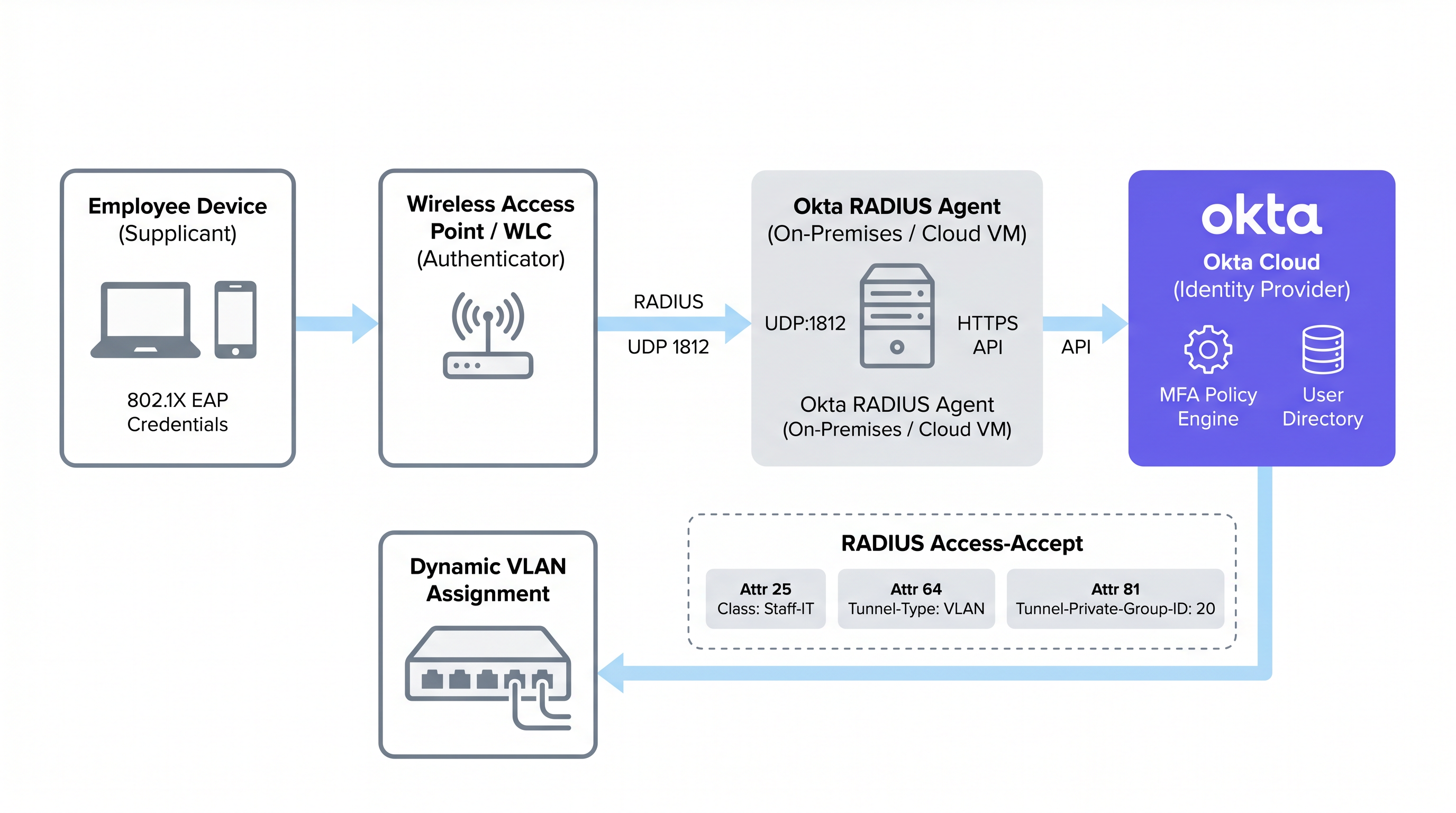
Questo modello proxy significa che l'agente Okta RADIUS non ha bisogno di memorizzare localmente le credenziali dell'utente. Tutta la logica di autenticazione, la valutazione delle policy e la registrazione dei log di audit avvengono nel cloud Okta, offrendo agli amministratori un'unica interfaccia per la governance dell'identità sia per le applicazioni cloud che per l'accesso alla rete.
Protocolli EAP supportati e limitazioni critiche
Un vincolo architettonico fondamentale dell'agente Okta RADIUS è la sua dipendenza dal Password Authentication Protocol (PAP) per l'autenticazione primaria. Sebbene il PAP trasmetta le password in chiaro nel livello interno, queste sono incapsulate e protette dal tunnel TLS esterno dell'Extensible Authentication Protocol (EAP). I protocolli esterni supportati sono EAP-TTLS (con PAP come metodo interno) ed EAP-GTC. Per un confronto più approfondito dei metodi EAP, consultare la guida di riferimento Comparativa de métodos EAP: PEAP, EAP-TLS, EAP-TTLS y EAP-FAST .
Fondamentalmente, PEAP-MSCHAPv2 non è supportato. Questo è il protocollo 802.1X predefinito per i client Windows e molti ambienti aziendali legacy. Le organizzazioni che migrano da una configurazione RADIUS NPS/Active Directory tradizionale devono riconfigurare i propri client supplicant per utilizzare EAP-TTLS con PAP — una modifica che in genere richiede un profilo wireless distribuito tramite MDM o Group Policy. Il mancato rispetto di questo requisito è la causa più comune di fallimento nelle implementazioni di Okta RADIUS.
EAP-TLS, che si basa interamente sull'autenticazione reciproca basata su certificati, non è supportato nativamente dall'agente Okta RADIUS. Le organizzazioni che richiedono EAP-TLS devono distribuire una PKI dedicata o una soluzione RADIUS cloud che si integri con Okta come IdP tramite SAML o OIDC, anziché utilizzare direttamente l'agente Okta RADIUS.
Applicazione della MFA sulle connessioni WiFi
L'agente Okta RADIUS supporta la MFA per l'accesso WiFi, ma introduce sfide per l'esperienza utente che devono essere attentamente considerate prima della distribuzione. Quando viene attivata una policy MFA, l'agente invia una Access-Challenge RADIUS al client. Okta supporta diversi fattori per le applicazioni RADIUS:
| Fattore MFA | PAP | EAP-TTLS | Note |
|---|---|---|---|
| Okta Verify Push | Supportato | Supportato | Inviato fuori banda; l'utente tocca Approva sul cellulare |
| TOTP (Okta Verify / Google Auth) | Supportato | Supportato | L'utente aggiunge l'OTP alla password (es. Pass123,456789) |
| SMS / Email / Voce | Supportato | Supportato | L'utente invia prima una stringa di attivazione (SMS, EMAIL, CALL) |
| Duo Push / SMS / Passcode | Supportato | Supportato | Passcode Duo solo per EAP-TTLS |
| YubiKey / U2F / Windows Hello | Non supportato | Non supportato | Token hardware incompatibili con il protocollo RADIUS |
Il vincolo pratico è il roaming. Negli ambienti Hospitality , il tablet di un addetto alle pulizie può passare da un access point all'altro decine di volte per turno, attivando ogni volta la ri-autenticazione. Richiedere l'approvazione di una notifica push a ogni roaming è operativamente insostenibile. Per il WiFi del personale generico, le policy sulle password forti combinate con il trust del dispositivo di Okta e le policy sulle zone di rete sono in genere preferite rispetto ai prompt MFA attivi. La MFA sul WiFi dovrebbe essere riservata agli SSID amministrativi o a scenari di accesso ad alto privilegio.
Autenticazione basata su password vs basata su certificati
La scelta tra RADIUS basato su password (tramite l'agente Okta RADIUS) ed EAP-TLS basato su certificati è una delle decisioni più importanti in un'implementazione WiFi aziendale. I compromessi non riguardano solo la sicurezza; coinvolgono la complessità della distribuzione, la maturità della gestione dei dispositivi e il sovraccarico operativo.
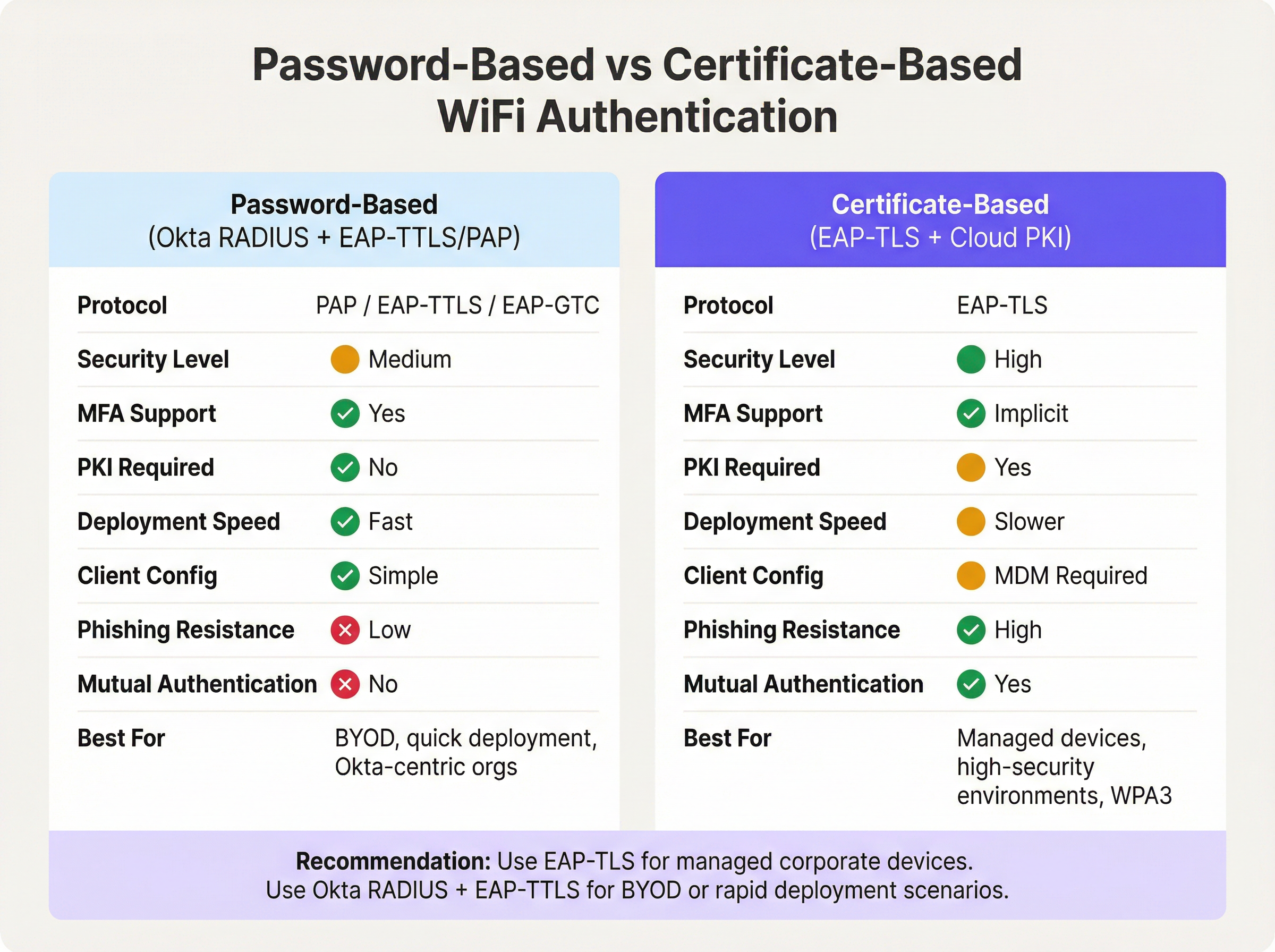
L'autenticazione basata su password tramite l'agente Okta RADIUS offre un percorso rapido verso l'identità unificata. Se la tua organizzazione gestisce già gli utenti in Okta, la distribuzione può essere completata in ore anziché in settimane. Non c'è una PKI da costruire, nessun certificato da distribuire e nessuna dipendenza da MDM. Il compromesso è che le password rimangono la credenziale primaria e l'assenza di autenticazione reciproca significa che il client non può verificare crittograficamente l'identità della rete — un vettore per attacchi evil twin in ambienti ad alto rischio.
L'EAP-TLS basato su certificati elimina completamente le password dall'equazione dell'autenticazione WiFi. Il client presenta un certificato del dispositivo e il server RADIUS presenta un certificato del server, fornendo un'autenticazione reciproca. Questo è l'approccio consigliato per IEEE 802.1X su reti WPA3-Enterprise, in particolare in ambienti soggetti a PCI DSS o NCSC Cyber Essentials Plus. Il prerequisito è una PKI funzionante — una distribuzione Microsoft ADCS on-premises o un servizio PKI cloud — e una piattaforma MDM in grado di distribuire certificati a tutti gli endpoint gestiti. Per gli ambienti Retail con centinaia di dispositivi point-of-sale gestiti, questo investimento è ben giustificato. Per ambienti con molti dispositivi BYOD o distribuzioni rapide, Okta RADIUS con EAP-TTLS è la scelta pragmatica.
Mappatura degli attributi RADIUS per l'assegnazione dinamica delle VLAN
L'assegnazione dinamica delle VLAN è l'ambito in cui l'integrazione di Okta RADIUS offre il valore operativo più tangibile. Mappando l'appartenenza ai gruppi Okta agli attributi RADIUS, gli amministratori di rete possono applicare la segmentazione della rete basata sui ruoli senza mantenere policy VLAN separate per dispositivo o per posizione.
Okta passa i dati di appartenenza al gruppo nel messaggio Access-Accept RADIUS utilizzando uno dei tre attributi, configurabili nelle impostazioni RADIUS avanzate dell'applicazione Okta:
- Attributo 11 (Filter-Id): Un attributo stringa contenente il nome del gruppo. Ampiamente supportato da vari fornitori.
- Attributo 25 (Class): Un attributo opaco utilizzato per l'autorizzazione. Supportato da Cisco ISE, Aruba ClearPass e Fortinet.
- Attributo 26 (Vendor-Specific): Consente sotto-attributi specifici del fornitore per un controllo più granulare.
Il controller di rete (WLC, appliance NAC) riceve il nome del gruppo Okta nell'attributo scelto e lo mappa agli attributi tunnel RADIUS standard richiesti per l'assegnazione della VLAN:
| Attributo RADIUS | Valore | Scopo |
|---|---|---|
| 64 (Tunnel-Type) | 13 (VLAN) | Specifica il tunneling VLAN |
| 65 (Tunnel-Medium-Type) | 6 (802) | Specifica il supporto IEEE 802 |
| 81 (Tunnel-Private-Group-ID) | es., 40 |
L'ID della VLAN di destinazione |
Ad esempio, un utente nel gruppo Okta Retail-POS-Staff riceverebbe Class: Retail-POS-Staff nel messaggio Access-Accept. La policy del WLC mapperebbe questo valore a Tunnel-Private-Group-ID: 40, posizionando il dispositivo sulla VLAN 40 — la rete POS isolata. Un utente in Store-Management verrebbe inserito nella VLAN 50. Questa logica viene applicata all'edge della rete, non in Okta, ma è guidata interamente dall'appartenenza al gruppo Okta.
Guida all'implementazione
Passaggio 1: Distribuire l'agente Okta RADIUS (Alta disponibilità)
Distribuisci l'agente Okta RADIUS su un minimo di due server — on-premises o in un VPC cloud — per garantire l'alta disponibilità. Le distribuzioni con un singolo agente rappresentano un rischio critico: se il server non è disponibile per l'applicazione di patch o subisce un guasto, tutta l'autenticazione WiFi 802.1X fallirà nell'intera struttura. Configura il tuo WLC o l'appliance NAC per bilanciare il carico delle richieste RADIUS tra entrambi gli agenti.
Durante l'installazione, l'agente richiederà un login come amministratore Okta per autorizzare l'agente e collegarlo al tenant Okta. Una volta autorizzato, l'agente appare nella console di amministrazione di Okta in Settings > Downloads > RADIUS Agent Status, dove è possibile monitorare lo stato di salute e la connettività.
Passaggio 2: Configurare l'applicazione RADIUS in Okta
- Nella console di amministrazione di Okta, vai su Applications > Applications e cerca nel catalogo delle app RADIUS Application.
- Aggiungi l'applicazione, assegnale un nome descrittivo (es.
Corporate-WiFi-Staff) e fai clic su Next. - Nella scheda Sign On, configura la RADIUS Port (predefinita 1812) e genera un Shared Secret forte, generato casualmente, di almeno 32 caratteri.
- In Advanced RADIUS Settings, abilita Accept password and security token in the same login request se intendi supportare il TOTP aggiunto alle password.
- Opzionalmente, abilita Permit Automatic Push for Okta Verify Enrolled Users per una MFA basata su push senza interruzioni.
- Assegna l'applicazione ai gruppi Okta pertinenti che rappresentano il tuo personale.
Passaggio 3: Configurare l'assegnazione della VLAN basata sui gruppi
- Nelle impostazioni Sign On dell'applicazione RADIUS, fai clic su Edit nella sezione Advanced RADIUS Settings.
- Seleziona Include groups in RADIUS response.
- Seleziona l'attributo RADIUS: 25 Class è consigliato per ambienti Aruba e Cisco; 11 Filter-Id per Fortinet e altri.
- Aggiungi i nomi specifici dei gruppi Okta da includere (es.
Retail-POS-Staff,Store-Management,IT-Admins). - Sul tuo WLC o appliance NAC, crea policy di applicazione che mappino ogni nome di gruppo ai corrispondenti attributi del tunnel VLAN.
Passaggio 4: Configurare i client supplicant
Poiché PEAP-MSCHAPv2 non è supportato, i dispositivi client devono essere configurati per utilizzare EAP-TTLS con PAP come metodo interno. Distribuisci un profilo di rete wireless tramite la tua piattaforma MDM (es. Microsoft Intune, Jamf Pro) o tramite Group Policy Objects (GPO) per i dispositivi Windows aggiunti al dominio. Il profilo dovrebbe specificare:
- SSID: Il nome del tuo SSID aziendale
- Security: WPA2-Enterprise o WPA3-Enterprise
- EAP Method: EAP-TTLS
- Inner Authentication: PAP
- Server Certificate Validation: Abilitato (collegalo al CN del certificato server del tuo agente RADIUS)
Passaggio 5: Impostare i timeout RADIUS
Aumenta il timeout RADIUS sul tuo WLC dai predefiniti 3-5 secondi a 30-60 secondi. Questo è fondamentale se si utilizzano le notifiche push MFA, poiché l'utente deve avere tempo sufficiente per approvare la notifica sul proprio dispositivo prima che il WLC abbandoni il tentativo di autenticazione.
Best Practice
L'implementazione di Okta RADIUS per l'autenticazione WiFi è semplice, ma diverse best practice operative distinguono una distribuzione di produzione resiliente da un proof-of-concept fragile.
Segmenta il traffico ospiti e personale a livello di SSID. Okta RADIUS è uno strumento per l'identità della forza lavoro. Per l'accesso di visitatori e ospiti, distribuisci una soluzione Captive Portal dedicata. Ciò evita che i costi delle licenze Okta aumentino con il volume degli ospiti e garantisce una netta separazione delle responsabilità. I clienti aziendali Purple possono distribuire Guest WiFi su un SSID separato utilizzando Okta RADIUS per l'autenticazione del personale sulla stessa infrastruttura fisica.
Utilizza un'appliance NAC per ambienti con policy complesse. Se il tuo ambiente richiede l'accesso condizionale basato sullo stato del dispositivo, il filtraggio degli indirizzi MAC o lo stato del certificato insieme all'identità dell'utente, distribuisci un'appliance NAC intermedia (Aruba ClearPass, Cisco ISE o Portnox) per inoltrare le richieste all'agente Okta RADIUS. L'appliance NAC può arricchire la risposta RADIUS con attributi tunnel aggiuntivi che l'agente Okta da solo non può generare.
Monitora tramite l'Okta System Log. Ogni evento di autenticazione — successo, fallimento, richiesta MFA e tipo di fattore — viene registrato nell'Okta System Log. Configura lo streaming dei log verso il tuo SIEM per avvisi in tempo reale su anomalie di autenticazione. Ciò è particolarmente prezioso per le organizzazioni del settore Healthcare e del settore pubblico soggette a requisiti di audit.
Ruota i segreti condivisi secondo una pianificazione. Il segreto condiviso tra l'applicazione Okta RADIUS e il tuo NAS è una credenziale di sicurezza critica. Implementa un programma di rotazione (si consiglia trimestrale) e aggiorna contemporaneamente sia l'applicazione Okta che la configurazione WLC/NAC.
Limita gli indirizzi del servizio RADIUS. Nella configurazione dell'agente Okta RADIUS, limita gli indirizzi IP autorizzati a inviare richieste RADIUS. Ciò impedisce a dispositivi NAS non autorizzati di tentare l'autenticazione contro il tuo tenant Okta.
Per indicazioni sul contesto più ampio dell'architettura di rete, consulta The Core SD WAN Benefits for Modern Businesses e Wireless Access Points Definition Your Ultimate 2026 Guide .
Risoluzione dei problemi e mitigazione dei rischi
La tabella seguente riassume le modalità di guasto più comuni riscontrate nelle distribuzioni WiFi Okta RADIUS e le relative mitigazioni consigliate.
| Modalità di guasto | Causa principale | Mitigazione |
|---|---|---|
| Timeout di autenticazione | Timeout RADIUS del WLC troppo breve per l'API Okta o la risposta MFA | Aumentare il timeout RADIUS del WLC a 30-60 secondi |
| Client Windows rifiutati | Windows utilizza per impostazione predefinita PEAP-MSCHAPv2, che Okta RADIUS rifiuta | Distribuire il profilo wireless EAP-TTLS/PAP tramite MDM o GPO |
| Utenti nella VLAN errata | Mancata corrispondenza del nome del gruppo Okta o attributi tunnel mancanti sul WLC | Verificare che il WLC mappi Class/Filter-Id a Tunnel-Private-Group-ID; controllare l'Okta System Log |
| Agente irraggiungibile | Server offline, token API scaduto o firewall che blocca HTTPS verso Okta | Distribuire agenti ridondanti; monitorare lo stato dell'agente nella console di amministrazione Okta; verificare HTTPS in uscita |
| Push MFA non consegnata | Utente non registrato in Okta Verify o dispositivo mobile offline | Applicare la policy di registrazione a Okta Verify; considerare TOTP come fallback |
| Errori di validazione del certificato | Il client non può convalidare il certificato del server RADIUS | Fissare il CN del certificato server nel profilo wireless del client; assicurarsi che la catena CA sia attendibile |
| Attributi VLAN non inviati | Gruppo Okta non incluso nella configurazione della risposta RADIUS | Verificare che il gruppo sia elencato in Advanced RADIUS Settings; confermare che l'utente sia membro del gruppo in Okta |
Per gli ambienti del settore Transport e del settore pubblico in cui l'uptime della rete è fondamentale, implementa un monitoraggio sintetico che testi periodicamente l'autenticazione RADIUS end-to-end e segnali i guasti prima che gli utenti ne risentano.
ROI e impatto aziendale
Il business case per l'autenticazione WiFi Okta RADIUS si basa su tre pilastri: efficienza operativa, miglioramento della postura di sicurezza e prontezza alla conformità.
Efficienza operativa. Il consolidamento dell'autenticazione WiFi in Okta elimina la necessità di mantenere un'infrastruttura RADIUS on-premises separata (server NPS, AD locale) in ogni sede o sito. Per una catena alberghiera con 50 proprietà, ciò può rappresentare una riduzione significativa dei costi infrastrutturali per sito e del sovraccarico del supporto IT. Il provisioning e il deprovisioning degli utenti diventano atomici: l'aggiunta di un utente al gruppo Okta corretto garantisce contemporaneamente l'accesso all'applicazione e l'appropriato accesso alla VLAN WiFi. Quando un dipendente se ne va, la disattivazione del suo account Okta revoca immediatamente l'accesso WiFi in tutti i siti.
Postura di sicurezza. La sostituzione delle password WiFi PSK condivise con l'autenticazione 802.1X per utente elimina la condivisione delle credenziali, un vettore comune per le minacce interne e l'accesso non autorizzato. Combinato con l'assegnazione dinamica delle VLAN, questo applica il principio del privilegio minimo a livello di rete. L'Okta System Log fornisce un audit trail completo e a prova di manomissione di ogni evento di autenticazione WiFi, essenziale per la risposta agli incidenti.
Prontezza alla conformità. Il requisito 8.3 di PCI DSS 4.0 impone la MFA per tutti gli accessi amministrativi non da console. Il requisito 1.3 richiede la segmentazione della rete tra l'ambiente dei dati dei titolari di carta e le altre reti. Okta RADIUS con assegnazione della VLAN basata sui gruppi risponde direttamente a entrambi i requisiti. Per la conformità al GDPR, l'Okta System Log fornisce i record di accesso necessari per dimostrare controlli tecnici appropriati sui sistemi di trattamento dei dati personali. Per le sedi che implementano Modern Hospitality WiFi Solutions , questo approccio unificato all'identità e all'accesso alla rete è sempre più un prerequisito per gli appalti aziendali.
Le organizzazioni che hanno completato questa integrazione riportano in genere una riduzione dei ticket di supporto IT relativi al WiFi (meno richieste di reset della password, meno incidenti di configurazione errata della VLAN) e un miglioramento misurabile nei punteggi degli audit di sicurezza. L'investimento nella distribuzione e configurazione dell'agente Okta RADIUS — tipicamente misurato in giorni anziché in settimane per una distribuzione in un singolo sito — offre risparmi operativi continui che si accumulano in una struttura distribuita.
Termini chiave e definizioni
Okta RADIUS Agent
A lightweight on-premises or cloud-hosted proxy service that translates RADIUS authentication requests from network infrastructure (access points, WLCs) into Okta API calls, enabling the Okta cloud to serve as the authentication backend for 802.1X WiFi.
IT teams encounter this when deploying enterprise WiFi authentication backed by Okta. It is the critical bridge component between legacy RADIUS-based network infrastructure and modern cloud identity.
802.1X
An IEEE standard for port-based Network Access Control (NAC) that defines an authentication framework for wired and wireless networks. It uses the Extensible Authentication Protocol (EAP) to carry authentication credentials between the supplicant (device), authenticator (AP/switch), and authentication server (RADIUS).
802.1X is the foundation of enterprise WiFi security. Any deployment using WPA2-Enterprise or WPA3-Enterprise is using 802.1X. IT teams must understand the three-party model (supplicant, authenticator, authentication server) to troubleshoot connectivity issues.
EAP-TTLS (Extensible Authentication Protocol - Tunnelled Transport Layer Security)
An EAP method that establishes a TLS tunnel using only a server-side certificate, then carries a simpler inner authentication protocol (such as PAP) inside the tunnel. This protects the inner credentials from eavesdropping while requiring only server-side certificate infrastructure.
EAP-TTLS with PAP is the recommended protocol for Okta RADIUS WiFi authentication. It is more secure than bare PAP but does not require client-side certificates, making it practical for BYOD and mixed-device environments.
EAP-TLS (Extensible Authentication Protocol - Transport Layer Security)
An EAP method that uses mutual certificate-based authentication — both the client and the server present digital certificates. It is the most secure 802.1X method, providing phishing-resistant, password-free authentication.
EAP-TLS is the gold standard for managed corporate device environments. It requires a PKI infrastructure and MDM for certificate distribution. The Okta RADIUS agent does not natively support EAP-TLS; a dedicated cloud PKI or RADIUS service is required.
PAP (Password Authentication Protocol)
A simple authentication protocol that transmits usernames and passwords in plaintext. In the context of 802.1X, PAP is used as the inner authentication method inside an EAP-TTLS tunnel, where the outer TLS layer provides encryption.
PAP is the primary authentication mechanism supported by the Okta RADIUS agent. IT teams must understand that PAP alone is insecure, but PAP inside EAP-TTLS is acceptable for enterprise WiFi when the server certificate is properly validated.
Dynamic VLAN Assignment
A network access control technique where a RADIUS server returns VLAN assignment attributes in the Access-Accept message, causing the wireless controller or switch to place the authenticated client on a specific VLAN based on their identity or group membership, rather than a static per-SSID VLAN.
Dynamic VLAN assignment is essential for network segmentation in multi-role environments (e.g., separating POS terminals from general staff devices). It is configured by returning RADIUS attributes 64, 65, and 81 in the Access-Accept message.
RADIUS Attribute 25 (Class)
A standard RADIUS attribute used to pass arbitrary authorisation data from the authentication server to the NAS. Okta uses this attribute to return Okta group membership information to the wireless controller, which can then use it for VLAN assignment or access policy decisions.
IT teams configuring Okta group-based VLAN assignment will configure the WLC to read the Class attribute value and map it to a VLAN ID. The exact attribute to use (11, 25, or 26) depends on the WLC vendor's documentation.
NAS (Network Access Server)
In RADIUS terminology, the NAS is the network device that receives the user's connection request and forwards it to the RADIUS server for authentication. In WiFi deployments, the NAS is typically the wireless access point or wireless LAN controller.
The NAS is the authenticator in the 802.1X model. IT teams must configure the NAS with the RADIUS server IP address, port, and shared secret. The NAS IP address should be whitelisted in the Okta RADIUS agent's service address filtering configuration.
Shared Secret
A pre-shared password used to authenticate RADIUS messages between the NAS (WLC/AP) and the RADIUS server (Okta RADIUS agent). It is used to compute a Message-Authenticator hash that verifies the integrity of RADIUS packets.
The shared secret must be identical on both the Okta RADIUS application configuration and the WLC/NAC RADIUS server entry. It should be at least 32 characters, randomly generated, and rotated on a regular schedule. A mismatch is a common cause of RADIUS authentication failures.
MFA Challenge (RADIUS Access-Challenge)
A RADIUS message type sent by the authentication server to the NAS when additional authentication factors are required. The NAS relays the challenge to the client, which must respond with the appropriate factor (e.g., OTP, push approval) before authentication can complete.
The Access-Challenge mechanism is how Okta enforces MFA over RADIUS. IT teams must ensure the WLC supports the challenge-response exchange and that the RADIUS timeout is long enough for the user to complete the MFA step.
Casi di studio
A 150-property hotel chain currently uses on-premises NPS servers at each property for 802.1X staff WiFi authentication. Each NPS server is joined to a local Active Directory domain. The IT team wants to centralise identity management in Okta and eliminate the per-property NPS infrastructure. How should they approach the migration?
The recommended approach is a phased migration using the Okta RADIUS agent deployed in a centralised cloud VPC rather than at each property. Phase 1: Deploy two Okta RADIUS agent instances in a cloud VPC (e.g., AWS or Azure) in the same region as the majority of properties. Configure the agents to listen on UDP 1812. Phase 2: For each property, add the Okta RADIUS agent IPs as secondary RADIUS servers on the WLC, keeping the existing NPS as primary. This allows parallel operation and testing without disrupting live authentication. Phase 3: Migrate users from local AD to Okta. Use Okta's AD agent to sync existing accounts initially, then progressively move to Okta as the authoritative source. Phase 4: For each property, configure the WLC to use EAP-TTLS/PAP and push the new wireless profile to staff devices via MDM. Phase 5: Once all devices are confirmed on EAP-TTLS, switch the WLC RADIUS priority to the Okta agents as primary and decommission the NPS servers. Configure Okta groups (Front-Desk, Housekeeping, F&B, Management, IT-Admins) and enable group-based VLAN assignment using Attribute 25 (Class). Map each group to the appropriate VLAN on the WLC. Increase WLC RADIUS timeout to 45 seconds to accommodate Okta API latency.
A national retail chain with 320 stores needs to achieve PCI DSS 4.0 compliance for its staff WiFi. Store associates use handheld devices for inventory management, and a separate set of devices handles point-of-sale transactions. The chain uses Okta for all workforce identity. How do they implement VLAN segmentation using Okta RADIUS to satisfy PCI DSS network segmentation requirements?
Create three Okta groups: POS-Staff (for employees who operate POS terminals), Inventory-Staff (for warehouse and shop floor associates), and Store-Management. In the Okta RADIUS application, enable 'Include groups in RADIUS response' and select Attribute 25 (Class). Add all three groups to the response configuration. On the wireless controller at each store (or centrally via a cloud WLC), create three enforcement policies: (1) If Class = POS-Staff, assign Tunnel-Private-Group-ID = 40 (the POS VLAN, which is in scope for PCI DSS and has firewall rules restricting access to only the payment processor). (2) If Class = Inventory-Staff, assign Tunnel-Private-Group-ID = 50 (the inventory VLAN, out of PCI scope). (3) If Class = Store-Management, assign Tunnel-Private-Group-ID = 60 (the management VLAN with access to store management systems). Devices connecting with credentials of a user in the POS-Staff group are automatically placed on VLAN 40. If a store associate's role changes, updating their Okta group membership immediately changes their VLAN assignment on next connection — no WLC reconfiguration required. Document the Okta group-to-VLAN mapping in the network segmentation diagram for the PCI DSS QSA audit.
Analisi degli scenari
Q1. A mid-size conference centre uses Okta for all staff identity management. They want to deploy 802.1X WiFi for staff using their existing Cisco Meraki access points. Their Windows laptops are managed via Microsoft Intune. The IT manager wants to enforce Okta Verify push MFA for all WiFi connections. What are the three most critical configuration steps they must complete, and what is the most likely failure mode if they skip any of them?
💡 Suggerimento:Consider the EAP protocol compatibility between Okta RADIUS and Windows defaults, the RADIUS timeout setting, and the client wireless profile configuration.
Mostra l'approccio consigliato
The three critical steps are: (1) Deploy a wireless profile via Intune that configures Windows clients to use EAP-TTLS with PAP as the inner method — Windows defaults to PEAP-MSCHAPv2, which the Okta RADIUS agent does not support, causing all authentication attempts to be rejected. (2) Increase the Cisco Meraki RADIUS timeout from the default 5 seconds to at least 45-60 seconds — without this, the authentication request will time out before the user can approve the Okta Verify push notification. (3) Enable 'Permit Automatic Push for Okta Verify Enrolled Users' in the Okta RADIUS application's Advanced RADIUS Settings — without this, users may be prompted to manually select their MFA factor rather than receiving an automatic push. The most likely failure mode if step 1 is skipped is a complete authentication failure for all Windows devices. If step 2 is skipped, authentication will intermittently fail for users who take more than 5 seconds to approve the push. If step 3 is skipped, users will experience a confusing challenge prompt rather than a seamless push notification.
Q2. A large retail chain's security team has flagged that their current Okta RADIUS WiFi deployment uses a single RADIUS agent server. During a recent patching window, the server was offline for 45 minutes, causing WiFi authentication to fail across all 80 stores. What architectural changes should the IT team implement to prevent this, and what are the two deployment options for the agents?
💡 Suggerimento:Consider both the agent deployment topology and the WLC configuration required to support redundancy.
Mostra l'approccio consigliato
The IT team should deploy a minimum of two Okta RADIUS agent instances and configure the WLC at each store to use both agents. There are two deployment options: Option A (Centralised Cloud VMs) — deploy both agents in a cloud VPC (e.g., AWS or Azure), ideally in different availability zones. The WLC at each store points to both cloud IPs, with one as primary and one as secondary (or with load balancing enabled). This minimises per-site infrastructure but introduces WAN dependency. Option B (On-Premises Redundant Pair) — deploy two agent servers at a central data centre or co-location facility, with the WLC using RADIUS failover. On the WLC, configure the primary RADIUS server as Agent 1 and the secondary as Agent 2, with a failover timeout of 3-5 seconds. Enable 'Dead Server Detection' if supported by the WLC vendor. Additionally, the IT team should configure health monitoring in the Okta Admin Console and set up alerting if an agent goes offline. For stores with local servers, a local agent can serve as a tertiary fallback for resilience against WAN outages.
Q3. An enterprise organisation is evaluating whether to use the Okta RADIUS agent with EAP-TTLS/PAP or to invest in a cloud PKI solution for EAP-TLS for their corporate WiFi. They have 2,000 managed Windows and macOS devices enrolled in Microsoft Intune, and they are subject to PCI DSS 4.0. What is the recommended approach and what is the primary security justification?
💡 Suggerimento:Consider the PCI DSS requirements, the device management maturity (all devices are MDM-enrolled), and the security properties of each authentication method.
Mostra l'approccio consigliato
The recommended approach is to invest in EAP-TLS with a cloud PKI solution. The primary security justification is mutual authentication: EAP-TLS requires both the client and the RADIUS server to present digital certificates, meaning the device cryptographically proves its identity to the network and the network proves its identity to the device. This eliminates the risk of evil twin attacks (where a rogue AP impersonates the corporate SSID) and removes passwords from the WiFi authentication equation entirely, eliminating credential theft and phishing as attack vectors. For PCI DSS 4.0, EAP-TLS satisfies Requirement 8.3 (MFA for non-console admin access) implicitly through certificate-based authentication, and it supports WPA3-Enterprise 192-bit mode (Requirement 4.2.1 for strong cryptography). The prerequisite — all 2,000 devices enrolled in Intune — is already met, making certificate distribution via Intune SCEP profiles straightforward. The Okta RADIUS agent with EAP-TTLS/PAP would be an acceptable interim solution during the PKI build-out, but given the PCI DSS scope and the fully managed device estate, EAP-TLS is the correct long-term architecture. The additional investment in a cloud PKI service (typically $3-8 per device per year) is justified by the security uplift and reduced credential management overhead.
Punti chiave
- ✓The Okta RADIUS agent proxies 802.1X WiFi authentication requests from network infrastructure to the Okta cloud via HTTPS, enabling cloud identity to govern network access without on-premises directory servers.
- ✓The agent supports EAP-TTLS with PAP and EAP-GTC, but does NOT support PEAP-MSCHAPv2 (the Windows default) or EAP-TLS — client supplicants must be reconfigured via MDM or GPO before deployment.
- ✓MFA on WiFi is technically supported (Okta Verify push, TOTP, SMS) but requires increasing the WLC RADIUS timeout to 30-60 seconds; it is best reserved for administrative SSIDs rather than general staff WiFi due to roaming friction.
- ✓Dynamic VLAN assignment is achieved by enabling 'Include groups in RADIUS response' in Okta and mapping the returned Class (Attribute 25) or Filter-Id (Attribute 11) to VLAN tunnel attributes (64, 65, 81) on the WLC or NAC appliance.
- ✓Always deploy a minimum of two Okta RADIUS agent instances for high availability — a single agent is a critical single point of failure for all WiFi authentication across the estate.
- ✓For fully managed device environments subject to PCI DSS or high-security requirements, EAP-TLS with a cloud PKI is the superior long-term architecture; Okta RADIUS with EAP-TTLS/PAP is the pragmatic choice for BYOD or rapid deployment scenarios.
- ✓Okta RADIUS is a workforce identity tool — deploy a dedicated guest WiFi captive portal solution for visitor access to avoid Okta licence scaling costs and maintain clean separation between staff and guest network access.




