

Okta और RADIUS: अपने आइडेंटिटी प्रोवाइडर को WiFi ऑथेंटिकेशन तक विस्तारित करना
This guide provides a comprehensive technical reference for IT administrators at Okta-centric organisations who want to extend their cloud identity provider to WiFi authentication using the Okta RADIUS agent. It covers the full authentication architecture, MFA enforcement trade-offs, dynamic VLAN assignment via RADIUS attribute mapping, and the critical decision between password-based EAP-TTLS and certificate-based EAP-TLS. Venue operators and enterprise IT teams will find actionable deployment guidance, real-world case studies from hospitality and retail, and a clear framework for integrating Okta RADIUS alongside dedicated guest WiFi solutions.
🎧 इस गाइड को सुनें
ट्रांसक्रिप्ट देखें

कार्यकारी सारांश
वितरित स्थानों (होटल चेन से लेकर स्टेडियम तक) का प्रबंधन करने वाली एंटरप्राइज़ IT टीमों के लिए, क्लाउड आइडेंटिटी प्रोवाइडर के साथ नेटवर्क एक्सेस कंट्रोल को एकीकृत करना ज़ीरो ट्रस्ट (Zero Trust) की दिशा में एक महत्वपूर्ण कदम है। Okta RADIUS एजेंट आधुनिक क्लाउड आइडेंटिटी और पारंपरिक 802.1X WiFi इन्फ्रास्ट्रक्चर के बीच की खाई को पाटता है, जिससे संगठनों को नेटवर्क ऑथेंटिकेशन के लिए पुराने ऑन-प्रिमाइसेस RADIUS सर्वर और एक्टिव डायरेक्ट्री (Active Directory) इन्फ्रास्ट्रक्चर को हटाने की अनुमति मिलती है。
यह गाइड एंटरप्राइज़ WiFi ऑथेंटिकेशन के लिए Okta RADIUS एजेंट को डिप्लॉय करने का विस्तृत विवरण देती है, जिसमें प्रॉक्सी आर्किटेक्चर, MFA एन्फोर्समेंट मैकेनिज्म, और पासवर्ड-आधारित EAP-TTLS तथा सर्टिफिकेट-आधारित EAP-TLS के बीच के ट्रेड-ऑफ़ शामिल हैं। यह डायनामिक VLAN असाइनमेंट के लिए Okta ग्रुप मेंबरशिप को RADIUS एट्रिब्यूट्स के साथ मैप करने पर कार्रवाई योग्य मार्गदर्शन भी प्रदान करती है — एक ऐसी क्षमता जो सीधे PCI DSS नेटवर्क सेगमेंटेशन आवश्यकताओं का समर्थन करती है। Guest WiFi समाधानों के साथ-साथ स्टाफ ऑथेंटिकेशन के लिए Okta को एकीकृत करके, वेन्यू ऑपरेटर आइडेंटिटी इन्फ्रास्ट्रक्चर को डुप्लिकेट किए बिना एक एकीकृत, सुरक्षित और कंप्लायंट एक्सेस लेयर प्राप्त कर सकते हैं।
तकनीकी डीप-डाइव
Okta RADIUS एजेंट कैसे काम करता है
Okta RADIUS एजेंट एक लाइटवेट सिस्टम सर्विस है जो नेटवर्क एक्सेस सर्वर (NAS) — जैसे वायरलेस एक्सेस पॉइंट (WAP) या वायरलेस LAN कंट्रोलर (WLC) — और Okta क्लाउड के बीच प्रॉक्सी के रूप में कार्य करती है। इसे आमतौर पर ऑन-प्रिमाइसेस Windows या Linux सर्वर पर या क्लाउड VPC के भीतर डिप्लॉय किया जाता है, और प्रारंभिक इंस्टॉलेशन के बाद इसे पूरी तरह से Okta एडमिन कंसोल से प्रबंधित किया जाता है।
ऑथेंटिकेशन फ्लो एक मानक 802.1X प्रॉक्सी मॉडल का पालन करता है। उपयोगकर्ता का डिवाइस (सप्लिकेंट) एक एंटरप्राइज़ SSID से कनेक्ट होता है और क्रेडेंशियल्स प्रस्तुत करता है। WAP या WLC (ऑथेंटिकेटर) UDP पोर्ट 1812 पर Okta RADIUS एजेंट को एक RADIUS Access-Request फॉरवर्ड करता है। एजेंट HTTPS API कॉल के माध्यम से इस रिक्वेस्ट को सुरक्षित रूप से Okta क्लाउड पर टनल करता है, जहाँ Okta का पॉलिसी इंजन अपनी यूज़र डायरेक्ट्री और किसी भी कॉन्फ़िगर की गई साइन-ऑन पॉलिसी के विरुद्ध क्रेडेंशियल्स का मूल्यांकन करता है। यदि ऑथेंटिकेशन सफल होता है, तो एजेंट ऑथेंटिकेटर को एक RADIUS Access-Accept संदेश लौटाता है, जिसमें वैकल्पिक रूप से ऑथराइज़ेशन के लिए RADIUS एट्रिब्यूट्स जैसे VLAN असाइनमेंट शामिल होते हैं। यदि MFA आवश्यक है, तो एजेंट क्लाइंट को वापस एक RADIUS Access-Challenge भेजता है, जो अंतिम निर्णय लौटाए जाने से पहले दूसरे फैक्टर के लिए संकेत देता है।
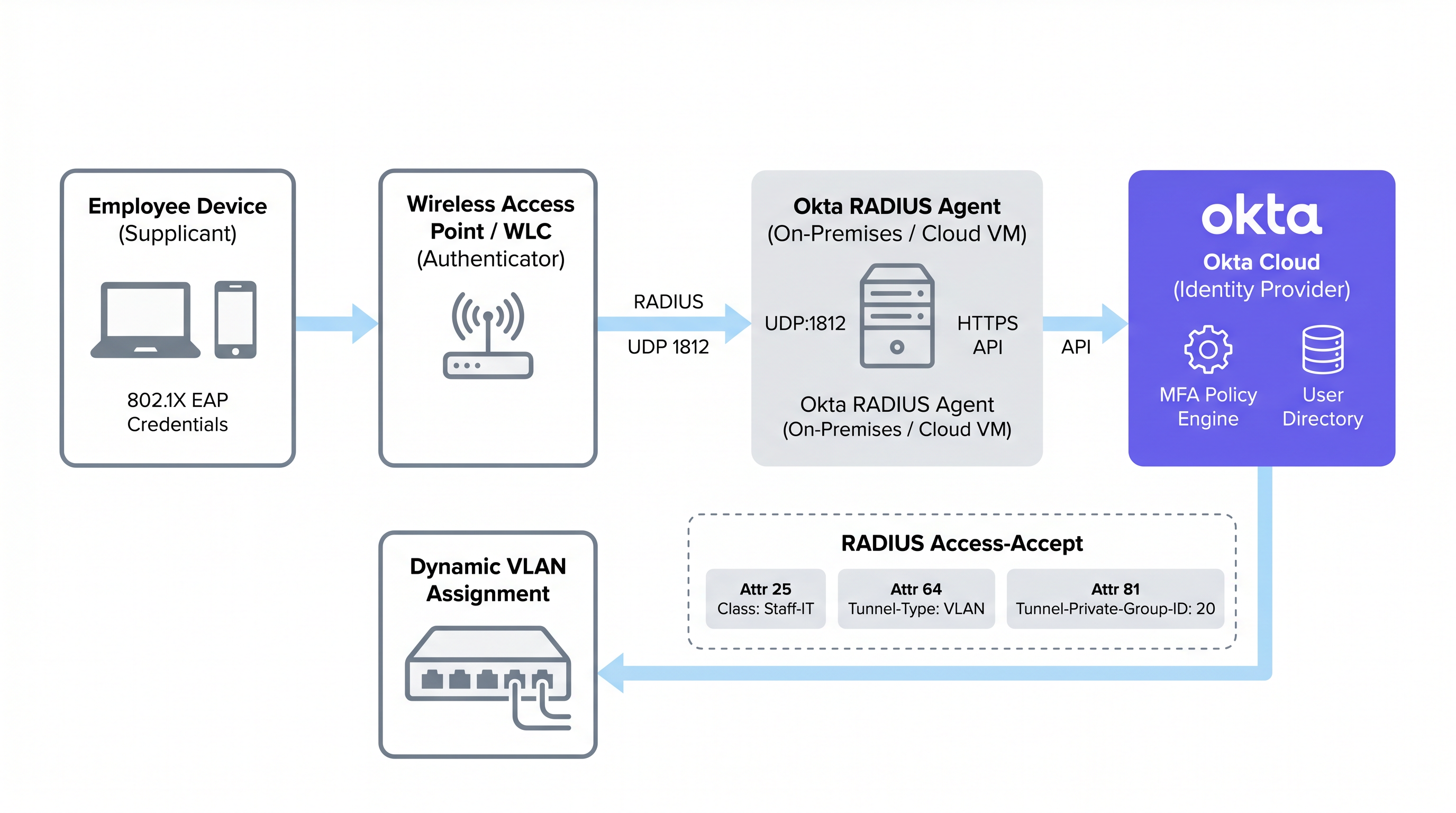
इस प्रॉक्सी मॉडल का अर्थ है कि Okta RADIUS एजेंट को यूज़र क्रेडेंशियल्स को स्थानीय रूप से स्टोर करने की आवश्यकता नहीं है। सभी ऑथेंटिकेशन लॉजिक, पॉलिसी मूल्यांकन, और ऑडिट लॉगिंग Okta क्लाउड में होती है, जो एडमिनिस्ट्रेटर्स को क्लाउड एप्लिकेशन और नेटवर्क एक्सेस दोनों में आइडेंटिटी गवर्नेंस के लिए एक सिंगल पेन ऑफ़ ग्लास (single pane of glass) प्रदान करता है।
समर्थित EAP प्रोटोकॉल और महत्वपूर्ण सीमाएँ
Okta RADIUS एजेंट की एक मूलभूत आर्किटेक्चरल बाधा प्राथमिक ऑथेंटिकेशन के लिए पासवर्ड ऑथेंटिकेशन प्रोटोकॉल (PAP) पर इसकी निर्भरता है। हालाँकि PAP आंतरिक लेयर पर प्लेनटेक्स्ट में पासवर्ड ट्रांसमिट करता है, लेकिन यह एक्सटेंसिबल ऑथेंटिकेशन प्रोटोकॉल (EAP) के बाहरी TLS टनल द्वारा एनकैप्सुलेटेड और सुरक्षित होता है। समर्थित बाहरी प्रोटोकॉल EAP-TTLS (आंतरिक विधि के रूप में PAP के साथ) और EAP-GTC हैं। EAP विधियों की गहन तुलना के लिए, Comparativa de métodos EAP: PEAP, EAP-TLS, EAP-TTLS y EAP-FAST संदर्भ गाइड देखें।
महत्वपूर्ण रूप से, PEAP-MSCHAPv2 समर्थित नहीं है। यह Windows क्लाइंट्स और कई पुराने एंटरप्राइज़ वातावरणों के लिए डिफ़ॉल्ट 802.1X प्रोटोकॉल है। पारंपरिक NPS/Active Directory RADIUS सेटअप से माइग्रेट करने वाले संगठनों को PAP के साथ EAP-TTLS का उपयोग करने के लिए अपने क्लाइंट सप्लिकेंट्स को फिर से कॉन्फ़िगर करना होगा — एक ऐसा बदलाव जिसके लिए आमतौर पर MDM या ग्रुप पॉलिसी के माध्यम से पुश किए गए वायरलेस प्रोफ़ाइल की आवश्यकता होती है। इसे ध्यान में न रखना Okta RADIUS डिप्लॉयमेंट के विफल होने का सबसे आम कारण है。
EAP-TLS, जो पूरी तरह से म्यूचुअल सर्टिफिकेट-आधारित ऑथेंटिकेशन पर निर्भर करता है, वह भी मूल रूप से Okta RADIUS एजेंट द्वारा समर्थित नहीं है। EAP-TLS की आवश्यकता वाले संगठनों को सीधे Okta RADIUS एजेंट का उपयोग करने के बजाय एक समर्पित PKI या क्लाउड RADIUS समाधान डिप्लॉय करना चाहिए जो SAML या OIDC के माध्यम से IdP के रूप में Okta के साथ एकीकृत होता है।
WiFi कनेक्शन पर MFA लागू करना
Okta RADIUS एजेंट WiFi एक्सेस के लिए MFA का समर्थन करता है, लेकिन यह यूज़र एक्सपीरियंस से जुड़ी चुनौतियाँ पेश करता है जिन पर डिप्लॉयमेंट से पहले सावधानीपूर्वक विचार किया जाना चाहिए। जब कोई MFA पॉलिसी ट्रिगर होती है, तो एजेंट क्लाइंट को एक RADIUS Access-Challenge भेजता है। Okta RADIUS एप्लिकेशन्स के लिए कई फैक्टर्स का समर्थन करता है:
| MFA फैक्टर | PAP | EAP-TTLS | नोट्स |
|---|---|---|---|
| Okta Verify Push | समर्थित | समर्थित | आउट-ऑफ़-बैंड भेजा गया; उपयोगकर्ता मोबाइल पर Approve टैप करता है |
| TOTP (Okta Verify / Google Auth) | समर्थित | समर्थित | उपयोगकर्ता पासवर्ड के साथ OTP जोड़ता है (उदा., Pass123,456789) |
| SMS / Email / Voice | समर्थित | समर्थित | उपयोगकर्ता पहले ट्रिगर स्ट्रिंग (SMS, EMAIL, CALL) भेजता है |
| Duo Push / SMS / Passcode | समर्थित | समर्थित | केवल EAP-TTLS के लिए Duo पासकोड |
| YubiKey / U2F / Windows Hello | समर्थित नहीं | समर्थित नहीं | हार्डवेयर टोकन RADIUS प्रोटोकॉल के साथ असंगत हैं |
व्यावहारिक बाधा रोमिंग है। Hospitality वातावरण में, एक हाउसकीपर का टैबलेट प्रति शिफ्ट दर्जनों बार एक्सेस पॉइंट्स के बीच रोम कर सकता है, जिससे हर बार री-ऑथेंटिकेशन ट्रिगर होता है। हर रोम पर पुश नोटिफ़िकेशन अप्रूवल की आवश्यकता होना परिचालन रूप से अस्थिर है। सामान्य स्टाफ WiFi के लिए, सक्रिय MFA प्रॉम्प्ट के बजाय Okta की डिवाइस ट्रस्ट और नेटवर्क ज़ोन पॉलिसी के साथ संयुक्त मज़बूत पासवर्ड पॉलिसी को आमतौर पर प्राथमिकता दी जाती है। WiFi पर MFA को एडमिनिस्ट्रेटिव SSID या उच्च-विशेषाधिकार वाले एक्सेस परिदृश्यों के लिए आरक्षित किया जाना चाहिए।
पासवर्ड-आधारित बनाम सर्टिफिकेट-आधारित ऑथेंटिकेशन
पासवर्ड-आधारित RADIUS (Okta RADIUS एजेंट के माध्यम से) और सर्टिफिकेट-आधारित EAP-TLS के बीच का चुनाव एंटरप्राइज़ WiFi डिप्लॉयमेंट में सबसे महत्वपूर्ण निर्णयों में से एक है। ट्रेड-ऑफ़ केवल सुरक्षा के बारे में नहीं हैं; इनमें डिप्लॉयमेंट की जटिलता, डिवाइस प्रबंधन की परिपक्वता और परिचालन ओवरहेड शामिल हैं।
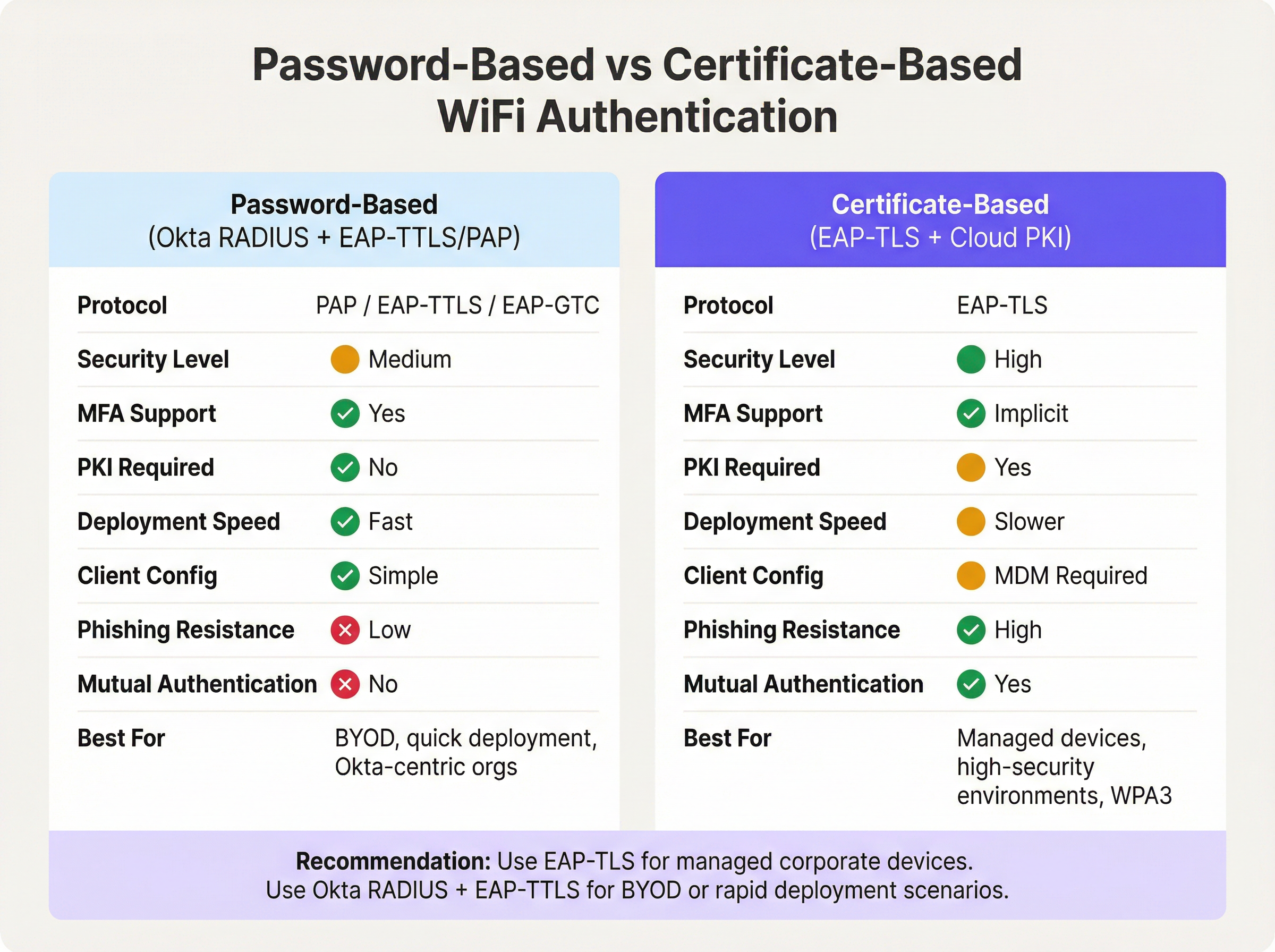
Okta RADIUS एजेंट के माध्यम से पासवर्ड-आधारित ऑथेंटिकेशन एकीकृत आइडेंटिटी के लिए एक तेज़ मार्ग प्रदान करता है। यदि आपका संगठन पहले से ही Okta में उपयोगकर्ताओं का प्रबंधन करता है, तो डिप्लॉयमेंट हफ्तों के बजाय घंटों में पूरा किया जा सकता है। इसमें बनाने के लिए कोई PKI नहीं है, वितरित करने के लिए कोई सर्टिफिकेट नहीं है, और कोई MDM निर्भरता नहीं है। ट्रेड-ऑफ़ यह है कि पासवर्ड प्राथमिक क्रेडेंशियल बने रहते हैं, और म्यूचुअल ऑथेंटिकेशन की अनुपस्थिति का अर्थ है कि क्लाइंट क्रिप्टोग्राफ़िक रूप से नेटवर्क की पहचान को सत्यापित नहीं कर सकता है — जो उच्च-जोखिम वाले वातावरण में ईविल ट्विन (evil twin) हमलों के लिए एक वेक्टर है।
सर्टिफिकेट-आधारित EAP-TLS पूरी तरह से WiFi ऑथेंटिकेशन समीकरण से पासवर्ड को समाप्त कर देता है। क्लाइंट एक डिवाइस सर्टिफिकेट प्रस्तुत करता है, और RADIUS सर्वर एक सर्वर सर्टिफिकेट प्रस्तुत करता है, जो म्यूचुअल ऑथेंटिकेशन प्रदान करता है। WPA3-Enterprise नेटवर्क पर IEEE 802.1X के लिए यह अनुशंसित दृष्टिकोण है, विशेष रूप से PCI DSS या NCSC Cyber Essentials Plus के अधीन वातावरण में। इसकी पूर्व शर्त एक कार्यशील PKI है — या तो एक ऑन-प्रिमाइसेस Microsoft ADCS डिप्लॉयमेंट या एक क्लाउड PKI सर्विस — और एक MDM प्लेटफ़ॉर्म जो सभी प्रबंधित एंडपॉइंट्स पर सर्टिफिकेट वितरित करने में सक्षम हो। सैकड़ों प्रबंधित पॉइंट-ऑफ़-सेल डिवाइस वाले Retail वातावरण के लिए, यह निवेश पूरी तरह से उचित है। BYOD-भारी वातावरण या तेज़ डिप्लॉयमेंट के लिए, EAP-TTLS के साथ Okta RADIUS एक व्यावहारिक विकल्प है।
डायनामिक VLAN असाइनमेंट के लिए RADIUS एट्रिब्यूट मैपिंग
डायनामिक VLAN असाइनमेंट वह जगह है जहाँ Okta RADIUS एकीकरण अपना सबसे ठोस परिचालन मूल्य प्रदान करता है। Okta ग्रुप मेंबरशिप को RADIUS एट्रिब्यूट्स के साथ मैप करके, नेटवर्क एडमिनिस्ट्रेटर प्रति डिवाइस या प्रति स्थान अलग-अलग VLAN पॉलिसी बनाए रखे बिना रोल-आधारित नेटवर्क सेगमेंटेशन लागू कर सकते हैं।
Okta RADIUS Access-Accept संदेश में तीन एट्रिब्यूट्स में से एक का उपयोग करके ग्रुप मेंबरशिप डेटा पास करता है, जिसे Okta एप्लिकेशन की Advanced RADIUS Settings में कॉन्फ़िगर किया जा सकता है:
- Attribute 11 (Filter-Id): एक स्ट्रिंग एट्रिब्यूट जिसमें ग्रुप का नाम होता है। वेंडर्स के बीच व्यापक रूप से समर्थित है।
- Attribute 25 (Class): ऑथराइज़ेशन के लिए उपयोग किया जाने वाला एक अपारदर्शी एट्रिब्यूट। Cisco ISE, Aruba ClearPass, और Fortinet द्वारा समर्थित है।
- Attribute 26 (Vendor-Specific): अधिक विस्तृत नियंत्रण के लिए वेंडर-विशिष्ट सब-एट्रिब्यूट्स की अनुमति देता है।
नेटवर्क कंट्रोलर (WLC, NAC एप्लायंस) चुने गए एट्रिब्यूट में Okta ग्रुप का नाम प्राप्त करता है और इसे VLAN असाइनमेंट के लिए आवश्यक मानक RADIUS टनल एट्रिब्यूट्स में मैप करता है:
| RADIUS एट्रिब्यूट | वैल्यू | उद्देश्य |
|---|---|---|
| 64 (Tunnel-Type) | 13 (VLAN) | VLAN टनलिंग निर्दिष्ट करता है |
| 65 (Tunnel-Medium-Type) | 6 (802) | IEEE 802 माध्यम निर्दिष्ट करता है |
| 81 (Tunnel-Private-Group-ID) | उदा., 40 |
लक्ष्य VLAN ID |
उदाहरण के लिए, Okta ग्रुप Retail-POS-Staff के किसी उपयोगकर्ता को Access-Accept में Class: Retail-POS-Staff वापस मिलेगा। WLC पॉलिसी इसे Tunnel-Private-Group-ID: 40 पर मैप करेगी, जिससे डिवाइस VLAN 40 — आइसोलेटेड POS नेटवर्क पर आ जाएगा। Store-Management के किसी उपयोगकर्ता को VLAN 50 पर रखा जाएगा। यह लॉजिक नेटवर्क एज पर लागू किया जाता है, Okta में नहीं, लेकिन यह पूरी तरह से Okta ग्रुप मेंबरशिप द्वारा संचालित होता है।
इम्प्लीमेंटेशन गाइड
चरण 1: Okta RADIUS एजेंट डिप्लॉय करें (हाई अवेलेबिलिटी)
हाई अवेलेबिलिटी सुनिश्चित करने के लिए कम से कम दो सर्वरों पर — या तो ऑन-प्रिमाइसेस या क्लाउड VPC में — Okta RADIUS एजेंट डिप्लॉय करें। सिंगल-एजेंट डिप्लॉयमेंट एक गंभीर जोखिम है: यदि सर्वर पैचिंग के लिए अनुपलब्ध है या विफल हो जाता है, तो पूरे एस्टेट में सभी 802.1X WiFi ऑथेंटिकेशन विफल हो जाएंगे। दोनों एजेंटों के बीच RADIUS रिक्वेस्ट्स को लोड बैलेंस करने के लिए अपने WLC या NAC एप्लायंस को कॉन्फ़िगर करें।
इंस्टॉलेशन के दौरान, एजेंट को ऑथराइज़ करने और इसे Okta टेनेंट से लिंक करने के लिए एजेंट एक Okta एडमिनिस्ट्रेटर लॉगिन के लिए संकेत देगा। ऑथराइज़ होने के बाद, एजेंट Okta एडमिन कंसोल में Settings > Downloads > RADIUS Agent Status के अंतर्गत दिखाई देता है, जहाँ हेल्थ और कनेक्टिविटी की निगरानी की जा सकती है।
चरण 2: Okta में RADIUS एप्लिकेशन कॉन्फ़िगर करें
- Okta एडमिन कंसोल में, Applications > Applications पर जाएँ और ऐप कैटलॉग में RADIUS Application खोजें।
- एप्लिकेशन जोड़ें, इसे एक वर्णनात्मक नाम (उदा.,
Corporate-WiFi-Staff) असाइन करें, और Next पर क्लिक करें。 - Sign On टैब के अंतर्गत, RADIUS Port (डिफ़ॉल्ट 1812) कॉन्फ़िगर करें और कम से कम 32 वर्णों का एक मज़बूत, रैंडमली जनरेटेड Shared Secret बनाएँ।
- Advanced RADIUS Settings के अंतर्गत, यदि आप पासवर्ड के साथ जोड़े गए TOTP का समर्थन करना चाहते हैं, तो Accept password and security token in the same login request को सक्षम करें।
- निर्बाध पुश-आधारित MFA के लिए वैकल्पिक रूप से Permit Automatic Push for Okta Verify Enrolled Users को सक्षम करें।
- अपने स्टाफ का प्रतिनिधित्व करने वाले प्रासंगिक Okta ग्रुप्स को एप्लिकेशन असाइन करें।
चरण 3: ग्रुप-आधारित VLAN असाइनमेंट कॉन्फ़िगर करें
- RADIUS एप्लिकेशन की Sign On सेटिंग्स में, Advanced RADIUS Settings अनुभाग में Edit पर क्लिक करें।
- Include groups in RADIUS response को चेक करें।
- RADIUS एट्रिब्यूट चुनें: Aruba और Cisco वातावरण के लिए 25 Class अनुशंसित है; Fortinet और अन्य के लिए 11 Filter-Id।
- शामिल करने के लिए विशिष्ट Okta ग्रुप नाम जोड़ें (उदा.,
Retail-POS-Staff,Store-Management,IT-Admins)। - अपने WLC या NAC एप्लायंस पर, एन्फोर्समेंट पॉलिसी बनाएँ जो प्रत्येक ग्रुप नाम को संबंधित VLAN टनल एट्रिब्यूट्स में मैप करती हैं।
चरण 4: क्लाइंट सप्लिकेंट्स कॉन्फ़िगर करें
क्योंकि PEAP-MSCHAPv2 समर्थित नहीं है, इसलिए क्लाइंट डिवाइस को आंतरिक विधि के रूप में EAP-TTLS with PAP का उपयोग करने के लिए कॉन्फ़िगर किया जाना चाहिए। अपने MDM प्लेटफ़ॉर्म (उदा., Microsoft Intune, Jamf Pro) के माध्यम से या Windows डोमेन-जॉइन्ड डिवाइस के लिए ग्रुप पॉलिसी ऑब्जेक्ट्स (GPO) के माध्यम से एक वायरलेस नेटवर्क प्रोफ़ाइल डिप्लॉय करें। प्रोफ़ाइल को निर्दिष्ट करना चाहिए:
- SSID: आपके एंटरप्राइज़ SSID का नाम
- Security: WPA2-Enterprise या WPA3-Enterprise
- EAP Method: EAP-TTLS
- Inner Authentication: PAP
- Server Certificate Validation: सक्षम (अपने RADIUS एजेंट के सर्वर सर्टिफिकेट CN पर पिन करें)
चरण 5: RADIUS टाइमआउट सेट करें
अपने WLC पर RADIUS टाइमआउट को डिफ़ॉल्ट 3-5 सेकंड से बढ़ाकर 30-60 सेकंड करें। यदि MFA पुश नोटिफ़िकेशन उपयोग में हैं तो यह महत्वपूर्ण है, क्योंकि WLC द्वारा ऑथेंटिकेशन प्रयास को छोड़ने से पहले उपयोगकर्ता के पास अपने डिवाइस पर नोटिफ़िकेशन को अप्रूव करने के लिए पर्याप्त समय होना चाहिए।
सर्वोत्तम प्रथाएँ
WiFi ऑथेंटिकेशन के लिए Okta RADIUS को डिप्लॉय करना सीधा है, लेकिन कई परिचालन सर्वोत्तम प्रथाएँ एक लचीले प्रोडक्शन डिप्लॉयमेंट को एक कमज़ोर प्रूफ़-ऑफ़-कांसेप्ट (proof-of-concept) से अलग करती हैं।
SSID स्तर पर गेस्ट और स्टाफ ट्रैफ़िक को सेगमेंट करें। Okta RADIUS एक वर्कफोर्स आइडेंटिटी टूल है। विज़िटर और गेस्ट एक्सेस के लिए, एक समर्पित Captive Portal समाधान डिप्लॉय करें। यह Okta लाइसेंस लागतों को गेस्ट वॉल्यूम के साथ बढ़ने से रोकता है और चिंताओं का स्पष्ट पृथक्करण सुनिश्चित करता है। Purple एंटरप्राइज़ ग्राहक एक अलग SSID पर Guest WiFi डिप्लॉय कर सकते हैं, जबकि उसी भौतिक इन्फ्रास्ट्रक्चर पर स्टाफ ऑथेंटिकेशन के लिए Okta RADIUS का उपयोग कर सकते हैं।
जटिल पॉलिसी वातावरण के लिए NAC एप्लायंस का उपयोग करें। यदि आपके वातावरण को यूज़र आइडेंटिटी के साथ-साथ डिवाइस पोस्चर, MAC एड्रेस फ़िल्टरिंग, या सर्टिफिकेट स्थिति के आधार पर कंडीशनल एक्सेस की आवश्यकता है, तो Okta RADIUS एजेंट को रिक्वेस्ट्स प्रॉक्सी करने के लिए एक मध्यवर्ती NAC एप्लायंस (Aruba ClearPass, Cisco ISE, या Portnox) डिप्लॉय करें। NAC एप्लायंस RADIUS रिस्पॉन्स को अतिरिक्त टनल एट्रिब्यूट्स के साथ समृद्ध कर सकता है जो अकेले Okta एजेंट जनरेट नहीं कर सकता।
Okta System Log के माध्यम से मॉनिटर करें। प्रत्येक ऑथेंटिकेशन इवेंट — सफलता, विफलता, MFA चैलेंज, और फैक्टर प्रकार — Okta System Log में रिकॉर्ड किया जाता है। ऑथेंटिकेशन विसंगतियों पर रीयल-टाइम अलर्टिंग के लिए अपने SIEM में लॉग स्ट्रीमिंग कॉन्फ़िगर करें। यह ऑडिट आवश्यकताओं के अधीन Healthcare और सार्वजनिक-क्षेत्र के संगठनों के लिए विशेष रूप से मूल्यवान है।
एक शेड्यूल पर शेयर्ड सीक्रेट्स को रोटेट करें। Okta RADIUS एप्लिकेशन और आपके NAS के बीच शेयर्ड सीक्रेट एक महत्वपूर्ण सुरक्षा क्रेडेंशियल है। एक रोटेशन शेड्यूल लागू करें (त्रैमासिक अनुशंसित है) और Okta एप्लिकेशन और WLC/NAC कॉन्फ़िगरेशन दोनों को एक साथ अपडेट करें。
RADIUS सर्विस एड्रेस को प्रतिबंधित करें। Okta RADIUS एजेंट कॉन्फ़िगरेशन में, प्रतिबंधित करें कि किन IP एड्रेस को RADIUS रिक्वेस्ट्स भेजने की अनुमति है। यह अनधिकृत NAS डिवाइस को आपके Okta टेनेंट के विरुद्ध ऑथेंटिकेशन का प्रयास करने से रोकता है।
व्यापक नेटवर्क आर्किटेक्चर संदर्भ पर मार्गदर्शन के लिए, The Core SD WAN Benefits for Modern Businesses और Wireless Access Points Definition Your Ultimate 2026 Guide देखें।
समस्या निवारण और जोखिम न्यूनीकरण
निम्नलिखित तालिका Okta RADIUS WiFi डिप्लॉयमेंट में सामने आने वाले सबसे आम विफलता मोड और उनके अनुशंसित न्यूनीकरणों का सारांश देती है।
| विफलता मोड | मूल कारण | न्यूनीकरण |
|---|---|---|
| ऑथेंटिकेशन टाइमआउट | Okta API या MFA रिस्पॉन्स के लिए WLC RADIUS टाइमआउट बहुत कम है | WLC RADIUS टाइमआउट को 30-60 सेकंड तक बढ़ाएँ |
| Windows क्लाइंट्स अस्वीकृत | Windows डिफ़ॉल्ट रूप से PEAP-MSCHAPv2 पर होता है, जिसे Okta RADIUS अस्वीकार करता है | MDM या GPO के माध्यम से EAP-TTLS/PAP वायरलेस प्रोफ़ाइल पुश करें |
| गलत VLAN में उपयोगकर्ता | Okta ग्रुप नाम का बेमेल होना या WLC पर टनल एट्रिब्यूट्स का गायब होना | सत्यापित करें कि WLC Class/Filter-Id को Tunnel-Private-Group-ID में मैप करता है; Okta System Log की जाँच करें |
| एजेंट अगम्य (Unreachable) | सर्वर ऑफ़लाइन है, API टोकन समाप्त हो गया है, या फ़ायरवॉल Okta के लिए HTTPS को ब्लॉक कर रहा है | रिडंडेंट एजेंट डिप्लॉय करें; Okta एडमिन कंसोल में एजेंट की स्थिति की निगरानी करें; आउटबाउंड HTTPS सत्यापित करें |
| MFA पुश डिलीवर नहीं हुआ | उपयोगकर्ता Okta Verify में नामांकित नहीं है, या मोबाइल डिवाइस ऑफ़लाइन है | Okta Verify नामांकन पॉलिसी लागू करें; फ़ॉलबैक के रूप में TOTP पर विचार करें |
| सर्टिफिकेट वैलिडेशन त्रुटियाँ | क्लाइंट RADIUS सर्वर सर्टिफिकेट को मान्य नहीं कर सकता | क्लाइंट वायरलेस प्रोफ़ाइल में सर्वर सर्टिफिकेट CN पिन करें; सुनिश्चित करें कि CA चेन विश्वसनीय है |
| VLAN एट्रिब्यूट्स नहीं भेजे गए | Okta ग्रुप RADIUS रिस्पॉन्स कॉन्फ़िगरेशन में शामिल नहीं है | सत्यापित करें कि ग्रुप Advanced RADIUS Settings में सूचीबद्ध है; पुष्टि करें कि उपयोगकर्ता Okta में ग्रुप का सदस्य है |
Transport और सार्वजनिक-क्षेत्र के वातावरण के लिए जहाँ नेटवर्क अपटाइम मिशन-क्रिटिकल है, सिंथेटिक मॉनिटरिंग लागू करें जो समय-समय पर RADIUS ऑथेंटिकेशन का एंड-टू-एंड परीक्षण करती है और उपयोगकर्ताओं के प्रभावित होने से पहले विफलता पर अलर्ट करती है।
ROI और व्यावसायिक प्रभाव
Okta RADIUS WiFi ऑथेंटिकेशन के लिए व्यावसायिक मामला तीन स्तंभों पर टिका है: परिचालन दक्षता, सुरक्षा स्थिति में सुधार, और अनुपालन तत्परता।
परिचालन दक्षता। WiFi ऑथेंटिकेशन को Okta में समेकित करने से प्रत्येक स्थान या साइट पर अलग ऑन-प्रिमाइसेस RADIUS इन्फ्रास्ट्रक्चर (NPS सर्वर, स्थानीय AD) बनाए रखने की आवश्यकता समाप्त हो जाती है। 50 संपत्तियों वाली एक होटल चेन के लिए, यह प्रति-साइट इन्फ्रास्ट्रक्चर लागत और IT सपोर्ट ओवरहेड में महत्वपूर्ण कमी का प्रतिनिधित्व कर सकता है। यूज़र प्रोविज़निंग और डीप्रोविज़निंग एटॉमिक (atomic) हो जाते हैं: किसी उपयोगकर्ता को सही Okta ग्रुप में जोड़ने से एप्लिकेशन एक्सेस और उचित WiFi VLAN एक्सेस दोनों एक साथ मिल जाते हैं। जब कोई कर्मचारी छोड़ता है, तो उनके Okta खाते को निष्क्रिय करने से सभी साइटों पर WiFi एक्सेस तुरंत रद्द हो जाता है।
सुरक्षा स्थिति। साझा PSK WiFi पासवर्ड को प्रति-उपयोगकर्ता 802.1X ऑथेंटिकेशन से बदलने से क्रेडेंशियल शेयरिंग समाप्त हो जाती है, जो इनसाइडर थ्रेट और अनधिकृत एक्सेस के लिए एक सामान्य वेक्टर है। डायनामिक VLAN असाइनमेंट के साथ मिलकर, यह नेटवर्क लेयर पर न्यूनतम विशेषाधिकार (least privilege) के सिद्धांत को लागू करता है। Okta System Log प्रत्येक WiFi ऑथेंटिकेशन इवेंट का एक पूर्ण, टैम्पर-एविडेंट (tamper-evident) ऑडिट ट्रेल प्रदान करता है, जो इंसिडेंट रिस्पॉन्स के लिए आवश्यक है।
अनुपालन तत्परता। PCI DSS 4.0 आवश्यकता 8.3 सभी गैर-कंसोल एडमिनिस्ट्रेटिव एक्सेस के लिए MFA को अनिवार्य करती है। आवश्यकता 1.3 कार्डधारक डेटा वातावरण और अन्य नेटवर्क के बीच नेटवर्क सेगमेंटेशन की मांग करती है। ग्रुप-आधारित VLAN असाइनमेंट के साथ Okta RADIUS सीधे दोनों आवश्यकताओं को संबोधित करता है। GDPR अनुपालन के लिए, Okta System Log व्यक्तिगत डेटा प्रोसेसिंग सिस्टम पर उचित तकनीकी नियंत्रण प्रदर्शित करने के लिए आवश्यक एक्सेस रिकॉर्ड प्रदान करता है। Modern Hospitality WiFi Solutions डिप्लॉय करने वाले स्थानों के लिए, आइडेंटिटी और नेटवर्क एक्सेस के लिए यह एकीकृत दृष्टिकोण एंटरप्राइज़ खरीद के लिए तेजी से एक पूर्व शर्त बनता जा रहा है।
जिन संगठनों ने इस एकीकरण को पूरा कर लिया है, वे आमतौर पर WiFi से संबंधित IT सपोर्ट टिकटों में कमी (कम पासवर्ड रीसेट अनुरोध, कम VLAN मिसकॉन्फ़िगरेशन घटनाएँ) और सुरक्षा ऑडिट स्कोर में मापने योग्य सुधार की रिपोर्ट करते हैं। Okta RADIUS एजेंट को डिप्लॉय और कॉन्फ़िगर करने में किया गया निवेश — जिसे आमतौर पर सिंगल-साइट डिप्लॉयमेंट के लिए हफ्तों के बजाय दिनों में मापा जाता है — निरंतर परिचालन बचत प्रदान करता है जो एक वितरित एस्टेट में जुड़ती जाती है।
मुख्य शब्द और परिभाषाएं
Okta RADIUS Agent
A lightweight on-premises or cloud-hosted proxy service that translates RADIUS authentication requests from network infrastructure (access points, WLCs) into Okta API calls, enabling the Okta cloud to serve as the authentication backend for 802.1X WiFi.
IT teams encounter this when deploying enterprise WiFi authentication backed by Okta. It is the critical bridge component between legacy RADIUS-based network infrastructure and modern cloud identity.
802.1X
An IEEE standard for port-based Network Access Control (NAC) that defines an authentication framework for wired and wireless networks. It uses the Extensible Authentication Protocol (EAP) to carry authentication credentials between the supplicant (device), authenticator (AP/switch), and authentication server (RADIUS).
802.1X is the foundation of enterprise WiFi security. Any deployment using WPA2-Enterprise or WPA3-Enterprise is using 802.1X. IT teams must understand the three-party model (supplicant, authenticator, authentication server) to troubleshoot connectivity issues.
EAP-TTLS (Extensible Authentication Protocol - Tunnelled Transport Layer Security)
An EAP method that establishes a TLS tunnel using only a server-side certificate, then carries a simpler inner authentication protocol (such as PAP) inside the tunnel. This protects the inner credentials from eavesdropping while requiring only server-side certificate infrastructure.
EAP-TTLS with PAP is the recommended protocol for Okta RADIUS WiFi authentication. It is more secure than bare PAP but does not require client-side certificates, making it practical for BYOD and mixed-device environments.
EAP-TLS (Extensible Authentication Protocol - Transport Layer Security)
An EAP method that uses mutual certificate-based authentication — both the client and the server present digital certificates. It is the most secure 802.1X method, providing phishing-resistant, password-free authentication.
EAP-TLS is the gold standard for managed corporate device environments. It requires a PKI infrastructure and MDM for certificate distribution. The Okta RADIUS agent does not natively support EAP-TLS; a dedicated cloud PKI or RADIUS service is required.
PAP (Password Authentication Protocol)
A simple authentication protocol that transmits usernames and passwords in plaintext. In the context of 802.1X, PAP is used as the inner authentication method inside an EAP-TTLS tunnel, where the outer TLS layer provides encryption.
PAP is the primary authentication mechanism supported by the Okta RADIUS agent. IT teams must understand that PAP alone is insecure, but PAP inside EAP-TTLS is acceptable for enterprise WiFi when the server certificate is properly validated.
Dynamic VLAN Assignment
A network access control technique where a RADIUS server returns VLAN assignment attributes in the Access-Accept message, causing the wireless controller or switch to place the authenticated client on a specific VLAN based on their identity or group membership, rather than a static per-SSID VLAN.
Dynamic VLAN assignment is essential for network segmentation in multi-role environments (e.g., separating POS terminals from general staff devices). It is configured by returning RADIUS attributes 64, 65, and 81 in the Access-Accept message.
RADIUS Attribute 25 (Class)
A standard RADIUS attribute used to pass arbitrary authorisation data from the authentication server to the NAS. Okta uses this attribute to return Okta group membership information to the wireless controller, which can then use it for VLAN assignment or access policy decisions.
IT teams configuring Okta group-based VLAN assignment will configure the WLC to read the Class attribute value and map it to a VLAN ID. The exact attribute to use (11, 25, or 26) depends on the WLC vendor's documentation.
NAS (Network Access Server)
In RADIUS terminology, the NAS is the network device that receives the user's connection request and forwards it to the RADIUS server for authentication. In WiFi deployments, the NAS is typically the wireless access point or wireless LAN controller.
The NAS is the authenticator in the 802.1X model. IT teams must configure the NAS with the RADIUS server IP address, port, and shared secret. The NAS IP address should be whitelisted in the Okta RADIUS agent's service address filtering configuration.
Shared Secret
A pre-shared password used to authenticate RADIUS messages between the NAS (WLC/AP) and the RADIUS server (Okta RADIUS agent). It is used to compute a Message-Authenticator hash that verifies the integrity of RADIUS packets.
The shared secret must be identical on both the Okta RADIUS application configuration and the WLC/NAC RADIUS server entry. It should be at least 32 characters, randomly generated, and rotated on a regular schedule. A mismatch is a common cause of RADIUS authentication failures.
MFA Challenge (RADIUS Access-Challenge)
A RADIUS message type sent by the authentication server to the NAS when additional authentication factors are required. The NAS relays the challenge to the client, which must respond with the appropriate factor (e.g., OTP, push approval) before authentication can complete.
The Access-Challenge mechanism is how Okta enforces MFA over RADIUS. IT teams must ensure the WLC supports the challenge-response exchange and that the RADIUS timeout is long enough for the user to complete the MFA step.
केस स्टडीज
A 150-property hotel chain currently uses on-premises NPS servers at each property for 802.1X staff WiFi authentication. Each NPS server is joined to a local Active Directory domain. The IT team wants to centralise identity management in Okta and eliminate the per-property NPS infrastructure. How should they approach the migration?
The recommended approach is a phased migration using the Okta RADIUS agent deployed in a centralised cloud VPC rather than at each property. Phase 1: Deploy two Okta RADIUS agent instances in a cloud VPC (e.g., AWS or Azure) in the same region as the majority of properties. Configure the agents to listen on UDP 1812. Phase 2: For each property, add the Okta RADIUS agent IPs as secondary RADIUS servers on the WLC, keeping the existing NPS as primary. This allows parallel operation and testing without disrupting live authentication. Phase 3: Migrate users from local AD to Okta. Use Okta's AD agent to sync existing accounts initially, then progressively move to Okta as the authoritative source. Phase 4: For each property, configure the WLC to use EAP-TTLS/PAP and push the new wireless profile to staff devices via MDM. Phase 5: Once all devices are confirmed on EAP-TTLS, switch the WLC RADIUS priority to the Okta agents as primary and decommission the NPS servers. Configure Okta groups (Front-Desk, Housekeeping, F&B, Management, IT-Admins) and enable group-based VLAN assignment using Attribute 25 (Class). Map each group to the appropriate VLAN on the WLC. Increase WLC RADIUS timeout to 45 seconds to accommodate Okta API latency.
A national retail chain with 320 stores needs to achieve PCI DSS 4.0 compliance for its staff WiFi. Store associates use handheld devices for inventory management, and a separate set of devices handles point-of-sale transactions. The chain uses Okta for all workforce identity. How do they implement VLAN segmentation using Okta RADIUS to satisfy PCI DSS network segmentation requirements?
Create three Okta groups: POS-Staff (for employees who operate POS terminals), Inventory-Staff (for warehouse and shop floor associates), and Store-Management. In the Okta RADIUS application, enable 'Include groups in RADIUS response' and select Attribute 25 (Class). Add all three groups to the response configuration. On the wireless controller at each store (or centrally via a cloud WLC), create three enforcement policies: (1) If Class = POS-Staff, assign Tunnel-Private-Group-ID = 40 (the POS VLAN, which is in scope for PCI DSS and has firewall rules restricting access to only the payment processor). (2) If Class = Inventory-Staff, assign Tunnel-Private-Group-ID = 50 (the inventory VLAN, out of PCI scope). (3) If Class = Store-Management, assign Tunnel-Private-Group-ID = 60 (the management VLAN with access to store management systems). Devices connecting with credentials of a user in the POS-Staff group are automatically placed on VLAN 40. If a store associate's role changes, updating their Okta group membership immediately changes their VLAN assignment on next connection — no WLC reconfiguration required. Document the Okta group-to-VLAN mapping in the network segmentation diagram for the PCI DSS QSA audit.
परिदृश्य विश्लेषण
Q1. A mid-size conference centre uses Okta for all staff identity management. They want to deploy 802.1X WiFi for staff using their existing Cisco Meraki access points. Their Windows laptops are managed via Microsoft Intune. The IT manager wants to enforce Okta Verify push MFA for all WiFi connections. What are the three most critical configuration steps they must complete, and what is the most likely failure mode if they skip any of them?
💡 संकेत:Consider the EAP protocol compatibility between Okta RADIUS and Windows defaults, the RADIUS timeout setting, and the client wireless profile configuration.
अनुशंसित दृष्टिकोण दिखाएं
The three critical steps are: (1) Deploy a wireless profile via Intune that configures Windows clients to use EAP-TTLS with PAP as the inner method — Windows defaults to PEAP-MSCHAPv2, which the Okta RADIUS agent does not support, causing all authentication attempts to be rejected. (2) Increase the Cisco Meraki RADIUS timeout from the default 5 seconds to at least 45-60 seconds — without this, the authentication request will time out before the user can approve the Okta Verify push notification. (3) Enable 'Permit Automatic Push for Okta Verify Enrolled Users' in the Okta RADIUS application's Advanced RADIUS Settings — without this, users may be prompted to manually select their MFA factor rather than receiving an automatic push. The most likely failure mode if step 1 is skipped is a complete authentication failure for all Windows devices. If step 2 is skipped, authentication will intermittently fail for users who take more than 5 seconds to approve the push. If step 3 is skipped, users will experience a confusing challenge prompt rather than a seamless push notification.
Q2. A large retail chain's security team has flagged that their current Okta RADIUS WiFi deployment uses a single RADIUS agent server. During a recent patching window, the server was offline for 45 minutes, causing WiFi authentication to fail across all 80 stores. What architectural changes should the IT team implement to prevent this, and what are the two deployment options for the agents?
💡 संकेत:Consider both the agent deployment topology and the WLC configuration required to support redundancy.
अनुशंसित दृष्टिकोण दिखाएं
The IT team should deploy a minimum of two Okta RADIUS agent instances and configure the WLC at each store to use both agents. There are two deployment options: Option A (Centralised Cloud VMs) — deploy both agents in a cloud VPC (e.g., AWS or Azure), ideally in different availability zones. The WLC at each store points to both cloud IPs, with one as primary and one as secondary (or with load balancing enabled). This minimises per-site infrastructure but introduces WAN dependency. Option B (On-Premises Redundant Pair) — deploy two agent servers at a central data centre or co-location facility, with the WLC using RADIUS failover. On the WLC, configure the primary RADIUS server as Agent 1 and the secondary as Agent 2, with a failover timeout of 3-5 seconds. Enable 'Dead Server Detection' if supported by the WLC vendor. Additionally, the IT team should configure health monitoring in the Okta Admin Console and set up alerting if an agent goes offline. For stores with local servers, a local agent can serve as a tertiary fallback for resilience against WAN outages.
Q3. An enterprise organisation is evaluating whether to use the Okta RADIUS agent with EAP-TTLS/PAP or to invest in a cloud PKI solution for EAP-TLS for their corporate WiFi. They have 2,000 managed Windows and macOS devices enrolled in Microsoft Intune, and they are subject to PCI DSS 4.0. What is the recommended approach and what is the primary security justification?
💡 संकेत:Consider the PCI DSS requirements, the device management maturity (all devices are MDM-enrolled), and the security properties of each authentication method.
अनुशंसित दृष्टिकोण दिखाएं
The recommended approach is to invest in EAP-TLS with a cloud PKI solution. The primary security justification is mutual authentication: EAP-TLS requires both the client and the RADIUS server to present digital certificates, meaning the device cryptographically proves its identity to the network and the network proves its identity to the device. This eliminates the risk of evil twin attacks (where a rogue AP impersonates the corporate SSID) and removes passwords from the WiFi authentication equation entirely, eliminating credential theft and phishing as attack vectors. For PCI DSS 4.0, EAP-TLS satisfies Requirement 8.3 (MFA for non-console admin access) implicitly through certificate-based authentication, and it supports WPA3-Enterprise 192-bit mode (Requirement 4.2.1 for strong cryptography). The prerequisite — all 2,000 devices enrolled in Intune — is already met, making certificate distribution via Intune SCEP profiles straightforward. The Okta RADIUS agent with EAP-TTLS/PAP would be an acceptable interim solution during the PKI build-out, but given the PCI DSS scope and the fully managed device estate, EAP-TLS is the correct long-term architecture. The additional investment in a cloud PKI service (typically $3-8 per device per year) is justified by the security uplift and reduced credential management overhead.
मुख्य निष्कर्ष
- ✓The Okta RADIUS agent proxies 802.1X WiFi authentication requests from network infrastructure to the Okta cloud via HTTPS, enabling cloud identity to govern network access without on-premises directory servers.
- ✓The agent supports EAP-TTLS with PAP and EAP-GTC, but does NOT support PEAP-MSCHAPv2 (the Windows default) or EAP-TLS — client supplicants must be reconfigured via MDM or GPO before deployment.
- ✓MFA on WiFi is technically supported (Okta Verify push, TOTP, SMS) but requires increasing the WLC RADIUS timeout to 30-60 seconds; it is best reserved for administrative SSIDs rather than general staff WiFi due to roaming friction.
- ✓Dynamic VLAN assignment is achieved by enabling 'Include groups in RADIUS response' in Okta and mapping the returned Class (Attribute 25) or Filter-Id (Attribute 11) to VLAN tunnel attributes (64, 65, 81) on the WLC or NAC appliance.
- ✓Always deploy a minimum of two Okta RADIUS agent instances for high availability — a single agent is a critical single point of failure for all WiFi authentication across the estate.
- ✓For fully managed device environments subject to PCI DSS or high-security requirements, EAP-TLS with a cloud PKI is the superior long-term architecture; Okta RADIUS with EAP-TTLS/PAP is the pragmatic choice for BYOD or rapid deployment scenarios.
- ✓Okta RADIUS is a workforce identity tool — deploy a dedicated guest WiFi captive portal solution for visitor access to avoid Okta licence scaling costs and maintain clean separation between staff and guest network access.




