

¿Qué es la autenticación RADIUS y cómo funciona?
This guide provides a definitive technical reference on RADIUS authentication for IT leaders managing enterprise and guest WiFi deployments. It demystifies the AAA protocol, explains how 802.1X and EAP methods work together, and details how Purple's cloud-based platform simplifies deployment for hotels, retail chains, stadiums, and public-sector organisations. Readers will leave with a clear implementation roadmap, real-world case studies, and the decision frameworks needed to migrate from insecure pre-shared keys to a robust, identity-driven network access control architecture.
🎧 Escucha esta guía
Ver transcripción

Resumen ejecutivo
Para los líderes de TI en recintos con múltiples sedes —hoteles, cadenas de tiendas, estadios y centros de conferencias—, proporcionar un acceso WiFi seguro y confiable a miles de usuarios diarios es un servicio de misión crítica que conlleva un riesgo operativo y regulatorio significativo. El enfoque obsoleto de usar una única clave precompartida (PSK) para las redes de invitados y personal ya no es una postura de seguridad justificable. Expone a las organizaciones a violaciones de cumplimiento bajo PCI DSS y GDPR, interrupciones operativas y daños a la reputación por posibles brechas de seguridad.
La solución moderna y estándar de la industria es centralizar el control de acceso a la red a través del protocolo RADIUS (Remote Authentication Dial-In User Service). RADIUS proporciona un marco sólido para los tres pilares de la seguridad de la red —Autenticación, Autorización y Contabilidad (AAA)—, aplicando un acceso basado en la identidad para cada usuario y dispositivo. Al integrarse con un directorio de identidades existente como Azure AD, Google Workspace u Okta, RADIUS garantiza que solo las personas autorizadas puedan conectarse y que su acceso esté delimitado con precisión según su rol.
Esta guía ofrece una descripción general práctica y procesable de RADIUS, el estándar subyacente IEEE 802.1X, y cómo la plataforma de inteligencia WiFi de Purple abstrae la complejidad de la implementación. Está escrita para arquitectos de red y gerentes de TI que necesitan tomar decisiones de implementación este trimestre, no el próximo año.
Análisis técnico detallado
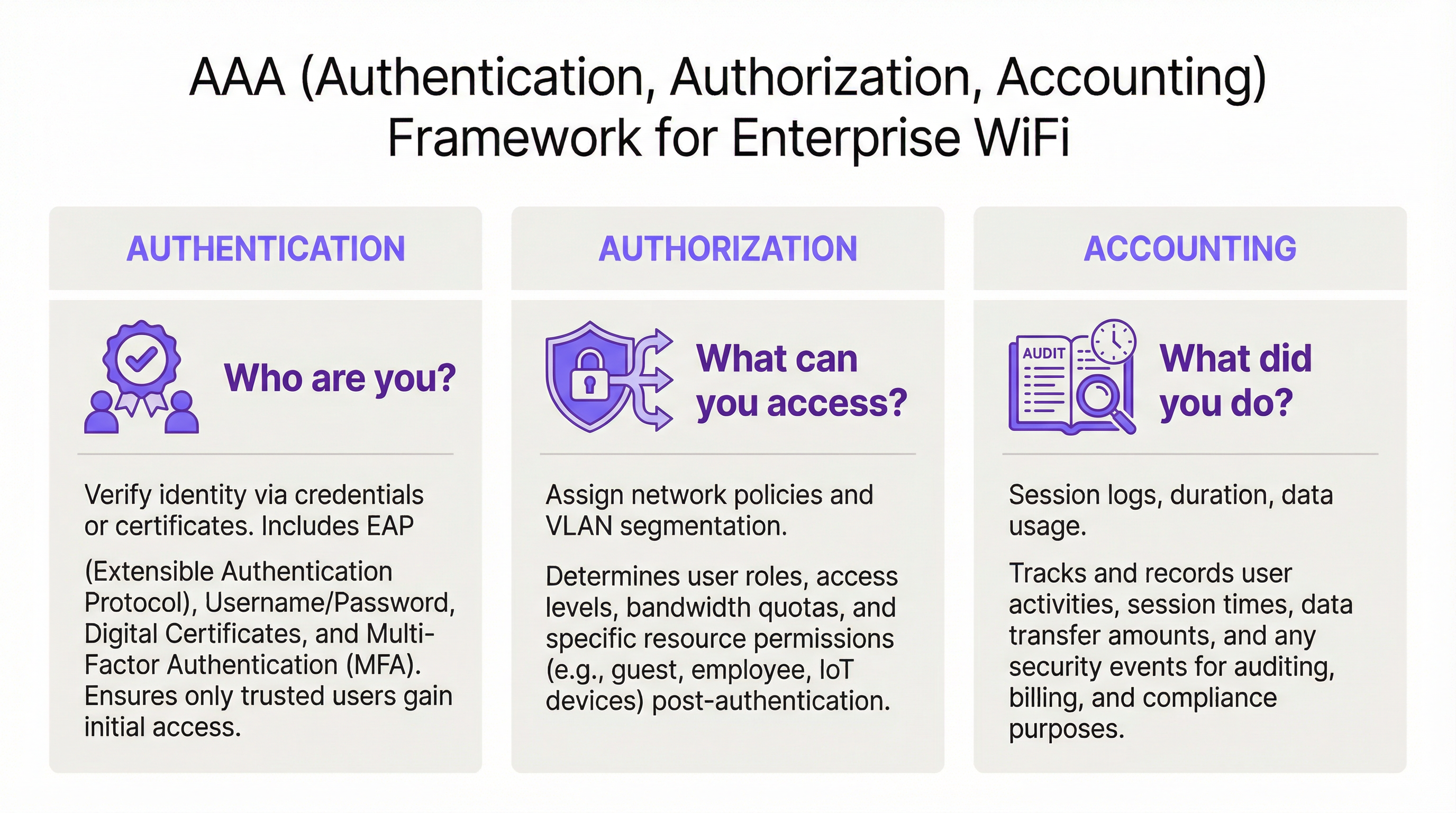
El marco AAA: Autenticación, Autorización y Contabilidad
RADIUS opera bajo el modelo cliente-servidor y está construido en torno al marco AAA, un concepto fundamental en la seguridad de redes. Comprender cada componente es esencial para una implementación exitosa.
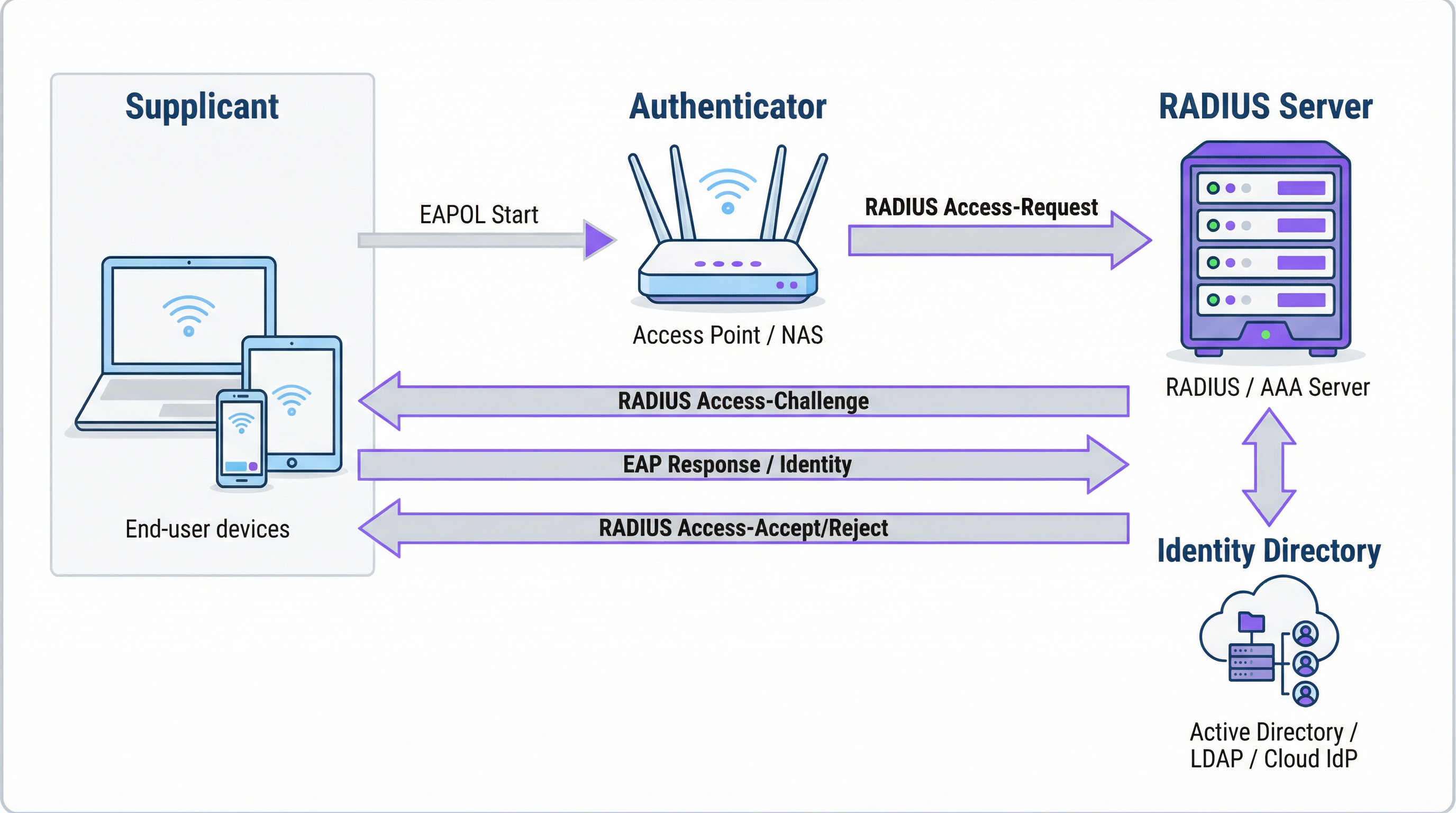
La Autenticación es el proceso de verificar la identidad de un usuario. Cuando un usuario intenta conectarse a una red WiFi protegida con WPA2/WPA3-Enterprise, su dispositivo —el Suplicante— envía credenciales al punto de acceso inalámbrico —el Autenticador—. El Autenticador no toma la decisión de acceso por sí mismo; reenvía la solicitud al servidor RADIUS. El servidor RADIUS valida estas credenciales frente a una fuente de identidad configurada: Microsoft Active Directory, un IdP en la nube como Okta o una base de datos de usuarios local. La validación puede usar una combinación de nombre de usuario y contraseña o, para una seguridad significativamente mayor, un certificado digital a través de un método EAP como EAP-TLS.
La Autorización determina qué se le permite hacer a un usuario autenticado. Según las políticas definidas por el administrador de la red, el servidor RADIUS devuelve atributos específicos al Autenticador. Estos atributos dictan la asignación de VLAN (separando el tráfico de invitados del tráfico corporativo), los límites de ancho de banda y las restricciones de acceso por hora del día. Esta aplicación de políticas granular y dinámica es una de las principales ventajas de RADIUS sobre los sistemas estáticos basados en PSK.
La Contabilidad rastrea la actividad del usuario durante toda la sesión. El servidor RADIUS registra las marcas de tiempo de conexión, la duración de la sesión, los datos transferidos y las direcciones MAC de los dispositivos. Este registro de auditoría es invaluable para la resolución de problemas, la planificación de capacidad y los informes de cumplimiento. Bajo PCI DSS 4.0, registrar y monitorear todo el acceso a los recursos de la red es un control obligatorio.
Cómo funcionan juntos RADIUS y 802.1X
El estándar IEEE 802.1X define el control de acceso a la red basado en puertos. En un contexto WiFi, 802.1X permite que un punto de acceso bloquee todo el tráfico de un dispositivo —excepto los mensajes de autenticación— hasta que el servidor RADIUS haya confirmado la autorización. La comunicación entre el Suplicante y el Autenticador utiliza el Protocolo de Autenticación Extensible (EAP), transportado a través de la LAN como EAPOL (EAP sobre LAN). Luego, el Autenticador retransmite esto al servidor RADIUS utilizando el protocolo RADIUS.
La elección del método EAP es una decisión de seguridad crítica:
| Método EAP | Tipo de autenticación | Nivel de seguridad | Caso de uso recomendado |
|---|---|---|---|
| EAP-TLS | Basada en certificados | El más alto | Dispositivos corporativos administrados: el estándar de oro |
| PEAP-MSCHAPv2 | Basada en credenciales | Medio | Entornos con predominio de Windows en transición a certificados |
| EAP-TTLS/PAP | Basada en credenciales | Medio | Entornos de sistemas operativos mixtos con soporte para dispositivos heredados |
Para los dispositivos corporativos, EAP-TLS es el estado objetivo. Utiliza autenticación mutua de certificados —tanto el cliente como el servidor presentan certificados—, eliminando por completo las contraseñas y los riesgos asociados de robo de credenciales y phishing.
Puertos y transporte de RADIUS
De forma predeterminada, RADIUS utiliza el puerto UDP 1812 para la autenticación y autorización, y el puerto UDP 1813 para la contabilidad. Algunas implementaciones heredadas utilizan los puertos 1645 y 1646. Desde el RFC 6613, RADIUS también puede operar sobre TCP con TLS (RadSec), lo que se utiliza cada vez más en implementaciones en la nube para mejorar la seguridad del transporte.
Guía de implementación
Transición de PSK a RADIUS: Una hoja de ruta de cinco pasos
Paso 1: Seleccione su infraestructura RADIUS. Elija entre un servidor local (Microsoft NPS para entornos Windows, FreeRADIUS para implementaciones de código abierto) o un servicio RADIUS basado en la nube. Para organizaciones con múltiples sedes, una plataforma RADIUS en la nube como la de Purple es casi siempre la opción correcta. Proporciona alta disponibilidad integrada, redundancia geográfica y elimina la carga operativa de la administración de servidores.
Paso 2: Integre su fuente de identidad. Conecte el servidor RADIUS al directorio de identidades autorizado de su organización. Las plataformas modernas de RADIUS en la nube admiten la integración directa con Azure AD, Google Workspace y Okta a través de SAML o LDAP. Para los usuarios invitados, la fuente de identidad suele ser un CRM, un sistema de gestión de propiedades (PMS) o una plataforma de WiFi para invitados diseñada específicamente para ese propósito.
Paso 3: Configure el hardware de red. En su controlador LAN inalámbrico o puntos de acceso, cree un nuevo SSID configurado para WPA2-Enterprise o WPA3-Enterprise. Apunte el SSID a la dirección IP de su servidor RADIUS y configure el secreto compartido (shared secret), una contraseña que cifra la comunicación entre el punto de acceso y el servidor RADIUS. Este valor debe coincidir exactamente en ambos lados; una discrepancia es una de las causas más comunes de fallas en la implementación inicial.
Paso 4: Defina las políticas de autorización. Cree reglas en el servidor RADIUS que asignen grupos de usuarios a políticas de red. Un conjunto de políticas típico para un hotel podría incluir: Personal en la VLAN 10 con acceso interno completo; Contratistas en la VLAN 30 con acceso limitado y un límite de ancho de banda de 50 Mbps; Invitados en la VLAN 20 con acceso solo a Internet y un límite de sesión de 8 horas.
Paso 5: Incorpore usuarios y dispositivos. Para el personal corporativo, implemente perfiles WiFi con configuraciones 802.1X a través de su plataforma MDM. Para los invitados, implemente un Captive Portal. La plataforma de Purple automatiza el flujo de incorporación de invitados —admitiendo inicios de sesión con redes sociales, formularios de registro y códigos de cupones— y crea cuentas de usuario RADIUS temporales que caducan automáticamente.

Mejores prácticas
Adopte WPA3-Enterprise. Donde el hardware lo permita, WPA3-Enterprise proporciona mejoras de seguridad significativas sobre WPA2-Enterprise, incluyendo Marcos de Administración Protegidos (PMF) y un cifrado más fuerte a través del modo de seguridad de 192 bits. Realice una auditoría de hardware para identificar los puntos de acceso que requieren actualizaciones de firmware o reemplazo.
Implemente EAP-TLS para dispositivos corporativos. La autenticación basada en certificados elimina la contraseña como vulnerabilidad. Integre su servidor RADIUS con su PKI o utilice una solución de gestión de certificados basada en la nube. Automatice la implementación de certificados a través de MDM para minimizar la carga administrativa de TI.
Aplique la segmentación de VLAN. La asignación dinámica de VLAN a través de RADIUS es innegociable para el cumplimiento de PCI DSS y la arquitectura Zero Trust. Asegúrese de que sus conmutadores de red y firewalls apliquen políticas de enrutamiento entre VLAN que eviten que el tráfico de invitados llegue a los recursos corporativos.
Implemente una infraestructura RADIUS redundante. Configure al menos un servidor RADIUS primario y secundario en sus puntos de acceso. Las plataformas RADIUS en la nube generalmente proporcionan esto de forma automática. Pruebe la conmutación por error (failover) con regularidad.
Resolución de problemas y mitigación de riesgos
| Modo de falla | Causa raíz | Resolución |
|---|---|---|
| Todos los usuarios son rechazados | Discrepancia del secreto compartido entre el AP y el servidor RADIUS | Verifique el secreto compartido tanto en la configuración del AP como en la del servidor RADIUS |
| Errores de certificado en dispositivos cliente | El cliente no confía en el certificado del servidor RADIUS | Instale el certificado de la CA raíz en todos los dispositivos cliente a través de MDM |
| Fallas de autenticación intermitentes | Servidor RADIUS sobrecargado o inalcanzable | Implemente un servidor RADIUS secundario; revise la capacidad del servidor |
| El portal de invitados no redirige | Mala configuración del walled garden | Asegúrese de que la URL del portal y los dominios del proveedor de inicio de sesión social estén en el walled garden |
| Los usuarios no pueden volver a conectarse después de que expira la sesión | La sesión de contabilidad no se terminó correctamente | Revise la configuración de contabilidad de RADIUS; verifique si hay sesiones estancadas |
ROI e impacto comercial
El caso de negocio para la implementación de RADIUS es convincente en múltiples dimensiones. La reducción del riesgo de seguridad es el beneficio más inmediato: reemplazar una PSK compartida con un acceso basado en la identidad elimina el vector más común de intrusiones de red basadas en WiFi, evitando potencialmente costos por brechas que promedian los £3.4 millones para las empresas del Reino Unido. La garantía de cumplimiento bajo PCI DSS, GDPR y regulaciones específicas del sector se logra a través de la combinación de control de acceso basado en la identidad y registros de contabilidad exhaustivos. Las ganancias en eficiencia operativa son significativas en grandes implementaciones: la gestión centralizada de políticas significa que incorporar a un nuevo usuario o revocar el acceso de un empleado que se marcha es una acción única en el directorio de identidades, no una reconfiguración manual en docenas de puntos de acceso. Finalmente, los datos de contabilidad generados por RADIUS proporcionan inteligencia procesable para la planificación de capacidad, permitiendo que las decisiones de inversión en infraestructura se basen en datos de uso reales en lugar de estimaciones.
Términos clave y definiciones
RADIUS (Remote Authentication Dial-In User Service)
A networking protocol, standardised in RFC 2865, that provides centralised Authentication, Authorization, and Accounting (AAA) management for users connecting to a network service. It operates on a client-server model, where the Network Access Server (NAS) is the client and the RADIUS server is the decision-making authority.
This is the core engine of enterprise WiFi security. When an IT manager talks about 'moving to 802.1X', they are almost always talking about deploying a RADIUS server.
802.1X
An IEEE standard for port-based Network Access Control (PNAC). It defines the encapsulation of the Extensible Authentication Protocol (EAP) over IEEE 802 networks, enabling an authenticator (e.g., a WiFi access point) to enforce authentication before granting network access.
This is the standard that makes RADIUS work for WiFi. When configuring an SSID for 'WPA2-Enterprise', you are enabling 802.1X on that SSID.
AAA (Authentication, Authorization, Accounting)
A security framework for intelligently controlling access to computer resources, enforcing policies, and auditing usage. Authentication verifies identity, Authorization determines permitted actions, and Accounting records activity.
RADIUS servers are often called 'AAA servers'. Understanding this framework is the conceptual foundation for all network access control design.
Supplicant
In the 802.1X framework, the Supplicant is the client device — a laptop, smartphone, or IoT device — that is requesting access to the network. The supplicant software on the device handles the EAP authentication exchange.
When troubleshooting authentication failures, the supplicant configuration (e.g., the WiFi profile on a laptop) is often the source of the problem.
Authenticator
In the 802.1X framework, the Authenticator is the network device — typically a wireless access point or an Ethernet switch — that enforces access control. It relays EAP messages between the Supplicant and the Authentication Server but does not make the authentication decision itself.
The access point is a relay, not a decision-maker. This is a critical distinction: the AP's job is to forward the request to RADIUS and then act on the response.
EAP (Extensible Authentication Protocol)
An authentication framework defined in RFC 3748 that supports multiple authentication methods. EAP itself does not define a specific authentication mechanism; instead, it provides a standard format for negotiating and carrying various EAP methods (e.g., EAP-TLS, PEAP, EAP-TTLS).
When configuring 802.1X, you must choose an EAP method. The choice between EAP-TLS (certificates) and PEAP (passwords) is one of the most consequential security decisions in a WiFi deployment.
EAP-TLS (EAP Transport Layer Security)
A certificate-based EAP method that provides mutual authentication between the client and the RADIUS server using X.509 digital certificates. It is widely regarded as the most secure EAP method, as it eliminates passwords entirely.
EAP-TLS is the gold standard for corporate device authentication. Deploying it requires a Public Key Infrastructure (PKI) to issue and manage client certificates, which is why cloud-based certificate management solutions are increasingly popular.
Captive Portal
A web page that intercepts a user's connection to a public WiFi network, requiring them to complete an action — such as accepting terms of service, entering credentials, or authenticating via a social media account — before internet access is granted.
Captive portals work in conjunction with RADIUS for guest WiFi. The portal is the user-facing interface; RADIUS is the back-end authentication engine that validates the user's session and enforces access policies.
VLAN (Virtual Local Area Network)
A logical network segment created within a physical network infrastructure. VLANs allow network administrators to segregate traffic from different user groups — such as guests, staff, and IoT devices — even when they share the same physical hardware.
Dynamic VLAN assignment via RADIUS is the mechanism that enables network segmentation in enterprise WiFi. It is a fundamental requirement for PCI DSS compliance and Zero Trust architecture.
Shared Secret
A password configured on both the RADIUS client (the access point) and the RADIUS server to authenticate their communication and encrypt RADIUS attribute values. It must be identical on both sides.
A shared secret mismatch is one of the most common causes of RADIUS authentication failures during initial deployment. Always copy-paste rather than manually type this value.
Casos de éxito
A 500-room hotel needs to provide secure WiFi for guests, conference attendees, and staff. Guests should have a frictionless onboarding experience, while staff require secure access to internal property management and point-of-sale systems. The hotel uses Oracle OPERA as its Property Management System (PMS).
Deploy Purple's cloud RADIUS platform integrated with the hotel's Oracle OPERA PMS. Provision three separate SSIDs: 'Hotel-Guest', 'Conference-WiFi', and 'Staff-Internal'. The 'Staff-Internal' SSID is configured for WPA3-Enterprise with EAP-TLS. Digital certificates are deployed to all hotel-owned devices via an MDM platform (e.g., Jamf or Microsoft Intune), enabling passwordless, seamless authentication for staff. The 'Hotel-Guest' SSID uses a branded captive portal integrated with OPERA. At check-in, OPERA automatically creates a temporary RADIUS user account with credentials valid for the duration of the guest's stay. The guest receives a QR code or a welcome email with a direct connection link. The 'Conference-WiFi' SSID uses a voucher-based system within Purple's platform, allowing event coordinators to generate unique, time-limited access codes for their attendees. All three SSIDs use dynamic VLAN assignment to enforce strict traffic segmentation.
A retail chain with 200 stores across the UK wants to replace its insecure, shared-password guest WiFi network. The marketing team requires opt-in demographic data from store visitors to support targeted campaigns. The IT team uses Azure Active Directory for all corporate identity management.
Deploy Purple's cloud RADIUS and guest WiFi platform across all 200 stores using a centralised, templated configuration. For guest access, configure a branded captive portal on a dedicated guest SSID. The portal offers authentication via social media accounts (Facebook, Google) or a simple registration form, capturing opt-in marketing consent in compliance with GDPR. Purple's platform aggregates this data into a centralised analytics dashboard, providing the marketing team with visitor demographics, dwell times, and repeat visit rates. For corporate staff, integrate the RADIUS server with the existing Azure AD tenant. Staff connect to a separate 'Staff' SSID using their Azure AD credentials via PEAP, with a phased migration plan to EAP-TLS with certificates for the highest-risk roles. All guest traffic is isolated on a dedicated VLAN with no access to the store's internal network or EPOS systems, meeting PCI DSS network segmentation requirements.
Análisis de escenarios
Q1. You are the IT architect for a large conference centre. A major technology company is renting your venue for a three-day conference with 5,000 attendees. The client has a hard requirement that attendees can connect to a secure, high-performance WiFi network without manually entering a password each day. The client uses Okta as their identity provider. How would you design the authentication solution?
💡 Sugerencia:Consider how to provide a seamless, passwordless experience for a large number of users from a single external organisation. Think about certificate-based authentication and how to integrate with a third-party identity provider for a time-limited event.
Mostrar enfoque recomendado
The optimal solution is to provision a dedicated SSID for the conference configured for WPA3-Enterprise with EAP-TLS. Integrate your cloud RADIUS platform with the client's Okta tenant via SAML federation for the duration of the event. Before the conference opens, attendees are directed to a one-time onboarding portal where they authenticate with their Okta credentials. Upon successful authentication, a unique digital certificate is generated and installed on their device. For the remainder of the conference, their device automatically and securely connects to the SSID without any further user interaction. The certificates are issued with a validity period matching the conference duration and are automatically revoked at close. This delivers a seamless, passwordless experience while maintaining strong security, and it leverages the client's existing identity infrastructure rather than creating a separate credential system.
Q2. A private hospital needs to provide WiFi for patients and visitors, but must ensure this traffic is completely isolated from the network used for clinical systems, electronic health records, and medical devices, to comply with HIPAA and NHS DSP Toolkit requirements. What RADIUS feature is most critical to achieving this isolation, and how would you configure it?
💡 Sugerencia:Focus on the Authorization pillar of the AAA framework. The key is not just authenticating users, but controlling what they can reach after authentication. Consider how RADIUS communicates network policy to the access point.
Mostrar enfoque recomendado
The most critical feature is dynamic VLAN assignment via RADIUS authorization policies. You would create a dedicated 'Patient-Guest' VLAN (e.g., VLAN 50) on the network infrastructure, configured with firewall rules that permit only internet access and explicitly deny all traffic to the clinical network VLANs. On the RADIUS server, create an authorization policy that assigns any user authenticating to the patient WiFi SSID to VLAN 50, regardless of their credentials. The RADIUS server communicates this assignment to the access point via the Tunnel-Type, Tunnel-Medium-Type, and Tunnel-Private-Group-ID attributes in the Access-Accept message. The access point then places the user's traffic into VLAN 50 at the point of connection. This ensures that even if a patient's device is compromised, it has no network path to clinical systems — a fundamental requirement for HIPAA compliance and clinical network security.
Q3. Your organisation has deployed 802.1X with RADIUS across its corporate estate. An employee reports that they cannot connect to the corporate WiFi from their new laptop, but they can connect successfully from their smartphone and from their previous laptop. The IT helpdesk has confirmed the employee's account is active in Azure AD. What is your diagnostic approach, and what are the three most likely root causes?
💡 Sugerencia:The issue is device-specific, not user-specific — the user can authenticate from other devices. This narrows the problem to the device configuration, the device's certificate, or the device's supplicant settings. Start with the RADIUS server logs.
Mostrar enfoque recomendado
The diagnostic approach is to first examine the RADIUS server's authentication logs for Access-Reject messages corresponding to the MAC address of the new laptop. The rejection reason code will identify the root cause. The three most likely causes are: (1) Missing or invalid client certificate — if the deployment uses EAP-TLS, the new laptop may not yet have had a certificate provisioned via MDM. Check whether the device is enrolled in the MDM platform and whether the certificate deployment policy has been applied. (2) Incorrect WiFi profile — the new laptop may have the wrong 802.1X supplicant settings, such as the wrong EAP method, an incorrect RADIUS server certificate trust configuration, or the wrong username format. Verify the WiFi profile matches the standard corporate template. (3) Device not yet registered in the identity directory — some RADIUS policies perform a device compliance check against Azure AD. If the new laptop has not yet completed Azure AD join and device registration, it may fail this check even though the user's account is active.
Conclusiones clave
- ✓RADIUS is the industry-standard protocol for centralised network access control, implementing the AAA (Authentication, Authorization, Accounting) framework to manage who can access your WiFi, what they can do, and to log all activity.
- ✓It replaces insecure pre-shared keys (PSKs) with robust, identity-based authentication, ensuring every user and device has a unique, verifiable identity on the network.
- ✓IEEE 802.1X is the standard that enables RADIUS to work with WiFi access points, blocking all network traffic from a device until the RADIUS server has confirmed authorisation.
- ✓EAP-TLS (certificate-based authentication) is the gold standard for corporate devices, eliminating passwords entirely and providing the strongest protection against credential theft and phishing.
- ✓Dynamic VLAN assignment via RADIUS authorization policies is the mechanism that enforces network segmentation — a mandatory control for PCI DSS compliance and a cornerstone of Zero Trust architecture.
- ✓For guest WiFi, RADIUS works in conjunction with a captive portal: the portal handles the user-facing onboarding experience, while RADIUS manages the back-end authentication and session policy enforcement.
- ✓Cloud-based RADIUS platforms such as Purple simplify deployment, provide built-in high availability, and integrate directly with modern identity providers (Azure AD, Google Workspace, Okta), making enterprise-grade network access control accessible for organisations of all sizes.




