

RADIUS ऑथेंटिकेशन क्या है और यह कैसे काम करता है?
This guide provides a definitive technical reference on RADIUS authentication for IT leaders managing enterprise and guest WiFi deployments. It demystifies the AAA protocol, explains how 802.1X and EAP methods work together, and details how Purple's cloud-based platform simplifies deployment for hotels, retail chains, stadiums, and public-sector organisations. Readers will leave with a clear implementation roadmap, real-world case studies, and the decision frameworks needed to migrate from insecure pre-shared keys to a robust, identity-driven network access control architecture.
🎧 इस गाइड को सुनें
ट्रांसक्रिप्ट देखें

कार्यकारी सारांश (Executive Summary)
मल्टी-साइट स्थानों — होटलों, रिटेल चेन, स्टेडियमों और कॉन्फ्रेंस सेंटरों — के IT लीडर्स के लिए, रोज़ाना हज़ारों यूज़र्स को सुरक्षित और विश्वसनीय WiFi एक्सेस प्रदान करना एक मिशन-क्रिटिकल सर्विस है, जिसमें महत्वपूर्ण ऑपरेशनल और रेगुलेटरी जोखिम शामिल हैं। गेस्ट और स्टाफ नेटवर्क के लिए सिंगल प्री-शेयर्ड की (PSK) का उपयोग करने का पुराना तरीका अब एक सुरक्षित दृष्टिकोण नहीं रह गया है। यह संगठनों को PCI DSS और GDPR के तहत कंप्लायंस उल्लंघनों, ऑपरेशनल रुकावटों और संभावित डेटा ब्रीच से होने वाले प्रतिष्ठा के नुकसान के जोखिम में डालता है。
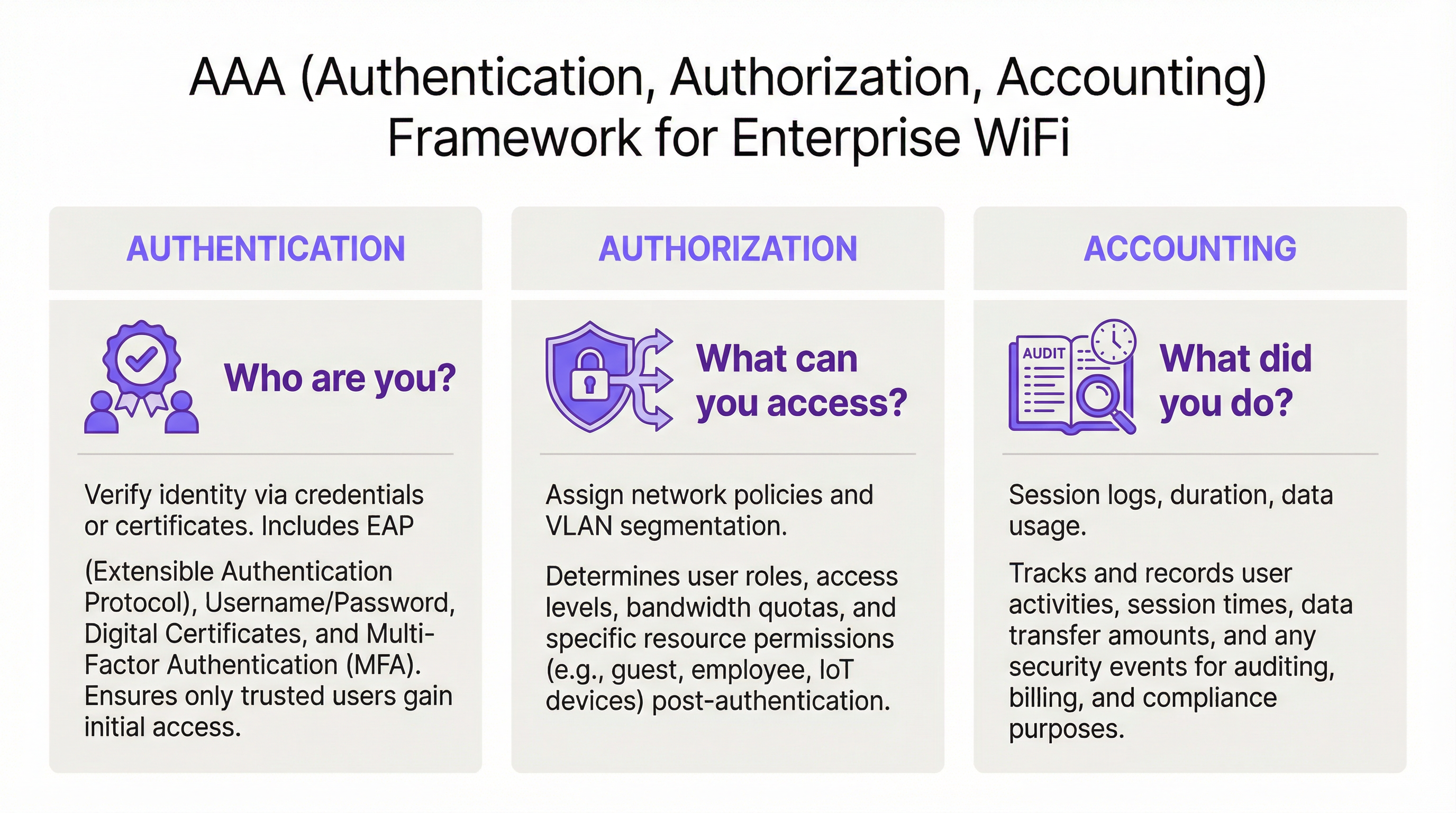
इसका आधुनिक, इंडस्ट्री-स्टैंडर्ड समाधान RADIUS (रिमोट ऑथेंटिकेशन डायल-इन यूज़र सर्विस) प्रोटोकॉल के माध्यम से नेटवर्क एक्सेस कंट्रोल को सेंट्रलाइज़ करना है। RADIUS नेटवर्क सुरक्षा के तीन स्तंभों — ऑथेंटिकेशन (Authentication), ऑथराइज़ेशन (Authorization), और अकाउंटिंग (Accounting) (AAA) — के लिए एक मज़बूत फ्रेमवर्क प्रदान करता है, जो हर यूज़र और डिवाइस के लिए आइडेंटिटी-आधारित एक्सेस लागू करता है। Azure AD, Google Workspace, या Okta जैसी मौजूदा आइडेंटिटी डायरेक्टरी के साथ इंटीग्रेट करके, RADIUS यह सुनिश्चित करता है कि केवल ऑथराइज़्ड व्यक्ति ही कनेक्ट हो सकें, और उनका एक्सेस उनकी भूमिका के अनुसार सटीक रूप से निर्धारित हो।
यह गाइड RADIUS, इसके मूल IEEE 802.1X स्टैंडर्ड, और Purple का WiFi इंटेलिजेंस प्लेटफ़ॉर्म डिप्लॉयमेंट की जटिलता को कैसे दूर करता है, इसका एक व्यावहारिक और कार्रवाई योग्य अवलोकन प्रदान करती है। यह नेटवर्क आर्किटेक्ट्स और IT मैनेजर्स के लिए लिखी गई है, जिन्हें अगले साल नहीं, बल्कि इसी तिमाही में इम्प्लीमेंटेशन के निर्णय लेने हैं।
तकनीकी डीप-डाइव (Technical Deep-Dive)
AAA फ्रेमवर्क: ऑथेंटिकेशन, ऑथराइज़ेशन और अकाउंटिंग
RADIUS क्लाइंट-सर्वर मॉडल पर काम करता है और AAA फ्रेमवर्क के इर्द-गिर्द बना है, जो नेटवर्क सुरक्षा में एक मूलभूत अवधारणा है। सफल डिप्लॉयमेंट के लिए प्रत्येक घटक को समझना आवश्यक है।
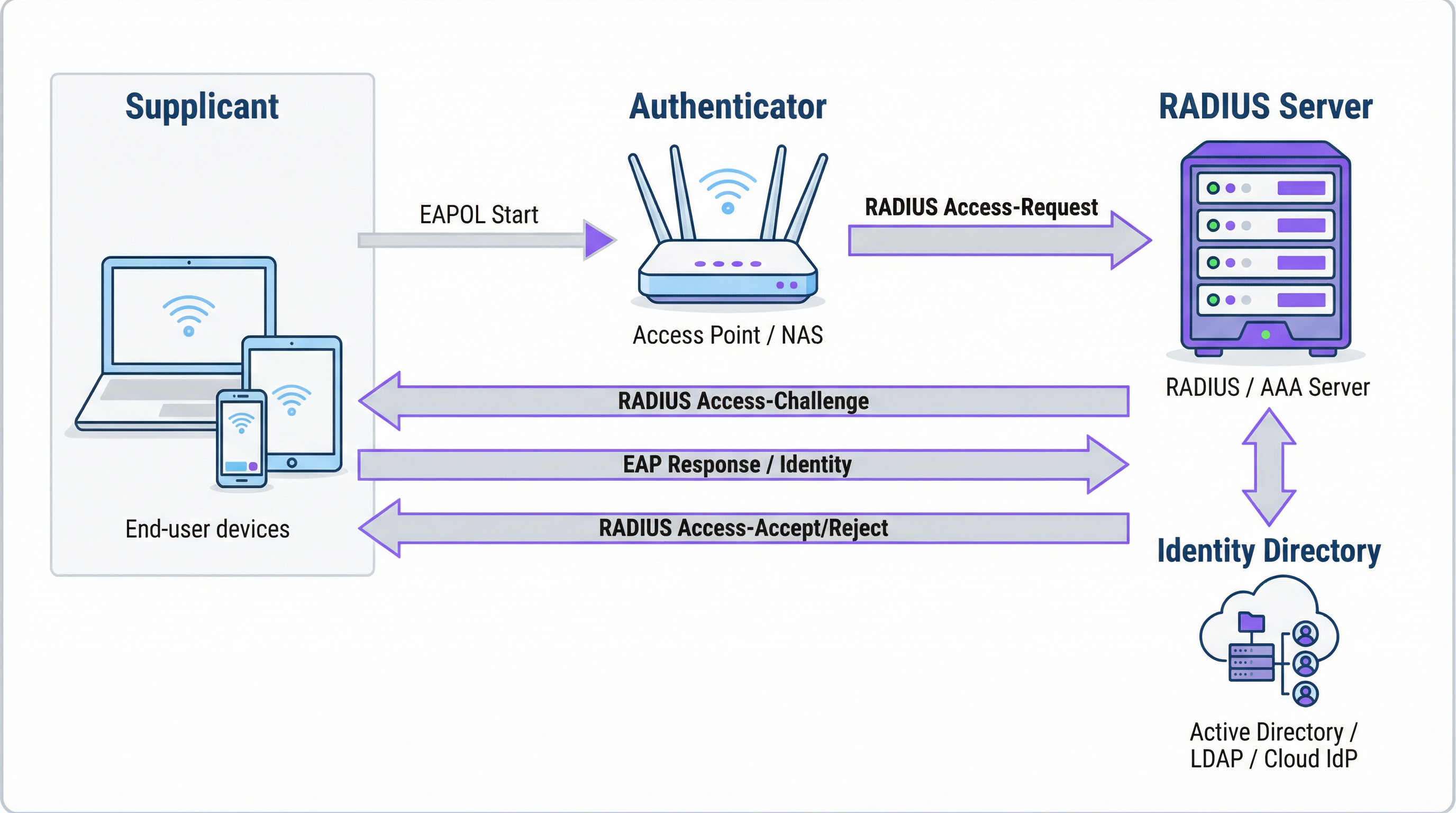
ऑथेंटिकेशन (Authentication) किसी यूज़र की पहचान सत्यापित करने की प्रक्रिया है। जब कोई यूज़र WPA2/WPA3-Enterprise से सुरक्षित WiFi नेटवर्क से कनेक्ट करने का प्रयास करता है, तो उनका डिवाइस — सप्लिकेंट (Supplicant) — वायरलेस एक्सेस पॉइंट — ऑथेंटिकेटर (Authenticator) — को क्रेडेंशियल्स भेजता है। ऑथेंटिकेटर स्वयं एक्सेस का निर्णय नहीं लेता है; यह रिक्वेस्ट को RADIUS सर्वर पर फॉरवर्ड कर देता है। RADIUS सर्वर इन क्रेडेंशियल्स को कॉन्फ़िगर किए गए आइडेंटिटी सोर्स: Microsoft Active Directory, Okta जैसे क्लाउड IdP, या लोकल यूज़र डेटाबेस के विरुद्ध वैलिडेट करता है। वैलिडेशन में यूज़रनेम और पासवर्ड के संयोजन का उपयोग किया जा सकता है या, काफी मज़बूत सुरक्षा के लिए, EAP-TLS जैसे EAP तरीके के माध्यम से डिजिटल सर्टिफ़िकेट का उपयोग किया जा सकता है।
ऑथराइज़ेशन (Authorization) यह निर्धारित करता है कि एक ऑथेंटिकेटेड यूज़र को क्या करने की अनुमति है। नेटवर्क एडमिनिस्ट्रेटर द्वारा परिभाषित पॉलिसियों के आधार पर, RADIUS सर्वर ऑथेंटिकेटर को विशिष्ट एट्रिब्यूट्स लौटाता है। ये एट्रिब्यूट्स VLAN असाइनमेंट (गेस्ट ट्रैफ़िक को कॉर्पोरेट ट्रैफ़िक से अलग करना), बैंडविड्थ लिमिट्स और दिन के समय के अनुसार एक्सेस प्रतिबंधों को निर्धारित करते हैं। यह ग्रैन्युलर, डायनामिक पॉलिसी एन्फोर्समेंट स्थिर PSK-आधारित सिस्टम्स की तुलना में RADIUS के मुख्य लाभों में से एक है。
अकाउंटिंग (Accounting) पूरे सेशन के दौरान यूज़र एक्टिविटी को ट्रैक करता है। RADIUS सर्वर कनेक्शन टाइमस्टैम्प, सेशन की अवधि, ट्रांसफ़र किया गया डेटा और डिवाइस के MAC एड्रेस को लॉग करता है। यह ऑडिट ट्रेल ट्रबलशूटिंग, कैपेसिटी प्लानिंग और कंप्लायंस रिपोर्टिंग के लिए अमूल्य है। PCI DSS 4.0 के तहत, नेटवर्क रिसोर्सेज़ के सभी एक्सेस की लॉगिंग और मॉनिटरिंग एक अनिवार्य नियंत्रण है।
RADIUS और 802.1X एक साथ कैसे काम करते हैं
IEEE 802.1X स्टैंडर्ड पोर्ट-आधारित नेटवर्क एक्सेस कंट्रोल को परिभाषित करता है। WiFi के संदर्भ में, 802.1X एक एक्सेस पॉइंट को किसी डिवाइस से आने वाले सभी ट्रैफ़िक को ब्लॉक करने में सक्षम बनाता है — ऑथेंटिकेशन संदेशों को छोड़कर — जब तक कि RADIUS सर्वर ऑथराइज़ेशन की पुष्टि नहीं कर देता। सप्लिकेंट और ऑथेंटिकेटर के बीच संचार एक्सटेंसिबल ऑथेंटिकेशन प्रोटोकॉल (EAP) का उपयोग करता है, जिसे LAN पर EAPOL (EAP over LAN) के रूप में ले जाया जाता है। इसके बाद ऑथेंटिकेटर इसे RADIUS प्रोटोकॉल का उपयोग करके RADIUS सर्वर पर रिले करता है।
EAP तरीके का चुनाव एक महत्वपूर्ण सुरक्षा निर्णय है:
| EAP तरीका | ऑथेंटिकेशन का प्रकार | सुरक्षा स्तर | अनुशंसित उपयोग केस |
|---|---|---|---|
| EAP-TLS | सर्टिफ़िकेट-आधारित | उच्चतम | कॉर्पोरेट प्रबंधित डिवाइस — गोल्ड स्टैंडर्ड |
| PEAP-MSCHAPv2 | क्रेडेंशियल-आधारित | मध्यम | सर्टिफ़िकेट्स में ट्रांज़िशन कर रहे Windows-बहुल वातावरण |
| EAP-TTLS/PAP | क्रेडेंशियल-आधारित | मध्यम | लिगेसी डिवाइस सपोर्ट वाले मिक्स्ड-OS वातावरण |
कॉर्पोरेट डिवाइसेज़ के लिए, EAP-TLS लक्षित स्थिति है। यह म्यूचुअल सर्टिफ़िकेट ऑथेंटिकेशन का उपयोग करता है — क्लाइंट और सर्वर दोनों सर्टिफ़िकेट प्रस्तुत करते हैं — जो पासवर्ड और क्रेडेंशियल चोरी तथा फ़िशिंग के जुड़े जोखिमों को पूरी तरह से समाप्त कर देता है।
RADIUS पोर्ट्स और ट्रांसपोर्ट
डिफ़ॉल्ट रूप से, RADIUS ऑथेंटिकेशन और ऑथराइज़ेशन के लिए UDP पोर्ट 1812, और अकाउंटिंग के लिए UDP पोर्ट 1813 का उपयोग करता है। कुछ लिगेसी डिप्लॉयमेंट पोर्ट 1645 और 1646 का उपयोग करते हैं। RFC 6613 के बाद से, RADIUS TLS (RadSec) के साथ TCP पर भी काम कर सकता है, जिसका उपयोग उन्नत ट्रांसपोर्ट सुरक्षा के लिए क्लाउड डिप्लॉयमेंट में तेज़ी से किया जा रहा है।
इम्प्लीमेंटेशन गाइड
PSK से RADIUS में ट्रांज़िशन: एक पाँच-चरणीय रोडमैप
चरण 1: अपना RADIUS इन्फ्रास्ट्रक्चर चुनें। ऑन-प्रिमाइसेस सर्वर (Windows वातावरण के लिए Microsoft NPS, ओपन-सोर्स डिप्लॉयमेंट के लिए FreeRADIUS) या क्लाउड-आधारित RADIUS सर्विस के बीच चुनाव करें। मल्टी-साइट संगठनों के लिए, Purple जैसा क्लाउड RADIUS प्लेटफ़ॉर्म लगभग हमेशा सही विकल्प होता है। यह बिल्ट-इन हाई अवेलेबिलिटी, जियोग्राफ़िक रिडंडेंसी प्रदान करता है, और सर्वर मैनेजमेंट के ऑपरेशनल बोझ को खत्म करता है।
चरण 2: अपने आइडेंटिटी सोर्स को इंटीग्रेट करें। RADIUS सर्वर को अपने संगठन की आधिकारिक आइडेंटिटी डायरेक्टरी से कनेक्ट करें। आधुनिक क्लाउड RADIUS प्लेटफ़ॉर्म SAML या LDAP के माध्यम से Azure AD, Google Workspace और Okta के साथ सीधे इंटीग्रेशन का समर्थन करते हैं। गेस्ट यूज़र्स के लिए, आइडेंटिटी सोर्स आमतौर पर एक CRM, एक प्रॉपर्टी मैनेजमेंट सिस्टम (PMS), या एक विशेष रूप से निर्मित गेस्ट WiFi प्लेटफ़ॉर्म होता है。
चरण 3: नेटवर्क हार्डवेयर कॉन्फ़िगर करें। अपने वायरलेस LAN कंट्रोलर या एक्सेस पॉइंट्स पर, WPA2-Enterprise या WPA3-Enterprise के लिए कॉन्फ़िगर किया गया एक नया SSID बनाएँ। SSID को अपने RADIUS सर्वर के IP एड्रेस पर पॉइंट करें और शेयर्ड सीक्रेट (shared secret) कॉन्फ़िगर करें — एक पासवर्ड जो एक्सेस पॉइंट और RADIUS सर्वर के बीच संचार को एन्क्रिप्ट करता है। यह वैल्यू दोनों तरफ बिल्कुल मेल खानी चाहिए; बेमेल होना शुरुआती डिप्लॉयमेंट विफलताओं के सबसे आम कारणों में से एक है।
चरण 4: ऑथराइज़ेशन पॉलिसियाँ परिभाषित करें। RADIUS सर्वर पर यूज़र ग्रुप्स को नेटवर्क पॉलिसियों से मैप करने वाले नियम बनाएँ। एक होटल के लिए एक सामान्य पॉलिसी सेट में शामिल हो सकते हैं: पूर्ण आंतरिक एक्सेस के साथ VLAN 10 पर स्टाफ; सीमित एक्सेस और 50 Mbps बैंडविड्थ कैप के साथ VLAN 30 पर कॉन्ट्रैक्टर्स; केवल इंटरनेट एक्सेस और 8-घंटे की सेशन लिमिट के साथ VLAN 20 पर गेस्ट।
चरण 5: यूज़र्स और डिवाइसेज़ को ऑनबोर्ड करें। कॉर्पोरेट स्टाफ के लिए, अपने MDM प्लेटफ़ॉर्म के माध्यम से 802.1X सेटिंग्स के साथ WiFi प्रोफ़ाइल डिप्लॉय करें। गेस्ट्स के लिए, एक Captive Portal डिप्लॉय करें। Purple का प्लेटफ़ॉर्म गेस्ट ऑनबोर्डिंग फ़्लो को ऑटोमेट करता है — सोशल मीडिया लॉगिन, रजिस्ट्रेशन फ़ॉर्म और वाउचर कोड का समर्थन करता है — और अस्थायी RADIUS यूज़र अकाउंट बनाता है जो स्वचालित रूप से समाप्त हो जाते हैं।

सर्वोत्तम प्रथाएँ (Best Practices)
WPA3-Enterprise अपनाएँ। जहाँ हार्डवेयर इसका समर्थन करता है, WPA3-Enterprise, WPA2-Enterprise की तुलना में महत्वपूर्ण सुरक्षा सुधार प्रदान करता है, जिसमें प्रोटेक्टेड मैनेजमेंट फ्रेम्स (PMF) और 192-बिट सुरक्षा मोड के माध्यम से मज़बूत एन्क्रिप्शन शामिल हैं। उन एक्सेस पॉइंट्स की पहचान करने के लिए हार्डवेयर ऑडिट करें जिन्हें फ़र्मवेयर अपडेट या रिप्लेसमेंट की आवश्यकता है।
कॉर्पोरेट डिवाइसेज़ के लिए EAP-TLS लागू करें। सर्टिफ़िकेट-आधारित ऑथेंटिकेशन पासवर्ड को एक भेद्यता के रूप में समाप्त कर देता है। अपने RADIUS सर्वर को अपने PKI के साथ इंटीग्रेट करें या क्लाउड-आधारित सर्टिफ़िकेट मैनेजमेंट समाधान का उपयोग करें। IT ओवरहेड को कम करने के लिए MDM के माध्यम से सर्टिफ़िकेट डिप्लॉयमेंट को ऑटोमेट करें।
VLAN सेगमेंटेशन लागू करें। RADIUS के माध्यम से डायनामिक VLAN असाइनमेंट PCI DSS कंप्लायंस और ज़ीरो ट्रस्ट आर्किटेक्चर के लिए अनिवार्य है। सुनिश्चित करें कि आपके नेटवर्क स्विच और फ़ायरवॉल इंटर-VLAN रूटिंग पॉलिसियों को लागू करते हैं जो गेस्ट ट्रैफ़िक को कॉर्पोरेट रिसोर्सेज़ तक पहुँचने से रोकते हैं।
रिडंडेंट RADIUS इन्फ्रास्ट्रक्चर डिप्लॉय करें। अपने एक्सेस पॉइंट्स पर कम से कम एक प्राइमरी और सेकेंडरी RADIUS सर्वर कॉन्फ़िगर करें। क्लाउड RADIUS प्लेटफ़ॉर्म आमतौर पर यह स्वचालित रूप से प्रदान करते हैं। नियमित रूप से फ़ेलओवर का परीक्षण करें।
ट्रबलशूटिंग और जोखिम न्यूनीकरण
| विफलता मोड | मूल कारण | समाधान |
|---|---|---|
| सभी यूज़र्स रिजेक्ट हो गए | AP और RADIUS सर्वर के बीच शेयर्ड सीक्रेट बेमेल | AP और RADIUS सर्वर दोनों कॉन्फ़िगरेशन पर शेयर्ड सीक्रेट सत्यापित करें |
| क्लाइंट डिवाइसेज़ पर सर्टिफ़िकेट त्रुटियाँ | RADIUS सर्वर सर्टिफ़िकेट क्लाइंट द्वारा विश्वसनीय नहीं है | MDM के माध्यम से सभी क्लाइंट डिवाइसेज़ पर रूट CA सर्टिफ़िकेट इंस्टॉल करें |
| रुक-रुक कर ऑथेंटिकेशन विफलताएँ | RADIUS सर्वर ओवरलोडेड है या पहुँच से बाहर है | सेकेंडरी RADIUS सर्वर लागू करें; सर्वर क्षमता की समीक्षा करें |
| गेस्ट पोर्टल रीडायरेक्ट नहीं हो रहा है | वॉल्ड गार्डन मिसकॉन्फ़िगरेशन | सुनिश्चित करें कि पोर्टल URL और सोशल लॉगिन प्रोवाइडर डोमेन वॉल्ड गार्डन में हैं |
| सेशन समाप्त होने के बाद यूज़र्स फिर से कनेक्ट नहीं हो सकते | अकाउंटिंग सेशन ठीक से समाप्त नहीं हुआ | RADIUS अकाउंटिंग कॉन्फ़िगरेशन की समीक्षा करें; पुराने सेशंस की जाँच करें |
ROI और व्यावसायिक प्रभाव
RADIUS डिप्लॉयमेंट के लिए व्यावसायिक मामला कई आयामों में सम्मोहक है। सुरक्षा जोखिम में कमी सबसे तात्कालिक लाभ है: शेयर्ड PSK को आइडेंटिटी-आधारित एक्सेस से बदलने से WiFi-आधारित नेटवर्क घुसपैठ के लिए सबसे आम वेक्टर समाप्त हो जाता है, जिससे संभावित रूप से डेटा ब्रीच की लागत से बचा जा सकता है जो यूके के व्यवसायों के लिए औसतन £3.4 मिलियन है।
PCI DSS, GDPR, और सेक्टर-विशिष्ट नियमों के तहत कंप्लायंस का आश्वासन आइडेंटिटी-आधारित एक्सेस कंट्रोल और व्यापक अकाउंटिंग लॉग्स के संयोजन के माध्यम से प्राप्त किया जाता है।
बड़े डिप्लॉयमेंट में ऑपरेशनल दक्षता लाभ महत्वपूर्ण हैं — सेंट्रलाइज़्ड पॉलिसी मैनेजमेंट का अर्थ है कि किसी नए यूज़र को ऑनबोर्ड करना या जाने वाले कर्मचारी के लिए एक्सेस रद्द करना आइडेंटिटी डायरेक्टरी में एक सिंगल एक्शन है, न कि दर्जनों एक्सेस पॉइंट्स पर मैन्युअल रीकॉन्फ़िगरेशन।
अंत में, RADIUS द्वारा उत्पन्न अकाउंटिंग डेटा कैपेसिटी प्लानिंग के लिए कार्रवाई योग्य इंटेलिजेंस प्रदान करता है, जिससे इन्फ्रास्ट्रक्चर निवेश के निर्णय अनुमानों के बजाय वास्तविक उपयोग डेटा पर आधारित होते हैं।
मुख्य शब्द और परिभाषाएं
RADIUS (Remote Authentication Dial-In User Service)
A networking protocol, standardised in RFC 2865, that provides centralised Authentication, Authorization, and Accounting (AAA) management for users connecting to a network service. It operates on a client-server model, where the Network Access Server (NAS) is the client and the RADIUS server is the decision-making authority.
This is the core engine of enterprise WiFi security. When an IT manager talks about 'moving to 802.1X', they are almost always talking about deploying a RADIUS server.
802.1X
An IEEE standard for port-based Network Access Control (PNAC). It defines the encapsulation of the Extensible Authentication Protocol (EAP) over IEEE 802 networks, enabling an authenticator (e.g., a WiFi access point) to enforce authentication before granting network access.
This is the standard that makes RADIUS work for WiFi. When configuring an SSID for 'WPA2-Enterprise', you are enabling 802.1X on that SSID.
AAA (Authentication, Authorization, Accounting)
A security framework for intelligently controlling access to computer resources, enforcing policies, and auditing usage. Authentication verifies identity, Authorization determines permitted actions, and Accounting records activity.
RADIUS servers are often called 'AAA servers'. Understanding this framework is the conceptual foundation for all network access control design.
Supplicant
In the 802.1X framework, the Supplicant is the client device — a laptop, smartphone, or IoT device — that is requesting access to the network. The supplicant software on the device handles the EAP authentication exchange.
When troubleshooting authentication failures, the supplicant configuration (e.g., the WiFi profile on a laptop) is often the source of the problem.
Authenticator
In the 802.1X framework, the Authenticator is the network device — typically a wireless access point or an Ethernet switch — that enforces access control. It relays EAP messages between the Supplicant and the Authentication Server but does not make the authentication decision itself.
The access point is a relay, not a decision-maker. This is a critical distinction: the AP's job is to forward the request to RADIUS and then act on the response.
EAP (Extensible Authentication Protocol)
An authentication framework defined in RFC 3748 that supports multiple authentication methods. EAP itself does not define a specific authentication mechanism; instead, it provides a standard format for negotiating and carrying various EAP methods (e.g., EAP-TLS, PEAP, EAP-TTLS).
When configuring 802.1X, you must choose an EAP method. The choice between EAP-TLS (certificates) and PEAP (passwords) is one of the most consequential security decisions in a WiFi deployment.
EAP-TLS (EAP Transport Layer Security)
A certificate-based EAP method that provides mutual authentication between the client and the RADIUS server using X.509 digital certificates. It is widely regarded as the most secure EAP method, as it eliminates passwords entirely.
EAP-TLS is the gold standard for corporate device authentication. Deploying it requires a Public Key Infrastructure (PKI) to issue and manage client certificates, which is why cloud-based certificate management solutions are increasingly popular.
Captive Portal
A web page that intercepts a user's connection to a public WiFi network, requiring them to complete an action — such as accepting terms of service, entering credentials, or authenticating via a social media account — before internet access is granted.
Captive portals work in conjunction with RADIUS for guest WiFi. The portal is the user-facing interface; RADIUS is the back-end authentication engine that validates the user's session and enforces access policies.
VLAN (Virtual Local Area Network)
A logical network segment created within a physical network infrastructure. VLANs allow network administrators to segregate traffic from different user groups — such as guests, staff, and IoT devices — even when they share the same physical hardware.
Dynamic VLAN assignment via RADIUS is the mechanism that enables network segmentation in enterprise WiFi. It is a fundamental requirement for PCI DSS compliance and Zero Trust architecture.
Shared Secret
A password configured on both the RADIUS client (the access point) and the RADIUS server to authenticate their communication and encrypt RADIUS attribute values. It must be identical on both sides.
A shared secret mismatch is one of the most common causes of RADIUS authentication failures during initial deployment. Always copy-paste rather than manually type this value.
केस स्टडीज
A 500-room hotel needs to provide secure WiFi for guests, conference attendees, and staff. Guests should have a frictionless onboarding experience, while staff require secure access to internal property management and point-of-sale systems. The hotel uses Oracle OPERA as its Property Management System (PMS).
Deploy Purple's cloud RADIUS platform integrated with the hotel's Oracle OPERA PMS. Provision three separate SSIDs: 'Hotel-Guest', 'Conference-WiFi', and 'Staff-Internal'. The 'Staff-Internal' SSID is configured for WPA3-Enterprise with EAP-TLS. Digital certificates are deployed to all hotel-owned devices via an MDM platform (e.g., Jamf or Microsoft Intune), enabling passwordless, seamless authentication for staff. The 'Hotel-Guest' SSID uses a branded captive portal integrated with OPERA. At check-in, OPERA automatically creates a temporary RADIUS user account with credentials valid for the duration of the guest's stay. The guest receives a QR code or a welcome email with a direct connection link. The 'Conference-WiFi' SSID uses a voucher-based system within Purple's platform, allowing event coordinators to generate unique, time-limited access codes for their attendees. All three SSIDs use dynamic VLAN assignment to enforce strict traffic segmentation.
A retail chain with 200 stores across the UK wants to replace its insecure, shared-password guest WiFi network. The marketing team requires opt-in demographic data from store visitors to support targeted campaigns. The IT team uses Azure Active Directory for all corporate identity management.
Deploy Purple's cloud RADIUS and guest WiFi platform across all 200 stores using a centralised, templated configuration. For guest access, configure a branded captive portal on a dedicated guest SSID. The portal offers authentication via social media accounts (Facebook, Google) or a simple registration form, capturing opt-in marketing consent in compliance with GDPR. Purple's platform aggregates this data into a centralised analytics dashboard, providing the marketing team with visitor demographics, dwell times, and repeat visit rates. For corporate staff, integrate the RADIUS server with the existing Azure AD tenant. Staff connect to a separate 'Staff' SSID using their Azure AD credentials via PEAP, with a phased migration plan to EAP-TLS with certificates for the highest-risk roles. All guest traffic is isolated on a dedicated VLAN with no access to the store's internal network or EPOS systems, meeting PCI DSS network segmentation requirements.
परिदृश्य विश्लेषण
Q1. You are the IT architect for a large conference centre. A major technology company is renting your venue for a three-day conference with 5,000 attendees. The client has a hard requirement that attendees can connect to a secure, high-performance WiFi network without manually entering a password each day. The client uses Okta as their identity provider. How would you design the authentication solution?
💡 संकेत:Consider how to provide a seamless, passwordless experience for a large number of users from a single external organisation. Think about certificate-based authentication and how to integrate with a third-party identity provider for a time-limited event.
अनुशंसित दृष्टिकोण दिखाएं
The optimal solution is to provision a dedicated SSID for the conference configured for WPA3-Enterprise with EAP-TLS. Integrate your cloud RADIUS platform with the client's Okta tenant via SAML federation for the duration of the event. Before the conference opens, attendees are directed to a one-time onboarding portal where they authenticate with their Okta credentials. Upon successful authentication, a unique digital certificate is generated and installed on their device. For the remainder of the conference, their device automatically and securely connects to the SSID without any further user interaction. The certificates are issued with a validity period matching the conference duration and are automatically revoked at close. This delivers a seamless, passwordless experience while maintaining strong security, and it leverages the client's existing identity infrastructure rather than creating a separate credential system.
Q2. A private hospital needs to provide WiFi for patients and visitors, but must ensure this traffic is completely isolated from the network used for clinical systems, electronic health records, and medical devices, to comply with HIPAA and NHS DSP Toolkit requirements. What RADIUS feature is most critical to achieving this isolation, and how would you configure it?
💡 संकेत:Focus on the Authorization pillar of the AAA framework. The key is not just authenticating users, but controlling what they can reach after authentication. Consider how RADIUS communicates network policy to the access point.
अनुशंसित दृष्टिकोण दिखाएं
The most critical feature is dynamic VLAN assignment via RADIUS authorization policies. You would create a dedicated 'Patient-Guest' VLAN (e.g., VLAN 50) on the network infrastructure, configured with firewall rules that permit only internet access and explicitly deny all traffic to the clinical network VLANs. On the RADIUS server, create an authorization policy that assigns any user authenticating to the patient WiFi SSID to VLAN 50, regardless of their credentials. The RADIUS server communicates this assignment to the access point via the Tunnel-Type, Tunnel-Medium-Type, and Tunnel-Private-Group-ID attributes in the Access-Accept message. The access point then places the user's traffic into VLAN 50 at the point of connection. This ensures that even if a patient's device is compromised, it has no network path to clinical systems — a fundamental requirement for HIPAA compliance and clinical network security.
Q3. Your organisation has deployed 802.1X with RADIUS across its corporate estate. An employee reports that they cannot connect to the corporate WiFi from their new laptop, but they can connect successfully from their smartphone and from their previous laptop. The IT helpdesk has confirmed the employee's account is active in Azure AD. What is your diagnostic approach, and what are the three most likely root causes?
💡 संकेत:The issue is device-specific, not user-specific — the user can authenticate from other devices. This narrows the problem to the device configuration, the device's certificate, or the device's supplicant settings. Start with the RADIUS server logs.
अनुशंसित दृष्टिकोण दिखाएं
The diagnostic approach is to first examine the RADIUS server's authentication logs for Access-Reject messages corresponding to the MAC address of the new laptop. The rejection reason code will identify the root cause. The three most likely causes are: (1) Missing or invalid client certificate — if the deployment uses EAP-TLS, the new laptop may not yet have had a certificate provisioned via MDM. Check whether the device is enrolled in the MDM platform and whether the certificate deployment policy has been applied. (2) Incorrect WiFi profile — the new laptop may have the wrong 802.1X supplicant settings, such as the wrong EAP method, an incorrect RADIUS server certificate trust configuration, or the wrong username format. Verify the WiFi profile matches the standard corporate template. (3) Device not yet registered in the identity directory — some RADIUS policies perform a device compliance check against Azure AD. If the new laptop has not yet completed Azure AD join and device registration, it may fail this check even though the user's account is active.
मुख्य निष्कर्ष
- ✓RADIUS is the industry-standard protocol for centralised network access control, implementing the AAA (Authentication, Authorization, Accounting) framework to manage who can access your WiFi, what they can do, and to log all activity.
- ✓It replaces insecure pre-shared keys (PSKs) with robust, identity-based authentication, ensuring every user and device has a unique, verifiable identity on the network.
- ✓IEEE 802.1X is the standard that enables RADIUS to work with WiFi access points, blocking all network traffic from a device until the RADIUS server has confirmed authorisation.
- ✓EAP-TLS (certificate-based authentication) is the gold standard for corporate devices, eliminating passwords entirely and providing the strongest protection against credential theft and phishing.
- ✓Dynamic VLAN assignment via RADIUS authorization policies is the mechanism that enforces network segmentation — a mandatory control for PCI DSS compliance and a cornerstone of Zero Trust architecture.
- ✓For guest WiFi, RADIUS works in conjunction with a captive portal: the portal handles the user-facing onboarding experience, while RADIUS manages the back-end authentication and session policy enforcement.
- ✓Cloud-based RADIUS platforms such as Purple simplify deployment, provide built-in high availability, and integrate directly with modern identity providers (Azure AD, Google Workspace, Okta), making enterprise-grade network access control accessible for organisations of all sizes.




