

Cos'è l'autenticazione RADIUS e come funziona?
This guide provides a definitive technical reference on RADIUS authentication for IT leaders managing enterprise and guest WiFi deployments. It demystifies the AAA protocol, explains how 802.1X and EAP methods work together, and details how Purple's cloud-based platform simplifies deployment for hotels, retail chains, stadiums, and public-sector organisations. Readers will leave with a clear implementation roadmap, real-world case studies, and the decision frameworks needed to migrate from insecure pre-shared keys to a robust, identity-driven network access control architecture.
🎧 Ascolta questa guida
Visualizza trascrizione

Sintesi esecutiva
Per i responsabili IT di strutture multi-sede — hotel, catene di vendita al dettaglio, stadi e centri congressi — fornire un accesso WiFi sicuro e affidabile a migliaia di utenti giornalieri è un servizio mission-critical che comporta significativi rischi operativi e normativi. L'approccio obsoleto di utilizzare un'unica chiave precondivisa (PSK) per le reti degli ospiti e del personale non rappresenta più una postura di sicurezza difendibile. Espone le organizzazioni a violazioni della conformità ai sensi del PCI DSS e del GDPR, a interruzioni operative e a danni reputazionali derivanti da potenziali violazioni.
La soluzione moderna e standard del settore consiste nel centralizzare il controllo degli accessi di rete tramite il protocollo RADIUS (Remote Authentication Dial-In User Service). RADIUS fornisce un framework solido per i tre pilastri della sicurezza di rete — Autenticazione, Autorizzazione e Accounting (AAA) — imponendo un accesso basato sull'identità per ogni utente e dispositivo. Integrandosi con una directory di identità esistente come Azure AD, Google Workspace o Okta, RADIUS garantisce che solo le persone autorizzate possano connettersi e che il loro accesso sia limitato con precisione al loro ruolo.
Questa guida fornisce una panoramica pratica e attuabile di RADIUS, dello standard IEEE 802.1X sottostante e di come la piattaforma di intelligence WiFi di Purple elimini la complessità dell'implementazione. È scritta per architetti di rete e responsabili IT che devono prendere decisioni di implementazione in questo trimestre, non l'anno prossimo.
Approfondimento tecnico
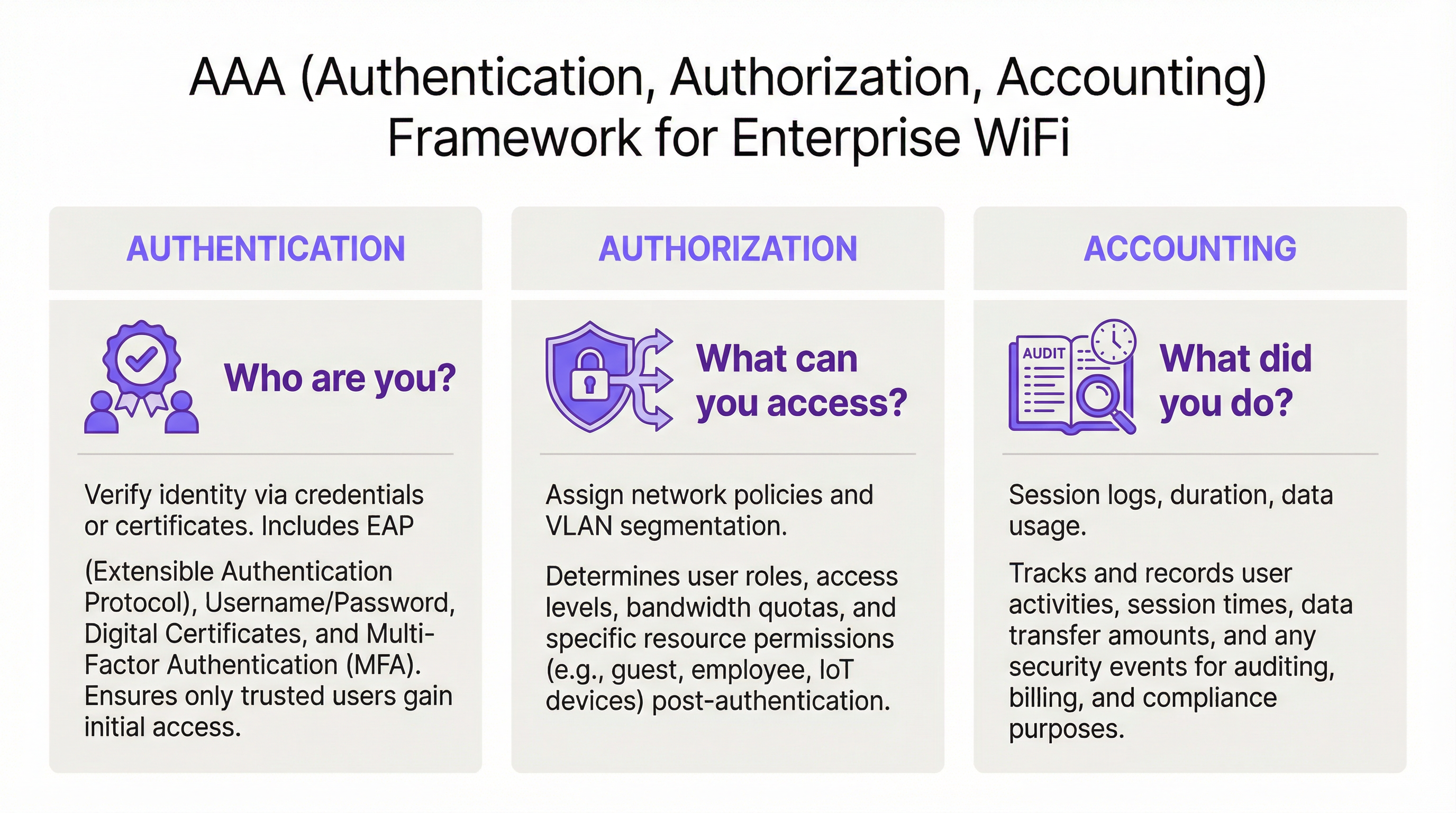
Il framework AAA: Autenticazione, Autorizzazione e Accounting
RADIUS opera sul modello client-server ed è basato sul framework AAA, un concetto fondamentale nella sicurezza di rete. Comprendere ogni componente è essenziale per un'implementazione di successo.
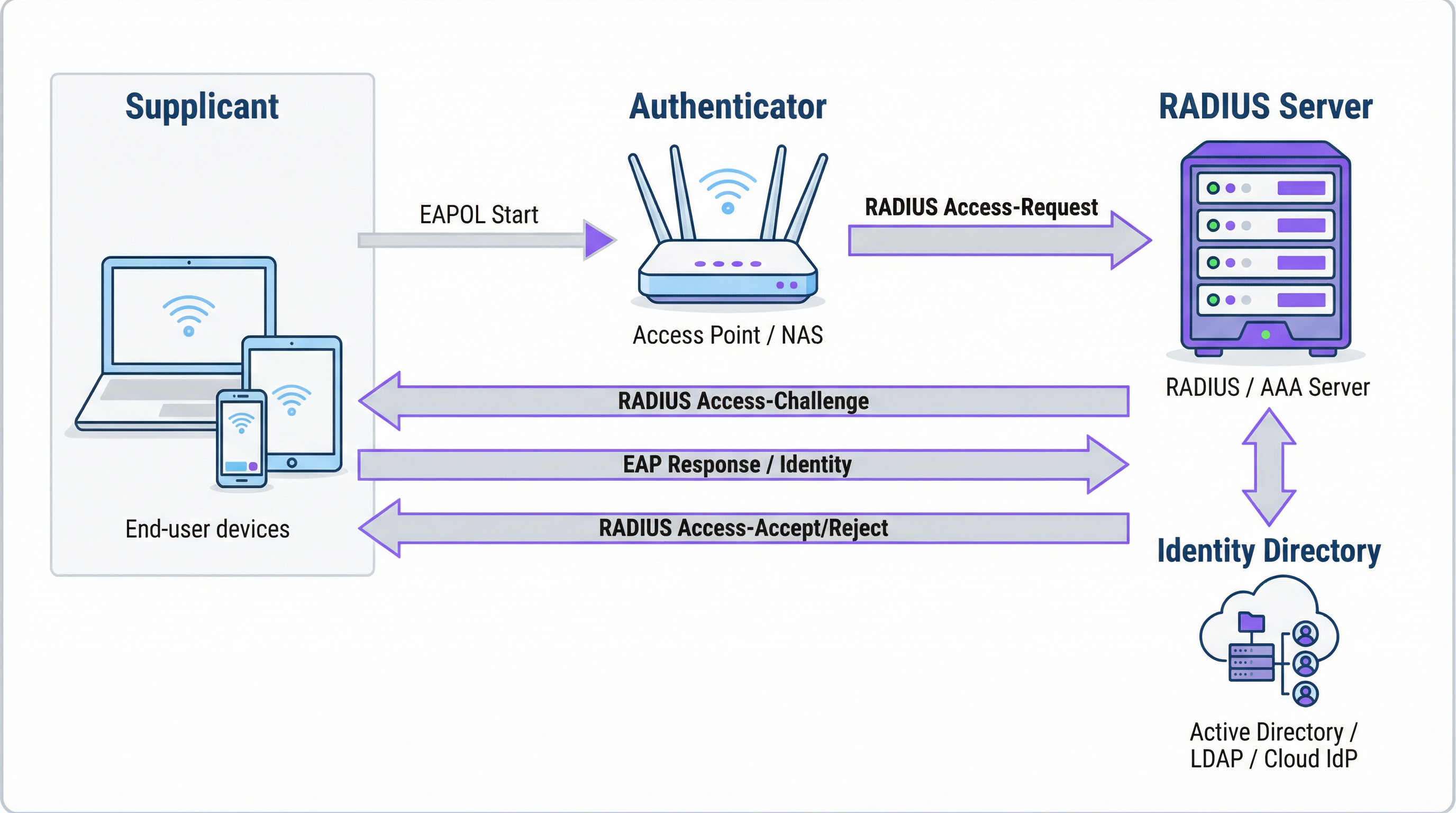
L'Autenticazione è il processo di verifica dell'identità di un utente. Quando un utente tenta di connettersi a una rete WiFi protetta con WPA2/WPA3-Enterprise, il suo dispositivo — il Supplicant — invia le credenziali al Wireless Access Point — l'Authenticator. L'Authenticator non prende autonomamente la decisione sull'accesso; inoltra la richiesta al server RADIUS. Il server RADIUS convalida queste credenziali rispetto a una fonte di identità configurata: Microsoft Active Directory, un IdP cloud come Okta o un database utenti locale. La convalida può utilizzare una combinazione di nome utente e password o, per una sicurezza notevolmente superiore, un certificato digitale tramite un metodo EAP come EAP-TLS.
L'Autorizzazione determina cosa è consentito fare a un utente autenticato. In base alle policy definite dall'amministratore di rete, il server RADIUS restituisce attributi specifici all'Authenticator. Questi attributi dettano l'assegnazione della VLAN (separando il traffico degli ospiti da quello aziendale), i limiti di larghezza di banda e le restrizioni di accesso in base all'orario. Questa applicazione granulare e dinamica delle policy è uno dei principali vantaggi di RADIUS rispetto ai sistemi statici basati su PSK.
L'Accounting traccia l'attività dell'utente durante l'intera sessione. Il server RADIUS registra i timestamp di connessione, la durata della sessione, i dati trasferiti e gli indirizzi MAC dei dispositivi. Questo audit trail è inestimabile per la risoluzione dei problemi, la pianificazione della capacità e il reporting di conformità. Ai sensi del PCI DSS 4.0, la registrazione e il monitoraggio di tutti gli accessi alle risorse di rete sono un controllo obbligatorio.
Come funzionano insieme RADIUS e 802.1X
Lo standard IEEE 802.1X definisce il controllo degli accessi di rete basato sulle porte. In un contesto WiFi, l'802.1X consente a un access point di bloccare tutto il traffico proveniente da un dispositivo — ad eccezione dei messaggi di autenticazione — finché il server RADIUS non ha confermato l'autorizzazione. La comunicazione tra il Supplicant e l'Authenticator utilizza l'Extensible Authentication Protocol (EAP), trasportato sulla LAN come EAPOL (EAP over LAN). L'Authenticator inoltra quindi questi dati al server RADIUS utilizzando il protocollo RADIUS.
La scelta del metodo EAP è una decisione di sicurezza critica:
| Metodo EAP | Tipo di autenticazione | Livello di sicurezza | Caso d'uso consigliato |
|---|---|---|---|
| EAP-TLS | Basata su certificato | Massimo | Dispositivi gestiti dall'azienda — gold standard |
| PEAP-MSCHAPv2 | Basata su credenziali | Medio | Ambienti a prevalenza Windows in transizione verso i certificati |
| EAP-TTLS/PAP | Basata su credenziali | Medio | Ambienti con sistemi operativi misti e supporto per dispositivi legacy |
Per i dispositivi aziendali, EAP-TLS rappresenta lo stato di arrivo ideale. Utilizza l'autenticazione reciproca tramite certificati — sia il client che il server presentano certificati — eliminando completamente le password e i rischi associati di furto di credenziali e phishing.
Porte e trasporto RADIUS
Per impostazione predefinita, RADIUS utilizza la porta UDP 1812 per l'autenticazione e l'autorizzazione, e la porta UDP 1813 per l'accounting. Alcune implementazioni legacy utilizzano le porte 1645 e 1646. A partire dalla RFC 6613, RADIUS può operare anche su TCP con TLS (RadSec), sempre più utilizzato nelle implementazioni cloud per una maggiore sicurezza del trasporto.
Guida all'implementazione
Passaggio da PSK a RADIUS: una roadmap in cinque fasi
Fase 1: Selezionare l'infrastruttura RADIUS. Scegliere tra un server on-premise (Microsoft NPS per ambienti Windows, FreeRADIUS per implementazioni open-source) o un servizio RADIUS basato su cloud. Per le organizzazioni multi-sede, una piattaforma RADIUS cloud come quella di Purple è quasi sempre la scelta corretta. Fornisce alta affidabilità integrata, ridondanza geografica ed elimina l'onere operativo della gestione dei server.
Fase 2: Integrare la fonte di identità. Collegare il server RADIUS alla directory di identità autorevole dell'organizzazione. Le moderne piattaforme RADIUS cloud supportano l'integrazione diretta con Azure AD, Google Workspace e Okta tramite SAML o LDAP. Per gli utenti ospiti, la fonte di identità è in genere un CRM, un Property Management System (PMS) o una piattaforma WiFi per ospiti appositamente creata.
Fase 3: Configurare l'hardware di rete. Sul controller LAN wireless o sugli access point, creare un nuovo SSID configurato per WPA2-Enterprise o WPA3-Enterprise. Indirizzare l'SSID all'indirizzo IP del server RADIUS e configurare il segreto condiviso (shared secret) — una password che crittografa la comunicazione tra l'access point e il server RADIUS. Questo valore deve corrispondere esattamente su entrambi i lati; una mancata corrispondenza è una delle cause più comuni di fallimento nelle implementazioni iniziali.
Fase 4: Definire le policy di autorizzazione. Creare regole sul server RADIUS che mappino i gruppi di utenti alle policy di rete. Un tipico set di policy per un hotel potrebbe includere: Personale sulla VLAN 10 con accesso interno completo; Appaltatori sulla VLAN 30 con accesso limitato e un tetto di larghezza di banda di 50 Mbps; Ospiti sulla VLAN 20 con accesso solo a Internet e un limite di sessione di 8 ore.
Fase 5: Onboarding di utenti e dispositivi. Per il personale aziendale, distribuire profili WiFi con impostazioni 802.1X tramite la piattaforma MDM. Per gli ospiti, implementare un Captive Portal. La piattaforma di Purple automatizza il flusso di onboarding degli ospiti — supportando accessi tramite social media, moduli di registrazione e codici voucher — e crea account utente RADIUS temporanei che scadono automaticamente.
Best Practice
Adottare WPA3-Enterprise. Laddove l'hardware lo supporti, WPA3-Enterprise offre miglioramenti significativi in termini di sicurezza rispetto a WPA2-Enterprise, inclusi i Protected Management Frames (PMF) e una crittografia più forte tramite la modalità di sicurezza a 192 bit. Condurre un audit hardware per identificare gli access point che richiedono aggiornamenti del firmware o la sostituzione.
Implementare EAP-TLS per i dispositivi aziendali. L'autenticazione basata su certificati elimina la password come vulnerabilità. Integrare il server RADIUS con la propria PKI o utilizzare una soluzione di gestione dei certificati basata su cloud. Automatizzare la distribuzione dei certificati tramite MDM per ridurre al minimo il carico di lavoro IT.
Imporre la segmentazione VLAN. L'assegnazione dinamica delle VLAN tramite RADIUS non è negoziabile per la conformità al PCI DSS e per l'architettura Zero Trust. Assicurarsi che gli switch di rete e i firewall applichino policy di routing inter-VLAN che impediscano al traffico degli ospiti di raggiungere le risorse aziendali.
Implementare un'infrastruttura RADIUS ridondante. Configurare almeno un server RADIUS primario e uno secondario sugli access point. Le piattaforme RADIUS cloud in genere forniscono questa funzionalità automaticamente. Testare regolarmente il failover.
Risoluzione dei problemi e mitigazione dei rischi
| Modalità di guasto | Causa principale | Risoluzione |
|---|---|---|
| Tutti gli utenti rifiutati | Mancata corrispondenza del segreto condiviso tra AP e server RADIUS | Verificare il segreto condiviso sia sull'AP che nella configurazione del server RADIUS |
| Errori di certificato sui dispositivi client | Certificato del server RADIUS non attendibile per il client | Installare il certificato della CA radice su tutti i dispositivi client tramite MDM |
| Errori di autenticazione intermittenti | Server RADIUS sovraccarico o irraggiungibile | Implementare un server RADIUS secondario; rivedere la capacità del server |
| Il portale ospiti non reindirizza | Errata configurazione del walled garden | Assicurarsi che l'URL del portale e i domini dei provider di social login siano nel walled garden |
| Gli utenti non riescono a riconnettersi dopo la scadenza della sessione | Sessione di accounting non terminata correttamente | Rivedere la configurazione dell'accounting RADIUS; verificare la presenza di sessioni inattive |
ROI e impatto sul business
Il business case per l'implementazione di RADIUS è convincente sotto molteplici aspetti. La riduzione dei rischi per la sicurezza è il vantaggio più immediato: sostituire una PSK condivisa con un accesso basato sull'identità elimina il vettore più comune per le intrusioni di rete basate su WiFi, evitando potenzialmente costi di violazione che in media ammontano a 3,4 milioni di sterline per le aziende del Regno Unito. La garanzia di conformità ai sensi del PCI DSS, del GDPR e delle normative specifiche di settore si ottiene attraverso la combinazione di controllo degli accessi basato sull'identità e log di accounting completi. I guadagni in termini di efficienza operativa sono significativi nelle implementazioni su larga scala: la gestione centralizzata delle policy significa che l'onboarding di un nuovo utente o la revoca dell'accesso per un dipendente uscente è una singola azione nella directory di identità, non una riconfigurazione manuale su dozzine di access point. Infine, i dati di accounting generati da RADIUS forniscono informazioni utili per la pianificazione della capacità, consentendo di basare le decisioni di investimento infrastrutturale su dati di utilizzo effettivi anziché su stime.
Termini chiave e definizioni
RADIUS (Remote Authentication Dial-In User Service)
A networking protocol, standardised in RFC 2865, that provides centralised Authentication, Authorization, and Accounting (AAA) management for users connecting to a network service. It operates on a client-server model, where the Network Access Server (NAS) is the client and the RADIUS server is the decision-making authority.
This is the core engine of enterprise WiFi security. When an IT manager talks about 'moving to 802.1X', they are almost always talking about deploying a RADIUS server.
802.1X
An IEEE standard for port-based Network Access Control (PNAC). It defines the encapsulation of the Extensible Authentication Protocol (EAP) over IEEE 802 networks, enabling an authenticator (e.g., a WiFi access point) to enforce authentication before granting network access.
This is the standard that makes RADIUS work for WiFi. When configuring an SSID for 'WPA2-Enterprise', you are enabling 802.1X on that SSID.
AAA (Authentication, Authorization, Accounting)
A security framework for intelligently controlling access to computer resources, enforcing policies, and auditing usage. Authentication verifies identity, Authorization determines permitted actions, and Accounting records activity.
RADIUS servers are often called 'AAA servers'. Understanding this framework is the conceptual foundation for all network access control design.
Supplicant
In the 802.1X framework, the Supplicant is the client device — a laptop, smartphone, or IoT device — that is requesting access to the network. The supplicant software on the device handles the EAP authentication exchange.
When troubleshooting authentication failures, the supplicant configuration (e.g., the WiFi profile on a laptop) is often the source of the problem.
Authenticator
In the 802.1X framework, the Authenticator is the network device — typically a wireless access point or an Ethernet switch — that enforces access control. It relays EAP messages between the Supplicant and the Authentication Server but does not make the authentication decision itself.
The access point is a relay, not a decision-maker. This is a critical distinction: the AP's job is to forward the request to RADIUS and then act on the response.
EAP (Extensible Authentication Protocol)
An authentication framework defined in RFC 3748 that supports multiple authentication methods. EAP itself does not define a specific authentication mechanism; instead, it provides a standard format for negotiating and carrying various EAP methods (e.g., EAP-TLS, PEAP, EAP-TTLS).
When configuring 802.1X, you must choose an EAP method. The choice between EAP-TLS (certificates) and PEAP (passwords) is one of the most consequential security decisions in a WiFi deployment.
EAP-TLS (EAP Transport Layer Security)
A certificate-based EAP method that provides mutual authentication between the client and the RADIUS server using X.509 digital certificates. It is widely regarded as the most secure EAP method, as it eliminates passwords entirely.
EAP-TLS is the gold standard for corporate device authentication. Deploying it requires a Public Key Infrastructure (PKI) to issue and manage client certificates, which is why cloud-based certificate management solutions are increasingly popular.
Captive Portal
A web page that intercepts a user's connection to a public WiFi network, requiring them to complete an action — such as accepting terms of service, entering credentials, or authenticating via a social media account — before internet access is granted.
Captive portals work in conjunction with RADIUS for guest WiFi. The portal is the user-facing interface; RADIUS is the back-end authentication engine that validates the user's session and enforces access policies.
VLAN (Virtual Local Area Network)
A logical network segment created within a physical network infrastructure. VLANs allow network administrators to segregate traffic from different user groups — such as guests, staff, and IoT devices — even when they share the same physical hardware.
Dynamic VLAN assignment via RADIUS is the mechanism that enables network segmentation in enterprise WiFi. It is a fundamental requirement for PCI DSS compliance and Zero Trust architecture.
Shared Secret
A password configured on both the RADIUS client (the access point) and the RADIUS server to authenticate their communication and encrypt RADIUS attribute values. It must be identical on both sides.
A shared secret mismatch is one of the most common causes of RADIUS authentication failures during initial deployment. Always copy-paste rather than manually type this value.
Casi di studio
A 500-room hotel needs to provide secure WiFi for guests, conference attendees, and staff. Guests should have a frictionless onboarding experience, while staff require secure access to internal property management and point-of-sale systems. The hotel uses Oracle OPERA as its Property Management System (PMS).
Deploy Purple's cloud RADIUS platform integrated with the hotel's Oracle OPERA PMS. Provision three separate SSIDs: 'Hotel-Guest', 'Conference-WiFi', and 'Staff-Internal'. The 'Staff-Internal' SSID is configured for WPA3-Enterprise with EAP-TLS. Digital certificates are deployed to all hotel-owned devices via an MDM platform (e.g., Jamf or Microsoft Intune), enabling passwordless, seamless authentication for staff. The 'Hotel-Guest' SSID uses a branded captive portal integrated with OPERA. At check-in, OPERA automatically creates a temporary RADIUS user account with credentials valid for the duration of the guest's stay. The guest receives a QR code or a welcome email with a direct connection link. The 'Conference-WiFi' SSID uses a voucher-based system within Purple's platform, allowing event coordinators to generate unique, time-limited access codes for their attendees. All three SSIDs use dynamic VLAN assignment to enforce strict traffic segmentation.
A retail chain with 200 stores across the UK wants to replace its insecure, shared-password guest WiFi network. The marketing team requires opt-in demographic data from store visitors to support targeted campaigns. The IT team uses Azure Active Directory for all corporate identity management.
Deploy Purple's cloud RADIUS and guest WiFi platform across all 200 stores using a centralised, templated configuration. For guest access, configure a branded captive portal on a dedicated guest SSID. The portal offers authentication via social media accounts (Facebook, Google) or a simple registration form, capturing opt-in marketing consent in compliance with GDPR. Purple's platform aggregates this data into a centralised analytics dashboard, providing the marketing team with visitor demographics, dwell times, and repeat visit rates. For corporate staff, integrate the RADIUS server with the existing Azure AD tenant. Staff connect to a separate 'Staff' SSID using their Azure AD credentials via PEAP, with a phased migration plan to EAP-TLS with certificates for the highest-risk roles. All guest traffic is isolated on a dedicated VLAN with no access to the store's internal network or EPOS systems, meeting PCI DSS network segmentation requirements.
Analisi degli scenari
Q1. You are the IT architect for a large conference centre. A major technology company is renting your venue for a three-day conference with 5,000 attendees. The client has a hard requirement that attendees can connect to a secure, high-performance WiFi network without manually entering a password each day. The client uses Okta as their identity provider. How would you design the authentication solution?
💡 Suggerimento:Consider how to provide a seamless, passwordless experience for a large number of users from a single external organisation. Think about certificate-based authentication and how to integrate with a third-party identity provider for a time-limited event.
Mostra l'approccio consigliato
The optimal solution is to provision a dedicated SSID for the conference configured for WPA3-Enterprise with EAP-TLS. Integrate your cloud RADIUS platform with the client's Okta tenant via SAML federation for the duration of the event. Before the conference opens, attendees are directed to a one-time onboarding portal where they authenticate with their Okta credentials. Upon successful authentication, a unique digital certificate is generated and installed on their device. For the remainder of the conference, their device automatically and securely connects to the SSID without any further user interaction. The certificates are issued with a validity period matching the conference duration and are automatically revoked at close. This delivers a seamless, passwordless experience while maintaining strong security, and it leverages the client's existing identity infrastructure rather than creating a separate credential system.
Q2. A private hospital needs to provide WiFi for patients and visitors, but must ensure this traffic is completely isolated from the network used for clinical systems, electronic health records, and medical devices, to comply with HIPAA and NHS DSP Toolkit requirements. What RADIUS feature is most critical to achieving this isolation, and how would you configure it?
💡 Suggerimento:Focus on the Authorization pillar of the AAA framework. The key is not just authenticating users, but controlling what they can reach after authentication. Consider how RADIUS communicates network policy to the access point.
Mostra l'approccio consigliato
The most critical feature is dynamic VLAN assignment via RADIUS authorization policies. You would create a dedicated 'Patient-Guest' VLAN (e.g., VLAN 50) on the network infrastructure, configured with firewall rules that permit only internet access and explicitly deny all traffic to the clinical network VLANs. On the RADIUS server, create an authorization policy that assigns any user authenticating to the patient WiFi SSID to VLAN 50, regardless of their credentials. The RADIUS server communicates this assignment to the access point via the Tunnel-Type, Tunnel-Medium-Type, and Tunnel-Private-Group-ID attributes in the Access-Accept message. The access point then places the user's traffic into VLAN 50 at the point of connection. This ensures that even if a patient's device is compromised, it has no network path to clinical systems — a fundamental requirement for HIPAA compliance and clinical network security.
Q3. Your organisation has deployed 802.1X with RADIUS across its corporate estate. An employee reports that they cannot connect to the corporate WiFi from their new laptop, but they can connect successfully from their smartphone and from their previous laptop. The IT helpdesk has confirmed the employee's account is active in Azure AD. What is your diagnostic approach, and what are the three most likely root causes?
💡 Suggerimento:The issue is device-specific, not user-specific — the user can authenticate from other devices. This narrows the problem to the device configuration, the device's certificate, or the device's supplicant settings. Start with the RADIUS server logs.
Mostra l'approccio consigliato
The diagnostic approach is to first examine the RADIUS server's authentication logs for Access-Reject messages corresponding to the MAC address of the new laptop. The rejection reason code will identify the root cause. The three most likely causes are: (1) Missing or invalid client certificate — if the deployment uses EAP-TLS, the new laptop may not yet have had a certificate provisioned via MDM. Check whether the device is enrolled in the MDM platform and whether the certificate deployment policy has been applied. (2) Incorrect WiFi profile — the new laptop may have the wrong 802.1X supplicant settings, such as the wrong EAP method, an incorrect RADIUS server certificate trust configuration, or the wrong username format. Verify the WiFi profile matches the standard corporate template. (3) Device not yet registered in the identity directory — some RADIUS policies perform a device compliance check against Azure AD. If the new laptop has not yet completed Azure AD join and device registration, it may fail this check even though the user's account is active.
Punti chiave
- ✓RADIUS is the industry-standard protocol for centralised network access control, implementing the AAA (Authentication, Authorization, Accounting) framework to manage who can access your WiFi, what they can do, and to log all activity.
- ✓It replaces insecure pre-shared keys (PSKs) with robust, identity-based authentication, ensuring every user and device has a unique, verifiable identity on the network.
- ✓IEEE 802.1X is the standard that enables RADIUS to work with WiFi access points, blocking all network traffic from a device until the RADIUS server has confirmed authorisation.
- ✓EAP-TLS (certificate-based authentication) is the gold standard for corporate devices, eliminating passwords entirely and providing the strongest protection against credential theft and phishing.
- ✓Dynamic VLAN assignment via RADIUS authorization policies is the mechanism that enforces network segmentation — a mandatory control for PCI DSS compliance and a cornerstone of Zero Trust architecture.
- ✓For guest WiFi, RADIUS works in conjunction with a captive portal: the portal handles the user-facing onboarding experience, while RADIUS manages the back-end authentication and session policy enforcement.
- ✓Cloud-based RADIUS platforms such as Purple simplify deployment, provide built-in high availability, and integrate directly with modern identity providers (Azure AD, Google Workspace, Okta), making enterprise-grade network access control accessible for organisations of all sizes.




