

O que é a Autenticação RADIUS e como ela funciona?
This guide provides a definitive technical reference on RADIUS authentication for IT leaders managing enterprise and guest WiFi deployments. It demystifies the AAA protocol, explains how 802.1X and EAP methods work together, and details how Purple's cloud-based platform simplifies deployment for hotels, retail chains, stadiums, and public-sector organisations. Readers will leave with a clear implementation roadmap, real-world case studies, and the decision frameworks needed to migrate from insecure pre-shared keys to a robust, identity-driven network access control architecture.
🎧 Ouça este Guia
Ver Transcrição

Resumo Executivo
Para líderes de TI em locais com múltiplas filiais — hotéis, redes de varejo, estádios e centros de conferências —, fornecer acesso WiFi seguro e confiável a milhares de usuários diários é um serviço de missão crítica que traz riscos operacionais e regulatórios significativos. A abordagem legada de usar uma única chave pré-compartilhada (PSK) para redes de visitantes e funcionários não é mais uma postura de segurança defensável. Ela expõe as organizações a violações de conformidade sob o PCI DSS e a GDPR, interrupções operacionais e danos à reputação decorrentes de possíveis violações.
A solução moderna e padrão do setor é centralizar o controle de acesso à rede por meio do protocolo RADIUS (Remote Authentication Dial-In User Service). O RADIUS fornece um framework robusto para os três pilares da segurança de rede — Autenticação, Autorização e Contabilização (AAA) —, impondo o acesso baseado em identidade para cada usuário e dispositivo. Ao se integrar a um diretório de identidades existente, como Azure AD, Google Workspace ou Okta, o RADIUS garante que apenas indivíduos autorizados possam se conectar e que seu acesso seja dimensionado com precisão para sua função.
Este guia fornece uma visão geral prática e acionável do RADIUS, do padrão IEEE 802.1X subjacente e de como a plataforma de inteligência WiFi da Purple abstrai a complexidade da implantação. Ele foi escrito para arquitetos de rede e gerentes de TI que precisam tomar decisões de implementação neste trimestre, e não no próximo ano.
Aprofundamento Técnico
O Framework AAA: Autenticação, Autorização e Contabilização
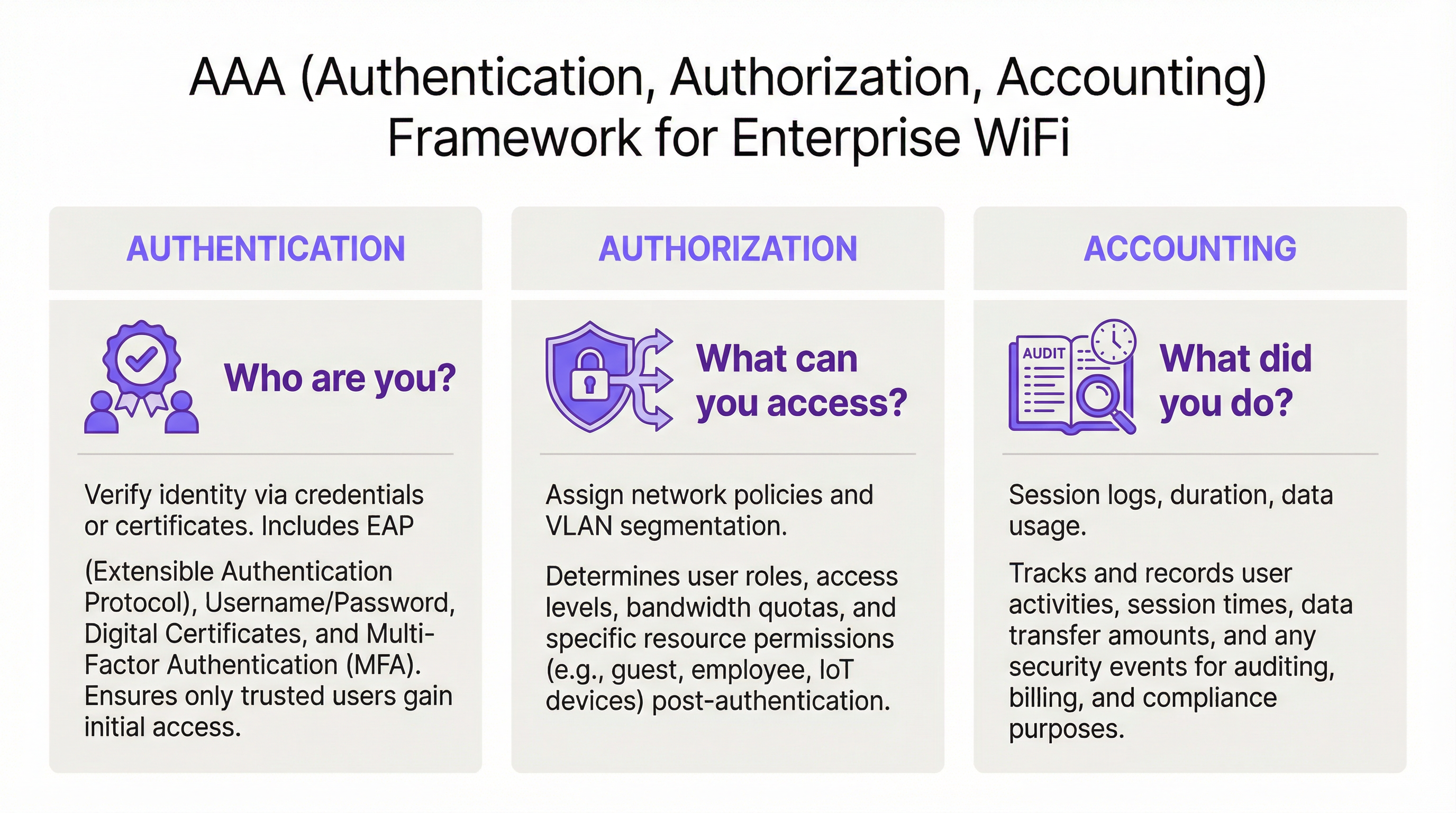
O RADIUS opera no modelo cliente-servidor e é construído em torno do framework AAA, um conceito fundamental em segurança de rede. Entender cada componente é essencial para uma implantação bem-sucedida.
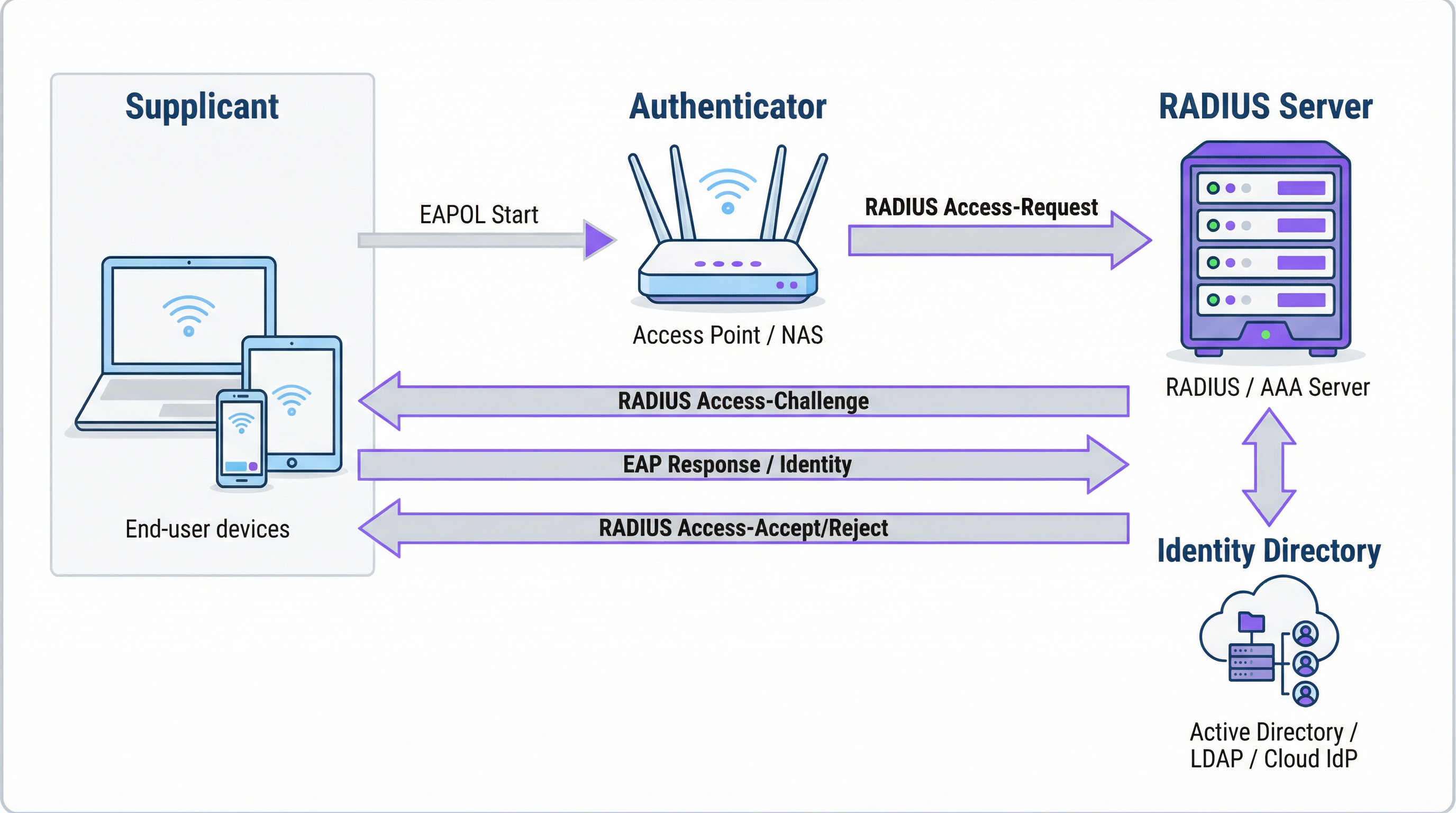
A Autenticação é o processo de verificação da identidade de um usuário. Quando um usuário tenta se conectar a uma rede WiFi protegida com WPA2/WPA3-Enterprise, seu dispositivo — o Suplicante — envia credenciais para o Ponto de Acesso Sem Fio — o Autenticador. O Autenticador não toma a decisão de acesso por si só; ele encaminha a solicitação para o servidor RADIUS. O servidor RADIUS valida essas credenciais em uma fonte de identidade configurada: Microsoft Active Directory, um IdP em nuvem como o Okta ou um banco de dados de usuários local. A validação pode usar uma combinação de nome de usuário e senha ou, para uma segurança significativamente mais forte, um certificado digital por meio de um método EAP, como o EAP-TLS.
A Autorização determina o que um usuário autenticado tem permissão para fazer. Com base nas políticas definidas pelo administrador da rede, o servidor RADIUS retorna atributos específicos ao Autenticador. Esses atributos ditam a atribuição de VLAN (separando o tráfego de visitantes do tráfego corporativo), limites de largura de banda e restrições de acesso por horário. Essa imposição de política granular e dinâmica é uma das principais vantagens do RADIUS sobre os sistemas estáticos baseados em PSK.
A Contabilização rastreia a atividade do usuário durante toda a sessão. O servidor RADIUS registra os carimbos de data/hora da conexão, a duração da sessão, os dados transferidos e os endereços MAC dos dispositivos. Essa trilha de auditoria é inestimável para a solução de problemas, planejamento de capacidade e relatórios de conformidade. Sob o PCI DSS 4.0, o registro e o monitoramento de todo o acesso aos recursos da rede é um controle obrigatório.
Como o RADIUS e o 802.1X funcionam juntos
O padrão IEEE 802.1X define o controle de acesso à rede baseado em porta. Em um contexto WiFi, o 802.1X permite que um ponto de acesso bloqueie todo o tráfego de um dispositivo — exceto mensagens de autenticação — até que o servidor RADIUS confirme a autorização. A comunicação entre o Suplicante e o Autenticador usa o Extensible Authentication Protocol (EAP), transportado pela LAN como EAPOL (EAP over LAN). O Autenticador então retransmite isso para o servidor RADIUS usando o protocolo RADIUS.
A escolha do método EAP é uma decisão crítica de segurança:
| Método EAP | Tipo de Autenticação | Nível de Segurança | Caso de Uso Recomendado |
|---|---|---|---|
| EAP-TLS | Baseado em certificado | Mais alto | Dispositivos corporativos gerenciados — padrão ouro |
| PEAP-MSCHAPv2 | Baseado em credenciais | Médio | Ambientes com predominância de Windows em transição para certificados |
| EAP-TTLS/PAP | Baseado em credenciais | Médio | Ambientes com sistemas operacionais mistos e suporte a dispositivos legados |
Para dispositivos corporativos, o EAP-TLS é o estado ideal. Ele usa autenticação mútua por certificado — tanto o cliente quanto o servidor apresentam certificados —, eliminando completamente as senhas e os riscos associados de roubo de credenciais e phishing.
Portas e Transporte RADIUS
Por padrão, o RADIUS usa a porta UDP 1812 para autenticação e autorização, e a porta UDP 1813 para contabilização. Algumas implantações legadas usam as portas 1645 e 1646. Desde a RFC 6613, o RADIUS também pode operar sobre TCP com TLS (RadSec), que é cada vez mais usado em implantações em nuvem para maior segurança de transporte.
Guia de Implementação
Transição do PSK para o RADIUS: Um Roteiro de Cinco Etapas
Etapa 1: Selecione sua infraestrutura RADIUS. Escolha entre um servidor local (Microsoft NPS para ambientes Windows, FreeRADIUS para implantações de código aberto) ou um serviço RADIUS baseado em nuvem. Para organizações com múltiplas filiais, uma plataforma RADIUS em nuvem como a da Purple é quase sempre a escolha correta. Ela fornece alta disponibilidade integrada, redundância geográfica e elimina a carga operacional do gerenciamento de servidores.
Etapa 2: Integre sua fonte de identidade. Conecte o servidor RADIUS ao diretório de identidades autoritativo da sua organização. Plataformas RADIUS em nuvem modernas suportam integração direta com Azure AD, Google Workspace e Okta via SAML ou LDAP. Para usuários visitantes, a fonte de identidade geralmente é um CRM, um sistema de gerenciamento de propriedades (PMS) ou uma plataforma de WiFi para visitantes desenvolvida para esse fim.
Etapa 3: Configure o hardware de rede. No seu controlador de LAN sem fio ou pontos de acesso, crie um novo SSID configurado para WPA2-Enterprise ou WPA3-Enterprise. Aponte o SSID para o endereço IP do seu servidor RADIUS e configure o segredo compartilhado (shared secret) — uma senha que criptografa a comunicação entre o ponto de acesso e o servidor RADIUS. Esse valor deve corresponder exatamente em ambos os lados; uma incompatibilidade é uma das causas mais comuns de falhas na implantação inicial.
Etapa 4: Defina as políticas de autorização. Crie regras no servidor RADIUS mapeando grupos de usuários para políticas de rede. Um conjunto de políticas típico para um hotel pode incluir: Funcionários na VLAN 10 com acesso interno total; Terceirizados na VLAN 30 com acesso limitado e um limite de largura de banda de 50 Mbps; Visitantes na VLAN 20 com acesso apenas à internet e um limite de sessão de 8 horas.
Etapa 5: Integre usuários e dispositivos. Para a equipe corporativa, implante perfis de WiFi com configurações 802.1X por meio da sua plataforma MDM. Para visitantes, implante um Captive Portal. A plataforma da Purple automatiza o fluxo de integração de visitantes — suportando logins de mídia social, formulários de registro e códigos de voucher — e cria contas de usuário RADIUS temporárias que expiram automaticamente.

Melhores Práticas
Adote o WPA3-Enterprise. Onde o hardware suportar, o WPA3-Enterprise oferece melhorias significativas de segurança em relação ao WPA2-Enterprise, incluindo Protected Management Frames (PMF) e criptografia mais forte por meio do modo de segurança de 192 bits. Realize uma auditoria de hardware para identificar pontos de acesso que exigem atualizações de firmware ou substituição.
Implemente o EAP-TLS para dispositivos corporativos. A autenticação baseada em certificado elimina a senha como uma vulnerabilidade. Integre seu servidor RADIUS à sua PKI ou use uma solução de gerenciamento de certificados baseada em nuvem. Automatize a implantação de certificados via MDM para minimizar a sobrecarga de TI.
Imponha a segmentação de VLAN. A atribuição dinâmica de VLAN via RADIUS é inegociável para a conformidade com o PCI DSS e a arquitetura Zero Trust. Certifique-se de que seus switches de rede e firewalls imponham políticas de roteamento inter-VLAN que impeçam que o tráfego de visitantes alcance os recursos corporativos.
Implante uma infraestrutura RADIUS redundante. Configure pelo menos um servidor RADIUS primário e um secundário em seus pontos de acesso. Plataformas RADIUS em nuvem geralmente fornecem isso automaticamente. Teste o failover regularmente.
Solução de Problemas e Mitigação de Riscos
| Modo de Falha | Causa Raiz | Resolução |
|---|---|---|
| Todos os usuários rejeitados | Incompatibilidade do segredo compartilhado entre o AP e o servidor RADIUS | Verifique o segredo compartilhado nas configurações do AP e do servidor RADIUS |
| Erros de certificado nos dispositivos clientes | Certificado do servidor RADIUS não confiável para o cliente | Instale o certificado CA raiz em todos os dispositivos clientes via MDM |
| Falhas intermitentes de autenticação | Servidor RADIUS sobrecarregado ou inacessível | Implemente um servidor RADIUS secundário; revise a capacidade do servidor |
| Portal de visitantes não redireciona | Configuração incorreta do walled garden | Certifique-se de que a URL do portal e os domínios do provedor de login social estejam no walled garden |
| Usuários não conseguem se reconectar após a expiração da sessão | Sessão de contabilização não encerrada corretamente | Revise a configuração de contabilização do RADIUS; verifique se há sessões obsoletas |
ROI e Impacto nos Negócios
O caso de negócios para a implantação do RADIUS é convincente em várias dimensões. A redução do risco de segurança é o benefício mais imediato: substituir uma PSK compartilhada por acesso baseado em identidade elimina o vetor mais comum para invasões de rede baseadas em WiFi, evitando potencialmente custos de violação que chegam a uma média de £ 3,4 milhões para empresas do Reino Unido. A garantia de conformidade sob o PCI DSS, a GDPR e regulamentações específicas do setor é alcançada por meio da combinação de controle de acesso baseado em identidade e logs de contabilização abrangentes. Os ganhos de eficiência operacional são significativos em grandes implantações — o gerenciamento centralizado de políticas significa que a integração de um novo usuário ou a revogação do acesso de um funcionário que está saindo é uma ação única no diretório de identidades, e não uma reconfiguração manual em dezenas de pontos de acesso. Por fim, os dados de contabilização gerados pelo RADIUS fornecem inteligência acionável para o planejamento de capacidade, permitindo que as decisões de investimento em infraestrutura sejam baseadas em dados reais de uso, em vez de estimativas.
Termos-Chave e Definições
RADIUS (Remote Authentication Dial-In User Service)
A networking protocol, standardised in RFC 2865, that provides centralised Authentication, Authorization, and Accounting (AAA) management for users connecting to a network service. It operates on a client-server model, where the Network Access Server (NAS) is the client and the RADIUS server is the decision-making authority.
This is the core engine of enterprise WiFi security. When an IT manager talks about 'moving to 802.1X', they are almost always talking about deploying a RADIUS server.
802.1X
An IEEE standard for port-based Network Access Control (PNAC). It defines the encapsulation of the Extensible Authentication Protocol (EAP) over IEEE 802 networks, enabling an authenticator (e.g., a WiFi access point) to enforce authentication before granting network access.
This is the standard that makes RADIUS work for WiFi. When configuring an SSID for 'WPA2-Enterprise', you are enabling 802.1X on that SSID.
AAA (Authentication, Authorization, Accounting)
A security framework for intelligently controlling access to computer resources, enforcing policies, and auditing usage. Authentication verifies identity, Authorization determines permitted actions, and Accounting records activity.
RADIUS servers are often called 'AAA servers'. Understanding this framework is the conceptual foundation for all network access control design.
Supplicant
In the 802.1X framework, the Supplicant is the client device — a laptop, smartphone, or IoT device — that is requesting access to the network. The supplicant software on the device handles the EAP authentication exchange.
When troubleshooting authentication failures, the supplicant configuration (e.g., the WiFi profile on a laptop) is often the source of the problem.
Authenticator
In the 802.1X framework, the Authenticator is the network device — typically a wireless access point or an Ethernet switch — that enforces access control. It relays EAP messages between the Supplicant and the Authentication Server but does not make the authentication decision itself.
The access point is a relay, not a decision-maker. This is a critical distinction: the AP's job is to forward the request to RADIUS and then act on the response.
EAP (Extensible Authentication Protocol)
An authentication framework defined in RFC 3748 that supports multiple authentication methods. EAP itself does not define a specific authentication mechanism; instead, it provides a standard format for negotiating and carrying various EAP methods (e.g., EAP-TLS, PEAP, EAP-TTLS).
When configuring 802.1X, you must choose an EAP method. The choice between EAP-TLS (certificates) and PEAP (passwords) is one of the most consequential security decisions in a WiFi deployment.
EAP-TLS (EAP Transport Layer Security)
A certificate-based EAP method that provides mutual authentication between the client and the RADIUS server using X.509 digital certificates. It is widely regarded as the most secure EAP method, as it eliminates passwords entirely.
EAP-TLS is the gold standard for corporate device authentication. Deploying it requires a Public Key Infrastructure (PKI) to issue and manage client certificates, which is why cloud-based certificate management solutions are increasingly popular.
Captive Portal
A web page that intercepts a user's connection to a public WiFi network, requiring them to complete an action — such as accepting terms of service, entering credentials, or authenticating via a social media account — before internet access is granted.
Captive portals work in conjunction with RADIUS for guest WiFi. The portal is the user-facing interface; RADIUS is the back-end authentication engine that validates the user's session and enforces access policies.
VLAN (Virtual Local Area Network)
A logical network segment created within a physical network infrastructure. VLANs allow network administrators to segregate traffic from different user groups — such as guests, staff, and IoT devices — even when they share the same physical hardware.
Dynamic VLAN assignment via RADIUS is the mechanism that enables network segmentation in enterprise WiFi. It is a fundamental requirement for PCI DSS compliance and Zero Trust architecture.
Shared Secret
A password configured on both the RADIUS client (the access point) and the RADIUS server to authenticate their communication and encrypt RADIUS attribute values. It must be identical on both sides.
A shared secret mismatch is one of the most common causes of RADIUS authentication failures during initial deployment. Always copy-paste rather than manually type this value.
Estudos de Caso
A 500-room hotel needs to provide secure WiFi for guests, conference attendees, and staff. Guests should have a frictionless onboarding experience, while staff require secure access to internal property management and point-of-sale systems. The hotel uses Oracle OPERA as its Property Management System (PMS).
Deploy Purple's cloud RADIUS platform integrated with the hotel's Oracle OPERA PMS. Provision three separate SSIDs: 'Hotel-Guest', 'Conference-WiFi', and 'Staff-Internal'. The 'Staff-Internal' SSID is configured for WPA3-Enterprise with EAP-TLS. Digital certificates are deployed to all hotel-owned devices via an MDM platform (e.g., Jamf or Microsoft Intune), enabling passwordless, seamless authentication for staff. The 'Hotel-Guest' SSID uses a branded captive portal integrated with OPERA. At check-in, OPERA automatically creates a temporary RADIUS user account with credentials valid for the duration of the guest's stay. The guest receives a QR code or a welcome email with a direct connection link. The 'Conference-WiFi' SSID uses a voucher-based system within Purple's platform, allowing event coordinators to generate unique, time-limited access codes for their attendees. All three SSIDs use dynamic VLAN assignment to enforce strict traffic segmentation.
A retail chain with 200 stores across the UK wants to replace its insecure, shared-password guest WiFi network. The marketing team requires opt-in demographic data from store visitors to support targeted campaigns. The IT team uses Azure Active Directory for all corporate identity management.
Deploy Purple's cloud RADIUS and guest WiFi platform across all 200 stores using a centralised, templated configuration. For guest access, configure a branded captive portal on a dedicated guest SSID. The portal offers authentication via social media accounts (Facebook, Google) or a simple registration form, capturing opt-in marketing consent in compliance with GDPR. Purple's platform aggregates this data into a centralised analytics dashboard, providing the marketing team with visitor demographics, dwell times, and repeat visit rates. For corporate staff, integrate the RADIUS server with the existing Azure AD tenant. Staff connect to a separate 'Staff' SSID using their Azure AD credentials via PEAP, with a phased migration plan to EAP-TLS with certificates for the highest-risk roles. All guest traffic is isolated on a dedicated VLAN with no access to the store's internal network or EPOS systems, meeting PCI DSS network segmentation requirements.
Análise de Cenário
Q1. You are the IT architect for a large conference centre. A major technology company is renting your venue for a three-day conference with 5,000 attendees. The client has a hard requirement that attendees can connect to a secure, high-performance WiFi network without manually entering a password each day. The client uses Okta as their identity provider. How would you design the authentication solution?
💡 Dica:Consider how to provide a seamless, passwordless experience for a large number of users from a single external organisation. Think about certificate-based authentication and how to integrate with a third-party identity provider for a time-limited event.
Mostrar Abordagem Recomendada
The optimal solution is to provision a dedicated SSID for the conference configured for WPA3-Enterprise with EAP-TLS. Integrate your cloud RADIUS platform with the client's Okta tenant via SAML federation for the duration of the event. Before the conference opens, attendees are directed to a one-time onboarding portal where they authenticate with their Okta credentials. Upon successful authentication, a unique digital certificate is generated and installed on their device. For the remainder of the conference, their device automatically and securely connects to the SSID without any further user interaction. The certificates are issued with a validity period matching the conference duration and are automatically revoked at close. This delivers a seamless, passwordless experience while maintaining strong security, and it leverages the client's existing identity infrastructure rather than creating a separate credential system.
Q2. A private hospital needs to provide WiFi for patients and visitors, but must ensure this traffic is completely isolated from the network used for clinical systems, electronic health records, and medical devices, to comply with HIPAA and NHS DSP Toolkit requirements. What RADIUS feature is most critical to achieving this isolation, and how would you configure it?
💡 Dica:Focus on the Authorization pillar of the AAA framework. The key is not just authenticating users, but controlling what they can reach after authentication. Consider how RADIUS communicates network policy to the access point.
Mostrar Abordagem Recomendada
The most critical feature is dynamic VLAN assignment via RADIUS authorization policies. You would create a dedicated 'Patient-Guest' VLAN (e.g., VLAN 50) on the network infrastructure, configured with firewall rules that permit only internet access and explicitly deny all traffic to the clinical network VLANs. On the RADIUS server, create an authorization policy that assigns any user authenticating to the patient WiFi SSID to VLAN 50, regardless of their credentials. The RADIUS server communicates this assignment to the access point via the Tunnel-Type, Tunnel-Medium-Type, and Tunnel-Private-Group-ID attributes in the Access-Accept message. The access point then places the user's traffic into VLAN 50 at the point of connection. This ensures that even if a patient's device is compromised, it has no network path to clinical systems — a fundamental requirement for HIPAA compliance and clinical network security.
Q3. Your organisation has deployed 802.1X with RADIUS across its corporate estate. An employee reports that they cannot connect to the corporate WiFi from their new laptop, but they can connect successfully from their smartphone and from their previous laptop. The IT helpdesk has confirmed the employee's account is active in Azure AD. What is your diagnostic approach, and what are the three most likely root causes?
💡 Dica:The issue is device-specific, not user-specific — the user can authenticate from other devices. This narrows the problem to the device configuration, the device's certificate, or the device's supplicant settings. Start with the RADIUS server logs.
Mostrar Abordagem Recomendada
The diagnostic approach is to first examine the RADIUS server's authentication logs for Access-Reject messages corresponding to the MAC address of the new laptop. The rejection reason code will identify the root cause. The three most likely causes are: (1) Missing or invalid client certificate — if the deployment uses EAP-TLS, the new laptop may not yet have had a certificate provisioned via MDM. Check whether the device is enrolled in the MDM platform and whether the certificate deployment policy has been applied. (2) Incorrect WiFi profile — the new laptop may have the wrong 802.1X supplicant settings, such as the wrong EAP method, an incorrect RADIUS server certificate trust configuration, or the wrong username format. Verify the WiFi profile matches the standard corporate template. (3) Device not yet registered in the identity directory — some RADIUS policies perform a device compliance check against Azure AD. If the new laptop has not yet completed Azure AD join and device registration, it may fail this check even though the user's account is active.
Principais Conclusões
- ✓RADIUS is the industry-standard protocol for centralised network access control, implementing the AAA (Authentication, Authorization, Accounting) framework to manage who can access your WiFi, what they can do, and to log all activity.
- ✓It replaces insecure pre-shared keys (PSKs) with robust, identity-based authentication, ensuring every user and device has a unique, verifiable identity on the network.
- ✓IEEE 802.1X is the standard that enables RADIUS to work with WiFi access points, blocking all network traffic from a device until the RADIUS server has confirmed authorisation.
- ✓EAP-TLS (certificate-based authentication) is the gold standard for corporate devices, eliminating passwords entirely and providing the strongest protection against credential theft and phishing.
- ✓Dynamic VLAN assignment via RADIUS authorization policies is the mechanism that enforces network segmentation — a mandatory control for PCI DSS compliance and a cornerstone of Zero Trust architecture.
- ✓For guest WiFi, RADIUS works in conjunction with a captive portal: the portal handles the user-facing onboarding experience, while RADIUS manages the back-end authentication and session policy enforcement.
- ✓Cloud-based RADIUS platforms such as Purple simplify deployment, provide built-in high availability, and integrate directly with modern identity providers (Azure AD, Google Workspace, Okta), making enterprise-grade network access control accessible for organisations of all sizes.




