

Segmentation des appareils IoT sur le WiFi : Isoler les terminaux non standard
Ce guide propose des stratégies concrètes de niveau entreprise pour segmenter en toute sécurité les appareils IoT non standard sur les réseaux WiFi des sites. Apprenez à mettre en œuvre l'isolation VLAN, l'authentification par adresse MAC et des politiques de pare-feu strictes pour protéger votre infrastructure centrale contre les terminaux intelligents vulnérables.
🎧 Écouter ce guide
Voir la transcription

Résumé analytique
Pour les responsables IT et les architectes réseau dans l'hôtellerie, le commerce de détail et les grands espaces publics, la prolifération des appareils de l'Internet des Objets (IoT) présente un défi de sécurité critique. Les téléviseurs intelligents, les terminaux de paiement, les imprimantes sans fil et les systèmes de gestion technique du bâtiment (GTB) sont essentiels aux opérations modernes des sites, mais ils supportent rarement l'authentification 802.1X de niveau entreprise.
Placer ces appareils « passifs » sur un réseau d'entreprise plat ou un réseau Guest WiFi public introduit de graves vulnérabilités. Un thermostat intelligent compromis peut devenir un point de pivot permettant aux attaquants d'accéder à des données d'entreprise sensibles ou à des systèmes de paiement, violant ainsi la conformité PCI DSS et GDPR.
Ce guide de référence technique décrit la stratégie définitive pour la segmentation des appareils IoT sur le WiFi. En mettant en œuvre des VLAN IoT dédiés, en exploitant les clés pré-partagées d'identité (iPSK) ou le MAC Authentication Bypass (MAB), et en appliquant des politiques de pare-feu Zero Trust, les équipes IT peuvent sécuriser l'intégration des terminaux non standard. Cette approche garantit une visibilité robuste via WiFi Analytics tout en atténuant les risques inhérents à un environnement d'appareils mixtes.
Analyse technique approfondie
Le principe fondamental de la segmentation des appareils IoT sur le WiFi est l'isolation logique. Les appareils qui ne peuvent pas s'authentifier de manière sécurisée doivent être mis en quarantaine dans un segment de réseau restreint.
L'architecture de l'isolation
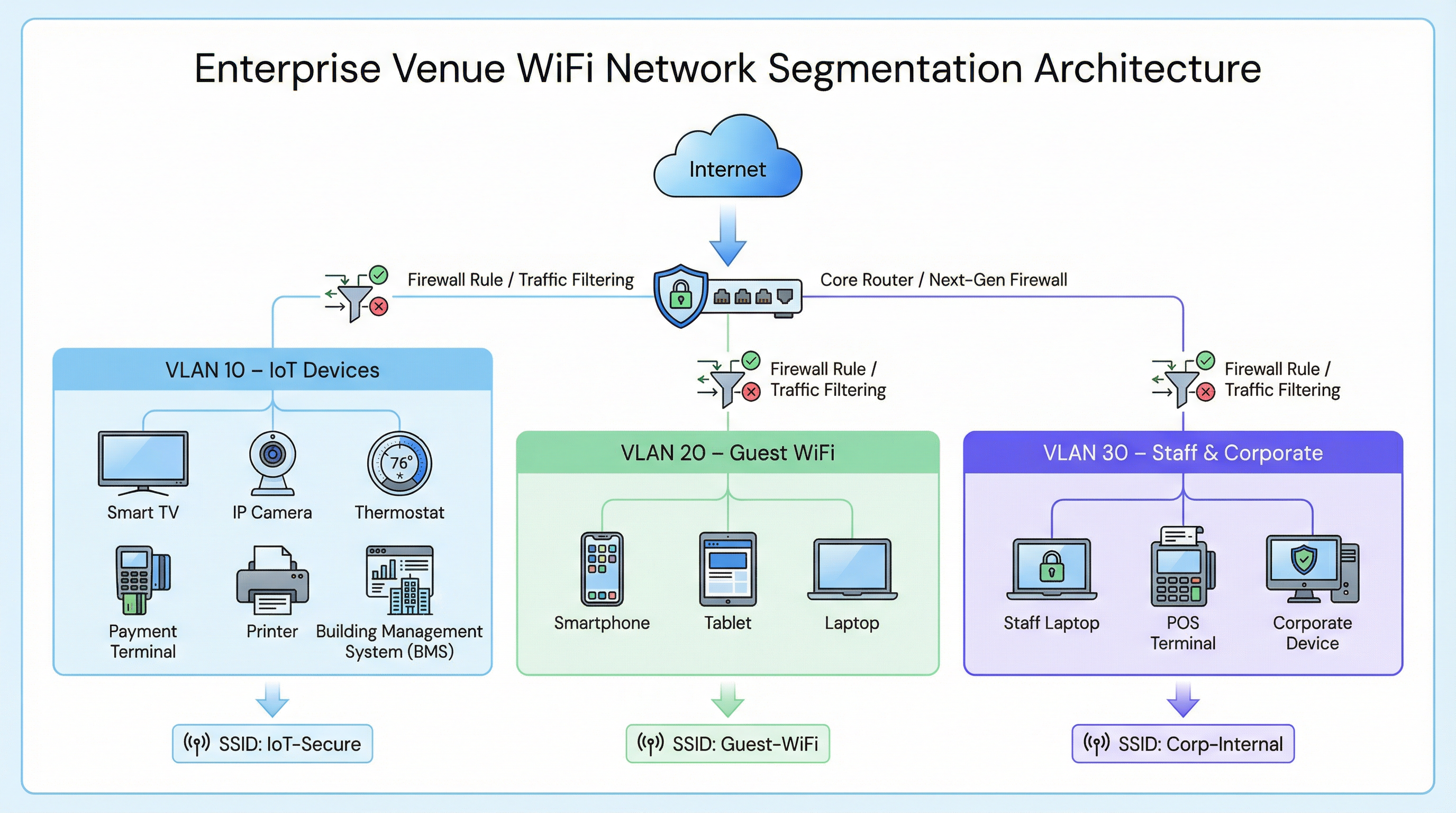
Dans un déploiement d'entreprise typique, comme une chaîne de Retail ou un établissement de Hospitality , le trafic réseau est divisé en réseaux locaux virtuels (VLAN) distincts.
- VLAN d'entreprise (ex. VLAN 30) : Sécurisé via 802.1X (WPA2/WPA3-Enterprise) pour les ordinateurs portables du personnel et les terminaux de point de vente.
- VLAN invité (ex. VLAN 20) : Un réseau ouvert utilisant un Captive Portal pour l'acceptation des conditions de service et la capture de données analytiques.
- VLAN IoT (ex. VLAN 10) : Un segment dédié aux appareils non standard.
Solutions de repli pour l'authentification des appareils non standard
Comme les appareils IoT manquent généralement des supplicants requis pour le 802.1X, les équipes IT doivent s'appuyer sur des méthodes d'authentification alternatives pour les affecter au VLAN IoT.
1. Clés pré-partagées d'identité (iPSK) / PSK multiples
Plutôt que d'utiliser un mot de passe unique et global (WPA2-Personal) pour tout un SSID IoT, les contrôleurs sans fil modernes supportent l'iPSK. Cela permet aux administrateurs de générer des clés pré-partagées uniques pour des appareils individuels ou des groupes d'appareils (par exemple, tous les téléviseurs intelligents d'une aile spécifique d'un hôtel) tout en diffusant un seul SSID.
- Avantage : Si une clé spécifique est compromise, elle peut être révoquée sans perturber l'ensemble du réseau IoT.
- Déploiement : Fortement recommandé pour les déploiements de bâtiments intelligents modernes.
2. MAC Authentication Bypass (MAB)
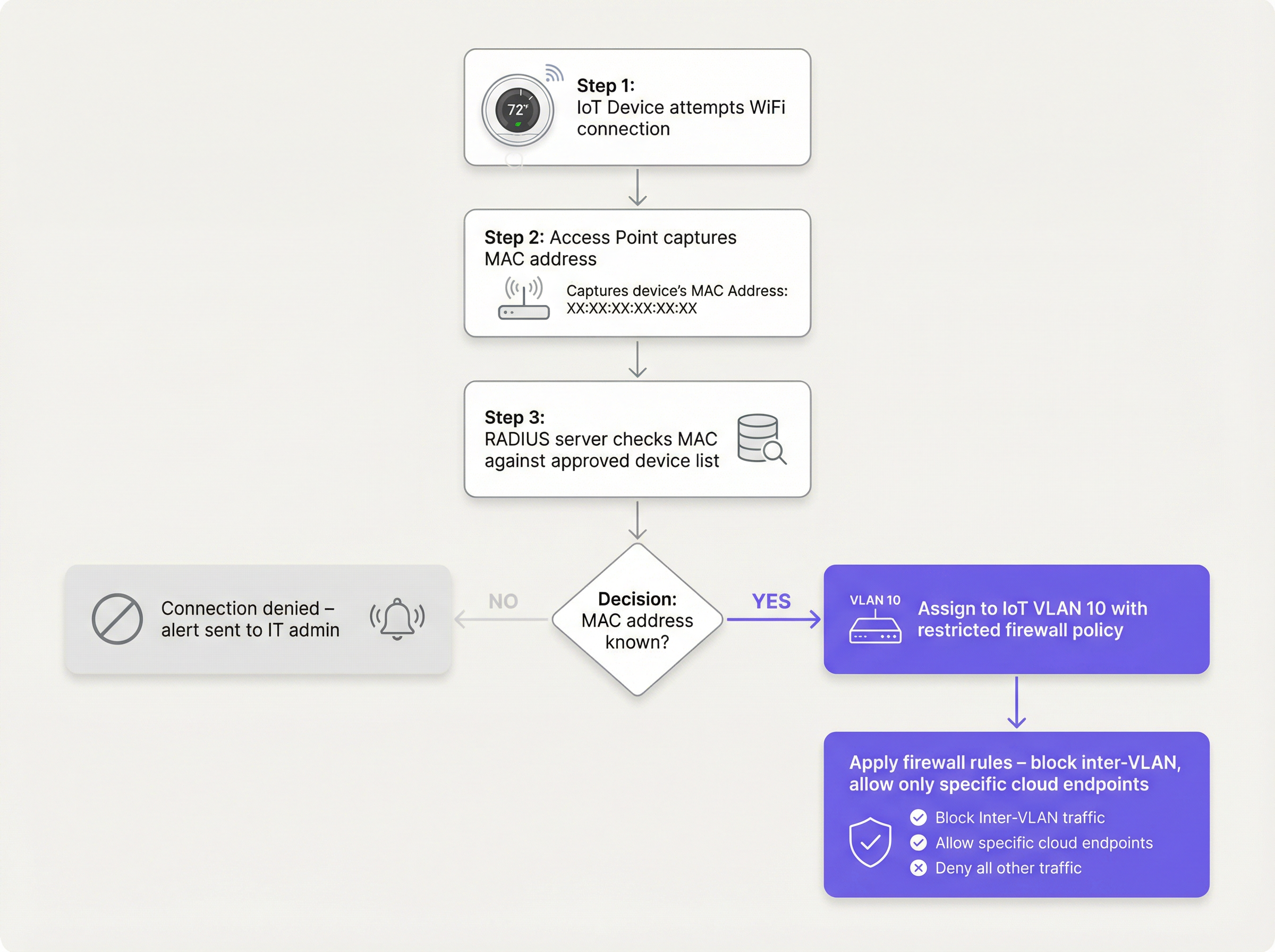
Pour les appareils anciens qui ont des difficultés même avec des PSK complexes, le MAB sert de solution de repli. Le point d'accès sans fil capture l'adresse MAC de l'appareil et interroge un serveur RADIUS. Si l'adresse MAC est enregistrée dans la base de données approuvée, le serveur RADIUS autorise la connexion et affecte dynamiquement l'appareil au VLAN IoT.
- Limitation : Les adresses MAC peuvent être usurpées. Le MAB n'est pas une sécurité forte ; c'est un contournement opérationnel qui doit être associé à des politiques de pare-feu agressives.
- Point de décision : Lors de l'évaluation de l'infrastructure RADIUS pour supporter le MAB, consultez le Cloud RADIUS vs On-Premise RADIUS : Guide de décision pour les équipes IT .
Guide de mise en œuvre
Le déploiement d'un segment IoT sécurisé nécessite une approche coordonnée entre le contrôleur sans fil, le serveur RADIUS et le pare-feu central.
Étape 1 : Définir la stratégie de VLAN IoT et de SSID
Créez un VLAN dédié (ex. VLAN 10) pour les appareils IoT. Décidez s'il faut utiliser un SSID dédié (ex. Venue-IoT) ou utiliser l'affectation dynamique de VLAN sur un SSID partagé. Pour une compatibilité maximale avec les radios IoT bon marché, un SSID dédié fonctionnant exclusivement sur la bande 2,4 GHz est souvent nécessaire, car de nombreux capteurs anciens ne supportent pas le 5 GHz.
Étape 2 : Configurer l'authentification (iPSK ou MAB)
Si vous utilisez l'iPSK, configurez le contrôleur sans fil pour mapper des clés spécifiques au VLAN IoT. Si vous utilisez le MAB, renseignez votre serveur RADIUS avec les adresses MAC des appareils IoT approuvés. Assurez-vous qu'un processus strict de gestion du cycle de vie est en place : lorsqu'un appareil est retiré, son adresse MAC doit être immédiatement purgée de la base de données.
Étape 3 : Appliquer des politiques de pare-feu Zero Trust
C'est l'étape la plus critique. Le VLAN IoT doit être traité comme non fiable.
- Bloquer le routage inter-VLAN : Le VLAN IoT ne doit pas pouvoir initier de connexions vers le VLAN d'entreprise ou le VLAN invité.
- Mettre en œuvre l'isolation des clients (isolation L2) : Les appareils sur le même SSID IoT ne doivent pas pouvoir communiquer entre eux. Un téléviseur intelligent dans la chambre 101 n'a pas besoin de pinger le téléviseur intelligent de la chambre 102.
- Restreindre l'accès Internet sortant (filtrage de sortie) : Appliquez une politique de refus par défaut pour le trafic sortant. Autorisez uniquement le trafic vers des adresses IP ou des domaines spécifiques et requis (par exemple, le point de terminaison cloud du fabricant via le port 443). Bloquez toutes les requêtes DNS, HTTP et NTP sortantes génériques, en forçant les appareils à utiliser des services internes surveillés.
Bonnes pratiques
- Ne masquez pas le SSID : Désactiver la diffusion du SSID offre des avantages de sécurité négligeables et provoque souvent une instabilité de connexion pour les piles réseau IoT mal codées. Laissez le SSID visible mais sécurisez-le correctement.
- Surveillez le comportement des appareils : Utilisez WiFi Analytics pour établir une base de comportement normal pour les appareils IoT. Si un capteur de température commence soudainement à transférer des gigaoctets de données, le système doit déclencher une alerte immédiate.
- Segmentation par type d'appareil : Dans les environnements complexes, tels que les établissements de Santé , envisagez de créer plusieurs micro-segments (par exemple, VLAN 11 pour l'IoT médical, VLAN 12 pour le CVC du bâtiment) afin de réduire davantage le périmètre d'impact d'une compromission.
Dépannage et atténuation des risques
Mode de défaillance courant : la compromission du « réseau plat »
La cause la plus fréquente des failles liées à l'IoT est le déploiement d'appareils intelligents sur le réseau d'entreprise principal par commodité. Cela contourne tous les contrôles de segmentation.
- Atténuation : Appliquez des politiques strictes de contrôle des changements. Aucun appareil ne se connecte au réseau sans une adresse MAC approuvée ou une attribution iPSK.
Mode de défaillance courant : adresses MAC obsolètes
Lorsqu'un appareil tombe en panne et est remplacé, l'ancienne adresse MAC reste souvent dans la base de données RADIUS, créant une porte dérobée permanente si un attaquant usurpe cette adresse spécifique.
- Atténuation : Implémentez une gestion automatisée du cycle de vie. Exigez une revalidation périodique de tous les appareils dans la base de données MAB.
ROI et impact commercial
La mise en œuvre d'une segmentation appropriée des appareils IoT sur le WiFi nécessite un effort de configuration initial, mais le retour sur investissement est substantiel :
- Atténuation des risques : Réduit considérablement la probabilité d'une violation de données catastrophique provenant d'un appareil intelligent vulnérable, protégeant ainsi la réputation de la marque et évitant les amendes réglementaires (GDPR, PCI DSS).
- Stabilité opérationnelle : L'isolation du trafic IoT bruyant empêche les tempêtes de diffusion de dégrader les performances des applications d'entreprise critiques ou l'expérience WiFi invité .
- Pérennité : Une architecture segmentée permet aux établissements de déployer en toute confiance de nouvelles technologies de bâtiment intelligent, telles que des Capteurs avancés et des solutions de Guidage , sans compromettre la sécurité du réseau central.
Termes clés et définitions
VLAN (Virtual Local Area Network)
A logical grouping of network devices that behave as if they are on an independent network, regardless of their physical location.
Used to isolate IoT devices from corporate and guest traffic, preventing lateral movement during a security breach.
MAC Authentication Bypass (MAB)
A network access control technique that uses a device's MAC address to authorize connection to the network when standard 802.1X authentication is not supported.
The primary fallback method for onboarding 'dumb' IoT devices, requiring a RADIUS server to validate the MAC address.
Identity Pre-Shared Key (iPSK)
A feature that allows multiple unique pre-shared keys to be used on a single SSID, with each key assigning the device to a specific VLAN or policy.
A more secure alternative to a single shared password for IoT networks, allowing IT teams to revoke individual compromised devices.
Client Isolation (L2 Isolation)
A wireless network setting that prevents devices connected to the same access point or SSID from communicating directly with each other.
Essential for guest networks and IoT networks to prevent infected devices from spreading malware to adjacent devices.
802.1X
An IEEE standard for port-based network access control, providing secure, enterprise-grade authentication using a RADIUS server.
The gold standard for corporate devices, but rarely supported by the IoT devices discussed in this guide.
Zero Trust
A security framework requiring all users and devices to be authenticated, authorized, and continuously validated before being granted access to applications and data.
The guiding principle for configuring firewall rules for the IoT VLAN—assume the device is compromised and restrict access accordingly.
Egress Filtering
The practice of monitoring and potentially restricting the flow of information outbound from one network to another, typically the internet.
Crucial for IoT devices to ensure they only communicate with authorized vendor cloud services and cannot be used in DDoS attacks.
Captive Portal
A web page that the user of a public-access network is obliged to view and interact with before access is granted.
Used for Guest WiFi, but unusable by headless IoT devices, necessitating MAB or iPSK for IoT onboarding.
Études de cas
A 300-room hotel is deploying new smart TVs in every guest room. The TVs require internet access to stream content from vendor-approved cloud services, but they do not support 802.1X. The hotel also needs to ensure guests cannot cast content to TVs in adjacent rooms.
The IT team should create a dedicated IoT VLAN (e.g., VLAN 40) and a hidden or visible dedicated SSID (e.g., Hotel-Media). They implement Identity PSK (iPSK), assigning a unique pre-shared key to each room's TV. At the access point level, Client Isolation (Layer 2 isolation) is enabled to prevent TVs from communicating with each other. At the core firewall, inter-VLAN routing is blocked, ensuring the TVs cannot access the corporate network or the guest network. Finally, egress filtering is applied to VLAN 40, allowing outbound traffic only to the specific IP ranges required by the streaming services.
A large retail chain needs to connect hundreds of wireless barcode scanners and receipt printers. These legacy devices only support basic WPA2-PSK and cannot handle complex passwords or iPSK. How should they be secured?
The network architect should deploy a dedicated SSID specifically for these legacy devices, operating on the 2.4GHz band for maximum compatibility. Because the devices cannot support iPSK, the team must use MAC Authentication Bypass (MAB). The MAC addresses of all authorized scanners and printers are loaded into the central RADIUS server. When a device connects, the RADIUS server authenticates the MAC and assigns it to a highly restricted Retail-IoT VLAN. The firewall policy for this VLAN strictly limits outbound traffic to the specific internal inventory servers and payment gateways required for operation.
Analyse de scénario
Q1. A stadium IT director wants to deploy 50 new wireless digital signage displays. The vendor states the displays only support WPA2-Personal (a single shared password). The director wants to put them on the Guest WiFi network to avoid managing a new SSID. What is your recommendation?
💡 Astuce :Consider the impact of client isolation and the security implications of mixing trusted and untrusted devices.
Afficher l'approche recommandée
Do not place the displays on the Guest WiFi. The Guest network uses a captive portal, which the headless displays cannot navigate. Furthermore, Guest networks typically have client isolation enabled, which might interfere with the management system trying to update the displays. Recommendation: Create a dedicated IoT SSID. Since the devices only support WPA2-Personal, use MAC Authentication Bypass (MAB) to assign them to a dedicated Digital Signage VLAN. Apply strict firewall rules to this VLAN, allowing outbound traffic only to the specific content management cloud server.
Q2. During a network audit at a retail chain, you discover that all wireless receipt printers are connected to the Corporate VLAN using MAB. The firewall allows the Corporate VLAN full outbound internet access. What is the primary risk, and how should it be remediated?
💡 Astuce :Think about what happens if an attacker unplugs a printer and connects their own device.
Afficher l'approche recommandée
The primary risk is MAC spoofing. An attacker could spoof a printer's MAC address and gain full access to the Corporate VLAN, including unrestricted outbound internet access, allowing them to exfiltrate sensitive data or establish a command-and-control connection. Remediation: Move the printers to a dedicated IoT VLAN. Enforce strict egress filtering on the IoT VLAN, blocking all outbound internet access and only allowing internal communication to the specific print servers required for operation.
Q3. A hospital is deploying new smart thermostats that support Identity PSK (iPSK). The IT team plans to use a single iPSK for all thermostats across the entire campus to simplify management. Is this the optimal approach?
💡 Astuce :Consider the blast radius if that single iPSK is compromised.
Afficher l'approche recommandée
While better than a standard shared password, using a single iPSK for all devices defeats the primary benefit of the technology. If that single key is compromised, all thermostats are vulnerable, and changing the key requires reconfiguring every device on campus. Recommendation: Group the thermostats logically (e.g., by floor, wing, or department) and assign a unique iPSK to each group. This minimizes the blast radius of a compromised key and simplifies revocation.
Points clés à retenir
- ✓IoT devices rarely support 802.1X and must be logically isolated on dedicated VLANs.
- ✓Never place IoT devices on corporate or guest networks.
- ✓Use Identity PSK (iPSK) to assign unique keys to devices on a shared SSID.
- ✓Use MAC Authentication Bypass (MAB) as a fallback for legacy devices that cannot support iPSK.
- ✓MAB is not strong security; it must be paired with aggressive Zero Trust firewall policies.
- ✓Implement client isolation on IoT SSIDs to prevent lateral movement between devices.
- ✓Enforce default-deny egress filtering, allowing IoT devices to communicate only with required vendor endpoints.




