

Microsoft Dynamics 365 आणि Guest WiFi डेटा समृद्धीकरण
हे तांत्रिक संदर्भ मार्गदर्शक Guest WiFi डेटा Microsoft Dynamics 365 सह एकत्रित करण्यासाठी आवश्यक असलेले आर्किटेक्चर, डेटा मॉडेलिंग आणि फील्ड मॅपिंगची माहिती देते. हे IT व्यवस्थापक आणि नेटवर्क आर्किटेक्टसाठी एकत्रित ग्राहक प्रोफाइल समृद्ध करण्यासाठी आणि भौतिक ठिकाणी मोजता येण्याजोगा ROI वाढवण्यासाठी कृती करण्यायोग्य अंमलबजावणी धोरणे प्रदान करते.
कार्यकारी सारांश
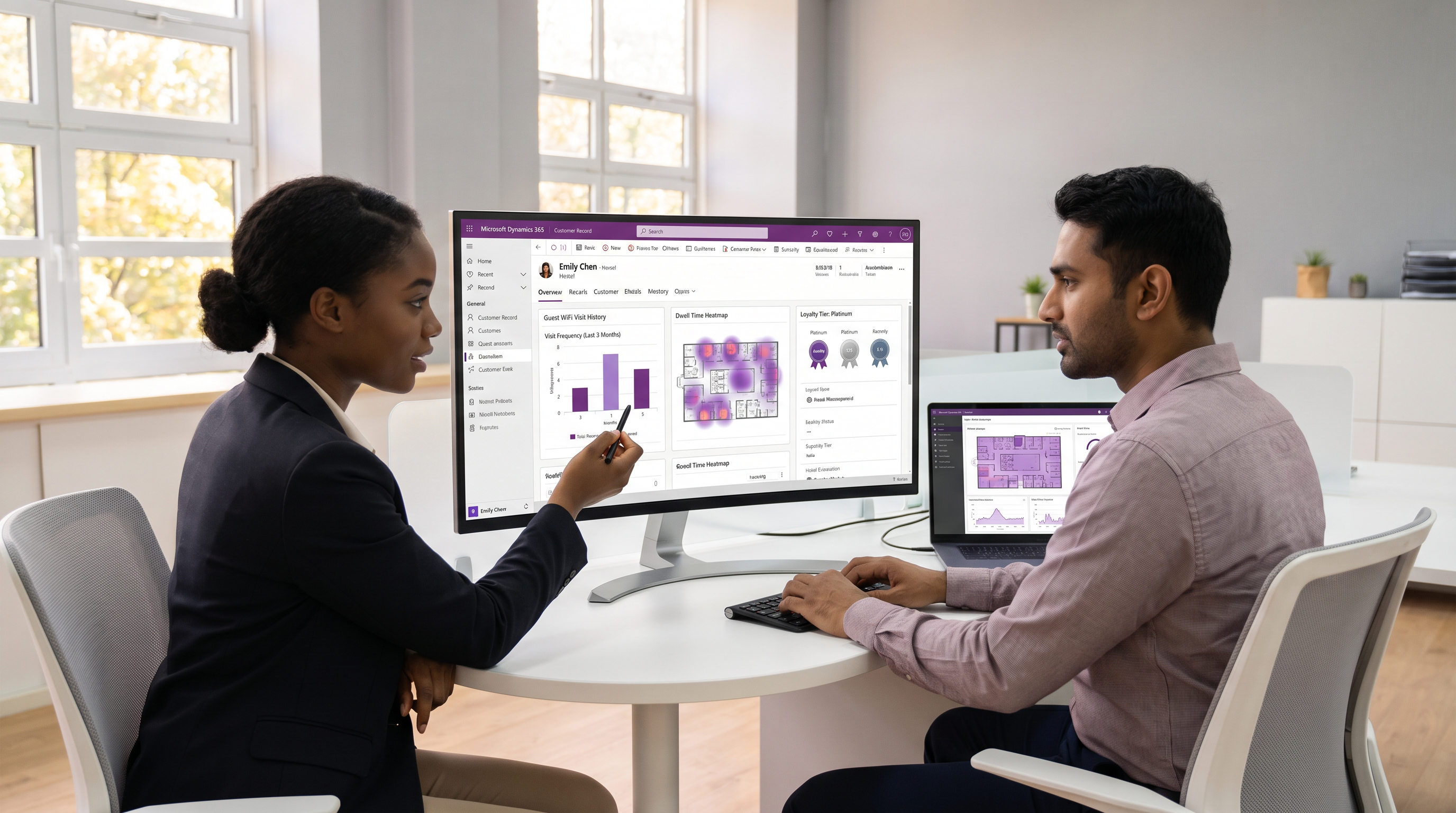
आधुनिक भौतिक ठिकाणांसाठी—रिटेल चेनपासून मोठ्या स्टेडियमपर्यंत—पाहुण्यांच्या वर्तनाला समजून घेणे आता ऐच्छिक राहिलेले नाही. तथापि, ई-कॉमर्स प्लॅटफॉर्म समृद्ध वर्तणूक विश्लेषण (behavioural analytics) प्रदान करत असताना, भौतिक ठिकाणांना अनेकदा एका अंध बिंदूचा सामना करावा लागतो: त्यांना ग्राहकाने काय खरेदी केले हे माहीत असते, परंतु ते किती वेळ थांबले, खरेदी न करता किती वेळा भेट देतात किंवा कोणत्या क्षेत्रांना ते वारंवार भेट देतात हे माहीत नसते. Guest WiFi प्रमाणीकरण डेटा Microsoft Dynamics 365 सह एकत्रित करून, IT नेते ही कमतरता दूर करू शकतात.
हे मार्गदर्शक Dynamics 365 WiFi एकत्रीकरणासाठी निश्चित आर्किटेक्चरची रूपरेषा देते. हे WiFi विश्लेषण प्लॅटफॉर्मवरून सत्यापित संपर्क तपशील, GDPR संमती टाइमस्टॅम्प आणि भेट मेट्रिक्स Dynamics 365 मध्ये कसे पुश करावे हे तपशीलवार स्पष्ट करते. महत्त्वाचे म्हणजे, CRM कार्यप्रदर्शन सुनिश्चित करण्यासाठी आणि Customer Insights मध्ये प्रगत सेगमेंटेशन सक्षम करण्यासाठी, हे दोन-स्तरीय डेटा मॉडेलचे समर्थन करते—मुख्य संपर्क अद्यतने उच्च-व्हॉल्यूम ट्रान्झॅक्शनल भेट नोंदींपासून वेगळे करणे. Retail आणि Hospitality मधील संस्थांसाठी, हे एकत्रीकरण अज्ञात पादचारी वाहतुकीला एकत्रित, कृती करण्यायोग्य ग्राहक प्रोफाइलमध्ये रूपांतरित करते.
तांत्रिक सखोल विश्लेषण: आर्किटेक्चर आणि डेटा प्रवाह
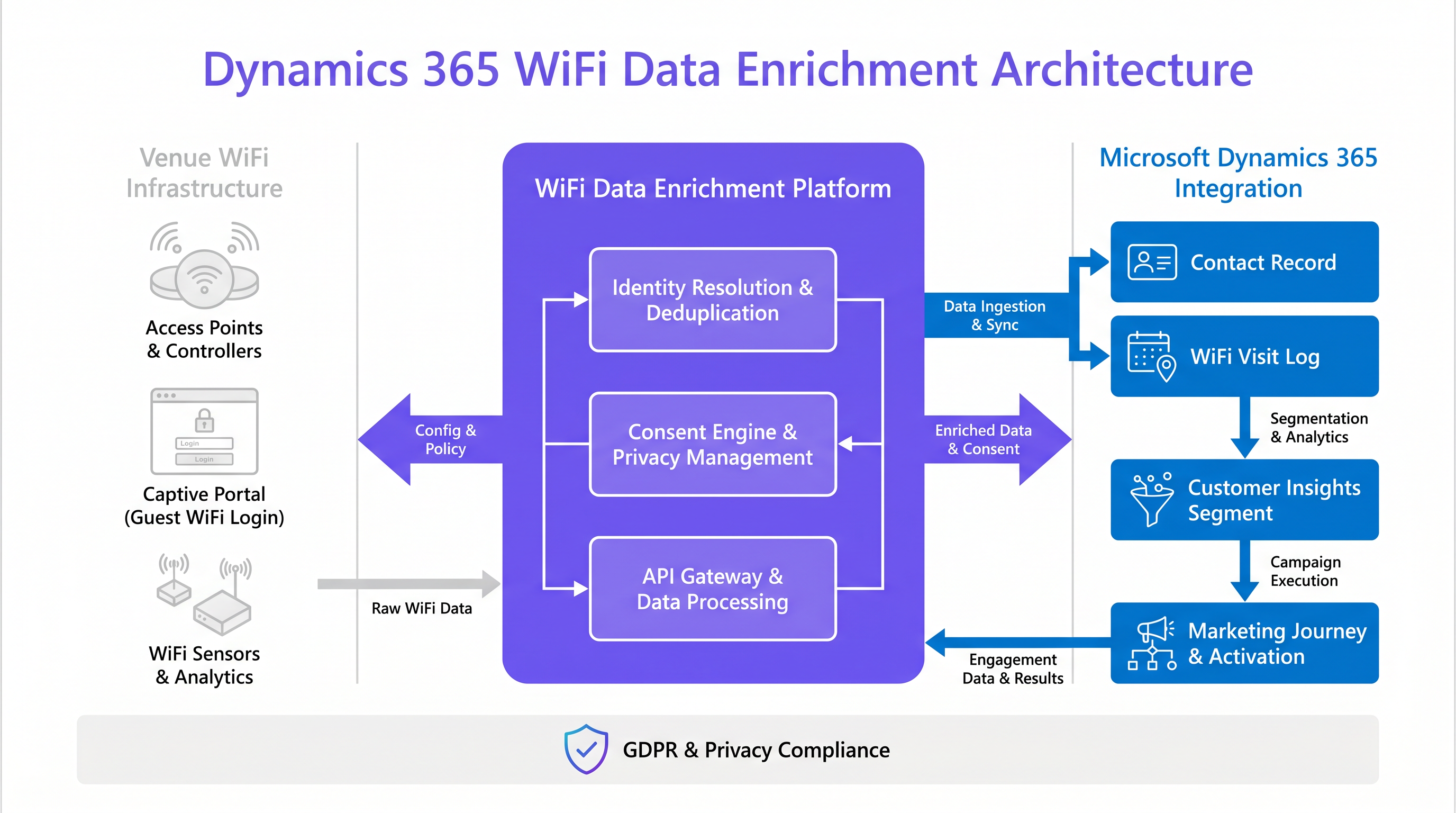
Dynamics 365 सह Guest WiFi एकत्रित करण्यासाठी ओळख निराकरण (identity resolution), डुप्लिकेशन काढणे (deduplication) आणि पेलोड रूपांतरण (payload transformation) हाताळण्यासाठी एक मजबूत मिडलवेअर स्तर आवश्यक आहे. कच्चा डेटा नेटवर्क एजवर—ॲक्सेस पॉइंट्स आणि Captive Portal मधून—तयार होतो आणि CRM मध्ये प्रवेश करण्यापूर्वी त्यावर प्रक्रिया करणे आवश्यक आहे.
इनजेस्टन पाइपलाइन
जेव्हा एखादा पाहुणा Captive Portal द्वारे प्रमाणीकरण करतो, तेव्हा WiFi प्लॅटफॉर्म त्यांचा MAC ॲड्रेस, प्रमाणीकरण पद्धत (उदा. सोशल लॉगिन, ईमेल फॉर्म) आणि मार्केटिंगसाठी त्यांची स्पष्ट संमती कॅप्चर करतो. ही घटना JSON पेलोड असलेले वेबहुक किंवा REST API कॉल ट्रिगर करते.
येथील महत्त्वाचे पाऊल म्हणजे ओळख निराकरण (Identity Resolution). आधुनिक मोबाइल ऑपरेटिंग सिस्टिम वापरकर्त्याच्या गोपनीयतेला वाढवण्यासाठी MAC ॲड्रेस रँडमायझेशन वापरतात. केवळ MAC ॲड्रेसवर प्राथमिक की म्हणून अवलंबून राहिल्यास प्रोफाइल खंडित होतील आणि भेटींची संख्या चुकीची होईल. म्हणून, Dynamics 365 मधील रेकॉर्ड जुळवण्यासाठी एकत्रीकरणाने प्रमाणीकृत ओळखकर्ता—सामान्यतः ईमेल ॲड्रेस किंवा मोबाइल फोन नंबर—प्राथमिक की म्हणून वापरणे आवश्यक आहे. हॅश केलेला MAC ॲड्रेस केवळ एका भेटीतील सत्र ट्रॅकिंगसाठी दुय्यम ओळखकर्ता म्हणून वापरला जावा.
दोन-स्तरीय एंटिटी रचना
प्रत्येक WiFi सत्र थेट मुख्य Contact एंटिटीमध्ये लिहिण्याचा प्रयत्न करणे हे एक सामान्य आर्किटेक्चरल अँटी-पॅटर्न आहे. हा दृष्टिकोन डेटाबेस जलद फुगवतो, CRM कार्यप्रदर्शन कमी करतो आणि अहवाल देणे गुंतागुंतीचे करतो. त्याऐवजी, Dynamics CRM WiFi एकत्रीकरणासाठी दोन-स्तरीय एंटिटी रचना हा उद्योग मानक आहे:
- संपर्क एंटिटी (मास्टर रेकॉर्ड): ही एंटिटी केवळ तेव्हाच अद्यतनित केली जावी जेव्हा पाहुण्याच्या प्रोफाइलमध्ये महत्त्वपूर्ण बदल होतो, जसे की नवीन ईमेल ॲड्रेस, अद्यतनित फोन नंबर किंवा त्यांच्या GDPR संमती स्थितीतील बदल. यात
cr_wifi_visit_countकिंवाcr_wifi_avg_dwellसारखे एकत्रित मेट्रिक्स देखील संग्रहित केले जाऊ शकतात, जे जलद सेगमेंटेशनसाठी उपयुक्त आहेत. - कस्टम भेट एंटिटी (
cr_wifiVisit): हे एक ट्रान्झॅक्शनल टेबल आहे जिथे प्रत्येक पूर्ण झालेले WiFi सत्र एक वेगळी पंक्ती म्हणून नोंदवले जाते. हे सत्राची सुरू होण्याची वेळ, संपण्याची वेळ, कालावधी आणि विशिष्ट ठिकाण किंवा झोन (उदा. "लॉबी", "स्पोर्ट्स बार") कॅप्चर करते. ही एंटिटीContactएंटिटीशी एक-ते-अनेक (1:N) संबंधाद्वारे जोडलेली आहे.
चिंतांचे हे पृथक्करण Microsoft Dynamics 365 Customer Insights चा लाभ घेण्यासाठी महत्त्वाचे आहे. cr_wifiVisit एंटिटीला एक वेगळा वर्तणूक डेटा प्रवाह मानून, Customer Insights नोंदी इनजेस्ट करू शकते आणि भौतिक ठिकाणांच्या परस्परसंवादावर आधारित डायनॅमिक सेगमेंट तयार करू शकते, त्यांना ऑनलाइन खरेदी इतिहासासह अखंडपणे विलीन करू शकते.
अंमलबजावणी मार्गदर्शक: फील्ड मॅपिंग आणि सिंक्रोनायझेशन
यशस्वी अंमलबजावणी अचूक फील्ड मॅपिंग आणि रेकॉर्ड प्रणालीच्या स्पष्ट समजावर अवलंबून असते.
फील्ड मॅपिंग सर्वोत्तम पद्धती
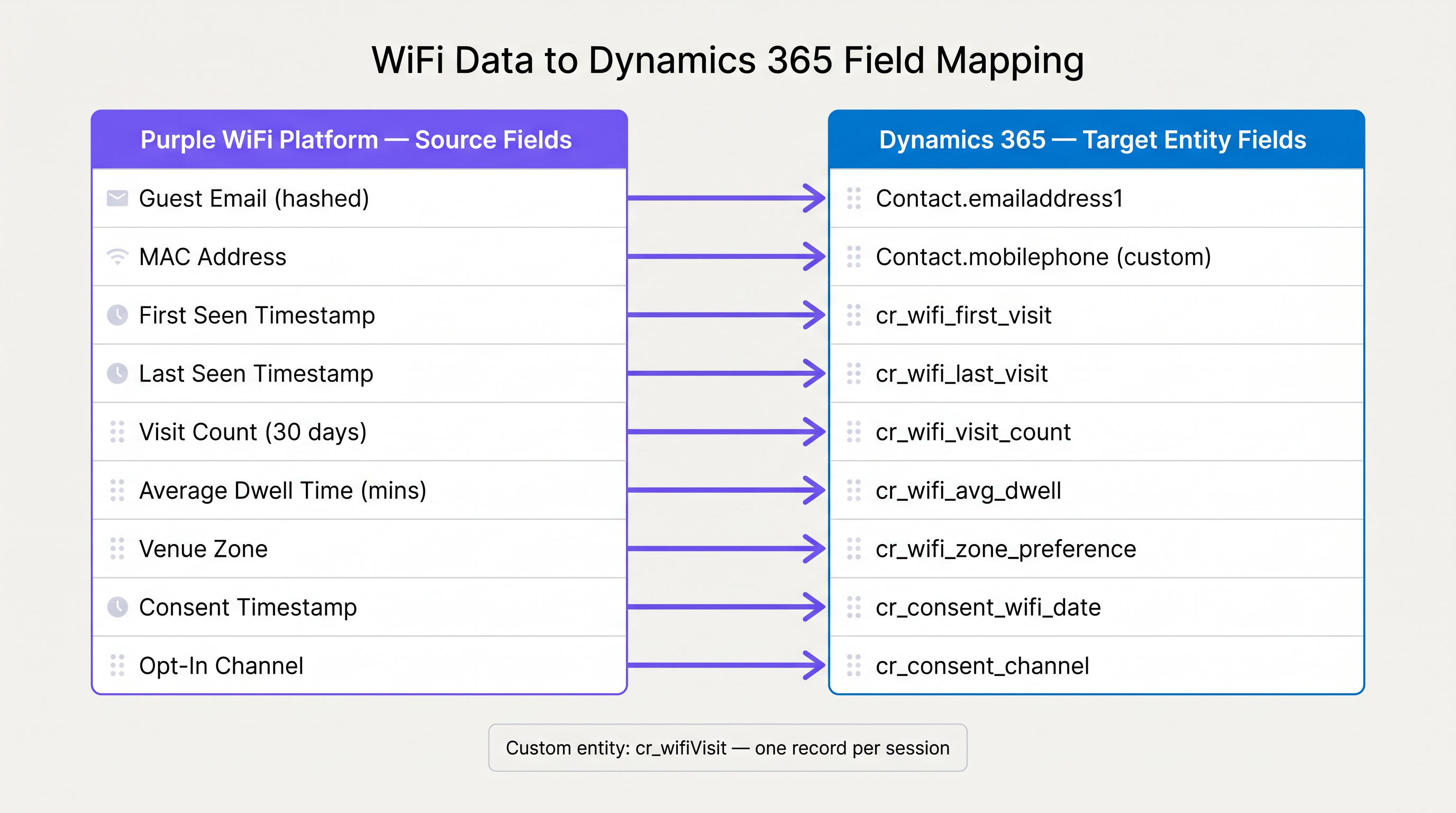
Purple प्लॅटफॉर्मवरून Dynamics 365 मध्ये फील्ड मॅप करताना, डेटा प्रकार जुळतात आणि आवश्यकतेनुसार कस्टम फील्ड तयार केली जातात याची खात्री करा.
| Purple WiFi स्त्रोत फील्ड | Dynamics 365 लक्ष्य फील्ड | डेटा प्रकार | टिप्पण्या |
|---|---|---|---|
| Guest Email | emailaddress1 |
String | डुप्लिकेशन काढण्यासाठी प्राथमिक की. |
| MAC Address (Hashed) | cr_device_mac_hash |
String | कस्टम भेट एंटिटीवर संग्रहित करा, संपर्क एंटिटीवर नाही. |
| First Seen Timestamp | cr_wifi_first_visit |
DateTime | संपर्काच्या प्रारंभिक निर्मितीवरच अद्यतनित करा. |
| Last Seen Timestamp | cr_wifi_last_visit |
DateTime | प्रत्येक त्यानंतरच्या भेटीवर अद्यतनित करा. |
| Consent Timestamp | cr_consent_wifi_date |
DateTime | अनुपालन ऑडिटसाठी महत्त्वाचे. |
| Venue Zone | cr_wifi_zone_preference |
String | संपर्कावर एकत्रित केले जाऊ शकते किंवा प्रत्येक भेटीनुसार लॉग केले जाऊ शकते. |
सिंक्रोनायझेशन धोरणे: रिअल-टाइम वि. बॅच
रिअल-टाइम आणि बॅच सिंक्रोनायझेशनमधील निवड पूर्णपणे व्यावसायिक वापराच्या केसवर अवलंबून असते.
- रिअल-टाइम (वेबहुक्स): ठिकाणावरील सक्रियतेसाठी आवश्यक. जर मार्केटिंग टीमला पाहुणा नेटवर्कशी कनेक्ट झाल्यानंतर पाच मिनिटांच्या आत स्वयंचलित "पुन्हा स्वागत आहे" ईमेल किंवा मोफत कॉफीसाठी SMS ऑफर ट्रिगर करायची असेल, तर रिअल-टाइम वेबहुक्स अनिवार्य आहेत. यासाठी मजबूत API गेटवेव्यवस्थापन, जे गर्दीच्या वेळी होणारी ट्रॅफिक वाढ हाताळते.
- Batch (OData / Scheduled API Pulls): जर प्राथमिक उद्दिष्ट दीर्घकालीन WiFi Analytics आणि साप्ताहिक सेगमेंट तयार करणे असेल, तर रात्रीची बॅच सिंक अधिक कार्यक्षम असते. यामुळे Dynamics 365 वरील API लोड कमी होतो आणि डेटा समाविष्ट करण्यापूर्वी त्याचे एकत्रीकरण करण्यास मदत होते.
अनुपालन आणि सुरक्षिततेसाठी सर्वोत्तम पद्धती
अतिथी डेटा हाताळताना, GDPR आणि PCI DSS सारख्या फ्रेमवर्कचे अनुपालन करणे अनिवार्य आहे. अनुपालनाबद्दल अधिक सखोल माहितीसाठी, आमचे ISO 27001 Guest WiFi: A Compliance Primer मार्गदर्शक पहा.
- संमती ही रेकॉर्डची प्रणाली आहे: Captive Portal हे डेटा कॅप्चर करण्याचे ठिकाण आणि संमतीसाठी प्राथमिक रेकॉर्ड प्रणाली आहे. Dynamics 365 वर डेटा पाठवताना, संमतीचा टाइमस्टॅम्प आणि विशिष्ट ऑप्ट-इन चॅनेल अचूकपणे मॅप केले पाहिजेत. जर एखाद्या अतिथीने नंतर Dynamics 365 मार्केटिंग ईमेलद्वारे संमती रद्द केली, तर भविष्यातील ट्रॅकिंग टाळण्यासाठी ती रद्दबातल WiFi प्लॅटफॉर्मवर सिंक झाली पाहिजे.
- डेटा कमी करणे: केवळ परिभाषित मार्केटिंग किंवा ऑपरेशनल वापरासाठी आवश्यक असलेला डेटाच पाठवा. कच्च्या, अप्रमाणित प्रोब विनंत्या CRM मध्ये पाठवू नका.
- सुरक्षित संक्रमण: WiFi प्लॅटफॉर्म आणि Dynamics 365 दरम्यान प्रवासात असलेला सर्व डेटा TLS 1.2 किंवा त्याहून अधिक वापरून एन्क्रिप्ट केलेला असावा. क्लायंट-साइड कोडमध्ये API की उघड करणे टाळा; सुरक्षित सर्व्हर-टू-सर्व्हर कम्युनिकेशन वापरा. नेटवर्क-स्तरीय सुरक्षिततेच्या विचारांसाठी, DNS Filtering for Guest WiFi वरील आमचे मार्गदर्शक पहा.
समस्यानिवारण आणि जोखीम कमी करणे
एक मजबूत आर्किटेक्चर असूनही, इंटिग्रेशन्स अयशस्वी होऊ शकतात. येथे सर्वात सामान्य अपयश मोड आणि ते कसे कमी करावेत हे दिले आहे.
API दर मर्यादा
Dynamics 365 सेवा स्थिरता सुनिश्चित करण्यासाठी API दर मर्यादा लागू करते. स्टेडियममधील मोठ्या कार्यक्रमादरम्यान, हजारो अतिथी एकाच वेळी WiFi वर लॉग इन करू शकतात, ज्यामुळे वेबहुक्सचा पूर येऊ शकतो.
- कमी करणे: WiFi प्लॅटफॉर्म आणि Dynamics 365 दरम्यान एक मेसेज क्यू (उदा. Azure Service Bus) लागू करा. क्यू ट्रॅफिकमधील वाढ शोषून घेते आणि API मर्यादांचा आदर करणाऱ्या नियंत्रित दराने पेलोड्स Dynamics मध्ये फीड करते.
डुप्लिकेट संपर्क निर्मिती
जर डुप्लिकेशन काढण्याची लॉजिक सदोष असेल, तर CRM लवकरच डुप्लिकेट रेकॉर्डने भरून जाईल, ज्यामुळे एकत्रित ग्राहक प्रोफाइल नष्ट होईल.
- कमी करणे: उच्च-व्हॉल्यूम API इन्सर्टसाठी Dynamics 365 च्या असिंक्रोनस डुप्लिकेट डिटेक्शन नियमांवर पूर्णपणे अवलंबून राहू नका. इंटिग्रेशन मिडलवेअरने तयार करण्याची क्रिया करण्यापूर्वी स्पष्ट शोध (उदा. ईमेल पत्त्यानुसार क्वेरी करणे) करणे आवश्यक आहे. जर जुळणी आढळल्यास, त्याऐवजी अपडेट करा.
MAC रँडमायझेशनमधील विचलन
नमूद केल्याप्रमाणे, MAC रँडमायझेशन योग्यरित्या हाताळले नाही तर भेटींची संख्या कृत्रिमरित्या वाढवेल.
- कमी करणे: डिव्हाइस MAC पत्त्याऐवजी नेहमी प्रमाणित ओळख (ईमेल/फोन) ला प्राधान्य द्या. MAC पत्ते केवळ एका 24-तासांच्या कालावधीतील सत्र सातत्यासाठी वापरा, दीर्घकालीन ओळख निराकरणासाठी ते सोडून द्या.
ROI आणि व्यवसायावर परिणाम
Dynamics 365 ला अतिथी WiFi डेटासह एकत्रित केल्याने नेटवर्कला खर्च केंद्रातून महसूल-उत्पन्न करणाऱ्या बुद्धिमत्ता मालमत्तेत रूपांतरित करते.
- मार्केटिंग ऑटोमेशन कार्यक्षमता: केवळ ईमेल उघडण्याऐवजी प्रत्यक्ष भौतिक उपस्थितीवर आधारित मोहिमा सुरू केल्याने, रूपांतरण दर लक्षणीयरीत्या सुधारतात. एखादी रिटेल चेन स्टोअरमध्ये प्रवेश करताच लॉयल्टी सदस्याला आपोआप प्रचारात्मक ऑफर पाठवू शकते.
- एकत्रित ग्राहक प्रोफाइल: हे इंटिग्रेशन ग्राहकाचे 360-अंशांचे दृश्य प्रदान करते, ई-कॉमर्स डेटाला भौतिक जगातील वर्तनासह मिसळते. यामुळे ग्राहक अंतर्दृष्टीला टर्नओव्हर आणि आजीवन मूल्यासाठी अत्यंत अचूक भविष्यसूचक मॉडेल्स तयार करण्यास सक्षम करते.
- ऑपरेशनल इंटेलिजन्स: मार्केटिंगच्या पलीकडे, Wayfinding आणि ड्वेल टाइम डेटा ऑपरेशनल निर्णयांना माहिती देऊ शकतो, जसे की गर्दीच्या वेळेनुसार कर्मचाऱ्यांचे वेळापत्रक ऑप्टिमाइझ करणे किंवा झोनच्या लोकप्रियतेनुसार स्टोअर लेआउट्स पुन्हा डिझाइन करणे.
या मार्गदर्शिकेत नमूद केलेल्या दोन-स्तरीय आर्किटेक्चरची अंमलबजावणी करून आणि सर्वोत्तम पद्धतींचे पालन करून, IT नेते एक मजबूत, अनुपालनक्षम आणि अत्यंत मौल्यवान डेटा पाइपलाइन प्रदान करू शकतात जी संपूर्ण संस्थेला सक्षम करते.
महत्त्वाच्या संज्ञा आणि व्याख्या
Identity Resolution
The process of matching an anonymous device identifier (like a MAC address) to a known customer profile (like an email address) across multiple systems.
Critical for ensuring that WiFi data enriches the correct Contact record in Dynamics 365 rather than creating duplicates.
MAC Address Randomisation
A privacy feature in modern operating systems (iOS, Android) where the device generates a temporary, random MAC address when probing or connecting to networks.
Forces integrators to rely on authenticated data (captive portal logins) rather than passive network probing for accurate customer tracking.
Two-Tier Entity Architecture
A data modelling approach in Dynamics 365 where master data (Contact) is separated from high-volume transactional data (WiFi Visits) using a 1:N relationship.
Essential for maintaining CRM database performance and enabling clean segmentation in Customer Insights.
OData (Open Data Protocol)
An ISO/IEC approved, OASIS standard that defines a set of best practices for building and consuming RESTful APIs.
The recommended protocol for executing efficient, large-scale batch synchronisation of WiFi visit logs into Dynamics 365.
Webhook
A method of augmenting or altering the behaviour of a web page or web application with custom callbacks, delivering data to other applications as it happens.
Used to push real-time WiFi authentication events to Dynamics 365 for immediate in-venue marketing activation.
Customer Insights
Microsoft's customer data platform (CDP) that unifies data from multiple sources to create a single view of customers and discover insights.
The primary destination for aggregated WiFi visit data to build complex behavioural segments combining online and offline activity.
Captive Portal
A web page that the user of a public-access network is obliged to view and interact with before access is granted.
The primary point of data capture and GDPR consent collection for the Dynamics 365 integration.
Dwell Time
The duration of time a guest spends connected to the network or within a specific physical zone.
A key metric pushed to Dynamics 365 to measure venue engagement and trigger duration-based marketing campaigns.
केस स्टडीज
A 200-room hotel needs to trigger a personalised 'Welcome to the Spa' SMS via Dynamics 365 Marketing when a VIP guest connects to the WiFi in the wellness zone.
- Configure the Purple platform to tag the access points in the wellness area with the zone 'Spa'.
- Set up a real-time webhook in Purple that fires on the 'Authentication Success' event, filtering for the 'Spa' zone.
- The webhook payload is sent to an Azure Logic App. The Logic App parses the payload, extracts the guest's email and MAC address.
- The Logic App queries Dynamics 365 by email to verify the guest's VIP status and check their marketing consent flag.
- If the guest is a VIP and has consented, the Logic App creates a new record in the
cr_wifiVisitcustom entity and triggers a specific Dynamics 365 Marketing Journey that sends the SMS.
A retail chain with 50 locations wants to build a segment in Dynamics 365 Customer Insights of 'Lapsed In-Store Shoppers' (customers who bought online recently but haven't visited a physical store in 90 days).
- Implement a nightly batch sync (via OData) from the WiFi platform to Dynamics 365.
- The sync updates the
cr_wifi_last_visitfield on the coreContactentity for all guests who connected that day. - In Dynamics 365 Customer Insights, ingest the
Contactentity as a data source. - Create a segment rule:
Condition 1: Last_Online_Purchase_Date < 30 days agoANDCondition 2: cr_wifi_last_visit > 90 days ago. - Export this segment to Dynamics 365 Marketing for a targeted re-engagement email campaign.
परिस्थिती विश्लेषण
Q1. Your marketing team wants to send an email to any customer who has visited the flagship store more than 5 times this month but hasn't purchased anything online. How should you architect the data flow to support this without overloading the CRM?
💡 संकेत:Consider the Two-Tier Entity Architecture and the role of Customer Insights.
शिफारस केलेला दृष्टिकोन दाखवा
Do not write every visit to the Contact entity. Instead, use a nightly batch sync to push visit logs to a custom cr_wifiVisit entity linked to the Contact. Then, use Dynamics 365 Customer Insights to ingest both the custom visit entity and the e-commerce purchase history. Build a segment in Customer Insights combining the two criteria (cr_wifiVisit count > 5 AND online purchases = 0) and export that segment to Dynamics 365 Marketing.
Q2. During a load-testing exercise, your middleware (Azure Logic Apps) starts receiving HTTP 429 (Too Many Requests) errors from the Dynamics 365 API. What is the most appropriate architectural fix?
💡 संकेत:Think about how to decouple the real-time network events from the API insertion process.
शिफारस केलेला दृष्टिकोन दाखवा
Implement a message queue, such as Azure Service Bus, between the webhook receiver and the Dynamics 365 API connector. The webhook writes the payload to the queue immediately, and a separate process reads from the queue and inserts the records into Dynamics 365 at a controlled rate that respects the API limits.
Q3. A guest logs into the WiFi using their email address and accepts the marketing consent. Three weeks later, they click 'Unsubscribe' on a marketing email sent from Dynamics 365. What must happen at the integration layer?
💡 संकेत:Consider the system of record and compliance requirements.
शिफारस केलेला दृष्टिकोन दाखवा
The integration must be bidirectional for consent. When the 'Unsubscribe' event occurs in Dynamics 365, a webhook or automated flow must trigger an API call back to the Purple WiFi platform to update the guest's profile and revoke their marketing consent flag. This ensures that future WiFi logins do not inadvertently re-subscribe the user or trigger non-compliant marketing actions.




