

Passpoint (Hotspot 2.0) কীভাবে গেস্ট Wi-Fi অভিজ্ঞতাকে রূপান্তরিত করে
একটি বিস্তৃত প্রযুক্তিগত রেফারেন্স গাইড যা বিস্তারিতভাবে বর্ণনা করে যে কীভাবে Passpoint (Hotspot 2.0) এবং 802.11u প্রোটোকলগুলি প্রথাগত Captive Portal-এর পরিবর্তে নিরবচ্ছিন্ন, সুরক্ষিত, সেলুলার-এর মতো Wi-Fi রোমিং প্রদান করে। এটি IT লিডারদের আর্কিটেকচারাল ওভারভিউ, ইমপ্লিমেন্টেশন ফ্রেমওয়ার্ক এবং MAC randomisation চ্যালেঞ্জগুলি সমাধান করতে এবং গেস্ট অভিজ্ঞতা উন্নত করতে ক্রেডেনশিয়াল-ভিত্তিক অথেন্টিকেশন গ্রহণের ব্যবসায়িক কেস প্রদান করে।
🎧 এই গাইডটি শুনুন
ট্রান্সক্রিপ্ট দেখুন
এক্সিকিউটিভ সামারি
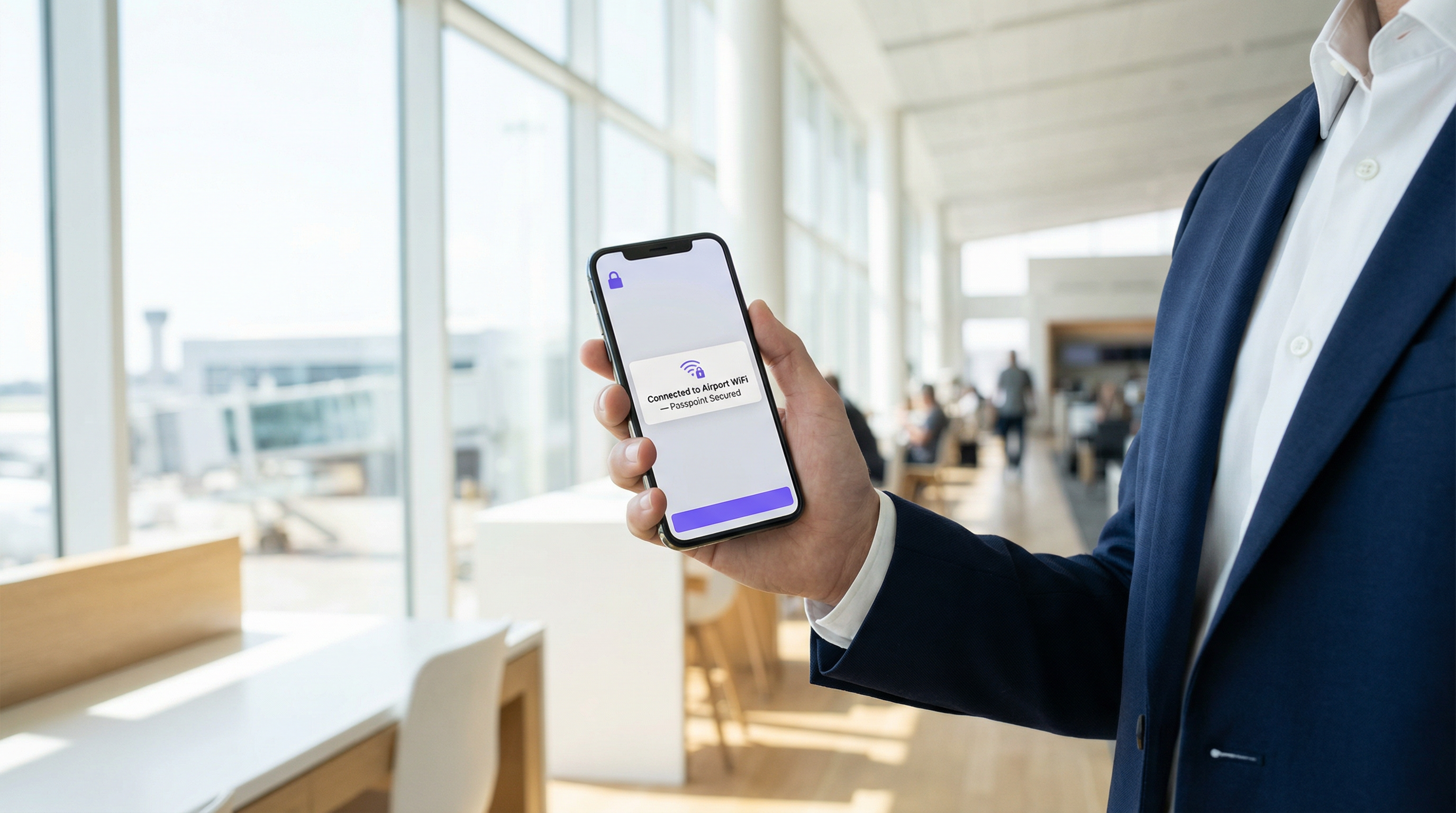
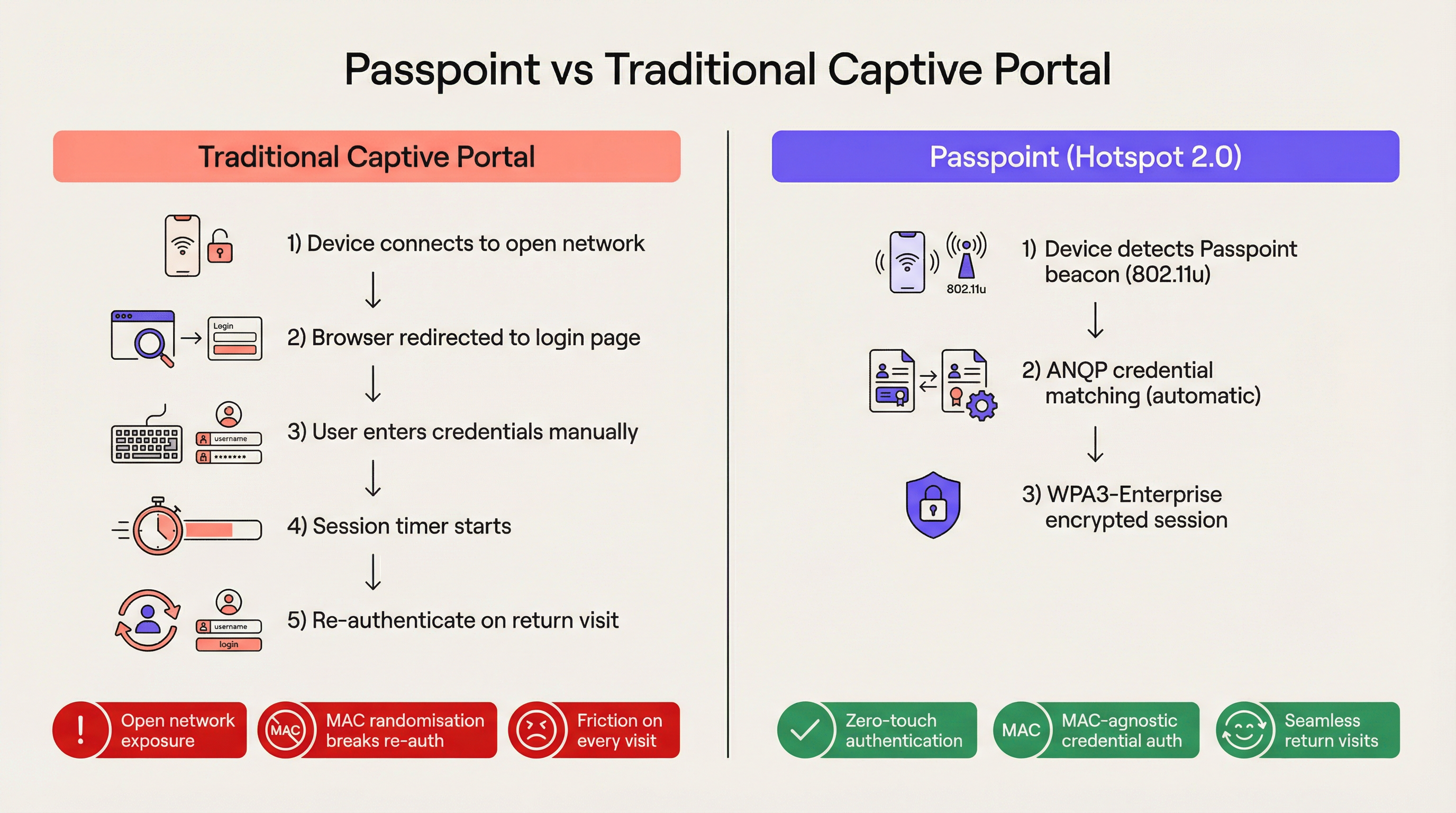
আধুনিক এন্টারপ্রাইজ ভেন্যুগুলোর জন্য, ঘর্ষণ বা বাধা একটি প্রতিযোগিতামূলক অসুবিধা। প্রথাগত Captive Portal, যা একসময় গেস্ট নেটওয়ার্ক অ্যাক্সেসের জন্য স্ট্যান্ডার্ড ছিল, এখন একটি উল্লেখযোগ্য অপারেশনাল বাধা এবং ব্যবহারকারীদের ক্রমাগত হতাশার উৎস। Passpoint, যা Hotspot 2.0 নামেও পরিচিত, ম্যানুয়াল ওয়েব-ভিত্তিক অথেন্টিকেশনকে নিরবচ্ছিন্ন, সেলুলার-এর মতো রোমিং দিয়ে প্রতিস্থাপন করে এই দৃষ্টান্তকে মৌলিকভাবে পরিবর্তন করে। IEEE 802.11u স্ট্যান্ডার্ড এবং WPA3-Enterprise এনক্রিপশন ব্যবহার করে, Passpoint গেস্ট ডিভাইসগুলোকে স্বয়ংক্রিয়ভাবে এবং সুরক্ষিতভাবে এন্টারপ্রাইজ Wi-Fi নেটওয়ার্কগুলো খুঁজে পেতে, অথেন্টিকেট করতে এবং সংযুক্ত হতে দেয়।
Hospitality , Retail , এবং বড় পাবলিক ভেন্যুগুলোর IT লিডারদের জন্য, Passpoint-এ রূপান্তর এখন আর ঐচ্ছিক নয়। আধুনিক iOS এবং Android ডিভাইসে ডিফল্ট MAC address randomisation কার্যকর করার ফলে লেগ্যাসি Captive Portal-এর রি-অথেন্টিকেশন লজিক কার্যকরভাবে ভেঙে গেছে, যার অর্থ হল ফিরে আসা গেস্টদের প্রতিবার ভিজিটে নতুন ডিভাইস হিসেবে দেখা হয়। Passpoint হার্ডওয়্যার অ্যাড্রেসের পরিবর্তে ব্যবহারকারীর ক্রেডেনশিয়াল প্রোফাইল অথেন্টিকেট করার মাধ্যমে এটি সমাধান করে। এই গাইডটি Passpoint-এর প্রযুক্তিগত আর্কিটেকচার, ডেপ্লয়মেন্টের ব্যবসায়িক প্রভাব এবং হেল্পডেস্ক ওভারহেড কমানোর পাশাপাশি Guest WiFi অভিজ্ঞতা উন্নত করার জন্য ডিজাইন করা একটি ভেন্ডর-নিরপেক্ষ ইমপ্লিমেন্টেশন ফ্রেমওয়ার্ক বিস্তারিতভাবে বর্ণনা করে।
টেকনিক্যাল ডিপ-ডাইভ
নেটওয়ার্ক সিলেকশন সমস্যা এবং 802.11u
লেগ্যাসি Wi-Fi ডেপ্লয়মেন্টে, ডিভাইসগুলো নেটওয়ার্ক সিলেকশনের জন্য একটি মৌলিকভাবে ভঙ্গুর মেকানিজমের ওপর নির্ভর করে: পরিচিত Service Set Identifiers (SSID) স্ক্যান করা। এই পদ্ধতিতে ব্যবহারকারীকে আগে নেটওয়ার্কের সাথে সংযুক্ত থাকতে হয় অথবা তালিকা থেকে ম্যানুয়ালি নেটওয়ার্ক নির্বাচন করতে হয়। এটি নেটওয়ার্কের সিকিউরিটি পজিশন, অথেন্টিকেশন প্রয়োজনীয়তা বা আপস্ট্রিম ইন্টারনেট প্রাপ্যতা সম্পর্কে প্রি-অ্যাসোসিয়েশন কোনো দৃশ্যমানতা প্রদান করে না। Passpoint এই সীমাবদ্ধতা সমাধান করে IEEE 802.11u অ্যামেন্ডমেন্টের মাধ্যমে, যা External Networks-এর সাথে ইন্টারওয়ার্কিং প্রবর্তন করে।
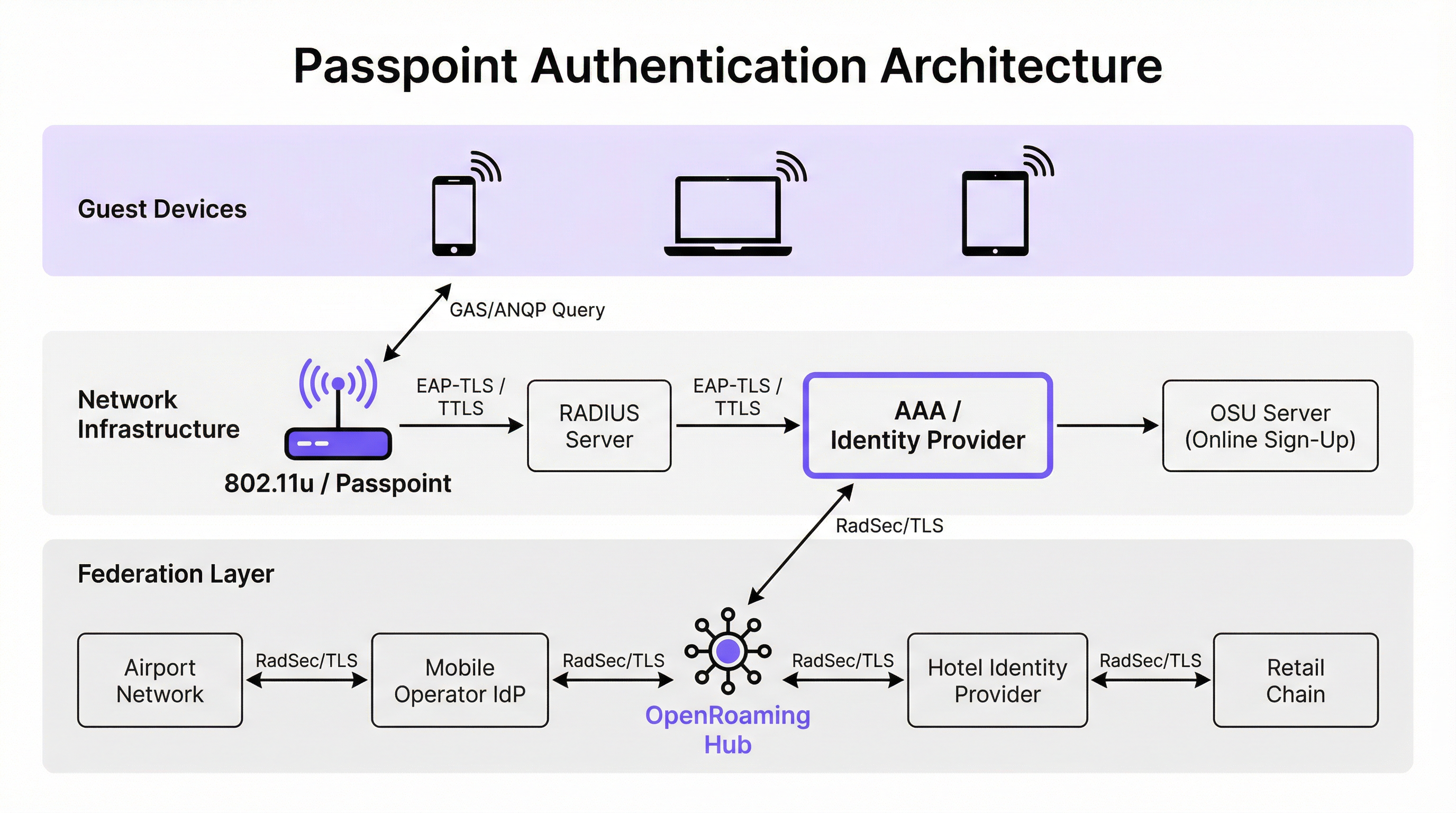
SSID-এর জন্য প্যাসিভভাবে স্ক্যান করার পরিবর্তে, একটি Passpoint-সক্ষম ডিভাইস অ্যাসোসিয়েশনের চেষ্টা করার আগে সক্রিয়ভাবে নেটওয়ার্ক ইনফ্রাস্ট্রাকচারকে কুয়েরি করে। যখন একটি অ্যাক্সেস পয়েন্ট তার বিকন ব্রডকাস্ট করে, তখন এতে একটি Interworking Element অন্তর্ভুক্ত থাকে — যা 802.11u সমর্থনের একটি ফ্ল্যাগ। ক্লায়েন্ট ডিভাইস এই ফ্ল্যাগটি শনাক্ত করে এবং একটি Generic Advertisement Service (GAS) রিকোয়েস্ট শুরু করে। এই রিকোয়েস্টের মধ্যে একটি Access Network Query Protocol (ANQP) কুয়েরি এনক্যাপসুলেটেড থাকে। ডিভাইসটি ইনফ্রাস্ট্রাকচারকে জিজ্ঞাসা করে, "আপনি কোন Roaming Consortium Organisational Identifiers (OIs) সমর্থন করেন?" যদি অ্যাক্সেস পয়েন্টের প্রতিক্রিয়া ডিভাইসে সংরক্ষিত ক্রেডেনশিয়াল প্রোফাইলের সাথে মিলে যায়, তবে স্বয়ংক্রিয় অথেন্টিকেশন শুরু হয়।
অথেন্টিকেশন এবং সিকিউরিটি আর্কিটেকচার
Passpoint এন্টারপ্রাইজ-গ্রেড সিকিউরিটি বাধ্যতামূলক করে, যা Captive Portal ডেপ্লয়মেন্টের সহজাত "ওপেন নেটওয়ার্ক" পর্যায়কে সম্পূর্ণভাবে নির্মূল করে। অথেন্টিকেশন IEEE 802.1X পোর্ট-ভিত্তিক নেটওয়ার্ক অ্যাক্সেস কন্ট্রোল এবং একটি Extensible Authentication Protocol (EAP) মেথডের মাধ্যমে পরিচালিত হয়। এন্টারপ্রাইজ ডেপ্লয়মেন্টে সবচেয়ে প্রচলিত মেথডগুলো হল EAP-TLS (ক্লায়েন্ট এবং সার্ভার সার্টিফিকেটের ওপর নির্ভরশীল), EAP-TTLS (টানেলড ক্রেডেনশিয়াল), এবং EAP-SIM/AKA (সেলুলার অফলোড সিনারিওর জন্য)।
এই আর্কিটেকচার মিউচুয়াল অথেন্টিকেশন প্রদান করে। ডিভাইসটি নেটওয়ার্কের কাছে ক্রিপ্টোগ্রাফিকভাবে তার পরিচয় প্রমাণ করে এবং গুরুত্বপূর্ণভাবে, নেটওয়ার্ক ডিভাইসের কাছে তার পরিচয় প্রমাণ করে। এই মিউচুয়াল ভেরিফিকেশন হল ইভিল টুইন অ্যাক্সেস পয়েন্ট এবং ম্যান-ইন-দ্য-মিডল ইন্টারসেপশন প্রচেষ্টার বিরুদ্ধে প্রাথমিক প্রতিরক্ষা। তদুপরি, Passpoint WPA2-Enterprise বা WPA3-Enterprise এনক্রিপশন বাধ্যতামূলক করে। WPA3-Enterprise ১৯২-বিট সিকিউরিটি মোড প্রবর্তন করে এবং ফরোয়ার্ড সিক্রেসি বাধ্যতামূলক করে, যা নিশ্চিত করে যে ভবিষ্যতে সেশন কি (key) আপস করা হলেও ঐতিহাসিক ট্রাফিক এনক্রিপ্ট করা থাকবে।
OpenRoaming ফেডারেশন
Passpoint যখন ডিসকভারি এবং অথেন্টিকেশনের প্রযুক্তিগত মেকানিজম সংজ্ঞায়িত করে, OpenRoaming তখন ট্রাস্ট ফ্রেমওয়ার্ক প্রদান করে। Wireless Broadband Alliance (WBA) দ্বারা তৈরি, OpenRoaming হল একটি গ্লোবাল ফেডারেশন যা আইডেন্টিটি প্রোভাইডার (যেমন মোবাইল নেটওয়ার্ক অপারেটর, Google, বা Apple) এবং অ্যাক্সেস প্রোভাইডারদের (যেমন হোটেল, স্টেডিয়াম এবং রিটেইল চেইন) প্রতিটি এনটিটির মধ্যে দ্বিপাক্ষিক চুক্তির প্রয়োজন ছাড়াই একে অপরের ক্রেডেনশিয়াল বিশ্বাস করতে দেয়।
OpenRoaming একটি হাব-অ্যান্ড-স্পোক Public Key Infrastructure (PKI) মডেলে কাজ করে। RadSec (RADIUS over TLS) টানেল ব্যবহার করে ফেডারেশন জুড়ে অথেন্টিকেশন রিকোয়েস্টগুলো প্রক্সি করা হয়। সেটেলমেন্ট-ফ্রি OpenRoaming OI (5A-03-BA) ব্রডকাস্ট করার মাধ্যমে, একটি এন্টারপ্রাইজ ভেন্যু তাৎক্ষণিকভাবে বিশ্বজুড়ে লক্ষ লক্ষ ব্যবহারকারীকে নিরবচ্ছিন্ন, সুরক্ষিত Wi-Fi অ্যাক্সেস প্রদান করতে পারে যাদের ডিভাইসে ইতিমধ্যে একটি সামঞ্জস্যপূর্ণ আইডেন্টিটি প্রোফাইল রয়েছে।
ইমপ্লিমেন্টেশন গাইড
Passpoint ডেপ্লয় করার জন্য প্রথাগত ওপেন নেটওয়ার্কের চেয়ে আরও পরিশীলিত ইনফ্রাস্ট্রাকচার বেসলাইন প্রয়োজন, তবে উপাদানগুলো আধুনিক এন্টারপ্রাইজ পরিবেশে স্ট্যান্ডার্ড।
ইনফ্রাস্ট্রাকচার প্রয়োজনীয়তা
- Passpoint-Certified Access Points: ওয়্যারলেস ইনফ্রাস্ট্রাকচার অবশ্যই 802.11u এবং Hotspot 2.0 স্পেসিফিকেশন সমর্থন করতে হবে। Cisco, Aruba এবং Ruckus-এর মতো ভেন্ডরদের গত পাঁচ বছরে তৈরি করা বেশিরভাগ এন্টারপ্রাইজ অ্যাক্সেস পয়েন্ট এই প্রয়োজনীয়তা পূরণ করে।
- RADIUS/AAA Infrastructure: একটি শক্তিশালী RADIUS সার্ভার যা EAP অথেন্টিকেশন পরিচালনা করতে এবং উপযুক্ত আইডেন্টিটি স্টোরে রিকোয়েস্ট পাঠাতে সক্ষম। OpenRoaming-এ অংশগ্রহণ করলে, RADIUS সার্ভারকে অবশ্যই সুরক্ষিত প্রক্সিংয়ের জন্য RadSec সমর্থন করতে হবে।
- Online Sign-Up (OSU) Server: যে পরিবেশগুলো তাদের নিজস্ব ক্রেডেনশিয়াল ইস্যু করে (শুধুমাত্র ফেডারেশন আইডেন্টিটির ওপর নির্ভর না করে), সেখানে একটি OSU সার্ভার গেস্ট ডিভাইসে সুরক্ষিতভাবে Passpoint প্রোফাইল প্রদানের মেকানিজম সরবরাহ করে।
ডুয়াল-SSID কৌশল
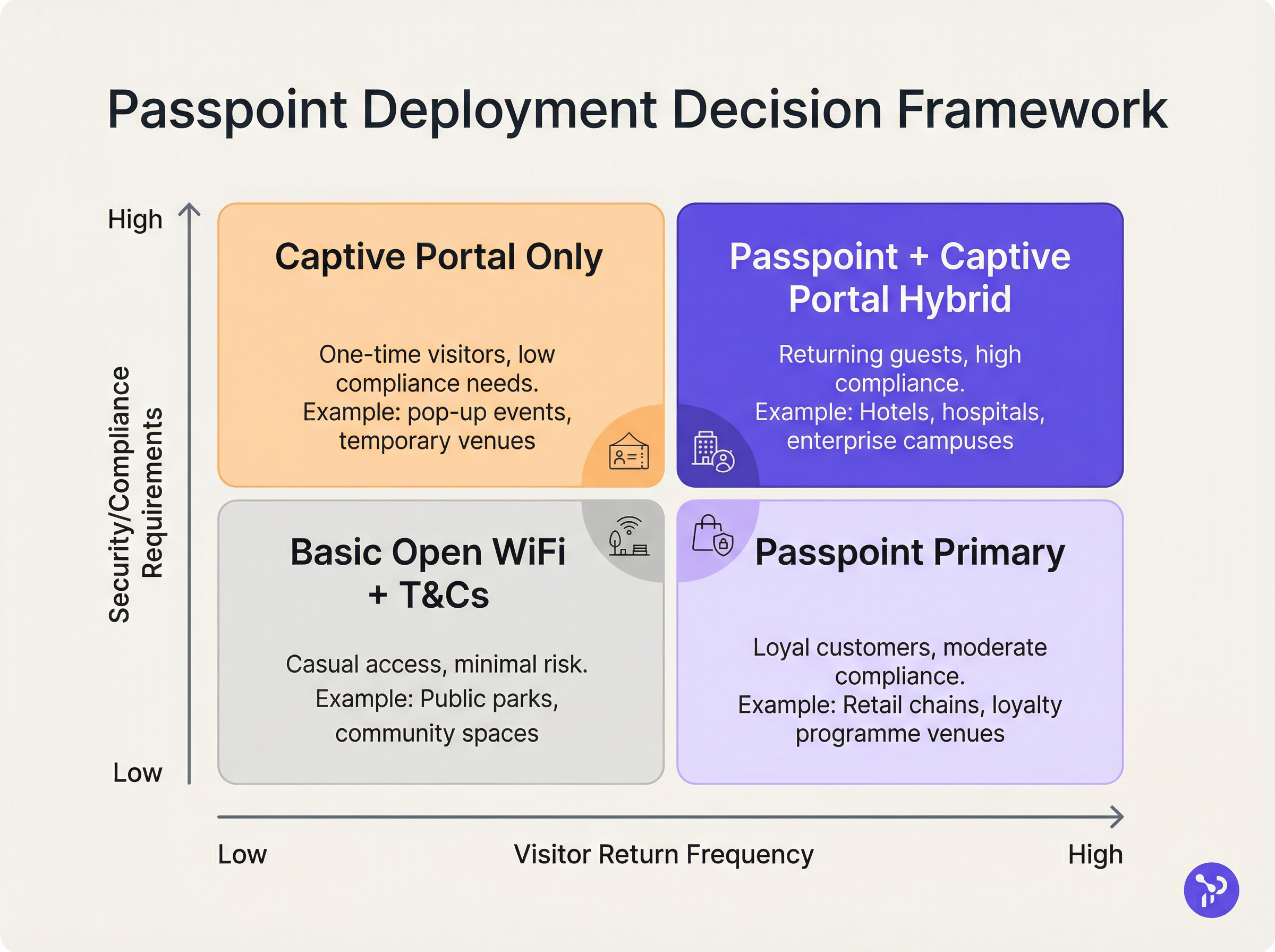
Passpoint-এ স্থানান্তরিত ভেন্যুগুলোর জন্য সবচেয়ে কার্যকর ডেপ্লয়মেন্ট মডেল হল ডুয়াল-SSID কৌশল। এই পদ্ধতিটি প্রাথমিক অনবোর্ডিংয়ের জন্য একটি প্রথাগত Captive Portal SSID বজায় রাখে এবং পরবর্তী নিরবচ্ছিন্ন সংযোগের জন্য একটি Passpoint SSID প্রদান করে।
যখন একজন গেস্ট প্রথমবারের মতো Captive Portal SSID-এ সংযুক্ত হন, তখন তারা স্ট্যান্ডার্ড অথেন্টিকেশন ফ্লো সম্পন্ন করেন (যেমন শর্তাবলী গ্রহণ করা, একটি ইমেল ঠিকানা প্রদান করা)। সফল অথেন্টিকেশনের পর, পোর্টালটি একটি Passpoint প্রোফাইল ডাউনলোড করার অপশন দেখায়। একবার ইনস্টল হয়ে গেলে, ডিভাইসটি ভবিষ্যতে সমস্ত ভিজিটে স্বয়ংক্রিয়ভাবে সুরক্ষিত Passpoint SSID-কে অগ্রাধিকার দেবে। এই প্রগতিশীল অনবোর্ডিং মডেলটি লেগ্যাসি ডিভাইসগুলোর জন্য অ্যাক্সেসযোগ্যতা নিশ্চিত করার পাশাপাশি বেশিরভাগ ব্যবহারকারীকে সুরক্ষিত, ঘর্ষণহীন Passpoint নেটওয়ার্কে স্থানান্তরিত করে।
বেস্ট প্র্যাকটিস
Passpoint আর্কিটেকচার ডিজাইন করার সময়, অপারেশনাল স্থিতিশীলতা এবং নিরাপত্তা নিশ্চিত করতে IT লিডারদের বেশ কয়েকটি গুরুত্বপূর্ণ বেস্ট প্র্যাকটিস মেনে চলতে হবে।
প্রথমত, সার্টিফিকেট লাইফসাইকেল ম্যানেজমেন্ট অত্যন্ত গুরুত্বপূর্ণ। EAP-TLS ব্যবহার করলে, ক্লায়েন্ট বা সার্ভার সার্টিফিকেটের মেয়াদ শেষ হওয়ার ফলে সাইলেন্ট অথেন্টিকেশন ফেইলিয়ার হবে যা ফ্রন্ট-লাইন হেল্পডেস্কের পক্ষে ডায়াগনসিস করা কঠিন। স্বয়ংক্রিয় সার্টিফিকেট রিনিউয়াল প্রোটোকল এবং প্রোঅ্যাক্টিভ মনিটরিং কার্যকর করুন। Device Posture Assessment for Network Access Control সংক্রান্ত আমাদের গাইডে যেমন হাইলাইট করা হয়েছে, সার্টিফিকেট-ভিত্তিক অ্যাক্সেস ম্যানেজ করার সময় শক্তিশালী এন্ডপয়েন্ট ভিজিবিলিটি অপরিহার্য।
দ্বিতীয়ত, লেগ্যাসি ডিভাইসের সামঞ্জস্যতা নিশ্চিত করুন। যদিও iOS 7+, Android 6+, এবং Windows 10+ নেটিভভাবে Passpoint সমর্থন করে, কিছু IoT ডিভাইস, লেগ্যাসি হার্ডওয়্যার এবং কঠোর কর্পোরেট-পরিচালিত ডিভাইসে সমর্থনের অভাব থাকতে পারে। ডুয়াল-SSID কৌশল একটি ফলব্যাক অ্যাক্সেস মেথড প্রদানের মাধ্যমে এই ঝুঁকি কমায়।
তৃতীয়ত, ANQP এলিমেন্ট কনফিগার করার সময়, Venue Information সঠিক এবং বর্ণনামূলক হওয়া নিশ্চিত করুন। ব্যবহারকারী কোন নেটওয়ার্কে যুক্ত হচ্ছেন সে সম্পর্কে প্রসঙ্গ প্রদান করতে ক্লায়েন্ট ডিভাইসের অপারেটিং সিস্টেম প্রায়ই এই মেটাডেটা প্রদর্শন করে।
ট্রাবলশুটিং এবং ঝুঁকি প্রশমন
Passpoint-এর জটিলতা নির্দিষ্ট ফেইলিয়ার ডোমেইন তৈরি করে যা Captive Portal ডেপ্লয়মেন্ট থেকে আলাদা।
ফেইলিয়ার মোড ১: RADIUS টাইমআউট বা অগম্যতা যদি লোকাল RADIUS সার্ভার আপস্ট্রিম আইডেন্টিটি প্রোভাইডারের কাছে পৌঁছাতে না পারে (বিশেষ করে ফেডারেশনভুক্ত OpenRoaming সিনারিওতে), তবে EAP হ্যান্ডশেক টাইমআউট হবে। প্রশমন: রিডানডেন্ট RADIUS ইনফ্রাস্ট্রাকচার কার্যকর করুন এবং RadSec টানেলের শক্তিশালী মনিটরিং নিশ্চিত করুন। কনফিগারেশন নির্দেশনার জন্য RadSec : Sécurisation du trafic d'authentification RADIUS avec TLS সংক্রান্ত আমাদের প্রযুক্তিগত ডকুমেন্টেশন দেখুন।
ফেইলিয়ার মোড ২: প্রোফাইল প্রভিশনিং ফেইলিয়ার ব্যবহারকারীরা OSU সার্ভার থেকে Passpoint প্রোফাইল ডাউনলোড করার চেষ্টা করার সময় ত্রুটির সম্মুখীন হতে পারেন, যা প্রায়শই মোবাইল ডিভাইসে Captive Portal ব্রাউজারের সীমাবদ্ধতার কারণে হয়। প্রশমন: প্রোফাইল ডাউনলোড শুরু করার আগে Captive Portal ফ্লো এমনভাবে ডিজাইন করুন যাতে এটি Captive Network Assistant (CNA) মিনি-ব্রাউজার থেকে ডিভাইসের নেটিভ সিস্টেম ব্রাউজারে চলে আসে।
ফেইলিয়ার মোড ৩: MAC Randomisation অ্যানালিটিক্স প্রভাব Passpoint যদিও MAC randomisation-এর কারণে সৃষ্ট অথেন্টিকেশন সমস্যা সমাধান করে, তবে শুধুমাত্র MAC অ্যাড্রেসের ওপর নির্ভরশীল লেগ্যাসি অ্যানালিটিক্স প্ল্যাটফর্মগুলো এখনও ভুল ভিজিটর সংখ্যা রিপোর্ট করবে। প্রশমন: আপনার WiFi Analytics প্ল্যাটফর্মের সাথে RADIUS অথেন্টিকেশন লগ ইন্টিগ্রেট করুন। MAC অ্যাড্রেসের পরিবর্তে ইউনিক ক্রেডেনশিয়াল আইডেন্টিফায়ার (যেমন Chargeable User Identity বা অ্যানোনিমাইজড NAI) ট্র্যাক করার মাধ্যমে, ভেন্যুগুলো সঠিক ফুটফল এবং লয়্যালটি মেট্রিক্স পুনরুদ্ধার করতে পারে।
ROI এবং ব্যবসায়িক প্রভাব
Passpoint ডেপ্লয়মেন্টের ব্যবসায়িক কেস তিনটি পরিমাপযোগ্য স্তম্ভের ওপর ভিত্তি করে: অপারেশনাল দক্ষতা, ঝুঁকি হ্রাস এবং ব্যবহারকারীর অভিজ্ঞতা।
অপারেশনাল দৃষ্টিকোণ থেকে, Captive Portal-এর বাধা দূর করা সরাসরি Wi-Fi কানেক্টিভিটি সংক্রান্ত IT হেল্পডেস্ক টিকিট হ্রাসের সাথে সম্পর্কিত। বড় Healthcare বা Transport পরিবেশে, এটি উল্লেখযোগ্য খরচ সাশ্রয় করে।
ঝুঁকি হ্রাসের ক্ষেত্রে, ওপেন নেটওয়ার্ক থেকে WPA3-Enterprise এনক্রিপশনে স্থানান্তর ভেন্যুর লায়াবিলিটি ফুটপ্রিন্ট উল্লেখযোগ্যভাবে কমিয়ে দেয়। PCI DSS-এর আওতাভুক্ত রিটেইল পরিবেশের জন্য, ডেটা হ্যান্ডলিং সারফেস এরিয়া হ্রাস (ওয়েব-ভিত্তিক ক্রেডেনশিয়াল সংগ্রহ নির্মূল করার মাধ্যমে) কমপ্লায়েন্স অডিটকে সহজ করে।
পরিশেষে, ব্যবহারকারীর অভিজ্ঞতার উন্নতি গভীর। হসপিটালিটি সেক্টরে, গবেষণাগুলো ক্রমাগত দেখায় যে নিরবচ্ছিন্ন, নির্ভরযোগ্য Wi-Fi হল গেস্টদের সন্তুষ্টি এবং বারবার বুকিং করার একটি প্রাথমিক চালিকাশক্তি। Passpoint কার্যকর করার মাধ্যমে, ভেন্যুগুলো এমন একটি কানেক্টিভিটি অভিজ্ঞতা প্রদান করে যা সেলুলার নেটওয়ার্কের নির্ভরযোগ্যতাকে প্রতিফলিত করে, যা Wi-Fi-কে একটি হতাশাজনক ইউটিলিটি থেকে একটি স্বচ্ছ, প্রিমিয়াম সুবিধায় রূপান্তরিত করে।
মূল শব্দ ও সংজ্ঞা
IEEE 802.11u
The wireless networking standard amendment that enables Interworking with External Networks, allowing devices to query APs before associating.
When configuring wireless controllers, engineers must enable 802.11u to allow devices to discover Passpoint capabilities.
ANQP (Access Network Query Protocol)
A query and response protocol used by devices to discover network services, roaming agreements, and venue information before connecting.
IT teams configure ANQP profiles on the wireless controller to broadcast their supported Roaming Consortium OIs and NAI Realms.
Roaming Consortium OI
An Organisational Identifier broadcast by the access point that indicates which identity providers or federations the network supports.
If an enterprise joins OpenRoaming, they must ensure their APs broadcast the specific OpenRoaming OI (5A-03-BA).
OSU (Online Sign-Up)
A standardized process and server infrastructure for securely provisioning Passpoint credentials and certificates to a user's device.
When building a self-service onboarding flow for a loyalty programme, developers will integrate with an OSU server to push the profile to the device.
RadSec
A protocol that encapsulates RADIUS authentication traffic within a TLS tunnel to ensure secure transmission over untrusted networks.
Required when proxying authentication requests from a local venue to a cloud-based OpenRoaming hub.
NAI Realm
Network Access Identifier Realm; indicates the domain of the user and the specific EAP authentication methods supported by the network.
Configured alongside ANQP to tell client devices whether the network requires EAP-TLS, EAP-TTLS, or EAP-SIM.
EAP-TLS
Extensible Authentication Protocol - Transport Layer Security; a highly secure authentication method requiring both client and server certificates.
Often used in enterprise employee Wi-Fi deployments where IT can push certificates to managed devices via MDM.
MAC Address Randomisation
A privacy feature in modern mobile operating systems that generates a fake, temporary hardware address for each Wi-Fi network connection.
The primary catalyst driving venues away from captive portals, as it breaks the ability to recognize returning visitors based on their hardware.
কেস স্টাডিজ
A 400-room enterprise hotel chain is experiencing a high volume of helpdesk tickets from returning guests who complain they must manually reconnect to the Wi-Fi in the lobby, restaurant, and their rooms, despite having connected previously. The hotel currently uses a traditional open SSID with a captive portal. How should the network architect resolve this?
The architect should implement a Dual-SSID strategy. First, deploy a secure Passpoint SSID broadcasting the hotel's specific Roaming Consortium OI. Second, modify the existing captive portal on the open SSID to serve as an onboarding funnel. When a guest logs in via the portal, they are prompted to download a Passpoint configuration profile to their device. Once installed, the device will automatically and securely authenticate via 802.1X/EAP to the Passpoint SSID as they move between the lobby, restaurant, and room, eliminating manual re-authentication.
A national retail chain wants to offer secure, seamless Wi-Fi across its 500 locations to drive loyalty app engagement. However, managing custom certificates or individual credentials for millions of potential customers is deemed operationally unfeasible. What is the recommended deployment architecture?
The retailer should deploy Passpoint and federate with OpenRoaming. By configuring their access points to broadcast the settlement-free OpenRoaming OI (5A-03-BA) and establishing RadSec tunnels from their RADIUS infrastructure to an OpenRoaming hub, the retailer allows any customer with a compatible identity provider profile (such as a modern Samsung device or a mobile carrier profile) to connect automatically. The retailer can then integrate this with their loyalty app to trigger push notifications upon successful network association.
দৃশ্যপট বিশ্লেষণ
Q1. A hospital IT director wants to deploy Passpoint to ensure doctors' mobile devices connect securely to the clinical network, while patients connect to a separate guest network. The doctors use unmanaged personal devices (BYOD). Which EAP method and provisioning strategy should the architect recommend?
💡 ইঙ্গিত:Consider the balance between security and the operational overhead of managing certificates on unmanaged personal devices.
প্রস্তাবিত পদ্ধতি দেখুন
The architect should recommend EAP-TTLS with an Online Sign-Up (OSU) server provisioning flow. EAP-TLS requires client certificates, which are operationally difficult to deploy and manage on unmanaged BYOD devices. EAP-TTLS allows the doctors to authenticate securely using their existing Active Directory/LDAP credentials (username and password) tunneled inside a secure TLS session. The OSU server can provide a self-service portal where doctors log in once to download the profile, enabling automatic connection thereafter.
Q2. During a Passpoint deployment pilot, Android devices are successfully authenticating and connecting, but iOS devices are failing during the EAP handshake. The RADIUS logs show 'Unknown CA' errors. What is the most likely cause and solution?
💡 ইঙ্গিত:Apple's iOS has strict requirements regarding the trust chain for RADIUS server certificates.
প্রস্তাবিত পদ্ধতি দেখুন
The most likely cause is that the RADIUS server is using a self-signed certificate or a certificate issued by a private internal Certificate Authority (CA) that the iOS devices do not inherently trust. Android devices sometimes allow users to bypass or ignore certificate validation (though this is poor security practice), whereas iOS strictly enforces it for Passpoint profiles. The solution is to replace the RADIUS server certificate with one issued by a publicly trusted commercial CA (e.g., DigiCert, Let's Encrypt), or ensure the private CA root certificate is explicitly bundled within the Passpoint configuration profile pushed to the iOS devices.
Q3. A stadium venue has implemented OpenRoaming. A user with a valid Google OpenRoaming profile walks into the venue, but their device does not attempt to connect automatically. What specific configuration on the stadium's wireless LAN controller should the network engineer verify first?
💡 ইঙ্গিত:How does the device know that the access point supports the OpenRoaming federation before it attempts to connect?
প্রস্তাবিত পদ্ধতি দেখুন
The engineer should verify the ANQP configuration, specifically checking that the Access Points are broadcasting the correct Roaming Consortium Organisational Identifier (OI) for OpenRoaming, which is 5A-03-BA. If this OI is not included in the AP's beacon or GAS response, the device will not recognize the network as an OpenRoaming participant and will not attempt to authenticate.
মূল বিষয়সমূহ
- ✓Passpoint (Hotspot 2.0) replaces manual captive portal logins with automatic, cellular-like Wi-Fi roaming.
- ✓It uses IEEE 802.11u for pre-association network discovery and WPA3-Enterprise for encrypted, mutually authenticated connections.
- ✓Passpoint solves the MAC address randomisation issue by authenticating the user's credential profile rather than their hardware address.
- ✓OpenRoaming is the global federation framework that allows Passpoint devices to connect across different venues seamlessly.
- ✓A dual-SSID strategy (Captive Portal for onboarding, Passpoint for returning users) is the recommended deployment model for enterprise venues.




