

Wie Passpoint (Hotspot 2.0) das Guest Wi-Fi-Erlebnis transformiert
Ein umfassender technischer Leitfaden, der detailliert beschreibt, wie Passpoint (Hotspot 2.0) und 802.11u-Protokolle herkömmliche Captive Portals durch nahtloses, sicheres Wi-Fi-Roaming auf Mobilfunk-Niveau ersetzen. Er bietet IT-Entscheidern Architektur-Übersichten, Implementierungs-Frameworks und die Business-Case-Argumentation für die Einführung anmeldedatenbasierter Authentifizierung, um Herausforderungen durch MAC-Randomisierung zu lösen und das Gästeerlebnis zu verbessern.
🎧 Diesen Leitfaden anhören
Transkript anzeigen
Executive Summary
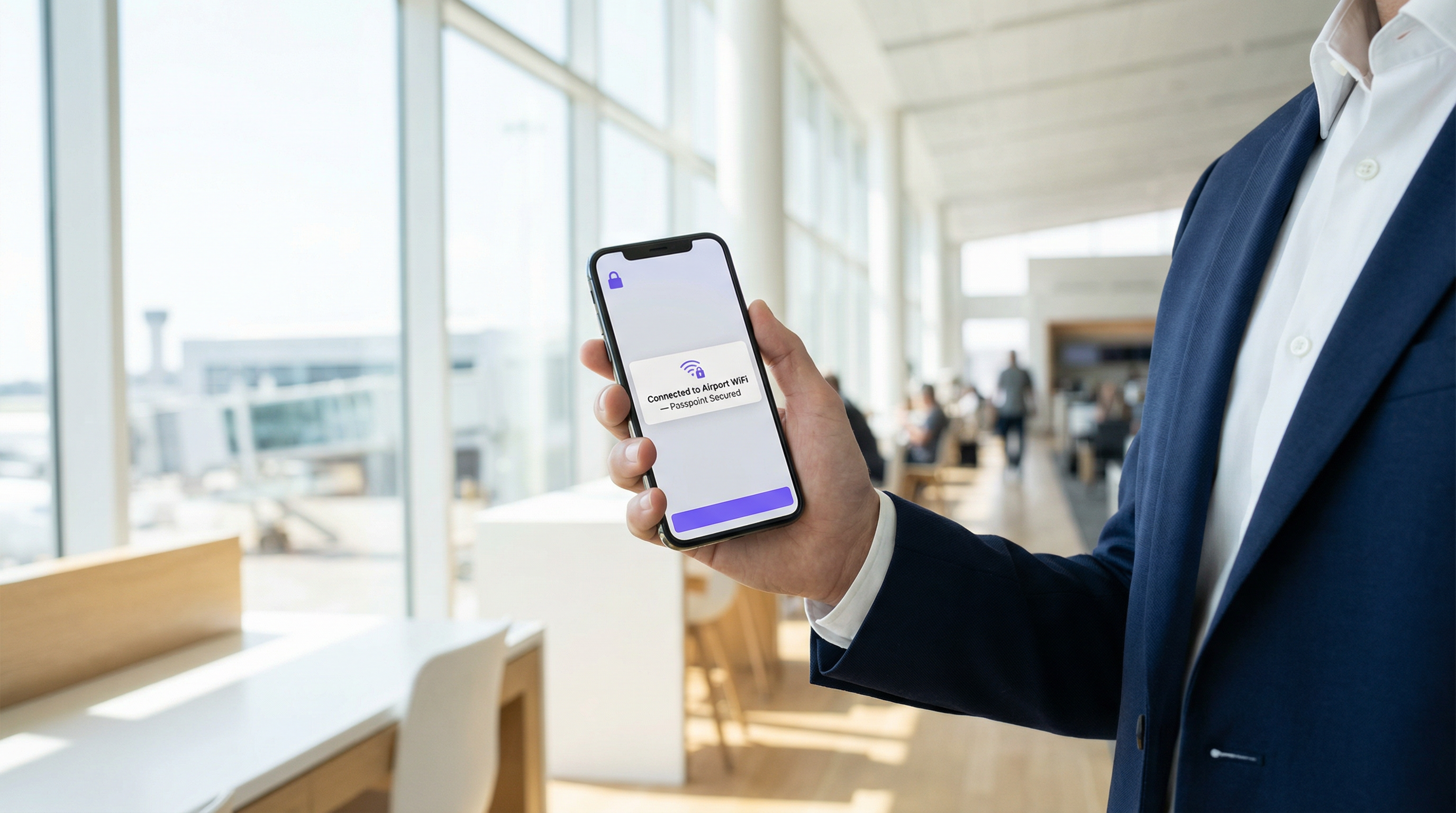
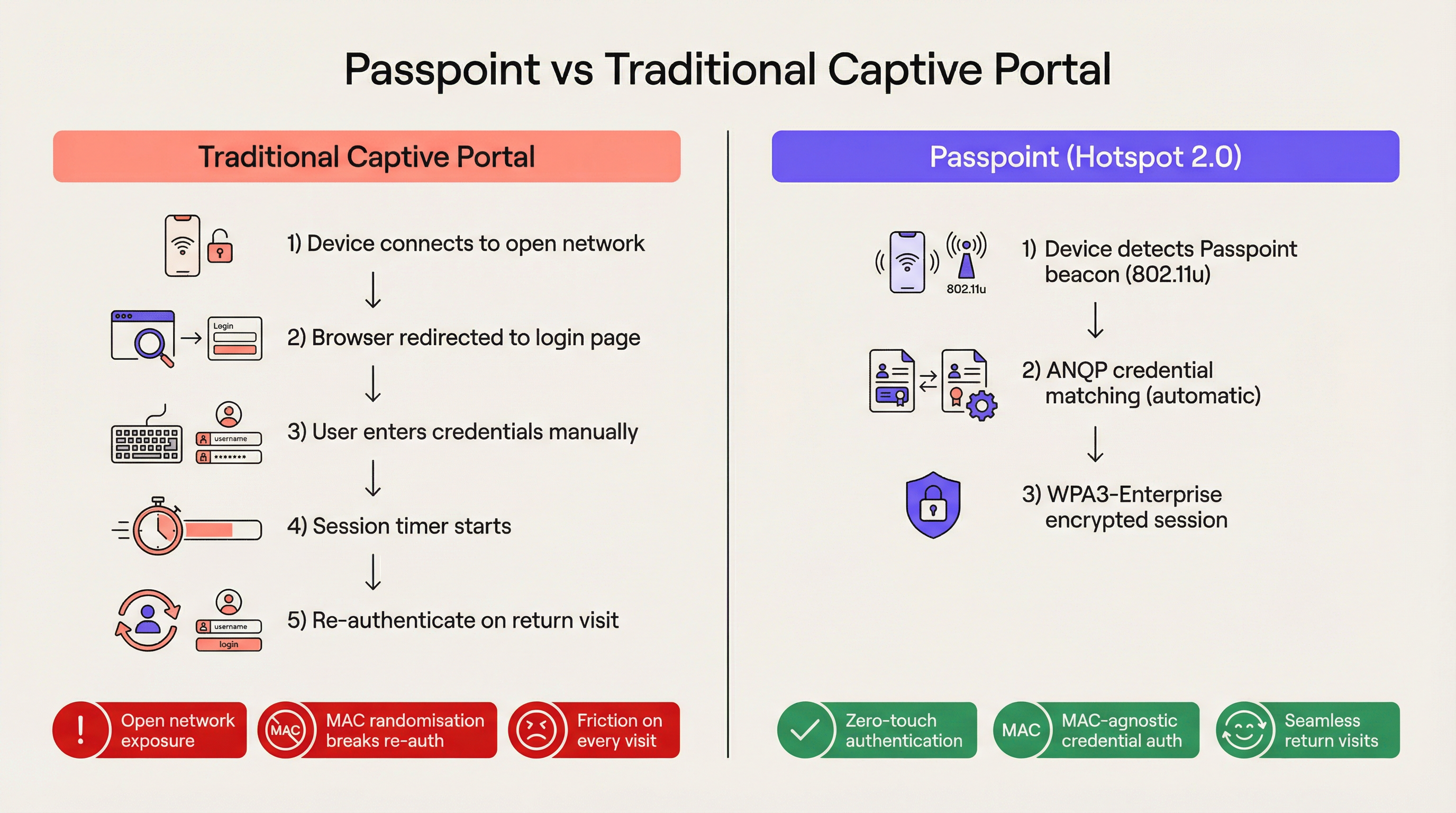
Für moderne Unternehmen und Veranstaltungsorte sind Reibungsverluste ein Wettbewerbsnachteil. Herkömmliche Captive Portals, einst der Standard für den Gast-Netzwerkzugang, stellen heute einen erheblichen operativen Engpass und eine Quelle ständiger Benutzerfrustration dar. Passpoint, auch bekannt als Hotspot 2.0, transformiert dieses Paradigma grundlegend, indem es die manuelle webbasierte Authentifizierung durch nahtloses, Mobilfunk-ähnliches Roaming ersetzt. Durch die Nutzung des IEEE 802.11u-Standards und der WPA3-Enterprise-Verschlüsselung ermöglicht Passpoint es Gastgeräten, Unternehmens-Wi-Fi-Netzwerke automatisch und sicher zu finden, zu authentifizieren und sich mit ihnen zu verbinden.
Für IT-Leiter in den Bereichen Gastgewerbe , Einzelhandel und großen öffentlichen Veranstaltungsorten ist der Übergang zu Passpoint nicht mehr optional. Die standardmäßige MAC-Randomisierung in modernen iOS- und Android-Geräten hat die Re-Authentifizierungslogik herkömmlicher Captive Portals effektiv unterbrochen, was bedeutet, dass wiederkehrende Gäste bei jedem Besuch als neue Geräte erscheinen. Passpoint löst dies, indem es das Anmeldeprofil des Benutzers anstelle seiner Hardware-Adresse authentifiziert. Dieser Leitfaden beschreibt die technische Architektur von Passpoint, die geschäftlichen Auswirkungen der Bereitstellung und ein herstellerneutrales Implementierungs-Framework, das darauf ausgelegt ist, das Guest WiFi -Erlebnis zu verbessern und gleichzeitig den Helpdesk-Aufwand zu reduzieren.
Technischer Deep-Dive
Das Problem der Netzwerkauswahl und 802.11u
In älteren Wi-Fi-Bereitstellungen verlassen sich Geräte auf einen grundlegend anfälligen Mechanismus zur Netzwerkauswahl: das Scannen nach bekannten Service Set Identifiers (SSIDs). Dieser Ansatz erfordert, dass der Benutzer zuvor mit dem Netzwerk verbunden war oder das Netzwerk manuell aus einer Liste auswählt. Er bietet vor der Assoziierung keinen Einblick in den Sicherheitsstatus des Netzwerks, die Authentifizierungsanforderungen oder die Verfügbarkeit des Upstream-Internets. Passpoint adressiert diese Einschränkung durch die IEEE 802.11u-Erweiterung, die das Interworking mit externen Netzwerken einführt.
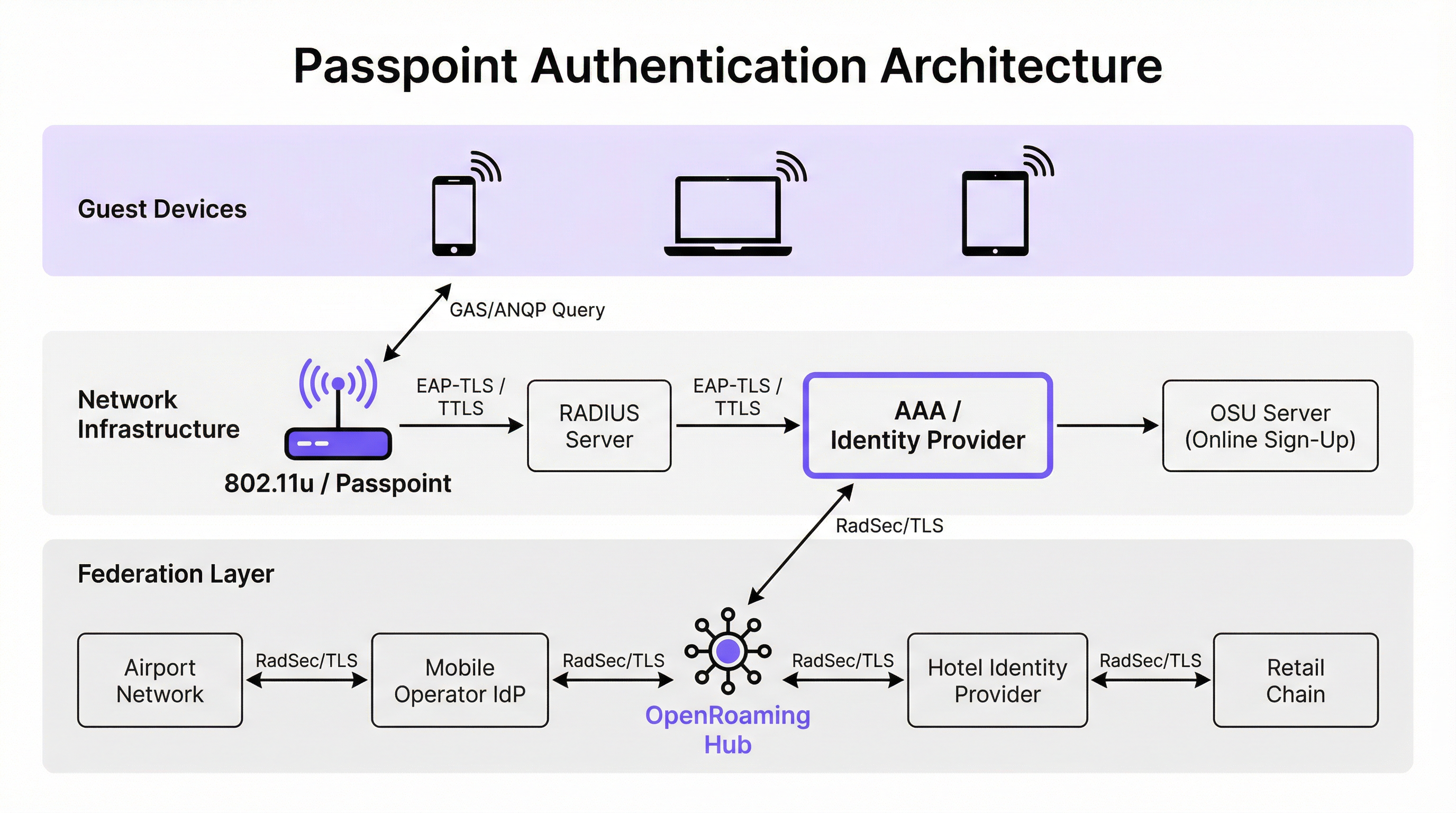
Anstatt passiv nach SSIDs zu scannen, fragt ein Passpoint-fähiges Gerät die Netzwerkinfrastruktur aktiv ab, bevor es eine Assoziierung versucht. Wenn ein Access Point seinen Beacon aussendet, enthält dieser ein Interworking-Element – ein Flag, das die Unterstützung für 802.11u anzeigt. Das Client-Gerät erkennt dieses Flag und initiiert eine Generic Advertisement Service (GAS)-Anfrage. In diese Anfrage ist eine Access Network Query Protocol (ANQP)-Abfrage eingebettet. Das Gerät fragt die Infrastruktur: „Welche Roaming Consortium Organisational Identifiers (OIs) unterstützt du?“ Wenn die Antwort des Access Points mit einem auf dem Gerät gespeicherten Anmeldeprofil übereinstimmt, erfolgt die automatische Authentifizierung.
Authentifizierungs- und Sicherheitsarchitektur
Passpoint schreibt Sicherheit auf Enterprise-Niveau vor und eliminiert die „offene Netzwerkphase“, die Captive Portal-Bereitstellungen eigen ist, vollständig. Die Authentifizierung erfolgt über die portbasierte Netzwerkzugriffskontrolle nach IEEE 802.1X in Verbindung mit einer Extensible Authentication Protocol (EAP)-Methode. Die am weitesten verbreiteten Methoden in Unternehmensumgebungen sind EAP-TLS (basiert auf Client- und Serverzertifikaten), EAP-TTLS (getunnelte Anmeldedaten) und EAP-SIM/AKA (für Mobilfunk-Offload-Szenarien).
Diese Architektur bietet eine gegenseitige Authentifizierung. Das Gerät beweist seine Identität kryptografisch gegenüber dem Netzwerk, und entscheidend ist, dass das Netzwerk seine Identität gegenüber dem Gerät beweist. Diese gegenseitige Verifizierung ist der primäre Schutz gegen Evil-Twin-Access-Points und Man-in-the-Middle-Abfangversuche. Darüber hinaus schreibt Passpoint eine WPA2-Enterprise- oder WPA3-Enterprise-Verschlüsselung vor. WPA3-Enterprise führt einen 192-Bit-Sicherheitsmodus ein und schreibt Forward Secrecy vor, um sicherzustellen, dass der historische Datenverkehr verschlüsselt bleibt, selbst wenn Sitzungsschlüssel in Zukunft kompromittiert werden.
Die OpenRoaming-Federation
Während Passpoint den technischen Mechanismus für Erkennung und Authentifizierung definiert, bietet OpenRoaming das Vertrauensmodell. OpenRoaming wurde von der Wireless Broadband Alliance (WBA) entwickelt und ist eine globale Federation, die es Identitätsanbietern (wie Mobilfunkbetreibern, Google oder Apple) und Zugangsanbietern (wie Hotels, Stadien und Einzelhandelsketten) ermöglicht, den Anmeldedaten der jeweils anderen Seite zu vertrauen, ohne dass bilaterale Vereinbarungen zwischen jeder Einheit erforderlich sind.
OpenRoaming arbeitet nach einem Hub-and-Spoke-Public-Key-Infrastructure (PKI)-Modell. Authentifizierungsanfragen werden über die Federation mittels RadSec-Tunneln (RADIUS über TLS) weitergeleitet. Durch das Ausstrahlen der abrechnungsfreien OpenRoaming-OI (5A-03-BA) kann ein Veranstaltungsort sofort nahtlosen, sicheren Wi-Fi-Zugang für Millionen von Benutzern weltweit bereitstellen, die bereits ein kompatibles Identitätsprofil auf ihren Geräten besitzen.
Implementierungsleitfaden
Die Bereitstellung von Passpoint erfordert eine anspruchsvollere Infrastrukturbasis als ein herkömmliches offenes Netzwerk, aber die Komponenten sind in modernen Unternehmensumgebungen Standard.
Infrastruktur-Voraussetzungen
- Passpoint-zertifizierte Access Points: Die Wireless-Infrastruktur muss die Spezifikationen für 802.11u und Hotspot 2.0 unterstützen. Die überwiegende Mehrheit der in den letzten fünf Jahren hergestellten Enterprise-Access-Points von Anbietern wie Cisco, Aruba und Ruckus erfüllt diese Anforderung.
- RADIUS/AAA-Infrastruktur: Ein robuster RADIUS-Server, der EAP-Authentifizierungen verarbeiten und Anfragen an die entsprechenden Identitätsspeicher weiterleiten kann. Bei der Teilnahme an OpenRoaming muss der RADIUS-Server RadSec für sicheres Proxying unterstützen.
- Online Sign-Up (OSU) Server: Für Umgebungen, die eigene Anmeldedaten ausgeben (anstatt sich ausschließlich auf federierte Identitäten zu verlassen), bietet ein OSU-Server den Mechanismus zur sicheren Bereitstellung von Passpoint-Profilen auf Gastgeräten.
Die Dual-SSID-Strategie
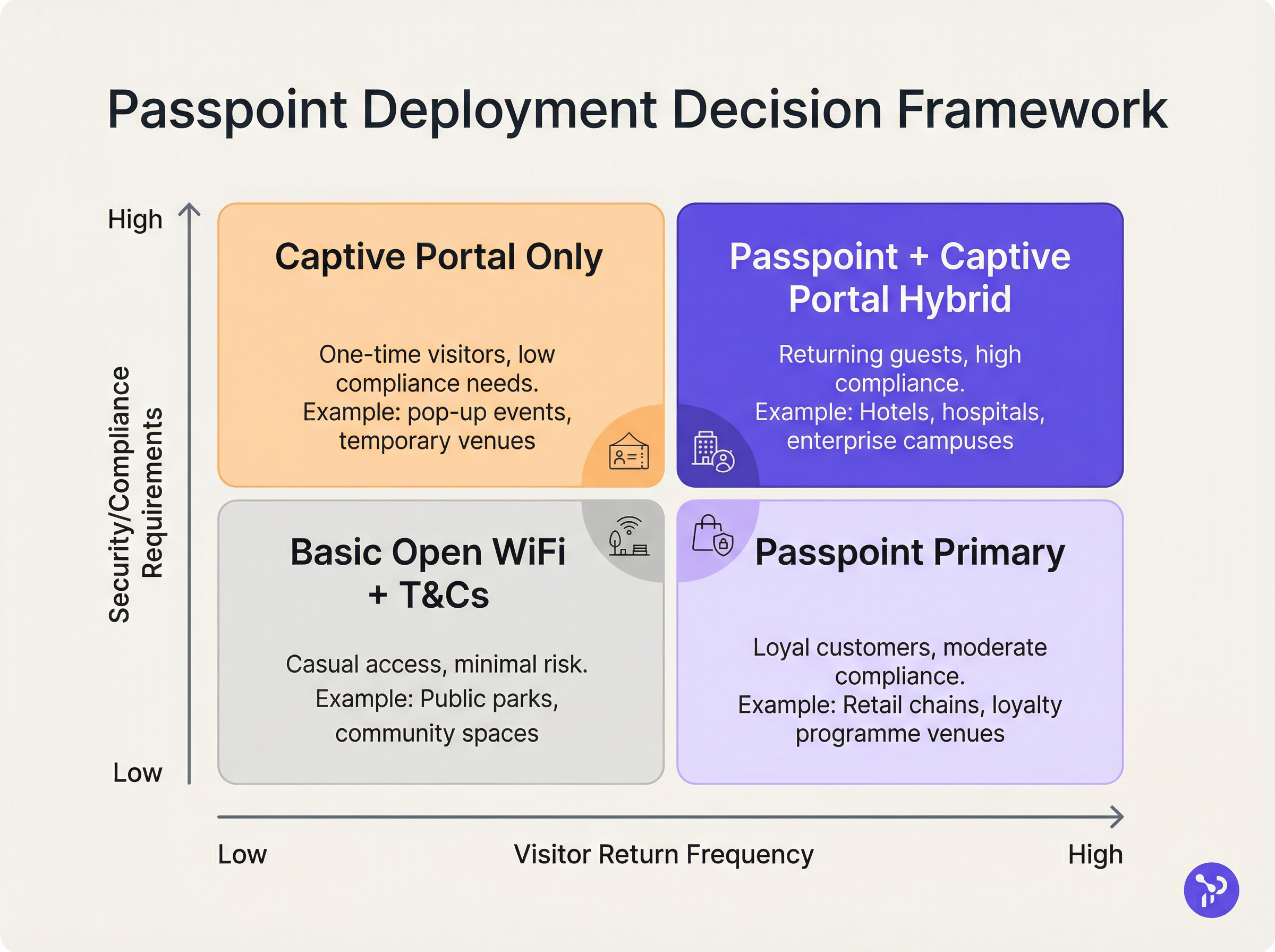
Das effektivste Bereitstellungsmodell für Veranstaltungsorte, die auf Passpoint umsteigen, ist die Dual-SSID-Strategie. Dieser Ansatz behält eine herkömmliche Captive Portal-SSID für das erste Onboarding bei und bietet gleichzeitig eine Passpoint-SSID für nahtlose Folgeverbindungen.
Wenn sich ein Gast zum ersten Mal mit der Captive Portal-SSID verbindet, durchläuft er den Standard-Authentifizierungsfluss (z. B. Akzeptieren der Geschäftsbedingungen, Angabe einer E-Mail-Adresse). Nach erfolgreicher Authentifizierung bietet das Portal die Option zum Download eines Passpoint-Profils an. Einmal installiert, wird das Gerät bei allen zukünftigen Besuchen automatisch die sichere Passpoint-SSID bevorzugen. Dieses progressive Onboarding-Modell gewährleistet die Zugänglichkeit für ältere Geräte, während die Mehrheit der Benutzer auf das sichere, reibungslose Passpoint-Netzwerk migriert wird.
Best Practices
Bei der Entwicklung einer Passpoint-Architektur müssen IT-Leiter mehrere kritische Best Practices beachten, um operative Stabilität und Sicherheit zu gewährleisten.
Erstens ist das Zertifikats-Lebenszyklusmanagement von größter Bedeutung. Bei der Verwendung von EAP-TLS führt der Ablauf von Client- oder Serverzertifikaten zu stillen Authentifizierungsfehlern, die für Frontline-Helpdesks schwer zu diagnostizieren sind. Implementieren Sie automatisierte Protokolle zur Zertifikatserneuerung und proaktive Überwachung. Wie in unserem Leitfaden zur Gerätestatusbewertung für die Netzwerkzugriffskontrolle hervorgehoben, ist eine robuste Endpunkt-Transparenz bei der Verwaltung des zertifikatsbasierten Zugriffs unerlässlich.
Zweitens: Stellen Sie die Kompatibilität mit Altgeräten sicher. Während iOS 7+, Android 6+ und Windows 10+ Passpoint nativ unterstützen, fehlt diese Unterstützung bei bestimmten IoT-Geräten, älterer Hardware und streng verwalteten Unternehmensgeräten. Die Dual-SSID-Strategie mindert dieses Risiko durch die Bereitstellung einer Fallback-Zugriffsmethode.
Drittens: Stellen Sie bei der Konfiguration von ANQP-Elementen sicher, dass die Veranstaltungsort-Informationen genau und aussagekräftig sind. Diese Metadaten werden oft vom Betriebssystem des Client-Geräts angezeigt, um Kontext über das Netzwerk zu liefern, dem der Benutzer beitritt.
Fehlerbehebung & Risikominderung
Die Komplexität von Passpoint führt zu spezifischen Fehlerbereichen, die sich von Captive Portal-Bereitstellungen unterscheiden.
Fehlermodus 1: RADIUS-Timeout oder Nichterreichbarkeit Wenn der lokale RADIUS-Server den Upstream-Identitätsanbieter nicht erreichen kann (insbesondere in federierten OpenRoaming-Szenarien), kommt es zu einem Timeout beim EAP-Handshake. Abhilfe: Implementieren Sie eine redundante RADIUS-Infrastruktur und stellen Sie eine robuste Überwachung der RadSec-Tunnel sicher. Weitere Konfigurationshinweise finden Sie in unserer technischen Dokumentation zu RadSec: Sécurisation du trafic d'authentification RADIUS avec TLS .
Fehlermodus 2: Fehler bei der Profilbereitstellung Benutzer können beim Versuch, das Passpoint-Profil vom OSU-Server herunterzuladen, auf Fehler stoßen, oft aufgrund von Browser-Einschränkungen des Captive Portals auf mobilen Geräten. Abhilfe: Gestalten Sie den Captive Portal-Fluss so, dass er aus dem Captive Network Assistant (CNA) Mini-Browser in den nativen Systembrowser des Geräts wechselt, bevor der Profildownload gestartet wird.
Fehlermodus 3: Auswirkungen der MAC-Randomisierung auf die Analytik Während Passpoint die durch MAC-Randomisierung verursachten Authentifizierungsprobleme löst, werden ältere Analyseplattformen, die sich ausschließlich auf MAC-Adressen verlassen, weiterhin ungenaue Besucherzahlen melden. Abhilfe: Integrieren Sie die RADIUS-Authentifizierungsprotokolle in Ihre WiFi Analytics -Plattform. Durch das Tracking eindeutiger Anmeldekennungen (wie der Chargeable User Identity oder anonymisierter NAI) anstelle von MAC-Adressen können Veranstaltungsorte wieder genaue Kennzahlen zu Besucherfrequenz und Loyalität erhalten.
ROI & geschäftliche Auswirkungen
Der Business Case für die Passpoint-Bereitstellung ruht auf drei messbaren Säulen: operative Effizienz, Risikominderung und Benutzererfahrung.
Aus operativer Sicht korreliert die Eliminierung von Captive Portal-Reibungsverlusten direkt mit einer Reduzierung der IT-Helpdesk-Tickets im Zusammenhang mit der Wi-Fi-Konnektivität. In großen Umgebungen im Gesundheitswesen oder Transportwesen stellt dies eine erhebliche Kostenersparnis dar.
In Bezug auf die Risikominderung reduziert der Wechsel von offenen Netzwerken zur WPA3-Enterprise-Verschlüsselung das Haftungsrisiko des Veranstaltungsorts erheblich. Für Einzelhandelsumgebungen, die PCI DSS unterliegen, vereinfacht die Reduzierung der Datenverarbeitungsfläche (durch den Verzicht auf webbasierte Erfassung von Anmeldedaten) die Compliance-Audits.
Schließlich ist die Verbesserung des Benutzererlebnisses tiefgreifend. Im Gastgewerbe zeigen Studien konsistent, dass nahtloses, zuverlässiges Wi-Fi ein Haupttreiber für Gästezufriedenheit und wiederholte Buchungen ist. Durch die Implementierung von Passpoint bieten Veranstaltungsorte ein Konnektivitätserlebnis, das die Zuverlässigkeit von Mobilfunknetzen widerspiegelt und Wi-Fi von einem frustrierenden Hilfsmittel in eine transparente Premium-Annehmlichkeit verwandelt.
Schlüsselbegriffe & Definitionen
IEEE 802.11u
The wireless networking standard amendment that enables Interworking with External Networks, allowing devices to query APs before associating.
When configuring wireless controllers, engineers must enable 802.11u to allow devices to discover Passpoint capabilities.
ANQP (Access Network Query Protocol)
A query and response protocol used by devices to discover network services, roaming agreements, and venue information before connecting.
IT teams configure ANQP profiles on the wireless controller to broadcast their supported Roaming Consortium OIs and NAI Realms.
Roaming Consortium OI
An Organisational Identifier broadcast by the access point that indicates which identity providers or federations the network supports.
If an enterprise joins OpenRoaming, they must ensure their APs broadcast the specific OpenRoaming OI (5A-03-BA).
OSU (Online Sign-Up)
A standardized process and server infrastructure for securely provisioning Passpoint credentials and certificates to a user's device.
When building a self-service onboarding flow for a loyalty programme, developers will integrate with an OSU server to push the profile to the device.
RadSec
A protocol that encapsulates RADIUS authentication traffic within a TLS tunnel to ensure secure transmission over untrusted networks.
Required when proxying authentication requests from a local venue to a cloud-based OpenRoaming hub.
NAI Realm
Network Access Identifier Realm; indicates the domain of the user and the specific EAP authentication methods supported by the network.
Configured alongside ANQP to tell client devices whether the network requires EAP-TLS, EAP-TTLS, or EAP-SIM.
EAP-TLS
Extensible Authentication Protocol - Transport Layer Security; a highly secure authentication method requiring both client and server certificates.
Often used in enterprise employee Wi-Fi deployments where IT can push certificates to managed devices via MDM.
MAC Address Randomisation
A privacy feature in modern mobile operating systems that generates a fake, temporary hardware address for each Wi-Fi network connection.
The primary catalyst driving venues away from captive portals, as it breaks the ability to recognize returning visitors based on their hardware.
Fallstudien
A 400-room enterprise hotel chain is experiencing a high volume of helpdesk tickets from returning guests who complain they must manually reconnect to the Wi-Fi in the lobby, restaurant, and their rooms, despite having connected previously. The hotel currently uses a traditional open SSID with a captive portal. How should the network architect resolve this?
The architect should implement a Dual-SSID strategy. First, deploy a secure Passpoint SSID broadcasting the hotel's specific Roaming Consortium OI. Second, modify the existing captive portal on the open SSID to serve as an onboarding funnel. When a guest logs in via the portal, they are prompted to download a Passpoint configuration profile to their device. Once installed, the device will automatically and securely authenticate via 802.1X/EAP to the Passpoint SSID as they move between the lobby, restaurant, and room, eliminating manual re-authentication.
A national retail chain wants to offer secure, seamless Wi-Fi across its 500 locations to drive loyalty app engagement. However, managing custom certificates or individual credentials for millions of potential customers is deemed operationally unfeasible. What is the recommended deployment architecture?
The retailer should deploy Passpoint and federate with OpenRoaming. By configuring their access points to broadcast the settlement-free OpenRoaming OI (5A-03-BA) and establishing RadSec tunnels from their RADIUS infrastructure to an OpenRoaming hub, the retailer allows any customer with a compatible identity provider profile (such as a modern Samsung device or a mobile carrier profile) to connect automatically. The retailer can then integrate this with their loyalty app to trigger push notifications upon successful network association.
Szenarioanalyse
Q1. A hospital IT director wants to deploy Passpoint to ensure doctors' mobile devices connect securely to the clinical network, while patients connect to a separate guest network. The doctors use unmanaged personal devices (BYOD). Which EAP method and provisioning strategy should the architect recommend?
💡 Hinweis:Consider the balance between security and the operational overhead of managing certificates on unmanaged personal devices.
Empfohlenen Ansatz anzeigen
The architect should recommend EAP-TTLS with an Online Sign-Up (OSU) server provisioning flow. EAP-TLS requires client certificates, which are operationally difficult to deploy and manage on unmanaged BYOD devices. EAP-TTLS allows the doctors to authenticate securely using their existing Active Directory/LDAP credentials (username and password) tunneled inside a secure TLS session. The OSU server can provide a self-service portal where doctors log in once to download the profile, enabling automatic connection thereafter.
Q2. During a Passpoint deployment pilot, Android devices are successfully authenticating and connecting, but iOS devices are failing during the EAP handshake. The RADIUS logs show 'Unknown CA' errors. What is the most likely cause and solution?
💡 Hinweis:Apple's iOS has strict requirements regarding the trust chain for RADIUS server certificates.
Empfohlenen Ansatz anzeigen
The most likely cause is that the RADIUS server is using a self-signed certificate or a certificate issued by a private internal Certificate Authority (CA) that the iOS devices do not inherently trust. Android devices sometimes allow users to bypass or ignore certificate validation (though this is poor security practice), whereas iOS strictly enforces it for Passpoint profiles. The solution is to replace the RADIUS server certificate with one issued by a publicly trusted commercial CA (e.g., DigiCert, Let's Encrypt), or ensure the private CA root certificate is explicitly bundled within the Passpoint configuration profile pushed to the iOS devices.
Q3. A stadium venue has implemented OpenRoaming. A user with a valid Google OpenRoaming profile walks into the venue, but their device does not attempt to connect automatically. What specific configuration on the stadium's wireless LAN controller should the network engineer verify first?
💡 Hinweis:How does the device know that the access point supports the OpenRoaming federation before it attempts to connect?
Empfohlenen Ansatz anzeigen
The engineer should verify the ANQP configuration, specifically checking that the Access Points are broadcasting the correct Roaming Consortium Organisational Identifier (OI) for OpenRoaming, which is 5A-03-BA. If this OI is not included in the AP's beacon or GAS response, the device will not recognize the network as an OpenRoaming participant and will not attempt to authenticate.
Wichtigste Erkenntnisse
- ✓Passpoint (Hotspot 2.0) replaces manual captive portal logins with automatic, cellular-like Wi-Fi roaming.
- ✓It uses IEEE 802.11u for pre-association network discovery and WPA3-Enterprise for encrypted, mutually authenticated connections.
- ✓Passpoint solves the MAC address randomisation issue by authenticating the user's credential profile rather than their hardware address.
- ✓OpenRoaming is the global federation framework that allows Passpoint devices to connect across different venues seamlessly.
- ✓A dual-SSID strategy (Captive Portal for onboarding, Passpoint for returning users) is the recommended deployment model for enterprise venues.




