

PEAP-MSCHAPv2: এটি কেন এখনও সাধারণ, কেন এটি ঝুঁকিপূর্ণ এবং কীভাবে পরিবর্তন করবেন
PEAP-MSCHAPv2-এর জটিল নিরাপত্তা দুর্বলতাগুলি বিস্তারিতভাবে বর্ণনা করার একটি ব্যাপক প্রযুক্তিগত নির্দেশিকা, যার মধ্যে ইভিল টুইন অ্যাটাক এবং ক্রেডেনশিয়াল ক্যাপচার অন্তর্ভুক্ত রয়েছে। এটি এন্টারপ্রাইজ WiFi নেটওয়ার্কগুলিকে নিরাপদ, সার্টিফিকেট-ভিত্তিক EAP-TLS অথেন্টিকেশনে স্থানান্তরিত করার জন্য IT টিমের জন্য একটি ব্যবহারিক এবং ভেন্ডর-নিরপেক্ষ রোডম্যাপ প্রদান করে।
🎧 এই গাইডটি শুনুন
ট্রান্সক্রিপ্ট দেখুন
এক্সিকিউটিভ সামারি
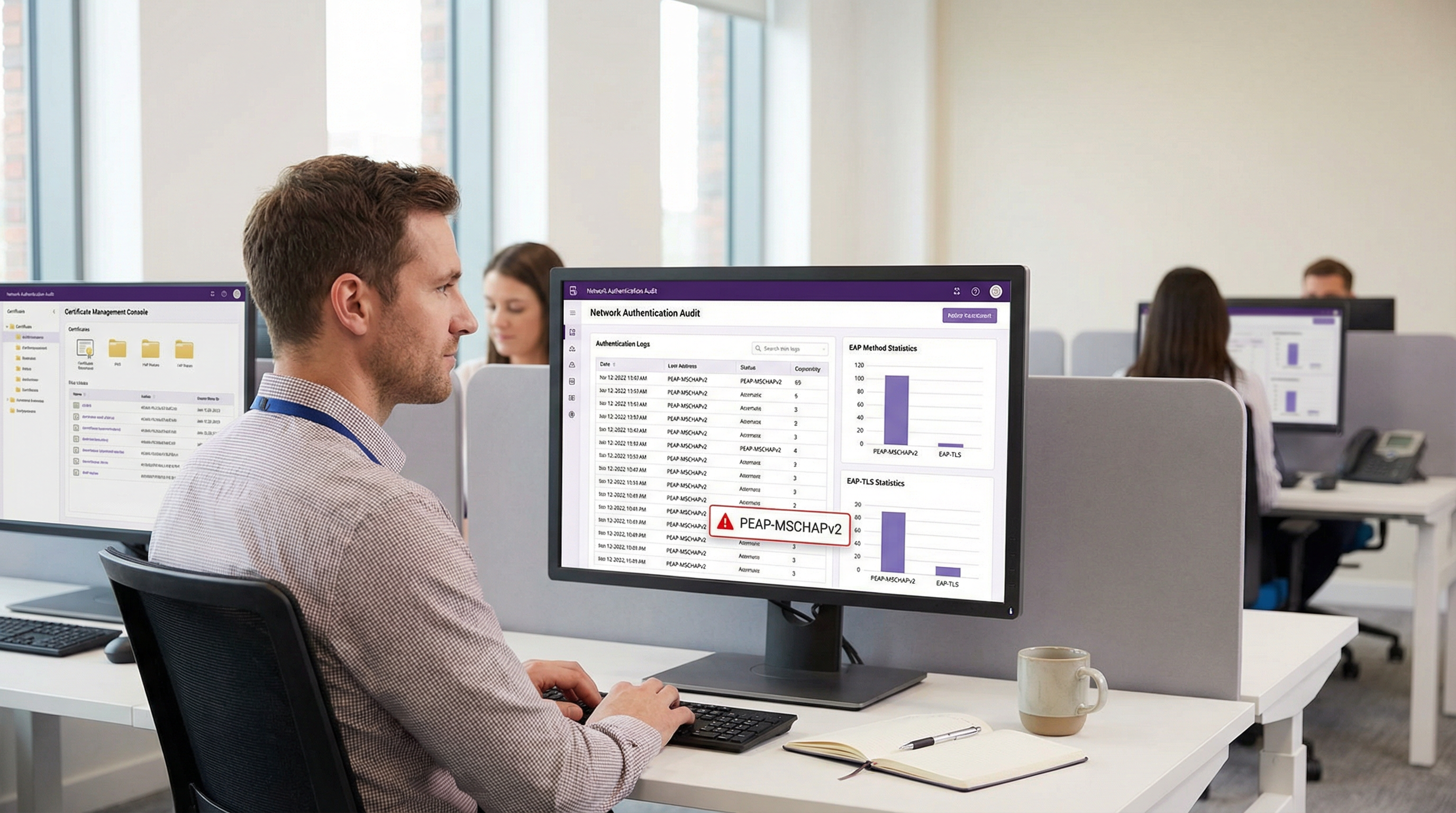
সুপরিচিত ক্রিপ্টোগ্রাফিক দুর্বলতা থাকা সত্ত্বেও, হসপিটালিটি, রিটেইল এবং পাবলিক সেক্টরে এন্টারপ্রাইজ WiFi অথেন্টিকেশনের জন্য PEAP-MSCHAPv2 এখনও সবচেয়ে বেশি ব্যবহৃত EAP পদ্ধতি। এর অব্যাহত প্রচলন নিরাপত্তার কার্যকারিতার চেয়ে স্থাপনার সহজতা—বিশেষ করে Active Directory-র সাথে এর নেটিভ ইন্টিগ্রেশন—দ্বারা পরিচালিত হয়। তবে, ঝুঁকির প্রোফাইল নাটকীয়ভাবে পরিবর্তিত হয়েছে। স্বয়ংক্রিয় এক্সপ্লয়টেশন টুলগুলি "ইভিল টুইন" অ্যাটাককে সহজলভ্য করেছে, যা থ্রেট অ্যাক্টরদের সামান্য প্রচেষ্টায় MSCHAPv2 চ্যালেঞ্জ-রেসপন্স হ্যাশ ক্যাপচার এবং ক্র্যাক করতে দেয়, যা সরাসরি আপোসকৃত Active Directory ক্রেডেনশিয়ালের দিকে পরিচালিত করে।
IT ডিরেক্টর এবং নেটওয়ার্ক আর্কিটেক্টদের জন্য ম্যান্ডেটটি স্পষ্ট: PCI DSS বা GDPR-এর মতো কমপ্লায়েন্স ফ্রেমওয়ার্কের অধীনস্থ কোনো পরিবেশের জন্য PEAP-MSCHAPv2 আর উপযুক্ত নয়। এই নির্দেশিকাটি PEAP-MSCHAPv2-কে লক্ষ্য করে নির্দিষ্ট অ্যাটাক ভেক্টরগুলির একটি সমালোচনামূলক বিশ্লেষণ প্রদান করে এবং EAP-TLS-এ একটি বাস্তবসম্মত, পর্যায়ক্রমিক মাইগ্রেশন পথের রূপরেখা দেয়। আধুনিক Mobile Device Management (MDM) এবং ক্লাউড Public Key Infrastructure (PKI) সমাধানগুলি ব্যবহার করে, সংস্থাগুলি ব্যবসায়িক কার্যক্রম ব্যাহত না করে বা লেগাসি ডিভাইসগুলিকে বিচ্ছিন্ন না করে শক্তিশালী, সার্টিফিকেট-ভিত্তিক অথেন্টিকেশনে রূপান্তর করতে পারে।
টেকনিক্যাল ডিপ-ডাইভ: দুর্বলতার শারীরস্থান
কেন PEAP-MSCHAPv2 বর্জন করা উচিত তা বোঝার জন্য, এর অন্তর্নিহিত ক্রিপ্টোগ্রাফিক আর্কিটেকচার পরীক্ষা করতে হবে। MSCHAPv2 (Microsoft Challenge Handshake Authentication Protocol version 2) ১৯৯০-এর দশকের শেষের দিকে ডিজাইন করা হয়েছিল এবং এটি MD4 হ্যাশিং অ্যালগরিদম এবং Data Encryption Standard (DES) [1]-এর উপর নির্ভর করে। আধুনিক ক্রিপ্টোগ্রাফিক মান অনুযায়ী উভয়ই অপ্রচলিত বলে বিবেচিত হয়।
ক্রিপ্টোগ্রাফিক ত্রুটি
মৌলিক দুর্বলতাটি নিহিত রয়েছে কীভাবে MSCHAPv2 ব্যবহারকারীর পাসওয়ার্ডের NT হ্যাশ পরিচালনা করে তার মধ্যে। প্রোটোকলটি NT হ্যাশ থেকে প্রাপ্ত একটি ২১-বাইটের কি-কে তিনটি ৭-বাইটের DES কি-তে বিভক্ত করে। গুরুত্বপূর্ণভাবে, তৃতীয় কি-টি হ্যাশের মাত্র দুটি সিগনিফিকেন্ট বাইট ব্যবহার করে, বাকি অংশ নাল বাইট দিয়ে পূর্ণ করে। এই কাঠামোগত ত্রুটি ক্রিপ্টোগ্রাফিক জটিলতাকে ব্যাপকভাবে হ্রাস করে।
২০১২ সালে, নিরাপত্তা গবেষক Moxie Marlinspike প্রদর্শন করেছিলেন যে MSCHAPv2 হ্যান্ডশেকটি সমস্যাটিকে একটি একক DES কি ক্র্যাকে নামিয়ে এনে নির্ণায়কভাবে ক্র্যাক করা যেতে পারে [2]। ক্লাউড-ভিত্তিক ক্র্যাকিং পরিষেবা বা hashcat-এর মতো টুল চালানো আধুনিক GPU রিগ ব্যবহার করে, একজন আক্রমণকারী পাসওয়ার্ডের জটিলতা নির্বিশেষে কয়েক ঘণ্টার মধ্যে একটি ক্যাপচার করা হ্যান্ডশেক থেকে প্লেইনটেক্সট Active Directory পাসওয়ার্ড পুনরুদ্ধার করতে পারে।
ইভিল টুইন অ্যাটাক ভেক্টর
"ইভিল টুইন" অ্যাটাকের মাধ্যমে এই ক্রিপ্টোগ্রাফিক দুর্বলতা বাস্তবে কাজে লাগানো হয়। একটি কর্পোরেট অফিস বা Hospitality ভেন্যুর একটি সাধারণ দৃশ্যকল্পে:
- Rogue AP Deployment: আক্রমণকারী টার্গেট কর্পোরেট SSID (যেমন, "Staff-WiFi") সম্প্রচারকারী একটি রোগ অ্যাক্সেস পয়েন্ট স্থাপন করে।
- Signal Dominance: রোগ AP উচ্চতর ট্রান্সমিট পাওয়ারে কাজ করে, যা কাছাকাছি ক্লায়েন্ট ডিভাইসগুলিকে বৈধ অবকাঠামোর পরিবর্তে এর সাথে যুক্ত হতে বাধ্য করে।
- Fake RADIUS Authentication: যখন ক্লায়েন্ট PEAP টানেল শুরু করে, তখন রোগ AP অনুরোধটি আক্রমণকারী-নিয়ন্ত্রিত RADIUS সার্ভারে (যেমন hostapd-wpe) প্রক্সি করে।
- Certificate Validation Failure: রোগ RADIUS সার্ভার একটি সেলফ-সাইনড বা যাচাইহীন ডিজিটাল সার্টিফিকেট উপস্থাপন করে। যদি ক্লায়েন্ট ডিভাইসটি কঠোর সার্ভার সার্টিফিকেট ভ্যালিডেশন বাইপাস করার জন্য ভুলভাবে কনফিগার করা থাকে—অথবা ব্যবহারকারী যদি কেবল একটি ট্রাস্ট প্রম্পটে "Accept" ক্লিক করেন—তবে টানেলটি প্রতিষ্ঠিত হয়।
- Credential Capture: ক্লায়েন্ট আপোসকৃত টানেলের মাধ্যমে MSCHAPv2 চ্যালেঞ্জ-রেসপন্স প্রেরণ করে। আক্রমণকারী হ্যাশটি ক্যাপচার করে এবং সংযোগটি বিচ্ছিন্ন করে দেয়।
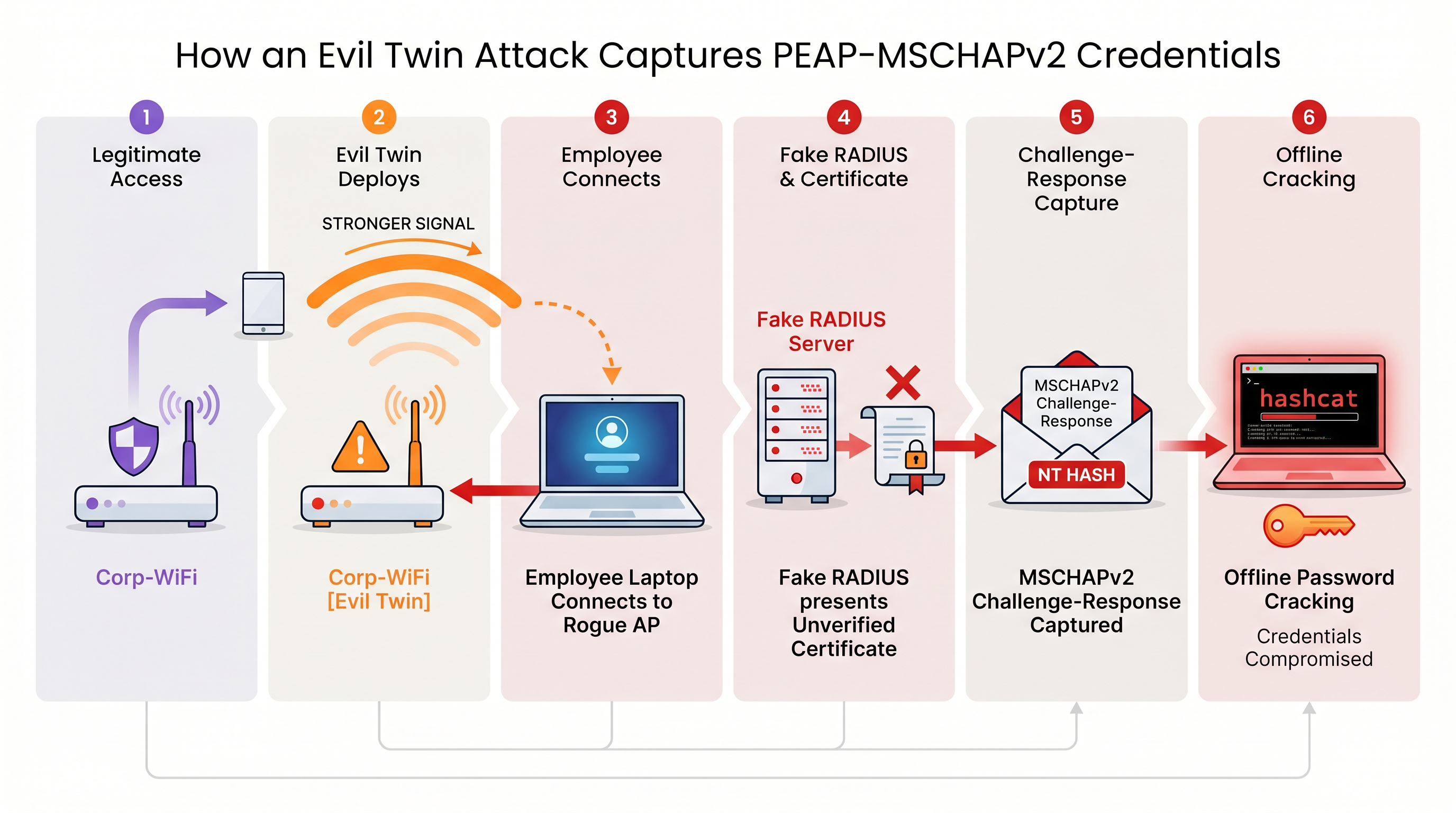
এন্ডপয়েন্ট স্তরে কঠোর সার্ভার সার্টিফিকেট ভ্যালিডেশন প্রয়োগ না করা হলে, PEAP-MSCHAPv2 ব্যবহারকারী প্রতিটি ডিভাইস এই ক্রেডেনশিয়াল ক্যাপচার কৌশলের কাছে ঝুঁকিপূর্ণ। এটি বিশেষ করে Retail পরিবেশের জন্য উদ্বেগজনক যেখানে ব্যাক-অফ-হাউস নেটওয়ার্কগুলি প্রায়শই পাবলিক স্পেসের খুব কাছাকাছি থাকে।
ইমপ্লিমেন্টেশন গাইড: EAP-TLS-এ মাইগ্রেশন
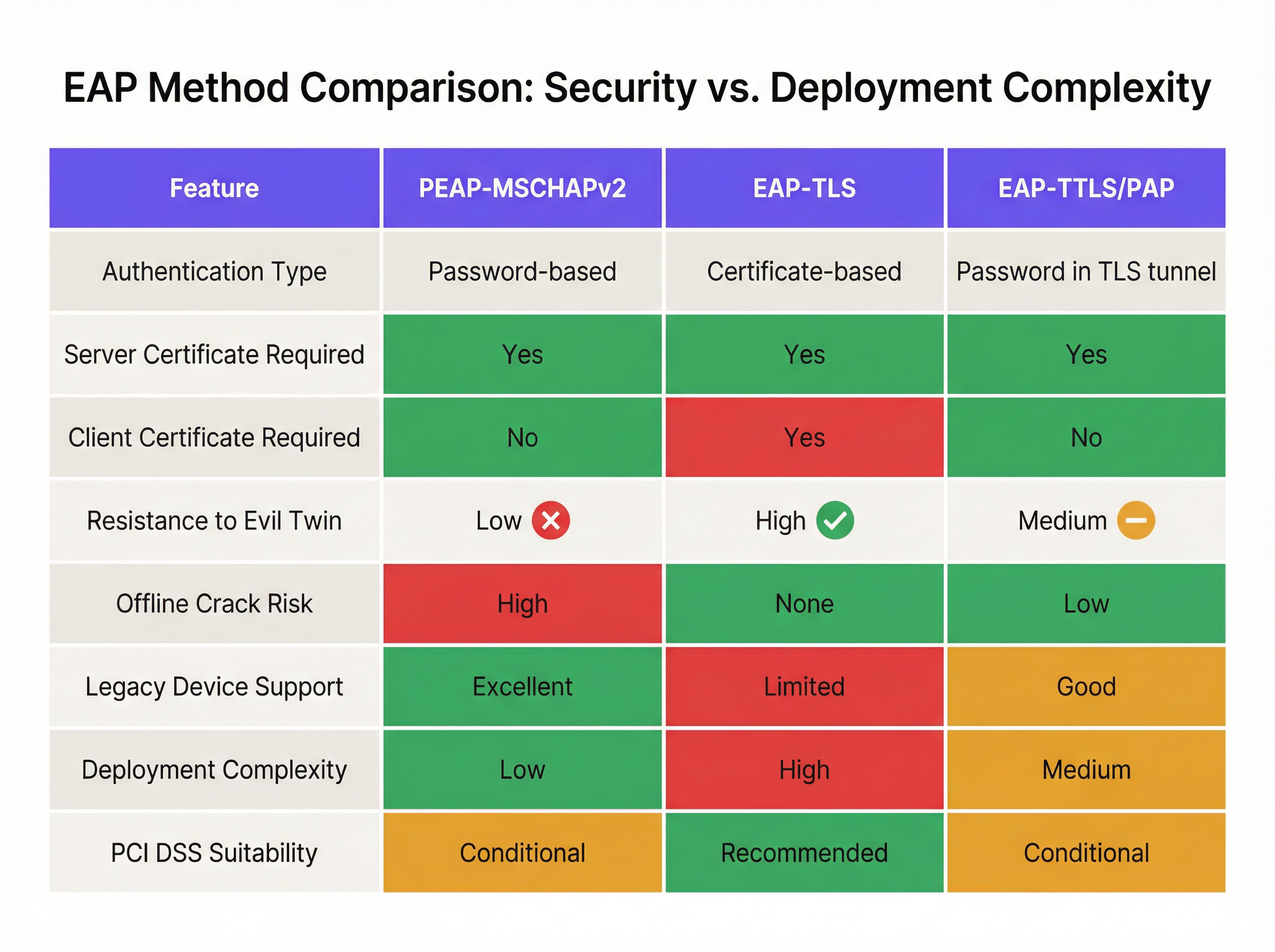
MSCHAPv2 দুর্বলতার নিশ্চিত সমাধান হলো EAP-TLS (Extensible Authentication Protocol-Transport Layer Security)-এ মাইগ্রেশন করা। EAP-TLS মিউচুয়াল অথেন্টিকেশন বাধ্যতামূলক করে: RADIUS সার্ভার এবং ক্লায়েন্ট ডিভাইস উভয়কেই বৈধ ডিজিটাল সার্টিফিকেট উপস্থাপন করতে হবে। যেহেতু হ্যান্ডশেকের সময় কোনো পাসওয়ার্ড প্রেরণ বা হ্যাশ করা হয় না, তাই EAP-TLS অফলাইন ডিকশনারি অ্যাটাক থেকে সম্পূর্ণ মুক্ত এবং ইভিল টুইন স্পুফিংয়ের বিরুদ্ধে অত্যন্ত প্রতিরোধী।
ঐতিহাসিকভাবে, EAP-TLS গ্রহণের ক্ষেত্রে বাধা ছিল অন-প্রিমিস Public Key Infrastructure (PKI) স্থাপনের জটিলতা। আজ, ক্লাউড PKI এবং আধুনিক MDM ইন্টিগ্রেশন এই প্রক্রিয়াটিকে সহজতর করেছে।
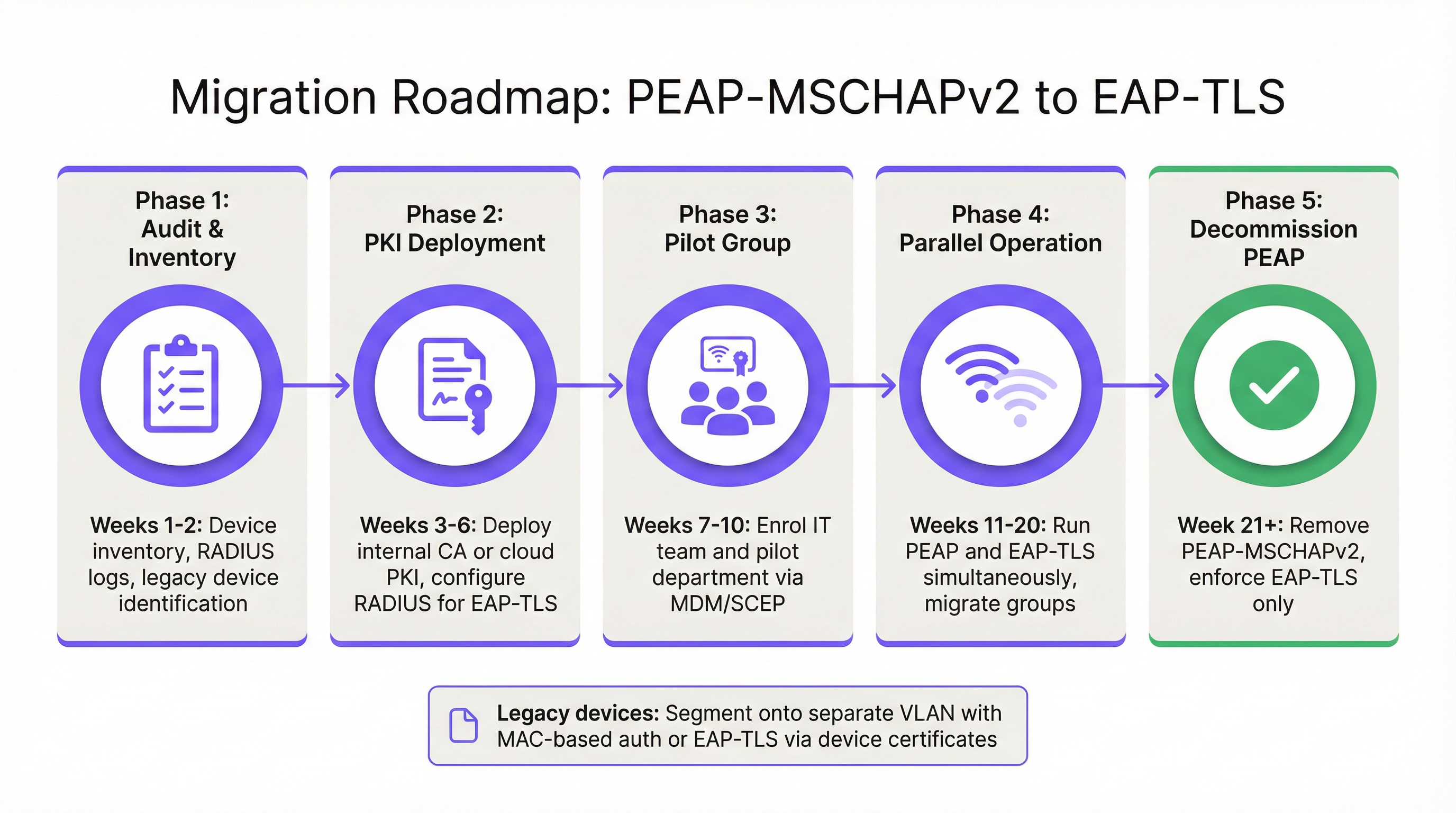
পর্যায় ১: অডিট এবং ইনভেন্টরি
অথেন্টিকেশন পলিসি পরিবর্তন করার আগে, আপনার বর্তমান RADIUS লগগুলির (যেমন, Cisco ISE, Aruba ClearPass, বা Windows NPS) একটি ব্যাপক অডিট পরিচালনা করুন। বর্তমানে PEAP-এর মাধ্যমে অথেন্টিকেট করা সমস্ত ডিভাইস শনাক্ত করুন। এই ডিভাইসগুলিকে দুটি গ্রুপে ভাগ করুন:
- Managed Devices: কর্পোরেট ল্যাপটপ, ট্যাবলেট এবং স্মার্টফোন যা একটি MDM প্ল্যাটফর্মে (যেমন, Intune, Jamf) নথিভুক্ত।
- Unmanaged/Legacy Devices: IoT সেন্সর, পুরানো পয়েন্ট-অফ-সেল টার্মিনাল, বারকোড স্ক্যানার বা BYOD ডিভাইস যা সার্টিফিকেট এনরোলমেন্ট সমর্থন করতে পারে না।
পর্যায় ২: PKI ডিপ্লয়মেন্ট এবং RADIUS কনফিগারেশন
ক্লায়েন্ট এবং সার্ভার সার্টিফিকেট ইস্যু করার জন্য একটি PKI সমাধান স্থাপন করুন। ক্লাউড-নেটিভ PKI প্ল্যাটফর্মগুলি সরাসরি Entra ID বা Google Workspace-এর সাথে একীভূত হতে পারে, যা একটি ভারী অন-প্রিমিস Microsoft AD CS-এর প্রয়োজনীয়তা দূর করে। EAP-TLS অথেন্টিকেশন গ্রহণ করার জন্য আপনার RADIUS সার্ভার কনফিগার করুন। গুরুত্বপূর্ণভাবে, ট্রানজিশন পিরিয়ড চলাকালীন একই SSID-তে একই সাথে PEAP এবং EAP-TLS উভয়কে সমর্থন করার জন্য নেটওয়ার্ক পলিসি কনফিগার করুন।
পর্যায় ৩: MDM-এর মাধ্যমে সার্টিফিকেট বিতরণ
SCEP (Simple Certificate Enrollment Protocol)-এর মতো প্রোটোকল ব্যবহার করে ম্যানেজড ডিভাইসগুলিতে নিঃশব্দে ক্লায়েন্ট সার্টিফিকেট বিতরণ করতে আপনার MDM প্ল্যাটফর্ম ব্যবহার করুন। একই সাথে, MDM-এর মাধ্যমে একটি আপডেট করা WiFi প্রোফাইল পেলোড পুশ করুন যা ডিভাইসগুলিকে কর্পোরেট SSID-এর জন্য EAP-TLS-কে অগ্রাধিকার দিতে নির্দেশ দেয়। এটি এন্ড-ইউজারদের জন্য একটি জিরো-টাচ ট্রানজিশন নিশ্চিত করে।
পর্যায় ৪: লেগাসি ডিভাইস পরিচালনা
লেগাসি ডিভাইসগুলি যা EAP-TLS সমর্থন করতে পারে না, সেগুলিকে কখনই প্রাথমিক কর্পোরেট নেটওয়ার্কের নিরাপত্তা ব্যবস্থা নির্ধারণ করতে দেওয়া উচিত নয়। পরিবর্তে, এই ডিভাইসগুলিকে একটি ডেডিকেটেড VLAN-এ সেগমেন্ট করুন। MAC-ভিত্তিক Authentication Bypass (MAB) এর সাথে কঠোর Access Control Lists (ACLs) প্রয়োগ করুন যাতে এই ডিভাইসগুলি কেবল তাদের কাজের জন্য প্রয়োজনীয় নির্দিষ্ট ইন্টারনাল সার্ভারের সাথে যোগাযোগ করতে পারে।
সেরা অনুশীলন এবং কমপ্লায়েন্স
একটি নিরাপদ এন্টারপ্রাইজ ওয়্যারলেস পরিবেশ বজায় রাখার জন্য শিল্পের মানদণ্ডগুলির ক্রমাগত অনুসরণ প্রয়োজন।
- সার্ভার সার্টিফিকেট ভ্যালিডেশন প্রয়োগ করুন: যদি আপনাকে সাময়িকভাবে PEAP-MSCHAPv2 বজায় রাখতে হয়, তবে সমস্ত এন্ডপয়েন্টে কঠোর সার্ভার সার্টিফিকেট পিনিং প্রয়োগ করতে MDM ব্যবহার করুন। ব্যবহারকারীদের ম্যানুয়ালি অজানা সার্টিফিকেট ট্রাস্ট করা থেকে বিরত রাখুন।
- WPA2-Personal বর্জন করুন: নিশ্চিত করুন যে সমস্ত কর্পোরেট অ্যাক্সেস 802.1X (WPA2/WPA3-Enterprise)-এর উপর নির্ভর করে। Pre-Shared Keys (PSK) কঠোরভাবে বিচ্ছিন্ন IoT নেটওয়ার্কগুলিতে সীমাবদ্ধ থাকা উচিত।
- PCI DSS-এর সাথে সামঞ্জস্যপূর্ণ হোন: পেমেন্ট প্রসেস করা ভেন্যুগুলির জন্য, PCI DSS Requirement 4 ওয়্যারলেস নেটওয়ার্কের মাধ্যমে কার্ডহোল্ডার ডেটা প্রেরণের জন্য শক্তিশালী ক্রিপ্টোগ্রাফি বাধ্যতামূলক করে। PCI Security Standards Council শক্তিশালী অথেন্টিকেশনের জন্য স্পষ্টভাবে EAP-TLS সুপারিশ করে [3]।
- অ্যানালিটিক্স মনিটর করুন: নেটওয়ার্কের স্বাস্থ্য পর্যবেক্ষণ করতে, অস্বাভাবিক সংযোগের ধরণ শনাক্ত করতে এবং লেগাসি ডিভাইসগুলি যাতে সীমাবদ্ধ সাবনেটগুলিতে অ্যাক্সেস করার চেষ্টা না করে তা নিশ্চিত করতে Purple-এর WiFi Analytics -এর মতো প্ল্যাটফর্মগুলি ব্যবহার করুন।
ROI এবং ব্যবসায়িক প্রভাব
EAP-TLS-এ মাইগ্রেশনের বিনিয়োগের রিটার্ন (ROI) মূলত ঝুঁকি হ্রাসের মাধ্যমে পরিমাপ করা হয়। PEAP-MSCHAPv2-এর বিরুদ্ধে একটি সফল ইভিল টুইন অ্যাটাক বৈধ Active Directory ক্রেডেনশিয়াল প্রদান করে, যা থ্রেট অ্যাক্টরদের কর্পোরেট নেটওয়ার্কে প্রাথমিক অ্যাক্সেস দেয়। এর ফলে ডেটা ব্রিচ, র্যানসমওয়্যার অ্যাটাক বা রেগুলেটরি জরিমানার (যেমন GDPR-এর অধীনে) আর্থিক প্রভাব একটি ক্লাউড PKI স্থাপন এবং MDM প্রোফাইল আপডেট করার অপারেশনাল খরচের চেয়ে অনেক বেশি।
তদুপরি, সার্টিফিকেট-ভিত্তিক অথেন্টিকেশন পাসওয়ার্ডের মেয়াদ শেষ হওয়া এবং লকআউট সংক্রান্ত হেল্পডেস্ক টিকিটের পরিমাণ উল্লেখযোগ্যভাবে হ্রাস করে। EAP-TLS-এ স্থানান্তরিত হওয়ার মাধ্যমে, IT টিম পাসওয়ার্ড-ভিত্তিক WiFi অ্যাক্সেসের জটিলতা দূর করে, একটি নিরবচ্ছিন্ন এবং নিরাপদ কানেক্টিভিটি অভিজ্ঞতা প্রদান করে যা আধুনিক জিরো-ট্রাস্ট নেটওয়ার্ক আর্কিটেকচারকে সমর্থন করে।
তথ্যসূত্র
[1] Microsoft Security Response Center. "Weaknesses in MS-CHAPv2 authentication." August 2012. [2] Marlinspike, Moxie. "Defeating PPTP VPNs and WPA2 Enterprise with MS-CHAPv2." DEF CON 20, 2012. [3] PCI Security Standards Council. "Information Supplement: PCI DSS Wireless Guidelines."
মূল শব্দ ও সংজ্ঞা
PEAP (Protected Extensible Authentication Protocol)
An EAP method that encapsulates the authentication process within a secure TLS tunnel to protect the inner authentication credentials from being intercepted over the air.
Widely used because it only requires a server-side certificate, making it easier to deploy than mutually authenticated methods.
MSCHAPv2
The inner authentication protocol commonly used inside a PEAP tunnel, which relies on a challenge-response mechanism using the NT hash of the user's password.
The primary source of vulnerability in PEAP deployments due to its reliance on outdated MD4 hashing and DES encryption.
EAP-TLS
An EAP method requiring mutual authentication, where both the RADIUS server and the client device present digital certificates to prove their identity.
The industry gold standard for enterprise WiFi security, immune to offline dictionary and evil twin attacks.
Evil Twin Attack
A wireless attack where a rogue access point mimics a legitimate corporate SSID to trick client devices into connecting, allowing the attacker to intercept traffic or capture authentication credentials.
The primary vector used by attackers to capture MSCHAPv2 handshakes from vulnerable PEAP deployments.
RADIUS (Remote Authentication Dial-In User Service)
A networking protocol that provides centralized Authentication, Authorization, and Accounting (AAA) management for users who connect and use a network service.
The core server infrastructure (like Cisco ISE or NPS) that processes 802.1X authentication requests from access points.
PKI (Public Key Infrastructure)
A set of roles, policies, hardware, software, and procedures needed to create, manage, distribute, use, store, and revoke digital certificates.
The foundational infrastructure required to deploy EAP-TLS, increasingly delivered via cloud-native SaaS platforms.
MDM (Mobile Device Management)
Software that allows IT administrators to control, secure, and enforce policies on smartphones, tablets, and endpoints.
Essential for EAP-TLS migrations, as it is used to silently push client certificates and strict WiFi profiles to corporate devices.
MAB (MAC Authentication Bypass)
A port-based access control method that authenticates devices based on their MAC address rather than requiring a username/password or certificate.
Used as a fallback mechanism to authenticate legacy 'headless' devices (like printers) that cannot support 802.1X protocols.
কেস স্টাডিজ
A 400-room hotel chain is currently using PEAP-MSCHAPv2 for its back-of-house staff network. The IT director wants to migrate to EAP-TLS but is concerned about 50 legacy handheld inventory scanners that run an outdated OS and do not support certificate enrollment. How should the network architect handle this migration without breaking inventory operations?
The network architect should implement a segmented approach. First, deploy a cloud PKI and configure the central RADIUS server to accept both EAP-TLS and PEAP-MSCHAPv2. Use the hotel's MDM platform to push client certificates and an updated EAP-TLS WiFi profile to all modern staff laptops and tablets. For the 50 legacy scanners, create a dedicated, hidden SSID mapped to an isolated VLAN. Configure MAC-based Authentication Bypass (MAB) for these specific scanner MAC addresses on the RADIUS server. Apply strict network ACLs to this VLAN so the scanners can only reach the inventory database server and nothing else. Once all modern devices are using EAP-TLS, disable PEAP-MSCHAPv2 on the primary staff network.
A retail organisation has rolled out Windows 11 22H2 to its corporate fleet. The IT helpdesk is suddenly receiving tickets that users cannot connect to the corporate WPA2-Enterprise WiFi network, which uses PEAP-MSCHAPv2. What is the likely cause, and what is the immediate remediation?
The likely cause is the introduction of Windows Defender Credential Guard, which is enabled by default in Windows 11 22H2 and newer. Credential Guard isolates and protects NTLM password hashes and Kerberos Ticket Granting Tickets. Because PEAP-MSCHAPv2 requires access to the NT hash to generate the challenge-response, Credential Guard intentionally breaks this authentication method to prevent credential theft. The immediate remediation is to accelerate the migration to EAP-TLS, which uses certificate-based authentication and is fully compatible with Credential Guard. A temporary, less secure workaround would be disabling Credential Guard via Group Policy, but this is strongly discouraged as it weakens the overall OS security posture.
দৃশ্যপট বিশ্লেষণ
Q1. You are auditing a newly acquired subsidiary's wireless network. They use PEAP-MSCHAPv2. The IT manager claims they are secure from evil twin attacks because they have hidden the SSID and disabled SSID broadcasting. Is their network secure from credential capture?
💡 ইঙ্গিত:Consider how client devices behave when configured to connect to hidden networks, and whether hiding an SSID prevents a rogue AP from spoofing it.
প্রস্তাবিত পদ্ধতি দেখুন
No, the network is not secure. Hiding the SSID (disabling beacon frames) provides zero cryptographic security. In fact, devices configured to connect to hidden networks actively broadcast probe requests containing the SSID name, effectively announcing the hidden network to any attacker listening. An attacker can easily capture the SSID name, spin up an evil twin AP broadcasting that exact SSID, and execute the standard MSCHAPv2 credential capture attack. The only defense is strict server certificate validation or migrating to EAP-TLS.
Q2. During an EAP-TLS migration pilot, you push client certificates to 20 Windows laptops via Intune. However, authentication fails for all 20 devices. The RADIUS server logs show 'Client Certificate Not Trusted'. The client certificates were issued by your new Cloud PKI. What critical configuration step was missed?
💡 ইঙ্গিত:For mutual authentication to work, both sides must trust the entity that issued the other side's certificate.
প্রস্তাবিত পদ্ধতি দেখুন
The RADIUS server has not been configured to trust the Root CA of the new Cloud PKI. While the laptops have the correct client certificates, when they present them to the RADIUS server, the server rejects them because it does not have the Cloud PKI's Root/Intermediate certificates in its local trust store. You must import the public Root CA certificate of the Cloud PKI into the RADIUS server's trusted certificate authorities store.
Q3. Your organisation mandates EAP-TLS for the corporate WiFi. A senior executive insists on connecting their personal, unmanaged iPad to the corporate network to access internal financial dashboards. How do you accommodate this request while maintaining the EAP-TLS security posture?
💡 ইঙ্গিত:Consider the prerequisites for EAP-TLS and the definition of a 'managed' device.
প্রস্তাবিত পদ্ধতি দেখুন
You cannot securely accommodate this request on the primary corporate network without compromising the EAP-TLS architecture. EAP-TLS requires a client certificate. Because the iPad is unmanaged (BYOD), the IT department cannot securely push a certificate via MDM. Allowing the executive to manually install a certificate introduces significant risk and administrative overhead. The correct approach is to deny access to the corporate SSID. Instead, the executive should connect to the Guest WiFi and use a secure corporate VPN (which supports modern MFA/SAML authentication) to access internal resources, or the device must be enrolled in the corporate MDM to receive a certificate.
মূল বিষয়সমূহ
- ✓PEAP-MSCHAPv2 relies on obsolete cryptography (MD4 and DES) that can be trivially cracked offline.
- ✓The protocol is highly vulnerable to 'Evil Twin' attacks if endpoint devices do not strictly validate the RADIUS server certificate.
- ✓Modern Windows updates (Credential Guard) are actively breaking MSCHAPv2 authentication to prevent hash theft.
- ✓EAP-TLS is the definitive replacement, offering mutual authentication via digital certificates and immunity to offline cracking.
- ✓Cloud PKI and modern MDM platforms have drastically reduced the complexity and cost of deploying EAP-TLS.
- ✓Legacy devices incompatible with EAP-TLS must be segmented onto dedicated, restricted VLANs rather than degrading primary network security.




