

PEAP-MSCHAPv2: Warum es immer noch verbreitet ist, warum es riskant ist und wie der Umstieg gelingt
Ein umfassender technischer Leitfaden, der die kritischen Sicherheitslücken von PEAP-MSCHAPv2 detailliert beschreibt, einschließlich Evil-Twin-Angriffen und dem Abgreifen von Anmeldedaten. Er bietet IT-Teams eine praxisnahe, herstellerneutrale Roadmap für die Migration von Enterprise WiFi-Netzwerken auf die sichere, zertifikatsbasierte EAP-TLS-Authentifizierung.
🎧 Diesen Leitfaden anhören
Transkript anzeigen
Management-Zusammenfassung
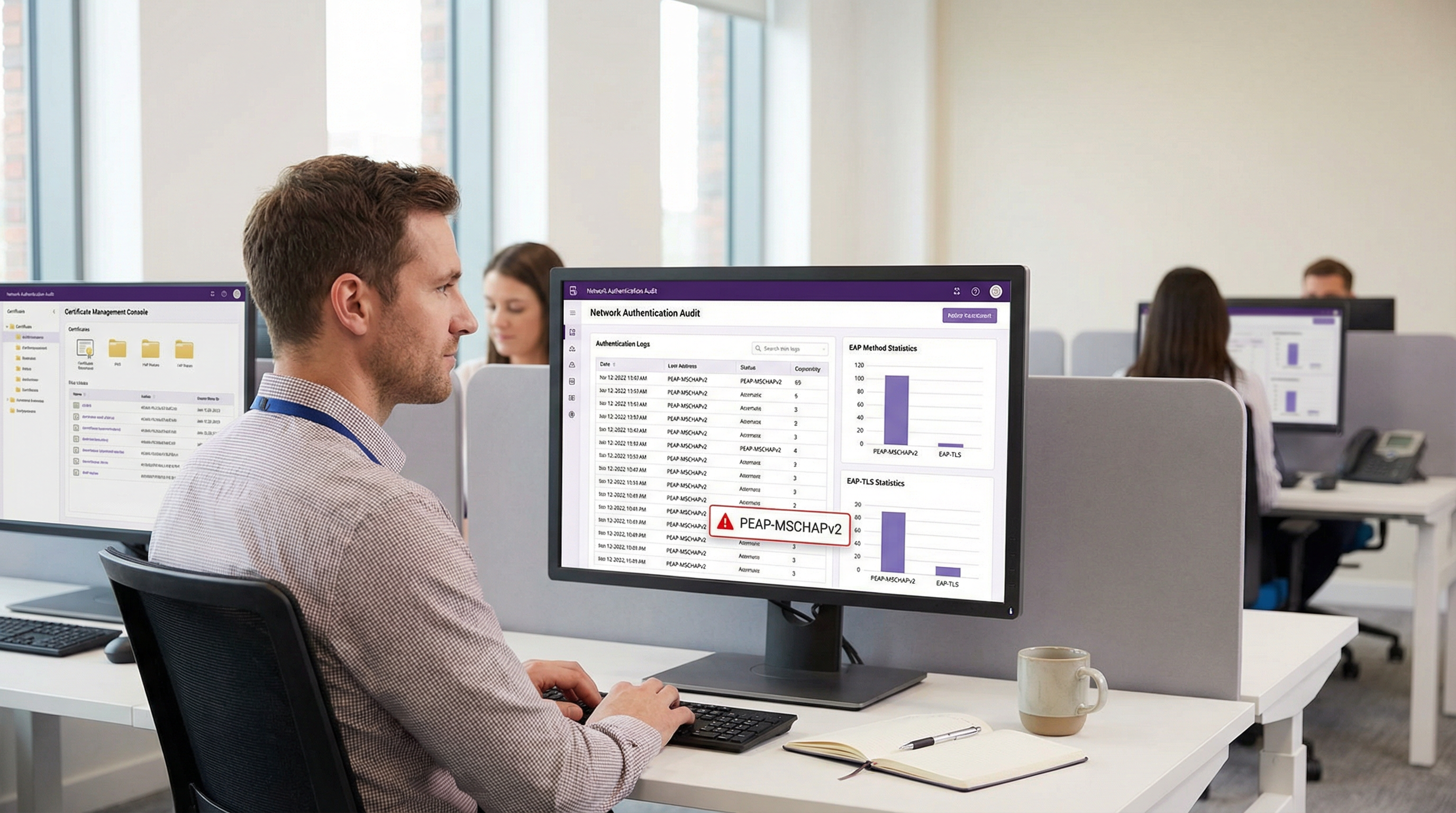
Trotz gut dokumentierter kryptografischer Schwachstellen bleibt PEAP-MSCHAPv2 die am weitesten verbreitete EAP-Methode für die WiFi-Authentifizierung in Unternehmen im Gastgewerbe, im Einzelhandel und im öffentlichen Sektor. Die anhaltende Verbreitung ist eher auf die einfache Bereitstellung zurückzuführen – insbesondere auf die native Integration in Active Directory – als auf die Sicherheitseffektivität. Das Risikoprofil hat sich jedoch dramatisch verändert. Automatisierte Exploitation-Tools haben den „Evil Twin“-Angriff zu einer Massenbedrohung gemacht, die es Angreifern ermöglicht, MSCHAPv2-Challenge-Response-Hashes mit minimalem Aufwand abzugreifen und zu knacken, was direkt zu kompromittierten Active Directory-Anmeldedaten führt.
Für IT-Leiter und Netzwerkarchitekten ist der Auftrag klar: PEAP-MSCHAPv2 ist in Umgebungen, die Compliance-Frameworks wie PCI DSS oder GDPR unterliegen, nicht mehr zweckmäßig. Dieser Leitfaden bietet eine kritische Analyse der spezifischen Angriffsvektoren auf PEAP-MSCHAPv2 und skizziert einen pragmatischen, phasenweisen Migrationspfad zu EAP-TLS. Durch den Einsatz moderner Mobile Device Management (MDM)- und Cloud-Public-Key-Infrastructure (PKI)-Lösungen können Unternehmen auf eine robuste, zertifikatsbasierte Authentifizierung umsteigen, ohne den Geschäftsbetrieb zu stören oder ältere Geräte auszuschließen.
Technischer Deep-Dive: Anatomie der Schwachstelle
Um zu verstehen, warum PEAP-MSCHAPv2 abgelöst werden muss, muss man seine zugrunde liegende kryptografische Architektur untersuchen. MSCHAPv2 (Microsoft Challenge Handshake Authentication Protocol Version 2) wurde Ende der 1990er Jahre entwickelt und basiert auf dem MD4-Hashing-Algorithmus und dem Data Encryption Standard (DES) [1]. Beide gelten nach modernen kryptografischen Standards als veraltet.
Die kryptografische Schwachstelle
Die grundlegende Schwäche liegt darin, wie MSCHAPv2 den NT-Hash des Benutzerpassworts verarbeitet. Das Protokoll teilt einen vom NT-Hash abgeleiteten 21-Byte-Schlüssel in drei 7-Byte-DES-Schlüssel auf. Entscheidend ist, dass der dritte Schlüssel nur zwei signifikante Bytes des Hashes verwendet und den Rest mit Null-Bytes auffüllt. Dieser strukturelle Fehler reduziert die kryptografische Komplexität exponentiell.
Im Jahr 2012 demonstrierte der Sicherheitsforscher Moxie Marlinspike, dass der MSCHAPv2-Handshake deterministisch geknackt werden kann, indem das Problem auf das Knacken eines einzelnen DES-Schlüssels reduziert wird [2]. Mit Cloud-basierten Cracking-Diensten oder modernen GPU-Rigs, auf denen Tools wie hashcat laufen, kann ein Angreifer das Active Directory-Passwort im Klartext aus einem abgefangenen Handshake innerhalb weniger Stunden wiederherstellen, unabhängig von der Passwortkomplexität.
Der Angriffsvektor: Evil Twin
Die kryptografische Schwachstelle wird in der Praxis über den „Evil Twin“-Angriff ausgenutzt. In einem typischen Szenario in einem Büro oder einem Hospitality -Standort:
- Bereitstellung eines Rogue AP: Der Angreifer installiert einen bösartigen Access Point, der die Ziel-SSID des Unternehmens ausstrahlt (z. B. „Staff-WiFi“).
- Signaldominanz: Der Rogue AP arbeitet mit einer höheren Sendeleistung und zwingt Client-Geräte in der Nähe, sich mit ihm statt mit der legitimen Infrastruktur zu verbinden.
- Gefälschte RADIUS-Authentifizierung: Wenn der Client den PEAP-Tunnel initiiert, leitet der Rogue AP die Anfrage an einen vom Angreifer kontrollierten RADIUS-Server (wie hostapd-wpe) weiter.
- Fehlgeschlagene Zertifikatsvalidierung: Der bösartige RADIUS-Server präsentiert ein selbstsigniertes oder nicht verifiziertes digitales Zertifikat. Wenn das Client-Gerät so konfiguriert ist, dass es die strikte Serverzertifikatsvalidierung umgeht – oder wenn der Benutzer einfach auf „Akzeptieren“ klickt – wird der Tunnel aufgebaut.
- Erfassung von Anmeldedaten: Der Client überträgt die MSCHAPv2-Challenge-Response durch den kompromittierten Tunnel. Der Angreifer fängt den Hash ab und beendet die Verbindung.
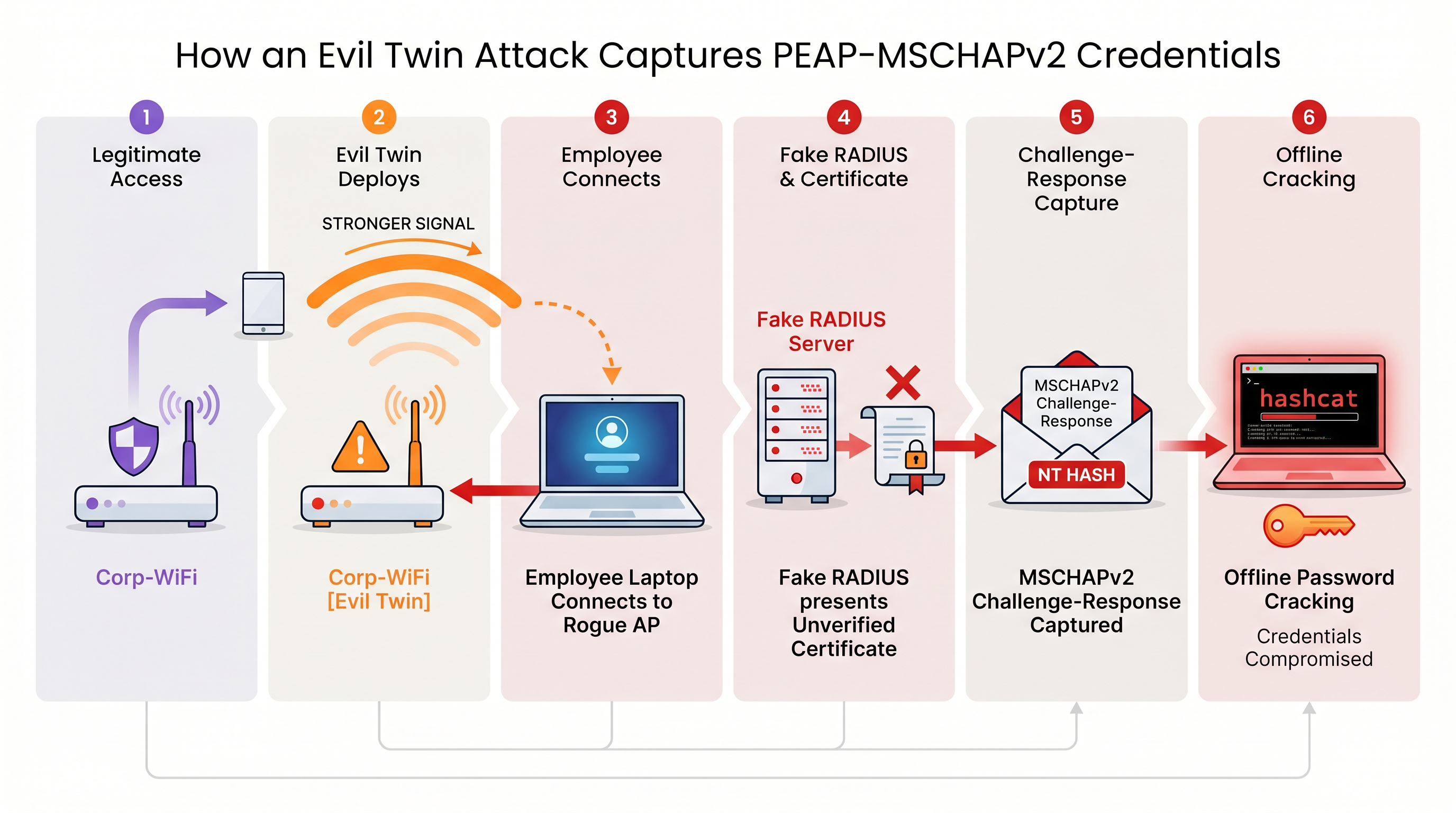
Ohne eine strikte Serverzertifikatsvalidierung auf Endpunktebene ist jedes Gerät, das PEAP-MSCHAPv2 verwendet, anfällig für diese Technik zum Abgreifen von Anmeldedaten. Dies ist besonders besorgniserregend für Retail -Umgebungen, in denen Back-of-House-Netzwerke oft in physischer Nähe zu öffentlichen Bereichen liegen.
Implementierungsleitfaden: Migration zu EAP-TLS
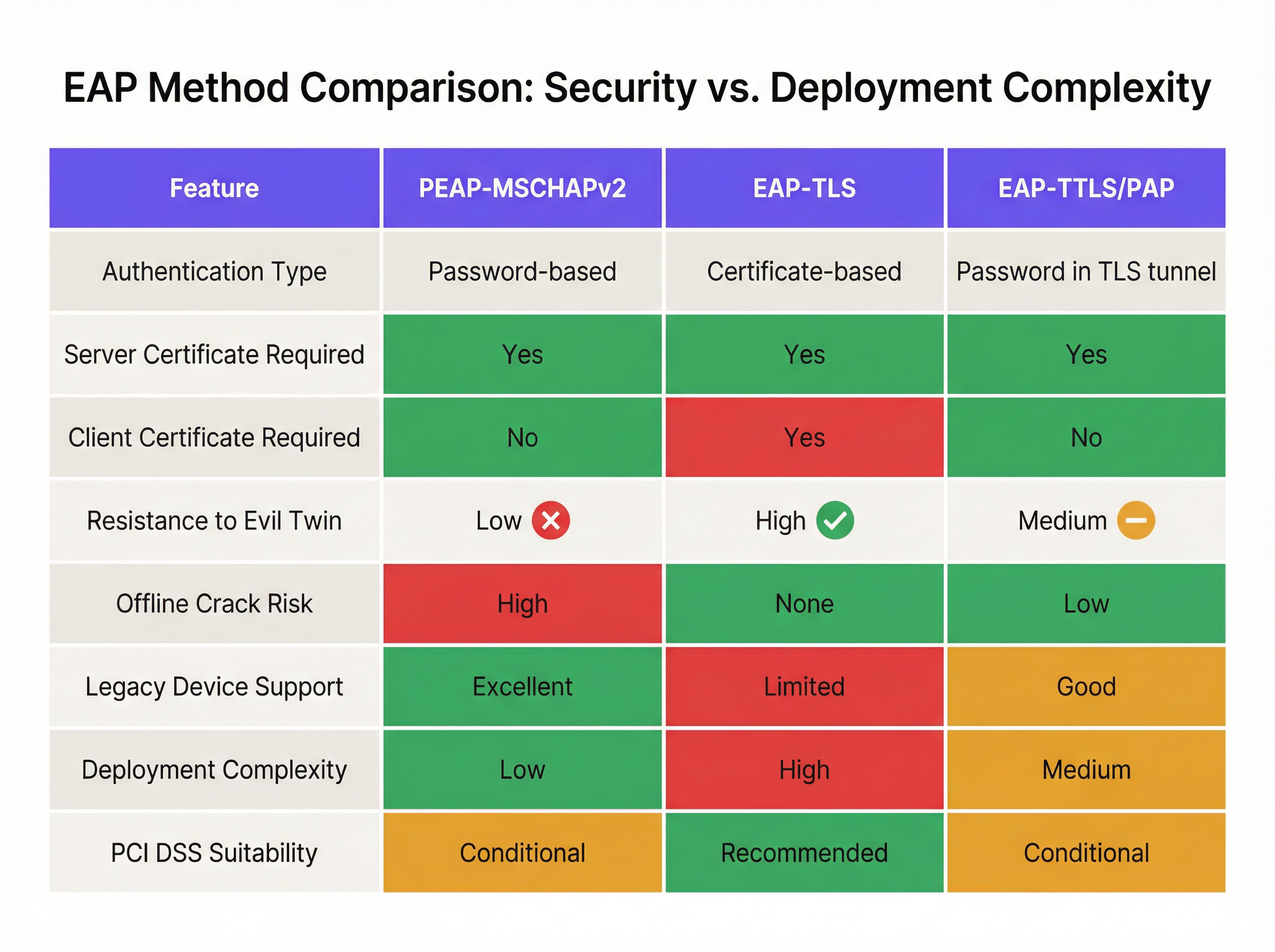
Die definitive Lösung für MSCHAPv2-Schwachstellen ist die Migration zu EAP-TLS (Extensible Authentication Protocol-Transport Layer Security). EAP-TLS schreibt eine gegenseitige Authentifizierung vor: Sowohl der RADIUS-Server als auch das Client-Gerät müssen gültige digitale Zertifikate vorlegen. Da während des Handshakes keine Passwörter übertragen oder gehasht werden, ist EAP-TLS völlig immun gegen Offline-Wörterbuchangriffe und hochgradig resistent gegen Evil-Twin-Spoofing.
In der Vergangenheit war die Hürde für die Einführung von EAP-TLS die Komplexität der Bereitstellung einer lokalen Public Key Infrastructure (PKI). Heute haben Cloud-PKI und moderne MDM-Integrationen diesen Prozess rationalisiert.
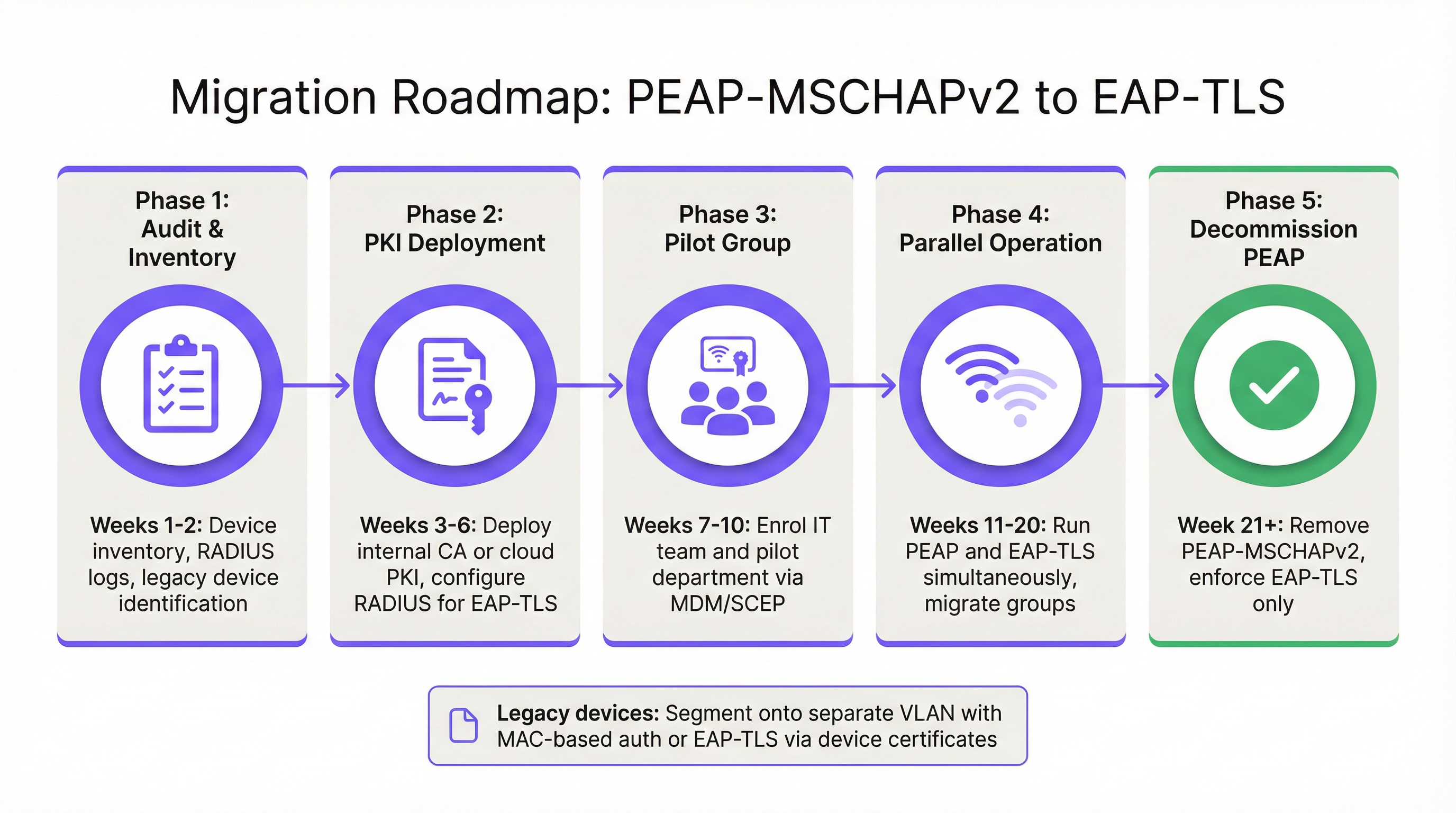
Phase 1: Audit und Inventur
Bevor Sie die Authentifizierungsrichtlinien ändern, führen Sie ein umfassendes Audit Ihrer aktuellen RADIUS-Protokolle durch (z. B. Cisco ISE, Aruba ClearPass oder Windows NPS). Identifizieren Sie alle Geräte, die sich derzeit über PEAP authentifizieren. Kategorisieren Sie diese Geräte in zwei Gruppen:
- Verwaltete Geräte: Laptops, Tablets und Smartphones des Unternehmens, die in einer MDM-Plattform (z. B. Intune, Jamf) registriert sind.
- Unverwaltete/Legacy-Geräte: IoT-Sensoren, ältere Point-of-Sale-Terminals, Barcodescanner oder BYOD-Geräte, die keine Zertifikatsregistrierung unterstützen.
Phase 2: PKI-Bereitstellung und RADIUS-Konfiguration
Stellen Sie eine PKI-Lösung bereit, um Client- und Serverzertifikate auszustellen. Cloud-native PKI-Plattformen können direkt in Entra ID oder Google Workspace integriert werden, wodurch eine umfangreiche lokale Microsoft AD CS-Infrastruktur überflüssig wird. Konfigurieren Sie Ihren RADIUS-Server so, dass er die EAP-TLS-Authentifizierung akzeptiert. Wichtig: Konfigurieren Sie die Netzwerkrichtlinie so, dass während der Übergangsphase sowohl PEAP als auch EAP-TLS gleichzeitig auf derselben SSID unterstützt werden.
Phase 3: Zertifikatsverteilung via MDM
Nutzen Sie Ihre MDM-Plattform, um Client-Zertifikate geräuschlos über Protokolle wie SCEP (Simple Certificate Enrollment Protocol) an verwaltete Geräte zu verteilen. Pushen Sie gleichzeitig eine aktualisierte WiFi-Profil-Payload über das MDM, die die Geräte anweist, EAP-TLS für die Unternehmens-SSID zu priorisieren. Dies gewährleistet einen Zero-Touch-Übergang für die Endbenutzer.
Phase 4: Umgang mit Legacy-Geräten
Legacy-Geräte, die EAP-TLS nicht unterstützen, sollten niemals die Sicherheitslage des primären Unternehmensnetzwerks bestimmen. Segmentieren Sie diese Geräte stattdessen in ein dediziertes VLAN. Implementieren Sie MAC-based Authentication Bypass (MAB) in Kombination mit strikten Access Control Lists (ACLs), um sicherzustellen, dass diese Geräte nur mit den spezifischen internen Servern kommunizieren können, die für ihre Funktion erforderlich sind.
Best Practices und Compliance
Die Aufrechterhaltung einer sicheren Wireless-Umgebung in Unternehmen erfordert die kontinuierliche Einhaltung von Industriestandards.
- Serverzertifikatsvalidierung erzwingen: Wenn Sie PEAP-MSCHAPv2 vorübergehend beibehalten müssen, verwenden Sie MDM, um ein striktes Server-Certificate-Pinning auf allen Endpunkten zu erzwingen. Verhindern Sie, dass Benutzer unbekannten Zertifikaten manuell vertrauen.
- WPA2-Personal ablösen: Stellen Sie sicher, dass der gesamte Unternehmenszugriff auf 802.1X (WPA2/WPA3-Enterprise) basiert. Pre-Shared Keys (PSK) sollten strikt auf isolierte IoT-Netzwerke beschränkt sein.
- Anpassung an PCI DSS: Für Standorte, die Zahlungen verarbeiten, schreibt die PCI DSS-Anforderung 4 eine starke Kryptografie für die Übertragung von Karteninhaberdaten über drahtlose Netzwerke vor. Der PCI Security Standards Council empfiehlt ausdrücklich EAP-TLS für eine robuste Authentifizierung [3].
- Analysen überwachen: Nutzen Sie Plattformen wie die WiFi-Analysen von Purple, um den Netzwerkzustand zu überwachen, anomale Verbindungsmuster zu identifizieren und sicherzustellen, dass Legacy-Geräte nicht versuchen, auf eingeschränkte Subnetze zuzugreifen.
ROI & geschäftliche Auswirkungen
Der Return on Investment für die Migration zu EAP-TLS bemisst sich in erster Linie an der Risikominderung. Ein erfolgreicher Evil-Twin-Angriff auf PEAP-MSCHAPv2 liefert gültige Active Directory-Anmeldedaten und ermöglicht Angreifern den Erstzugriff auf das Unternehmensnetzwerk. Die finanziellen Auswirkungen einer daraus resultierenden Datenschutzverletzung, einer Ransomware-Attacke oder einer behördlichen Geldstrafe (z. B. gemäß GDPR) übersteigen die Betriebskosten für die Bereitstellung einer Cloud-PKI und die Aktualisierung von MDM-Profilen bei weitem.
Darüber hinaus reduziert die zertifikatsbasierte Authentifizierung das Ticketaufkommen im Helpdesk im Zusammenhang mit Passwortabläufen und Sperrungen erheblich. Durch den Umstieg auf EAP-TLS eliminieren IT-Teams die Reibungsverluste beim passwortbasierten WiFi-Zugang und bieten ein nahtloses, sicheres Konnektivitätserlebnis, das moderne Zero-Trust-Netzwerkarchitekturen unterstützt.
Referenzen
[1] Microsoft Security Response Center. „Schwachstellen in der MS-CHAPv2-Authentifizierung.“ August 2012. [2] Marlinspike, Moxie. „Defeating PPTP VPNs and WPA2 Enterprise with MS-CHAPv2.“ DEF CON 20, 2012. [3] PCI Security Standards Council. „Informationsergänzung: PCI DSS Wireless-Richtlinien.“
Schlüsselbegriffe & Definitionen
PEAP (Protected Extensible Authentication Protocol)
An EAP method that encapsulates the authentication process within a secure TLS tunnel to protect the inner authentication credentials from being intercepted over the air.
Widely used because it only requires a server-side certificate, making it easier to deploy than mutually authenticated methods.
MSCHAPv2
The inner authentication protocol commonly used inside a PEAP tunnel, which relies on a challenge-response mechanism using the NT hash of the user's password.
The primary source of vulnerability in PEAP deployments due to its reliance on outdated MD4 hashing and DES encryption.
EAP-TLS
An EAP method requiring mutual authentication, where both the RADIUS server and the client device present digital certificates to prove their identity.
The industry gold standard for enterprise WiFi security, immune to offline dictionary and evil twin attacks.
Evil Twin Attack
A wireless attack where a rogue access point mimics a legitimate corporate SSID to trick client devices into connecting, allowing the attacker to intercept traffic or capture authentication credentials.
The primary vector used by attackers to capture MSCHAPv2 handshakes from vulnerable PEAP deployments.
RADIUS (Remote Authentication Dial-In User Service)
A networking protocol that provides centralized Authentication, Authorization, and Accounting (AAA) management for users who connect and use a network service.
The core server infrastructure (like Cisco ISE or NPS) that processes 802.1X authentication requests from access points.
PKI (Public Key Infrastructure)
A set of roles, policies, hardware, software, and procedures needed to create, manage, distribute, use, store, and revoke digital certificates.
The foundational infrastructure required to deploy EAP-TLS, increasingly delivered via cloud-native SaaS platforms.
MDM (Mobile Device Management)
Software that allows IT administrators to control, secure, and enforce policies on smartphones, tablets, and endpoints.
Essential for EAP-TLS migrations, as it is used to silently push client certificates and strict WiFi profiles to corporate devices.
MAB (MAC Authentication Bypass)
A port-based access control method that authenticates devices based on their MAC address rather than requiring a username/password or certificate.
Used as a fallback mechanism to authenticate legacy 'headless' devices (like printers) that cannot support 802.1X protocols.
Fallstudien
A 400-room hotel chain is currently using PEAP-MSCHAPv2 for its back-of-house staff network. The IT director wants to migrate to EAP-TLS but is concerned about 50 legacy handheld inventory scanners that run an outdated OS and do not support certificate enrollment. How should the network architect handle this migration without breaking inventory operations?
The network architect should implement a segmented approach. First, deploy a cloud PKI and configure the central RADIUS server to accept both EAP-TLS and PEAP-MSCHAPv2. Use the hotel's MDM platform to push client certificates and an updated EAP-TLS WiFi profile to all modern staff laptops and tablets. For the 50 legacy scanners, create a dedicated, hidden SSID mapped to an isolated VLAN. Configure MAC-based Authentication Bypass (MAB) for these specific scanner MAC addresses on the RADIUS server. Apply strict network ACLs to this VLAN so the scanners can only reach the inventory database server and nothing else. Once all modern devices are using EAP-TLS, disable PEAP-MSCHAPv2 on the primary staff network.
A retail organisation has rolled out Windows 11 22H2 to its corporate fleet. The IT helpdesk is suddenly receiving tickets that users cannot connect to the corporate WPA2-Enterprise WiFi network, which uses PEAP-MSCHAPv2. What is the likely cause, and what is the immediate remediation?
The likely cause is the introduction of Windows Defender Credential Guard, which is enabled by default in Windows 11 22H2 and newer. Credential Guard isolates and protects NTLM password hashes and Kerberos Ticket Granting Tickets. Because PEAP-MSCHAPv2 requires access to the NT hash to generate the challenge-response, Credential Guard intentionally breaks this authentication method to prevent credential theft. The immediate remediation is to accelerate the migration to EAP-TLS, which uses certificate-based authentication and is fully compatible with Credential Guard. A temporary, less secure workaround would be disabling Credential Guard via Group Policy, but this is strongly discouraged as it weakens the overall OS security posture.
Szenarioanalyse
Q1. You are auditing a newly acquired subsidiary's wireless network. They use PEAP-MSCHAPv2. The IT manager claims they are secure from evil twin attacks because they have hidden the SSID and disabled SSID broadcasting. Is their network secure from credential capture?
💡 Hinweis:Consider how client devices behave when configured to connect to hidden networks, and whether hiding an SSID prevents a rogue AP from spoofing it.
Empfohlenen Ansatz anzeigen
No, the network is not secure. Hiding the SSID (disabling beacon frames) provides zero cryptographic security. In fact, devices configured to connect to hidden networks actively broadcast probe requests containing the SSID name, effectively announcing the hidden network to any attacker listening. An attacker can easily capture the SSID name, spin up an evil twin AP broadcasting that exact SSID, and execute the standard MSCHAPv2 credential capture attack. The only defense is strict server certificate validation or migrating to EAP-TLS.
Q2. During an EAP-TLS migration pilot, you push client certificates to 20 Windows laptops via Intune. However, authentication fails for all 20 devices. The RADIUS server logs show 'Client Certificate Not Trusted'. The client certificates were issued by your new Cloud PKI. What critical configuration step was missed?
💡 Hinweis:For mutual authentication to work, both sides must trust the entity that issued the other side's certificate.
Empfohlenen Ansatz anzeigen
The RADIUS server has not been configured to trust the Root CA of the new Cloud PKI. While the laptops have the correct client certificates, when they present them to the RADIUS server, the server rejects them because it does not have the Cloud PKI's Root/Intermediate certificates in its local trust store. You must import the public Root CA certificate of the Cloud PKI into the RADIUS server's trusted certificate authorities store.
Q3. Your organisation mandates EAP-TLS for the corporate WiFi. A senior executive insists on connecting their personal, unmanaged iPad to the corporate network to access internal financial dashboards. How do you accommodate this request while maintaining the EAP-TLS security posture?
💡 Hinweis:Consider the prerequisites for EAP-TLS and the definition of a 'managed' device.
Empfohlenen Ansatz anzeigen
You cannot securely accommodate this request on the primary corporate network without compromising the EAP-TLS architecture. EAP-TLS requires a client certificate. Because the iPad is unmanaged (BYOD), the IT department cannot securely push a certificate via MDM. Allowing the executive to manually install a certificate introduces significant risk and administrative overhead. The correct approach is to deny access to the corporate SSID. Instead, the executive should connect to the Guest WiFi and use a secure corporate VPN (which supports modern MFA/SAML authentication) to access internal resources, or the device must be enrolled in the corporate MDM to receive a certificate.
Wichtigste Erkenntnisse
- ✓PEAP-MSCHAPv2 relies on obsolete cryptography (MD4 and DES) that can be trivially cracked offline.
- ✓The protocol is highly vulnerable to 'Evil Twin' attacks if endpoint devices do not strictly validate the RADIUS server certificate.
- ✓Modern Windows updates (Credential Guard) are actively breaking MSCHAPv2 authentication to prevent hash theft.
- ✓EAP-TLS is the definitive replacement, offering mutual authentication via digital certificates and immunity to offline cracking.
- ✓Cloud PKI and modern MDM platforms have drastically reduced the complexity and cost of deploying EAP-TLS.
- ✓Legacy devices incompatible with EAP-TLS must be segmented onto dedicated, restricted VLANs rather than degrading primary network security.




