

Device Posture Assessment für Network Access Control
Dieser technische Leitfaden erklärt, wie Device Posture Assessment für Network Access Control (NAC) funktioniert, und beschreibt detailliert die Architektur, MDM-Integration und Remediation-Flows, die für die Implementierung von Zero Trust WiFi in Unternehmens- und Veranstaltungs-Umgebungen erforderlich sind.
🎧 Diesen Leitfaden anhören
Transkript anzeigen
Executive Summary
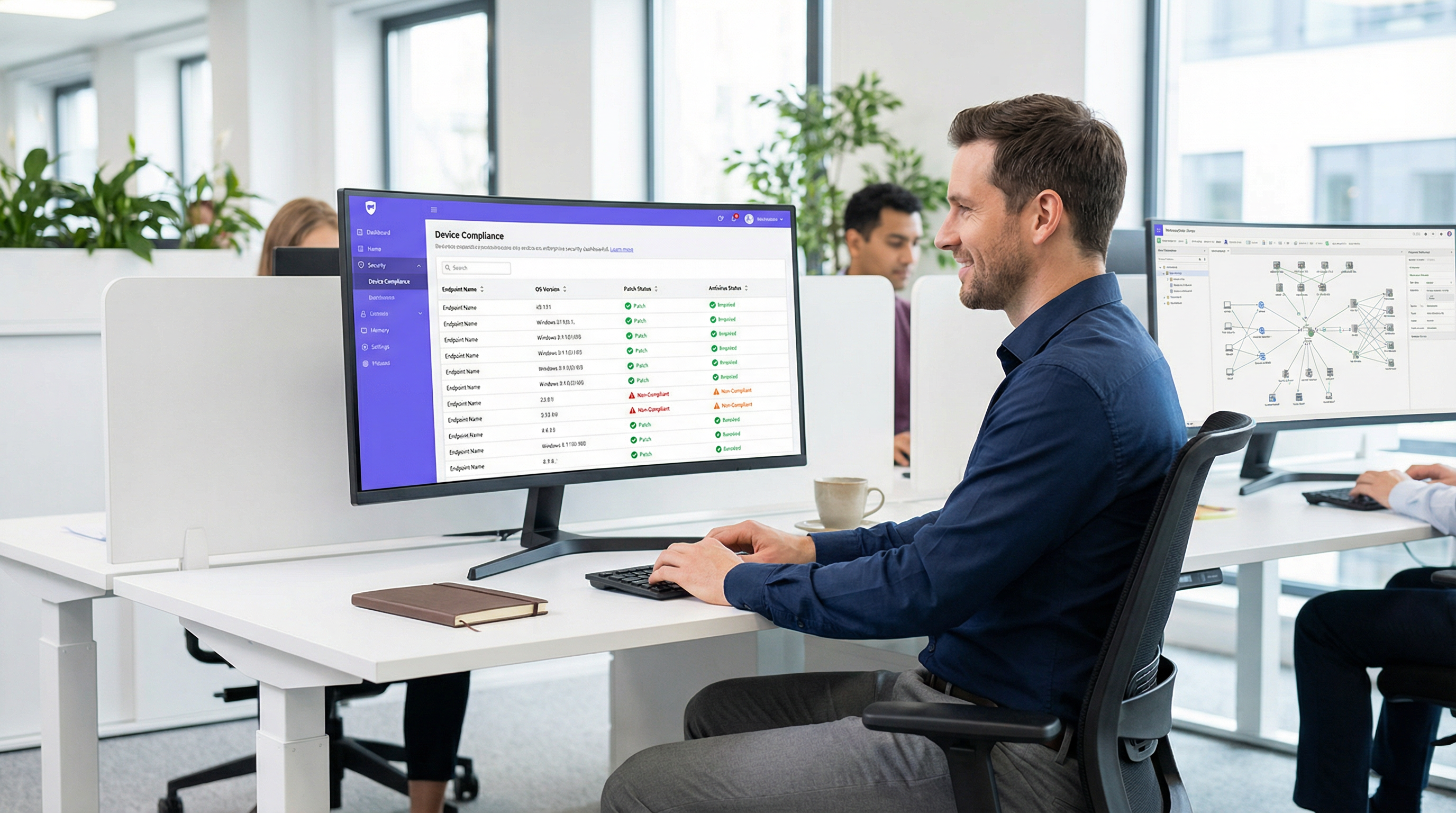
Da sich der Perimeter des Unternehmensnetzwerks auflöst, reicht die herkömmliche identitätsbasierte Authentifizierung nicht mehr aus. Die Validierung, dass ein Benutzer derjenige ist, der er vorgibt zu sein, über 802.1X oder ein Captive Portal, adressiert nicht das Risiko, das von dem verwendeten Gerät ausgeht. Device Posture Assessment ist die entscheidende nächste Verteidigungsebene in einer Zero Trust-Architektur, die den Gesundheits- und Compliance-Status eines Endpunkts abfragt, bevor der Netzwerkzugriff gewährt wird.
Für IT-Manager und Netzwerkarchitekten, die komplexe Umgebungen wie Hotels, Einzelhandelsketten, Stadien und Einrichtungen des öffentlichen Sektors verwalten, stellt der zustandsbasierte Netzwerkzugriff sicher, dass ungepatchte, nicht verwaltete oder kompromittierte Geräte sich nicht lateral über Unternehmens-VLANs bewegen können. Dieser Leitfaden bietet einen praktischen, herstellerneutralen Entwurf für die Implementierung von Device Posture Assessment für die Netzwerkzugriffskontrolle. Er deckt die Architekturmodelle, die Integrationspunkte mit RADIUS- und Mobile Device Management (MDM)-Plattformen sowie die kritischen Remediation-Workflows ab, die erforderlich sind, um nicht konforme Geräte zu handhaben, ohne den IT-Helpdesk zu überlasten. Am Ende dieses Leitfadens verfügen Sie über einen klaren Rahmen für die Bereitstellung von Endpunkt-Compliance-Prüfungen über WiFi, wodurch Ihre Angriffsfläche verringert und die kontinuierliche Compliance mit Frameworks wie PCI DSS und GDPR aufrechterhalten wird.
Technischer Deep-Dive: Die Architektur des Posture Assessment
Device Posture Assessment verändert den traditionellen Netzwerk-Authentifizierungsfluss grundlegend. Anstelle einer binären Erlauben/Ablehnen-Entscheidung basierend auf Anmeldedaten führt das Network Access Control (NAC)-System einen bedingten Status ein, bei dem der Zugriff davon abhängt, dass das Gerät bestimmte Gesundheitskriterien erfüllt.
Die drei Architekturmodelle
Die Implementierung von Device Posture Assessment erfordert die Wahl eines Architekturmodells, das auf Ihre Endpunkt-Management-Strategie abgestimmt ist. Es gibt drei primäre Ansätze:
- Agentenbasiertes Posture Assessment: Dies ist die umfassendste Methode. Ein auf dem Endpunkt installierter, leichtgewichtiger Software-Agent sammelt detaillierte Telemetriedaten – wie OS-Version, Patch-Level, Antiviren-Status und laufende Prozesse – und überträgt diese Daten an die NAC-Policy-Engine. Die Kommunikation erfolgt in der Regel über ein sicheres Protokoll oder eine API unmittelbar nach der ersten 802.1X-Authentifizierung. Während die agentenbasierte Bewertung die genauesten Daten liefert, erfordert sie die administrative Kontrolle über den Endpunkt, um den Agenten bereitzustellen, was sie für nicht verwaltete oder BYOD-Umgebungen ungeeignet macht.
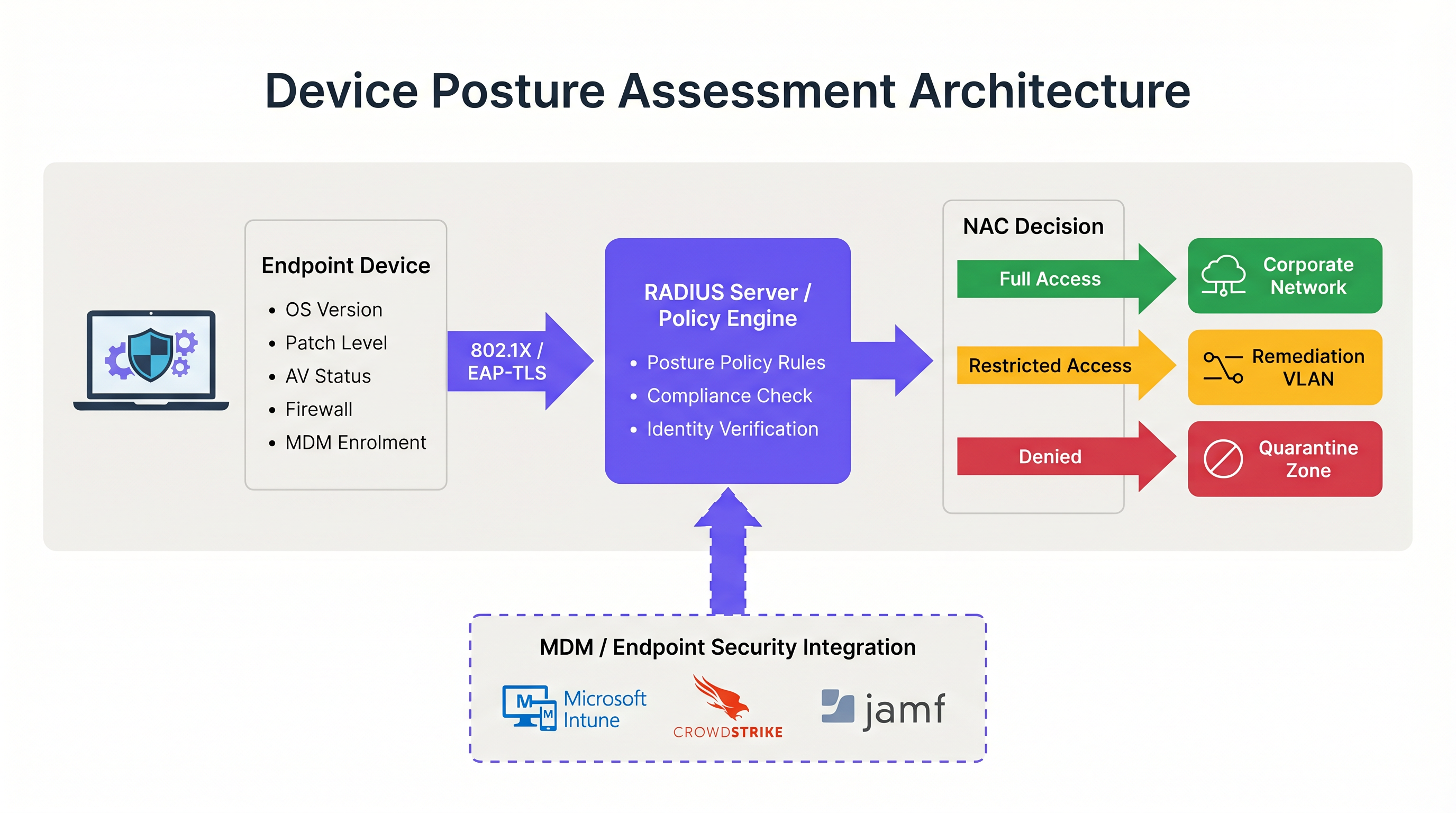
- Agentenloses (MDM-integriertes) Posture Assessment: In diesem Modell leitet das NAC-System den Gerätezustand ab, indem es eine Mobile Device Management (MDM)- oder Unified Endpoint Management (UEM)-Plattform über eine API abfragt. Wenn sich ein Gerät authentifiziert, ruft der RADIUS-Server Plattformen wie Microsoft Intune oder Jamf auf, um den Compliance-Datensatz des Geräts abzurufen. Dieser Ansatz ist für verwaltete Unternehmensgeräte hocheffektiv und macht einen dedizierten NAC-Agenten überflüssig. Er verlässt sich jedoch darauf, dass die MDM-Plattform über aktuelle Informationen verfügt; wenn das Gerät offline war, kann der Compliance-Status veraltet sein.
- Netzwerkbasierte Bewertung: Dieser passive Ansatz beinhaltet, dass das NAC-System das verbundene Gerät mit Techniken wie SNMP-Abfragen, WMI-Aufrufen oder Traffic-Fingerprinting scannt. Es erfordert keinen Agenten oder eine MDM-Registrierung, was es nützlich für das Profiling von IoT-Geräten oder Legacy-Systemen macht. Die Tiefe der Einblicke ist jedoch im Vergleich zu den anderen Modellen erheblich begrenzt, und es kann Patch-Level oder die Aktualität von Antiviren-Signaturen nicht zuverlässig bestimmen.
Der RADIUS- und 802.1X-Integrationsfluss
Die Integration von Posture Assessment mit der 802.1X-Authentifizierung ist der Punkt, an dem die Architektur betriebsbereit wird. Der Prozess stützt sich stark auf das RADIUS-Protokoll und insbesondere auf den in RFC 5176 definierten Change of Authorization (CoA)-Mechanismus.
Wenn ein Supplicant (das Gerät) eine 802.1X-Verbindung initiiert, präsentiert er dem Authenticator (dem Wireless Access Point oder Switch) die Anmeldedaten. Der Authenticator leitet diese an den RADIUS-Server weiter. Nach erfolgreicher Identitätsprüfung gibt der RADIUS-Server eine Access-Accept-Nachricht zurück. In einer Posture-aware Umgebung versetzt diese anfängliche Akzeptanz das Gerät jedoch in einen eingeschränkten Status – oft ein dediziertes Quarantäne- oder Posture-VLAN.
Während es sich in diesem eingeschränkten VLAN befindet, findet das Posture Assessment statt. Die Policy-Engine bewertet das Gerät anhand des konfigurierten Regelwerks. Wenn das Gerät die Prüfung besteht, sendet die Policy-Engine eine RADIUS-CoA-Nachricht an den Authenticator mit der Anweisung, das Gerät vom Posture-VLAN in das entsprechende Produktions-VLAN zu verschieben. Wenn das Gerät die Prüfung nicht besteht, bleibt es im eingeschränkten VLAN oder wird in ein Remediation-VLAN verschoben, wo es auf notwendige Update-Server zugreifen kann.
Für optimale Sicherheit sollte dieser Flow EAP-TLS nutzen. EAP-TLS bietet eine gegenseitige zertifikatsbasierte Authentifizierung, die es dem RADIUS-Server ermöglicht, die Geräteidentität kryptografisch zu verifizieren, bevor die Zustandsprüfung überhaupt beginnt. Dies stellt sicher, dass die Posture-Daten von einem bekannten, vertrauenswürdigen Endpunkt stammen und nicht von einer gefälschten MAC-Adresse. Weitere Informationen zur Sicherung des Gerätezugriffs finden Sie in unserem Leitfaden zur 802.1X-Authentifizierung: Sicherung des Netzwerkzugriffs auf modernen Geräten .
Implementierungsleitfaden: Bereitstellung von zustandsbasiertem Zugriff
Die Bereitstellung von Device Posture Assessment in einer Live-Unternehmensumgebung erfordert eine sorgfältige Planung, um Geschäftsabläufe nicht zu stören. Der folgende phasenweise Ansatz wird für Umgebungen von Unternehmensbüros bis hin zu Gastgewerbe -Standorten empfohlen.
Phase 1: Baseline-Sichtbarkeit (Monitor-Modus)
Der wichtigste Schritt bei der Bereitstellung ist die Erstellung einer Baseline. Aktivieren Sie niemals am ersten Tag Blockierungs- oder Remediation-Richtlinien. Konfigurieren Sie das NAC-System stattdessen so, dass es Posture-Checks in einem reinen Monitor-Modus ausführt. In dieser Phase bewertet das System die Geräte und protokolliert die Ergebnisse, ändert jedoch keine VLAN-Zuweisungen oder schränkt den Zugriff ein.
Führen Sie diese Phase mindestens vier Wochen lang durch. Analysieren Sie die Protokolle, um den Prozentsatz nicht konformer Geräte, die am häufigsten fehlschlagenden Attribute (z. B. veraltetes Betriebssystem vs. deaktivierte Firewall) und die Verteilung der Fehler auf verschiedene Gerätetypen zu identifizieren. Diese Daten ermöglichen es Ihnen, Ihre Richtlinienschwellenwerte zu kalibrieren. Wenn beispielsweise 40 % Ihrer Flotte eine 14-tägige Patch-Anforderung nicht erfüllen, müssen Sie den Schwellenwert möglicherweise zunächst auf 30 Tage anpassen, um den Helpdesk nicht zu überlasten.
Phase 2: VLAN-Segmentierungsdesign
Bevor Sie Richtlinien erzwingen, müssen Sie die Netzwerksegmente entwerfen, die die verschiedenen Posture-Zustände verarbeiten. Eine robuste zustandsbasierte Netzwerkzugriffsarchitektur erfordert mindestens drei verschiedene VLANs:
- Produktions-VLAN: Voller Zugriff auf Unternehmensressourcen für konforme, verwaltete Geräte.
- Remediation-VLAN: Eingeschränkter Zugriff, der nur die Kommunikation mit Update-Servern (z. B. Windows Update, WSUS), MDM-Plattformen und dem NAC-Remediation-Portal ermöglicht. Kein Zugriff auf interne Subnetze oder allgemeines Surfen im Internet.
- Gast/BYOD-VLAN: Segmentierter, reiner Internetzugang für nicht verwaltete persönliche Geräte, die nicht auf ihren Zustand geprüft werden können.
Stellen Sie sicher, dass Ihre Wireless Access Points und Core-Switches so konfiguriert sind, dass sie die dynamische VLAN-Zuweisung über RADIUS-Attribute unterstützen. Das Verständnis der Rolle Ihrer Access Points ist hier entscheidend; zur Auffrischung siehe Definition von Wireless Access Points: Ihr ultimativer Leitfaden für 2026 .
Phase 3: Definition des Posture-Regelwerks
Entwickeln Sie ein pragmatisches Regelwerk basierend auf Ihren Monitor-Modus-Daten und Compliance-Anforderungen. Eine Standard-Unternehmens-Baseline umfasst:
- Betriebssystem: Muss eine unterstützte Version sein (z. B. Windows 10 22H2 oder höher, macOS 13 oder höher).
- Patch-Level: Kritische Sicherheitsupdates, die innerhalb der letzten 30 Tage angewendet wurden.
- Endpunktschutz: Anerkannter Antiviren-/EDR-Agent installiert, ausgeführt und Signaturen innerhalb der letzten 7 Tage aktualisiert.
- Host-Firewall: Für alle Netzwerkprofile aktiviert.
- Festplattenverschlüsselung: BitLocker oder FileVault für das Systemlaufwerk aktiviert.
Phase 4: Erzwingen von Remediation-Workflows
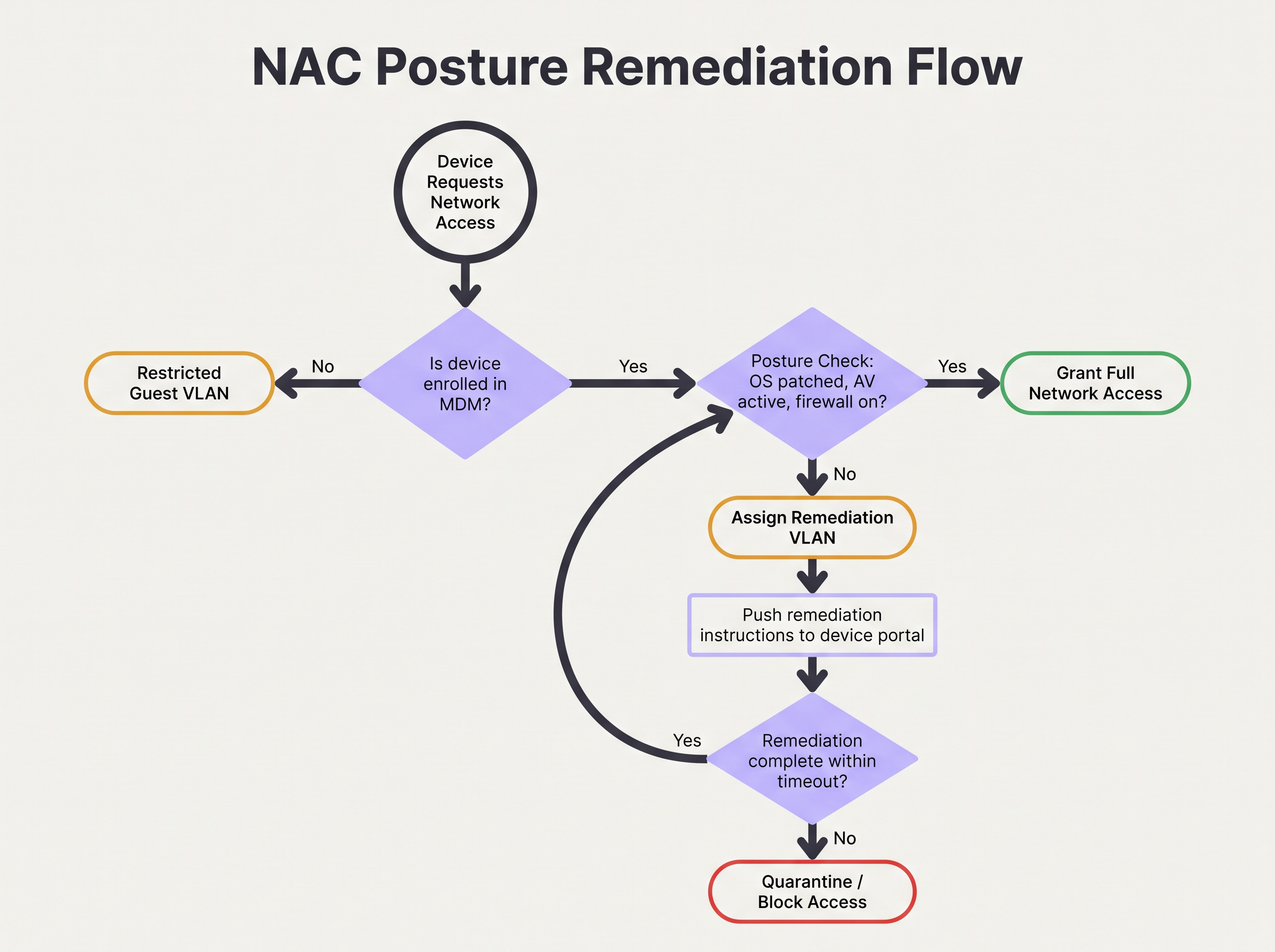
Wenn ein Gerät den Posture-Check nicht besteht, muss der Remediation-Workflow automatisiert und für den Benutzer klar sein. Das Gerät wird dem Remediation-VLAN zugewiesen, und der HTTP/HTTPS-Verkehr sollte auf ein Captive Portal umgeleitet werden. Dieses Portal muss den Benutzer explizit darüber informieren, warum sein Gerät unter Quarantäne gestellt wurde (z. B. „Ihr Virenschutz ist veraltet“) und umsetzbare Schritte oder Links zur Behebung des Problems bereitstellen.
Konfigurieren Sie ein Remediation-Timeout. Beispielsweise könnten einem Gerät 24 Stunden im Remediation-VLAN eingeräumt werden, um notwendige Patches herunterzuladen. Wenn das Gerät innerhalb dieses Zeitfensters keine Compliance erreicht, sollte es in ein striktes Quarantäne-VLAN verschoben werden, in dem jeglicher Zugriff bis zum Eingreifen der IT gesperrt ist.
Best Practices für komplexe Umgebungen
Die Implementierung von Posture Assessment in komplexen Umgebungen wie dem Einzelhandel oder großen öffentlichen Veranstaltungsorten bringt einzigartige Herausforderungen mit sich, insbesondere in Bezug auf Gerätevielfalt und Skalierbarkeit.
Umgang mit BYOD und IoT
In Umgebungen mit einer hohen Anzahl nicht verwalteter Geräte, wie Transportwesen -Knotenpunkten oder Einzelhandelsflächen, die Guest WiFi anbieten, ist der Versuch, Posture-Checks für jedes Gerät zu erzwingen, betrieblich nicht machbar. Sie müssen explizite Richtlinien für Geräte festlegen, die nicht bewertet werden können.
Die bewährte Methode besteht darin, MAC Authentication Bypass (MAB) oder Identitäts-Profiling zu nutzen, um diese Geräte frühzeitig im Authentifizierungsfluss zu kategorisieren. Nicht verwaltete BYOD-Geräte sollten automatisch in das Gast-VLAN geleitet werden. IoT-Geräte (Sensoren, Displays) sollten in dedizierten, mikrosegmentierten VLANs mit strengen Access Control Lists (ACLs) platziert werden, die ihre Kommunikation auf bestimmte Controller beschränken. Die Plattform von Purple kann bei der Identifizierung und Verwaltung dieser vielfältigen Gerätetypen helfen; erkunden Sie unsere Sensoren -Funktionen für weitere Einblicke.
Optimierung für hochfrequentierte Veranstaltungsorte
In Umgebungen mit hoher Dichte wie Stadien kann die durch das Posture Assessment verursachte Latenz zu Authentifizierungs-Timeouts und Verbindungsfehlern führen. Agentenbasierte Prüfungen können den Verbindungsprozess um mehrere Sekunden verlängern.
Um dies abzumildern, implementieren Sie Posture-Caching. Konfigurieren Sie die NAC-Policy-Engine so, dass sie den konformen Status eines Geräts für einen definierten Zeitraum (z. B. 4 bis 8 Stunden) zwischenspeichert. Wenn ein Gerät zwischen Access Points wechselt oder die Verbindung kurzzeitig unterbricht, kann der RADIUS-Server das zwischengespeicherte Posture-Ergebnis verwenden, um sofortigen Zugriff zu gewähren und den vollen Bewertungsaufwand zu umgehen. Dies ist entscheidend für die Aufrechterhaltung des Durchsatzes und einer positiven Benutzererfahrung. Die zugrunde liegende Netzwerkarchitektur spielt ebenfalls eine Rolle; berücksichtigen Sie die Vorteile, die in Die wichtigsten SD-WAN-Vorteile für moderne Unternehmen diskutiert werden.
Fehlerbehebung & Risikominderung
Selbst bei sorgfältiger Planung kann die zustandsbasierte Zugriffskontrolle fehlschlagen. Das Verständnis der häufigsten Fehlermodi ist entscheidend für die Aufrechterhaltung der Netzwerkverfügbarkeit.
CoA-Fehler
Das häufigste technische Problem ist das Fehlschlagen der RADIUS Change of Authorization (CoA)-Nachricht. Wenn das NAC-System feststellt, dass ein Gerät konform ist, der Access Point das CoA-Paket jedoch verwirft oder ignoriert, bleibt das Gerät im eingeschränkten VLAN stecken.
Abhilfe: Stellen Sie sicher, dass CoA auf allen Netzwerkzugriffsgeräten explizit aktiviert ist und dass der RADIUS-Server als vertrauenswürdiger CoA-Client konfiguriert ist. Überprüfen Sie, ob der UDP-Port 3799 (der Standard-CoA-Port) nicht durch Firewalls zwischen dem RADIUS-Server und den Access Points blockiert wird. Überwachen Sie die CoA-Bestätigungsraten (ACK) in Ihren RADIUS-Protokollen.
MDM API-Ratenbegrenzung
Bei agentenlosen Bereitstellungen kann ein plötzlicher Zustrom von sich authentifizierenden Geräten (z. B. Mitarbeiter, die um 9:00 Uhr morgens eintreffen) dazu führen, dass das NAC-System die MDM-Plattform mit API-Anfragen überflutet. Dies kann eine API-Ratenbegrenzung auslösen, was dazu führt, dass Posture-Checks fehlschlagen oder das Zeitlimit überschreiten.
Abhilfe: Implementieren Sie API-Anfragen-Batching oder Caching innerhalb der NAC-Plattform. Wenn das MDM Webhooks unterstützt, konfigurieren Sie das MDM so, dass es Änderungen des Compliance-Status proaktiv an das NAC-System sendet, anstatt dass das NAC-System das MDM bei jeder Authentifizierung abfragt.
ROI & geschäftliche Auswirkungen
Die geschäftlichen Auswirkungen der Implementierung von Device Posture Assessment gehen über die unmittelbare Risikominderung hinaus. Sie verändert die Sicherheitslage des Unternehmens grundlegend und bietet messbare Erträge.
Risikominderung und Compliance
Der primäre ROI ist die Verhinderung von lateralen Bewegungen durch kompromittierte Endpunkte. Indem sichergestellt wird, dass nur gesunde Geräte auf das Unternehmensnetzwerk zugreifen, reduzieren Unternehmen die Wahrscheinlichkeit der Verbreitung von Ransomware erheblich. Darüber hinaus bietet das automatisierte Posture Assessment die kontinuierliche Überwachung, die erforderlich ist, um Audit-Anforderungen für PCI DSS, HIPAA und GDPR zu erfüllen, was den Aufwand und die Kosten für die manuelle Compliance-Berichterstattung reduziert.
Operative Effizienz
Obwohl die Erstbereitstellung Aufwand erfordert, reduziert ein gut abgestimmtes Posture-Assessment-System die operative Belastung der IT. Automatisierte Remediation-Workflows ermöglichen es Benutzern, kleinere Compliance-Probleme (wie veraltete Signaturen) selbst zu lösen, ohne Helpdesk-Tickets zu erstellen. Durch die Integration von Posture-Checks mit umfassenderen Netzwerk-Analysen – wie WiFi Analytics – erhalten IT-Teams eine beispiellose Sichtbarkeit in den Zustand ihres Gerätebestands, was ein proaktives statt eines reaktiven Managements ermöglicht. Für Veranstaltungsorte, die ihr gesamtes Netzwerkerlebnis verbessern möchten, siehe unsere Einblicke in Moderne WiFi-Lösungen für das Gastgewerbe, die Ihre Gäste verdienen .
Schlüsselbegriffe & Definitionen
Device Posture Assessment
The process of evaluating an endpoint's security and compliance state (e.g., OS version, patch level, antivirus status) before or during network authentication.
Crucial for Zero Trust architecture, ensuring that compromised or vulnerable devices cannot access sensitive network segments even if the user has valid credentials.
RADIUS CoA (Change of Authorization)
An extension to the RADIUS protocol (RFC 5176) that allows a RADIUS server to dynamically modify the authorization attributes of an active session, such as changing a device's VLAN.
The essential mechanism in posture assessment that moves a device from a quarantine/remediation VLAN to a production VLAN once the health check passes.
Remediation VLAN
A restricted network segment designed specifically for devices that fail posture checks. It provides limited access only to the resources needed to fix the compliance issue (e.g., update servers, MDM).
Used to isolate vulnerable devices while allowing them to self-correct without requiring manual IT intervention.
Agentless Posture Assessment
Evaluating device health without installing dedicated NAC software on the endpoint, typically by querying an MDM/UEM platform via API for the device's compliance record.
Preferred for corporate environments with robust MDM deployments as it reduces endpoint software bloat and simplifies management.
Dissolvable Agent
A temporary, lightweight application downloaded via a captive portal that performs a posture check and then removes itself from the device.
Commonly used in BYOD or guest environments where permanent agent installation is impossible or unacceptable to the user.
EAP-TLS (Extensible Authentication Protocol-Transport Layer Security)
An 802.1X authentication method that requires both the server and the client (device) to present valid digital certificates for mutual authentication.
The most secure foundation for posture assessment, as it cryptographically proves the device identity before health checks are evaluated.
Posture Caching
Storing the result of a successful posture check for a defined period so that subsequent authentications (e.g., roaming between APs) do not require a full re-evaluation.
Vital for maintaining network performance and reducing latency in high-density environments like stadiums or large offices.
Zero Trust Network Access (ZTNA)
A security framework requiring all users and devices, whether inside or outside the organization's network, to be authenticated, authorized, and continuously validated before being granted access.
Device posture assessment is a foundational pillar of ZTNA, providing the 'continuous validation' of the device state.
Fallstudien
A 500-user corporate office is implementing device posture assessment. They currently use 802.1X (PEAP-MSCHAPv2) for all corporate laptops. They want to ensure no laptop connects unless its CrowdStrike Falcon agent is running and Windows is fully patched. How should they design the integration and remediation flow?
- Architecture Selection: Since all laptops are corporate-managed, an agentless approach via MDM integration (e.g., Intune) is recommended to avoid deploying a separate NAC agent. The NAC policy engine will query Intune for compliance status.
- VLAN Design: Create three VLANs: VLAN 10 (Corporate Production), VLAN 20 (Remediation), VLAN 30 (Guest).
- Policy Configuration: Configure Intune compliance policies to require CrowdStrike running and Windows updates within 30 days. Configure the NAC policy engine to map Intune 'Compliant' status to VLAN 10, and 'Non-Compliant' to VLAN 20.
- Authentication Flow: When a laptop authenticates via PEAP, the RADIUS server places it in VLAN 20 and queries Intune. If Intune returns 'Compliant', the RADIUS server sends a CoA message to the access point to switch the port/session to VLAN 10.
- Remediation: If Intune returns 'Non-Compliant', the laptop remains in VLAN 20. DHCP provides an IP, and DNS/firewall rules redirect HTTP traffic to a portal explaining the failure and allowing access only to CrowdStrike and Windows Update servers.
A large university campus wants to implement posture checks, but 80% of the devices are student BYOD laptops and phones. They cannot force MDM enrolment on these devices. How should they approach posture assessment?
- Architecture Selection: A hybrid approach is necessary. Use agentless/MDM checks for staff/faculty corporate devices, and a captive portal with a dissolvable agent or network-based assessment for student BYOD.
- BYOD Flow: Students connect to the 'Student-WiFi' SSID. They authenticate via a captive portal using university credentials.
- Dissolvable Agent: Upon login, the portal prompts the user to run a lightweight, temporary applet (dissolvable agent) that checks basic posture (e.g., minimum OS version, active firewall) without requiring admin rights or permanent installation.
- Enforcement: If the dissolvable agent reports a pass, the device is granted access to the student VLAN. If it fails, the portal displays instructions on how to update their OS.
- Alternative (Network-based): If dissolvable agents cause too much friction, use passive network profiling (DHCP fingerprinting, HTTP user-agent parsing) to detect grossly outdated OS versions and block them, accepting a lower level of assurance for BYOD.
Szenarioanalyse
Q1. Your organisation is rolling out posture assessment for 2,000 corporate laptops. You have configured the policy to require Windows 11 and an active EDR agent. On Monday morning, you plan to enable the policy in enforcement mode. What critical step have you missed?
💡 Hinweis:Consider the impact on the helpdesk if your assumptions about the fleet's health are wrong.
Empfohlenen Ansatz anzeigen
You have missed the 'Monitor Mode' phase. Before enforcing a blocking policy, the system must run in monitor-only mode for several weeks to establish a baseline of compliance. Enabling enforcement on day one without this data will likely result in a massive spike in helpdesk tickets from users who unexpectedly fail the posture check.
Q2. A device successfully authenticates via 802.1X and passes the MDM posture check. The RADIUS server logs show an Access-Accept and a successful posture evaluation, but the user reports they still cannot access the internet or corporate resources. What is the most likely point of failure in the architecture?
💡 Hinweis:Think about how the network access device (the AP or switch) is instructed to change the user's access level after the posture check completes.
Empfohlenen Ansatz anzeigen
The most likely failure is the RADIUS Change of Authorization (CoA). The device was likely placed in a restricted posture VLAN initially. Even though the posture check passed on the server side, if the CoA message was dropped, blocked by a firewall, or not processed by the access point, the device will remain stuck in the restricted VLAN.
Q3. You manage the WiFi for a retail chain. Corporate devices are managed via Intune, but store managers often connect personal iPads to the staff network. You want to implement posture checks for corporate devices. How should you handle the personal iPads?
💡 Hinweis:Consider whether you can perform agentless or agent-based checks on devices you don't own.
Empfohlenen Ansatz anzeigen
You cannot reliably perform deep posture checks on unmanaged personal devices without causing significant user friction. The best approach is to use identity profiling or MAB to identify the personal iPads and automatically route them to a segmented Guest or BYOD VLAN with internet-only access, bypassing the strict posture requirements applied to the corporate devices.
Wichtigste Erkenntnisse
- ✓Device posture assessment evaluates endpoint health (OS, patches, AV) before granting network access, moving beyond simple identity verification.
- ✓It is a foundational element of Zero Trust architecture, preventing vulnerable devices from moving laterally on the network.
- ✓Architectures include agent-based (deepest visibility), agentless via MDM integration (best for corporate fleets), and network-based profiling.
- ✓The process relies heavily on RADIUS Change of Authorization (CoA) to dynamically move devices between Posture, Remediation, and Production VLANs.
- ✓Always deploy posture policies in monitor-only mode for several weeks to establish a baseline before enforcing blocking rules.
- ✓Robust remediation workflows are essential to allow users to self-correct compliance issues without overwhelming the IT helpdesk.
- ✓For BYOD and high-density environments, utilize posture caching and explicit routing to guest VLANs to minimize user friction and latency.




