

Die Zukunft nahtloser Konnektivität: Passpoint und OpenRoaming erklärt
Dieser technische Leitfaden bietet IT-Entscheidern praxisnahe Einblicke in den Übergang von herkömmlichen Captive Portals zu Passpoint und OpenRoaming. Er erläutert die zugrunde liegenden IEEE 802.11u- und WPA3-Standards, sichere Authentifizierungsabläufe sowie Strategien für den Praxiseinsatz, um die nahtlose Konnektivität zu verbessern, die Sicherheit zu erhöhen und einen messbaren ROI an Unternehmensstandorten zu erzielen.
🎧 Diesen Leitfaden anhören
Transkript anzeigen

Management-Zusammenfassung
In den letzten zehn Jahren basierte Gast-WiFi auf Captive Portals – ein hürdenreiches Modell, das Nutzer frustriert, das Markenerlebnis beeinträchtigt und erhebliche Sicherheitslücken schafft. Da Standorte in den Bereichen Gastgewerbe , Einzelhandel und im öffentlichen Sektor höhere Attach-Raten fordern, um WiFi Analytics und standortbezogene Dienste zu unterstützen, bewegt sich die Branche hin zu einer nahtlosen, mobilfunkähnlichen Konnektivität.
Passpoint (Hotspot 2.0) und OpenRoaming stellen die definitive Zukunft des drahtlosen Netzzugangs für Unternehmen dar. Dieses Ökosystem basiert auf dem IEEE 802.11u-Standard und wird von der Wireless Broadband Alliance (WBA) verwaltet. Es ermöglicht eine sichere (WPA3) Zero-Touch-Authentifizierung. Durch die Föderation von Identitätsanbietern (wie Apple, Google und Mobilfunkanbietern) mit Zugangsnetzwerken können Standorte Gäste automatisch onboarden, ohne dass eine manuelle SSID-Auswahl oder Splash-Pages erforderlich sind. Dieser Leitfaden bietet IT-Managern und Netzwerkarchitekten eine praxisorientierte, herstellerneutrale Roadmap für die Evaluierung, Planung und Bereitstellung von Passpoint und OpenRoaming, um Gast-WiFi von einer Kostenstelle in ein sicheres, datenreiches Asset zu verwandeln.
Technischer Deep-Dive
Die Passpoint- und OpenRoaming-Architektur
Um diesen Wandel zu verstehen, müssen wir zwischen der zugrunde liegenden Technologie und der Föderation, die sie skaliert, unterscheiden.
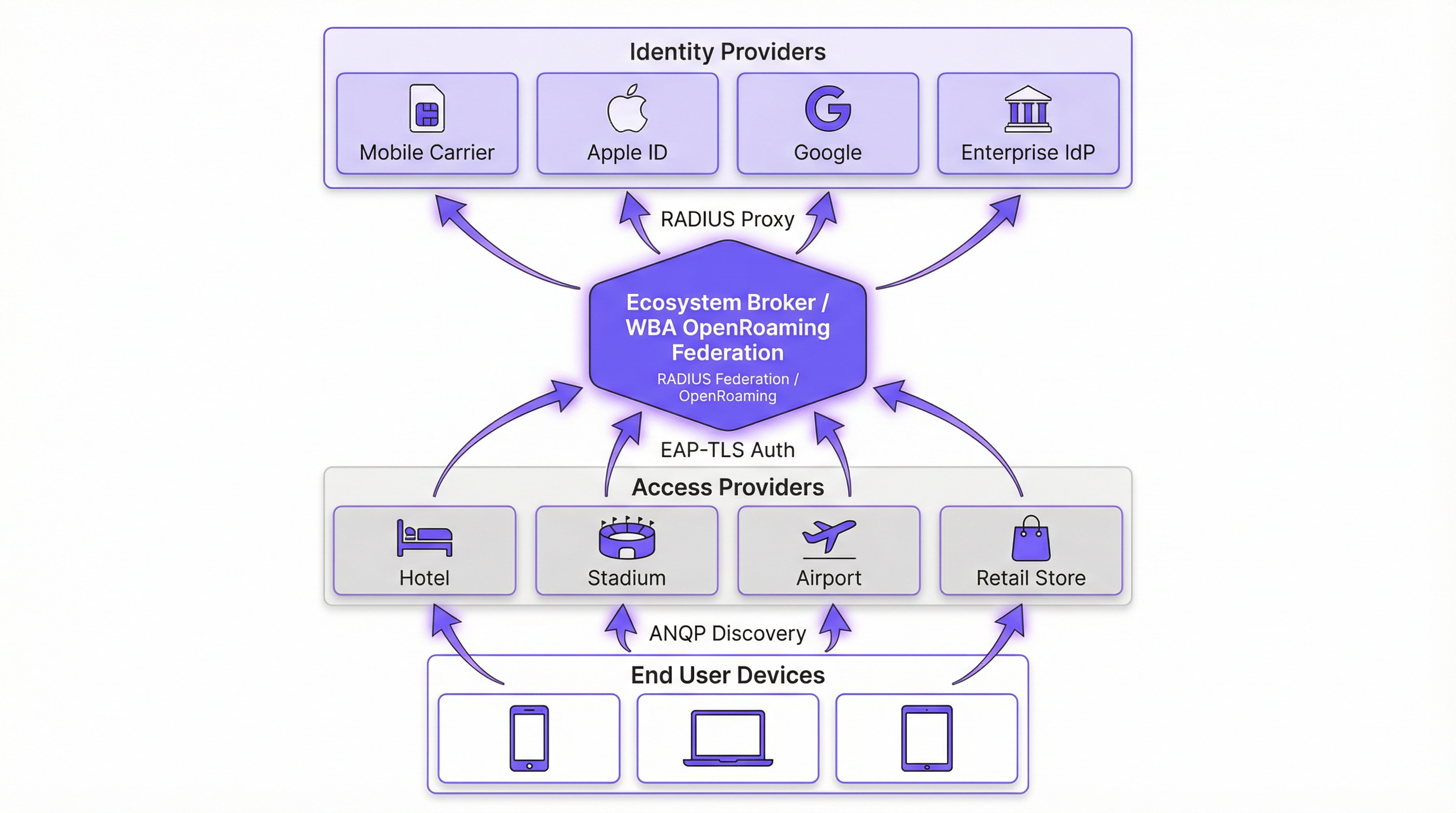
Passpoint (Hotspot 2.0) ist eine Wi-Fi Alliance-Zertifizierung, die auf dem IEEE 802.11u-Standard basiert. Es definiert den Mechanismus, mit dem Geräte Netzwerke automatisch erkennen und sich authentifizieren. Das Kernprotokoll ist das Access Network Query Protocol (ANQP), das es einem Client-Gerät ermöglicht, einen Access Point (AP) vor der Assoziierung abzufragen. Das Gerät gleicht die vom AP beworbenen Roaming Consortium Organizationally Unique Identifiers (OUIs) mit seinen lokal bereitgestellten Profilen ab. Wird eine Übereinstimmung gefunden, das Gerät initiiert eine Extensible Authentication Protocol (EAP)-Verbindung (typischerweise EAP-TLS oder EAP-TTLS).
OpenRoaming ist die globale Föderation, die auf Passpoint aufbaut. Während Passpoint die lokale Interaktion zwischen Gerät und AP übernimmt, stellt OpenRoaming die RADIUS-Proxy-Infrastruktur bereit, die Millionen von APs mit Tausenden von Identitätsanbietern (IdPs) verbindet. Dadurch entfällt für Standorte die Notwendigkeit, individuelle Roaming-Vereinbarungen auszuhandeln oder eine komplexe Public Key Infrastructure (PKI) für externe Gäste zu verwalten.
Sicherheits-Paradigmenwechsel
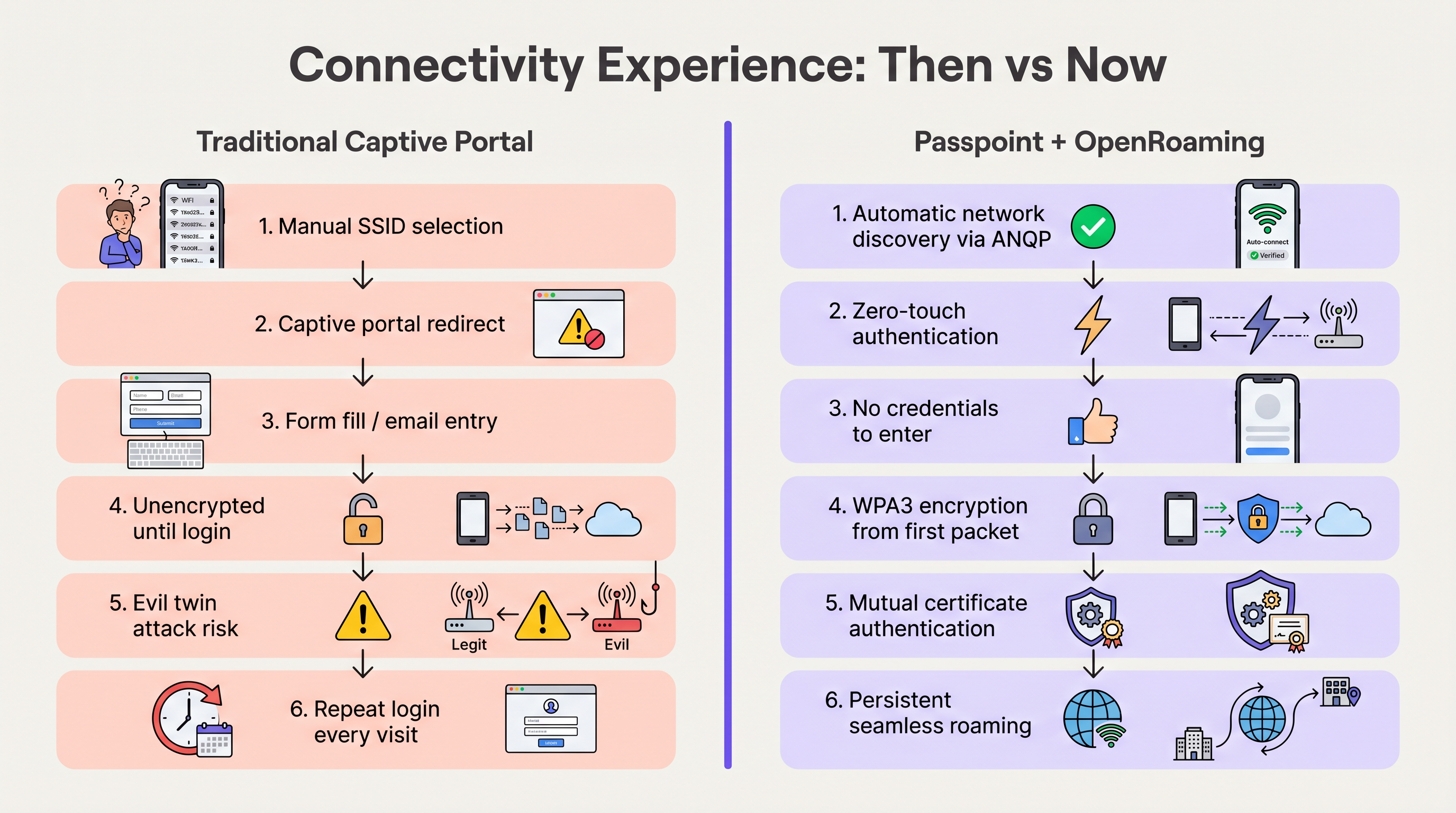
Herkömmliche offene Netzwerke mit Captive Portals übertragen Daten unverschlüsselt, bis der Nutzer den Anmeldevorgang abgeschlossen hat. Dies setzt Nutzer „Evil Twin“-Angriffen aus, bei denen böswillige Akteure die SSID des Standorts fälschen, um Anmeldedaten abzugreifen.
Passpoint verändert dieses Risikoprofil grundlegend. Da die Authentifizierung über 802.1X erfolgt, wird die Verbindung vom ersten Paket an mit WPA2-Enterprise- oder WPA3-Enterprise-Verschlüsselung gesichert. Darüber hinaus bedeutet die bei EAP-TLS inhärente gegenseitige Authentifizierung, dass das Gerät das Zertifikat des Netzwerks überprüft, bevor es Anmeldedaten sendet, wodurch Evil-Twin-Schwachstellen effektiv neutralisiert werden. Wie in unserem Leitfaden zur Gerätestatus-Bewertung für die Netzwerkzugriffskontrolle detailliert beschrieben, ist der Aufbau von Gerätevertrauen von entscheidender Bedeutung, und Passpoint setzt dies am Edge durch.
Implementierungsleitfaden
Die Bereitstellung von OpenRoaming erfordert die Koordination zwischen Ihrem Wireless LAN Controller (WLC), Ihrer RADIUS-Infrastruktur und der WBA-Föderation. Die folgenden herstellerneutralen Schritte skizzieren eine Standard-Unternehmensbereitstellung.
Phase 1: Bewertung der Infrastruktur-Bereitschaft
Überprüfen Sie vor der Konfiguration, ob Ihre vorhandene Hardware die erforderlichen Standards unterstützt. Die meisten in den letzten fünf Jahren veröffentlichten Enterprise-APs (z. B. Cisco, Aruba, Ruckus) unterstützen 802.11u und Passpoint nativ. Stellen Sie sicher, dass Ihre WLC-Firmware aktualisiert ist, um WPA3 und Protected Management Frames (PMF) zu unterstützen, die für Passpoint Release 3 obligatorisch sind.
Phase 2: RADIUS- und Föderations-Integration
Der entscheidende Integrationspunkt ist die Verbindung Ihres lokalen Netzwerks mit der OpenRoaming-Föderation. Dies wird durch den Aufbau einer sicheren RADIUS-Proxy-Verbindung erreicht.
- Wählen Sie einen Cloud-RADIUS-Anbieter: Wählen Sie einen Anbieter, der ein zertifizierter OpenRoaming Ecosystem Broker ist (z. B. IronWiFi, Cisco Spaces).
- RadSec-Tunnel einrichten: Konfigurieren Sie Ihren WLC so, dass Authentifizierungsanfragen über RadSec (RADIUS over TLS) an den Cloud-RADIUS-Server weitergeleitet werden. Dies sichert den Authentifizierungsverkehr über das Internet ab. Detaillierte Konfigurationsschritte finden Sie unter RadSec: Sicherung des RADIUS-Authentifizierungsverkehrs mit TLS .
- Realm-Routing konfigurieren: Richten Sie Routing-Regeln auf dem RADIUS-Server ein, um Anfragen, die mit OpenRoaming-Domains übereinstimmen (z. B.
apple.openroaming.net), an die WBA-Föderation weiterzuleiten.
Phase 3: WLAN-Konfiguration
Konfigurieren Sie die spezifische SSID auf Ihrem WLC, um die erforderlichen ANQP-Elemente auszustrahlen.
- 802.11u aktivieren: Aktivieren Sie Hotspot 2.0/Passpoint-Funktionen für das Ziel-WLAN.
- Roaming Consortium OUIs definieren: Fügen Sie die von der WBA bereitgestellten spezifischen OUIs (z. B.
5A-03-BAfür OpenRoaming-Settlement-Free) zum Beacon des AP hinzu. - Sicherheit konfigurieren: Stellen Sie die Layer-2-Sicherheit auf WPA2/WPA3-Enterprise mit 802.1X-Authentifizierung ein.
Phase 4: Strategie für das Nutzer-Onboarding
Während föderierte Nutzer (z. B. solche mit Apple- oder Google-Profilen) automatisch eine Verbindung herstellen, müssen Sie für Nutzer planen, die über keine bestehenden Profile verfügen. Implementieren Sie ein Online-Sign-Up (OSU)-Server oder integrieren Sie das Profil-Provisioning in die mobile App Ihres Standorts. Dies ermöglicht es Benutzern, bei ihrem ersten Besuch ein Passpoint-Profil herunterzuladen, was eine nahtlose Konnektivität bei allen folgenden Besuchen gewährleistet.
Best Practices
- Behalten Sie während der Übergangsphase einen hybriden Ansatz bei: Deaktivieren Sie Ihr bestehendes Captive Portal nicht sofort. Betreiben Sie die Passpoint-fähige SSID parallel zu Ihrem offenen Guest WiFi -Netzwerk, um ältere Geräte und Benutzer ohne Profile zu unterstützen. Überwachen Sie die Verbindungsraten, um zu bestimmen, wann das offene Netzwerk sicher abgeschaltet werden kann.
- Priorisieren Sie RadSec: Übertragen Sie RADIUS-Traffic niemals unverschlüsselt über das Internet. Verwenden Sie immer RadSec, um die Kommunikation zwischen Ihrem WLC und dem Cloud-RADIUS-Anbieter zu sichern.
- Nutzen Sie die App-Integration: Für Gastronomie- und Einzelhandelsstandorte sollten Sie das Passpoint-Profil-Provisioning in die Loyalty-App Ihrer Marke einbetten. Dies garantiert eine sichere Authentifizierung des Benutzers und verknüpft gleichzeitig die Netzwerkpräsenz direkt mit seinem Kundenprofil.
- Überwachen Sie den Ablauf von Zertifikaten: Passpoint stützt sich stark auf PKI. Implementieren Sie eine automatisierte Überwachung und Alarmierung für alle RADIUS- und Webserver-Zertifikate, um plötzliche Authentifizierungsfehler zu vermeiden.
Fehlerbehebung & Risikominimierung
Bei der Bereitstellung von Passpoint stoßen IT-Teams in der Regel auf spezifische Fehlermodi. Das Verständnis dieser Risiken ist entscheidend für einen reibungslosen Rollout.
- ANQP-Timeout-Probleme: Wenn APs überlastet sind oder der Controller träge reagiert, können ANQP-Antworten das Zeitlimit überschreiten, was verhindert, dass Geräte das Netzwerk finden. Abhilfe: Stellen Sie sicher, dass APs ausreichend dimensioniert sind, und überwachen Sie die CPU-Auslastung der Control Plane. Erwägen Sie für Umgebungen mit hoher Dichte die Optimierung der Beacon-Intervalle.
- Zertifikats-Vertrauensfehler: Wenn das Client-Gerät der Root-CA, die das Zertifikat des RADIUS-Servers signiert hat, nicht vertraut, schlägt der EAP-TLS-Handshake geräuschlos fehl. Abhilfe: Verwenden Sie für öffentlich zugängliche RADIUS-Server immer Zertifikate, die von weithin anerkannten öffentlichen Zertifizierungsstellen (z. B. DigiCert, Let's Encrypt) ausgestellt wurden. Vermeiden Sie selbstsignierte Zertifikate für den Gastzugang.
- RadSec-Verbindungsabbrüche: Firewalls oder zwischengeschaltete Routing-Probleme können die für RadSec erforderliche TCP-Verbindung unterbrechen. Abhilfe: Implementieren Sie eine robuste Überwachung des RadSec-Tunnelstatus und konfigurieren Sie sekundäre RADIUS-Server für das Failover.
ROI & geschäftliche Auswirkungen
Der Übergang zu Passpoint und OpenRoaming ist nicht nur ein IT-Upgrade, sondern ein strategischer Business-Enabler. Durch die Beseitigung der Hürden von Captive Portals sehen Standorte sofortige Verbesserungen bei den Kennzahlen.
- Erhöhte Verbindungsraten: Standorte beobachten in der Regel einen Anstieg der mit dem Netzwerk verbundenen Geräte um 40-60 %. Dies erweitert direkt die Stichprobengröße für WiFi Analytics und Sensors und liefert genauere Daten zu Besucherzahlen und Verweildauer.
- Verbesserte Kundenbindung: Im Einzelhandel und in der Gastronomie ermöglicht die nahtlose Konnektivität den Standorten, standortbezogene Benachrichtigungen über ihre Apps auszulösen, sobald ein Gast die Tür betritt, was das unmittelbare Engagement fördert.
- Reduzierter Support-Aufwand: Die Eliminierung von Captive Portals reduziert Helpdesk-Tickets im Zusammenhang mit Anmeldefehlern, Browser-Weiterleitungen und vergessenen Passwörtern drastisch und setzt IT-Ressourcen frei.
- Datenmonetarisierung: Durch die Integration mit Wayfinding - und Loyalty-Plattformen können Standorte die physische Präsenz mit dem Kaufverhalten korrelieren und so verwertbare Erkenntnisse gewinnen, die die Netzwerkinvestition rechtfertigen.
Hören Sie sich unser umfassendes Briefing zu diesem Thema an:
Schlüsselbegriffe & Definitionen
Passpoint (Hotspot 2.0)
A Wi-Fi Alliance certification based on the IEEE 802.11u standard that enables devices to automatically discover and securely connect to Wi-Fi networks without user intervention.
IT teams deploy Passpoint to replace legacy captive portals, providing a cellular-like roaming experience for enterprise and guest WiFi.
OpenRoaming
A global roaming federation managed by the Wireless Broadband Alliance (WBA) that connects Identity Providers (IdPs) with Access Networks using Passpoint technology.
Venues join OpenRoaming to allow guests to authenticate using existing credentials (e.g., Apple ID, Google, Carrier SIM) without managing local accounts.
ANQP (Access Network Query Protocol)
A Layer 2 protocol defined in 802.11u that allows a client device to request information from an Access Point (such as supported roaming partners) before associating with the network.
ANQP is the mechanism that allows a smartphone to 'know' if it can connect to a Passpoint network silently in the background.
RadSec (RADIUS over TLS)
A protocol that secures RADIUS authentication traffic by wrapping it in a TLS tunnel, typically using TCP port 2083.
Essential for OpenRoaming deployments to ensure that authentication requests sent from the venue to the cloud RADIUS provider cannot be intercepted.
OUI (Organizationally Unique Identifier)
A 24-bit number that uniquely identifies a vendor, manufacturer, or organization, used in Passpoint to identify supported roaming consortiums.
Network admins configure specific OUIs on their WLCs to broadcast which identity providers or federations (like OpenRoaming) are supported at the venue.
EAP-TLS (Extensible Authentication Protocol - Transport Layer Security)
A highly secure authentication framework that requires mutual certificate-based authentication between the client and the server.
The gold standard for Passpoint authentication, ensuring that both the user's device and the venue's network verify each other's identities before connecting.
OSU (Online Sign-Up)
A standardized mechanism in Passpoint Release 2 and later that allows a device to securely obtain network credentials and a profile from a provisioning server.
Used to onboard new guests who do not already have a Passpoint profile installed on their device.
Evil Twin Attack
A wireless attack where a malicious actor sets up a rogue Access Point broadcasting the same SSID as a legitimate network to intercept user traffic and credentials.
Passpoint eliminates this risk by requiring the network to present a valid certificate (mutual authentication) before the device will connect.
Fallstudien
A global hotel chain with 200 properties wants to improve guest connectivity and increase the adoption of its loyalty app. Guests currently complain about having to log in to the captive portal every day of their stay, and attach rates are low.
The hotel deploys Passpoint across all properties. Instead of a captive portal, they integrate Passpoint profile provisioning into their loyalty app. When a guest downloads the app and logs in, a Passpoint profile is silently installed on their device. The APs are configured to broadcast the hotel's specific Roaming Consortium OUI. The WLC uses RadSec to forward authentication requests to a cloud RADIUS provider. When the guest arrives at any property globally, their device detects the OUI, authenticates via EAP-TLS using the profile, and connects instantly with WPA3 encryption.
A large conference centre needs to provide secure WiFi for 10,000 attendees. Managing temporary credentials for a 3-day event via a captive portal is operationally heavy and insecure.
The venue implements OpenRoaming. They configure their WLC to broadcast the WBA OpenRoaming OUIs and establish a RadSec connection to an OpenRoaming Ecosystem Broker. Attendees arriving at the venue who already have an OpenRoaming profile (e.g., via their mobile carrier or a previous venue) connect automatically. For attendees without a profile, the venue provides QR codes around the concourse that direct users to an Online Sign-Up (OSU) server to download a temporary event profile.
Szenarioanalyse
Q1. You are the IT Director for a retail chain. Marketing wants to track repeat customer visits accurately using WiFi analytics, but the current open guest network with a captive portal has a 15% attach rate. Customers complain the login takes too long. How do you redesign the network access strategy to meet Marketing's goals while improving the customer experience?
💡 Hinweis:Consider how you can tie network authentication to an asset the customer already values, removing the friction of the captive portal entirely.
Empfohlenen Ansatz anzeigen
Implement Passpoint and integrate the profile provisioning into the retailer's existing mobile loyalty app. When customers download or update the app, the Passpoint profile is silently installed. Upon entering any store, their device authenticates automatically via EAP-TLS. This removes the captive portal friction, dramatically increases the attach rate (providing Marketing with accurate repeat visit data), and secures the connection with WPA3.
Q2. During a pilot deployment of OpenRoaming at a stadium, the network team notices that while authentication requests are reaching the local WLC, they are failing to reach the cloud RADIUS provider. The firewall team confirms that standard RADIUS ports (UDP 1812/1813) are open outbound. What is the most likely cause of the failure?
💡 Hinweis:OpenRoaming Ecosystem Brokers mandate secure communication for authentication traffic over the internet.
Empfohlenen Ansatz anzeigen
The WLC is likely attempting to send standard, unencrypted RADIUS traffic, but OpenRoaming deployments require RadSec (RADIUS over TLS) for communication with the cloud broker. The firewall team needs to ensure that TCP port 2083 (the standard port for RadSec) is open outbound, and the WLC must be configured to establish the TLS tunnel using the correct certificates.
Q3. A hospital wants to deploy Passpoint to provide seamless roaming for doctors moving between the main campus and satellite clinics. However, the Information Security Officer (ISO) is concerned about 'evil twin' attacks where a malicious actor might spoof the hospital's SSID at a nearby coffee shop to steal credentials. How does Passpoint address this specific concern?
💡 Hinweis:Focus on the specific EAP methods used in Passpoint and how the client device verifies the network before transmitting data.
Empfohlenen Ansatz anzeigen
Passpoint mitigates the evil twin risk through mutual authentication, typically using EAP-TLS or EAP-TTLS. Before the doctor's device sends any authentication credentials, the AP (via the RADIUS server) must present a valid digital certificate. The device verifies this certificate against its trusted Root CAs. If a malicious actor spoofs the SSID, they will not possess the valid private key/certificate for the hospital's RADIUS server, and the device will silently abort the connection before any credentials are exchanged.
Wichtigste Erkenntnisse
- ✓Passpoint (802.11u) eliminates captive portals by enabling devices to discover and connect to networks automatically and securely.
- ✓OpenRoaming scales Passpoint by creating a global federation, allowing users to authenticate using existing trusted identities (Apple, Google, Carriers).
- ✓Security is drastically improved through WPA3 encryption from the first packet and mutual certificate authentication, neutralizing 'evil twin' attacks.
- ✓Deploying Passpoint requires WPA3-capable access points, a cloud RADIUS provider, and RadSec (RADIUS over TLS) for secure external communication.
- ✓Integrating Passpoint profile provisioning into venue loyalty apps drives higher network attach rates and richer location-based analytics.
- ✓Venues should run a hybrid model during transition, broadcasting both the legacy captive portal SSID and the Passpoint SSID until adoption reaches critical mass.
- ✓OpenRoaming simplifies GDPR compliance by relying on anonymised persistent tokens rather than collecting personal data via splash pages.




