

Implementierung von iPSK (Identity Pre-Shared Key) für sichere IoT-Netzwerke
Dieser maßgebliche Leitfaden beschreibt die Implementierung der iPSK-Architektur (Identity Pre-Shared Key) zur Absicherung von IoT-Umgebungen in Unternehmen. Er bietet konkrete Bereitstellungsschritte, Strategien zur VLAN-Segmentierung und Compliance-Frameworks für Netzwerkbetreiber in den Bereichen Hospitality, Retail und im öffentlichen Sektor.
🎧 Diesen Leitfaden anhören
Transkript anzeigen
Executive Summary
Die Absicherung des Wireless Edge in Unternehmen hat sich von der Verwaltung von Mitarbeiter-Laptops hin zur Kontrolle tausender Headless-IoT-Geräte entwickelt. Herkömmliche WPA2-Personal-Netzwerke, die auf einer einzigen, universell geteilten Passphrase basieren, stellen für moderne Standorte ein unvertretbares Risiko dar. Ein einziges kompromittiertes Gerät oder ein geteiltes Passwort gefährdet das gesamte Netzwerksegment, verletzt Compliance-Vorgaben und erschwert die Reaktion auf Vorfälle.
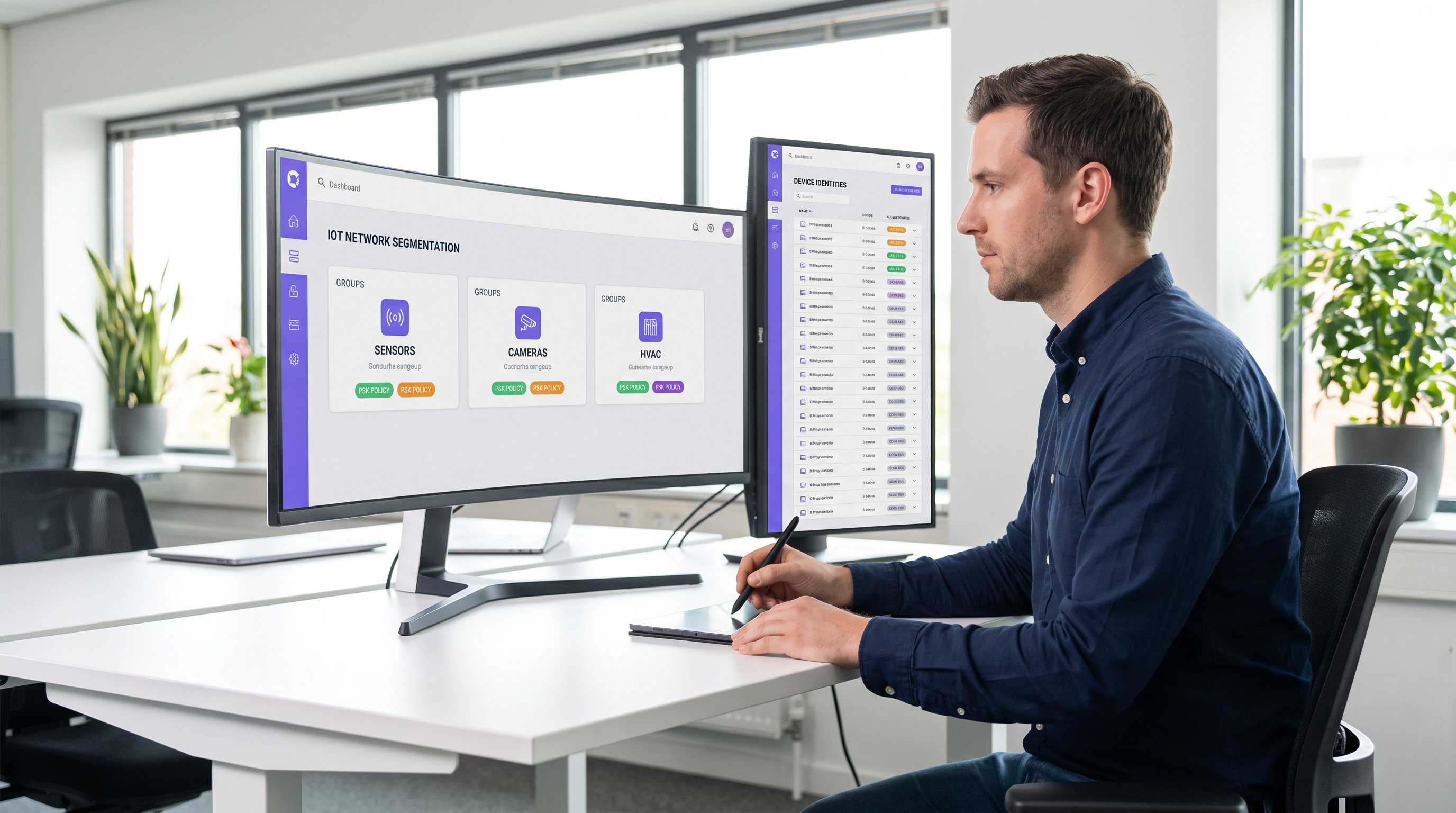
Identity Pre-Shared Key (iPSK) löst dies, indem einzelnen Geräten oder Funktionsgruppen eindeutige Anmeldedaten zugewiesen werden, während eine einzige SSID beibehalten wird. Durch die Integration mit einem RADIUS-Server weist iPSK dynamisch Virtual Local Area Networks (VLANs) zu und setzt granulare Zugriffsrichtlinien auf Ebene der Access Points durch. Diese Architektur macht komplexe 802.1X-Supplicants auf IoT-Hardware überflüssig und bietet Segmentierung auf Enterprise-Niveau ohne operativen Aufwand.
Für IT-Leiter und Netzwerkarchitekten in den Bereichen Hospitality , Retail und an öffentlichen Standorten ist iPSK die entscheidende Brücke zwischen robuster Sicherheit und nahtloser IoT-Bereitstellung. Dieser Leitfaden beschreibt die Architektur, die Implementierungsphasen und die operativen Best Practices, die für die skalierbare Bereitstellung von iPSK erforderlich sind.
Technischer Deep-Dive
Die Grenzen veralteter Authentifizierung
In herkömmlichen Unternehmensumgebungen stehen IT-Teams vor einem Dilemma: 802.1X für robusten identitätsbasierten Zugriff oder WPA2/WPA3-Personal (Pre-Shared Key) für mehr Einfachheit. Während 802.1X der Goldstandard für Unternehmens-Endpunkte ist – detailliert beschrieben in unserem Leitfaden zu 802.1X Authentication: Securing Network Access on Modern Devices – erfordert es einen Supplicant, der den meisten IoT-Geräten (intelligente Thermostate, Digital Signage, Sensors ) grundlegend fehlt.
Der Rückgriff auf ein Standard-PSK-Netzwerk schafft eine flache, unsegmentierte Umgebung. Wenn eine Schwachstelle in einer bestimmten Smart-TV-Marke entdeckt wird, ist das gesamte Netzwerk gefährdet. Das Ändern des Schlüssels erfordert den Zugriff auf jedes Gerät mit dieser SSID – eine operativ unmögliche Aufgabe in einem Hotel mit 500 Zimmern oder einem weitläufigen Einzelhandelsstandort.
Die iPSK-Architektur
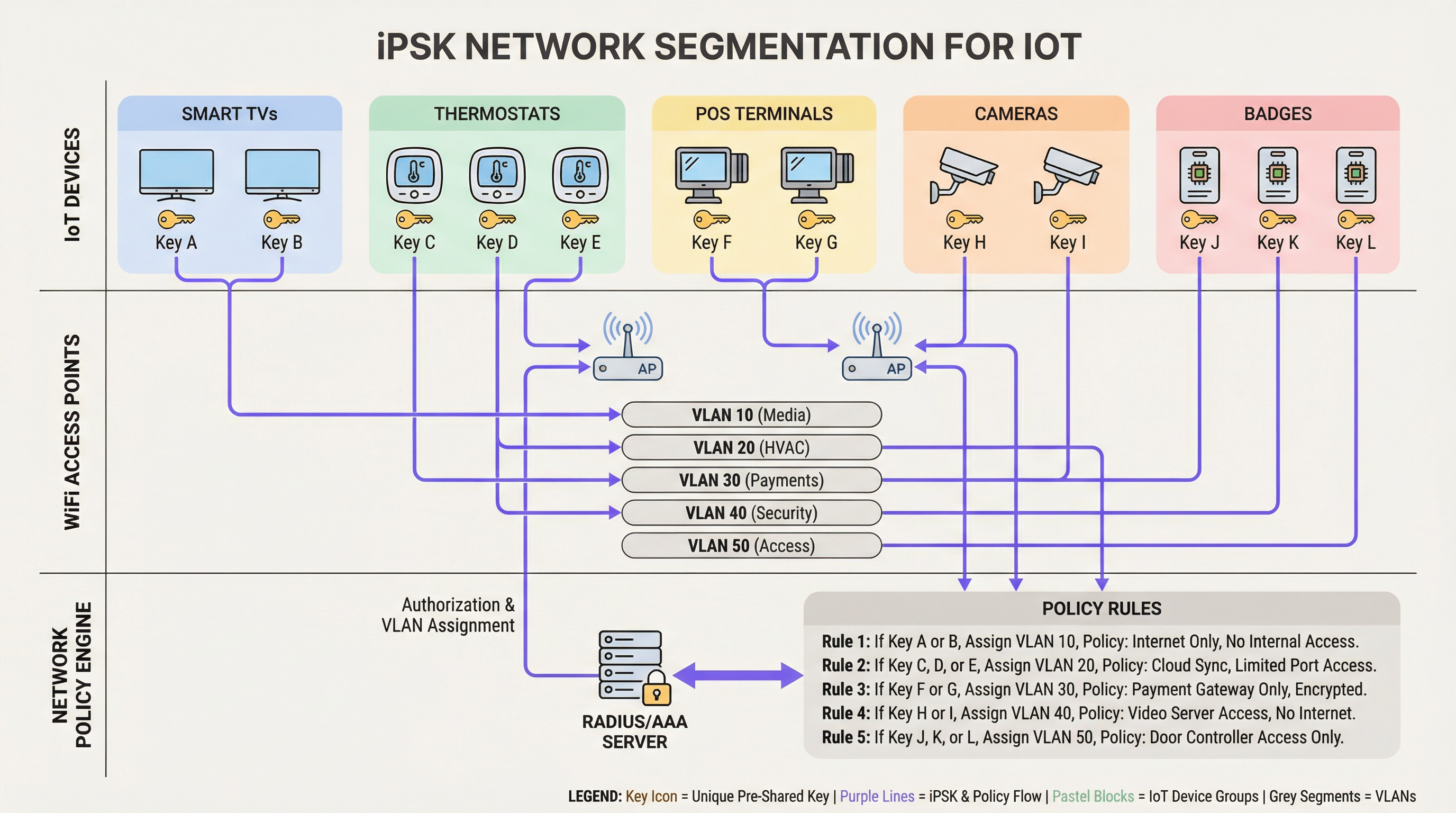
iPSK (je nach Anbieter auch als Multiple PSK oder Dynamic PSK bekannt) führt Identität in das PSK-Modell ein. Die Architektur basiert auf vier Kernkomponenten:
- Wireless Access Points (APs) / Controller: Die Edge-Infrastruktur muss iPSK unterstützen, die Assoziierungsanfrage des Clients abfangen und die MAC-Adresse sowie den PSK an den Authentifizierungsserver weiterleiten.
- RADIUS-Server (Policy Engine): Der Authentifizierungsserver (z. B. Cisco ISE, Aruba ClearPass, FreeRADIUS) fungiert als „Source of Truth“. Er validiert den PSK gegen die MAC-Adresse des Geräts oder das Gruppenprofil.
- Dynamische VLAN-Zuweisung: Nach erfolgreicher Authentifizierung sendet der RADIUS-Server eine
Access-Accept-Nachricht mit Standard-RADIUS-Attributen (wieTunnel-Type=VLANundTunnel-Private-Group-Id). Der AP weist den Client dynamisch dem vorgesehenen VLAN zu. - Policy Enforcement Point: Firewalls oder Layer-3-Switches wenden Access Control Lists (ACLs) auf das zugewiesene VLAN an und schränken so Seitwärtsbewegungen und den Internet-Egress ein.
WPA3 und iPSK
Moderne iPSK-Bereitstellungen sollten WPA3-Personal nutzen, sofern die Clients dies unterstützen. WPA3 führt Simultaneous Authentication of Equals (SAE) ein und ersetzt den anfälligen Four-Way-Handshake von WPA2. SAE schützt vor Offline-Wörterbuchangriffen und stellt sicher, dass ein Angreifer den PSK nicht per Brute-Force knacken kann, selbst wenn er den Handshake abfängt. Führende Enterprise-APs unterstützen den WPA3-Transition-Mode, sodass WPA2- und WPA3-Clients auf derselben iPSK-fähigen SSID koexistieren können.
Implementierungsleitfaden
Die Bereitstellung von iPSK erfordert eine methodische Planung, um Dienstunterbrechungen zu vermeiden. Für Unternehmensumgebungen wird der folgende phasenweise Ansatz empfohlen.
Phase 1: Geräteerkennung und Klassifizierung
Bevor Sie Netzwerkkonfigurationen ändern, erstellen Sie ein umfassendes Inventar aller drahtlosen IoT-Geräte. Kategorisieren Sie die Geräte nach Funktion, Anbieter und erforderlichem Netzwerkzugriff. Gängige Klassifizierungen in Standortumgebungen sind:
- Zahlung & POS: Kartenterminals, mobile POS-Tablets (hohe Sicherheit, PCI-relevant).
- Gebäudemanagement (BMS): HLK-Steuerungen, intelligente Beleuchtung, Umweltsensoren (nur intern, kein Internetzugang).
- Gästeservices: Smart-TVs, Casting-Geräte, Sprachassistenten (Internetzugang, isoliert von internen Netzwerken).
- Sicherheit: Drahtlose IP-Kameras, Türzugangskontrollen (hohe Bandbreite, nur interne Aufzeichnungsserver).
Phase 2: Vorbereitung der Infrastruktur
Konfigurieren Sie das zugrunde liegende kabelgebundene Netzwerk so, dass es die neue Segmentierungsstrategie unterstützt. Stellen Sie die erforderlichen VLANs in Ihrer Switching-Fabric bereit und definieren Sie strikte Inter-VLAN-Routing-Regeln. Für alle IoT-VLANs sollte eine Default-Deny-Haltung angewendet werden, die explizit nur notwendigen Datenverkehr zulässt (z. B. POS-Terminals den Zugriff auf bestimmte Payment-Gateways über Port 443 erlauben).
Stellen Sie sicher, dass Ihr RADIUS-Server hochverfügbar ist. iPSK führt eine harte Abhängigkeit von RADIUS für jede Client-Assoziierung ein. Stellen Sie redundante RADIUS-Knoten bereit, idealerweise geografisch verteilt, wenn Sie eine Multi-Site-WAN-Architektur verwalten. Weitere Informationen zum Design von Weitverkehrsnetzen finden Sie unter The Core SD WAN Benefits for Modern Businesses .
Phase 3: RADIUS- und WLAN-Konfiguration
Erstellen Sie in Ihrer RADIUS-Policy-Engine Gerätegruppen, die Ihren Klassifizierungen entsprechen. Generieren Sie zufällige PSKs mit hoher Entropie (mindestens 20 Zeichen) für jede Gruppe oder jedes einzelne Gerät. Ordnen Sie diese PSKs über RADIUS-Autorisierungsprofile ihren jeweiligen VLAN-IDs zu.
Konfigurieren Sie auf dem Wireless-Controller eine einzelne SSID (z. B. Venue_IoT) und aktivieren Sie die MAC-Filterung mit RADIUS-Authentifizierung. Konfigurieren Sie die SSID so, dass sie RADIUS-zugewiesene VLANs akzeptiert (oft als „AAA Override“ bezeichnet).
Phase 4: Pilotprojekt und Migration
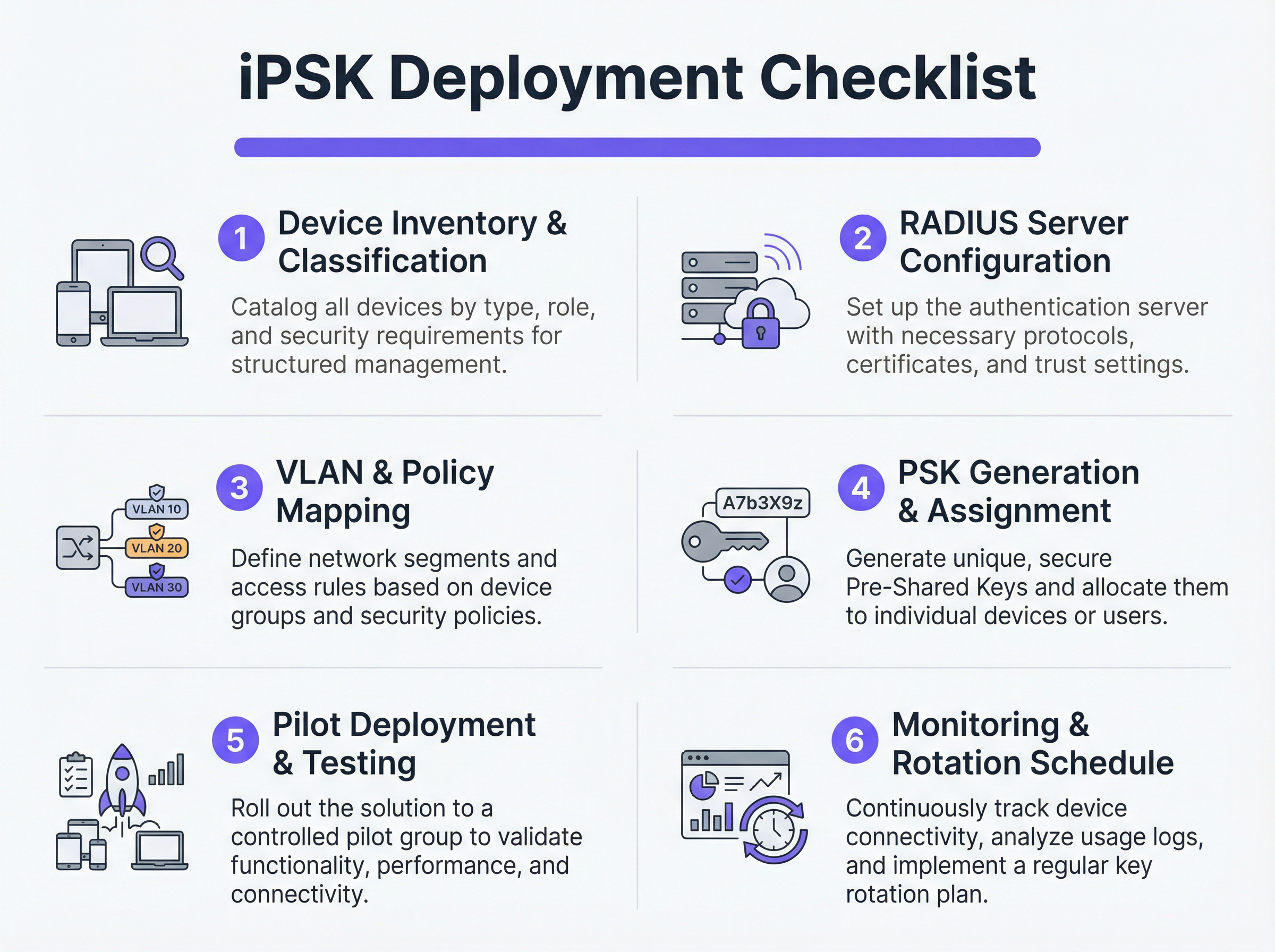
Versuchen Sie keine schlagartige Migration (Flash-Cut). Wählen Sie einen repräsentativen Pilotstandort oder eine bestimmte Gerätegruppe aus. Stellen Sie die neuen PSKs für die Pilotgeräte bereit und überwachen Sie die RADIUS-Protokolle. Überprüfen Sie, ob sich die Geräte erfolgreich authentifizieren, die korrekte VLAN-Zuweisung erhalten und innerhalb ihres eingeschränkten Netzwerksegments wie erwartet funktionieren.
Sobald dies validiert ist, fahren Sie mit einem schrittweisen Rollout fort. Nutzen Sie Mobile Device Management (MDM)-Plattformen, um neue Netzwerkprofile auf fähige Geräte zu übertragen, und koordinieren Sie sich mit den Facility-Teams, um Headless-IoT-Hardware manuell zu aktualisieren.
Best Practices
- Implementierung eines Default-Deny-Fallbacks: Wenn sich ein Gerät mit einem gültigen PSK verbindet, seine MAC-Adresse aber vom RADIUS-Server nicht erkannt wird, weisen Sie es einem „Quarantäne“-VLAN ohne Netzwerkzugriff zu. Dies verhindert, dass unbefugte Geräte bekannte Schlüssel mitbenutzen.
- Automatisierung des Schlüssel-Lebenszyklus-Managements: Die Verwaltung hunderter PSKs über Tabellenkalkulationen ist eine kritische Schwachstelle. Nutzen Sie API-gesteuerte RADIUS-Plattformen oder dedizierte iPSK-Managementportale, um die Generierung, Rotation und den Widerruf von Schlüsseln zu automatisieren.
- Risiken durch MAC-Spoofing begrenzen: Obwohl iPSK deutlich sicherer ist als Standard-PSK, basiert es oft auf MAC-Adressen als Teil der Identitätsbindung. Da MAC-Adressen gefälscht werden können, kombinieren Sie iPSK mit kontinuierlichem Profiling und Anomalieerkennung. Wenn ein Gerät, das sich als intelligentes Thermostat authentifiziert, plötzlich Traffic-Muster aufweist, die einem Windows-Laptop ähneln, sollte das System den Zugriff automatisch widerrufen.
- Integration mit Analytics: Speisen Sie Authentifizierungsprotokolle und Netzwerktelemetrie in Ihre WiFi Analytics -Plattform ein. Dies liefert Standortbetreibern verwertbare Erkenntnisse über Gerätezustand, Dichte und Auslastung.
Fehlerbehebung & Risikominderung
Häufige Fehlerszenarien
- RADIUS-Timeout/Unerreichbarkeit: Wenn der AP den RADIUS-Server nicht erreichen kann, schlägt die Authentifizierung der Clients fehl. Abhilfe: Implementieren Sie RADIUS-Server-Load-Balancing und stellen Sie sicher, dass lokale Ausfallsicherheitsfunktionen (wie das Caching von Anmeldedaten auf dem AP oder dem lokalen Controller) für kritische Infrastrukturen aktiviert sind.
- Erschöpfung des VLAN-Poolings: In dichten Umgebungen kann die Zuweisung zu vieler Geräte zu einem einzigen /24-Subnetz die DHCP-Bereiche erschöpfen. Abhilfe: Verwenden Sie VLAN-Pooling innerhalb des RADIUS-Autorisierungsprofils, um Clients auf mehrere Subnetze zu verteilen und gleichzeitig dieselbe logische Richtlinie beizubehalten.
- Probleme beim Client-Roaming: Einige ältere IoT-Geräte haben Probleme mit Fast Roaming (802.11r), wenn eine dynamische VLAN-Zuweisung im Spiel ist. Abhilfe: Wenn Roaming nicht erforderlich ist (z. B. bei einem fest installierten Smart-TV), deaktivieren Sie 802.11r auf der IoT-SSID, um die Kompatibilität zu maximieren. Für ein tieferes Verständnis der AP-Funktionen siehe Wireless Access Points Definition Your Ultimate 2026 Guide .
ROI & geschäftliche Auswirkungen
Die Implementierung von iPSK liefert messbare Erträge in den Bereichen Sicherheit, Betrieb und Compliance.
- Reduzierter Audit-Umfang: Durch die definitive Segmentierung von PCI- und PII-verarbeitenden Geräten in isolierte VLANs reduzieren Unternehmen den Umfang und die Kosten von Compliance-Audits (z. B. PCI DSS, HIPAA) drastisch.
- Operative Effizienz: Die Konsolidierung mehrerer zweckgebundener SSIDs (eine für POS, eine für AV, eine für Haustechnik) in einer einzigen iPSK-fähigen SSID reduziert Gleichkanalstörungen, verbessert die gesamte RF-Leistung und vereinfacht das Gästeerlebnis. Dies ist entscheidend für die Bereitstellung von Modern Hospitality WiFi Solutions Your Guests Deserve .
- Eindämmung von Vorfällen: Im Falle einer Gerätekompromittierung können Sicherheitsteams den spezifischen PSK sofort widerrufen oder das zugehörige VLAN unter Quarantäne stellen, ohne den restlichen Betrieb des Standorts zu beeinträchtigen.
Schlüsselbegriffe & Definitionen
iPSK (Identity Pre-Shared Key)
A wireless authentication method that allows multiple unique passwords to be used on a single SSID, with each password tying the device to a specific identity, VLAN, and policy.
Used by IT teams to secure headless IoT devices that cannot support enterprise 802.1X authentication.
RADIUS (Remote Authentication Dial-In User Service)
A networking protocol that provides centralized Authentication, Authorization, and Accounting (AAA) management for users or devices connecting to a network service.
Acts as the policy engine in an iPSK deployment, verifying the password and telling the access point which VLAN to assign.
Dynamic VLAN Assignment
The process where a network switch or access point places a connecting device into a specific Virtual LAN based on credentials provided during authentication, rather than the physical port or SSID.
Essential for network segmentation, allowing payment terminals and smart TVs to share an SSID but remain on completely separate networks.
Headless Device
A piece of hardware (like a sensor, thermostat, or camera) that lacks a traditional user interface, screen, or keyboard.
These devices cannot easily run the complex software (supplicants) required for standard enterprise security, making iPSK the ideal solution.
MAC Spoofing
A technique where a malicious actor changes the factory-assigned Media Access Control (MAC) address of their network interface to impersonate a legitimate device.
A key risk in IoT networks; IT teams must use behavioral profiling alongside iPSK to detect when a laptop is pretending to be a printer.
SAE (Simultaneous Authentication of Equals)
The secure key establishment protocol used in WPA3, which replaces the WPA2 four-way handshake and protects against offline dictionary attacks.
When deploying modern iPSK, utilizing WPA3/SAE ensures that even if an attacker captures the connection traffic, they cannot crack the password.
Endpoint Profiling
The continuous analysis of a device's network behavior, HTTP user agents, and traffic patterns to accurately determine its manufacturer, model, and operating system.
Used to validate that a device connecting to the network is actually what it claims to be, adding a layer of security beyond just the password.
PCI DSS Scope
The subset of an organization's network, systems, and personnel that store, process, or transmit cardholder data, and are therefore subject to strict security audits.
By using iPSK to force all payment terminals onto an isolated VLAN, organizations drastically shrink their PCI scope, saving time and money on compliance.
Fallstudien
A 400-room luxury hotel is deploying new smart TVs, wireless VoIP phones for housekeeping, and a fleet of mobile POS terminals for the pool bar. They currently use three separate SSIDs with standard WPA2 passwords. The IT Director wants to consolidate to a single SSID while ensuring the POS terminals meet PCI compliance. How should they architect the iPSK solution?
- Create three distinct device groups in the RADIUS server: 'Guest_Media', 'Staff_VoIP', and 'Retail_POS'.
- Generate a unique PSK for each group (or ideally, unique PSKs per device if the management platform supports it).
- Map 'Guest_Media' to VLAN 100 (Internet only, client isolation enabled).
- Map 'Staff_VoIP' to VLAN 200 (Access to internal PBX server, QoS tags applied).
- Map 'Retail_POS' to VLAN 300 (Strict ACLs allowing only outbound traffic to the payment gateway over port 443; no lateral movement).
- Broadcast a single SSID ('Hotel_IoT') with iPSK enabled. When a POS terminal connects using its specific PSK, the RADIUS server dynamically assigns it to VLAN 300, instantly satisfying PCI segmentation requirements.
A large retail chain uses iPSK for their digital signage and inventory scanners. During a routine audit, the security team discovers that an employee brought a personal gaming console from home, entered the PSK intended for the digital signage, and successfully connected to the network. How can this be prevented in the future?
The network team must implement MAC-to-PSK binding within the RADIUS policy.
- Update the RADIUS configuration so that authentication requires both the correct PSK AND a MAC address that exists in the authorized 'Digital_Signage' endpoint database.
- Implement a 'Default-Deny' or 'Quarantine' authorization profile. If a device presents the correct PSK but an unknown MAC address, the RADIUS server should return an Access-Accept but assign the device to a dead-end VLAN (e.g., VLAN 999) with no DHCP or routing.
- Enable endpoint profiling to detect MAC spoofing (e.g., identifying if a device claiming to be a Samsung display is exhibiting the network behavior of an Xbox).
Szenarioanalyse
Q1. You are deploying iPSK across a stadium environment for 500 digital signage displays. You have the option to generate one unique PSK for all 500 displays (Group PSK) or 500 individual PSKs (Unique PSK per device). Which approach should you choose, and what is the primary operational trade-off?
💡 Hinweis:Consider what happens if a single display is stolen or compromised, versus the administrative overhead of managing the initial deployment.
Empfohlenen Ansatz anzeigen
You should aim for Unique PSK per device if your RADIUS and MDM tooling supports automated provisioning. This provides the highest security: if one display is compromised, you revoke a single key without affecting the other 499. However, the operational trade-off is significant administrative overhead during deployment. If automated provisioning is not available, a Group PSK (one key for all 500 displays) is acceptable, provided it is combined with strict MAC address authorization and endpoint profiling to prevent credential sharing.
Q2. During an iPSK pilot deployment, smart thermostats are successfully authenticating and receiving their correct VLAN assignment from the RADIUS server. However, they are failing to obtain an IP address. Laptops placed on the same SSID (for testing) connect and get an IP without issue. What is the most likely cause?
💡 Hinweis:Think about how access points handle broadcast traffic and client roaming features that legacy IoT devices might not understand.
Empfohlenen Ansatz anzeigen
The most likely cause is an incompatibility with 802.11r (Fast BSS Transition). Many legacy IoT devices, including smart thermostats, do not understand the 802.11r Information Elements in the AP's beacon frames and will fail to complete the DHCP process or associate properly, even if the RADIUS authentication succeeds. The solution is to disable 802.11r on the specific SSID used for IoT devices, as stationary sensors do not require fast roaming capabilities.
Q3. A retail client wants to use iPSK to secure their mobile POS tablets. They insist on using a cloud-based RADIUS provider. What architectural risk does this introduce, and how must the network engineer mitigate it?
💡 Hinweis:Consider the path the authentication request must take and what happens if the WAN link goes down.
Empfohlenen Ansatz anzeigen
Using a cloud RADIUS provider introduces a hard dependency on the WAN connection for local authentication. If the retail store's internet connection drops, the APs cannot reach the RADIUS server, meaning mobile POS tablets cannot authenticate or roam, halting sales. The engineer must mitigate this by enabling local survivability features on the branch APs or controllers (such as caching recent successful authentications) or deploying a local, lightweight RADIUS proxy/replica at the branch site.
Wichtigste Erkenntnisse
- ✓iPSK eliminates the shared-password vulnerability of standard WPA2/WPA3-Personal networks by assigning unique keys to devices or groups.
- ✓It enables dynamic VLAN assignment and policy enforcement for headless IoT devices that cannot support 802.1X supplicants.
- ✓A comprehensive device inventory is the mandatory first step before configuring RADIUS policies or network segments.
- ✓Deployments must include a default-deny or quarantine VLAN for devices that present valid keys but fail MAC authorization.
- ✓iPSK significantly reduces compliance audit scope (e.g., PCI DSS) by physically and logically isolating sensitive devices on the network.




