

Implementar iPSK (Identity Pre-Shared Key) para Redes IoT Seguras
Este guia detalhado explica como implementar a arquitetura Identity Pre-Shared Key (iPSK) para proteger ambientes IoT empresariais. Fornece etapas de implementação práticas, estratégias de segmentação de VLAN e estruturas de conformidade para operadores de rede nos setores de hotelaria, retalho e setor público.
🎧 Ouça este Guia
Ver Transcrição
Resumo Executivo
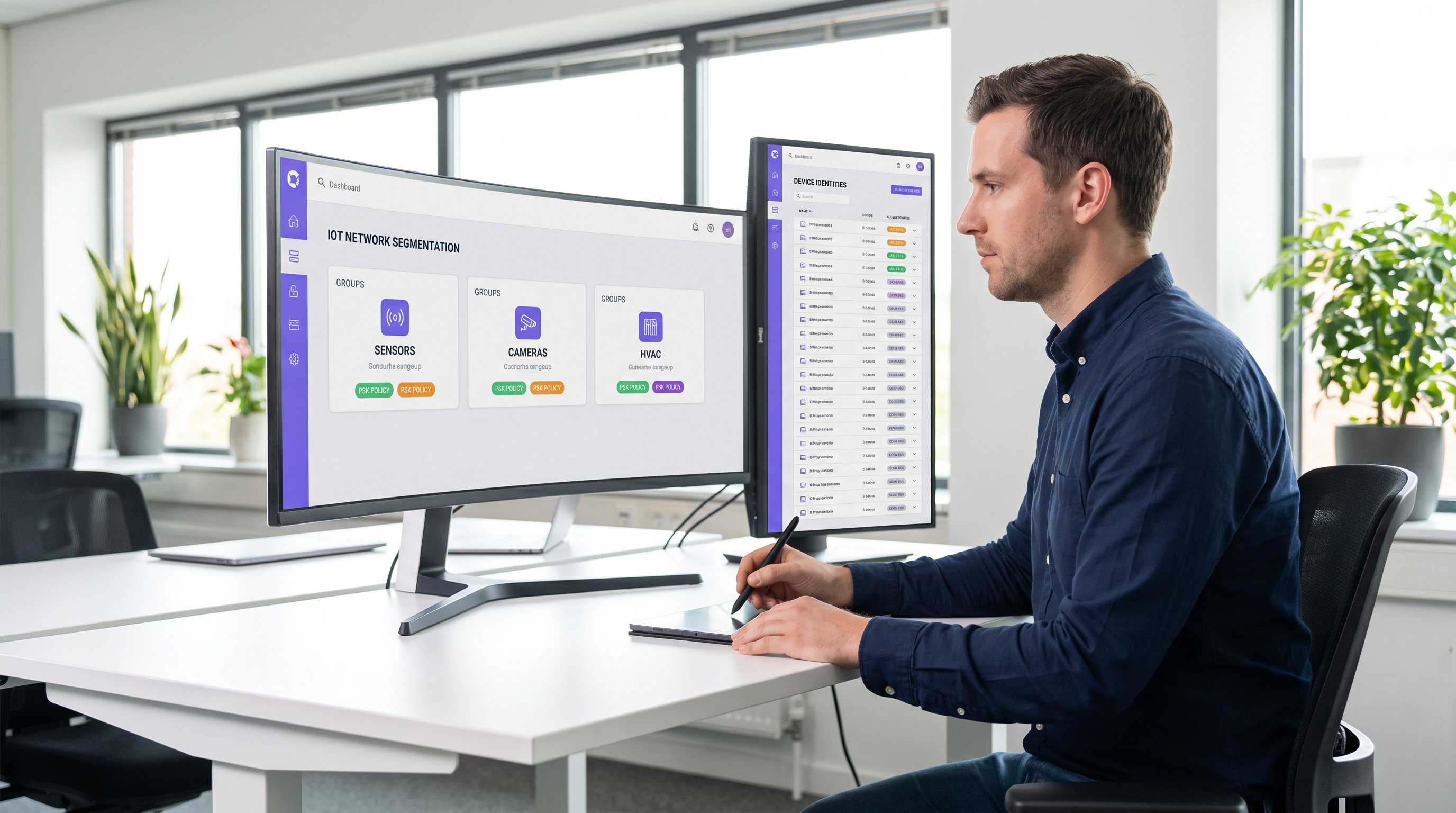
A proteção da extremidade sem fios empresarial evoluiu da gestão de portáteis de funcionários para a governação de milhares de dispositivos IoT sem interface (headless). As redes WPA2-Personal tradicionais, que dependem de uma única frase-passe partilhada universalmente, criam perfis de risco inaceitáveis para recintos modernos. Um único dispositivo comprometido ou uma palavra-passe partilhada expõe todo o segmento de rede, violando estruturas de conformidade e complicando a resposta a incidentes.
Identity Pre-Shared Key (iPSK) resolve este problema ao atribuir credenciais únicas a dispositivos individuais ou grupos funcionais, mantendo um único SSID. Ao integrar-se com um servidor RADIUS, a iPSK atribui dinamicamente Redes Locais Virtuais (VLANs) e aplica políticas de acesso granulares ao nível do ponto de acesso. Esta arquitetura elimina a necessidade de suplicantes 802.1X complexos em hardware IoT, proporcionando segmentação de nível empresarial sem fricção operacional.
Para diretores de TI e arquitetos de rede em Hotelaria , Retalho e recintos públicos, a iPSK é a ponte definitiva entre uma segurança robusta e a implementação simples de IoT. Este guia detalha a arquitetura, as fases de implementação e as melhores práticas operacionais necessárias para implementar a iPSK em escala.
Análise Técnica Aprofundada
As Limitações da Autenticação Legada
Nas implementações empresariais convencionais, as equipas de TI enfrentam uma dicotomia: utilizar 802.1X para um acesso robusto baseado na identidade, ou utilizar WPA2/WPA3-Personal (Pre-Shared Key) para simplificar. Embora o 802.1X seja o padrão de excelência para terminais corporativos — detalhado no nosso guia sobre Autenticação 802.1X: Proteger o Acesso à Rede em Dispositivos Modernos — este requer um suplicante, algo que a maioria dos dispositivos IoT (termóstatos inteligentes, sinalização digital, Sensors ) fundamentalmente não possui.
Recorrer a uma rede PSK padrão cria um ambiente plano e não segmentado. Se for descoberta uma vulnerabilidade numa marca específica de smart TV, toda a rede fica em risco. Rodar a chave requer intervir em todos os dispositivos nesse SSID, uma tarefa operacionalmente proibitiva num hotel de 500 quartos ou numa vasta propriedade de retalho.
A Arquitetura iPSK
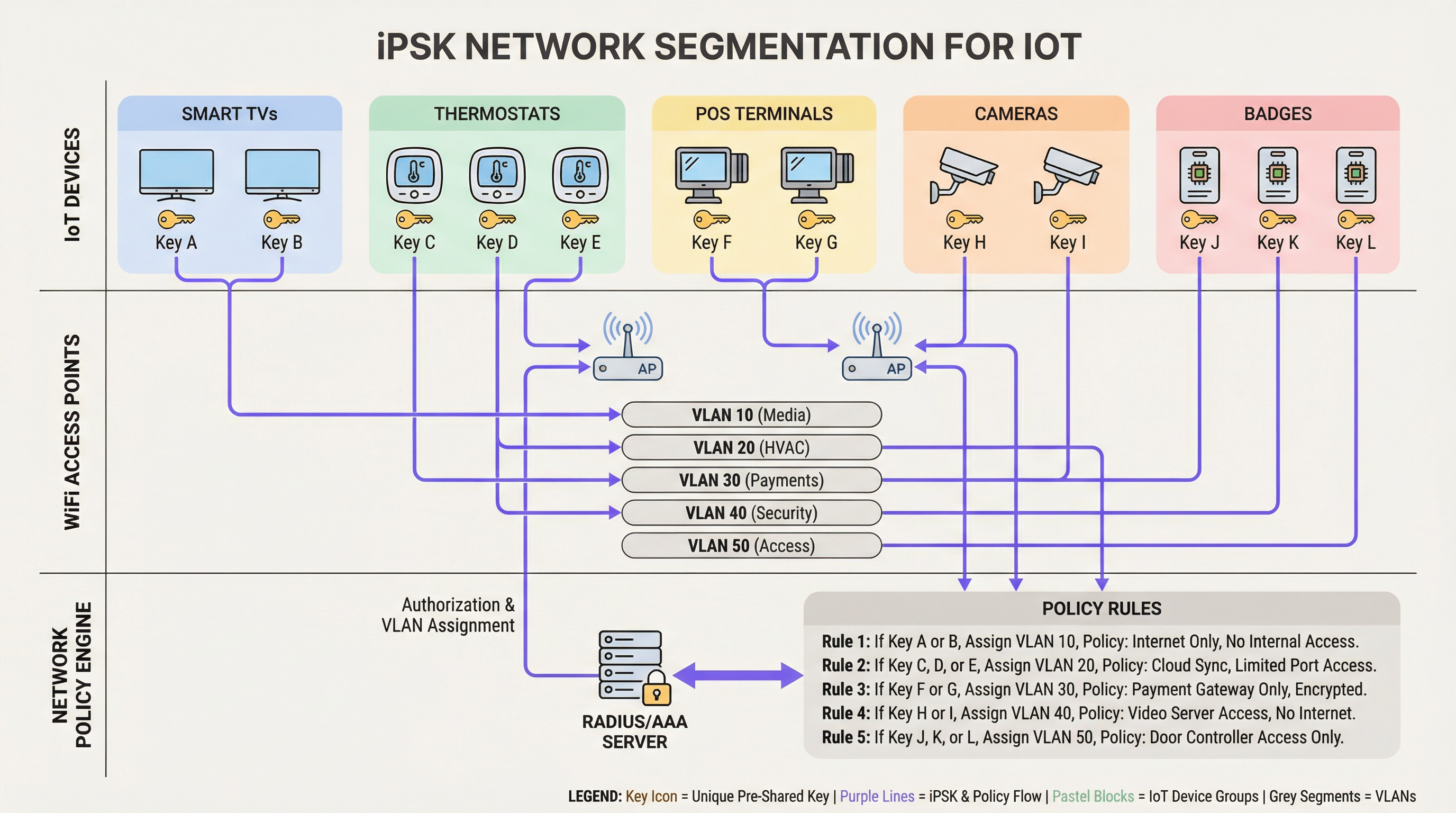
A iPSK (também conhecida como Multiple PSK ou Dynamic PSK, dependendo do fornecedor) introduz a identidade no modelo PSK. A arquitetura baseia-se em quatro componentes principais:
- Pontos de Acesso Sem Fios (APs) / Controladores: A infraestrutura de extremidade deve suportar iPSK, intercetando o pedido de associação do cliente e passando o endereço MAC e a PSK para o servidor de autenticação.
- Servidor RADIUS (Motor de Políticas): O servidor de autenticação (ex: Cisco ISE, Aruba ClearPass, FreeRADIUS) atua como a fonte da verdade. Valida a PSK contra o endereço MAC do dispositivo ou perfil de grupo.
- Atribuição Dinâmica de VLAN: Após a autenticação bem-sucedida, o servidor RADIUS devolve uma mensagem
Access-Acceptcontendo atributos RADIUS padrão (tais comoTunnel-Type=VLANeTunnel-Private-Group-Id). O AP coloca dinamicamente o cliente na VLAN designada. - Ponto de Aplicação de Políticas: Firewalls ou switches de Camada 3 aplicam Listas de Controlo de Acesso (ACLs) à VLAN atribuída, restringindo o movimento lateral e a saída para a internet.
WPA3 e iPSK
As implementações modernas de iPSK devem tirar partido do WPA3-Personal onde o suporte do cliente o permitir. O WPA3 introduz a Autenticação Simultânea de Iguais (SAE), substituindo o vulnerável handshake de quatro vias do WPA2. O SAE protege contra ataques de dicionário offline, garantindo que, mesmo que um atacante capture o handshake, não consiga forçar a PSK. Os APs empresariais líderes suportam o modo de transição WPA3, permitindo que clientes WPA2 e WPA3 coexistam no mesmo SSID habilitado para iPSK.
Guia de Implementação
Implementar a iPSK requer um planeamento metódico para evitar a interrupção do serviço. A seguinte abordagem faseada é recomendada para ambientes empresariais.
Fase 1: Descoberta e Classificação de Dispositivos
Antes de alterar as configurações de rede, estabeleça um inventário abrangente de todos os dispositivos IoT sem fios. Categorize os dispositivos com base na função, fornecedor e acesso à rede necessário. As classificações comuns em ambientes de recintos incluem:
- Pagamentos e POS: Terminais de cartões, tablets de POS móveis (Alta Segurança, âmbito PCI).
- Gestão de Edifícios (BMS): Controladores de AVAC, iluminação inteligente, sensores ambientais (Apenas interno, sem acesso à internet).
- Serviços para Hóspedes: Smart TVs, dispositivos de casting, assistentes de voz (Acesso à internet, isolados das redes internas).
- Segurança: Câmaras IP sem fios, controladores de acesso a portas (Alta largura de banda, apenas servidores de gravação internos).
Fase 2: Preparação da Infraestrutura
Configure a rede com fios subjacente para suportar a nova estratégia de segmentação. Provisione as VLANs necessárias em toda a sua estrutura de switching e defina regras rigorosas de encaminhamento entre VLANs. Deve ser aplicada uma postura de negação por defeito (default-deny) a todas as VLANs IoT, permitindo explicitamente apenas o tráfego necessário (ex: permitir que os terminais POS alcancem gateways de pagamento específicos através da porta 443).
Certifique-se de que o seu servidor RADIUS tem alta disponibilidade. A iPSK introduz uma dependência crítica do RADIUS para cada associação de cliente. Implemente nós RADIUS redundantes, idealmente distribuídos geograficamente se estiver a gerir uma arquitetura WAN multi-site. Para saber mais sobre o design de redes de área alargada, reveja Os Principais Benefícios da SD WAN para Empresas Modernas .
Fase 3: Configuração de RADIUS e WLAN
Dentro do seu motor de políticas RADIUS, crie grupos de dispositivos correspondentes às suas classificações. Gere PSKs aleatórias de alta entropia (mínimo de 20 caracteres) para cada grupo ou dispositivo individual. Mapeie estas PSKs para os respetivos IDs de VLAN através de perfis de autorização RADIUS.
No controlador sem fios, configure um único SSID (ex: Venue_IoT) e ative a filtragem de MAC com autenticação RADIUS. Configure o SSID para aceitar VLANs atribuídas por RADIUS (frequentemente designado como 'AAA Override').
Fase 4: Piloto e Migração
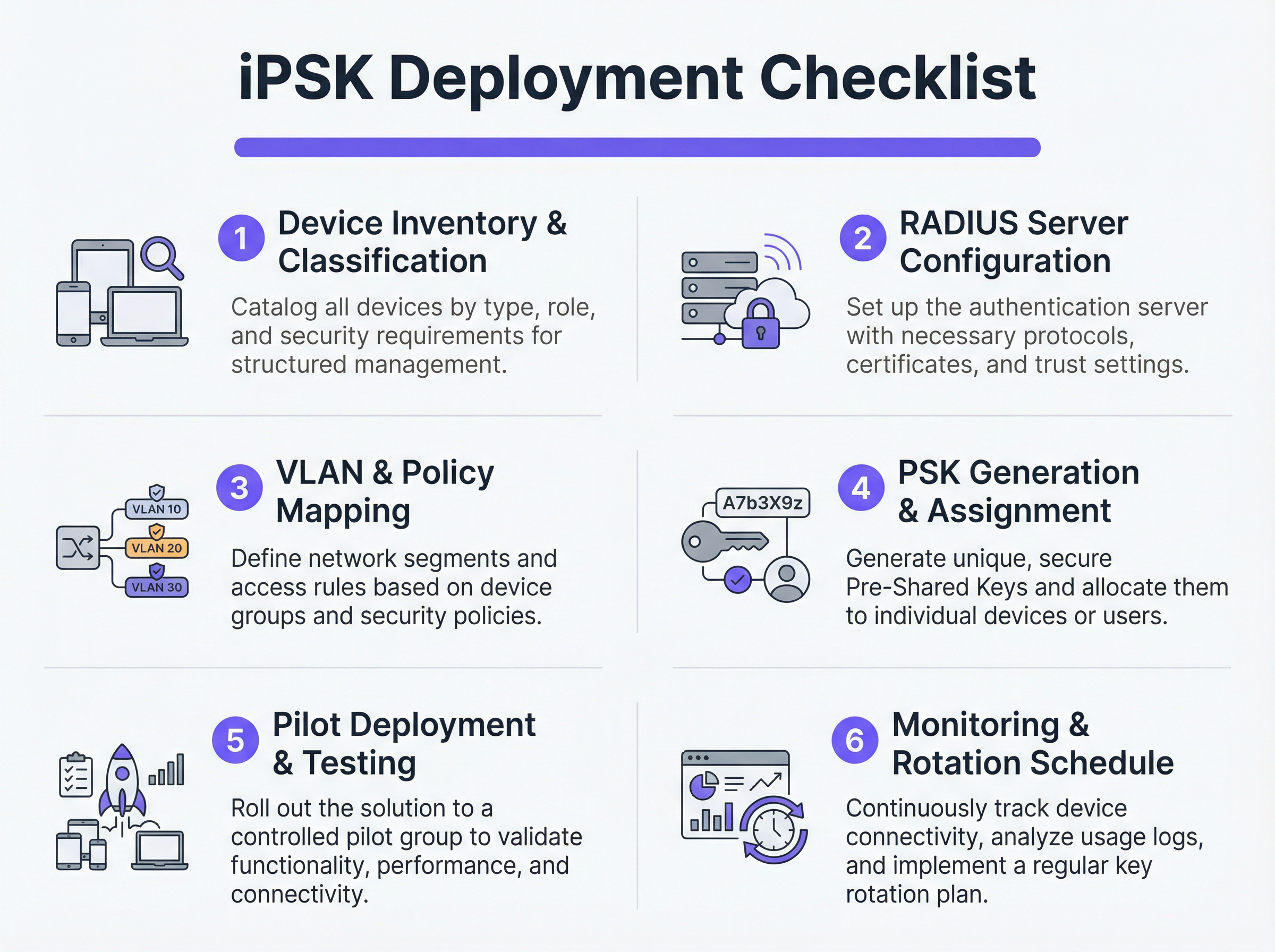
Não tente uma migração de corte imediato (flash-cut). Selecione um site piloto representativo ou um grupo de dispositivos específico. Provisione as novas PSKs nos dispositivos piloto e monitorize os registos RADIUS. Verifique se os dispositivos estão a autenticar-se com sucesso, a receber a atribuição de VLAN correta e a funcionar como esperado dentro do seu segmento de rede restrito.
Uma vez validado, proceda com uma implementação faseada. Utilize plataformas de Gestão de Dispositivos Móveis (MDM) para enviar novos perfis de rede para dispositivos compatíveis e coordene com as equipas de instalações para atualizar manualmente o hardware IoT sem interface.
Melhores Práticas
- Implementar um Fallback de Negação por Defeito: Se um dispositivo se ligar com uma PSK válida mas o seu endereço MAC não for reconhecido pelo servidor RADIUS, atribua-o a uma VLAN de 'quarentena' com zero acesso à rede. Isto evita que dispositivos não autorizados se aproveitem de chaves conhecidas.
- Automatizar a Gestão do Ciclo de Vida das Chaves: Depender de folhas de cálculo para gerir centenas de PSKs é uma vulnerabilidade crítica. Utilize plataformas RADIUS baseadas em API ou portais de gestão iPSK dedicados para automatizar a geração, rotação e revogação de chaves.
- Limitar Riscos de Spoofing de MAC: Embora a iPSK seja significativamente mais segura do que a PSK padrão, depende frequentemente de endereços MAC como parte da vinculação de identidade. Como os endereços MAC podem ser falsificados, combine a iPSK com a criação contínua de perfis e deteção de anomalias. Se um dispositivo autenticado como um termóstato inteligente exibir subitamente padrões de tráfego semelhantes aos de um portátil Windows, o sistema deve revogar automaticamente o acesso.
- Integrar com Analytics: Envie os registos de autenticação e a telemetria de rede para a sua plataforma de WiFi Analytics . Isto fornece aos operadores de recintos informações acionáveis sobre o estado, densidade e utilização dos dispositivos.
Resolução de Problemas e Mitigação de Riscos
Modos de Falha Comuns
- Timeout/Inacessibilidade do RADIUS: Se o AP não conseguir alcançar o servidor RADIUS, os clientes não conseguirão autenticar-se. Mitigação: Implemente o equilíbrio de carga do servidor RADIUS e garanta que as funcionalidades de sobrevivência local (como o armazenamento de credenciais em cache no AP ou controlador local) estão ativadas para infraestruturas críticas.
- Esgotamento de Pooling de VLAN: Em ambientes densos, a atribuição de demasiados dispositivos a uma única sub-rede /24 pode esgotar os âmbitos DHCP. Mitigação: Utilize o pooling de VLAN dentro do perfil de autorização RADIUS para distribuir os clientes por várias sub-redes, mantendo a mesma política lógica.
- Problemas de Roaming do Cliente: Alguns dispositivos IoT legados têm dificuldade com o roaming rápido (802.11r) quando a atribuição dinâmica de VLAN está em jogo. Mitigação: Se o roaming não for necessário (ex: para uma smart TV fixa), desative o 802.11r no SSID IoT para maximizar a compatibilidade. Para uma compreensão mais profunda das capacidades dos APs, consulte Definição de Pontos de Acesso Sem Fios: O Seu Guia Definitivo para 2026 .
ROI e Impacto no Negócio
A implementação da iPSK proporciona retornos mensuráveis nos domínios da segurança, operações e conformidade.
- Âmbito de Auditoria Reduzido: Ao segmentar definitivamente os dispositivos que lidam com PCI e PII em VLANs isoladas, as organizações reduzem drasticamente o âmbito e o custo das auditorias de conformidade (ex: PCI DSS, HIPAA).
- Eficiência Operacional: A consolidação de múltiplos SSIDs criados para fins específicos (um para POS, um para AV, um para instalações) num único SSID habilitado para iPSK reduz a interferência de co-canal, melhora o desempenho geral de RF e simplifica a experiência do hóspede. Isto é crucial para oferecer as Soluções WiFi Modernas para Hotelaria que os Seus Hóspedes Merecem .
- Contenção de Incidentes: No caso de um dispositivo ser comprometido, as equipas de segurança podem revogar instantaneamente a PSK específica ou colocar a VLAN associada em quarentena sem afetar o resto das operações do recinto.
Termos-Chave e Definições
iPSK (Identity Pre-Shared Key)
A wireless authentication method that allows multiple unique passwords to be used on a single SSID, with each password tying the device to a specific identity, VLAN, and policy.
Used by IT teams to secure headless IoT devices that cannot support enterprise 802.1X authentication.
RADIUS (Remote Authentication Dial-In User Service)
A networking protocol that provides centralized Authentication, Authorization, and Accounting (AAA) management for users or devices connecting to a network service.
Acts as the policy engine in an iPSK deployment, verifying the password and telling the access point which VLAN to assign.
Dynamic VLAN Assignment
The process where a network switch or access point places a connecting device into a specific Virtual LAN based on credentials provided during authentication, rather than the physical port or SSID.
Essential for network segmentation, allowing payment terminals and smart TVs to share an SSID but remain on completely separate networks.
Headless Device
A piece of hardware (like a sensor, thermostat, or camera) that lacks a traditional user interface, screen, or keyboard.
These devices cannot easily run the complex software (supplicants) required for standard enterprise security, making iPSK the ideal solution.
MAC Spoofing
A technique where a malicious actor changes the factory-assigned Media Access Control (MAC) address of their network interface to impersonate a legitimate device.
A key risk in IoT networks; IT teams must use behavioral profiling alongside iPSK to detect when a laptop is pretending to be a printer.
SAE (Simultaneous Authentication of Equals)
The secure key establishment protocol used in WPA3, which replaces the WPA2 four-way handshake and protects against offline dictionary attacks.
When deploying modern iPSK, utilizing WPA3/SAE ensures that even if an attacker captures the connection traffic, they cannot crack the password.
Endpoint Profiling
The continuous analysis of a device's network behavior, HTTP user agents, and traffic patterns to accurately determine its manufacturer, model, and operating system.
Used to validate that a device connecting to the network is actually what it claims to be, adding a layer of security beyond just the password.
PCI DSS Scope
The subset of an organization's network, systems, and personnel that store, process, or transmit cardholder data, and are therefore subject to strict security audits.
By using iPSK to force all payment terminals onto an isolated VLAN, organizations drastically shrink their PCI scope, saving time and money on compliance.
Estudos de Caso
A 400-room luxury hotel is deploying new smart TVs, wireless VoIP phones for housekeeping, and a fleet of mobile POS terminals for the pool bar. They currently use three separate SSIDs with standard WPA2 passwords. The IT Director wants to consolidate to a single SSID while ensuring the POS terminals meet PCI compliance. How should they architect the iPSK solution?
- Create three distinct device groups in the RADIUS server: 'Guest_Media', 'Staff_VoIP', and 'Retail_POS'.
- Generate a unique PSK for each group (or ideally, unique PSKs per device if the management platform supports it).
- Map 'Guest_Media' to VLAN 100 (Internet only, client isolation enabled).
- Map 'Staff_VoIP' to VLAN 200 (Access to internal PBX server, QoS tags applied).
- Map 'Retail_POS' to VLAN 300 (Strict ACLs allowing only outbound traffic to the payment gateway over port 443; no lateral movement).
- Broadcast a single SSID ('Hotel_IoT') with iPSK enabled. When a POS terminal connects using its specific PSK, the RADIUS server dynamically assigns it to VLAN 300, instantly satisfying PCI segmentation requirements.
A large retail chain uses iPSK for their digital signage and inventory scanners. During a routine audit, the security team discovers that an employee brought a personal gaming console from home, entered the PSK intended for the digital signage, and successfully connected to the network. How can this be prevented in the future?
The network team must implement MAC-to-PSK binding within the RADIUS policy.
- Update the RADIUS configuration so that authentication requires both the correct PSK AND a MAC address that exists in the authorized 'Digital_Signage' endpoint database.
- Implement a 'Default-Deny' or 'Quarantine' authorization profile. If a device presents the correct PSK but an unknown MAC address, the RADIUS server should return an Access-Accept but assign the device to a dead-end VLAN (e.g., VLAN 999) with no DHCP or routing.
- Enable endpoint profiling to detect MAC spoofing (e.g., identifying if a device claiming to be a Samsung display is exhibiting the network behavior of an Xbox).
Análise de Cenários
Q1. You are deploying iPSK across a stadium environment for 500 digital signage displays. You have the option to generate one unique PSK for all 500 displays (Group PSK) or 500 individual PSKs (Unique PSK per device). Which approach should you choose, and what is the primary operational trade-off?
💡 Dica:Consider what happens if a single display is stolen or compromised, versus the administrative overhead of managing the initial deployment.
Mostrar Abordagem Recomendada
You should aim for Unique PSK per device if your RADIUS and MDM tooling supports automated provisioning. This provides the highest security: if one display is compromised, you revoke a single key without affecting the other 499. However, the operational trade-off is significant administrative overhead during deployment. If automated provisioning is not available, a Group PSK (one key for all 500 displays) is acceptable, provided it is combined with strict MAC address authorization and endpoint profiling to prevent credential sharing.
Q2. During an iPSK pilot deployment, smart thermostats are successfully authenticating and receiving their correct VLAN assignment from the RADIUS server. However, they are failing to obtain an IP address. Laptops placed on the same SSID (for testing) connect and get an IP without issue. What is the most likely cause?
💡 Dica:Think about how access points handle broadcast traffic and client roaming features that legacy IoT devices might not understand.
Mostrar Abordagem Recomendada
The most likely cause is an incompatibility with 802.11r (Fast BSS Transition). Many legacy IoT devices, including smart thermostats, do not understand the 802.11r Information Elements in the AP's beacon frames and will fail to complete the DHCP process or associate properly, even if the RADIUS authentication succeeds. The solution is to disable 802.11r on the specific SSID used for IoT devices, as stationary sensors do not require fast roaming capabilities.
Q3. A retail client wants to use iPSK to secure their mobile POS tablets. They insist on using a cloud-based RADIUS provider. What architectural risk does this introduce, and how must the network engineer mitigate it?
💡 Dica:Consider the path the authentication request must take and what happens if the WAN link goes down.
Mostrar Abordagem Recomendada
Using a cloud RADIUS provider introduces a hard dependency on the WAN connection for local authentication. If the retail store's internet connection drops, the APs cannot reach the RADIUS server, meaning mobile POS tablets cannot authenticate or roam, halting sales. The engineer must mitigate this by enabling local survivability features on the branch APs or controllers (such as caching recent successful authentications) or deploying a local, lightweight RADIUS proxy/replica at the branch site.
Principais Conclusões
- ✓iPSK eliminates the shared-password vulnerability of standard WPA2/WPA3-Personal networks by assigning unique keys to devices or groups.
- ✓It enables dynamic VLAN assignment and policy enforcement for headless IoT devices that cannot support 802.1X supplicants.
- ✓A comprehensive device inventory is the mandatory first step before configuring RADIUS policies or network segments.
- ✓Deployments must include a default-deny or quarantine VLAN for devices that present valid keys but fail MAC authorization.
- ✓iPSK significantly reduces compliance audit scope (e.g., PCI DSS) by physically and logically isolating sensitive devices on the network.




