

LAN vs. WAN: Den Unterschied bei WiFi-Bereitstellungen verstehen
A technical reference for IT leaders and venue operators on the critical differences between LAN and WAN in enterprise WiFi deployments. This guide provides actionable architectural insights, implementation best practices, and clarifies how understanding this distinction drives ROI for guest WiFi and operational intelligence.
🎧 Diesen Leitfaden anhören
Transkript anzeigen
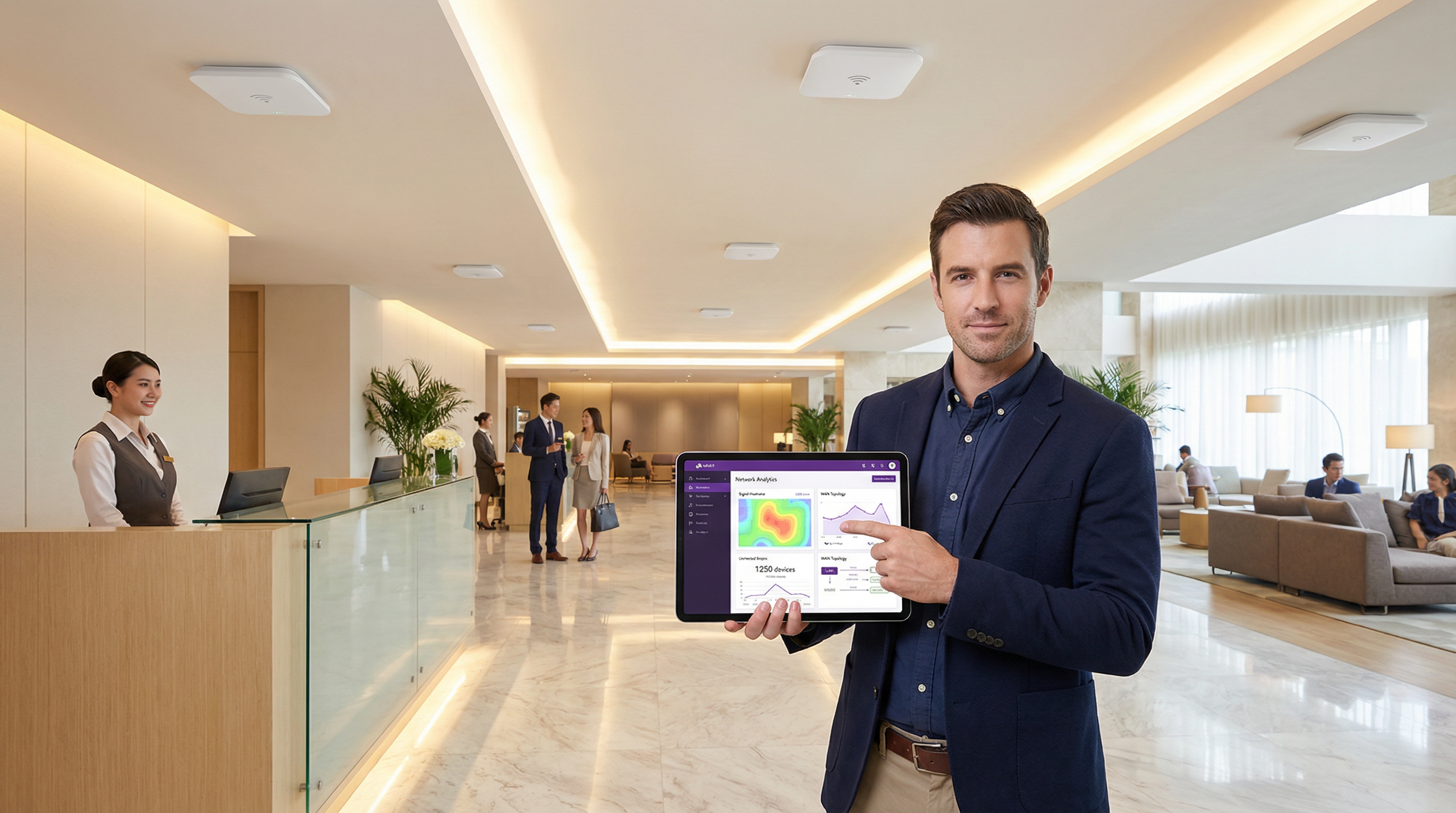
Executive Summary
Für IT-Führungskräfte und Netzwerkarchitekten ist die Unterscheidung zwischen einem Local Area Network (LAN) und einem Wide Area Network (WAN) grundlegend. Dennoch ist die praktische Anwendung bei großflächigen WiFi-Bereitstellungen oft eine Quelle erheblicher Komplexität und Budgetüberschreitungen. Ein LAN bietet Hochgeschwindigkeitskonnektivität mit geringer Latenz innerhalb eines begrenzten physischen Bereichs – einem einzelnen Hotel, einem Einzelhandelsgeschäft oder einer Konferenzetage. Ein WAN hingegen verbindet mehrere LANs über eine große geografische Entfernung und ermöglicht es beispielsweise einer Einzelhandelskette, ihre Filialen zu vernetzen, oder einer Hotelgruppe, ihre Standorte an ein zentrales Rechenzentrum anzubinden. Ein Missverständnis dieser Grenze führt zu einem schlechten Netzwerkdesign, was Leistungsengpässe, Sicherheitslücken und eine beeinträchtigte Benutzererfahrung zur Folge hat. Dieser Leitfaden dient als praktische Referenz, entmystifiziert die Kernkonzepte und bietet einen strategischen Rahmen für das Design, die Bereitstellung und die Verwaltung von WiFi-Netzwerken auf Enterprise-Niveau. Wir untersuchen die architektonischen Entscheidungen, Sicherheitsaspekte unter Standards wie WPA3 und PCI DSS sowie die geschäftlichen Auswirkungen eines gut durchdachten Netzwerks. Dabei kontextualisieren wir, wo eine WiFi-Intelligence-Plattform wie Purple eine entscheidende Wertschöpfungsebene bietet, um den Umsatz zu steigern und das Kundenverhalten zu verstehen.
Technischer Deep-Dive
Das Verständnis der LAN/WAN-Grenze ist entscheidend für ein effektives WiFi-Netzwerkdesign. Das LAN ist Ihr interner Kontrollbereich, der die gesamte Hardware vor Ort umfasst, während das WAN die externe Struktur ist, die Ihre Standorte verbindet und typischerweise von einem Internet Service Provider (ISP) oder einem Telekommunikationsanbieter verwaltet wird.
Das Local Area Network (LAN): Das Kraftpaket vor Ort
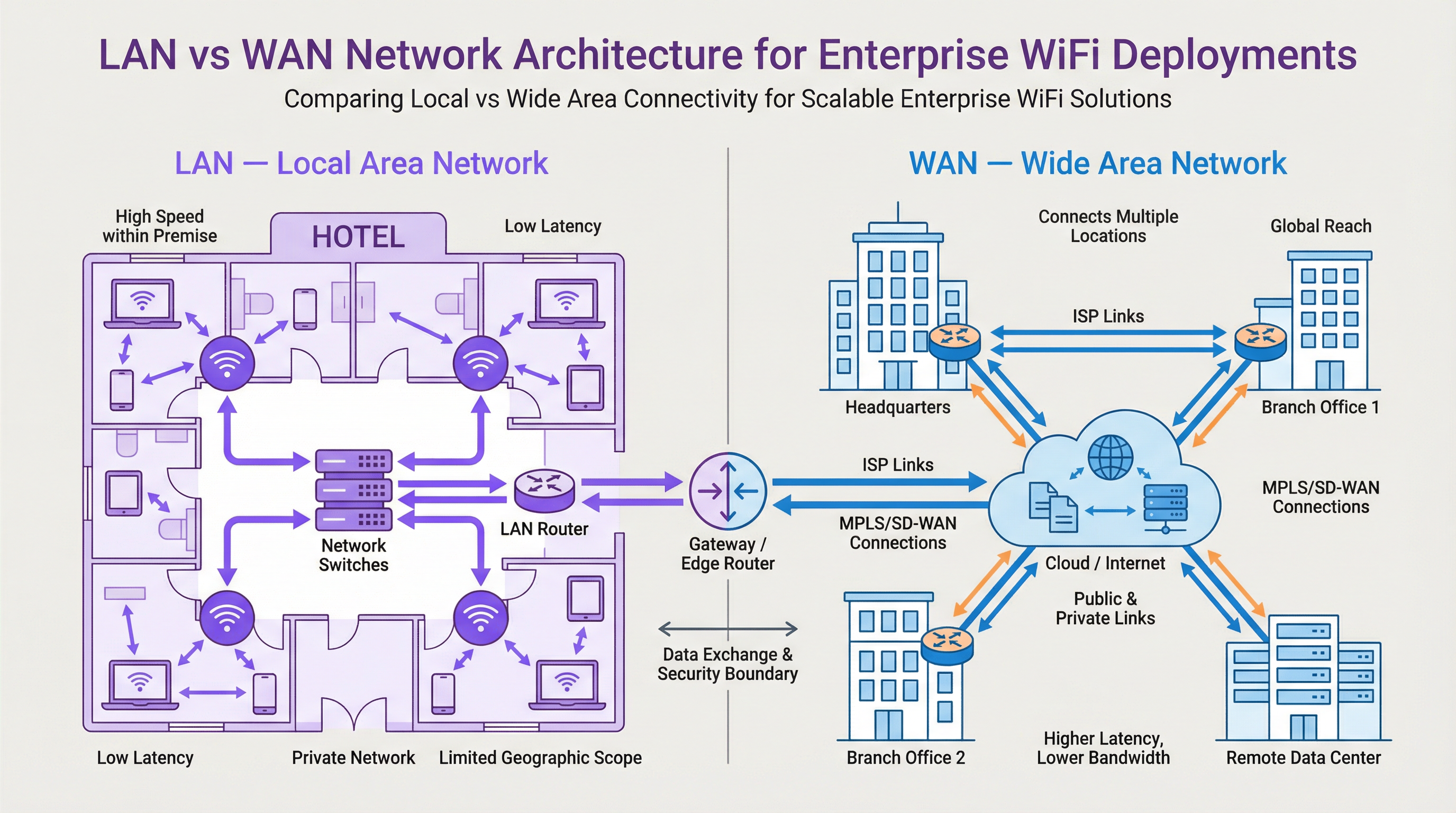
Ein LAN ist ein privates Netzwerk, das auf einen einzigen geografischen Standort beschränkt ist, wie z. B. ein Bürogebäude, ein Stadion oder ein Hotel. Sein Hauptzweck besteht darin, den Hochgeschwindigkeits-Datenaustausch zwischen miteinander verbundenen Geräten innerhalb dieses Bereichs zu erleichtern. Bei einer modernen WiFi-Bereitstellung geht es beim LAN nicht nur um Kabel; es ist ein hochkomplexes Ökosystem von Komponenten, die nahtlos zusammenarbeiten.
- Komponenten: Zur wichtigsten Hardware gehören Wireless Access Points (APs), die das WiFi-Signal aussenden (z. B. basierend auf den IEEE 802.11ax/Wi-Fi 6-Standards), Netzwerk-Switches, die den Datenverkehr von APs und anderen kabelgebundenen Geräten aggregieren, sowie ein zentraler Router oder Layer-3-Switch, der den Datenverkehr verwaltet und die Daten an ihr Ziel leitet, einschließlich des WAN-Gateways.
- Leistung: LANs zeichnen sich durch eine sehr hohe Bandbreite (typischerweise 1 Gbit/s bis 10 Gbit/s oder mehr über Ethernet) und eine extrem geringe Latenz (oft im Submillisekundenbereich) aus. Dies ist unerlässlich für die Unterstützung von High-Density-Umgebungen wie Konferenzzentren oder Anwendungen, die Echtzeitdaten erfordern, wie z. B. Point-of-Sale (POS)-Systeme im Einzelhandel.
- Kontrolle & Sicherheit: Da sich das LAN in Privatbesitz befindet, haben IT-Teams die volle Kontrolle über dessen Architektur und Sicherheitsstatus. Dies ermöglicht die Implementierung granularer Zugriffskontrollen mittels IEEE 802.1X, die Netzwerksegmentierung mit VLANs zur Isolierung des Gastdatenverkehrs vom Unternehmensdatenverkehr sowie robuste Verschlüsselungsprotokolle wie WPA3 zum Schutz der Datenübertragung.
Das Wide Area Network (WAN): Vernetzung des Unternehmens
Ein WAN verbindet mehrere LANs über große geografische Gebiete hinweg, von wenigen Kilometern bis hin zur weltweiten Vernetzung. Das Internet selbst ist das größte WAN, aber für Unternehmen bezieht sich ein WAN typischerweise auf die privaten oder öffentlichen Verbindungen, die zur Vernetzung verteilter Standorte genutzt werden.
- Konnektivität: WAN-Verbindungen werden von externen Dienstanbietern bezogen und können verschiedene Technologien wie Glasfaserleitungen, MPLS (Multi-Protocol Label Switching) oder zunehmend SD-WAN (Software-Defined WAN) umfassen. SD-WAN bietet einen flexibleren, kostengünstigeren und anwendungsbezogenen Ansatz zur Verwaltung der WAN-Konnektivität, der es IT-Teams ermöglicht, den Datenverkehr basierend auf der Anwendungspriorität dynamisch über mehrere Verbindungstypen (z. B. MPLS, Breitband, 4G/5G) zu leiten.
- Leistung: Die WAN-Leistung wird durch die Kosten und die Verfügbarkeit der Verbindungen der Dienstanbieter eingeschränkt. Die Bandbreite ist deutlich geringer und teurer als im LAN, und die Latenz ist aufgrund der physischen Entfernungen viel höher. Eine landesweite Verbindung kann eine Latenz von 50-100 ms aufweisen – ein starker Kontrast zur Submillisekunden-Latenz im LAN.
- Sicherheit & Verwaltung: Die Sicherung des WAN umfasst Firewalls, VPNs (Virtual Private Networks) und Intrusion-Detection-Systeme am Netzwerkrand. Die Verwaltung eines WAN ist komplex, da sie die Koordination mit mehreren Carriern und die Sicherstellung einer konsistenten Richtliniendurchsetzung über alle Standorte hinweg erfordert. Dies ist ein weiterer Bereich, in dem SD-WAN durch zentrale Kontrolle und vereinfachte Richtlinien-Orchestrierung erhebliche Vorteile bietet.
Wo Purple im Stack angesiedelt ist
Purple ist eine Overlay-Plattform, die auf Ihrer bestehenden LAN- und WAN-Infrastruktur aufbaut. Sie lässt sich in die WiFi-APs in Ihrem LAN integrieren, um die Benutzererfahrung der Gäste über ein Captive Portal zu verwalten. Wenn sich ein Gast verbindet, werden seine Authentifizierung und der anschließende Web-Traffic von der Cloud-Plattform von Purple verwaltet, auf die über die WAN-Verbindung Ihres Standorts zugegriffen wird. Purple erfasst dann anonymisierte Standort- und Präsenzanalysedaten, verarbeitet diese in der Cloud und stellt sie den Betreibern des Standorts über ein Dashboard zur Verfügung. Diese Intelligence-Ebene ersetzt nicht Ihre LAN- oder WAN-Infrastruktur, sondern nutzt sie, um wertvolle Einblicke in das Besucherverhalten zu gewinnen. So können Sie die Kundenbindung stärken, den Umsatz steigern und die betriebliche Effizienz verbessern.
Implementierungsleitfaden
- Standortanforderungen definieren: Dokumentieren Sie für jeden Standort den physischen Bereich, die erwartete Gerätedichte und die Anforderungen an die Anwendungsleistung. Ein Hotel benötigt eine nahtlose Abdeckung in den Zimmern und Gemeinschaftsbereichen, während ein Einzelhandelsgeschäft POS-Systeme, Gäste-WiFi und Mitarbeitergeräte unterstützen muss.
- LAN-Design & AP-Platzierung: Führen Sie eine WLAN-Standortuntersuchung (Site Survey) durch, um die optimale Anzahl und Platzierung der APs zu bestimmen. Verwenden Sie Tools, die die HF-Ausbreitung für Ihr spezifisches Gebäudelayout modellieren können. Stellen Sie sicher, dass Ihre Switching-Infrastruktur über ausreichend Port-Kapazität und Power over Ethernet (PoE)-Budget verfügt, um alle APs zu unterstützen.
- Strategie zur Netzwerksegmentierung: Implementieren Sie VLANs, um verschiedene Arten von Datenverkehr logisch zu trennen. Ein Standardmodell umfasst separate VLANs für: Gäste-WiFi, Unternehmens-WLAN, IoT-Geräte (z. B. intelligente Thermostate, Überwachungskameras) und Management-Traffic.
- Beschaffung der WAN-Konnektivität: Bewerten Sie WAN-Optionen basierend auf der Kritikalität des Standorts und dem Bandbreitenbedarf. Für einen Flagship-Store im Einzelhandel bietet eine primäre Glasfaserverbindung mit einem 4G/5G-Backup über SD-WAN eine hohe Verfügbarkeit. Für kleinere Zweigstellen kann eine einzelne Business-Breitbandverbindung ausreichen.
- Konfiguration der Edge-Sicherheit: Stellen Sie eine Next-Generation Firewall (NGFW) am WAN-Edge jedes LANs bereit. Konfigurieren Sie Richtlinien, um Zugriffskontrollen durchzusetzen, Eindringversuche zu verhindern und die Einhaltung von Standards wie PCI DSS sicherzustellen, falls Zahlungskartendaten verarbeitet werden.
- Purple integrieren: Sobald das zugrunde liegende Netzwerk stabil ist, integrieren Sie Ihren WiFi-Controller oder Ihre APs in die Cloud-Plattform von Purple. Dies beinhaltet typischerweise die Weiterleitung des Captive Portal oder der RADIUS-Authentifizierungseinstellungen an die Service-Endpunkte von Purple. Testen Sie die Guest Journey gründlich, von der Verbindung über die Authentifizierung bis hin zum Internetzugang.
Best Practices
- Zentrales Management: Verwenden Sie eine cloudbasierte Netzwerkmanagement-Plattform, um Ihre APs, Switches und Firewalls über alle Standorte hinweg zu konfigurieren und zu überwachen. Dies vereinfacht Richtlinienaktualisierungen und bietet eine zentrale Ansicht (Single Pane of Glass) für die Fehlerbehebung.
- Rollenbasierte Zugriffskontrolle (RBAC): Setzen Sie das Prinzip der geringsten Rechte (Principle of Least Privilege) durch. Verwenden Sie IEEE 802.1X zur Authentifizierung von Benutzern und Geräten, weisen Sie diese dem entsprechenden VLAN zu und wenden Sie spezifische Zugriffsrichtlinien basierend auf ihrer Rolle an.
- Compliance by Design: Integrieren Sie beim Design Ihres Netzwerks von Anfang an Kontrollen, um regulatorische Anforderungen zu erfüllen. Für die GDPR bedeutet dies, sicherzustellen, dass die Zustimmung der Gäste am Captive Portal ordnungsgemäß erfasst wird. Für PCI DSS ist eine strikte Trennung der Karteninhaber-Datenumgebung von allen anderen Netzwerken, einschließlich des Gäste-WiFi, erforderlich.
- Regelmäßige Audits: Überprüfen Sie regelmäßig Ihre Netzwerkkonfiguration, Firewall-Regeln und Zugriffsprotokolle, um potenzielle Sicherheitslücken oder Fehlkonfigurationen zu identifizieren. Automatisierte Tools können helfen, diesen Prozess zu optimieren.

Fehlerbehebung & Risikominderung
- Häufige Fehlerquelle: Sättigung der WAN-Verbindung. Ein häufiges Problem tritt auf, wenn der Gäste-WiFi-Traffic die primäre WAN-Verbindung sättigt und kritische Geschäftsanwendungen beeinträchtigt. Maßnahme: Implementieren Sie Quality of Service (QoS)-Richtlinien auf Ihrem Edge-Router/Ihrer Firewall, um geschäftskritischen Datenverkehr (z. B. POS, Voice) gegenüber dem Gastdatenverkehr zu priorisieren. Begrenzen Sie die Bandbreite für Gastbenutzer auf ein angemessenes Limit (Rate-Limiting).
- Häufige Fehlerquelle: Erschöpfung der IP-Adressen. An einem stark frequentierten Standort kann der DHCP-Bereich für das Gäste-VLAN keine verfügbaren IP-Adressen mehr aufweisen, was verhindert, dass sich neue Benutzer verbinden. Maßnahme: Verwenden Sie ein /22- oder /21-Subnetz für Ihr Gäste-VLAN, um Tausende von verfügbaren Adressen bereitzustellen. Überwachen Sie die Auslastung des DHCP-Bereichs und richten Sie Warnmeldungen ein, wenn diese 80 % überschreitet.
- Risiko: Unsicheres Gästenetzwerk. Ein schlecht konfiguriertes Gästenetzwerk kann für einen Angreifer ein Einfallstor sein, um auf das Unternehmens-LAN zuzugreifen. Maßnahme: Stellen Sie sicher, dass
Schlüsselbegriffe & Definitionen
Local Area Network (LAN)
A private computer network covering a small physical area, like a home, office, or a single building in a campus.
This is your on-site network. IT teams have full control over the LAN, making it the domain for high-speed, secure, internal communications and WiFi access.
Wide Area Network (WAN)
A computer network that extends over a large geographical distance, connecting multiple LANs together.
This is how your different sites (e.g., multiple stores or hotels) connect to each other and to the internet. Performance and cost are key considerations, as it relies on third-party carriers.
Access Point (AP)
A hardware device that allows other Wi-Fi devices to connect to a wired network. An AP acts as a central transmitter and receiver of wireless radio signals.
These are the devices that create your WiFi network. Proper placement and configuration of APs are critical for ensuring good coverage and performance.
Router
A network device that forwards data packets between computer networks. Routers perform the traffic directing functions on the internet.
The router is the gateway of your LAN. It connects your internal network to the external WAN (the internet) and makes decisions about where to send traffic.
Switch
A network device that connects devices together on a computer network by using packet switching to receive, process, and forward data to the destination device.
Switches are the backbone of your wired LAN, connecting your APs, servers, and other wired devices together at high speed.
VLAN (Virtual LAN)
A virtual local area network is any broadcast domain that is partitioned and isolated in a computer network at the data link layer (OSI layer 2).
VLANs are a critical security tool. They allow you to create separate, isolated networks on the same physical hardware, for example, to keep guest traffic completely separate from your corporate traffic.
SD-WAN (Software-Defined WAN)
A software-defined wide area network is a virtual WAN architecture that allows enterprises to leverage any combination of transport services – including MPLS, LTE, and broadband internet services – to securely connect users to applications.
For businesses with multiple sites, SD-WAN offers a more intelligent, cost-effective, and resilient way to manage WAN connectivity compared to traditional approaches.
Captive Portal
A web page that the user of a public-access network is obliged to view and interact with before access is granted.
This is the login page guests see when they connect to your WiFi. Purple uses the captive portal to manage authentication, present terms and conditions, and offer marketing opt-ins.
Fallstudien
A 200-room luxury hotel wants to upgrade its WiFi to provide a seamless, high-performance experience for guests while securely separating this traffic from its internal property management system (PMS). The hotel group also wants to centralize guest data analytics across its 10 properties.
The solution involves a two-pronged approach. On the LAN, each hotel will deploy a high-density Wi-Fi 6 (802.11ax) network with APs in every room and common area. A core switch aggregates traffic, and VLANs are used to create logically separate networks: VLAN 10 for Guests, VLAN 20 for Staff, VLAN 30 for IoT (smart locks, minibars), and VLAN 40 for the PMS. An on-site firewall inspects all traffic. For the WAN, each hotel is connected to the internet via a primary 1Gbps fiber link and a secondary 5G wireless link, managed by an SD-WAN appliance. The SD-WAN is configured to route Purple guest analytics data and PMS data over the secure, low-latency fiber link, while general guest internet traffic can be backhauled or routed directly to the internet at the local site. Purple is integrated with the on-site WiFi controller, using RADIUS to authenticate guests against its cloud platform, allowing the hotel group to view analytics for all 10 properties in a single dashboard.
A retail chain with 50 stores across the UK needs to deploy guest WiFi to drive its loyalty app adoption. The stores have limited on-site IT staff and the company needs to ensure a consistent, secure deployment across all locations.
A template-based, zero-touch provisioning model is the optimal solution. For the LAN, each store gets a standardized set of hardware: 5-10 APs and a single integrated security gateway appliance that combines routing, switching, and firewalling. The configuration is standardized via a cloud management platform. For the WAN, a dual-broadband solution at each site, managed by an SD-WAN overlay, provides a cost-effective and resilient connection. The key is the centralized configuration: a single network template is created in the cloud controller. This template defines the SSIDs, VLANs (Guest, Corporate, POS), firewall rules, and QoS policies. When a new store is brought online, a local staff member simply plugs in the gateway, which then automatically downloads its entire configuration from the cloud. Purple is integrated at the template level, so every store automatically uses the same branded captive portal, which prominently features a link to download the loyalty app.
Szenarioanalyse
Q1. You are designing the network for a new 5-floor conference centre. The venue will host multiple events simultaneously, with up to 1,000 concurrent users per floor. How would you structure your VLAN and IP addressing strategy for the guest network?
💡 Hinweis:Consider the number of devices, broadcast traffic, and the need for isolation between different events.
Empfohlenen Ansatz anzeigen
A single, large VLAN for all guests would be inefficient and create a massive broadcast domain. A better approach is to use a separate VLAN for each floor (e.g., VLAN 101 for Floor 1, VLAN 102 for Floor 2). Each VLAN would be assigned a /21 subnet (e.g., 10.101.0.0/21), providing 2,046 usable IP addresses, which is more than sufficient for 1,000 users. To provide isolation between different events on the same floor, you could use Private VLANs or simply rely on AP client isolation. All guest VLANs would be routed through a common firewall policy that strictly limits their access to the internet only.
Q2. A retail chain is experiencing slow point-of-sale (POS) transaction times at its stores during peak hours. They have a single 100 Mbps broadband connection at each site, which is shared by the POS terminals, staff devices, and the free guest WiFi. What is the most likely cause and what immediate steps should you take?
💡 Hinweis:Think about traffic contention on the WAN link.
Empfohlenen Ansatz anzeigen
The most likely cause is WAN link saturation, where the high volume of guest WiFi traffic is consuming all available bandwidth, leaving little for the latency-sensitive POS transactions. The immediate steps are: 1) Implement a Quality of Service (QoS) policy on the edge router to guarantee a certain percentage of bandwidth for the POS system's traffic and give it the highest priority. 2) Apply a bandwidth limit (e.g., 5 Mbps per user) to the guest WiFi users to prevent them from monopolizing the connection. A long-term solution would be to add a secondary WAN link and use SD-WAN to route POS traffic over the more reliable link.
Q3. Your company is deploying a guest WiFi solution across 100 stadium venues. The CISO is concerned about the security risks of allowing 50,000+ unknown devices onto the network per event. What key security control must be enabled on the wireless infrastructure to mitigate a significant portion of this risk?
💡 Hinweis:How do you prevent connected guests from attacking each other or other devices on the same network?
Empfohlenen Ansatz anzeigen
The single most critical security control in this high-density, public-facing scenario is Client Isolation (also known as AP Isolation or Port Isolation). When enabled on the guest SSID, this feature prevents wireless clients from communicating directly with each other at Layer 2. Each device can only communicate with the gateway (the router), not with any other device on the same WiFi network. This effectively neutralizes the risk of a compromised guest device attempting to scan, attack, or infect other users' devices, dramatically reducing the internal attack surface of the guest network.
Wichtigste Erkenntnisse
- ✓A LAN is your private, on-site network (a building); a WAN connects your sites together (a highway).
- ✓Effective WiFi design depends on understanding the LAN/WAN boundary to manage performance and cost.
- ✓Use VLANs to segment traffic for security (e.g., Guest vs. Corporate).
- ✓Use QoS on your WAN link to prioritize critical business traffic over guest browsing.
- ✓SD-WAN provides a flexible and resilient way to manage connectivity for multi-site businesses.
- ✓Client Isolation is a critical security feature for any public-facing guest WiFi network.
- ✓WiFi analytics platforms like Purple are an overlay service that leverages your LAN/WAN to provide business intelligence.




