

MAC-Adressen-Randomisierung: Was sie ist und wie Sie damit umgehen
This guide provides IT leaders and network architects with a comprehensive technical overview of MAC address randomisation. It details the impact on enterprise and guest WiFi networks and presents actionable strategies, including Purple's SecurePass technology, to mitigate risks and maintain robust analytics and security.
🎧 Diesen Leitfaden anhören
Transkript anzeigen

Zusammenfassung
Die MAC-Adressen-Randomisierung, eine Datenschutzfunktion, die mittlerweile in iOS, Android und anderen Betriebssystemen Standard ist, stellt eine kritische Herausforderung für das Enterprise-WiFi-Management dar. Durch die regelmäßige Änderung der Hardware-Kennung eines Geräts stört sie zentrale Netzwerkabläufe, die auf einer statischen MAC-Adresse für Authentifizierung, Sicherheit und Analysen basieren. Für IT-Manager und Betreiber von Standorten im Gastgewerbe, im Einzelhandel und in großen öffentlichen Einrichtungen bedeutet dies unzuverlässige Besuchermetriken, frustrierende Nutzererlebnisse und eine geschwächte Sicherheitslage. Herkömmliche Methoden wie MAC-basierte Zugriffskontrolle (MAC-ACL) und Whitelisting werden wirkungslos, während Analyseplattformen Schwierigkeiten haben, neue von wiederkehrenden Besuchern zu unterscheiden, was die Messung von Besucherzahlen, Verweildauer und Loyalität erheblich beeinträchtigt. Dieser Leitfaden bietet einen technischen Deep-Dive in die Funktionsweise der Randomisierung, skizziert die spezifischen betrieblichen und geschäftlichen Auswirkungen und bietet einen klaren, umsetzbaren Rahmen zur Risikominderung. Er beschreibt detailliert, wie man sich von veralteten MAC-basierten Kontrollen zu einer modernen, identitätszentrierten Authentifizierungsstrategie entwickelt, die Standards wie IEEE 802.1X und innovative Lösungen wie SecurePass von Purple nutzt, das für nahtlosen, sicheren Zugriff im Zeitalter der MAC-Randomisierung entwickelt wurde.
Technischer Deep-Dive
Die MAC-Adressen-Randomisierung ist der Prozess, bei dem ein Gerät seine echte, in der Hardware verankerte MAC-Adresse (die Universally Administered Address oder UAA) verschleiert und eine temporäre, zufällig generierte Adresse (eine Locally Administered Address oder LAA) verwendet, wenn es sich mit WiFi-Netzwerken verbindet. Diese datenschutzfördernde Funktion, die erstmals 2014 von Apple eingeführt wurde, ist mittlerweile ein Standardverhalten in allen gängigen mobilen Betriebssystemen.
Technisch gesehen wird eine LAA dadurch identifiziert, dass das zweitniedrigstwertige Bit des ersten Oktetts der MAC-Adresse auf '1' gesetzt wird. Obwohl dies randomisierte Adressen programmatisch identifizierbar macht, liegt die eigentliche Herausforderung in ihrer Vergänglichkeit. Das Randomisierungsverhalten variiert je nach Betriebssystem und Version:
- Netzwerkspezifische Randomisierung: Die häufigste Implementierung, bei der ein Gerät für jedes spezifische WiFi-Netzwerk (SSID), mit dem es sich verbindet, eine persistente, randomisierte MAC-Adresse generiert und verwendet. Dies war der Standard ab iOS 14 und Android 10.
- Zeitbasierte Rotation: Eine neuere und disruptivere Entwicklung, die ab iOS 18 zu beobachten ist, bei der das Gerät die randomisierte MAC-Adresse für dasselbe Netzwerk regelmäßig ändert. Diese Rotation kann alle zwei Wochen oder sogar noch häufiger auftreten, wenn ein Nutzer das Netzwerk manuell „ignoriert“ oder das Gerät seinen Cache leert.
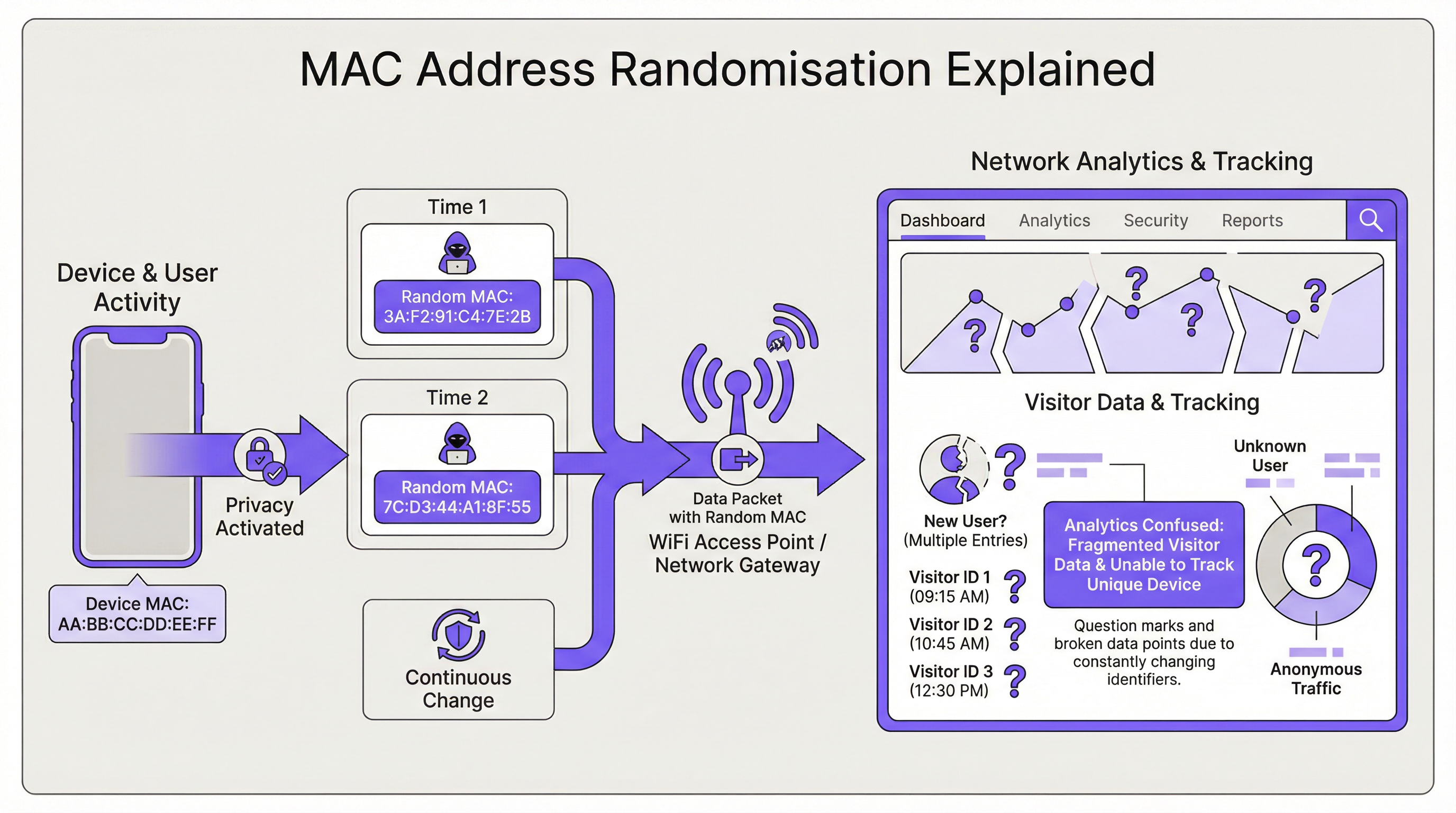
Die direkte Folge für die Netzwerkinfrastruktur ist der Verlust einer stabilen Gerätekennung. Dies wirkt sich auf mehrere Schlüsselbereiche aus:
| Netzwerkfunktion | Auswirkungen der MAC-Randomisierung |
|---|---|
| Authentifizierung | MAC Authentication Bypass (MAB) und Whitelisting schlagen fehl. Geräte erfordern bei einer MAC-Rotation eine erneute Authentifizierung, was den nahtlosen Zugriff stört. |
| Analytics & BI | Besucheranalysen werden stark verfälscht. Ein einzelnes wiederkehrendes Gerät erscheint als mehrere „neue“ Besucher, was die Präsenzzahlen künstlich in die Höhe treibt und Metriken zu wiederholten Besuchen bedeutungslos macht. |
| Sicherheit | MAC-basiertes Blacklisting lässt sich leicht umgehen. Die Verfolgung der Aktivitäten eines bösartigen Geräts über mehrere Sitzungen hinweg wird schwierig, was forensische Analysen erschwert. |
| Compliance | Systeme, die sich für die Netzwerksegmentierung oder Protokollierung auf MAC-Adressen verlassen (z. B. für PCI DSS), können aufgrund der fehlenden Möglichkeit, Geräte konsistent zu identifizieren, die Compliance-Anforderungen verfehlen. |
Implementierungsleitfaden
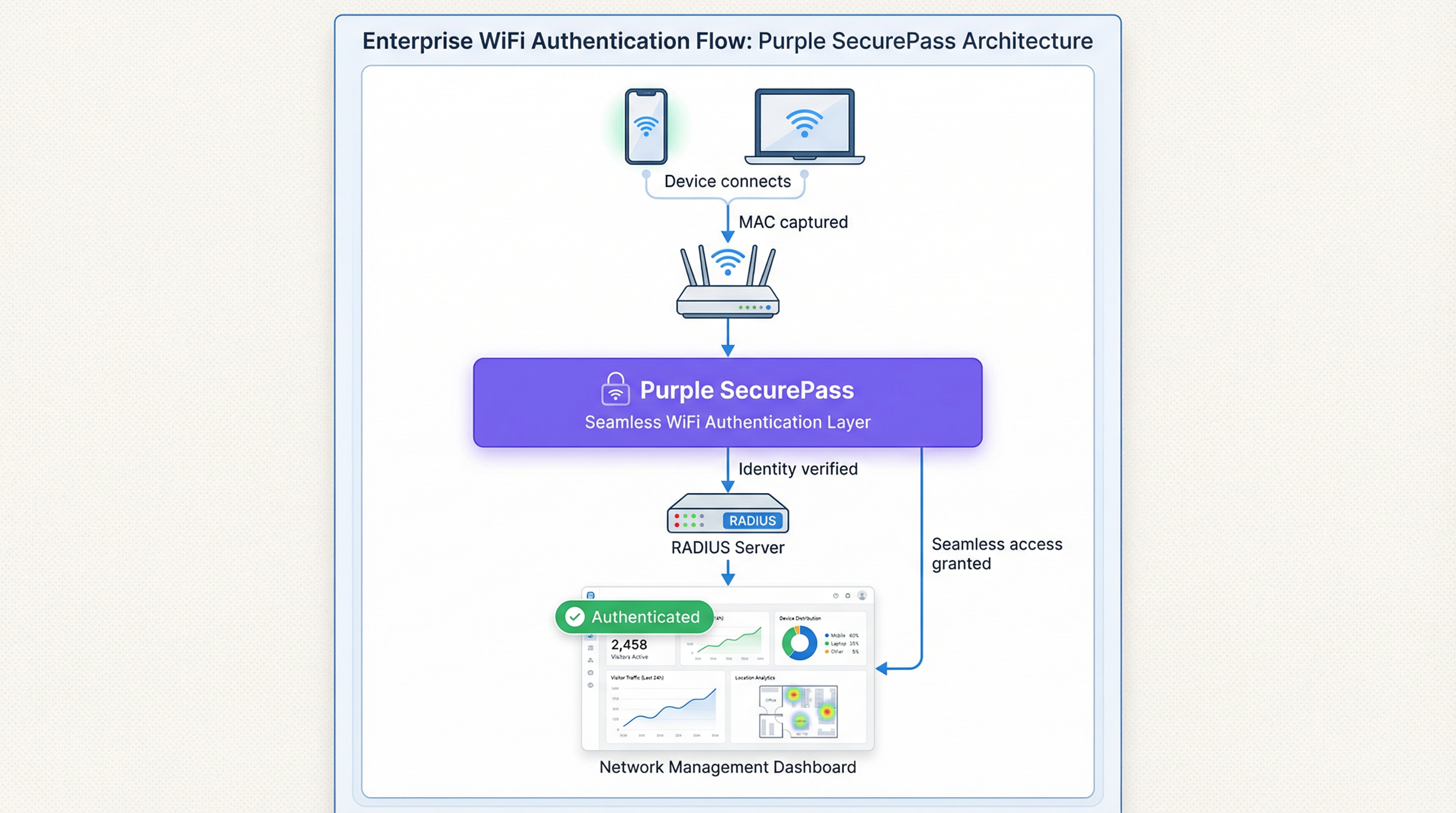
Die grundlegende Lösung besteht darin, von einer gerätebasierten Identität (der MAC-Adresse) zu einer nutzerbasierten Identität überzugehen. Dies erfordert eine neue Authentifizierungsarchitektur.
Schritt 1: Bewerten Sie Ihre Umgebung Segmentieren Sie zunächst Ihre Nutzerbasis. Verwalten Sie unternehmenseigene Geräte, Gastgeräte oder eine Mischung aus beidem? Die Strategie unterscheidet sich jeweils.
- Unternehmens-/Verwaltete Geräte: Diese bieten mehr Kontrolle. Das Ziel ist eine hochsichere Zero-Touch-Verbindung.
- Gast-/BYOD-Geräte: Die Priorität liegt auf einem reibungslosen, sicheren Onboarding-Prozess, der eine persistente Identität etabliert, ohne eine Geräteverwaltung zu erfordern.
Schritt 2: Stellen Sie IEEE 802.1X für verwaltete Geräte bereit Für Unternehmensumgebungen ist die branchenübliche Lösung IEEE 802.1X Port-Based Network Access Control. Anstatt die MAC-Adresse zu überprüfen, authentifiziert das Netzwerk das Gerät oder den Nutzer über einen Berechtigungsnachweis, typischerweise ein digitales Zertifikat. Der Ablauf ist wie folgt:
- Ein Gerät versucht, sich mit einer 802.1X-fähigen SSID zu verbinden.
- Der Access Point (der Authenticator) fordert vom Gerät (dem Supplicant) die Berechtigungsnachweise an.
- Das Gerät präsentiert sein Zertifikat, das an einen RADIUS-Server (den Authentication Server) weitergeleitet wird.
- Der RADIUS-Server validiert das Zertifikat gegen eine vertrauenswürdige Zertifizierungsstelle (CA). Wenn es gültig ist, gewährt er den Zugriff. Diese Methode ist immun gegen MAC-Randomisierung, da das Zertifikat eine stabile, langfristige Kennung bietet. Es ist die empfohlene Best Practice zur Sicherung interner Netzwerke.
Schritt 3: Implementieren Sie ein fortschrittliches Captive Portal für den Gastzugang Für Gastnetzwerke ist die Bereitstellung von Zertifikaten nicht praktikabel. Hier ist die Lösung eine intelligente Authentifizierungsschicht wie SecurePass von Purple. Diese Technologie geht über die einfache MAC-Authentifizierung hinaus, um ein persistentes Nutzerprofil zu erstellen.
- Erstmalige Authentifizierung: Ein Nutzer verbindet sich mit dem Gast-WiFi und wird zu einem Captive Portal weitergeleitet. Er authentifiziert sich über ein Social-Media-Konto, ein Formular oder einen vorab bereitgestellten Zugangscode.
- Identitätserstellung: Purple erstellt ein eindeutiges Profil für diesen Nutzer und verknüpft seine Authentifizierungsmethode mit seiner anfänglichen Sitzung.
- Nahtlose Re-Authentifizierung: Bei nachfolgenden Besuchen kann SecurePass den Nutzer durch andere persistente Kennungen (wie ein Cookie im Browser oder ein über unsere App installiertes Profil) erkennen, selbst wenn das Gerät eine neue, randomisierte MAC-Adresse präsentiert. Es authentifiziert ihn dann nahtlos neu, ohne dass ein weiterer Login erforderlich ist. Dieser Ansatz stellt die Fähigkeit wieder her, wiederkehrende Besucher zu erkennen, und bietet ein reibungsloses Nutzererlebnis, wodurch das Randomisierungsproblem für Gastnetzwerke effektiv gelöst wird.
Best Practices
- Blockieren Sie keine randomisierten MACs: Obwohl es möglich ist, einige Netzwerkgeräte so zu konfigurieren, dass sie Geräten mit LAAs den Zugriff verweigern, ist dies eine kontraproduktive Strategie. Sie blockiert die Mehrheit moderner Geräte, was zu einem schlechten Nutzererlebnis und einem Albtraum für den Support führt.
- Priorisieren Sie das Nutzererlebnis: Das Ziel ist Sicherheit und Komfort. Lösungen sollten die Reibungsverluste beim Login für wiederkehrende Nutzer minimieren. Eine nahtlose Verbindung ist ein wesentlicher Treiber für die WiFi-Akzeptanz und -Zufriedenheit.
- Integrieren Sie in Ihren Tech-Stack: Ihre Authentifizierungslösung sollte Daten in Ihre CRM- und Business-Intelligence-Plattformen einspeisen. Purple bietet umfangreiche APIs, um sicherzustellen, dass die wertvollen Besucherdaten, die Sie erfassen, in Ihrem gesamten Unternehmen nutzbar sind.
- Bleiben Sie informiert: Das Verhalten der MAC-Randomisierung entwickelt sich mit jedem neuen OS-Release weiter. Arbeiten Sie mit einem Anbieter wie Purple zusammen, der sich dafür einsetzt, diesen Änderungen immer einen Schritt voraus zu sein und seine Plattform entsprechend zu aktualisieren.
Fehlerbehebung & Risikominderung
Häufiger Fehlerfall: Die Endlos-Login-Schleife
- Symptom: Ein Nutzer beschwert sich, dass er sich bei jedem Besuch ins WiFi einloggen muss, sogar am selben Tag.
- Ursache: Das Netzwerk verwendet wahrscheinlich eine einfache MAC-basierte Authentifizierung oder ein Captive Portal, das jede neue randomisierte MAC als neues Gerät behandelt und eine erneute Authentifizierung erzwingt.
- Lösung: Implementieren Sie eine Lösung wie SecurePass, die eine persistente Identität über die MAC-Adresse hinaus etabliert. Dies stellt sicher, dass wiederkehrende Nutzer erkannt werden und automatisch Zugriff erhalten.
Risiko: Umgehung der Blacklist
- Symptom: Ein Gerät, das wegen bösartiger Aktivitäten für das Netzwerk gesperrt wurde, kann sich erneut verbinden.
- Ursache: Das Gerät hat einfach eine neue randomisierte MAC-Adresse generiert und so die MAC-basierte Blacklist umgangen.
- Lösung: Ihre Sicherheitsrichtlinie muss von der Sperrung von MAC-Adressen zur Sperrung von Nutzerkonten oder Geräte-Fingerabdrücken übergehen. Eine fortschrittliche Plattform kann Geräte basierend auf einer Kombination von Attributen identifizieren, was es schwieriger macht, eine Sperre zu umgehen.
ROI & Geschäftliche Auswirkungen
Die Lösung der Herausforderung durch MAC-Randomisierung ist nicht nur ein IT-Thema, sondern eine geschäftliche Notwendigkeit. Der ROI wird in mehreren Schlüsselbereichen gemessen:
- Verbesserte Datengenauigkeit: Durch die genaue Unterscheidung zwischen neuen und wiederkehrenden Besuchern können Unternehmen intelligentere Entscheidungen über Marketingausgaben, Personalbestand und Ladenlayouts treffen. Für eine Einzelhandelskette kann das Verständnis der wahren Kundenbindung die Werbestrategie direkt beeinflussen und den Umsatz steigern.
- Verbessertes Kundenerlebnis: Eine nahtlose, automatische Verbindung für wiederkehrende Besucher ist ein starker Treiber für die Kundenbindung. In einem Hotel bedeutet dies, dass ein Gast vom Moment des Betretens an sofort verbunden ist, was die Zufriedenheit erhöht und die Nutzung der digitalen Dienste des Hotels fördert.
- Erhöhte Sicherheit & reduziertes Risiko: Ein robustes Authentifizierungs-Framework verringert das Risiko unbefugten Zugriffs und liefert zuverlässigere Daten für forensische Analysen, was die potenziellen Kosten einer Sicherheitsverletzung senkt.
- Betriebliche Effizienz: Die Automatisierung des Authentifizierungsprozesses für verwaltete und Gastgeräte reduziert die Anzahl der Helpdesk-Tickets im Zusammenhang mit der WiFi-Konnektivität und setzt IT-Ressourcen für strategischere Initiativen frei.
Schlüsselbegriffe & Definitionen
MAC Address Randomisation
A privacy feature where a device temporarily replaces its permanent, factory-assigned MAC address with a randomly generated one when connecting to WiFi networks.
IT teams encounter this as the root cause of failing MAC-based access controls and skewed visitor analytics. It matters because it breaks legacy network management paradigms.
Private WiFi Address
Apple's specific terminology for its implementation of MAC address randomisation in iOS, iPadOS, and watchOS.
When users or junior IT staff report issues with an 'Apple Private Address', this is the feature they are referring to. It's crucial for support teams to recognise this term.
Locally Administered Address (LAA)
A MAC address where the second-least-significant bit of the first octet is set to 1, indicating it is not the globally unique, factory-assigned address. Randomised MACs are a type of LAA.
Network architects can use this technical property to create policies or filters that specifically identify randomised traffic, although blocking it is generally not recommended.
Universally Administered Address (UAA)
The permanent, globally unique MAC address assigned to a network interface by its manufacturer.
This is the 'real' MAC address that randomisation is designed to hide. In high-security contexts, solutions may aim to verify the UAA after an initial secure handshake.
MAC Authentication Bypass (MAB)
A method where a network switch or access point uses a device's MAC address as its authentication credential, checking it against a list of approved addresses on a RADIUS server.
This is a common legacy authentication method for devices that don't support 802.1X (like printers or IoT devices). It is highly vulnerable to MAC randomisation and spoofing.
IEEE 802.1X
An IEEE standard for port-based Network Access Control (PNAC) that provides a robust and secure method for authenticating devices or users, typically using certificates or credentials.
This is the industry-standard solution for securing corporate networks and is the primary alternative to MAC-based authentication for managed devices.
Purple SecurePass
Purple's proprietary technology that provides seamless and secure WiFi authentication for guest networks, designed to overcome the challenges of MAC address randomisation.
For venue operators, SecurePass is the key to maintaining a high-quality user experience and reliable analytics by creating a persistent user identity that is independent of the device's MAC address.
Captive Portal
A web page that a user is required to view and interact with before being granted access to a public WiFi network.
Modern captive portals, like those powered by Purple, are no longer just a simple login page. They are sophisticated tools for creating user identity, driving marketing engagement, and enforcing terms of service.
Fallstudien
A 500-room luxury hotel wants to provide seamless WiFi for returning guests to enhance their loyalty program. However, their existing system relies on MAC whitelisting for repeat visitors, which has stopped working due to MAC randomisation. How can they restore this functionality?
The hotel should deploy Purple's Guest WiFi with SecurePass. On their first visit, guests will authenticate via a branded captive portal, perhaps with an option to log in using their loyalty program credentials. Purple creates a persistent profile for the guest. On subsequent visits, SecurePass recognises the guest's device and automatically connects them to the WiFi, bypassing the need for a static MAC address. The login event is then pushed via API to the hotel's CRM, updating the guest's loyalty profile and providing valuable data on their visit patterns.
A large retail chain with 200 stores uses WiFi analytics to measure footfall and customer dwell time. Since the widespread adoption of MAC randomisation, their 'new vs. repeat' customer reports are wildly inaccurate, showing almost 90% new visitors, which they know is incorrect. How can they regain accurate visitor metrics?
The retail chain should implement Purple's analytics platform across their estate. While Purple cannot definitively reverse all randomisation, its sophisticated engine is designed to handle it. It filters out probe requests from non-connecting devices and uses advanced algorithms to correlate sessions, providing a much more accurate picture of visitor behaviour. By using a persistent login via a captive portal, the system can tie sessions from the same user together, even if their MAC changes between visits. This allows for the reconstruction of the customer journey and provides far more reliable metrics for new vs. repeat visits and true dwell time.
Szenarioanalyse
Q1. You are the Network Architect for a chain of conference centres. A major event is approaching, and you need to provide WiFi for 5,000 attendees. Your sponsor requires analytics on how many attendees visit their booth. How does MAC randomisation affect this, and what is your primary mitigation strategy?
💡 Hinweis:Consider the transient nature of the attendees and the need for reliable analytics.
Empfohlenen Ansatz anzeigen
MAC randomisation will make it impossible to use device MACs to track unique visitors to the sponsor's booth. A single attendee's phone could generate multiple MACs throughout the day, appearing as multiple visitors. The primary mitigation strategy is to implement a guest WiFi solution with a captive portal for the event. By requiring a simple, one-time registration (e.g., email address), I can establish a session-based identity for each attendee. Using Purple's location analytics, I can then track the movement of these authenticated sessions to the sponsor's booth zone, providing accurate data on unique visitor counts to the sponsor.
Q2. Your CFO has questioned the investment in a new guest WiFi platform, asking why the existing, cheaper solution that uses MAC whitelisting for repeat customers is no longer sufficient. How do you explain the business case in terms of ROI?
💡 Hinweis:Focus on the financial and business impact, not just the technical details.
Empfohlenen Ansatz anzeigen
The existing MAC whitelisting system is now obsolete due to MAC randomisation, a standard feature in all modern smartphones. This means we can no longer recognise our repeat customers, which has two major financial impacts. First, our customer loyalty data is now inaccurate, so we are making poor marketing decisions based on bad data. Second, the frustrating re-login experience for our best customers is damaging our brand and reducing engagement. Investing in a new platform like Purple with SecurePass will provide a direct ROI by: 1) Restoring accurate customer analytics, allowing us to optimise marketing spend. 2) Increasing customer satisfaction and loyalty through a seamless experience, which drives repeat business. 3) Reducing IT support overhead from WiFi-related complaints.
Q3. An IT administrator at one of your venues suggests a 'quick fix' by creating a script to block all devices that use a Locally Administered Address (LAA). Why is this a bad idea, and what is the more strategic alternative?
💡 Hinweis:Think about the prevalence of LAAs and the user impact.
Empfohlenen Ansatz anzeigen
Blocking all LAAs is a terrible idea because the vast majority of modern smartphones and laptops use them by default for privacy. This 'quick fix' would effectively ban almost all of our visitors from using the WiFi, leading to a massive drop in service availability and a surge in customer complaints. It's a classic case of treating the symptom, not the disease. The strategic alternative is to embrace the reality that the MAC address is no longer a reliable identifier. We must upgrade our architecture to be identity-centric. For our corporate network, this means accelerating our planned rollout of 802.1X with certificates. For our guest network, it means implementing an intelligent authentication layer like Purple's SecurePass that can create a persistent user identity through a captive portal, making the MAC address irrelevant.
Wichtigste Erkenntnisse
- ✓MAC address randomisation is a default privacy feature in modern devices that breaks traditional WiFi management.
- ✓It severely impacts visitor analytics, making metrics like 'new vs. repeat' unreliable.
- ✓MAC-based authentication and security controls (whitelists, blacklists) are no longer effective.
- ✓The solution is to shift from device-based identity to user-based identity.
- ✓For corporate networks, use IEEE 802.1X with digital certificates.
- ✓For guest networks, use an advanced platform like Purple SecurePass to create persistent user profiles.
- ✓Do not simply block randomised MACs; this will deny service to most of your users.




