

मोबाइल डिवाइस पर 802.1X प्रमाणीकरण लागू करना
यह व्यापक मार्गदर्शिका IT लीडर्स को iOS और Android डिवाइस पर 802.1X प्रमाणीकरण लागू करने के लिए एक तकनीकी ब्लूप्रिंट प्रदान करती है। इसमें सुरक्षित, स्केलेबल मोबाइल नेटवर्क एक्सेस सुनिश्चित करने के लिए आर्किटेक्चर, EAP मेथड चयन, MDM प्रोविज़निंग और समस्या निवारण शामिल है।
🎧 Listen to this Guide
View Transcript
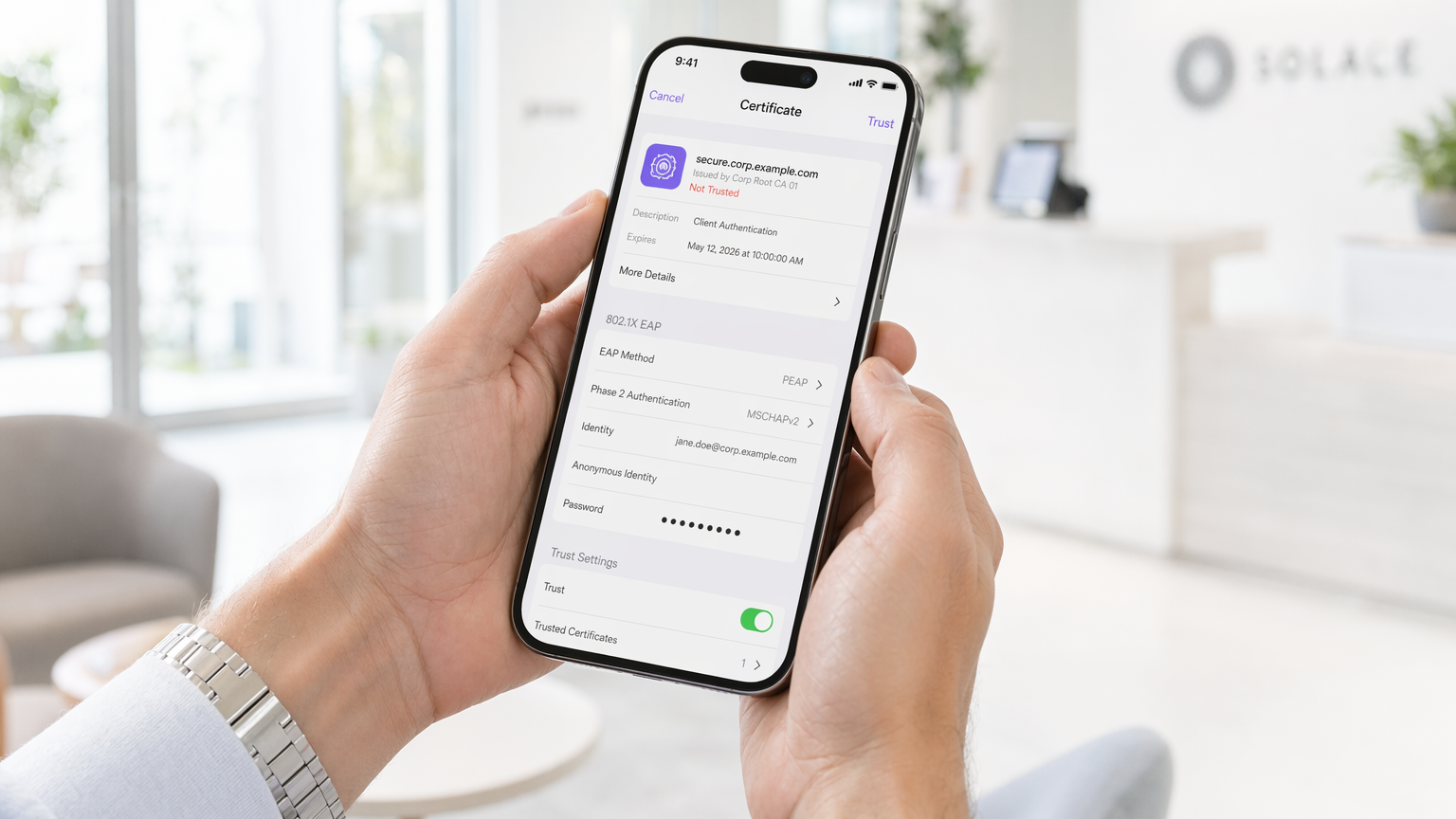
कार्यकारी सारांश
एंटरप्राइज़ परिवेशों के लिए मोबाइल डिवाइस पर 802.1X प्रमाणीकरण लागू करना अब वैकल्पिक नहीं है। चाहे कॉर्पोरेट कार्यालय, 500 कमरों वाले होटल या स्टेडियम का प्रबंधन कर रहे हों, प्री-शेयर्ड कीज़ (PSKs) पर निर्भरता एक अस्वीकार्य सुरक्षा जोखिम प्रस्तुत करती है। यह मार्गदर्शिका iOS और Android एस्टेट्स में 802.1X को डिप्लॉय करने के लिए एक व्यापक तकनीकी ब्लूप्रिंट प्रदान करती है। हम आर्किटेक्चरल आवश्यकताओं, एक्सटेंसिबल ऑथेंटिकेशन प्रोटोकॉल (EAP) मेथड चयन, मोबाइल डिवाइस मैनेजमेंट (MDM) प्रोविज़निंग और सामान्य विफलता मोड को कवर करेंगे।
802.1X में संक्रमण करके, संगठन ग्रैन्युलर नेटवर्क एक्सेस कंट्रोल, बेहतर Guest WiFi सुरक्षा और PCI DSS और GDPR जैसे फ्रेमवर्क के साथ अनुपालन प्राप्त करते हैं। इस संक्रमण के लिए वायरलेस इंफ्रास्ट्रक्चर, RADIUS सर्वर और मोबाइल एंडपॉइंट्स के बीच सावधानीपूर्वक समन्वय की आवश्यकता होती है।
तकनीकी गहन-विश्लेषण: आर्किटेक्चर और EAP मेथड्स
IEEE 802.1X मानक पोर्ट-आधारित नेटवर्क एक्सेस कंट्रोल को परिभाषित करता है, जिसमें तीन प्राथमिक घटक शामिल हैं: सप्लिकेंट (मोबाइल डिवाइस), ऑथेंटिकेटर (वायरलेस एक्सेस पॉइंट या कंट्रोलर), और ऑथेंटिकेशन सर्वर (RADIUS)।
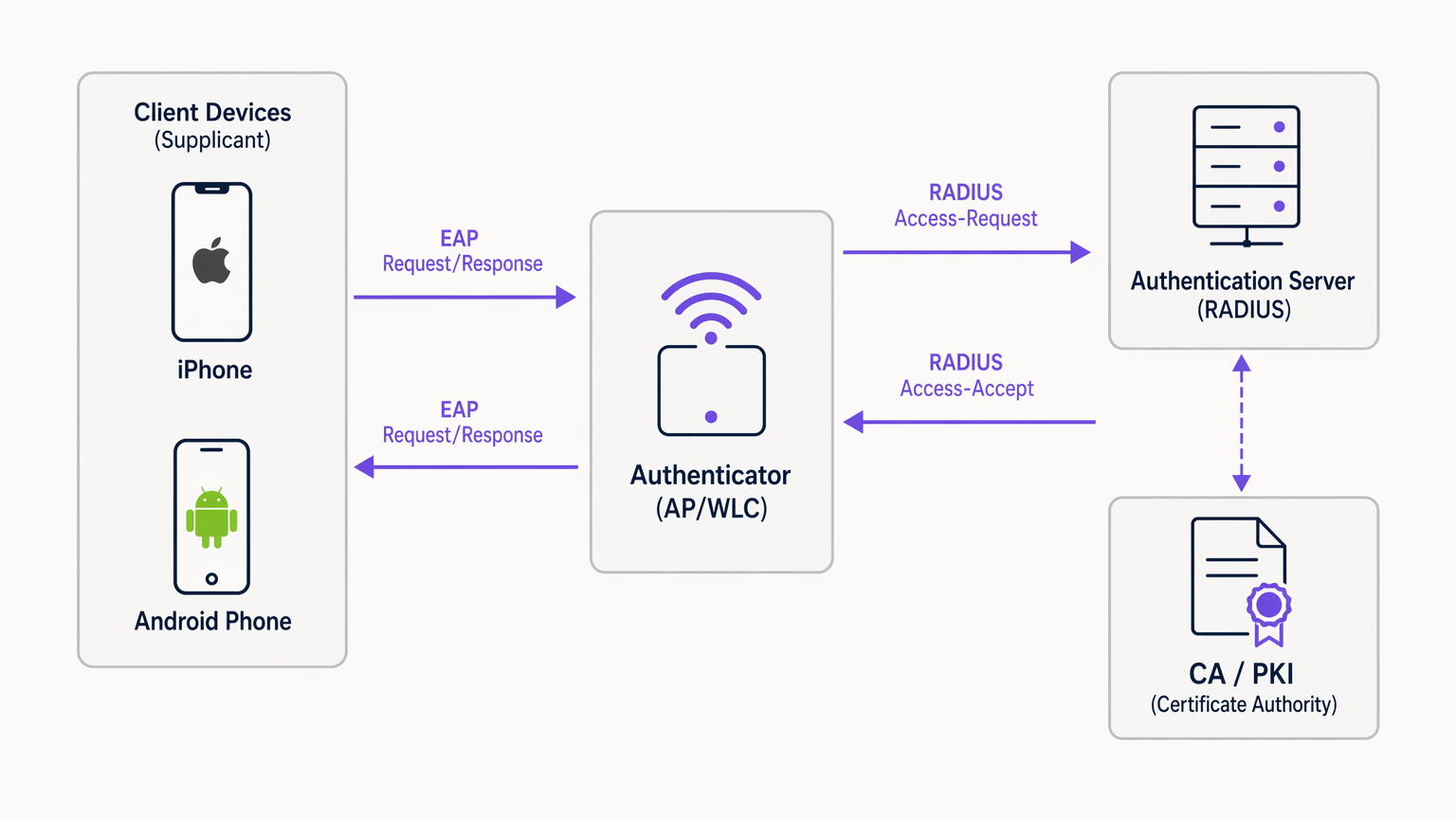
जब कोई मोबाइल डिवाइस कनेक्ट करने का प्रयास करता है, तो ऑथेंटिकेटर EAP over LAN (EAPoL) पैकेट को छोड़कर सभी ट्रैफ़िक को तब तक ब्लॉक कर देता है जब तक कि RADIUS सर्वर क्रेडेंशियल्स को सफलतापूर्वक वैलिडेट नहीं कर देता। EAP मेथड का चुनाव सुरक्षा स्थिति और डिप्लॉयमेंट की जटिलता को निर्धारित करता है।
मोबाइल के लिए EAP मेथड चयन
मोबाइल ऑपरेटिंग सिस्टम में EAP मेथड्स के लिए नेटिव सपोर्ट के विभिन्न स्तर होते हैं। एंटरप्राइज़ डिप्लॉयमेंट के लिए दो प्रमुख मानक EAP-TLS और PEAP-MSCHAPv2 हैं।
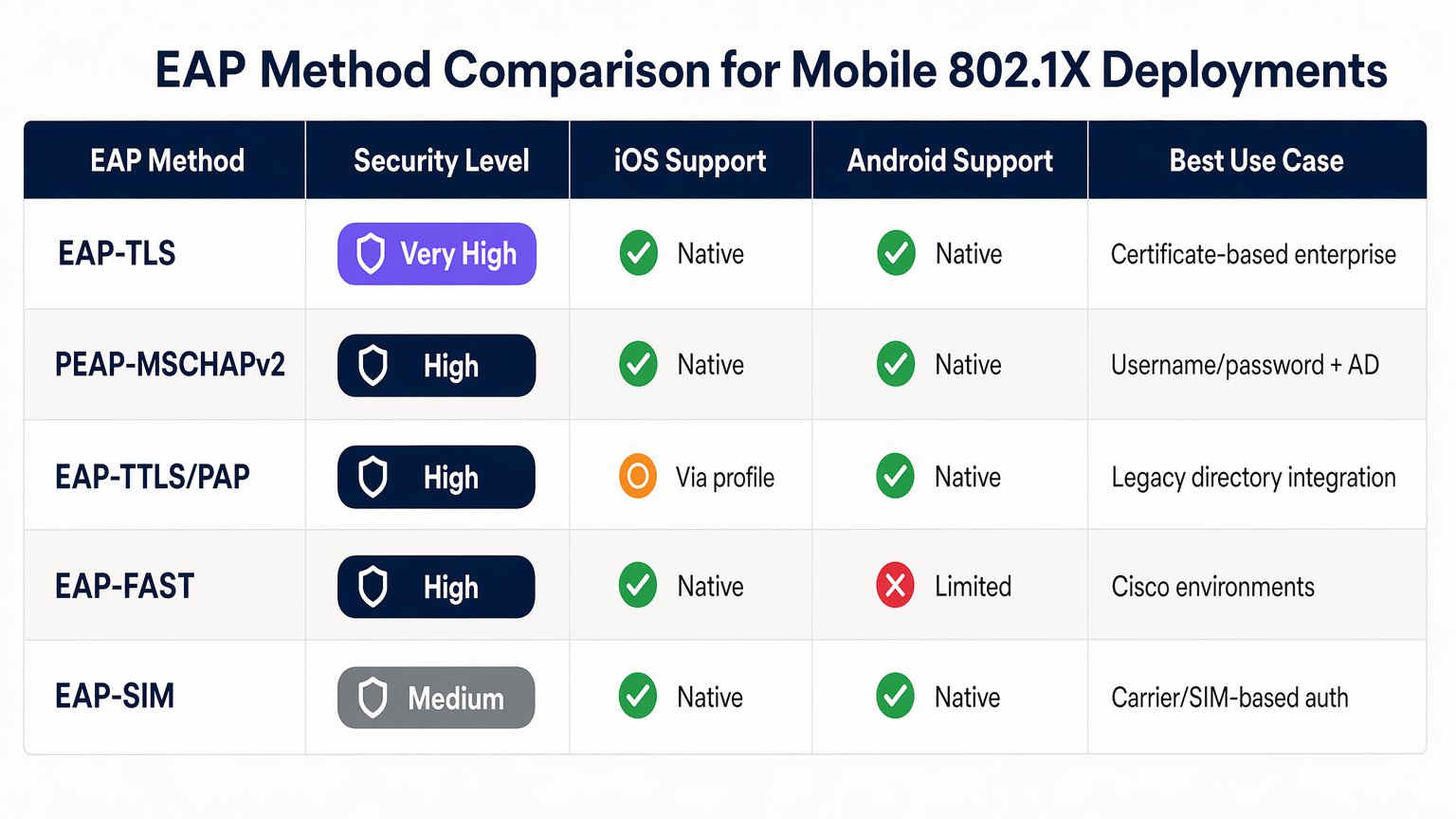
EAP-TLS सबसे सुरक्षित मेथड है, जो म्यूचुअल सर्टिफिकेट-आधारित प्रमाणीकरण पर निर्भर करता है। यह क्रेडेंशियल चोरी के जोखिमों को समाप्त करता है लेकिन सर्टिफिकेट वितरण के लिए एक मजबूत पब्लिक की इंफ्रास्ट्रक्चर (PKI) और MDM की आवश्यकता होती है। iOS और Android दोनों नेटिव रूप से EAP-TLS का समर्थन करते हैं।
PEAP-MSCHAPv2 एक TLS टनल के भीतर प्रमाणीकरण एक्सचेंज को एनकैप्सुलेट करता है, जिससे एक्टिव डायरेक्टरी क्रेडेंशियल्स का उपयोग किया जा सकता है। PKI के बिना डिप्लॉय करना आसान होने के बावजूद, यदि क्लाइंट डिवाइस सर्वर सर्टिफिकेट को वैलिडेट करने के लिए सख्ती से कॉन्फ़िगर नहीं किया गया है, तो यह क्रेडेंशियल हार्वेस्टिंग के प्रति संवेदनशील है।
कार्यान्वयन मार्गदर्शिका
802.1X को डिप्लॉय करने के लिए नेटवर्क इंफ्रास्ट्रक्चर और मोबाइल फ्लीट में समन्वित कॉन्फ़िगरेशन की आवश्यकता होती है।
1. RADIUS सर्वर कॉन्फ़िगरेशन
RADIUS सर्वर (जैसे, Microsoft NPS, Cisco ISE, या JumpCloud जैसे क्लाउड विकल्प) को चुने गए EAP मेथड का समर्थन करने के लिए कॉन्फ़िगर किया जाना चाहिए। PEAP के लिए, एक विश्वसनीय सर्टिफिकेट अथॉरिटी (CA) द्वारा जारी किया गया सर्वर सर्टिफिकेट इंस्टॉल करें। EAP-TLS के लिए, सर्वर को क्लाइंट सर्टिफिकेट जारी करने वाले CA पर भरोसा करने के लिए कॉन्फ़िगर करें। सुनिश्चित करें कि RADIUS सर्वर आपकी डायरेक्टरी सर्विस (AD, LDAP) या आइडेंटिटी प्रोवाइडर के साथ इंटीग्रेटेड है।
2. वायरलेस इंफ्रास्ट्रक्चर कॉन्फ़िगरेशन
अपने एक्सेस पॉइंट (APs) या वायरलेस LAN कंट्रोलर (WLC) को WPA2-एंटरप्राइज़ या WPA3-एंटरप्राइज़ सुरक्षा के साथ एक SSID प्रसारित करने के लिए कॉन्फ़िगर करें। RADIUS सर्वर का IP एड्रेस और शेयर्ड सीक्रेट निर्दिष्ट करें। यूज़र सेशन को ट्रैक करने के लिए RADIUS अकाउंटिंग सक्षम करें, जो WiFi Analytics और समस्या निवारण के लिए महत्वपूर्ण है।
एडवांस्ड डिप्लॉयमेंट के लिए, एन्हांस्ड वायरलेस सिक्योरिटी के लिए Implementing WPA3-Enterprise for Enhanced Wireless Security पर हमारी मार्गदर्शिका की समीक्षा करने पर विचार करें।
3. मोबाइल डिवाइस प्रोविज़निंग (MDM)
यूज़र एरर और सुरक्षा जोखिमों (जैसे, यूज़र्स द्वारा रोग सर्वर सर्टिफिकेट स्वीकार करना) के कारण मोबाइल डिवाइस पर 802.1X का मैन्युअल कॉन्फ़िगरेशन अत्यधिक हतोत्साहित किया जाता है। एक WiFi कॉन्फ़िगरेशन प्रोफ़ाइल पुश करने के लिए एक MDM सॉल्यूशन (Jamf, Intune, Workspace ONE) का उपयोग करें।
- iOS: SSID, EAP मेथड और विश्वसनीय सर्वर सर्टिफिकेट चेन वाले प्रोफ़ाइल को पुश करने के लिए Apple Configurator या MDM का उपयोग करें। EAP-TLS के लिए, प्रोफ़ाइल को क्लाइंट सर्टिफिकेट भी डिप्लॉय करना होगा।
- Android: Android 11+ को सर्वर सर्टिफिकेट वैलिडेशन की सख्त आवश्यकता है। MDM को WiFi प्रोफ़ाइल के साथ CA सर्टिफिकेट को डिवाइस ट्रस्ट स्टोर में पुश करना होगा।
सर्वोत्तम अभ्यास
- सर्वर सर्टिफिकेट वैलिडेशन अनिवार्य करें: RADIUS सर्वर सर्टिफिकेट को वैलिडेट किए बिना डिवाइस को कनेक्ट करने की अनुमति कभी न दें। यह मैन-इन-द-मिडल हमलों को रोकता है।
- प्रोविज़निंग के लिए MDM का उपयोग करें: यूज़र्स पर 802.1X सेटिंग्स को मैन्युअल रूप से कॉन्फ़िगर करने के लिए निर्भर रहना सपोर्ट ओवरहेड और सुरक्षा कमजोरियों को जन्म देता है।
- ट्रैफ़िक को सेगमेंट करें: 802.1X प्रमाणित यूज़र्स को गेस्ट ट्रैफ़िक या IoT डिवाइस से अलग VLAN पर रखें।
- क्लाउड RADIUS लागू करें: Retail चेन या Hospitality वेन्यू जैसे डिस्ट्रीब्यूटेड परिवेशों के लिए, क्लाउड RADIUS ऑन-प्रिमाइसेस इंफ्रास्ट्रक्चर निर्भरताओं को कम करता है।
समस्या निवारण और जोखिम न्यूनीकरण
मोबाइल 802.1X डिप्लॉयमेंट में सबसे आम विफलता मोड सर्टिफिकेट और टाइमआउट के इर्द-गिर्द घूमते हैं।
- सर्टिफिकेट ट्रस्ट एरर: यदि iOS डिवाइस यूज़र्स को सर्टिफिकेट पर भरोसा करने के लिए प्रॉम्प्ट करते हैं, या Android डिवाइस कनेक्ट होने से इनकार करते हैं, तो MDM प्रोफ़ाइल से पूर्ण सर्टिफिकेट चेन (रूट और इंटरमीडिएट CA) गायब होने की संभावना है।
- RADIUS लेटेंसी: यदि RADIUS सर्वर को प्रतिक्रिया देने में 2-3 सेकंड से अधिक समय लगता है, तो मोबाइल डिवाइस कनेक्शन छोड़ देंगे। सुनिश्चित करें कि आपका RADIUS इंफ्रास्ट्रक्चर सही ढंग से स्केल्ड है, खासकर उच्च-घनत्व वाले परिवेशों में।
- EAP बेमेल: सुनिश्चित करें कि WLC पर कॉन्फ़िगर किया गया EAP मेथड RADIUS सर्वर और क्लाइंट प्रोफ़ाइल से मेल खाता है।
ROI और व्यावसायिक प्रभाव
लागू करना 802.1X अनाधिकृत नेटवर्क एक्सेस और लेटरल मूवमेंट के जोखिम को काफी कम करता है। 10,000 कर्मचारियों वाले उद्यम के लिए, MDM और 802.1X के माध्यम से WiFi ऑनबोर्डिंग को स्वचालित करने से PSK रोटेशन के प्रबंधन की तुलना में सालाना सैकड़ों IT सपोर्ट घंटों की बचत हो सकती है। इसके अतिरिक्त, RADIUS अकाउंटिंग द्वारा प्रदान की गई विस्तृत दृश्यता अनुपालन जनादेशों का समर्थन करती है और क्षमता नियोजन में सहायता करती है।
अधिक जानकारी के लिए हमारी पूरी पॉडकास्ट ब्रीफिंग सुनें:
Key Terms & Definitions
802.1X
An IEEE standard for port-based network access control that provides an authentication mechanism to devices wishing to attach to a LAN or WLAN.
The foundational standard replacing insecure shared passwords (PSKs) in enterprise environments.
Supplicant
The software client on the mobile device that requests network access and handles the EAP exchange.
The native WiFi settings on iOS or Android act as the supplicant.
Authenticator
The network device (AP or WLC) that facilitates the authentication process between the supplicant and the RADIUS server.
The AP blocks traffic until authentication succeeds.
RADIUS Server
Remote Authentication Dial-In User Service; a networking protocol that provides centralized Authentication, Authorization, and Accounting (AAA) management.
The decision engine that validates credentials against a directory (e.g., Active Directory).
EAP (Extensible Authentication Protocol)
An authentication framework frequently used in wireless networks and point-to-point connections.
The protocol carrying the authentication data between the mobile device and the RADIUS server.
EAP-TLS
An EAP method that uses Public Key Infrastructure (PKI) to require both the client and server to present certificates for mutual authentication.
The most secure method, ideal for fully managed corporate devices.
PEAP-MSCHAPv2
Protected EAP; creates an encrypted TLS tunnel within which the client authenticates using a username and password.
The most common method, balancing security with ease of deployment for environments without a PKI.
MDM (Mobile Device Management)
Software used by IT departments to monitor, manage, and secure employees' mobile devices.
Essential for silently configuring 802.1X settings and distributing certificates without user intervention.
Case Studies
A 500-room hotel needs to deploy secure WiFi for staff mobile devices (a mix of corporate-owned iOS and BYOD Android). They currently use a shared WPA2-PSK.
Deploy an 802.1X SSID using PEAP-MSCHAPv2. Integrate a cloud RADIUS server with the hotel's Azure AD. For corporate iOS devices, use an MDM to push the WiFi profile and the trusted CA certificate. For BYOD Android, provide an onboarding portal (like SecureW2) to automatically configure the device supplicant and install the CA certificate, avoiding manual configuration errors.
A large public-sector organisation is rolling out 5,000 corporate-owned Android tablets for field workers and requires the highest level of network security.
Implement EAP-TLS. Deploy an internal PKI or cloud CA. Use the organisation's MDM (e.g., VMware Workspace ONE) to generate and push unique client certificates to each Android tablet, along with the WiFi configuration profile and the Root CA certificate. Configure the RADIUS server to only accept EAP-TLS connections.
Scenario Analysis
Q1. Your organisation is deploying 802.1X for a fleet of BYOD Android devices. You do not have an MDM solution. Users are complaining that they cannot connect to the new SSID, and they see a 'Must specify a domain' or 'CA certificate required' error.
💡 Hint:Consider how modern Android versions handle server certificate validation compared to older versions.
Show Recommended Approach
Modern Android versions (11+) no longer allow users to bypass server certificate validation ('Do not validate'). Without an MDM to push the CA certificate, users must manually download and install the CA certificate into their device's trust store, and then manually configure the WiFi profile to use that specific certificate. A better long-term solution is implementing an onboarding portal to automate this process.
Q2. You have deployed EAP-TLS using an internal Microsoft ADCS PKI. Windows laptops connect flawlessly, but iOS devices deployed via Jamf MDM are failing authentication silently.
💡 Hint:Think about the full certificate chain and what the iOS device needs to trust the server.
Show Recommended Approach
The iOS devices likely lack the Root CA certificate (and any Intermediate CAs) of the internal PKI. Windows laptops automatically trust the ADCS Root CA via Group Policy. The Jamf MDM WiFi profile must be updated to explicitly include the Root CA certificate payload so the iOS device can validate the RADIUS server's certificate during the TLS handshake.
Q3. During a high-traffic event at a stadium, many mobile devices are failing to connect to the 802.1X network, while others connect fine. Packet captures show the APs sending RADIUS Access-Requests, but the RADIUS server is responding with Access-Rejects after several seconds, or not responding at all.
💡 Hint:Consider the '3-Second Rule' for mobile devices and RADIUS performance.
Show Recommended Approach
The RADIUS server is likely overwhelmed by the volume of simultaneous authentication requests, leading to high latency. Mobile devices have short timeout thresholds (often 3 seconds) and will abort the connection or retry, further exacerbating the load. The solution is to scale the RADIUS infrastructure (e.g., adding more nodes or deploying regional proxies) and tuning the WLC timeout/retry settings.




