
Implementing 802.1X Authentication on Mobile Devices
This comprehensive guide provides IT leaders with a technical blueprint for implementing 802.1X authentication on iOS and Android devices. It covers architecture, EAP method selection, MDM provisioning, and troubleshooting to ensure secure, scalable mobile network access.
Video overview
Listen to this guide
View podcast transcript
Part of our core series: Enterprise WiFi Security Guide →
Executive Summary
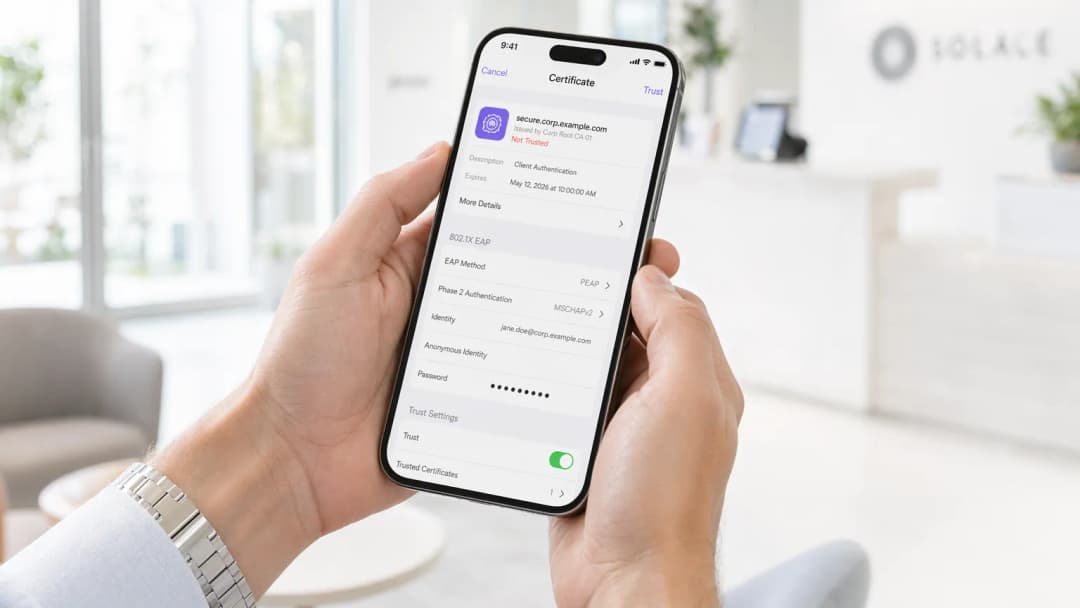
Implementing 802.1X authentication on mobile devices is no longer optional for enterprise environments. Whether managing a corporate office, a 500-room hotel, or a stadium, the reliance on pre-shared keys (PSKs) presents an unacceptable security risk. This guide provides a comprehensive technical blueprint for deploying 802.1X across iOS and Android estates. We will cover the architectural requirements, Extensible Authentication Protocol (EAP) method selection, Mobile Device Management (MDM) provisioning, and common failure modes.
By transitioning to 802.1X, organisations achieve granular network access control, enhanced Guest WiFi security, and compliance with frameworks like PCI DSS and GDPR. This transition requires careful orchestration between the wireless infrastructure, the RADIUS server, and the mobile endpoints.
Technical Deep-Dive: Architecture and EAP Methods
The IEEE 802.1X standard defines port-based network access control, consisting of three primary components: the supplicant (mobile device), the authenticator (wireless access point or controller), and the authentication server (RADIUS).
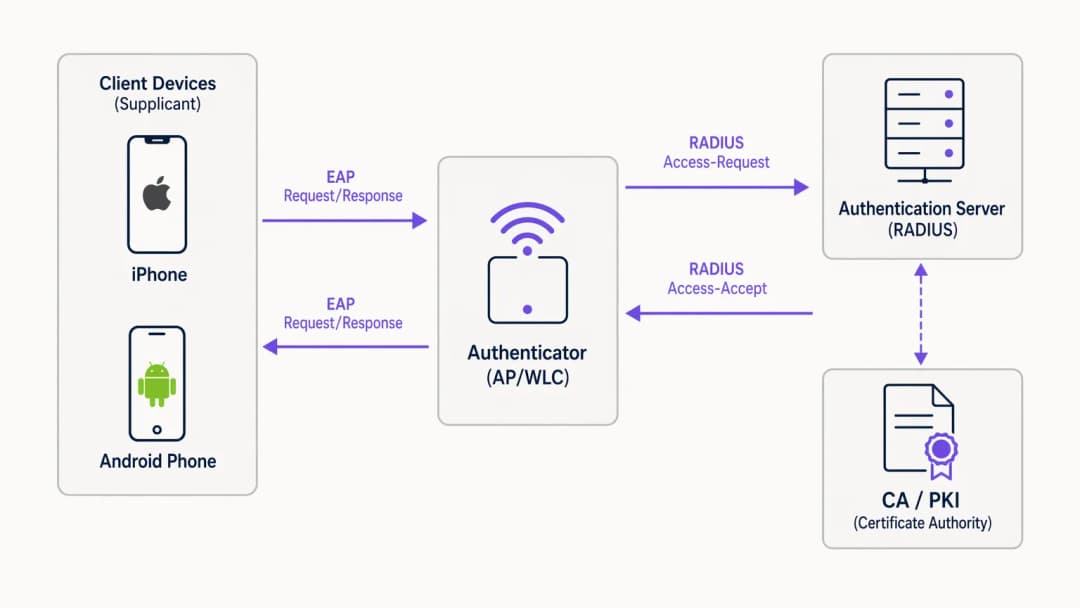
When a mobile device attempts to connect, the authenticator blocks all traffic except EAP over LAN (EAPoL) packets until the RADIUS server successfully validates the credentials. The choice of EAP method dictates the security posture and deployment complexity.
EAP Method Selection for Mobile
Mobile operating systems have varying levels of native support for EAP methods. The two dominant standards for enterprise deployments are EAP-TLS and PEAP-MSCHAPv2.

EAP-TLS is the most secure method, relying on mutual certificate-based authentication. It eliminates credential theft risks but requires a robust Public Key Infrastructure (PKI) and MDM for certificate distribution. Both iOS and Android support EAP-TLS natively.
PEAP-MSCHAPv2 encapsulates the authentication exchange within a TLS tunnel, allowing the use of Active Directory credentials. While easier to deploy without a PKI, it is vulnerable to credential harvesting if the client device is not strictly configured to validate the server certificate.
Got questions about your specific setup?
Our team works with venue operators, IT managers, and network engineers across 80,000 venues. Book a 20-minute call and we will show you how others like you solved it.
Implementation Guide
Deploying 802.1X requires coordinated configuration across the network infrastructure and the mobile fleet.
1. RADIUS Server Configuration
The RADIUS server (e.g., Microsoft NPS, Cisco ISE, or cloud alternatives like JumpCloud) must be configured to support the chosen EAP method. For PEAP, install a server certificate issued by a trusted Certificate Authority (CA). For EAP-TLS, configure the server to trust the CA issuing the client certificates. Ensure the RADIUS server is integrated with your directory service (AD, LDAP) or identity provider.
2. Wireless Infrastructure Configuration
Configure your access points (APs) or Wireless LAN Controller (WLC) to broadcast an SSID with WPA2-Enterprise or WPA3-Enterprise security. Specify the IP address and shared secret of the RADIUS server. Enable RADIUS accounting to track user sessions, which is crucial for WiFi Analytics and troubleshooting.
For advanced deployments, consider reviewing our guide on Implementing WPA3-Enterprise for Enhanced Wireless Security.
3. Mobile Device Provisioning (MDM)
Manual configuration of 802.1X on mobile devices is highly discouraged due to user error and security risks (e.g., users accepting rogue server certificates). Use an MDM solution (Jamf, Intune, Workspace ONE) to push a WiFi configuration profile.
- iOS: Use Apple Configurator or MDM to push a profile containing the SSID, EAP method, and the trusted server certificate chain. For EAP-TLS, the profile must also deploy the client certificate.
- Android: Android 11+ strictly requires server certificate validation. The MDM must push the CA certificate to the device trust store alongside the WiFi profile.
Best Practices
- Mandate Server Certificate Validation: Never allow devices to connect without validating the RADIUS server certificate. This prevents man-in-the-middle attacks.
- Use MDM for Provisioning: Relying on users to manually configure 802.1X settings leads to support overhead and security vulnerabilities.
- Segment Traffic: Place 802.1X authenticated users on a separate VLAN from guest traffic or IoT devices.
- Implement Cloud RADIUS: For distributed environments like Retail chains or Hospitality venues, cloud RADIUS reduces on-premises infrastructure dependencies.
Troubleshooting & Risk Mitigation
The most common failure modes in mobile 802.1X deployments revolve around certificates and timeouts.
- Certificate Trust Errors: If iOS devices prompt users to trust a certificate, or Android devices refuse to connect, the full certificate chain (Root and Intermediate CAs) is likely missing from the MDM profile.
- RADIUS Latency: Mobile devices will drop the connection if the RADIUS server takes longer than 2-3 seconds to respond. Ensure your RADIUS infrastructure is scaled correctly, especially in high-density environments.
- EAP Mismatch: Ensure the EAP method configured on the WLC matches the RADIUS server and the client profile.
ROI & Business Impact
Implementing 802.1X significantly reduces the risk of unauthorised network access and lateral movement. For a 10,000-employee enterprise, automating WiFi onboarding via MDM and 802.1X can save hundreds of IT support hours annually compared to managing PSK rotations. Furthermore, the granular visibility provided by RADIUS accounting supports compliance mandates and aids in capacity planning.
Listen to our full podcast briefing for more insights:
Key Definitions
802.1X
An IEEE standard for port-based network access control that provides an authentication mechanism to devices wishing to attach to a LAN or WLAN.
The foundational standard replacing insecure shared passwords (PSKs) in enterprise environments.
Supplicant
The software client on the mobile device that requests network access and handles the EAP exchange.
The native WiFi settings on iOS or Android act as the supplicant.
Authenticator
The network device (AP or WLC) that facilitates the authentication process between the supplicant and the RADIUS server.
The AP blocks traffic until authentication succeeds.
RADIUS Server
Remote Authentication Dial-In User Service; a networking protocol that provides centralized Authentication, Authorization, and Accounting (AAA) management.
The decision engine that validates credentials against a directory (e.g., Active Directory).
EAP (Extensible Authentication Protocol)
An authentication framework frequently used in wireless networks and point-to-point connections.
The protocol carrying the authentication data between the mobile device and the RADIUS server.
EAP-TLS
An EAP method that uses Public Key Infrastructure (PKI) to require both the client and server to present certificates for mutual authentication.
The most secure method, ideal for fully managed corporate devices.
PEAP-MSCHAPv2
Protected EAP; creates an encrypted TLS tunnel within which the client authenticates using a username and password.
The most common method, balancing security with ease of deployment for environments without a PKI.
MDM (Mobile Device Management)
Software used by IT departments to monitor, manage, and secure employees' mobile devices.
Essential for silently configuring 802.1X settings and distributing certificates without user intervention.
Worked Examples
A 500-room hotel needs to deploy secure WiFi for staff mobile devices (a mix of corporate-owned iOS and BYOD Android). They currently use a shared WPA2-PSK.
Deploy an 802.1X SSID using PEAP-MSCHAPv2. Integrate a cloud RADIUS server with the hotel's Azure AD. For corporate iOS devices, use an MDM to push the WiFi profile and the trusted CA certificate. For BYOD Android, provide an onboarding portal (like SecureW2) to automatically configure the device supplicant and install the CA certificate, avoiding manual configuration errors.
A large public-sector organisation is rolling out 5,000 corporate-owned Android tablets for field workers and requires the highest level of network security.
Implement EAP-TLS. Deploy an internal PKI or cloud CA. Use the organisation's MDM (e.g., VMware Workspace ONE) to generate and push unique client certificates to each Android tablet, along with the WiFi configuration profile and the Root CA certificate. Configure the RADIUS server to only accept EAP-TLS connections.
Practice Questions
Q1. Your organisation is deploying 802.1X for a fleet of BYOD Android devices. You do not have an MDM solution. Users are complaining that they cannot connect to the new SSID, and they see a 'Must specify a domain' or 'CA certificate required' error.
Hint: Consider how modern Android versions handle server certificate validation compared to older versions.
View model answer
Modern Android versions (11+) no longer allow users to bypass server certificate validation ('Do not validate'). Without an MDM to push the CA certificate, users must manually download and install the CA certificate into their device's trust store, and then manually configure the WiFi profile to use that specific certificate. A better long-term solution is implementing an onboarding portal to automate this process.
Q2. You have deployed EAP-TLS using an internal Microsoft ADCS PKI. Windows laptops connect flawlessly, but iOS devices deployed via Jamf MDM are failing authentication silently.
Hint: Think about the full certificate chain and what the iOS device needs to trust the server.
View model answer
The iOS devices likely lack the Root CA certificate (and any Intermediate CAs) of the internal PKI. Windows laptops automatically trust the ADCS Root CA via Group Policy. The Jamf MDM WiFi profile must be updated to explicitly include the Root CA certificate payload so the iOS device can validate the RADIUS server's certificate during the TLS handshake.
Q3. During a high-traffic event at a stadium, many mobile devices are failing to connect to the 802.1X network, while others connect fine. Packet captures show the APs sending RADIUS Access-Requests, but the RADIUS server is responding with Access-Rejects after several seconds, or not responding at all.
Hint: Consider the '3-Second Rule' for mobile devices and RADIUS performance.
View model answer
The RADIUS server is likely overwhelmed by the volume of simultaneous authentication requests, leading to high latency. Mobile devices have short timeout thresholds (often 3 seconds) and will abort the connection or retry, further exacerbating the load. The solution is to scale the RADIUS infrastructure (e.g., adding more nodes or deploying regional proxies) and tuning the WLC timeout/retry settings.
Continue reading in this series
iOS and macOS 802.1X troubleshooting: a deployment checklist for Intune, Jamf and Entra ID
Use this checklist to diagnose why iPhones, iPads and Macs fail 802.1X on Intune or Jamf Pro. Each failure maps to one of four causes: server trust, identity certificate, macOS mode or Entra ID group scoping. You will confirm the cause from eapolclient and RADIUS logs, apply the fix and stage future certificate rotations.
Intune WiFi profile server trust: certificate server names and root CA checklist for Entra ID
You will be able to configure the server validation half of an Intune WiFi profile so EAP-TLS and PEAP connect on Windows, Apple and Android. You will match certificate server names to the RADIUS certificate, deploy the correct root CA, align Entra ID group assignments, and stage certificate renewals before they silently break connections.
Android 802.1X and EAP-TLS troubleshooting: a deployment checklist for Intune and Entra ID
You will be able to pinpoint why managed Android cell phones fail EAP-TLS on your staff SSID and fix it in Intune. Match each symptom to the four usual causes - missing CA or domain, client certificate in the wrong profile, a mismatched RADIUS server names value, or an undelivered trusted root. Then apply a rollout checklist that stops repeat outages.
Got questions about your specific setup?
Our team works with venue operators, IT managers, and network engineers across 80,000 venues. Book a 20-minute call and we will show you how others like you solved it.