

Segmentación de dispositivos IoT en WiFi: aislamiento de dispositivos no estándar
Esta guía ofrece estrategias prácticas de nivel empresarial para segmentar de forma segura dispositivos IoT no estándar en redes WiFi de establecimientos. Aprenda a implementar el aislamiento de VLAN, la autenticación basada en MAC y políticas de firewall estrictas para proteger su infraestructura principal de dispositivos inteligentes vulnerables.
🎧 Escucha esta guía
Ver transcripción

Resumen ejecutivo
Para los gerentes de TI y arquitectos de red en los sectores de hotelería, retail y grandes recintos públicos, la proliferación de dispositivos de Internet de las cosas (IoT) representa un desafío de seguridad crítico. Las Smart TV, las terminales de pago, las impresoras inalámbricas y los sistemas de gestión de edificios (BMS) son esenciales para las operaciones modernas de los establecimientos, pero rara vez admiten la autenticación 802.1X de nivel empresarial.
Colocar estos dispositivos "tontos" en una red corporativa plana o en una red pública de Guest WiFi introduce vulnerabilidades graves. Un termostato inteligente comprometido puede convertirse en un punto de pivote para que los atacantes accedan a datos corporativos confidenciales o sistemas de pago, violando el cumplimiento de PCI DSS y GDPR.
Esta guía de referencia técnica describe la estrategia definitiva para la segmentación de dispositivos IoT en WiFi. Al implementar VLAN dedicadas para IoT, aprovechar las Identity Pre-Shared Keys (iPSK) o el MAC Authentication Bypass (MAB) y aplicar políticas de firewall Zero Trust, los equipos de TI de los establecimientos pueden incorporar dispositivos no estándar de forma segura. Este enfoque garantiza una visibilidad robusta de WiFi Analytics al tiempo que mitiga los riesgos inherentes de un entorno de dispositivos mixtos.
Análisis técnico profundo
El principio fundamental de la segmentación de dispositivos IoT en WiFi es el aislamiento lógico. Los dispositivos que no pueden autenticarse de forma segura deben ponerse en cuarentena en un segmento de red restringido.
La arquitectura del aislamiento
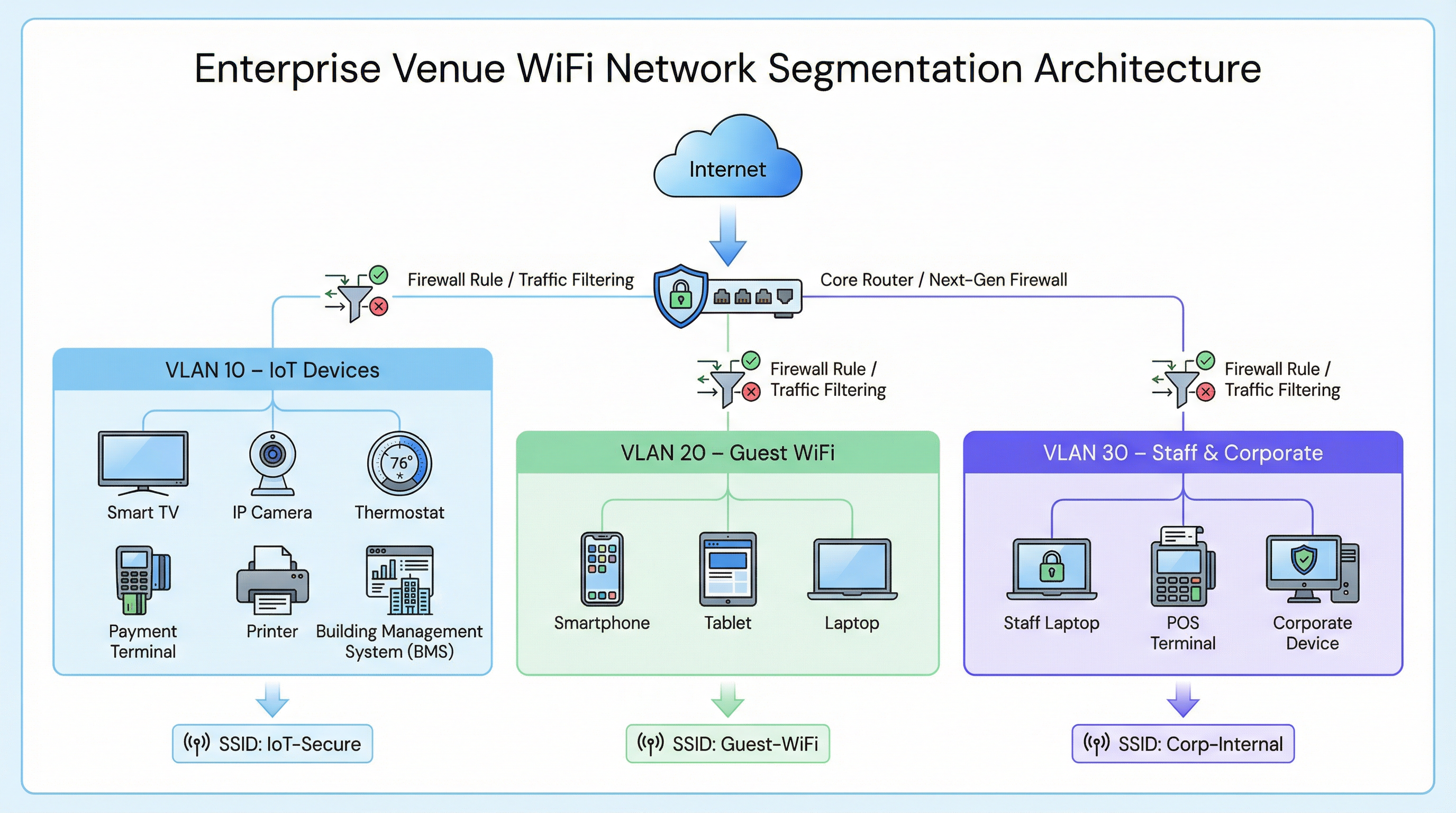
En una implementación empresarial típica, como una cadena de Retail o un establecimiento de Hospitality , el tráfico de red se divide en distintas redes de área local virtuales (VLAN).
- VLAN corporativa (p. ej., VLAN 30): Protegida mediante 802.1X (WPA2/WPA3-Enterprise) para laptops del personal y terminales de punto de venta.
- VLAN de invitados (p. ej., VLAN 20): Una red abierta que utiliza un Captive Portal para la aceptación de los términos de servicio y la captura de analíticas.
- VLAN de IoT (p. ej., VLAN 10): Un segmento dedicado para dispositivos no estándar.
Alternativas de autenticación para dispositivos no estándar
Dado que los dispositivos IoT suelen carecer de los suplicantes necesarios para 802.1X, los equipos de TI deben recurrir a métodos de autenticación alternativos para asignarlos a la VLAN de IoT.
1. Identity Pre-Shared Keys (iPSK) / PSK múltiple
En lugar de utilizar una única contraseña global (WPA2-Personal) para todo un SSID de IoT, los controladores inalámbricos modernos admiten iPSK. Esto permite a los administradores generar claves precompartidas únicas para dispositivos individuales o grupos de dispositivos (p. ej., todas las Smart TV en un ala específica de un hotel) mientras transmiten un solo SSID.
- Ventaja: Si una clave específica se ve comprometida, se puede revocar sin interrumpir toda la red IoT.
- Implementación: Muy recomendable para implementaciones modernas de edificios inteligentes.
2. MAC Authentication Bypass (MAB)
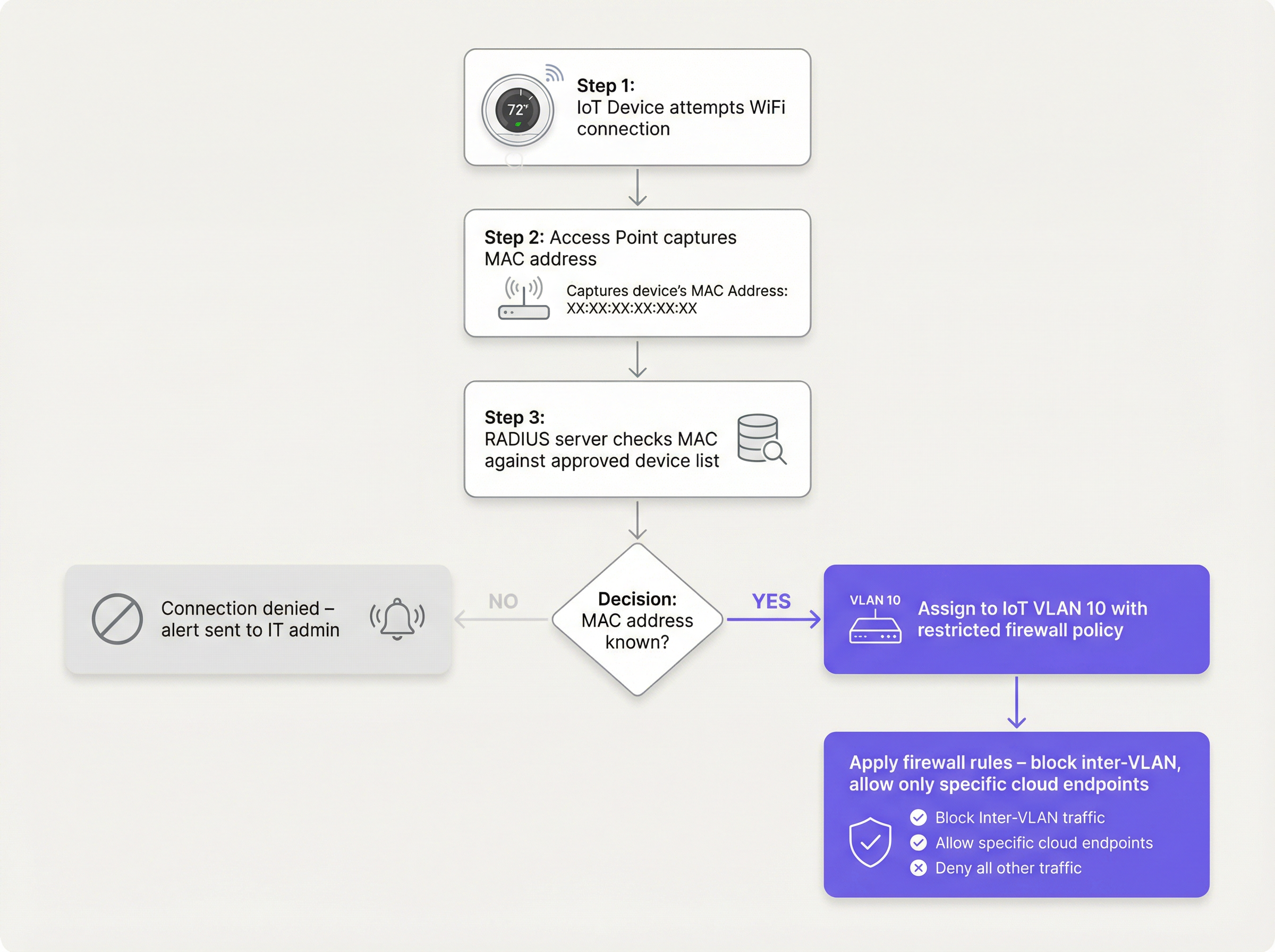
Para los dispositivos heredados que tienen dificultades incluso con PSK complejas, el MAB sirve como alternativa. El punto de acceso inalámbrico captura la dirección MAC del dispositivo y consulta a un servidor RADIUS. Si la dirección MAC está registrada en la base de datos aprobada, el servidor RADIUS autoriza la conexión y asigna dinámicamente el dispositivo a la VLAN de IoT.
- Limitación: Las direcciones MAC se pueden suplantar. El MAB no es una seguridad sólida; es una solución operativa que debe combinarse con políticas de firewall agresivas.
- Punto de decisión: Al evaluar la infraestructura RADIUS para admitir MAB, consulte la Guía de decisión para equipos de TI: Cloud RADIUS frente a RADIUS local .
Guía de implementación
La implementación de un segmento IoT seguro requiere un enfoque coordinado entre el controlador inalámbrico, el servidor RADIUS y el firewall principal.
Paso 1: Definir la estrategia de VLAN de IoT y SSID
Cree una VLAN dedicada (p. ej., VLAN 10) para los dispositivos IoT. Decida si utilizará un SSID dedicado (p. ej., Venue-IoT) o si utilizará la asignación dinámica de VLAN en un SSID compartido. Para una máxima compatibilidad con radios IoT de bajo costo, a menudo es necesario un SSID dedicado que funcione exclusivamente en la banda de 2.4 GHz, ya que muchos sensores heredados no admiten 5 GHz.
Paso 2: Configurar la autenticación (iPSK o MAB)
Si utiliza iPSK, configure el controlador inalámbrico para asignar claves específicas a la VLAN de IoT. Si utiliza MAB, complete su servidor RADIUS con las direcciones MAC de los dispositivos IoT aprobados. Asegúrese de que exista un proceso estricto de gestión del ciclo de vida: cuando un dispositivo se retire, su dirección MAC debe eliminarse de inmediato de la base de datos.
Paso 3: Aplicar políticas de firewall Zero Trust
Este es el paso más crítico. La VLAN de IoT debe tratarse como no confiable.
- Bloquear el enrutamiento entre VLAN: La VLAN de IoT no debe poder iniciar conexiones con la VLAN corporativa ni con la VLAN de invitados.
- Implementar el aislamiento de clientes (aislamiento L2): Los dispositivos en el mismo SSID de IoT no deben poder comunicarse entre sí. Una Smart TV en la habitación 101 no necesita hacer ping a la Smart TV en la habitación 102.
- Restringir el acceso a Internet de salida (filtrado de salida): Aplique una política de denegación por defecto para el tráfico de salida. Solo permita el tráfico a direcciones IP o dominios específicos y necesarios (p. ej., el endpoint en la nube del fabricante a través del puerto 443). Bloquee todas las solicitudes genéricas de DNS, HTTP y NTP de salida, obligando a los dispositivos a utilizar servicios internos monitoreados.
Mejores prácticas
- No oculte el SSID: Desactivar la transmisión del SSID proporciona beneficios de seguridad insignificantes y, a menudo, causa inestabilidad en la conexión para pilas de red IoT mal codificadas. Deje el SSID visible pero asegúrelo correctamente.
- Monitorear el comportamiento de los dispositivos: Utilice WiFi Analytics para establecer una línea base de comportamiento normal para dispositivos IoT. Si un sensor de temperatura comienza repentinamente a transferir gigabytes de datos, el sistema debe activar una alerta inmediata.
- Segmentar por tipo de dispositivo: En entornos complejos, como instalaciones de Salud , considere crear múltiples microsegmentos (por ejemplo, VLAN 11 para IoT médico, VLAN 12 para HVAC de la instalación) para reducir aún más el radio de impacto de una vulneración.
Resolución de problemas y mitigación de riesgos
Modo de falla común: El compromiso de la "red plana"
La causa más frecuente de las brechas relacionadas con IoT es el despliegue de dispositivos inteligentes en la red corporativa principal por conveniencia. Esto elude todos los controles de segmentación.
- Mitigación: Aplique políticas estrictas de control de cambios. Ningún dispositivo se conecta a la red sin una dirección MAC aprobada o una asignación de iPSK.
Modo de falla común: Direcciones MAC obsoletas
Cuando un dispositivo se avería y es reemplazado, la dirección MAC antigua a menudo permanece en la base de datos RADIUS, lo que crea una puerta trasera permanente si un atacante suplanta esa dirección específica.
- Mitigación: Implemente una gestión de ciclo de vida automatizada. Requiera la revalidación periódica de todos los dispositivos en la base de datos MAB.
ROI e impacto empresarial
Implementar una segmentación adecuada de dispositivos IoT en WiFi requiere un esfuerzo de configuración inicial, pero el retorno de la inversión es sustancial:
- Mitigación de riesgos: Reduce drásticamente la probabilidad de una brecha de datos catastrófica originada en un dispositivo inteligente vulnerable, protegiendo la reputación de la marca y evitando multas regulatorias (GDPR, PCI DSS).
- Estabilidad operativa: Aislar el tráfico ruidoso de IoT evita que las tormentas de difusión degraden el rendimiento de las aplicaciones corporativas críticas o la experiencia de WiFi para invitados .
- Preparación para el futuro: Una arquitectura segmentada permite a los establecimientos implementar con confianza nuevas tecnologías de edificios inteligentes, como Sensores avanzados y soluciones de Wayfinding con total seguridad, sin comprometer la seguridad de la red principal.
Términos clave y definiciones
VLAN (Virtual Local Area Network)
A logical grouping of network devices that behave as if they are on an independent network, regardless of their physical location.
Used to isolate IoT devices from corporate and guest traffic, preventing lateral movement during a security breach.
MAC Authentication Bypass (MAB)
A network access control technique that uses a device's MAC address to authorize connection to the network when standard 802.1X authentication is not supported.
The primary fallback method for onboarding 'dumb' IoT devices, requiring a RADIUS server to validate the MAC address.
Identity Pre-Shared Key (iPSK)
A feature that allows multiple unique pre-shared keys to be used on a single SSID, with each key assigning the device to a specific VLAN or policy.
A more secure alternative to a single shared password for IoT networks, allowing IT teams to revoke individual compromised devices.
Client Isolation (L2 Isolation)
A wireless network setting that prevents devices connected to the same access point or SSID from communicating directly with each other.
Essential for guest networks and IoT networks to prevent infected devices from spreading malware to adjacent devices.
802.1X
An IEEE standard for port-based network access control, providing secure, enterprise-grade authentication using a RADIUS server.
The gold standard for corporate devices, but rarely supported by the IoT devices discussed in this guide.
Zero Trust
A security framework requiring all users and devices to be authenticated, authorized, and continuously validated before being granted access to applications and data.
The guiding principle for configuring firewall rules for the IoT VLAN—assume the device is compromised and restrict access accordingly.
Egress Filtering
The practice of monitoring and potentially restricting the flow of information outbound from one network to another, typically the internet.
Crucial for IoT devices to ensure they only communicate with authorized vendor cloud services and cannot be used in DDoS attacks.
Captive Portal
A web page that the user of a public-access network is obliged to view and interact with before access is granted.
Used for Guest WiFi, but unusable by headless IoT devices, necessitating MAB or iPSK for IoT onboarding.
Casos de éxito
A 300-room hotel is deploying new smart TVs in every guest room. The TVs require internet access to stream content from vendor-approved cloud services, but they do not support 802.1X. The hotel also needs to ensure guests cannot cast content to TVs in adjacent rooms.
The IT team should create a dedicated IoT VLAN (e.g., VLAN 40) and a hidden or visible dedicated SSID (e.g., Hotel-Media). They implement Identity PSK (iPSK), assigning a unique pre-shared key to each room's TV. At the access point level, Client Isolation (Layer 2 isolation) is enabled to prevent TVs from communicating with each other. At the core firewall, inter-VLAN routing is blocked, ensuring the TVs cannot access the corporate network or the guest network. Finally, egress filtering is applied to VLAN 40, allowing outbound traffic only to the specific IP ranges required by the streaming services.
A large retail chain needs to connect hundreds of wireless barcode scanners and receipt printers. These legacy devices only support basic WPA2-PSK and cannot handle complex passwords or iPSK. How should they be secured?
The network architect should deploy a dedicated SSID specifically for these legacy devices, operating on the 2.4GHz band for maximum compatibility. Because the devices cannot support iPSK, the team must use MAC Authentication Bypass (MAB). The MAC addresses of all authorized scanners and printers are loaded into the central RADIUS server. When a device connects, the RADIUS server authenticates the MAC and assigns it to a highly restricted Retail-IoT VLAN. The firewall policy for this VLAN strictly limits outbound traffic to the specific internal inventory servers and payment gateways required for operation.
Análisis de escenarios
Q1. A stadium IT director wants to deploy 50 new wireless digital signage displays. The vendor states the displays only support WPA2-Personal (a single shared password). The director wants to put them on the Guest WiFi network to avoid managing a new SSID. What is your recommendation?
💡 Sugerencia:Consider the impact of client isolation and the security implications of mixing trusted and untrusted devices.
Mostrar enfoque recomendado
Do not place the displays on the Guest WiFi. The Guest network uses a captive portal, which the headless displays cannot navigate. Furthermore, Guest networks typically have client isolation enabled, which might interfere with the management system trying to update the displays. Recommendation: Create a dedicated IoT SSID. Since the devices only support WPA2-Personal, use MAC Authentication Bypass (MAB) to assign them to a dedicated Digital Signage VLAN. Apply strict firewall rules to this VLAN, allowing outbound traffic only to the specific content management cloud server.
Q2. During a network audit at a retail chain, you discover that all wireless receipt printers are connected to the Corporate VLAN using MAB. The firewall allows the Corporate VLAN full outbound internet access. What is the primary risk, and how should it be remediated?
💡 Sugerencia:Think about what happens if an attacker unplugs a printer and connects their own device.
Mostrar enfoque recomendado
The primary risk is MAC spoofing. An attacker could spoof a printer's MAC address and gain full access to the Corporate VLAN, including unrestricted outbound internet access, allowing them to exfiltrate sensitive data or establish a command-and-control connection. Remediation: Move the printers to a dedicated IoT VLAN. Enforce strict egress filtering on the IoT VLAN, blocking all outbound internet access and only allowing internal communication to the specific print servers required for operation.
Q3. A hospital is deploying new smart thermostats that support Identity PSK (iPSK). The IT team plans to use a single iPSK for all thermostats across the entire campus to simplify management. Is this the optimal approach?
💡 Sugerencia:Consider the blast radius if that single iPSK is compromised.
Mostrar enfoque recomendado
While better than a standard shared password, using a single iPSK for all devices defeats the primary benefit of the technology. If that single key is compromised, all thermostats are vulnerable, and changing the key requires reconfiguring every device on campus. Recommendation: Group the thermostats logically (e.g., by floor, wing, or department) and assign a unique iPSK to each group. This minimizes the blast radius of a compromised key and simplifies revocation.
Conclusiones clave
- ✓IoT devices rarely support 802.1X and must be logically isolated on dedicated VLANs.
- ✓Never place IoT devices on corporate or guest networks.
- ✓Use Identity PSK (iPSK) to assign unique keys to devices on a shared SSID.
- ✓Use MAC Authentication Bypass (MAB) as a fallback for legacy devices that cannot support iPSK.
- ✓MAB is not strong security; it must be paired with aggressive Zero Trust firewall policies.
- ✓Implement client isolation on IoT SSIDs to prevent lateral movement between devices.
- ✓Enforce default-deny egress filtering, allowing IoT devices to communicate only with required vendor endpoints.




