

Segmentação de Dispositivos IoT em WiFi: Isolando Dispositivos Não Padronizados
Este guia fornece estratégias práticas de nível empresarial para segmentar com segurança dispositivos IoT não padronizados em redes WiFi de locais. Saiba como implementar o isolamento de VLAN, autenticação baseada em MAC e políticas de firewall rigorosas para proteger sua infraestrutura principal contra dispositivos inteligentes vulneráveis.
🎧 Ouça este Guia
Ver Transcrição

Resumo Executivo
Para gerentes de TI e arquitetos de rede em hospitalidade, varejo e grandes locais públicos, a proliferação de dispositivos de Internet das Coisas (IoT) apresenta um desafio de segurança crítico. Smart TVs, terminais de pagamento, impressoras sem fio e sistemas de gestão predial (BMS) são essenciais para as operações modernas do local, mas raramente suportam a autenticação 802.1X de nível empresarial.
Colocar esses dispositivos "burros" em uma rede corporativa plana ou em uma rede Guest WiFi pública introduz vulnerabilidades graves. Um termostato inteligente comprometido pode se tornar um ponto de articulação para invasores acessarem dados corporativos confidenciais ou sistemas de pagamento, violando a conformidade com PCI DSS e GDPR.
Este guia de referência técnica descreve a estratégia definitiva para a segmentação de dispositivos IoT em WiFi. Ao implementar VLANs de IoT dedicadas, aproveitando Identity Pre-Shared Keys (iPSK) ou MAC Authentication Bypass (MAB) e aplicando políticas de firewall Zero Trust, as equipes de TI do local podem integrar dispositivos não padronizados com segurança. Essa abordagem garante uma visibilidade robusta de WiFi Analytics enquanto mitiga os riscos inerentes de um ambiente de dispositivos mistos.
Aprofundamento Técnico
O princípio fundamental da segmentação de dispositivos IoT em WiFi é o isolamento lógico. Dispositivos que não podem se autenticar com segurança devem ser colocados em quarentena em um segmento de rede restrito.
A Arquitetura do Isolamento
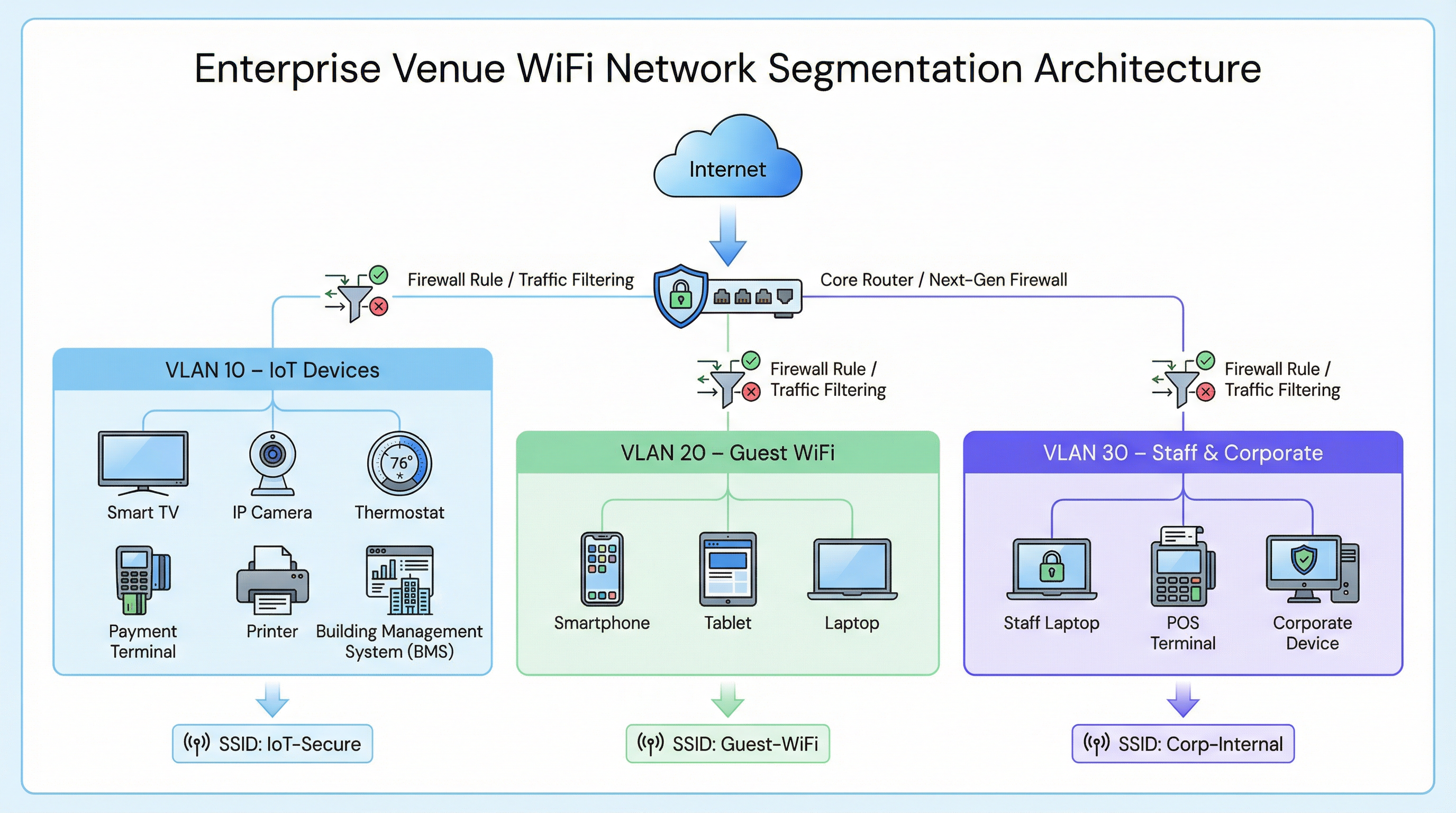
Em uma implantação empresarial típica, como uma rede de Retail ou um local de Hospitality , o tráfego de rede é dividido em Redes Locais Virtuais (VLANs) distintas.
- VLAN Corporativa (ex: VLAN 30): Protegida via 802.1X (WPA2/WPA3-Enterprise) para laptops de funcionários e terminais POS.
- VLAN de Visitantes (ex: VLAN 20): Uma rede aberta que utiliza um Captive Portal para aceitação dos termos de serviço e captura de analytics.
- VLAN de IoT (ex: VLAN 10): Um segmento dedicado para dispositivos não padronizados.
Fallbacks de Autenticação para Dispositivos Não Padronizados
Como os dispositivos IoT geralmente carecem dos suplicantes necessários para o 802.1X, as equipes de TI devem contar com métodos de autenticação alternativos para atribuí-los à VLAN de IoT.
1. Identity Pre-Shared Keys (iPSK) / Multiple PSK
Em vez de usar uma única senha global (WPA2-Personal) para todo um SSID de IoT, os controladores sem fio modernos suportam iPSK. Isso permite que os administradores gerem chaves pré-compartilhadas exclusivas para dispositivos individuais ou grupos de dispositivos (por exemplo, todas as smart TVs em uma ala específica de um hotel) enquanto transmitem um único SSID.
- Vantagem: Se uma chave específica for comprometida, ela pode ser revogada sem interromper toda a rede IoT.
- Implantação: Altamente recomendado para implantações modernas de edifícios inteligentes.
2. MAC Authentication Bypass (MAB)
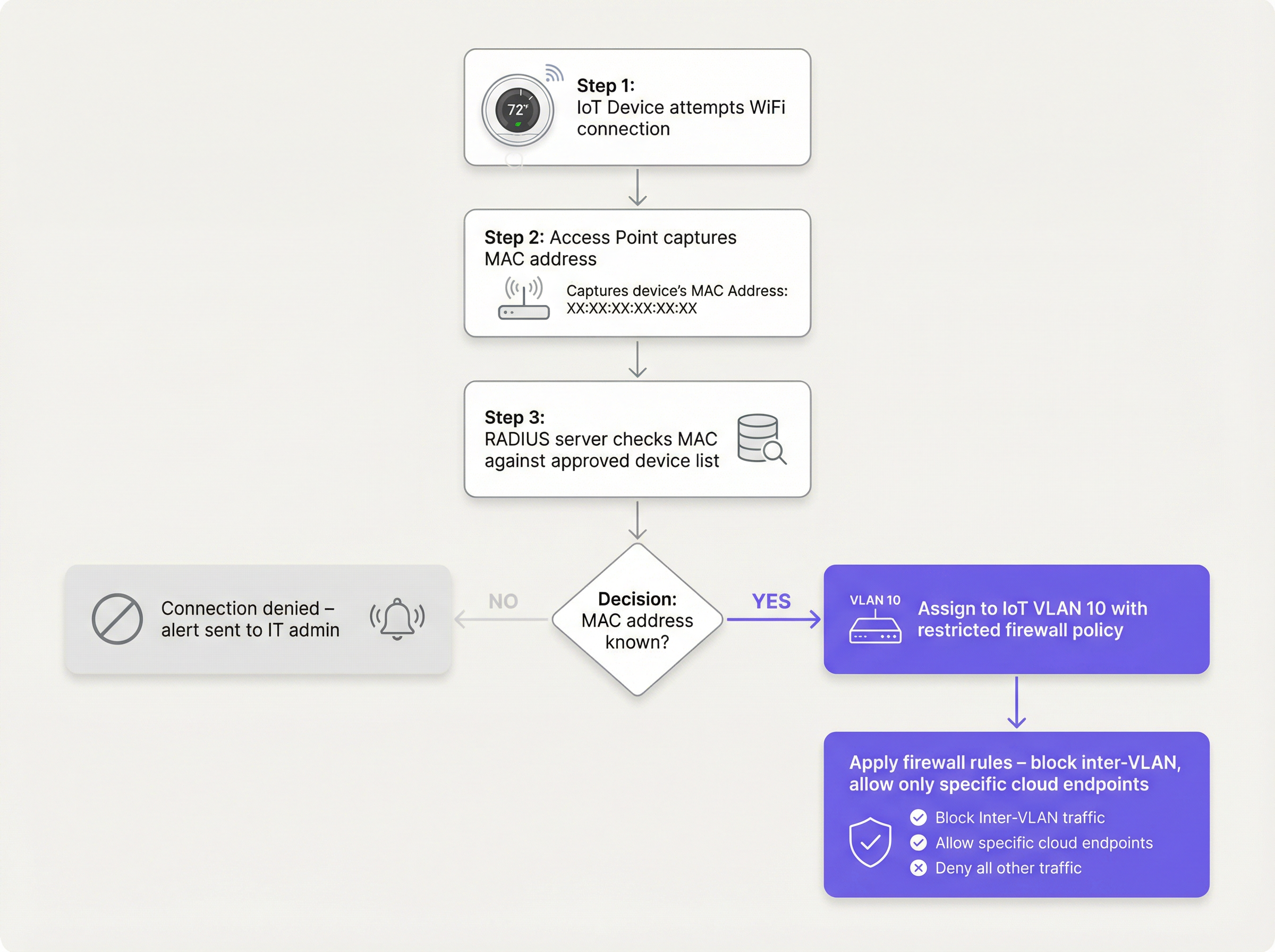
Para dispositivos legados que têm dificuldade até mesmo com PSKs complexos, o MAB serve como um fallback. O ponto de acesso sem fio captura o endereço MAC do dispositivo e consulta um servidor RADIUS. Se o endereço MAC estiver registrado no banco de dados aprovado, o servidor RADIUS autoriza a conexão e atribui dinamicamente o dispositivo à VLAN de IoT.
- Limitação: Endereços MAC podem ser falsificados. O MAB não é uma segurança forte; é uma solução operacional alternativa que deve ser combinada com políticas de firewall agressivas.
- Ponto de Decisão: Ao avaliar a infraestrutura RADIUS para suportar MAB, consulte o Cloud RADIUS vs On-Premise RADIUS: Guia de Decisão para Equipes de TI .
Guia de Implementação
A implantação de um segmento de IoT seguro requer uma abordagem coordenada entre o controlador sem fio, o servidor RADIUS e o firewall principal.
Passo 1: Definir a Estratégia de VLAN de IoT e SSID
Crie uma VLAN dedicada (ex: VLAN 10) para dispositivos IoT. Decida se deseja usar um SSID dedicado (ex: Venue-IoT) ou utilizar a atribuição dinâmica de VLAN em um SSID compartilhado. Para máxima compatibilidade com rádios IoT baratos, um SSID dedicado operando exclusivamente na banda de 2,4 GHz é frequentemente necessário, já que muitos sensores legados não suportam 5 GHz.
Passo 2: Configurar a Autenticação (iPSK ou MAB)
Se estiver usando iPSK, configure o controlador sem fio para mapear chaves específicas para a VLAN de IoT. Se estiver usando MAB, preencha seu servidor RADIUS com os endereços MAC dos dispositivos IoT aprovados. Certifique-se de que um processo rigoroso de gerenciamento de ciclo de vida esteja em vigor — quando um dispositivo for retirado, seu endereço MAC deve ser imediatamente removido do banco de dados.
Passo 3: Aplicar Políticas de Firewall Zero Trust
Este é o passo mais crítico. A VLAN de IoT deve ser tratada como não confiável.
- Bloquear Roteamento Inter-VLAN: A VLAN de IoT não deve ser capaz de iniciar conexões com a VLAN Corporativa ou a VLAN de Visitantes.
- Implementar Isolamento de Cliente (Isolamento L2): Dispositivos no mesmo SSID de IoT não devem ser capazes de se comunicar entre si. Uma smart TV no Quarto 101 não precisa dar ping na smart TV no Quarto 102.
- Restringir o Acesso à Internet de Saída (Filtragem de Saída): Aplique uma política de negação padrão para o tráfego de saída. Permita apenas o tráfego para endereços IP ou domínios específicos e necessários (por exemplo, o endpoint na nuvem do fabricante pela porta 443). Bloqueie todas as solicitações genéricas de DNS, HTTP e NTP de saída, forçando os dispositivos a usar serviços internos monitorados.
Melhores Práticas
- Não Esconda o SSID: Desativar a transmissão do SSID oferece benefícios de segurança insignificantes e frequentemente causa instabilidade de conexão para pilhas de rede IoT mal codificadas. Deixe o SSID visível, mas proteja-o adequadamente.
- Monitore o Comportamento do Dispositivo: Utilize o WiFi Analytics para estabelecer uma linha de base de comportamento normal para dispositivos IoT. Se um sensor de temperatura começar repentinamente a transferir gigabytes de dados, o sistema deve disparar um alerta imediato.
- Segmente por Tipo de Dispositivo: Em ambientes complexos, como instalações de Healthcare , considere criar múltiplos microsegmentos (ex: VLAN 11 para IoT médico, VLAN 12 para HVAC da instalação) para reduzir ainda mais o raio de alcance de um comprometimento.
Solução de Problemas e Mitigação de Riscos
Modo de Falha Comum: O Comprometimento da "Rede Plana"
A causa mais frequente de violações relacionadas à IoT é a implantação de dispositivos inteligentes na rede corporativa principal por conveniência. Isso ignora todos os controles de segmentação.
- Mitigação: Aplique políticas rigorosas de controle de mudanças. Nenhum dispositivo se conecta à rede sem um endereço MAC aprovado ou atribuição de iPSK.
Modo de Falha Comum: Endereços MAC Obsoletos
Quando um dispositivo quebra e é substituído, o endereço MAC antigo geralmente permanece no banco de dados RADIUS, criando um backdoor permanente se um invasor falsificar esse endereço específico.
- Mitigação: Implemente o gerenciamento automatizado do ciclo de vida. Exija a revalidação periódica de todos os dispositivos no banco de dados MAB.
ROI e Impacto nos Negócios
A implementação da segmentação adequada de dispositivos IoT em WiFi requer um esforço de configuração inicial, mas o retorno sobre o investimento é substancial:
- Mitigação de Riscos: Reduz drasticamente a probabilidade de uma violação de dados catastrófica originada de um dispositivo inteligente vulnerável, protegendo a reputação da marca e evitando multas regulatórias (GDPR, PCI DSS).
- Estabilidade Operacional: O isolamento do tráfego ruidoso de IoT evita que tempestades de broadcast degradem o desempenho de aplicações corporativas críticas ou a experiência de Guest WiFi .
- Preparação para o Futuro: Uma arquitetura segmentada permite que os locais implantem com confiança novas tecnologias de edifícios inteligentes, como Sensors avançados e soluções de Wayfinding , sem comprometer a segurança da rede principal.
Termos-Chave e Definições
VLAN (Virtual Local Area Network)
A logical grouping of network devices that behave as if they are on an independent network, regardless of their physical location.
Used to isolate IoT devices from corporate and guest traffic, preventing lateral movement during a security breach.
MAC Authentication Bypass (MAB)
A network access control technique that uses a device's MAC address to authorize connection to the network when standard 802.1X authentication is not supported.
The primary fallback method for onboarding 'dumb' IoT devices, requiring a RADIUS server to validate the MAC address.
Identity Pre-Shared Key (iPSK)
A feature that allows multiple unique pre-shared keys to be used on a single SSID, with each key assigning the device to a specific VLAN or policy.
A more secure alternative to a single shared password for IoT networks, allowing IT teams to revoke individual compromised devices.
Client Isolation (L2 Isolation)
A wireless network setting that prevents devices connected to the same access point or SSID from communicating directly with each other.
Essential for guest networks and IoT networks to prevent infected devices from spreading malware to adjacent devices.
802.1X
An IEEE standard for port-based network access control, providing secure, enterprise-grade authentication using a RADIUS server.
The gold standard for corporate devices, but rarely supported by the IoT devices discussed in this guide.
Zero Trust
A security framework requiring all users and devices to be authenticated, authorized, and continuously validated before being granted access to applications and data.
The guiding principle for configuring firewall rules for the IoT VLAN—assume the device is compromised and restrict access accordingly.
Egress Filtering
The practice of monitoring and potentially restricting the flow of information outbound from one network to another, typically the internet.
Crucial for IoT devices to ensure they only communicate with authorized vendor cloud services and cannot be used in DDoS attacks.
Captive Portal
A web page that the user of a public-access network is obliged to view and interact with before access is granted.
Used for Guest WiFi, but unusable by headless IoT devices, necessitating MAB or iPSK for IoT onboarding.
Estudos de Caso
A 300-room hotel is deploying new smart TVs in every guest room. The TVs require internet access to stream content from vendor-approved cloud services, but they do not support 802.1X. The hotel also needs to ensure guests cannot cast content to TVs in adjacent rooms.
The IT team should create a dedicated IoT VLAN (e.g., VLAN 40) and a hidden or visible dedicated SSID (e.g., Hotel-Media). They implement Identity PSK (iPSK), assigning a unique pre-shared key to each room's TV. At the access point level, Client Isolation (Layer 2 isolation) is enabled to prevent TVs from communicating with each other. At the core firewall, inter-VLAN routing is blocked, ensuring the TVs cannot access the corporate network or the guest network. Finally, egress filtering is applied to VLAN 40, allowing outbound traffic only to the specific IP ranges required by the streaming services.
A large retail chain needs to connect hundreds of wireless barcode scanners and receipt printers. These legacy devices only support basic WPA2-PSK and cannot handle complex passwords or iPSK. How should they be secured?
The network architect should deploy a dedicated SSID specifically for these legacy devices, operating on the 2.4GHz band for maximum compatibility. Because the devices cannot support iPSK, the team must use MAC Authentication Bypass (MAB). The MAC addresses of all authorized scanners and printers are loaded into the central RADIUS server. When a device connects, the RADIUS server authenticates the MAC and assigns it to a highly restricted Retail-IoT VLAN. The firewall policy for this VLAN strictly limits outbound traffic to the specific internal inventory servers and payment gateways required for operation.
Análise de Cenário
Q1. A stadium IT director wants to deploy 50 new wireless digital signage displays. The vendor states the displays only support WPA2-Personal (a single shared password). The director wants to put them on the Guest WiFi network to avoid managing a new SSID. What is your recommendation?
💡 Dica:Consider the impact of client isolation and the security implications of mixing trusted and untrusted devices.
Mostrar Abordagem Recomendada
Do not place the displays on the Guest WiFi. The Guest network uses a captive portal, which the headless displays cannot navigate. Furthermore, Guest networks typically have client isolation enabled, which might interfere with the management system trying to update the displays. Recommendation: Create a dedicated IoT SSID. Since the devices only support WPA2-Personal, use MAC Authentication Bypass (MAB) to assign them to a dedicated Digital Signage VLAN. Apply strict firewall rules to this VLAN, allowing outbound traffic only to the specific content management cloud server.
Q2. During a network audit at a retail chain, you discover that all wireless receipt printers are connected to the Corporate VLAN using MAB. The firewall allows the Corporate VLAN full outbound internet access. What is the primary risk, and how should it be remediated?
💡 Dica:Think about what happens if an attacker unplugs a printer and connects their own device.
Mostrar Abordagem Recomendada
The primary risk is MAC spoofing. An attacker could spoof a printer's MAC address and gain full access to the Corporate VLAN, including unrestricted outbound internet access, allowing them to exfiltrate sensitive data or establish a command-and-control connection. Remediation: Move the printers to a dedicated IoT VLAN. Enforce strict egress filtering on the IoT VLAN, blocking all outbound internet access and only allowing internal communication to the specific print servers required for operation.
Q3. A hospital is deploying new smart thermostats that support Identity PSK (iPSK). The IT team plans to use a single iPSK for all thermostats across the entire campus to simplify management. Is this the optimal approach?
💡 Dica:Consider the blast radius if that single iPSK is compromised.
Mostrar Abordagem Recomendada
While better than a standard shared password, using a single iPSK for all devices defeats the primary benefit of the technology. If that single key is compromised, all thermostats are vulnerable, and changing the key requires reconfiguring every device on campus. Recommendation: Group the thermostats logically (e.g., by floor, wing, or department) and assign a unique iPSK to each group. This minimizes the blast radius of a compromised key and simplifies revocation.
Principais Conclusões
- ✓IoT devices rarely support 802.1X and must be logically isolated on dedicated VLANs.
- ✓Never place IoT devices on corporate or guest networks.
- ✓Use Identity PSK (iPSK) to assign unique keys to devices on a shared SSID.
- ✓Use MAC Authentication Bypass (MAB) as a fallback for legacy devices that cannot support iPSK.
- ✓MAB is not strong security; it must be paired with aggressive Zero Trust firewall policies.
- ✓Implement client isolation on IoT SSIDs to prevent lateral movement between devices.
- ✓Enforce default-deny egress filtering, allowing IoT devices to communicate only with required vendor endpoints.




