

Segmentazione dei dispositivi IoT su WiFi: isolamento dei dispositivi non standard
Questa guida fornisce strategie pratiche di livello enterprise per segmentare in modo sicuro i dispositivi IoT non standard sulle reti WiFi delle location. Scopri come implementare l'isolamento VLAN, l'autenticazione basata su MAC e policy firewall rigorose per proteggere la tua infrastruttura core dai dispositivi smart vulnerabili.
🎧 Ascolta questa guida
Visualizza trascrizione

Sintesi operativa
Per i responsabili IT e gli architetti di rete nei settori hospitality, retail e grandi spazi pubblici, la proliferazione dei dispositivi Internet of Things (IoT) rappresenta una sfida di sicurezza critica. Smart TV, terminali di pagamento, stampanti wireless e sistemi di gestione degli edifici (BMS) sono essenziali per le moderne operazioni delle location, ma raramente supportano l'autenticazione 802.1X di livello enterprise.
Collocare questi dispositivi "dumb" su una rete aziendale piatta o su una rete Guest WiFi pubblica introduce gravi vulnerabilità. Un termostato intelligente compromesso può diventare un punto di pivot per gli aggressori per accedere a dati aziendali sensibili o sistemi di pagamento, violando la conformità PCI DSS e GDPR.
Questa guida tecnica di riferimento delinea la strategia definitiva per la segmentazione dei dispositivi IoT su WiFi. Implementando VLAN IoT dedicate, sfruttando le Identity Pre-Shared Keys (iPSK) o il MAC Authentication Bypass (MAB) e applicando policy firewall Zero Trust, i team IT delle location possono integrare in sicurezza i dispositivi non standard. Questo approccio garantisce una visibilità robusta tramite WiFi Analytics mitigando al contempo i rischi intrinseci di un ambiente con dispositivi misti.
Approfondimento tecnico
Il principio fondamentale della segmentazione dei dispositivi IoT su WiFi è l'isolamento logico. I dispositivi che non possono autenticarsi in modo sicuro devono essere messi in quarantena in un segmento di rete limitato.
L'architettura dell'isolamento
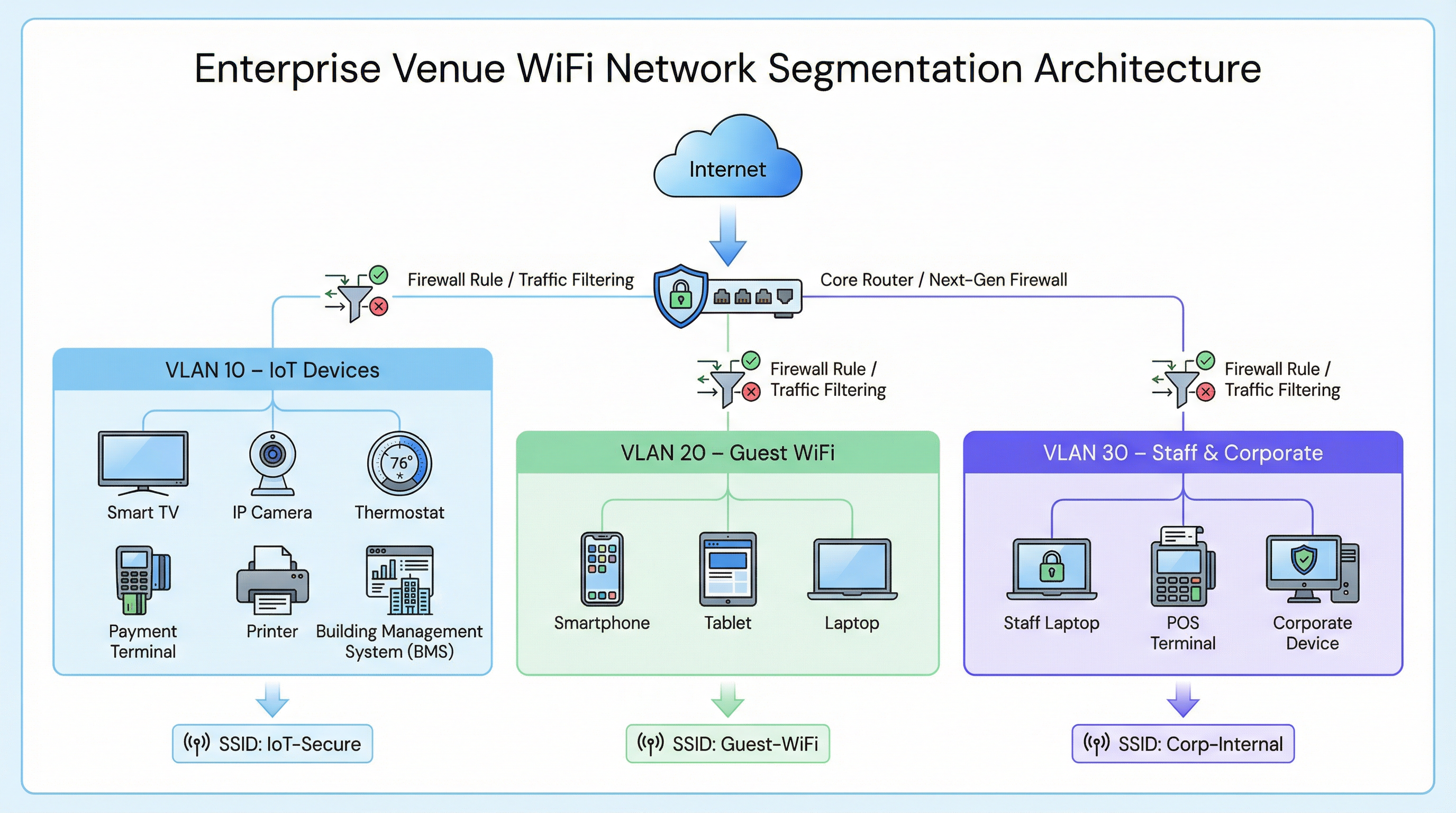
In una tipica implementazione enterprise, come una catena Retail o una struttura Hospitality , il traffico di rete è suddiviso in distinte Virtual Local Area Networks (VLAN).
- Corporate VLAN (es. VLAN 30): protetta tramite 802.1X (WPA2/WPA3-Enterprise) per i laptop del personale e i terminali POS.
- Guest VLAN (es. VLAN 20): una rete aperta che utilizza un Captive Portal per l'accettazione dei termini di servizio e l'acquisizione di analytics.
- IoT VLAN (es. VLAN 10): un segmento dedicato ai dispositivi non standard.
Fallback di autenticazione per dispositivi non standard
Poiché i dispositivi IoT in genere mancano dei supplicant richiesti per l'802.1X, i team IT devono affidarsi a metodi di autenticazione alternativi per assegnarli alla VLAN IoT.
1. Identity Pre-Shared Keys (iPSK) / Multiple PSK
Invece di utilizzare una singola password globale (WPA2-Personal) per un intero SSID IoT, i moderni controller wireless supportano l'iPSK. Ciò consente agli amministratori di generare chiavi pre-condivise univoche per singoli dispositivi o gruppi di dispositivi (ad esempio, tutte le smart TV in una specifica ala dell'hotel) trasmettendo al contempo un singolo SSID.
- Vantaggio: se una chiave specifica viene compromessa, può essere revocata senza interrompere l'intera rete IoT.
- Implementazione: altamente raccomandata per le moderne implementazioni di smart building.
2. MAC Authentication Bypass (MAB)
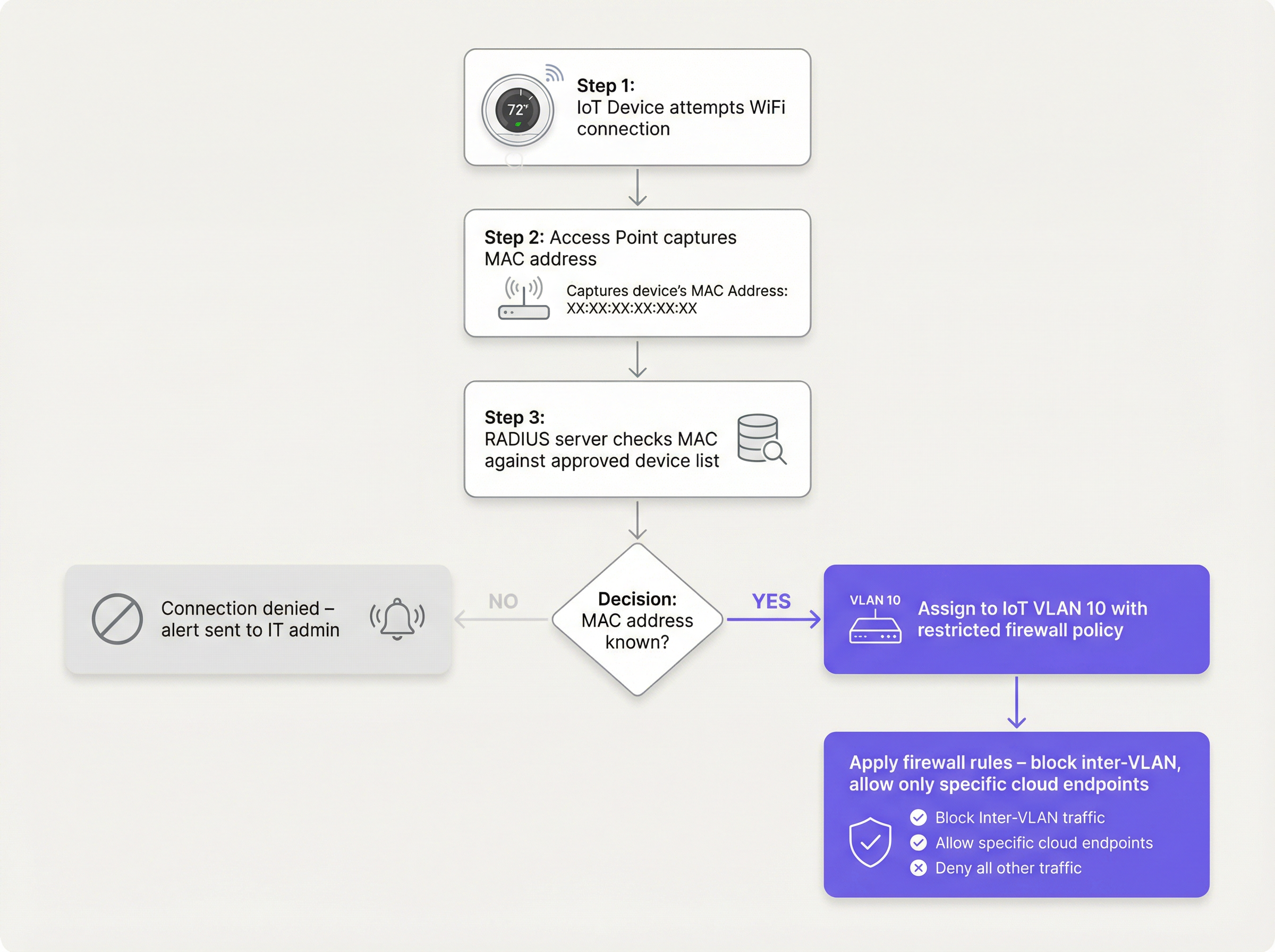
Per i dispositivi legacy che hanno difficoltà anche con PSK complessi, il MAB funge da fallback. L'access point wireless acquisisce l'indirizzo MAC del dispositivo e interroga un server RADIUS. Se l'indirizzo MAC è registrato nel database approvato, il server RADIUS autorizza la connessione e assegna dinamicamente il dispositivo alla VLAN IoT.
- Limitazione: gli indirizzi MAC possono essere contraffatti (spoofing). Il MAB non è una sicurezza forte; è una soluzione operativa che deve essere abbinata a policy firewall aggressive.
- Punto decisionale: quando si valuta l'infrastruttura RADIUS per supportare il MAB, consultare la Guida decisionale per i team IT: Cloud RADIUS vs RADIUS On-Premise .
Guida all'implementazione
L'implementazione di un segmento IoT sicuro richiede un approccio coordinato tra il controller wireless, il server RADIUS e il firewall core.
Passaggio 1: Definire la strategia VLAN IoT e SSID
Crea una VLAN dedicata (es. VLAN 10) per i dispositivi IoT. Decidi se utilizzare un SSID dedicato (es. Venue-IoT) o utilizzare l'assegnazione dinamica della VLAN su un SSID condiviso. Per la massima compatibilità con i moduli radio IoT economici, è spesso necessario un SSID dedicato che operi esclusivamente sulla banda a 2,4 GHz, poiché molti sensori legacy non supportano i 5 GHz.
Passaggio 2: Configurare l'autenticazione (iPSK o MAB)
Se utilizzi l'iPSK, configura il controller wireless per mappare chiavi specifiche sulla VLAN IoT. Se utilizzi il MAB, popola il tuo server RADIUS con gli indirizzi MAC dei dispositivi IoT approvati. Assicurati che sia in atto un rigoroso processo di gestione del ciclo di vita: quando un dispositivo viene ritirato, il suo indirizzo MAC deve essere immediatamente rimosso dal database.
Passaggio 3: Applicare policy firewall Zero Trust
Questo è il passaggio più critico. La VLAN IoT deve essere trattata come non attendibile.
- Bloccare il routing inter-VLAN: la VLAN IoT non deve essere in grado di avviare connessioni verso la VLAN aziendale o la VLAN Guest.
- Implementare l'isolamento dei client (isolamento L2): i dispositivi sullo stesso SSID IoT non devono essere in grado di comunicare tra loro. Una smart TV nella stanza 101 non ha bisogno di pingare la smart TV nella stanza 102.
- Limitare l'accesso a Internet in uscita (Egress Filtering): applica una policy di negazione predefinita (default-deny) per il traffico in uscita. Consenti il traffico solo verso indirizzi IP o domini specifici e richiesti (ad esempio, l'endpoint cloud del produttore sulla porta 443). Blocca tutte le richieste DNS, HTTP e NTP generiche in uscita, obbligando i dispositivi a utilizzare servizi interni monitorati.
Best Practice
- Non nascondere l'SSID: disabilitare la trasmissione dell'SSID offre vantaggi minimi in termini di sicurezza e spesso causa instabilità di connessione per gli stack di rete IoT scritti male. Lascia l'SSID visibile ma proteggilo adeguatamente.
- Monitorare il comportamento dei dispositivi: utilizza WiFi Analytics per stabilire una baseline del comportamento normale per i dispositivi IoT. Se un sensore di temperatura inizia improvvisamente a trasferire gigabyte di dati, il sistema dovrebbe attivare un avviso immediato.
- Segmentare per tipo di dispositivo: in ambienti complessi, come le strutture Healthcare , considera la creazione di più micro-segmenti (ad esempio, VLAN 11 per l'IoT medico, VLAN 12 per l'HVAC della struttura) per ridurre ulteriormente il raggio d'azione di una compromissione.
Risoluzione dei problemi e mitigazione dei rischi
Modalità di guasto comune: la compromissione della "rete piatta"
La causa più frequente di violazioni legate all'IoT è l'implementazione di dispositivi smart sulla rete aziendale principale per comodità. Questo bypassa tutti i controlli di segmentazione.
- Mitigazione: applica rigorose policy di controllo dei cambiamenti. Nessun dispositivo si connette alla rete senza un indirizzo MAC approvato o un'assegnazione iPSK.
Modalità di guasto comune: indirizzi MAC obsoleti
Quando un dispositivo si rompe e viene sostituito, il vecchio indirizzo MAC spesso rimane nel database RADIUS, creando una backdoor permanente se un aggressore contraffà quell'indirizzo specifico.
- Mitigazione: implementa la gestione automatizzata del ciclo di vita. Richiedi la riconvalida periodica di tutti i dispositivi nel database MAB.
ROI e impatto sul business
L'implementazione di una corretta segmentazione dei dispositivi IoT su WiFi richiede uno sforzo di configurazione iniziale, ma il ritorno sull'investimento è sostanziale:
- Mitigazione del rischio: riduce drasticamente la probabilità di una violazione dei dati catastrofica originata da un dispositivo smart vulnerabile, proteggendo la reputazione del marchio ed evitando sanzioni normative (GDPR, PCI DSS).
- Stabilità operativa: l'isolamento del traffico IoT rumoroso impedisce ai broadcast storm di degradare le prestazioni delle applicazioni aziendali critiche o l'esperienza Guest WiFi .
- A prova di futuro: un'architettura segmentata consente alle location di implementare con fiducia nuove tecnologie per smart building, come Sensors avanzati e soluzioni di Wayfinding , senza compromettere la sicurezza della rete core.
Termini chiave e definizioni
VLAN (Virtual Local Area Network)
A logical grouping of network devices that behave as if they are on an independent network, regardless of their physical location.
Used to isolate IoT devices from corporate and guest traffic, preventing lateral movement during a security breach.
MAC Authentication Bypass (MAB)
A network access control technique that uses a device's MAC address to authorize connection to the network when standard 802.1X authentication is not supported.
The primary fallback method for onboarding 'dumb' IoT devices, requiring a RADIUS server to validate the MAC address.
Identity Pre-Shared Key (iPSK)
A feature that allows multiple unique pre-shared keys to be used on a single SSID, with each key assigning the device to a specific VLAN or policy.
A more secure alternative to a single shared password for IoT networks, allowing IT teams to revoke individual compromised devices.
Client Isolation (L2 Isolation)
A wireless network setting that prevents devices connected to the same access point or SSID from communicating directly with each other.
Essential for guest networks and IoT networks to prevent infected devices from spreading malware to adjacent devices.
802.1X
An IEEE standard for port-based network access control, providing secure, enterprise-grade authentication using a RADIUS server.
The gold standard for corporate devices, but rarely supported by the IoT devices discussed in this guide.
Zero Trust
A security framework requiring all users and devices to be authenticated, authorized, and continuously validated before being granted access to applications and data.
The guiding principle for configuring firewall rules for the IoT VLAN—assume the device is compromised and restrict access accordingly.
Egress Filtering
The practice of monitoring and potentially restricting the flow of information outbound from one network to another, typically the internet.
Crucial for IoT devices to ensure they only communicate with authorized vendor cloud services and cannot be used in DDoS attacks.
Captive Portal
A web page that the user of a public-access network is obliged to view and interact with before access is granted.
Used for Guest WiFi, but unusable by headless IoT devices, necessitating MAB or iPSK for IoT onboarding.
Casi di studio
A 300-room hotel is deploying new smart TVs in every guest room. The TVs require internet access to stream content from vendor-approved cloud services, but they do not support 802.1X. The hotel also needs to ensure guests cannot cast content to TVs in adjacent rooms.
The IT team should create a dedicated IoT VLAN (e.g., VLAN 40) and a hidden or visible dedicated SSID (e.g., Hotel-Media). They implement Identity PSK (iPSK), assigning a unique pre-shared key to each room's TV. At the access point level, Client Isolation (Layer 2 isolation) is enabled to prevent TVs from communicating with each other. At the core firewall, inter-VLAN routing is blocked, ensuring the TVs cannot access the corporate network or the guest network. Finally, egress filtering is applied to VLAN 40, allowing outbound traffic only to the specific IP ranges required by the streaming services.
A large retail chain needs to connect hundreds of wireless barcode scanners and receipt printers. These legacy devices only support basic WPA2-PSK and cannot handle complex passwords or iPSK. How should they be secured?
The network architect should deploy a dedicated SSID specifically for these legacy devices, operating on the 2.4GHz band for maximum compatibility. Because the devices cannot support iPSK, the team must use MAC Authentication Bypass (MAB). The MAC addresses of all authorized scanners and printers are loaded into the central RADIUS server. When a device connects, the RADIUS server authenticates the MAC and assigns it to a highly restricted Retail-IoT VLAN. The firewall policy for this VLAN strictly limits outbound traffic to the specific internal inventory servers and payment gateways required for operation.
Analisi degli scenari
Q1. A stadium IT director wants to deploy 50 new wireless digital signage displays. The vendor states the displays only support WPA2-Personal (a single shared password). The director wants to put them on the Guest WiFi network to avoid managing a new SSID. What is your recommendation?
💡 Suggerimento:Consider the impact of client isolation and the security implications of mixing trusted and untrusted devices.
Mostra l'approccio consigliato
Do not place the displays on the Guest WiFi. The Guest network uses a captive portal, which the headless displays cannot navigate. Furthermore, Guest networks typically have client isolation enabled, which might interfere with the management system trying to update the displays. Recommendation: Create a dedicated IoT SSID. Since the devices only support WPA2-Personal, use MAC Authentication Bypass (MAB) to assign them to a dedicated Digital Signage VLAN. Apply strict firewall rules to this VLAN, allowing outbound traffic only to the specific content management cloud server.
Q2. During a network audit at a retail chain, you discover that all wireless receipt printers are connected to the Corporate VLAN using MAB. The firewall allows the Corporate VLAN full outbound internet access. What is the primary risk, and how should it be remediated?
💡 Suggerimento:Think about what happens if an attacker unplugs a printer and connects their own device.
Mostra l'approccio consigliato
The primary risk is MAC spoofing. An attacker could spoof a printer's MAC address and gain full access to the Corporate VLAN, including unrestricted outbound internet access, allowing them to exfiltrate sensitive data or establish a command-and-control connection. Remediation: Move the printers to a dedicated IoT VLAN. Enforce strict egress filtering on the IoT VLAN, blocking all outbound internet access and only allowing internal communication to the specific print servers required for operation.
Q3. A hospital is deploying new smart thermostats that support Identity PSK (iPSK). The IT team plans to use a single iPSK for all thermostats across the entire campus to simplify management. Is this the optimal approach?
💡 Suggerimento:Consider the blast radius if that single iPSK is compromised.
Mostra l'approccio consigliato
While better than a standard shared password, using a single iPSK for all devices defeats the primary benefit of the technology. If that single key is compromised, all thermostats are vulnerable, and changing the key requires reconfiguring every device on campus. Recommendation: Group the thermostats logically (e.g., by floor, wing, or department) and assign a unique iPSK to each group. This minimizes the blast radius of a compromised key and simplifies revocation.
Punti chiave
- ✓IoT devices rarely support 802.1X and must be logically isolated on dedicated VLANs.
- ✓Never place IoT devices on corporate or guest networks.
- ✓Use Identity PSK (iPSK) to assign unique keys to devices on a shared SSID.
- ✓Use MAC Authentication Bypass (MAB) as a fallback for legacy devices that cannot support iPSK.
- ✓MAB is not strong security; it must be paired with aggressive Zero Trust firewall policies.
- ✓Implement client isolation on IoT SSIDs to prevent lateral movement between devices.
- ✓Enforce default-deny egress filtering, allowing IoT devices to communicate only with required vendor endpoints.




