

WiFi वरील IoT डिव्हाइस सेगमेंटेशन: नॉन-स्टँडर्ड डिव्हाइसेस वेगळे करणे
हे मार्गदर्शक वेन्यू WiFi नेटवर्क्सवर नॉन-स्टँडर्ड IoT डिव्हाइसेस सुरक्षितपणे सेगमेंट करण्यासाठी व्यावहारिक, एंटरप्राइझ-ग्रेड धोरणे प्रदान करते. असुरक्षित स्मार्ट डिव्हाइसेसपासून तुमच्या कोअर इन्फ्रास्ट्रक्चरचे संरक्षण करण्यासाठी VLAN आयसोलेशन, MAC-आधारित ऑथेंटिकेशन आणि कडक फायरवॉल पॉलिसी कशा लागू करायच्या ते शिका.
🎧 हे मार्गदर्शक ऐका
ट्रान्सक्रिप्ट पहा

कार्यकारी सारांश
हॉस्पिटॅलिटी, रिटेल आणि मोठ्या सार्वजनिक ठिकाणांमधील IT मॅनेजर्स आणि नेटवर्क आर्किटेक्ट्ससाठी, इंटरनेट ऑफ थिंग्स (IoT) डिव्हाइसेसचा प्रसार हे एक गंभीर सुरक्षा आव्हान आहे. स्मार्ट टीव्ही, पेमेंट टर्मिनल्स, वायरलेस प्रिंटर आणि बिल्डिंग मॅनेजमेंट सिस्टम्स (BMS) आधुनिक वेन्यू ऑपरेशन्ससाठी आवश्यक आहेत, परंतु ते क्वचितच एंटरप्राइझ-ग्रेड 802.1X ऑथेंटिकेशनला सपोर्ट करतात.
या "डंब" डिव्हाइसेसना फ्लॅट कॉर्पोरेट नेटवर्कवर किंवा सार्वजनिक Guest WiFi नेटवर्कवर ठेवल्याने गंभीर सुरक्षा त्रुटी निर्माण होतात. एक कॉम्प्रोमाइज्ड स्मार्ट थर्मोस्टॅट हल्लेखोरांसाठी संवेदनशील कॉर्पोरेट डेटा किंवा पेमेंट सिस्टम्समध्ये प्रवेश करण्यासाठी एक पिव्होट पॉइंट बनू शकतो, ज्यामुळे PCI DSS आणि GDPR कंप्लायन्सचे उल्लंघन होते.
हे तांत्रिक संदर्भ मार्गदर्शक WiFi वरील IoT डिव्हाइस सेगमेंटेशनसाठी निश्चित धोरण स्पष्ट करते. डेडिकेटेड IoT VLANs लागू करून, आयडेंटिटी प्री-शेअर्ड की (iPSK) किंवा MAC ऑथेंटिकेशन बायपास (MAB) चा वापर करून आणि झिरो ट्रस्ट फायरवॉल पॉलिसी लागू करून, वेन्यू IT टीम्स नॉन-स्टँडर्ड डिव्हाइसेस सुरक्षितपणे ऑनबोर्ड करू शकतात. हा दृष्टिकोन मिश्र-डिव्हाइस वातावरणातील अंगभूत जोखीम कमी करताना मजबूत WiFi Analytics व्हिजिबिलिटी सुनिश्चित करतो.
तांत्रिक सखोल विश्लेषण
WiFi वरील IoT डिव्हाइस सेगमेंटेशनचे मूलभूत तत्व लॉजिकल आयसोलेशन आहे. जे डिव्हाइसेस सुरक्षितपणे ऑथेंटिकेट होऊ शकत नाहीत त्यांना प्रतिबंधित नेटवर्क सेगमेंटमध्ये क्वारंटाइन केले पाहिजे.
आयसोलेशनचे आर्किटेक्चर
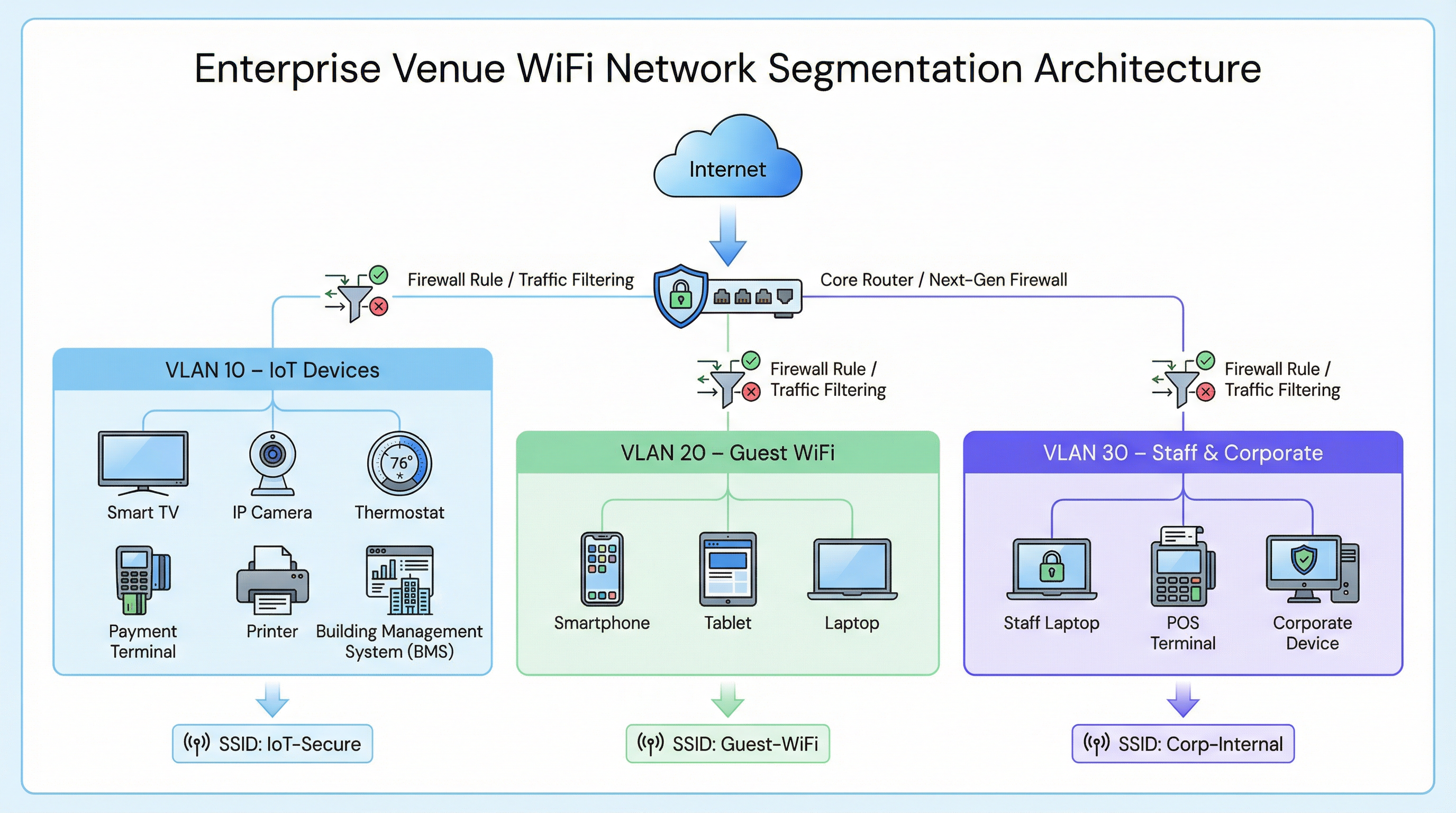
एखाद्या विशिष्ट एंटरप्राइझ डिप्लॉयमेंटमध्ये, जसे की Retail चेन किंवा Hospitality वेन्यूमध्ये, नेटवर्क ट्रॅफिक वेगवेगळ्या व्हर्च्युअल लोकल एरिया नेटवर्क्स (VLANs) मध्ये विभागले जाते.
- कॉर्पोरेट VLAN (उदा., VLAN 30): स्टाफ लॅपटॉप आणि POS टर्मिनल्ससाठी 802.1X (WPA2/WPA3-एंटरप्राइझ) द्वारे सुरक्षित.
- गेस्ट VLAN (उदा., VLAN 20): अटी आणि शर्ती स्वीकारण्यासाठी आणि ॲनालिटिक्स कॅप्चर करण्यासाठी Captive Portal वापरणारे एक ओपन नेटवर्क.
- IoT VLAN (उदा., VLAN 10): नॉन-स्टँडर्ड डिव्हाइसेससाठी एक डेडिकेटेड सेगमेंट.
नॉन-स्टँडर्ड डिव्हाइसेससाठी ऑथेंटिकेशन फॉलबॅक्स
IoT डिव्हाइसेसमध्ये सहसा 802.1X साठी आवश्यक सप्लिकंट्स नसल्यामुळे, IT टीम्सना त्यांना IoT VLAN मध्ये नियुक्त करण्यासाठी पर्यायी ऑथेंटिकेशन पद्धतींवर अवलंबून राहावे लागते.
1. आयडेंटिटी प्री-शेअर्ड की (iPSK) / मल्टिपल PSK
संपूर्ण IoT SSID साठी एकच, ग्लोबल पासवर्ड (WPA2-पर्सनल) वापरण्याऐवजी, आधुनिक वायरलेस कंट्रोलर्स iPSK ला सपोर्ट करतात. हे ॲडमिनिस्ट्रेटर्सना एकाच SSID चे ब्रॉडकास्टिंग करताना वैयक्तिक डिव्हाइसेस किंवा डिव्हाइसेसच्या गटांसाठी (उदा., हॉटेलच्या विशिष्ट विंगमधील सर्व स्मार्ट टीव्ही) युनिक प्री-शेअर्ड की तयार करण्यास अनुमती देते.
- फायदा: जर एखादी विशिष्ट की कॉम्प्रोमाइज झाली, तर संपूर्ण IoT नेटवर्कमध्ये व्यत्यय न आणता ती रद्द केली जाऊ शकते.
- डिप्लॉयमेंट: आधुनिक स्मार्ट बिल्डिंग डिप्लॉयमेंटसाठी अत्यंत शिफारसीय.
2. MAC ऑथेंटिकेशन बायपास (MAB)
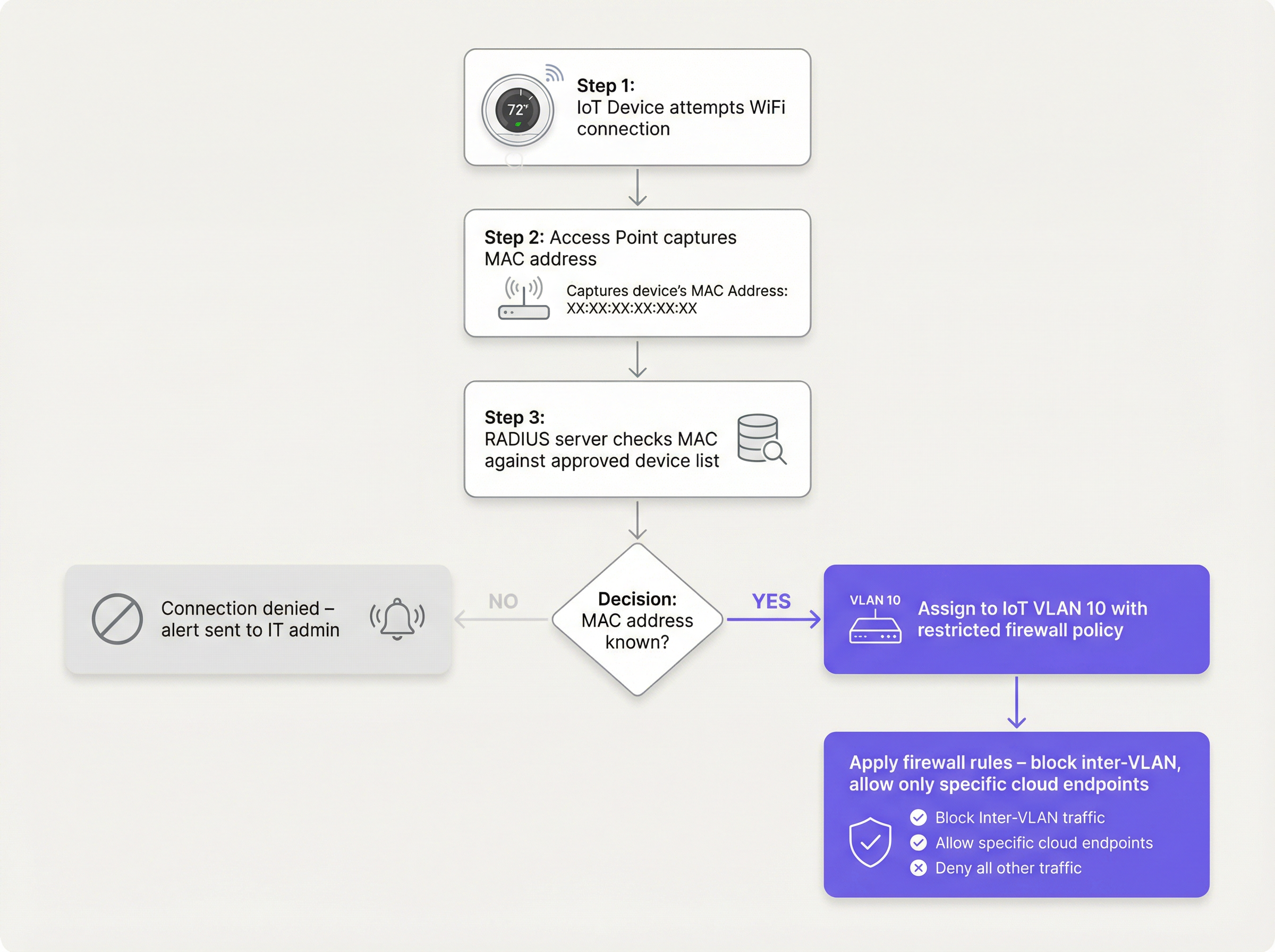
जुन्या डिव्हाइसेससाठी जे जटिल PSKs सह देखील संघर्ष करतात, MAB एक फॉलबॅक म्हणून काम करते. वायरलेस ॲक्सेस पॉइंट डिव्हाइसचा MAC ॲड्रेस कॅप्चर करतो आणि RADIUS सर्व्हरला क्वेरी करतो. जर MAC ॲड्रेस मंजूर डेटाबेसमध्ये नोंदणीकृत असेल, तर RADIUS सर्व्हर कनेक्शन अधिकृत करतो आणि डायनॅमिकली डिव्हाइसला IoT VLAN मध्ये नियुक्त करतो.
- मर्यादा: MAC ॲड्रेस स्पूफ केले जाऊ शकतात. MAB ही मजबूत सुरक्षा नाही; हा एक ऑपरेशनल वर्कअराउंड आहे जो आक्रमक फायरवॉल पॉलिसीसह जोडला पाहिजे.
- निर्णय बिंदू: MAB ला सपोर्ट करण्यासाठी RADIUS इन्फ्रास्ट्रक्चरचे मूल्यमापन करताना, Cloud RADIUS vs On-Premise RADIUS: Decision Guide for IT Teams चा सल्ला घ्या.
अंमलबजावणी मार्गदर्शक
सुरक्षित IoT सेगमेंट तैनात करण्यासाठी वायरलेस कंट्रोलर, RADIUS सर्व्हर आणि कोअर फायरवॉलमध्ये समन्वित दृष्टिकोन आवश्यक आहे.
पायरी 1: IoT VLAN आणि SSID धोरण निश्चित करा
IoT डिव्हाइसेससाठी एक डेडिकेटेड VLAN (उदा., VLAN 10) तयार करा. डेडिकेटेड SSID (उदा., Venue-IoT) वापरायचा की शेअर केलेल्या SSID वर डायनॅमिक VLAN असाइनमेंट वापरायचे ते ठरवा. स्वस्त IoT रेडिओसह जास्तीत जास्त सुसंगततेसाठी, केवळ 2.4GHz बँडवर चालणारा डेडिकेटेड SSID अनेकदा आवश्यक असतो, कारण अनेक जुने सेन्सर्स 5GHz ला सपोर्ट करत नाहीत.
पायरी 2: ऑथेंटिकेशन कॉन्फिगर करा (iPSK किंवा MAB)
जर iPSK वापरत असाल, तर विशिष्ट कीज IoT VLAN ला मॅप करण्यासाठी वायरलेस कंट्रोलर कॉन्फिगर करा. जर MAB वापरत असाल, तर तुमच्या RADIUS सर्व्हरमध्ये मंजूर IoT डिव्हाइसेसचे MAC ॲड्रेस भरा. एक कडक लाइफसायकल मॅनेजमेंट प्रक्रिया असल्याची खात्री करा—जेव्हा एखादे डिव्हाइस निवृत्त केले जाते, तेव्हा त्याचा MAC ॲड्रेस डेटाबेसमधून त्वरित काढून टाकला पाहिजे.
पायरी 3: झिरो ट्रस्ट फायरवॉल पॉलिसी लागू करा
ही सर्वात महत्त्वाची पायरी आहे. IoT VLAN ला 'अनट्रस्टेड' मानले पाहिजे.
- इंटर-VLAN राउटिंग ब्लॉक करा: IoT VLAN कॉर्पोरेट VLAN किंवा गेस्ट VLAN शी कनेक्शन सुरू करण्यास सक्षम नसावे.
- क्लायंट आयसोलेशन (L2 आयसोलेशन) लागू करा: एकाच IoT SSID वरील डिव्हाइसेस एकमेकांशी संवाद साधण्यास सक्षम नसावेत. रूम 101 मधील स्मार्ट टीव्हीला रूम 102 मधील स्मार्ट टीव्हीला पिंग करण्याची गरज नाही.
- आउटबाउंड इंटरनेट ॲक्सेस प्रतिबंधित करा (इग्रेस फिल्टरिंग): आउटबाउंड ट्रॅफिकसाठी 'डिफॉल्ट-डिनाय' पॉलिसी लागू करा. केवळ विशिष्ट, आवश्यक IP ॲड्रेस किंवा डोमेनवर ट्रॅफिकला अनुमती द्या (उदा., पोर्ट 443 वर उत्पादकाचा क्लाउड एंडपॉइंट). सर्व जेनेरिक आउटबाउंड DNS, HTTP आणि NTP विनंत्या ब्लॉक करा, ज्यामुळे डिव्हाइसेसना अंतर्गत, मॉनिटर केलेल्या सेवा वापरण्यास भाग पाडले जाईल.
सर्वोत्तम पद्धती
- SSID लपवू नका: SSID ब्रॉडकास्ट अक्षम केल्याने नगण्य सुरक्षा फायदे मिळतात आणि अनेकदा खराब कोडिंग असलेल्या IoT नेटवर्क स्टॅक्ससाठी कनेक्शन अस्थिरता निर्माण होते. SSID दृश्यमान ठेवा परंतु ते योग्यरित्या सुरक्षित करा.
- डिव्हाइसच्या वर्तनाचे निरीक्षण करा: [WiFi Analytics](/products/w वापराifi-analytics) IoT उपकरणांच्या सामान्य वर्तनाचा बेसलाइन स्थापित करण्यासाठी. जर तापमान सेन्सरने अचानक गिगाबाइट डेटा ट्रान्सफर करण्यास सुरुवात केली, तर सिस्टमने त्वरित अलर्ट ट्रिगर केला पाहिजे.
- उपकरण प्रकारानुसार विभागणी: हेल्थकेअर सुविधांसारख्या जटिल वातावरणात, तडजोडीची व्याप्ती अधिक कमी करण्यासाठी एकाधिक मायक्रो-सेगमेंट्स (उदा. वैद्यकीय IoT साठी VLAN 11, फॅसिलिटी HVAC साठी VLAN 12) तयार करण्याचा विचार करा.
ट्रबलशूटिंग आणि जोखीम कमी करणे
सामान्य बिघाड मोड: "फ्लॅट नेटवर्क" तडजोड
IoT-संबंधित उल्लंघनांचे सर्वात वारंवार कारण म्हणजे सोयीसाठी मुख्य कॉर्पोरेट नेटवर्कवर स्मार्ट उपकरणे तैनात करणे. हे सर्व सेगमेंटेशन नियंत्रणांना बायपास करते.
- शमन (Mitigation): कडक बदल नियंत्रण धोरणे लागू करा. मंजूर MAC पत्ता किंवा iPSK असाइनमेंटशिवाय कोणतेही उपकरण नेटवर्कशी कनेक्ट होऊ नये.
सामान्य बिघाड मोड: जुने MAC पत्ते
जेव्हा एखादे उपकरण खराब होते आणि बदलले जाते, तेव्हा जुना MAC पत्ता अनेकदा RADIUS डेटाबेसमध्ये राहतो, ज्यामुळे एखादा आक्रमणकर्ता त्या विशिष्ट पत्त्याची स्पूफ (spoof) केल्यास कायमस्वरूपी बॅकडोअर तयार होतो.
- शमन (Mitigation): स्वयंचलित लाइफसायकल मॅनेजमेंट लागू करा. MAB डेटाबेसमधील सर्व उपकरणांचे वेळोवेळी पुन्हा प्रमाणीकरण आवश्यक करा.
ROI आणि व्यवसायावर होणारा परिणाम
WiFi वर योग्य IoT उपकरण सेगमेंटेशन लागू करण्यासाठी सुरुवातीला कॉन्फिगरेशन प्रयत्नांची आवश्यकता असते, परंतु गुंतवणुकीवरील परतावा लक्षणीय असतो:
- जोखीम कमी करणे: असुरक्षित स्मार्ट उपकरणातून उद्भवणाऱ्या विनाशकारी डेटा उल्लंघनाची शक्यता मोठ्या प्रमाणात कमी करते, ब्रँडच्या प्रतिष्ठेचे रक्षण करते आणि नियामक दंड (GDPR, PCI DSS) टाळते.
- ऑपरेशनल स्थिरता: गोंधळलेला IoT ट्रॅफिक वेगळा केल्याने ब्रॉडकास्ट स्टॉर्म्सना गंभीर कॉर्पोरेट ॲप्लिकेशन्स किंवा Guest WiFi अनुभवाची कार्यक्षमता कमी करण्यापासून रोखले जाते.
- फ्युचर-प्रूफिंग: सेगमेंटेड आर्किटेक्चर ठिकाणांना कोअर नेटवर्क सुरक्षिततेशी तडजोड न करता प्रगत सेन्सर्स आणि वेफाइंडिंग सोल्यूशन्स सारख्या नवीन स्मार्ट बिल्डिंग तंत्रज्ञानाचा आत्मविश्वासाने वापर करण्यास अनुमती देते.
महत्त्वाच्या संज्ञा आणि व्याख्या
VLAN (Virtual Local Area Network)
A logical grouping of network devices that behave as if they are on an independent network, regardless of their physical location.
Used to isolate IoT devices from corporate and guest traffic, preventing lateral movement during a security breach.
MAC Authentication Bypass (MAB)
A network access control technique that uses a device's MAC address to authorize connection to the network when standard 802.1X authentication is not supported.
The primary fallback method for onboarding 'dumb' IoT devices, requiring a RADIUS server to validate the MAC address.
Identity Pre-Shared Key (iPSK)
A feature that allows multiple unique pre-shared keys to be used on a single SSID, with each key assigning the device to a specific VLAN or policy.
A more secure alternative to a single shared password for IoT networks, allowing IT teams to revoke individual compromised devices.
Client Isolation (L2 Isolation)
A wireless network setting that prevents devices connected to the same access point or SSID from communicating directly with each other.
Essential for guest networks and IoT networks to prevent infected devices from spreading malware to adjacent devices.
802.1X
An IEEE standard for port-based network access control, providing secure, enterprise-grade authentication using a RADIUS server.
The gold standard for corporate devices, but rarely supported by the IoT devices discussed in this guide.
Zero Trust
A security framework requiring all users and devices to be authenticated, authorized, and continuously validated before being granted access to applications and data.
The guiding principle for configuring firewall rules for the IoT VLAN—assume the device is compromised and restrict access accordingly.
Egress Filtering
The practice of monitoring and potentially restricting the flow of information outbound from one network to another, typically the internet.
Crucial for IoT devices to ensure they only communicate with authorized vendor cloud services and cannot be used in DDoS attacks.
Captive Portal
A web page that the user of a public-access network is obliged to view and interact with before access is granted.
Used for Guest WiFi, but unusable by headless IoT devices, necessitating MAB or iPSK for IoT onboarding.
केस स्टडीज
A 300-room hotel is deploying new smart TVs in every guest room. The TVs require internet access to stream content from vendor-approved cloud services, but they do not support 802.1X. The hotel also needs to ensure guests cannot cast content to TVs in adjacent rooms.
The IT team should create a dedicated IoT VLAN (e.g., VLAN 40) and a hidden or visible dedicated SSID (e.g., Hotel-Media). They implement Identity PSK (iPSK), assigning a unique pre-shared key to each room's TV. At the access point level, Client Isolation (Layer 2 isolation) is enabled to prevent TVs from communicating with each other. At the core firewall, inter-VLAN routing is blocked, ensuring the TVs cannot access the corporate network or the guest network. Finally, egress filtering is applied to VLAN 40, allowing outbound traffic only to the specific IP ranges required by the streaming services.
A large retail chain needs to connect hundreds of wireless barcode scanners and receipt printers. These legacy devices only support basic WPA2-PSK and cannot handle complex passwords or iPSK. How should they be secured?
The network architect should deploy a dedicated SSID specifically for these legacy devices, operating on the 2.4GHz band for maximum compatibility. Because the devices cannot support iPSK, the team must use MAC Authentication Bypass (MAB). The MAC addresses of all authorized scanners and printers are loaded into the central RADIUS server. When a device connects, the RADIUS server authenticates the MAC and assigns it to a highly restricted Retail-IoT VLAN. The firewall policy for this VLAN strictly limits outbound traffic to the specific internal inventory servers and payment gateways required for operation.
परिस्थिती विश्लेषण
Q1. A stadium IT director wants to deploy 50 new wireless digital signage displays. The vendor states the displays only support WPA2-Personal (a single shared password). The director wants to put them on the Guest WiFi network to avoid managing a new SSID. What is your recommendation?
💡 संकेत:Consider the impact of client isolation and the security implications of mixing trusted and untrusted devices.
शिफारस केलेला दृष्टिकोन दाखवा
Do not place the displays on the Guest WiFi. The Guest network uses a captive portal, which the headless displays cannot navigate. Furthermore, Guest networks typically have client isolation enabled, which might interfere with the management system trying to update the displays. Recommendation: Create a dedicated IoT SSID. Since the devices only support WPA2-Personal, use MAC Authentication Bypass (MAB) to assign them to a dedicated Digital Signage VLAN. Apply strict firewall rules to this VLAN, allowing outbound traffic only to the specific content management cloud server.
Q2. During a network audit at a retail chain, you discover that all wireless receipt printers are connected to the Corporate VLAN using MAB. The firewall allows the Corporate VLAN full outbound internet access. What is the primary risk, and how should it be remediated?
💡 संकेत:Think about what happens if an attacker unplugs a printer and connects their own device.
शिफारस केलेला दृष्टिकोन दाखवा
The primary risk is MAC spoofing. An attacker could spoof a printer's MAC address and gain full access to the Corporate VLAN, including unrestricted outbound internet access, allowing them to exfiltrate sensitive data or establish a command-and-control connection. Remediation: Move the printers to a dedicated IoT VLAN. Enforce strict egress filtering on the IoT VLAN, blocking all outbound internet access and only allowing internal communication to the specific print servers required for operation.
Q3. A hospital is deploying new smart thermostats that support Identity PSK (iPSK). The IT team plans to use a single iPSK for all thermostats across the entire campus to simplify management. Is this the optimal approach?
💡 संकेत:Consider the blast radius if that single iPSK is compromised.
शिफारस केलेला दृष्टिकोन दाखवा
While better than a standard shared password, using a single iPSK for all devices defeats the primary benefit of the technology. If that single key is compromised, all thermostats are vulnerable, and changing the key requires reconfiguring every device on campus. Recommendation: Group the thermostats logically (e.g., by floor, wing, or department) and assign a unique iPSK to each group. This minimizes the blast radius of a compromised key and simplifies revocation.
महत्त्वाचे निष्कर्ष
- ✓IoT devices rarely support 802.1X and must be logically isolated on dedicated VLANs.
- ✓Never place IoT devices on corporate or guest networks.
- ✓Use Identity PSK (iPSK) to assign unique keys to devices on a shared SSID.
- ✓Use MAC Authentication Bypass (MAB) as a fallback for legacy devices that cannot support iPSK.
- ✓MAB is not strong security; it must be paired with aggressive Zero Trust firewall policies.
- ✓Implement client isolation on IoT SSIDs to prevent lateral movement between devices.
- ✓Enforce default-deny egress filtering, allowing IoT devices to communicate only with required vendor endpoints.




