
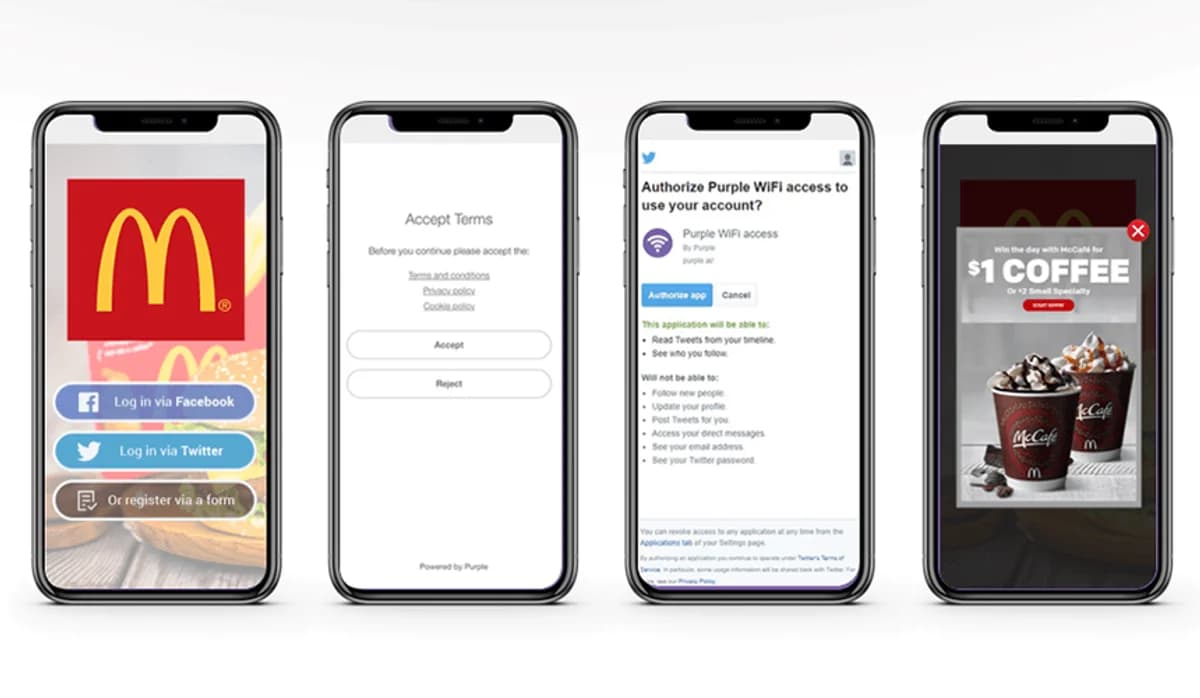
When physical venues offer public guest WiFi access, the captive portal splash page serves as the digital front door. For venue managers and marketing teams, this splash page presents a critical decision: how to authenticate visitors quickly without frustrating them or losing valuable data capture opportunities.
Traditional guest WiFi registration forms requiring first name, last name, home address, phone number, and multiple custom survey fields often suffer from high bounce rates. Visitors seeking immediate connectivity frequently abandon complex forms or enter fake contact details. Implementing social login on guest WiFi captive portals addresses this friction directly, allowing visitors to authenticate in seconds using credentials they already maintain on identity platforms such as Google, Apple, or Meta.
The role of social login in guest WiFi captive portals
Social login leverages established OAuth 2.0 protocol frameworks to exchange authentication tokens securely between identity providers and the captive portal software. Instead of requiring the user to create and remember a new password for every venue they visit, the portal requests permission to access verified profile attributes from the user's selected account.
By streamlining this connection step, venues achieve higher completion rates on their splash pages while capturing accurate contact records. Rather than receiving invalid or mistyped email addresses, venues obtain verified email accounts associated with active identity profiles. This verified data feeds directly into WiFi marketing databases to support automated communication workflows.
Comparing social login authentication methods for venue WiFi
Selecting the right mix of social sign-on options depends on your venue's visitor demographics, regional preferences, and hardware environments. Modern guest WiFi infrastructure should support a multi-provider strategy alongside a standard registration fallback.
Google Sign-In
Google authentication offers the widest universal coverage across both Android and iOS mobile devices. Because Android smartphone users are logged into a Google account natively, authenticating on a captive portal via Google requires only a single tap. For venues with high footfall volume, Google Sign-In delivers consistently fast connection speeds and verified email addresses.
Sign in with Apple
For venues with a high proportion of iPhone and iPad users, Sign in with Apple provides rapid authentication using Face ID or Touch ID. Apple's privacy architecture allows users to share their verified email or select "Hide My Email", which generates a unique, private relay address. Captive portal systems integrated with Apple relay routing can still communicate with the guest, delivering promotional updates while respecting user privacy choices.
Meta (Facebook) and Instagram
Meta login options remain popular in leisure, hospitality, and entertainment environments. Beyond basic contact details, Meta authentication allows venues to gather age demographic bands and regional insights. Splash pages can also redirect guests to the venue's social media page upon successful connection, encouraging check-ins, reviews, and social engagement.
LinkedIn for business and corporate environments
In B2B settings, corporate campuses, trade shows, and hotel conference facilities, LinkedIn social login enables professionals to connect quickly while providing rich business profile attributes. Marketing teams can segment venue visitors by job function, industry sector, and company size, facilitating B2B lead scoring and targeted corporate follow-ups.
Balancing guest convenience with privacy regulations
While social login accelerates connectivity, venues must maintain full transparency regarding data collection practices. Compliance with global privacy legislation - such as GDPR in Europe and the UK, CCPA in California, and LGPD in Brazil - requires clear, explicit consent mechanisms on the captive portal.
- Explicit opt-in checkboxes: Terms of service acceptance must remain distinct from optional marketing communications consent checkboxes.
- Granular permission scopes: Request only the essential profile attributes necessary for communication and venue analytics.
- Clear privacy policy links: Provide accessible links on the splash page detailing how visitor data is stored, processed, and retained.
- Data subject rights: Ensure visitors can request data deletion or update their communication preferences at any time.
Estimating the impact of social login on lead capture
To evaluate how social sign-on improves guest WiFi completion rates and marketing database growth for your venue, use the interactive calculator below.
Data enrichment and CRM marketing automation
The primary commercial benefit of social login on captive portals lies in data enrichment. When a guest authenticates, the captive portal links their verified profile with physical location metrics, such as visit frequency, dwell time, and venue location. This creates a unified profile within your WiFi marketing software.
By connecting guest WiFi data with third-party marketing automation platforms, CRM systems, and loyalty engines via webhooks or API connectors, venue operators can execute automated campaigns based on real visitor behaviour:
- Welcome messages: Send an automated welcome email or SMS with an exclusive in-store offer within minutes of first connection.
- Lapsed visitor re-engagement: Automatically trigger a special return incentive to guests who have not visited the venue in 30 days.
- Post-visit feedback requests: Dispatch a review request or satisfaction survey 2 hours after a visitor leaves the facility.
- Demographic segmentation: Tailor marketing offers specifically to distinct age groups, business roles, or regional visitor segments.
Best practices for splash page social login implementation
To maximize connection conversion rates and data collection, follow these design and configuration guidelines when updating your captive portal splash page:
- Limit social options to 2-3 primary providers: Offering too many sign-on buttons creates visual clutter and choice paralysis. Display Google, Apple, and one secondary option tailored to your audience.
- Always provide a manual form fallback: Ensure visitors who do not use social media or prefer not to link their accounts can still access guest WiFi via a minimal email form.
- Keep splash pages lightweight: optimise images and scripts on the portal to ensure instant rendering across all mobile browser types and OS versions.
- Test across mobile operating systems: Verify that OAuth popups and redirect URI callbacks function smoothly within native operating system captive portal webviews (such as Android CaptivePortalLogin or iOS Captive Network Assistant).
Frequently asked questions: Social login on captive portals
Does social login give venues access to a user's private social media password?
No. Social login uses the secure OAuth 2.0 protocol. The user authenticates directly with their identity provider (such as Google or Apple). The venue captive portal never sees or receives the user's password; it receives only a cryptographic authentication token and the specific profile attributes approved by the user.
What happens if a guest signs in using Apple's Hide My Email feature?
When a guest selects Hide My Email, Apple generates a unique random email address (ending in @privaterelay.appleid.com). Messages sent to this address are automatically forwarded by Apple to the user's actual inbox. Venues can still send marketing emails and survey invitations through this relay address without compromising user privacy.
Why is an email form fallback necessary alongside social login?
Not all venue visitors maintain active social media profiles, and some demographics or corporate users prefer not to connect personal accounts on public networks. Providing a simple email registration form ensures 100% of visitors can access guest WiFi regardless of personal preference.
How does social login improve guest WiFi security for venues?
Social identity providers enforce multi-factor authentication (MFA) and automated fraud detection on their accounts. This significantly reduces the creation of bot accounts or fake email registrations on public WiFi networks compared to unverified text entry forms.


Guest WiFi social login & journey advisor
Model captive portal login journeys, compare social authentication protocols, and calculate verified CRM data capture rates.
Toggle authentication options on your captive portal to see real-time impact on conversion and latency.
Comparative access method benchmarks