
চ্যানেল ওভারল্যাপ সমস্যা সমাধানের জন্য সেরা WiFi অ্যানালাইজার টুলস
এই বিস্তারিত নির্দেশিকা IT ম্যানেজার এবং নেটওয়ার্ক আর্কিটেক্টদের উচ্চ-ঘনত্বের পরিবেশে WiFi চ্যানেল ওভারল্যাপ সনাক্তকরণ ও সমাধানের জন্য কার্যকর কৌশল সরবরাহ করে। এটি সেরা WiFi অ্যানালাইজার টুলস মূল্যায়ন করে এবং RF কর্মক্ষমতা অপ্টিমাইজ করার জন্য একটি প্রমাণিত পদ্ধতি তুলে ধরে, যাতে একটি নির্বিঘ্ন অতিথি অভিজ্ঞতা নিশ্চিত করা যায় এবং অবকাঠামোগত ROI সর্বাধিক করা যায়।
এই গাইডটি শুনুন
পডকাস্ট ট্রান্সক্রিপ্ট দেখুন
নির্বাহী সারসংক্ষেপ
উচ্চ-ঘনত্বের পরিবেশ পরিচালনাকারী IT ম্যানেজার এবং নেটওয়ার্ক আর্কিটেক্টদের জন্য, চ্যানেল ওভারল্যাপ WiFi কর্মক্ষমতা হ্রাসের অন্যতম প্রধান কারণ। যখন অ্যাক্সেস পয়েন্টগুলি একই স্পেকট্রামের জন্য প্রতিযোগিতা করে, তখন কো-চ্যানেল এবং অ্যাডজাসেন্ট-চ্যানেল ইন্টারফারেন্স সরাসরি থ্রুপুটকে প্রভাবিত করে, রিট্রাই রেট বাড়ায় এবং অতিথিদের অভিজ্ঞতাকে ব্যাহত করে। এই নির্দেশিকাটি শিল্পের সেরা WiFi অ্যানালাইজার টুলস ব্যবহার করে চ্যানেল ওভারল্যাপ সনাক্তকরণ, নির্ণয় এবং সমাধানের জন্য একটি সুনির্দিষ্ট প্রযুক্তিগত রেফারেন্স সরবরাহ করে।
অন্তর্নিহিত RF মেকানিক্স বোঝা এবং সঠিক ডায়াগনস্টিক সফটওয়্যার স্থাপন করার মাধ্যমে, প্রযুক্তিগত দলগুলি চ্যানেল অ্যাসাইনমেন্ট অপ্টিমাইজ করতে, ইন্টারফারেন্স কমাতে এবং এন্টারপ্রাইজ ওয়্যারলেস স্থাপনার জন্য বিনিয়োগের উপর সর্বোচ্চ রিটার্ন পেতে পারে। আপনি একটি ২০০-রুমের হোটেল, একটি বহু-সাইট Retail চেইন, অথবা একটি বিস্তৃত পাবলিক-সেক্টর ভেন্যু পরিচালনা করুন না কেন, এখানে বিস্তারিত পদ্ধতিগুলি আপনাকে একটি শক্তিশালী, উচ্চ-পারফরম্যান্স ওয়্যারলেস নেটওয়ার্ক বজায় রাখতে সজ্জিত করবে। এছাড়াও, Purple-এর মতো উন্নত WiFi Analytics প্ল্যাটফর্মগুলির সাথে এই অনুশীলনগুলিকে একত্রিত করা RF পরিবেশের অবিচ্ছিন্ন দৃশ্যমানতা এবং সক্রিয় ব্যবস্থাপনা নিশ্চিত করে।
প্রযুক্তিগত গভীর বিশ্লেষণ
চ্যানেল ওভারল্যাপের পদার্থবিদ্যা
ফিজিক্যাল লেয়ারে, WiFi নেটওয়ার্কগুলি নির্দিষ্ট ফ্রিকোয়েন্সি ব্যান্ডগুলির মধ্যে কাজ করে, প্রাথমিকভাবে 2.4GHz, 5GHz, এবং ক্রমবর্ধমানভাবে 6GHz। WiFi স্থাপনার মৌলিক চ্যালেঞ্জ হল এই ব্যান্ডগুলির মধ্যে উপলব্ধ সীমিত স্পেকট্রাম পরিচালনা করা যাতে একাধিক অ্যাক্সেস পয়েন্ট (APs) এবং ক্লায়েন্ট ডিভাইসগুলিকে ধ্বংসাত্মক ইন্টারফারেন্স ছাড়াই পরিষেবা দেওয়া যায়।
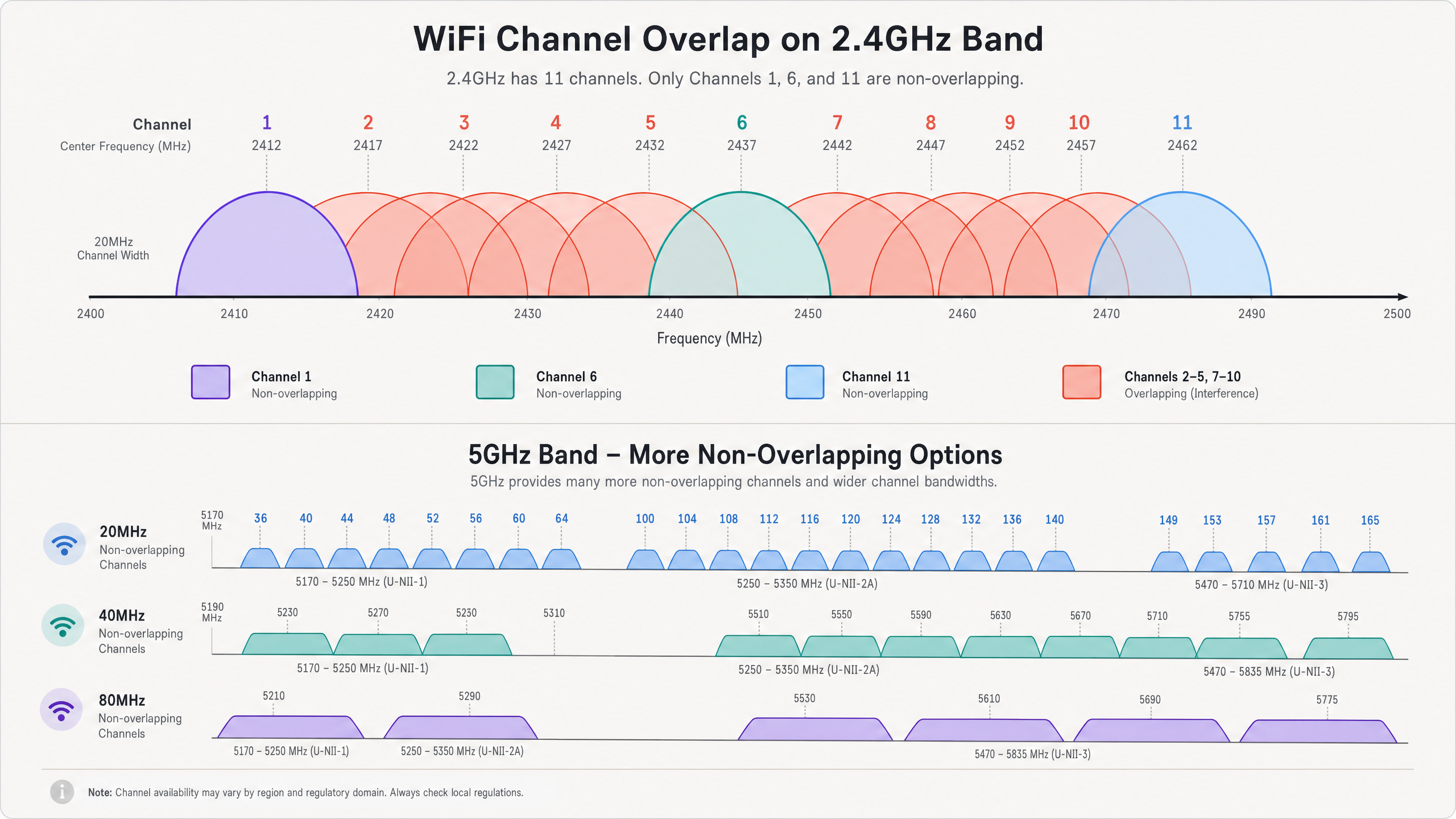
2.4GHz ব্যান্ডে, উত্তর আমেরিকায় ১১টি চ্যানেল এবং ইউরোপে ১৩টি পর্যন্ত চ্যানেল উপলব্ধ। তবে, প্রতিটি চ্যানেল 20MHz স্পেকট্রাম দখল করে, যখন চ্যানেলগুলি নিজেরাই মাত্র 5MHz ব্যবধানে থাকে। এই ভৌত বাস্তবতা নির্দেশ করে যে শুধুমাত্র চ্যানেল ১, ৬, এবং ১১ সম্পূর্ণরূপে নন-ওভারল্যাপিং। যখন একটি AP চ্যানেল ২-এ ট্রান্সমিট করে, তখন এর সিগন্যাল চ্যানেল ১, ৩, এবং ৪-এ ছড়িয়ে পড়ে। এটি অ্যাডজাসেন্ট-চ্যানেল ইন্টারফারেন্স (ACI) নামে পরিচিত। ACI বিশেষভাবে ক্ষতিকারক কারণ 802.11 CSMA/CA (Carrier Sense Multiple Access with Collision Avoidance) প্রোটোকল আংশিকভাবে ওভারল্যাপিং ট্রান্সমিশনগুলির মধ্যে সংঘর্ষ কার্যকরভাবে পরিচালনা করতে পারে না, যার ফলে করাপ্টেড ফ্রেম এবং উচ্চ রিট্রাই রেট হয়।
অন্যদিকে, কো-চ্যানেল ইন্টারফারেন্স (CCI) ঘটে যখন একাধিক APs ঠিক একই চ্যানেলে কাজ করে। যদিও CSMA/CA প্রোটোকল ডিভাইসগুলিকে পালাক্রমে ট্রান্সমিট করতে বাধ্য করে CCI পরিচালনা করতে পারে, তবে এটি কার্যকরভাবে চ্যানেলে শেয়ার করা সমস্ত ডিভাইসের জন্য উপলব্ধ এয়ারটাইম এবং থ্রুপুট হ্রাস করে। উচ্চ-ঘনত্বের পরিবেশে, অতিরিক্ত CCI একটি নেটওয়ার্ককে অকেজো করে তুলতে পারে। ব্যান্ড বৈশিষ্ট্য সম্পর্কে গভীর বোঝার জন্য, আমাদের গাইড Why 5GHz is Faster but 2.4GHz is More Reliable দেখুন।
5GHz এবং 6GHz এর সুবিধা
5GHz ব্যান্ড 2.4GHz এর ভিড় থেকে উল্লেখযোগ্য স্বস্তি দেয়। এটি ২৫টি পর্যন্ত নন-ওভারল্যাপিং 20MHz চ্যানেল সরবরাহ করে। স্পেকট্রামের এই প্রাচুর্য নেটওয়ার্ক আর্কিটেক্টদেরকে CCI বা ACI অবিলম্বে সৃষ্টি না করেই থ্রুপুট বাড়ানোর জন্য প্রশস্ত চ্যানেল (40MHz বা 80MHz) ব্যবহার করার অনুমতি দেয়। তবে, সতর্ক চ্যানেল পরিকল্পনা এখনও প্রয়োজন, বিশেষ করে যখন প্রশস্ত চ্যানেল ব্যবহার করা হয়, কারণ দুটি 20MHz চ্যানেলকে একত্রিত করলে উপলব্ধ নন-ওভারল্যাপিং চ্যানেলের সংখ্যা অর্ধেক হয়ে যায়।
WiFi 6E এবং 6GHz ব্যান্ডের প্রবর্তন আরও বেশি স্পেকট্রাম সরবরাহ করে—৫৯টি পর্যন্ত নন-ওভারল্যাপিং 20MHz চ্যানেল বা ১৪টি নন-ওভারল্যাপিং 80MHz চ্যানেল। ক্ষমতার এই বিশাল বৃদ্ধি ঘন পরিবেশে সত্যিকারের গিগাবিট ওয়্যারলেস পারফরম্যান্সের অনুমতি দেয়, যদি ক্লায়েন্ট ডিভাইসগুলি নতুন স্ট্যান্ডার্ড সমর্থন করে।
মূল অ্যানালাইজার ক্ষমতা
চ্যানেল ওভারল্যাপ কার্যকরভাবে নির্ণয় করার জন্য, IT দলগুলির RF পরিবেশকে ভিজ্যুয়ালাইজ করতে সক্ষম সরঞ্জাম প্রয়োজন। মূল ক্ষমতাগুলির মধ্যে রয়েছে:
- স্পেকট্রাম বিশ্লেষণ: স্পেকট্রাম জুড়ে কাঁচা RF শক্তিকে ভিজ্যুয়ালাইজ করার ক্ষমতা। এটি নন-WiFi ইন্টারফারেন্স উৎস সনাক্ত করার জন্য অত্যন্ত গুরুত্বপূর্ণ, যেমন মাইক্রোওয়েভ ওভেন, Bluetooth ডিভাইস, বা ওয়্যারলেস সিকিউরিটি ক্যামেরা, যা 2.4GHz ব্যান্ডে কাজ করে কিন্তু 802.11 ফ্রেম ট্রান্সমিট করে না।
- চ্যানেল ইউটিলাইজেশন পরিমাপ: একটি চ্যানেলের কতটুকু ক্ষমতা WiFi ট্র্যাফিক দ্বারা সক্রিয়ভাবে ব্যবহৃত হচ্ছে বনাম কতটুকু উপলব্ধ আছে তা পরিমাপ করার ক্ষমতা। উচ্চ ইউটিলাইজেশন ভিড় এবং চ্যানেল পুনঃবণ্টনের প্রয়োজনীয়তা নির্দেশ করে।
- সিগন্যাল-টু-নয়েজ রেশিও (SNR) ম্যাপিং: SNR হল সিগন্যাল শক্তি (RSSI) এবং ব্যাকগ্রাউন্ড নয়েজ ফ্লোরের মধ্যে পার্থক্য। উচ্চ ডেটা রেট সরবরাহকারী জটিল মডুলেশন স্কিমগুলির (যেমন 256-QAM বা 1024-QAM) জন্য একটি উচ্চ SNR প্রয়োজন।
- BSSID ট্র্যাকিং: ব্যক্তিগত বেসিক সার্ভিস সেট আইডেন্টিফায়ার (BSSIDs)—ব্যক্তিগত AP রেডিওগুলির MAC অ্যাড্রেস—ট্র্যাক করার ক্ষমতা, যাতে রোগ APs বা ভুলভাবে কনফিগার করা অবকাঠামো সনাক্ত করা যায়।
বাস্তবায়ন নির্দেশিকা
একটি WiFi অ্যানালাইজার টুল কার্যকরভাবে স্থাপন করার জন্য একটি কাঠামোগত পদ্ধতির প্রয়োজন। নিম্নলিখিত পদক্ষেপগুলি একটি ওয়্যারলেস নেটওয়ার্কের সমস্যা সমাধান এবং অপ্টিমাইজ করার জন্য একটি সেরা-অনুশীলন পদ্ধতি তুলে ধরে।
ধাপ ১: বেসলাইন মূল্যায়ন
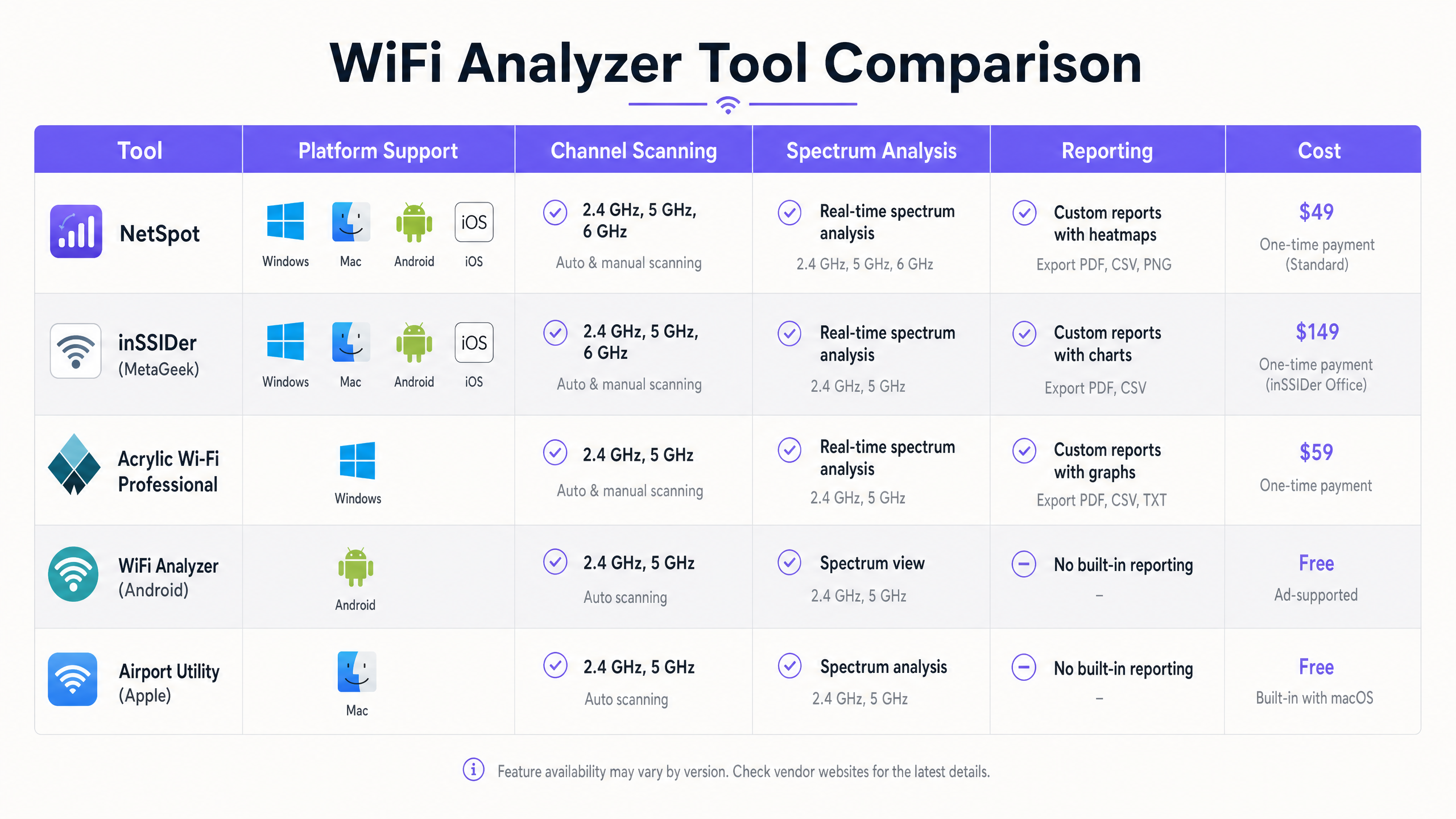
যেকোনো কনফিগারেশন পরিবর্তন করার আগে, বর্তমান RF পরিবেশের একটি বেসলাইন স্থাপন করুন। একটি প্যাসিভ সাইট সার্ভে পরিচালনা করতে Ekahau বা NetSpot এর মতো একটি টুল ব্যবহার করুন। কভারেজ এলাকায় হেঁটে যান এবং সিগন্যাল শক্তি, চ্যানেল অ্যাসাইনমেন্ট এবং নয়েজ ফ্লোর সম্পর্কিত ডেটা সংগ্রহ করুন। এই বেসলাইনটি কাজ করবে প্রতিকারমূলক প্রচেষ্টার পর তুলনার একটি বিন্দু।
ধাপ 2: হস্তক্ষেপ অঞ্চলগুলি চিহ্নিত করুন
সমীক্ষার ডেটা বিশ্লেষণ করে উচ্চ CCI বা ACI সহ এলাকাগুলি চিহ্নিত করুন। এমন স্থানগুলি খুঁজুন যেখানে একই বা ওভারল্যাপিং চ্যানেলে পরিচালিত তিনটি বা তার বেশি AP -70 dBm এর বেশি সিগন্যাল শক্তি সহ প্রাপ্ত হয়। এগুলি আপনার প্রাথমিক হস্তক্ষেপ অঞ্চল। একটি Hospitality সেটিংয়ে, এগুলি প্রায়শই করিডোর ছেদ হয়; Retail -এ, এগুলি পয়েন্ট-অফ-সেল টার্মিনালের কাছাকাছি হতে পারে।
ধাপ 3: স্পেকট্রাম সুইপস
সত্যিকারের স্পেকট্রাম বিশ্লেষণ ক্ষমতা সম্পন্ন একটি টুল (যেমন, Ekahau Sidekick বা একটি ডেডিকেটেড স্পেকট্রাম অ্যানালাইজার) ব্যবহার করে স্পেকট্রাম সুইপ পরিচালনা করুন। অবিচ্ছিন্ন বা বার্স্টি নন-WiFi শক্তি স্বাক্ষরগুলি সন্ধান করুন যা নয়েজ ফ্লোরকে বাড়িয়ে তোলে। যদি নন-WiFi হস্তক্ষেপ চিহ্নিত করা হয়, তবে চ্যানেল পরিকল্পনা কার্যকর হওয়ার আগে উৎসটি সনাক্ত করে অপসারণ বা প্রশমিত করতে হবে।
ধাপ 4: চ্যানেল পুনর্বণ্টন
সমীক্ষা এবং স্পেকট্রাম ডেটার উপর ভিত্তি করে, চ্যানেল পরিকল্পনা পুনরায় ডিজাইন করুন।
- 2.4GHz: 1-6-11 নিয়ম কঠোরভাবে মেনে চলুন। যদি AP ঘনত্ব বেশি হয়, CCI কমাতে বিকল্প AP গুলিতে 2.4GHz রেডিও নিষ্ক্রিয় করার কথা বিবেচনা করুন।
- 5GHz: যদি স্থানীয় নিয়মাবলী অনুমতি দেয় এবং রাডার হস্তক্ষেপ না থাকে তবে ডাইনামিক ফ্রিকোয়েন্সি সিলেকশন (DFS) চ্যানেলগুলি ব্যবহার করুন। চ্যানেলের প্রস্থ সাবধানে নির্বাচন করুন; যদিও 80MHz চ্যানেলগুলি উচ্চতর পিক থ্রুপুট সরবরাহ করে, 40MHz বা এমনকি 20MHz চ্যানেলগুলি ঘন স্থাপনায় প্রায়শই বেশি উপযুক্ত হয় যাতে নন-ওভারল্যাপিং চ্যানেলের সংখ্যা সর্বাধিক করা যায়।
ধাপ 5: পাওয়ার লেভেল টিউনিং
অতিরিক্ত ট্রান্সমিট পাওয়ারের কারণে চ্যানেল ওভারল্যাপ প্রায়শই বেড়ে যায়। যদি একটি AP-এর সিগন্যাল খুব বেশি দূরে ছড়িয়ে পড়ে, তবে এটি প্রতিবেশী AP গুলির জন্য অপ্রয়োজনীয় CCI সৃষ্টি করে। পর্যাপ্ত কভারেজ সরবরাহ করতে এবং সেল প্রান্তে একটি লক্ষ্য SNR বজায় রাখতে ট্রান্সমিট পাওয়ারকে সর্বনিম্ন প্রয়োজনীয় স্তরে হ্রাস করুন। এটি কভারেজ সেলকে সংকুচিত করে এবং হস্তক্ষেপ হ্রাস করে।
ধাপ 6: প্রতিকার-পরবর্তী বৈধতা
নতুন চ্যানেল পরিকল্পনা এবং পাওয়ার সেটিংস প্রয়োগ করার পর, একটি ফলো-আপ সাইট সার্ভে পরিচালনা করুন। CCI এবং ACI হ্রাস পেয়েছে এবং কভারেজের প্রয়োজনীয়তা এখনও পূরণ হচ্ছে কিনা তা যাচাই করতে নতুন ডেটা বেসলাইনের সাথে তুলনা করুন।
সেরা অনুশীলন
একটি অপ্টিমাইজড RF পরিবেশ বজায় রাখতে, নিম্নলিখিত শিল্প সেরা অনুশীলনগুলি মেনে চলুন:
- এন্টারপ্রাইজ টুলস-এ মানীকরণ করুন: যদিও বিনামূল্যে স্মার্টফোন অ্যাপগুলি দ্রুত স্পট চেকের জন্য দরকারী, তবে ব্যাপক সমস্যা সমাধান এবং পরিকল্পনার জন্য Ekahau, OmniPeek, বা AirMagnet-এর মতো এন্টারপ্রাইজ-গ্রেড টুল প্রয়োজন।
- অ্যানালিটিক্স-এর সাথে একীভূত করুন: RF বিশ্লেষণকে একটি ব্যাপক Guest WiFi এবং অ্যানালিটিক্স প্ল্যাটফর্মের সাথে একত্রিত করুন। Purple ক্লায়েন্ট অ্যাসোসিয়েশন গুণমান, সেশন সময়কাল এবং সামগ্রিক নেটওয়ার্ক স্বাস্থ্যের উপর অবিচ্ছিন্ন দৃশ্যমানতা সরবরাহ করে, যা IT দলগুলিকে ব্যবহারকারীরা সমস্যা রিপোর্ট করার আগেই অবনতি সনাক্ত করতে দেয়।
- নিয়মিত নিরীক্ষা: RF পরিবেশ গতিশীল। নতুন প্রতিবেশী নেটওয়ার্ক, বিল্ডিং লেআউটের পরিবর্তন, বা নতুন সরঞ্জামের প্রবর্তন RF ল্যান্ডস্কেপ পরিবর্তন করতে পারে। নেটওয়ার্ক অপ্টিমাইজড থাকে তা নিশ্চিত করতে নিয়মিত সাইট সার্ভে (যেমন, ত্রৈমাসিক) সময়সূচী করুন।
- সাবধানে অটো-RF ব্যবহার করুন: বেশিরভাগ আধুনিক এন্টারপ্রাইজ WLAN কন্ট্রোলারে স্বয়ংক্রিয় রেডিও রিসোর্স ম্যানেজমেন্ট (RRM) বৈশিষ্ট্য রয়েছে। যদিও এই অ্যালগরিদমগুলি অত্যাধুনিক, তবে তারা অত্যন্ত গতিশীল পরিবেশে কখনও কখনও "channel thrashing" ঘটাতে পারে। RRM আচরণ নিবিড়ভাবে পর্যবেক্ষণ করুন এবং প্রয়োজনে ম্যানুয়ালি চ্যানেল অ্যাসাইনমেন্ট লক করার জন্য প্রস্তুত থাকুন।
- মানগুলির সাথে আপ-টু-ডেট থাকুন: নিশ্চিত করুন যে আপনার অবকাঠামো এবং সমস্যা সমাধানের পদ্ধতিগুলি সর্বশেষ IEEE মান (যেমন, 802.11ax/WiFi 6) এবং নিরাপত্তা প্রোটোকল (যেমন, WPA3) এর সাথে সঙ্গতিপূর্ণ।
সমস্যা সমাধান ও ঝুঁকি প্রশমন
এমনকি সূক্ষ্ম পরিকল্পনা সত্ত্বেও, WiFi নেটওয়ার্কগুলি কর্মক্ষমতা সমস্যা অনুভব করতে পারে। সাধারণ ব্যর্থতার মোড এবং প্রশমন কৌশলগুলি বোঝা অপরিহার্য।
সাধারণ ব্যর্থতার মোড
- "স্টিকি ক্লায়েন্ট" সমস্যা: ক্লায়েন্টরা প্রায়শই একটি দূরবর্তী AP এর সাথে দুর্বল সংযোগ ধরে রাখে এমনকি যখন একটি কাছাকাছি, শক্তিশালী AP উপলব্ধ থাকে। এটি স্টিকি ক্লায়েন্টের জন্য কর্মক্ষমতা হ্রাস করে এবং অতিরিক্ত এয়ারটাইম খরচ করে, যা সেই চ্যানেলের অন্যান্য সমস্ত ক্লায়েন্টকে প্রভাবিত করে। প্রতিকার: ক্লায়েন্টদের আরও ভাল AP গুলিতে রোম করতে বাধ্য করার জন্য ন্যূনতম মৌলিক হার এবং RSSI থ্রেশহোল্ড প্রয়োগ করুন।
- DFS রাডার ইভেন্ট: 5GHz ব্যান্ডে, DFS চ্যানেলে পরিচালিত AP গুলিকে রাডার স্বাক্ষরগুলির জন্য শুনতে হবে এবং রাডার সনাক্ত হলে অবিলম্বে চ্যানেলটি খালি করতে হবে। এটি হঠাৎ নেটওয়ার্ক বিঘ্ন ঘটাতে পারে। প্রতিকার: DFS ইভেন্টগুলির জন্য কন্ট্রোলার লগগুলি পর্যবেক্ষণ করুন। যদি ঘন ঘন রাডার হিট ঘটে, তবে সেই নির্দিষ্ট স্থানে DFS চ্যানেল ব্যবহার করা এড়িয়ে চলুন।
- হিডেন নোড সমস্যা: ঘটে যখন দুটি ক্লায়েন্ট একই AP এর সাথে যোগাযোগ করতে পারে কিন্তু একে অপরের কথা শুনতে পারে না। তারা একই সাথে ট্রান্সমিট করতে পারে, যার ফলে AP তে সংঘর্ষ হয়। প্রতিকার: RTS/CTS (Request to Send/Clear to Send) প্রক্রিয়াগুলি সক্ষম করুন, যদিও এটি ওভারহেড যোগ করে এবং সামগ্রিক থ্রুপুট হ্রাস করে।
ঝুঁকি প্রশমন কৌশল
- শক্তিশালী প্রমাণীকরণ প্রয়োগ করুন: কর্পোরেট ডিভাইসের জন্য 802.1X/EAP এবং গেস্ট অ্যাক্সেসের জন্য সুরক্ষিত Captive Portal ব্যবহার করে নেটওয়ার্ক সুরক্ষিত করুন। আধুনিক, সুরক্ষিত অ্যাক্সেসের জন্য, How a wi fi assistant Enables Passwordless Access in 2026 এর মতো সমাধানগুলি বিবেচনা করুন।
- নেটওয়ার্ক বিভাজন: নিরাপত্তা উন্নত করতে এবং ব্রডকাস্ট ডোমেনগুলি পরিচালনা করতে বিভিন্ন ধরণের ট্র্যাফিক (যেমন, গেস্ট, কর্পোরেট, IoT, PoS) আলাদা VLAN এবং SSIDs-এ বিচ্ছিন্ন করুন।
- অবিচ্ছিন্ন পর্যবেক্ষণ: নেটওয়ার্ক কর্মক্ষমতা মেট্রিক্স এবং ব্যবহারকারীর আচরণ অবিচ্ছিন্নভাবে পর্যবেক্ষণ করতে Purple এর মতো প্ল্যাটফর্মগুলি ব্যবহার করুন। উদাহরণস্বরূপ, ব্যবহারকারীরা কীভাবে একটি স্থান নেভিগেট করে তা বোঝা AP স্থাপনাকে প্রভাবিত করতে পারে, এই ধারণাটি Purple Launches Offline Maps Mode for Seamless, Secure Navigation to WiFi Hotspots এ আরও বিস্তারিতভাবে অন্বেষণ করা হয়েছে।
ROI এবং ব্যবসায়িক প্রভাব
কঠোর চ্যানেল পরিকল্পনা এবং বিশ্লেষণের মাধ্যমে WiFi নেটওয়ার্ক অপ্টিমাইজ করা পরিমাপযোগ্য ফলাফল প্রদান করেবিভিন্ন মাত্রায় ব্যবসায়িক মূল্য:
১. উন্নত ব্যবহারকারীর অভিজ্ঞতা: চ্যানেল ওভারল্যাপ কমানো সরাসরি থ্রুপুট বাড়ায় এবং ল্যাটেন্সি কমায়। একটি Transport হাব-এ, এর অর্থ হল যাত্রীরা নির্ভরযোগ্যভাবে বোর্ডিং পাস এবং বিনোদন অ্যাক্সেস করতে পারে; একটি হোটেলে, এটি উচ্চতর অতিথি সন্তুষ্টি স্কোর এবং ফ্রন্ট ডেস্কে কম অভিযোগের দিকে পরিচালিত করে। ২. বর্ধিত অপারেশনাল দক্ষতা: একটি স্থিতিশীল, উচ্চ-কার্যক্ষমতাসম্পন্ন নেটওয়ার্ক আইটি হেল্পডেস্কের উপর চাপ কমায়। কম কানেক্টিভিটি টিকিট মানে আইটি কর্মীরা প্রতিক্রিয়াশীল সমস্যা সমাধানের পরিবর্তে কৌশলগত উদ্যোগে মনোযোগ দিতে পারে। ৩. উন্নত ডেটা সংগ্রহ: একটি নির্ভরযোগ্য নেটওয়ার্ক সঠিক অবস্থান বিশ্লেষণ এবং ব্যবহারকারীর ব্যস্ততার ভিত্তি। যখন নেটওয়ার্ক ভালোভাবে কাজ করে, তখন Purple-এর মতো প্ল্যাটফর্মগুলি উচ্চ-মানের ডেটা সংগ্রহ করতে পারে, যা আরও কার্যকর বিপণন প্রচারাভিযান এবং অপারেশনাল অন্তর্দৃষ্টি সক্ষম করে। সাম্প্রতিক কৌশলগত পদক্ষেপগুলি দ্বারা যেমন Purple Appoints Iain Fox as VP Growth – Public Sector to Drive Digital Inclusion and Smart City Innovation দ্বারা তুলে ধরা হয়েছে, উন্নত ডিজিটাল উদ্যোগের জন্য শক্তিশালী অবকাঠামো অত্যন্ত গুরুত্বপূর্ণ। ৪. বর্ধিত হার্ডওয়্যার জীবনকাল: আরএফ পরিবেশ অপ্টিমাইজ করার মাধ্যমে, বিদ্যমান অবকাঠামো প্রায়শই তাৎক্ষণিক হার্ডওয়্যার আপগ্রেডের প্রয়োজন ছাড়াই উচ্চতর ক্লায়েন্ট ঘনত্ব সমর্থন করতে পারে, যা মূলধন ব্যয়ের উপর সর্বোচ্চ রিটার্ন নিশ্চিত করে।
মূল সংজ্ঞাসমূহ
Co-Channel Interference (CCI)
Interference that occurs when two or more access points operate on the exact same frequency channel.
Forces devices to share airtime, reducing overall throughput. Often caused by overly dense AP deployments or excessive transmit power.
Adjacent-Channel Interference (ACI)
Interference that occurs when transmissions on one channel bleed into and disrupt communications on a neighboring, overlapping channel.
More destructive than CCI because the CSMA/CA protocol cannot effectively manage the collisions. Common when channels other than 1, 6, or 11 are used in the 2.4GHz band.
Signal-to-Noise Ratio (SNR)
The difference (in decibels) between the received signal strength (RSSI) and the background noise floor.
A critical metric for performance. High SNR is required for high data rates. A strong signal is useless if the noise floor is equally high.
Received Signal Strength Indicator (RSSI)
A measurement of the power level being received by the antenna.
Used to determine basic coverage boundaries. Typically, enterprise deployments aim for an RSSI of -65 dBm to -70 dBm at the cell edge.
Dynamic Frequency Selection (DFS)
A mechanism that allows unlicensed devices to share the 5GHz spectrum with legacy radar systems.
APs must monitor DFS channels for radar signatures and immediately switch channels if detected, which can cause temporary client disconnects.
Radio Resource Management (RRM)
Automated algorithms used by WLAN controllers to dynamically adjust AP transmit power and channel assignments.
Useful for initial setup, but can cause instability ('channel thrashing') in highly dynamic environments if not monitored.
Basic Service Set Identifier (BSSID)
The MAC address of the wireless access point radio.
Essential for tracking specific hardware during a site survey and identifying rogue APs.
Spectrum Analysis
The process of measuring and visualizing all RF energy within a specific frequency band, not just 802.11 traffic.
Necessary for identifying non-WiFi interference sources like microwaves or Bluetooth devices that standard WiFi scanners cannot see.
সমাধানকৃত উদাহরণসমূহ
A 300-room hotel is experiencing widespread guest complaints regarding slow WiFi speeds and dropped connections during peak evening hours, particularly in the central atrium where multiple access points are deployed.
- Deploy a tool like Ekahau Site Survey to conduct a passive RF sweep of the atrium during peak hours.
- Analyze the resulting heatmaps to identify areas where more than two APs operating on the 2.4GHz band are visible on the same channel (e.g., channel 6) with RSSI > -70 dBm.
- Implement a strict 1-6-11 channel plan for the 2.4GHz radios, ensuring adjacent APs use non-overlapping channels.
- Reduce the transmit power on the 2.4GHz radios in the atrium to minimize cell overlap.
- Conduct a post-remediation survey to verify CCI reduction and monitor Purple Analytics for improved session stability.
A large retail store recently upgraded its PoS terminals to wireless tablets, but transactions are frequently timing out. The IT team suspects interference but standard WiFi scans show only the store's own SSIDs.
- Utilize a spectrum analyzer (like Ekahau Sidekick or a dedicated tool) rather than a standard WiFi scanner.
- Perform a spectrum sweep in the 2.4GHz and 5GHz bands around the PoS areas.
- Identify non-802.11 energy signatures (e.g., from a nearby microwave oven, wireless security cameras, or Bluetooth beacons) that are elevating the noise floor and causing a low SNR.
- If possible, remove the source of interference. If not, migrate the PoS tablets to the 5GHz band, selecting channels far removed from the identified interference frequencies.
অনুশীলনী প্রশ্নসমূহ
Q1. You are auditing a new retail deployment. The 2.4GHz APs are currently set to channels 1, 4, 8, and 11 to 'spread out' the signals. What is the immediate risk, and what is the recommended action?
ইঙ্গিত: Consider the 20MHz width of a 2.4GHz channel and the 5MHz spacing between channel numbers.
মডেল উত্তর দেখুন
The immediate risk is severe adjacent-channel interference (ACI). Channel 4 overlaps with 1 and 8; channel 8 overlaps with 4 and 11. ACI is highly destructive to throughput. The recommended action is to immediately reconfigure all 2.4GHz radios to use only channels 1, 6, and 11.
Q2. During a site survey in a conference center, you notice the noise floor on channel 6 is elevated to -75 dBm, but your WiFi scanner shows no BSSIDs broadcasting on that channel. What is the likely cause?
ইঙ্গিত: Think about what a standard WiFi scanner can and cannot detect.
মডেল উত্তর দেখুন
The likely cause is a non-802.11 interference source, such as a microwave oven, wireless AV equipment, or Bluetooth devices operating in the 2.4GHz band. A standard WiFi scanner only sees 802.11 management frames. A dedicated spectrum analyzer is required to visualize this raw RF energy.
Q3. A hotel IT manager wants to maximize throughput by configuring all 5GHz APs to use 80MHz channel widths. The hotel has a dense deployment with APs in every other room. Why might this approach degrade performance rather than improve it?
ইঙ্গিত: Consider the total number of available non-overlapping channels in the 5GHz band when using wider channels.
মডেল উত্তর দেখুন
Using 80MHz channels significantly reduces the number of available non-overlapping channels (typically to 5 or 6, depending on regulatory domain and DFS usage). In a dense deployment, this will inevitably lead to co-channel interference (CCI) as neighboring APs are forced to reuse the same wide channels, ultimately reducing aggregate capacity and stability.