
As Melhores Ferramentas de WiFi Analyzer para a Resolução de Problemas de Sobreposição de Canais
Este guia abrangente fornece aos gestores de TI e arquitetos de rede estratégias acionáveis para identificar e resolver a sobreposição de canais de WiFi em ambientes de alta densidade. Avalia as melhores ferramentas de WiFi analyzer e descreve uma metodologia comprovada para otimizar o desempenho de RF para garantir uma experiência de cliente perfeita e maximizar o ROI da infraestrutura.
Ouça este guia
Ver transcrição do podcast
এক্সিকিউটিভ সামারি
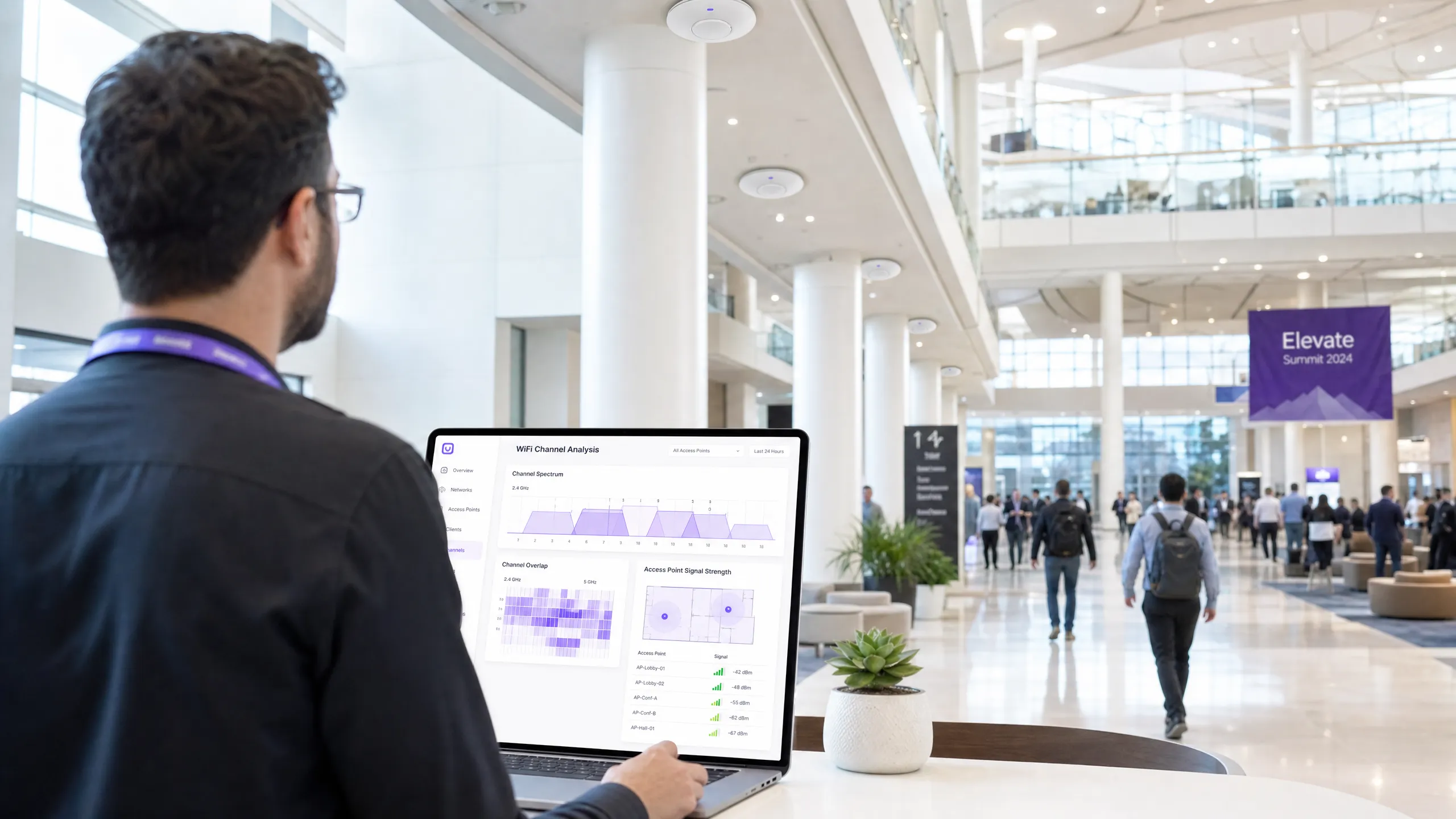
উচ্চ-ঘনত্বের পরিবেশ পরিচালনা করা আইটি ম্যানেজার এবং নেটওয়ার্ক আর্কিটেক্টদের জন্য, চ্যানেল ওভারল্যাপ হলো WiFi পারফরম্যান্স কমার অন্যতম প্রধান কারণ। যখন অ্যাক্সেস পয়েন্টগুলো একই স্পেকট্রামের জন্য প্রতিযোগিতা করে, তখন কো-চ্যানেল এবং অ্যাডজাসেন্ট-চ্যানেল ইন্টারফারেন্স সরাসরি থ্রুপুটকে প্রভাবিত করে, রিট্রাই রেট বাড়ায় এবং গেস্ট এক্সপেরিয়েন্স নষ্ট করে। এই গাইডটি ইন্ডাস্ট্রির সেরা WiFi অ্যানালাইজার টুল ব্যবহার করে চ্যানেল ওভারল্যাপ শনাক্ত, ডায়াগনোজ এবং সমাধান করার জন্য একটি চূড়ান্ত টেকনিক্যাল রেফারেন্স প্রদান করে।
অন্তর্নিহিত RF মেকানিক্স বুঝে এবং সঠিক ডায়াগনস্টিক সফটওয়্যার ডিপ্লয় করে, টেকনিক্যাল টিমগুলো চ্যানেল অ্যাসাইনমেন্ট অপ্টিমাইজ করতে, ইন্টারফারেন্স কমাতে এবং এন্টারপ্রাইজ ওয়্যারলেস ডিপ্লয়মেন্টের জন্য সর্বোচ্চ রিটার্ন অন ইনভেস্টমেন্ট (ROI) নিশ্চিত করতে পারে। আপনি ২০০-রুমের হোটেল, মাল্টি-সাইট Retail চেইন, বা বিশাল পাবলিক-সেক্টর ভেন্যু পরিচালনা করুন না কেন, এখানে বিস্তারিত মেথডলজিগুলো আপনাকে একটি শক্তিশালী, হাই-পারফরম্যান্স ওয়্যারলেস নেটওয়ার্ক বজায় রাখতে সাহায্য করবে। তাছাড়া, Purple-এর মতো উন্নত WiFi Analytics প্ল্যাটফর্মের সাথে এই প্র্যাকটিসগুলো ইন্টিগ্রেট করলে RF পরিবেশের নিরবচ্ছিন্ন ভিজিবিলিটি এবং প্রোঅ্যাকটিভ ম্যানেজমেন্ট নিশ্চিত হয়।
টেকনিক্যাল ডিপ-ডাইভ
চ্যানেল ওভারল্যাপের ফিজিক্স
ফিজিক্যাল লেয়ারে, WiFi নেটওয়ার্কগুলো নির্দিষ্ট ফ্রিকোয়েন্সি ব্যান্ডের মধ্যে কাজ করে, প্রধানত 2.4GHz, 5GHz এবং ক্রমবর্ধমানভাবে 6GHz। WiFi ডিপ্লয়মেন্টের মূল চ্যালেঞ্জ হলো ধ্বংসাত্মক ইন্টারফারেন্স সৃষ্টি না করে একাধিক অ্যাক্সেস পয়েন্ট (APs) এবং ক্লায়েন্ট ডিভাইসকে পরিষেবা দেওয়ার জন্য এই ব্যান্ডগুলোর মধ্যে উপলব্ধ সীমিত স্পেকট্রাম পরিচালনা করা।
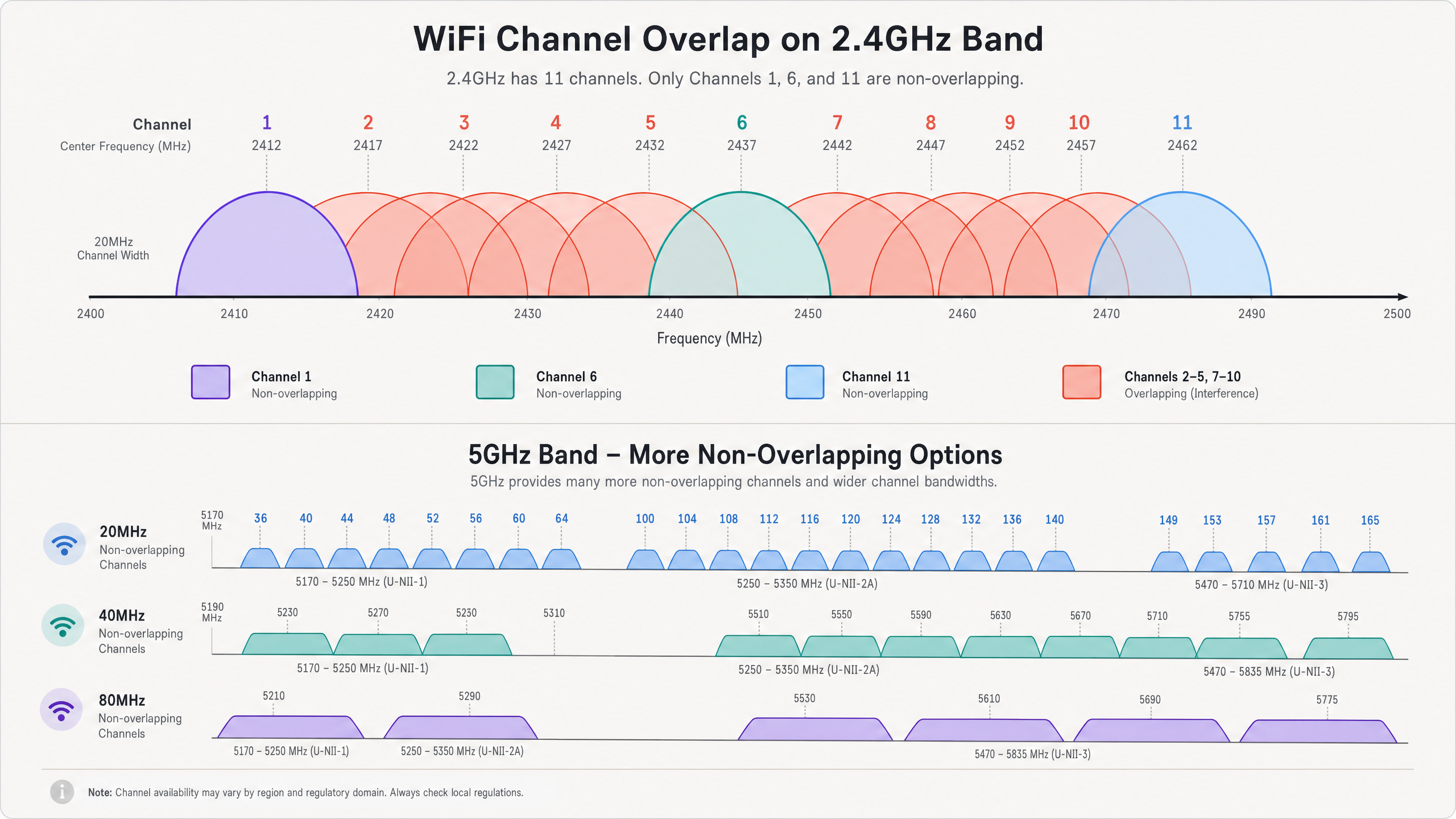
2.4GHz ব্যান্ডে, উত্তর আমেরিকায় ১১টি এবং ইউরোপে ১৩টি পর্যন্ত চ্যানেল উপলব্ধ। তবে, প্রতিটি চ্যানেল 20MHz স্পেকট্রাম দখল করে, যেখানে চ্যানেলগুলোর মধ্যে মাত্র 5MHz ব্যবধান থাকে। এই বাস্তবতার কারণে শুধুমাত্র ১, ৬ এবং ১১ নম্বর চ্যানেলগুলো সম্পূর্ণ নন-ওভারল্যাপিং। যখন একটি AP ২ নম্বর চ্যানেলে ট্রান্সমিট করে, তখন এর সিগন্যাল ১, ৩ এবং ৪ নম্বর চ্যানেলে ছড়িয়ে পড়ে। এটি অ্যাডজাসেন্ট-চ্যানেল ইন্টারফারেন্স (ACI) নামে পরিচিত। ACI বিশেষভাবে ক্ষতিকর কারণ 802.11 CSMA/CA (ক্যারিয়ার সেন্স মাল্টিপল অ্যাক্সেস উইথ কলিশন অ্যাভয়ডেন্স) প্রোটোকল আংশিক ওভারল্যাপিং ট্রান্সমিশনের মধ্যে কলিশন কার্যকরভাবে পরিচালনা করতে পারে না, যার ফলে ফ্রেম করাপ্ট হয় এবং রিট্রাই রেট বেড়ে যায়।
অন্যদিকে, কো-চ্যানেল ইন্টারফারেন্স (CCI) তখন ঘটে যখন একাধিক AP ঠিক একই চ্যানেলে কাজ করে। যদিও CSMA/CA প্রোটোকল ডিভাইসগুলোকে পর্যায়ক্রমে ট্রান্সমিট করতে বাধ্য করে CCI পরিচালনা করতে পারে, এটি কার্যকরভাবে চ্যানেল শেয়ার করা সমস্ত ডিভাইসের জন্য উপলব্ধ এয়ারটাইম এবং থ্রুপুট কমিয়ে দেয়। উচ্চ-ঘনত্বের পরিবেশে, অতিরিক্ত CCI একটি নেটওয়ার্ককে অকেজো করে দিতে পারে। ব্যান্ডের বৈশিষ্ট্য সম্পর্কে আরও গভীরভাবে বুঝতে, আমাদের Why 5GHz is Faster but 2.4GHz is More Reliable গাইডটি দেখুন।
5GHz এবং 6GHz এর সুবিধা
5GHz ব্যান্ড 2.4GHz এর কনজেশন থেকে উল্লেখযোগ্য স্বস্তি দেয়। এটি ২৫টি পর্যন্ত নন-ওভারল্যাপিং 20MHz চ্যানেল প্রদান করে। স্পেকট্রামের এই প্রাচুর্য নেটওয়ার্ক আর্কিটেক্টদের তাৎক্ষণিকভাবে CCI বা ACI সৃষ্টি না করে থ্রুপুট বাড়ানোর জন্য প্রশস্ত চ্যানেল (40MHz বা 80MHz) ব্যবহার করার সুযোগ দেয়। তবে, বিশেষ করে প্রশস্ত চ্যানেল ব্যবহার করার সময় সতর্ক চ্যানেল প্ল্যানিং প্রয়োজন, কারণ দুটি 20MHz চ্যানেল যুক্ত করলে উপলব্ধ নন-ওভারল্যাপিং চ্যানেলের সংখ্যা অর্ধেক হয়ে যায়।
WiFi 6E এবং 6GHz ব্যান্ডের প্রবর্তন আরও বেশি স্পেকট্রাম প্রদান করে—৫৯টি পর্যন্ত নন-ওভারল্যাপিং 20MHz চ্যানেল বা ১৪টি নন-ওভারল্যাপিং 80MHz চ্যানেল। ক্যাপাসিটির এই বিশাল বৃদ্ধি ঘন পরিবেশে সত্যিকারের গিগাবিট ওয়্যারলেস পারফরম্যান্সের সুযোগ দেয়, যদি ক্লায়েন্ট ডিভাইসগুলো নতুন স্ট্যান্ডার্ড সাপোর্ট করে।
কোর অ্যানালাইজার ক্যাপাবিলিটিজ
চ্যানেল ওভারল্যাপ কার্যকরভাবে ডায়াগনোজ করতে, আইটি টিমগুলোর এমন টুল প্রয়োজন যা RF পরিবেশ ভিজ্যুয়ালাইজ করতে সক্ষম। মূল ক্যাপাবিলিটিগুলোর মধ্যে রয়েছে:
১. স্পেকট্রাম অ্যানালাইসিস: স্পেকট্রাম জুড়ে র (raw) RF এনার্জি ভিজ্যুয়ালাইজ করার ক্ষমতা। এটি নন-WiFi ইন্টারফারেন্স সোর্স শনাক্ত করার জন্য অত্যন্ত গুরুত্বপূর্ণ, যেমন মাইক্রোওয়েভ ওভেন, ব্লুটুথ ডিভাইস বা ওয়্যারলেস সিকিউরিটি ক্যামেরা, যা 2.4GHz ব্যান্ডে কাজ করে কিন্তু 802.11 ফ্রেম ট্রান্সমিট করে না। ২. চ্যানেল ইউটিলাইজেশন মেজারমেন্ট: একটি চ্যানেলের ক্যাপাসিটির কতটুকু সক্রিয়ভাবে WiFi ট্রাফিকের জন্য ব্যবহৃত হচ্ছে বনাম কতটুকু উপলব্ধ আছে তা পরিমাপ করার ক্ষমতা। উচ্চ ইউটিলাইজেশন কনজেশন এবং চ্যানেল রিঅ্যালোকেশনের প্রয়োজনীয়তা নির্দেশ করে। ৩. সিগন্যাল-টু-নয়েজ রেশিও (SNR) ম্যাপিং: SNR হলো সিগন্যাল স্ট্রেন্থ (RSSI) এবং ব্যাকগ্রাউন্ড নয়েজ ফ্লোরের মধ্যে পার্থক্য। উচ্চ ডেটা রেট প্রদানকারী জটিল মডুলেশন স্কিমগুলোর (যেমন 256-QAM বা 1024-QAM) জন্য একটি উচ্চ SNR প্রয়োজন। ৪. BSSID ট্র্যাকিং: রোগ (rogue) AP বা ভুল কনফিগার করা ইনফ্রাস্ট্রাকচার শনাক্ত করতে পৃথক বেসিক সার্ভিস সেট আইডেন্টিফায়ার (BSSIDs)—স্বতন্ত্র AP রেডিওর MAC অ্যাড্রেস—ট্র্যাক করার ক্ষমতা।
ইমপ্লিমেন্টেশন গাইড
একটি WiFi অ্যানালাইজার টুল কার্যকরভাবে ডিপ্লয় করার জন্য একটি স্ট্রাকচার্ড মেথডলজি প্রয়োজন। নিচের ধাপগুলো একটি ওয়্যারলেস নেটওয়ার্ক ট্রাবলশুট এবং অপ্টিমাইজ করার জন্য একটি বেস্ট-প্র্যাকটিস অ্যাপ্রোচের রূপরেখা দেয়।
ধাপ ১: বেসলাইন অ্যাসেসমেন্ট
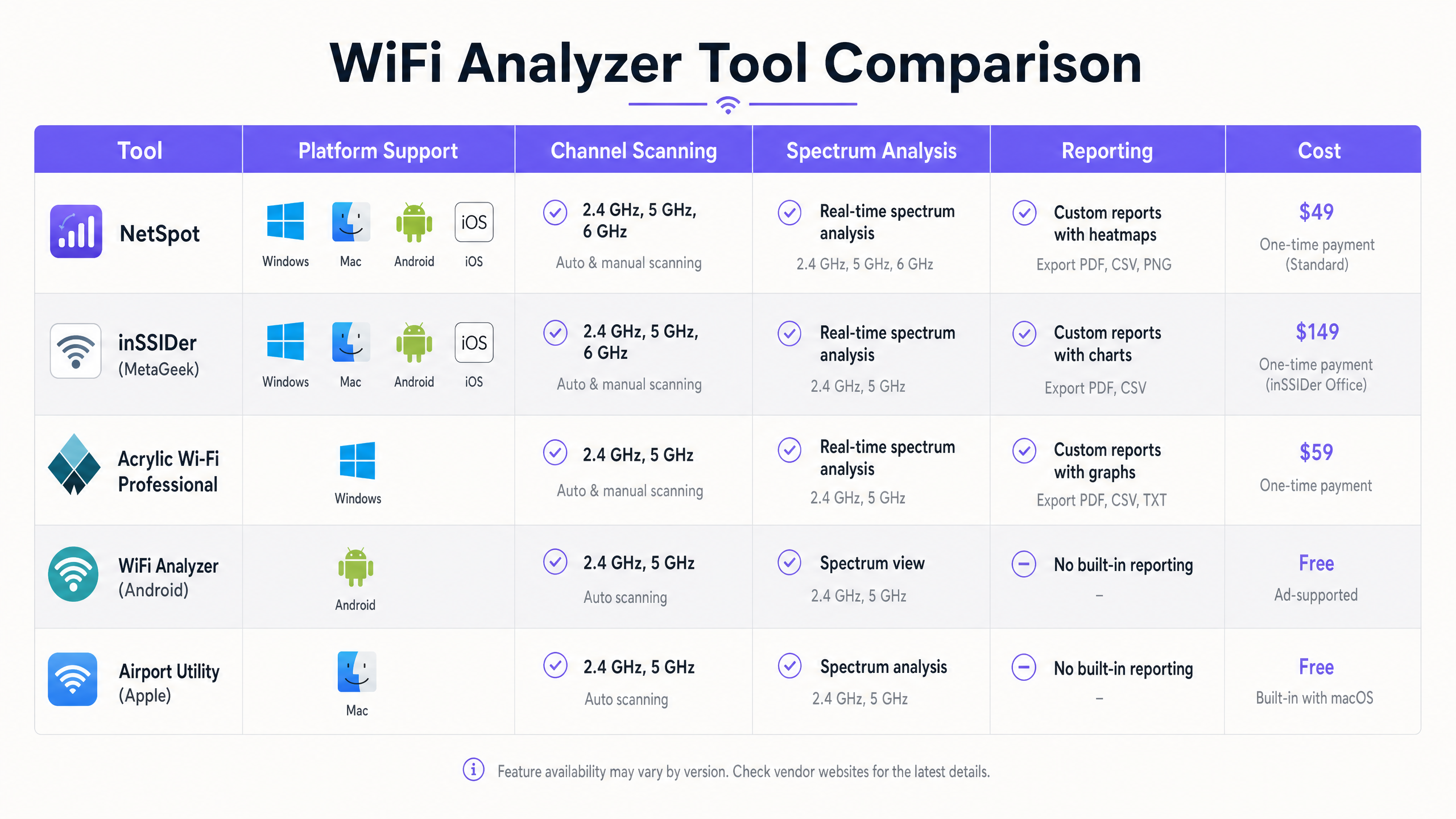
যেকোনো কনফিগারেশন পরিবর্তনের আগে, বর্তমান RF পরিবেশের একটি বেসলাইন তৈরি করুন। প্যাসিভ সাইট সার্ভে পরিচালনা করতে Ekahau বা NetSpot এর মতো টুল ব্যবহার করুন। কভারেজ এরিয়া ঘুরে সিগন্যাল স্ট্রেন্থ, চ্যানেল অ্যাসাইনমেন্ট এবং নয়েজ ফ্লোরের ডেটা ক্যাপচার করুন। এই বেসলাইনটি রিমিডিয়েশন প্রচেষ্টার পরে তুলনার একটি পয়েন্ট হিসেবে কাজ করবে।
ধাপ ২: ইন্টারফারেন্স জোন শনাক্তকরণ
উচ্চ CCI বা ACI যুক্ত এলাকাগুলো শনাক্ত করতে সার্ভে ডেটা বিশ্লেষণ করুন। এমন অবস্থানগুলো খুঁজুন যেখানে একই বা ওভারল্যাপিং চ্যানেলে কাজ করা তিনটি বা তার বেশি AP -70 dBm এর চেয়ে বেশি সিগন্যাল স্ট্রেন্থে রিসিভ হয়। এগুলো আপনার প্রাথমিক ইন্টারফারেন্স জোন। একটি Hospitality সেটিংয়ে, এগুলো প্রায়শই করিডোর ইন্টারসেকশন হয়; Retail -এ, এগুলো পয়েন্ট-অফ-সেল টার্মিনালের কাছাকাছি হতে পারে।
ধাপ ৩: স্পেকট্রাম সুইপস
প্রকৃত স্পেকট্রাম অ্যানালাইসিস ক্যাপাবিলিটি যুক্ত টুল (যেমন, Ekahau Sidekick বা একটি ডেডিকেটেড স্পেকট্রাম অ্যানালাইজার) ব্যবহার করে স্পেকট্রাম সুইপ পরিচালনা করুন। একটানা বা বার্স্টি নন-WiFi এনার্জি সিগনেচার খুঁজুন যা নয়েজ ফ্লোর বাড়িয়ে দেয়। যদি নন-WiFi ইন্টারফারেন্স শনাক্ত হয়, তবে চ্যানেল প্ল্যানিং কার্যকর হওয়ার আগে এর সোর্স খুঁজে বের করে তা অপসারণ বা প্রশমিত করতে হবে।
ধাপ ৪: চ্যানেল রিঅ্যালোকেশন
সার্ভে এবং স্পেকট্রাম ডেটার উপর ভিত্তি করে, চ্যানেল প্ল্যানটি রিডিজাইন করুন।
- 2.4GHz: কঠোরভাবে ১-৬-১১ নিয়ম মেনে চলুন। যদি AP ডেনসিটি বেশি হয়, তবে CCI কমাতে পর্যায়ক্রমিক AP-গুলোতে 2.4GHz রেডিও ডিজেবল করার কথা বিবেচনা করুন।
- 5GHz: স্থানীয় নিয়মকানুন অনুমতি দিলে এবং রাডার ইন্টারফারেন্স না থাকলে ডায়নামিক ফ্রিকোয়েন্সি সিলেকশন (DFS) চ্যানেল ব্যবহার করুন। চ্যানেল উইডথ সাবধানে নির্বাচন করুন; যদিও 80MHz চ্যানেলগুলো উচ্চতর পিক থ্রুপুট দেয়, তবে নন-ওভারল্যাপিং চ্যানেলের সংখ্যা সর্বাধিক করতে ঘন ডিপ্লয়মেন্টে 40MHz বা এমনকি 20MHz চ্যানেলগুলো প্রায়শই বেশি উপযুক্ত।
ধাপ ৫: পাওয়ার লেভেল টিউনিং
অতিরিক্ত ট্রান্সমিট পাওয়ারের কারণে চ্যানেল ওভারল্যাপ প্রায়শই আরও খারাপ হয়। যদি কোনো AP-এর সিগন্যাল খুব বেশি দূর পর্যন্ত পৌঁছায়, তবে এটি প্রতিবেশী AP-গুলোর জন্য অপ্রয়োজনীয় CCI সৃষ্টি করে। পর্যাপ্ত কভারেজ প্রদান করতে এবং সেল এজে একটি টার্গেট SNR বজায় রাখতে ট্রান্সমিট পাওয়ারকে প্রয়োজনীয় ন্যূনতম লেভেলে কমিয়ে দিন। এটি কভারেজ সেলকে ছোট করে এবং ইন্টারফারেন্স কমায়।
ধাপ ৬: পোস্ট-রিমিডিয়েশন ভ্যালিডেশন
নতুন চ্যানেল প্ল্যান এবং পাওয়ার সেটিংস প্রয়োগ করার পর, একটি ফলো-আপ সাইট সার্ভে পরিচালনা করুন। CCI এবং ACI কমেছে কিনা এবং কভারেজের প্রয়োজনীয়তাগুলো এখনও পূরণ হচ্ছে কিনা তা যাচাই করতে বেসলাইনের সাথে নতুন ডেটা তুলনা করুন।
বেস্ট প্র্যাকটিস
একটি অপ্টিমাইজড RF পরিবেশ বজায় রাখতে, নিচের ইন্ডাস্ট্রি বেস্ট প্র্যাকটিসগুলো মেনে চলুন:
- এন্টারপ্রাইজ টুলে স্ট্যান্ডার্ডাইজ করুন: যদিও ফ্রি স্মার্টফোন অ্যাপগুলো দ্রুত স্পট চেকের জন্য দরকারী, তবে ব্যাপক ট্রাবলশুটিং এবং প্ল্যানিংয়ের জন্য Ekahau, OmniPeek বা AirMagnet এর মতো এন্টারপ্রাইজ-গ্রেড টুল প্রয়োজন।
- অ্যানালিটিক্সের সাথে ইন্টিগ্রেট করুন: একটি বিস্তৃত Guest WiFi এবং অ্যানালিটিক্স প্ল্যাটফর্মের সাথে RF অ্যানালাইসিস একত্রিত করুন। Purple ক্লায়েন্ট অ্যাসোসিয়েশন কোয়ালিটি, সেশন ডিউরেশন এবং সামগ্রিক নেটওয়ার্ক হেলথের নিরবচ্ছিন্ন ভিজিবিলিটি প্রদান করে, যা ব্যবহারকারীরা সমস্যা রিপোর্ট করার আগেই আইটি টিমগুলোকে পারফরম্যান্স ডিগ্রেডেশন শনাক্ত করতে দেয়।
- নিয়মিত অডিট: RF পরিবেশ ডায়নামিক। নতুন প্রতিবেশী নেটওয়ার্ক, বিল্ডিং লেআউটে পরিবর্তন বা নতুন ইকুইপমেন্টের প্রবর্তন RF ল্যান্ডস্কেপ পরিবর্তন করতে পারে। নেটওয়ার্ক অপ্টিমাইজড আছে কিনা তা নিশ্চিত করতে নিয়মিত সাইট সার্ভে (যেমন, ত্রৈমাসিক) শিডিউল করুন।
- সতর্কতার সাথে Auto-RF ব্যবহার করুন: বেশিরভাগ আধুনিক এন্টারপ্রাইজ WLAN কন্ট্রোলারে অটোমেটেড রেডিও রিসোর্স ম্যানেজমেন্ট (RRM) বৈশিষ্ট্য রয়েছে। যদিও এই অ্যালগরিদমগুলো অত্যাধুনিক, তবে এগুলো কখনও কখনও অত্যন্ত ডায়নামিক পরিবেশে "চ্যানেল থ্র্যাশিং" সৃষ্টি করতে পারে। RRM-এর আচরণ নিবিড়ভাবে মনিটর করুন এবং প্রয়োজনে ম্যানুয়ালি চ্যানেল অ্যাসাইনমেন্ট লক করার জন্য প্রস্তুত থাকুন।
- স্ট্যান্ডার্ডের সাথে আপ-টু-ডেট থাকুন: নিশ্চিত করুন যে আপনার ইনফ্রাস্ট্রাকচার এবং ট্রাবলশুটিং মেথডলজিগুলো লেটেস্ট IEEE স্ট্যান্ডার্ড (যেমন, 802.11ax/WiFi 6) এবং সিকিউরিটি প্রোটোকলগুলোর (যেমন, WPA3) সাথে সামঞ্জস্যপূর্ণ।
ট্রাবলশুটিং এবং রিস্ক মিটিগেশন
সতর্ক প্ল্যানিং সত্ত্বেও, WiFi নেটওয়ার্কগুলোতে পারফরম্যান্স সমস্যা দেখা দিতে পারে। সাধারণ ফেইলিওর মোড এবং মিটিগেশন স্ট্র্যাটেজিগুলো বোঝা অপরিহার্য।
সাধারণ ফেইলিওর মোড
১. "স্টিকি ক্লায়েন্ট" সমস্যা: ক্লায়েন্টরা প্রায়শই একটি দূরবর্তী AP-এর সাথে দুর্বল কানেকশন ধরে রাখে, এমনকি যখন একটি কাছাকাছি, শক্তিশালী AP উপলব্ধ থাকে। এটি স্টিকি ক্লায়েন্টের পারফরম্যান্স কমিয়ে দেয় এবং অতিরিক্ত এয়ারটাইম খরচ করে, যা ওই চ্যানেলের অন্যান্য সমস্ত ক্লায়েন্টকে প্রভাবিত করে। মিটিগেশন: ক্লায়েন্টদের আরও ভালো AP-তে রোম করতে বাধ্য করার জন্য মিনিমাম বেসিক রেট এবং RSSI থ্রেশহোল্ড প্রয়োগ করুন। ২. DFS রাডার ইভেন্ট: 5GHz ব্যান্ডে, DFS চ্যানেলে কাজ করা AP-গুলোকে অবশ্যই রাডার সিগনেচার শুনতে হবে এবং রাডার শনাক্ত হলে সাথে সাথে চ্যানেল খালি করতে হবে। এটি হঠাৎ নেটওয়ার্ক ব্যাঘাত ঘটাতে পারে। মিটিগেশন: DFS ইভেন্টগুলোর জন্য কন্ট্রোলার লগ মনিটর করুন। যদি ঘন ঘন রাডার হিট হয়, তবে সেই নির্দিষ্ট স্থানে DFS চ্যানেল ব্যবহার করা এড়িয়ে চলুন। ৩. হিডেন নোড সমস্যা: এটি তখন ঘটে যখন দুটি ক্লায়েন্ট একই AP-এর সাথে যোগাযোগ করতে পারে কিন্তু একে অপরের কথা শুনতে পারে না। তারা একই সাথে ট্রান্সমিট করতে পারে, যার ফলে AP-তে কলিশন হয়। মিটিগেশন: RTS/CTS (রিকোয়েস্ট টু সেন্ড/ক্লিয়ার টু সেন্ড) মেকানিজম এনাবল করুন, যদিও এটি ওভারহেড যোগ করে এবং সামগ্রিক থ্রুপুট কমিয়ে দেয়।
রিস্ক মিটিগেশন স্ট্র্যাটেজি
- রোবাস্ট অথেনটিকেশন প্রয়োগ করুন: কর্পোরেট ডিভাইসের জন্য 802.1X/EAP এবং গেস্ট অ্যাক্সেসের জন্য সুরক্ষিত Captive Portal ব্যবহার করে নেটওয়ার্ক সুরক্ষিত করুন। আধুনিক, সুরক্ষিত অ্যাক্সেসের জন্য, How a wi fi assistant Enables Passwordless Access in 2026 -এর মতো সলিউশনগুলো বিবেচনা করুন।
- নেটওয়ার্ক সেগমেন্টেশন: সিকিউরিটি উন্নত করতে এবং ব্রডকাস্ট ডোমেইন পরিচালনা করতে বিভিন্ন ধরনের ট্রাফিক (যেমন, গেস্ট, কর্পোরেট, IoT, PoS) আলাদা VLAN এবং SSID-তে আইসোলেট করুন।
- নিরবচ্ছিন্ন মনিটরিং: নেটওয়ার্ক পারফরম্যান্স মেট্রিক্স এবং ব্যবহারকারীর আচরণ নিরবচ্ছিন্নভাবে মনিটর করতে Purple-এর মতো প্ল্যাটফর্ম ব্যবহার করুন। উদাহরণস্বরূপ, ব্যবহারকারীরা কীভাবে একটি স্পেসে নেভিগেট করে তা বোঝা AP প্লেসমেন্টে সাহায্য করতে পারে, যে কনসেপ্টটি Purple Launches Offline Maps Mode for Seamless, Secure Navigation to WiFi Hotspots -এ আরও বিস্তারিত আলোচনা করা হয়েছে।
ROI এবং বিজনেস ইমপ্যাক্ট
কঠোর চ্যানেল প্ল্যানিং এবং অ্যানালাইসিসের মাধ্যমে WiFi নেটওয়ার্ক অপ্টিমাইজ করা বিভিন্ন ডাইমেনশন জুড়ে পরিমাপযোগ্য বিজনেস ভ্যালু প্রদান করে:
১. উন্নত ইউজার এক্সপেরিয়েন্স: চ্যানেল ওভারল্যাপ কমানো সরাসরি থ্রুপুট বাড়ায় এবং ল্যাটেন্সি কমায়। একটি Transport হাবে, এর অর্থ হলো যাত্রীরা নির্ভরযোগ্যভাবে বোর্ডিং পাস এবং এন্টারটেইনমেন্ট অ্যাক্সেস করতে পারে; একটি হোটেলে, এটি উচ্চতর গেস্ট স্যাটিসফ্যাকশন স্কোর এবং ফ্রন্ট ডেস্কে কম অভিযোগের অনুবাদ করে। ২. অপারেশনাল এফিশিয়েন্সি বৃদ্ধি: একটি স্থিতিশীল, হাই-পারফর্মিং নেটওয়ার্ক আইটি হেল্পডেস্কের উপর বোঝা কমায়। কানেক্টিভিটি টিকিট কম হওয়ার অর্থ হলো আইটি স্টাফরা রিঅ্যাকটিভ ট্রাবলশুটিংয়ের পরিবর্তে স্ট্র্যাটেজিক ইনিশিয়েটিভগুলোতে ফোকাস করতে পারে। ৩. উন্নত ডেটা কালেকশন: একটি নির্ভরযোগ্য নেটওয়ার্ক হলো নির্ভুল লোকেশন অ্যানালিটিক্স এবং ইউজার এনগেজমেন্টের ভিত্তি। যখন নেটওয়ার্ক ভালো পারফর্ম করে, তখন Purple-এর মতো প্ল্যাটফর্মগুলো উচ্চ-মানের ডেটা সংগ্রহ করতে পারে, যা আরও কার্যকর মার্কেটিং ক্যাম্পেইন এবং অপারেশনাল ইনসাইট সক্ষম করে। সাম্প্রতিক স্ট্র্যাটেজিক পদক্ষেপগুলোতে যেমন হাইলাইট করা হয়েছে, Purple Appoints Iain Fox as VP Growth – Public Sector to Drive Digital Inclusion and Smart City Innovation , উন্নত ডিজিটাল ইনিশিয়েটিভের জন্য শক্তিশালী ইনফ্রাস্ট্রাকচার অত্যন্ত গুরুত্বপূর্ণ। ৪. হার্ডওয়্যারের আয়ুষ্কাল বৃদ্ধি: RF পরিবেশ অপ্টিমাইজ করার মাধ্যমে, বিদ্যমান ইনফ্রাস্ট্রাকচার প্রায়শই তাৎক্ষণিক হার্ডওয়্যার আপগ্রেডের প্রয়োজন ছাড়াই উচ্চতর ক্লায়েন্ট ডেনসিটি সাপোর্ট করতে পারে, যা ক্যাপিটাল এক্সপেন্ডিচারের উপর রিটার্ন সর্বাধিক করে।
Definições Principais
Co-Channel Interference (CCI)
Interferência que ocorre quando dois ou mais pontos de acesso operam exatamente no mesmo canal de frequência.
Força os dispositivos a partilharem o tempo de antena, reduzindo o rendimento (throughput) global. É frequentemente causada por implementações de AP demasiado densas ou potência de transmissão excessiva.
Adjacent-Channel Interference (ACI)
Interferência que ocorre quando as transmissões num canal extravasam e perturbam as comunicações num canal vizinho e sobreposto.
Mais destrutiva do que a CCI porque o protocolo CSMA/CA não consegue gerir eficazmente as colisões. É comum quando são utilizados canais que não o 1, 6 ou 11 na banda de 2.4GHz.
Signal-to-Noise Ratio (SNR)
A diferença (em decibéis) entre a força do sinal recebido (RSSI) e o nível de ruído de fundo (noise floor).
Uma métrica crítica para o desempenho. É necessário um SNR elevado para obter taxas de dados elevadas. Um sinal forte é inútil se o nível de ruído de fundo for igualmente elevado.
Received Signal Strength Indicator (RSSI)
Uma medição do nível de potência que está a ser recebido pela antena.
Utilizado para determinar os limites básicos de cobertura. Normalmente, as implementações empresariais visam um RSSI de -65 dBm a -70 dBm no limite da célula.
Dynamic Frequency Selection (DFS)
Um mecanismo que permite aos dispositivos sem licença partilharem o espetro de 5GHz com sistemas de radar legados.
Os APs devem monitorizar os canais DFS à procura de assinaturas de radar e mudar imediatamente de canal se forem detetadas, o que pode causar desconexões temporárias dos clientes.
Radio Resource Management (RRM)
Algoritmos automatizados utilizados pelos controladores WLAN para ajustar dinamicamente a potência de transmissão do AP e as atribuições de canais.
Útil para a configuração inicial, mas pode causar instabilidade ("channel thrashing") em ambientes altamente dinâmicos se não for monitorizado.
Basic Service Set Identifier (BSSID)
O endereço MAC do rádio do ponto de acesso sem fios.
Essencial para monitorizar hardware específico durante uma vistoria do local (site survey) e identificar APs fraudulentos.
Spectrum Analysis
O processo de medição e visualização de toda a energia de RF dentro de uma banda de frequência específica, e não apenas do tráfego 802.11.
Necessário para identificar fontes de interferência que não sejam de WiFi, tais como micro-ondas ou dispositivos Bluetooth, que os scanners de WiFi normais não conseguem detetar.
Exemplos Práticos
Um hotel com 300 quartos está a registar reclamações generalizadas de clientes relativas a velocidades de WiFi lentas e quedas de ligação durante as horas de ponta da noite, particularmente no átrio central onde estão implementados múltiplos pontos de acesso.
- Implementar uma ferramenta como o Ekahau Site Survey para realizar uma varredura de RF passiva no átrio durante as horas de ponta.
- Analisar os mapas de calor resultantes para identificar áreas onde mais de dois APs a operar na banda de 2.4GHz são visíveis no mesmo canal (ex. canal 6) com RSSI > -70 dBm.
- Implementar um plano de canais estrito de 1-6-11 para os rádios de 2.4GHz, garantindo que os APs adjacentes utilizam canais que não se sobrepõem.
- Reduzir a potência de transmissão nos rádios de 2.4GHz no átrio para minimizar a sobreposição de células.
- Realizar um levantamento pós-correção para verificar a redução de CCI e monitorizar o Purple Analytics para verificar a melhoria da estabilidade da sessão.
Uma grande loja de retalho atualizou recentemente os seus terminais de PoS para tablets sem fios, mas as transações estão frequentemente a expirar por timeout. A equipa de TI suspeita de interferência, mas as varreduras de WiFi padrão mostram apenas os SSIDs da própria loja.
- Utilizar um analisador de espetro (como o Ekahau Sidekick ou uma ferramenta dedicada) em vez de um scanner de WiFi padrão.
- Realizar uma varredura de espetro nas bandas de 2.4GHz e 5GHz em redor das áreas de PoS.
- Identificar assinaturas de energia não-802.11 (por exemplo, de um forno micro-ondas próximo, câmaras de segurança sem fios ou transmissores Bluetooth) que estejam a elevar o ruído de fundo e a causar um SNR baixo.
- Se possível, remover a fonte de interferência. Se não, migrar os tablets de PoS para la banda de 5GHz, selecionando canais distantes das frequências de interferência identificadas.
Perguntas de Prática
Q1. Está a auditar uma nova implementação de retalho. Os APs de 2.4GHz estão atualmente configurados para os canais 1, 4, 8 e 11 para 'espalhar' os sinais. Qual é o risco imediato e qual é a ação recomendada?
Dica: Considere a largura de 20MHz de um canal de 2.4GHz e o espaçamento de 5MHz entre os números de canal.
Ver resposta modelo
O risco imediato é a interferência grave de canal adjacente (ACI). O canal 4 sobrepõe-se ao 1 e ao 8; o canal 8 sobrepõe-se ao 4 e ao 11. A ACI é altamente destrutiva para o throughput. A ação recomendada é reconfigurar imediatamente todos os rádios de 2.4GHz para utilizarem apenas os canais 1, 6 e 11.
Q2. Durante um levantamento de local (site survey) num centro de conferências, nota que o ruído de fundo (noise floor) no canal 6 subiu para -75 dBm, mas o seu scanner de WiFi não mostra BSSIDs a transmitir nesse canal. Qual é a causa provável?
Dica: Pense no que um scanner de WiFi padrão consegue e não consegue detetar.
Ver resposta modelo
A causa provável é uma fonte de interferência não-802.11, como um forno micro-ondas, equipamento de AV sem fios ou dispositivos Bluetooth a operar na banda de 2.4GHz. Um scanner de WiFi padrão apenas vê tramas de gestão 802.11. É necessário um analisador de espetro dedicado para visualizar esta energia de RF bruta.
Q3. O gestor de TI de um hotel quer maximizar o throughput configurando todos os APs de 5GHz para utilizarem larguras de canal de 80MHz. O hotel tem uma implementação densa com APs em quartos alternados. Porque é que esta abordagem pode degradar o desempenho em vez de o melhorar?
Dica: Considere o número total de canais não sobrepostos disponíveis na banda de 5GHz ao utilizar canais mais largos.
Ver resposta modelo
A utilização de canais de 80MHz reduz significativamente o número de canais não sobrepostos disponíveis (normalmente para 5 ou 6, dependendo do domínio regulamentar e da utilização de DFS). Numa implementação densa, isto levará inevitavelmente à interferência de canal partilhado (CCI), uma vez que os APs vizinhos são forçados a reutilizar os mesmos canais largos, reduzindo, em última análise, a capacidade agregada e a estabilidade.
Continue a ler esta série
Compreender o RSSI e a Força do Sinal para um Planeamento de Canais Ideal
Este guia fornece uma análise técnica aprofundada sobre RSSI, Relação Sinal-Ruído (SNR) e princípios de propagação de RF para um planeamento de canais ideal. Equipará gestores de TI, arquitetos de rede e diretores de operações de espaços com estratégias práticas para mitigar a Interferência de Canal Co-Adjacente e de Canal Adjacente, otimizar a colocação de APs e tirar partido de análises para um impacto comercial mensurável nos setores da hotelaria, retalho e setor público.
20MHz vs 40MHz vs 80MHz: Que Largura de Canal Deve Utilizar?
Este guia fornece uma referência técnica definitiva e neutra em termos de fornecedor para gestores de TI, arquitetos de rede e diretores de operações de espaços sobre como selecionar a largura de canal WiFi correta — 20MHz, 40MHz ou 80MHz — em implementações empresariais nos setores da hotelaria, retalho, eventos e setor público. Abrange a mecânica subjacente do IEEE 802.11, os compromissos de capacidade no mundo real e orientações de implementação passo a passo para ajudar as equipas a tomar a decisão certa este trimestre. Compreender a seleção da largura de canal é uma das decisões de maior impacto em qualquer design de LAN sem fios, influenciando diretamente o débito, a interferência, o suporte de densidade de clientes e a fiabilidade dos serviços orientados para os visitantes.
Wi-Fi 6 vs Wi-Fi 5: Resolve a Interferência de Canais?
Este guia fornece uma análise técnica aprofundada sobre como o Wi-Fi 6 (802.11ax) aborda a interferência de canais em ambientes empresariais de alta densidade através de OFDMA e BSS Coloring. Equipará gestores de TI, arquitetos de rede e CTOs com estratégias de implementação práticas, estudos de caso reais dos setores da hotelaria e saúde, e uma estrutura para avaliar o ROI de atualizações de infraestrutura em locais onde o desempenho sem fios é crítico para o negócio.