

Dynamische VLAN-Zuweisung mit RADIUS: Benutzersegmentierung nach Rollen
Dieser Leitfaden bietet einen umfassenden technischen Überblick über die Implementierung der dynamischen VLAN-Zuweisung mithilfe von RADIUS-Attributen. Er beschreibt detailliert, wie Unternehmen die Netzwerksegmentierung für Mitarbeiter, Gäste und IoT-Geräte automatisieren können, um die Sicherheit zu erhöhen und den manuellen Konfigurationsaufwand zu reduzieren.
🎧 Diesen Leitfaden anhören
Transkript anzeigen
Zusammenfassung für Führungskräfte
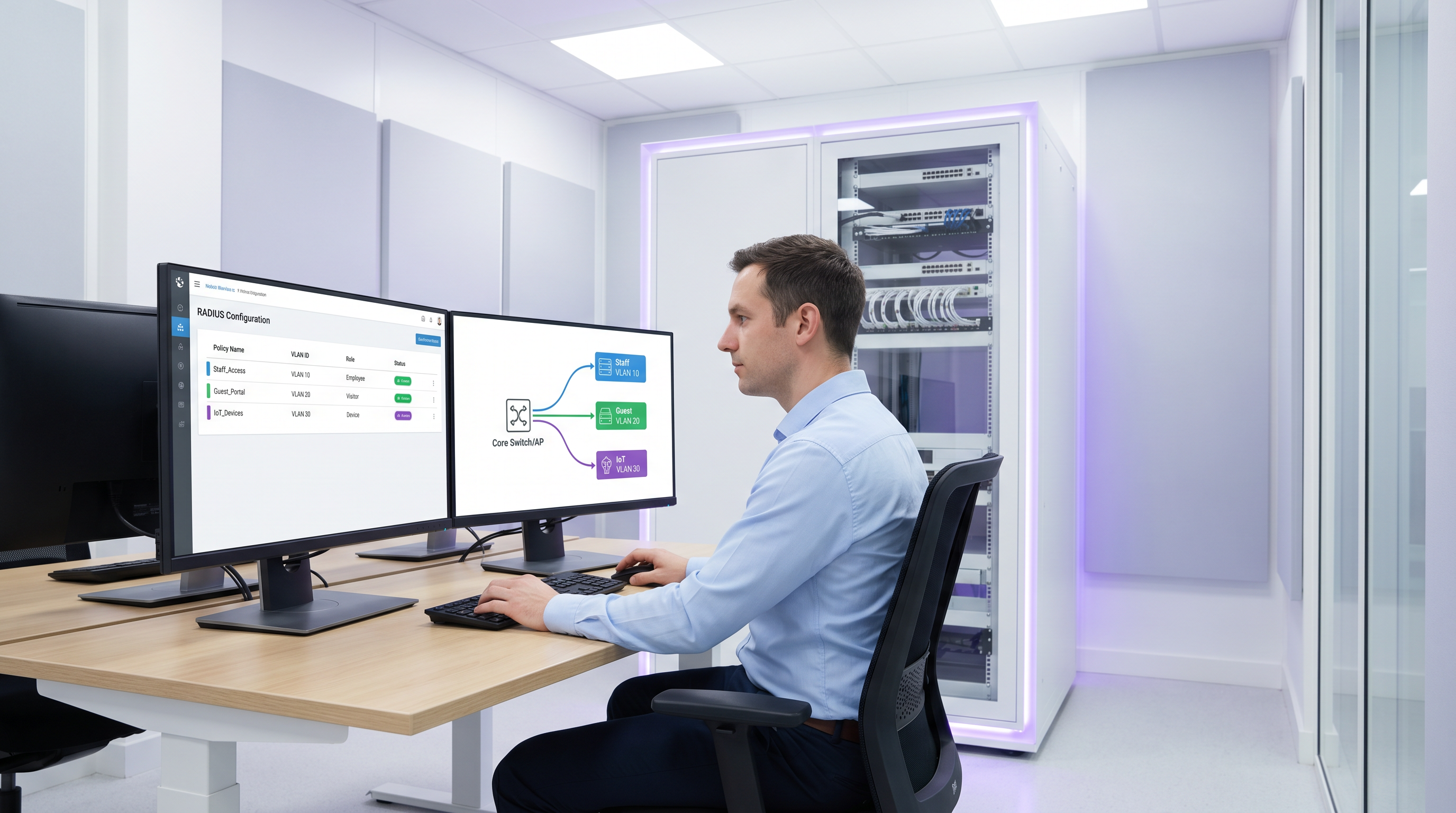
Für Betreiber mehrerer Standorte stellt die manuelle Verwaltung der Netzwerksegmentierung einen erheblichen betrieblichen Engpass dar. Da die Anzahl der verbundenen Geräte in Umgebungen wie dem Gastgewerbe, dem Einzelhandel und dem öffentlichen Sektor skaliert, wird der Rückgriff auf statische VLAN-Konfigurationen pro Port oder das Ausstrahlen von Dutzenden von SSIDs untragbar. Dieser Leitfaden untersucht, wie die dynamische VLAN-Zuweisung mit RADIUS genutzt werden kann, um Benutzer und Geräte zum Zeitpunkt der Authentifizierung automatisch nach Rollen zu segmentieren. Durch die Übergabe spezifischer RADIUS-Attribute (wie Tunnel-Pvt-Group-ID) können Netzwerkarchitekten Benutzer dynamisch dem richtigen VLAN zuweisen, strenge Sicherheitsrichtlinien durchsetzen, die Einhaltung von Standards wie PCI DSS gewährleisten und den manuellen IT-Aufwand drastisch reduzieren.
Technischer Deep-Dive
Die dynamische VLAN-Zuweisung basiert auf dem IEEE 802.1X-Standard für portbasierte Netzwerkzugriffskontrolle in Kombination mit einem RADIUS-Server (Remote Authentication Dial-In User Service) für zentrale Authentifizierung, Autorisierung und Abrechnung (AAA). Wenn ein Client-Gerät versucht, eine Verbindung zum Netzwerk herzustellen, fungiert der Authenticator (in der Regel ein Wireless Access Point oder ein Netzwerk-Switch) als Vermittler und leitet die Anmeldedaten des Clients über das Extensible Authentication Protocol (EAP) an den RADIUS-Server weiter.
Wenn die Anmeldedaten gültig sind, antwortet der RADIUS-Server mit einer Access-Accept-Nachricht. Der entscheidende Mechanismus für die dynamische VLAN-Zuweisung ist die Einbeziehung spezifischer IETF-Standard-RADIUS-Attribute in dieses Access-Accept-Paket. Die drei wesentlichen Attribute sind:
- Tunnel-Type (Attribut 64): Muss auf
VLAN(Wert 13) gesetzt sein. - Tunnel-Medium-Type (Attribut 65): Muss auf
IEEE-802(Wert 6) gesetzt sein. - Tunnel-Private-Group-ID (Attribut 81): Dieses enthält den tatsächlichen VLAN-ID-String (z. B. „10“, „20“, „Guest_VLAN“).
Wenn der Authenticator diese Attribute empfängt, versieht er den Datenverkehr des Benutzers dynamisch mit der angegebenen VLAN-ID und platziert ihn in das entsprechende Netzwerksegment, unabhängig vom physischen Port oder der SSID, mit der er verbunden ist.
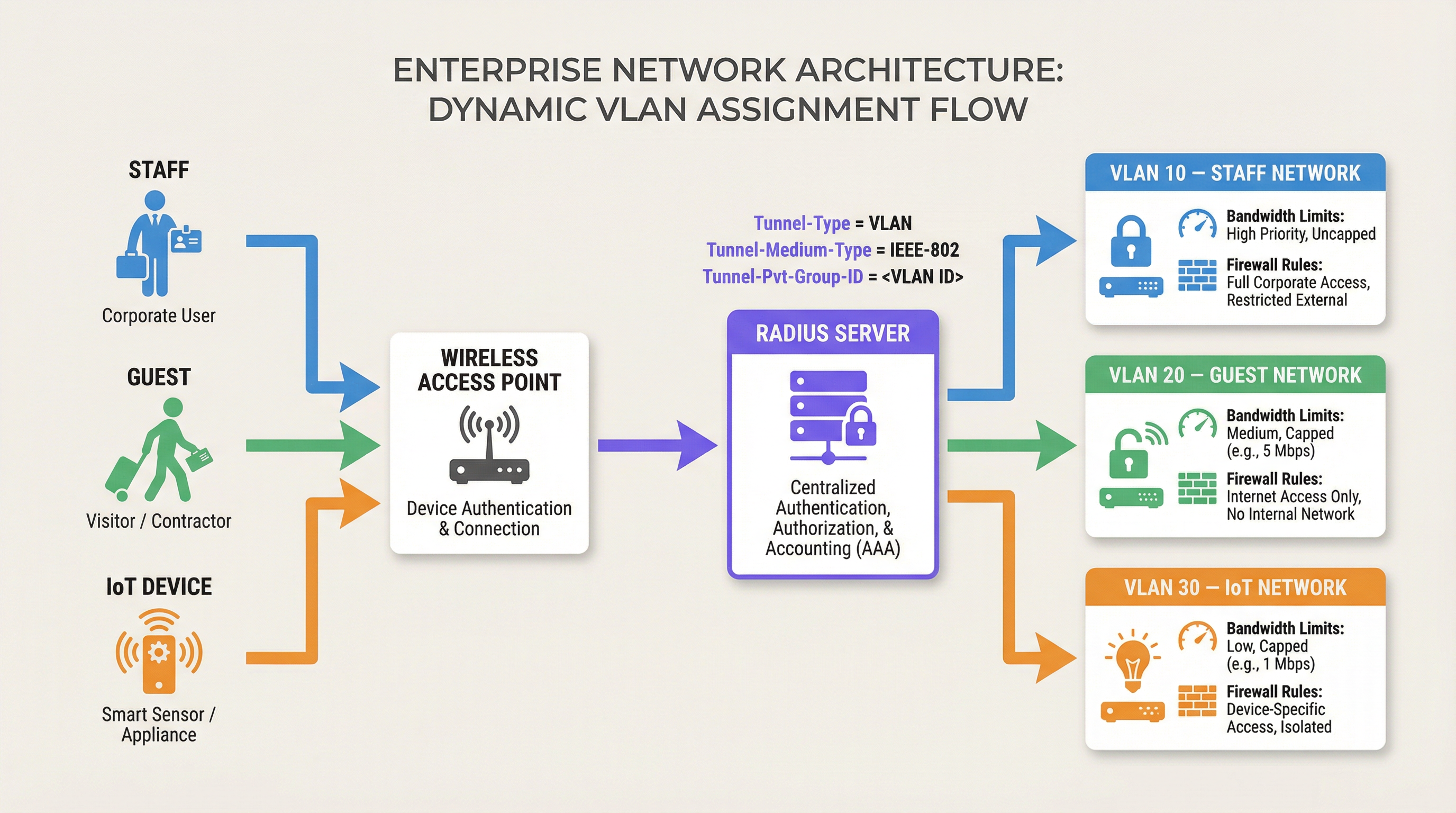
Diese Architektur ermöglicht eine rollenbasierte Netzwerkzugriffskontrolle. Eine einzige SSID kann sicher mehrere verschiedene Benutzergruppen bedienen und sie in isolierte Netzwerksegmente mit eigenen Firewall-Regeln, Bandbreitenbeschränkungen und Routing-Richtlinien einteilen. Beispielsweise lassen sich die Guest WiFi -Lösungen von Purple häufig in RADIUS integrieren, um sicherzustellen, dass Gäste in einem isolierten VLAN platziert werden und interne Ressourcen geschützt bleiben.
Implementierungsleitfaden
Die Bereitstellung der dynamischen VLAN-Zuweisung erfordert eine Konfiguration sowohl auf dem RADIUS-Server als auch auf der Netzwerkinfrastruktur (Access Points oder Switches). Obwohl die genaue Syntax je nach Hersteller variiert (z. B. Cisco ISE, Aruba ClearPass, FreeRADIUS), bleiben die Kernprinzipien konsistent.
Schritt 1: RADIUS-Server-Konfiguration
Konfigurieren Sie Ihren RADIUS-Server so, dass er die erforderlichen Attribute basierend auf Benutzergruppen oder Geräteprofilen zurückgibt. Sie könnten beispielsweise Richtlinien erstellen, die besagen:
- Wenn Benutzergruppe = „Mitarbeiter“, gib Tunnel-Private-Group-ID = „10“ zurück.
- Wenn Benutzergruppe = „Auftragnehmer“, gib Tunnel-Private-Group-ID = „20“ zurück.
- Wenn Gerätetyp = „IoT-Sensor“ (über MAC Authentication Bypass), gib Tunnel-Private-Group-ID = „30“ zurück.
Schritt 2: Authenticator-Konfiguration (Access Points/Switches)
Konfigurieren Sie Ihre Netzwerkgeräte so, dass sie den RADIUS-Server abfragen und die zurückgegebenen Attribute verarbeiten. Dies umfasst in der Regel:
- Definition der IP-Adresse des RADIUS-Servers und des Shared Secret.
- Aktivierung der 802.1X-Authentifizierung auf den relevanten SSIDs oder Switch-Ports.
- Aktivierung der dynamischen VLAN-Zuweisung (manchmal als „AAA Override“ oder „RADIUS VLAN assignment“ bezeichnet).
Herstellerspezifische Überlegungen
- Cisco: Stellen Sie auf WLCs sicher, dass „AAA Override“ in der WLAN-Konfiguration aktiviert ist. Konfigurieren Sie für Switches
authentication port-control autounddot1x pae authenticator. - Aruba: Stellen Sie in ArubaOS sicher, dass im AAA-Profil ein „RADIUS Server“ konfiguriert ist und dass die Servergruppe so eingestellt ist, dass sie Serverregeln für die VLAN-Ableitung verarbeitet.
- Ubiquiti UniFi: Aktivieren Sie in der UniFi Network-Anwendung „RADIUS MAC Authentication“ oder „WPA2/WPA3 Enterprise“ und stellen Sie sicher, dass „Enable RADIUS assigned VLAN“ in den Netzwerkeinstellungen aktiviert ist.
Best Practices
Um eine robuste und skalierbare Bereitstellung zu gewährleisten, halten Sie sich an die folgenden branchenüblichen Empfehlungen:
- VLAN-IDs global standardisieren: Eine inkonsistente VLAN-Benennung über Standorte hinweg ist eine große Falle. Wenn VLAN 10 an Standort A „Mitarbeiter“, an Standort B jedoch „Gast“ ist, führt die dynamische Zuweisung zu Chaos. Erstellen Sie ein globales VLAN-Nummerierungsschema, bevor Sie die dynamische Zuweisung implementieren.
- Fallback-Mechanismen implementieren: Die Nichtverfügbarkeit von RADIUS ist ein kritischer Fehlermodus. Konfigurieren Sie ein „Critical VLAN“ oder „Fallback VLAN“ auf Ihren Access Points. Wenn der RADIUS-Server nicht erreichbar ist, sollte der AP das Gerät in ein eingeschränktes VLAN verschieben, das vielleicht nur Internetzugang erlaubt, um die Konnektivität aufrechtzuerhalten, ohne die interne Sicherheit zu gefährden.
- MAC Authentication Bypass (MAB) für Headless-Geräte nutzen: IoT-Geräte wie Sensoren oder intelligente Thermostate können oft keine 802.1X-Authentifizierung durchführen. Verwenden Sie MAB, um diese Geräte basierend auf ihrer MAC-Adresse zu authentifizieren und sie einem gesperrten IoT-VLAN zuzuweisen.
- Analytics nutzen: Verwenden Sie Plattformen wie WiFi Analytics von Purple, um Authentifizierungstrends zu überwachen, Anomalien zu identifizieren und die Netzwerkleistung basierend auf rollenbasierten Nutzungsmustern zu optimieren.
Fehlerbehebung & Risikominderung
Bereiten Sie sich bei der Implementierung der dynamischen VLAN-Zuweisung darauf vor, häufige Probleme zu beheben:
- Client wird im Standard-VLAN platziert: Dies tritt normalerweise auf, wenn der RADIUS-Server nicht die korrekten Attribute sendet oder wenn der Authenticator nicht für deren Verarbeitung konfiguriert ist (z. B. „AAA Override“ ist deaktiviert). Verwenden Sie Packet Captures, um den Inhalt der
Access-Accept-Nachricht zu überprüfen. - Authentifizierungs-Timeouts: Wenn die Authentifizierung von Geräten fehlschlägt, überprüfen Sie die Netzwerkkonnektivität zwischen dem Authenticator und dem RADIUS-Server. Überprüfen Sie das Shared Secret und stellen Sie sicher, dass der RADIUS-Server den Authenticator als gültigen Client konfiguriert hat.
- DHCP-Probleme: Nachdem ein Gerät dynamisch einem VLAN zugewiesen wurde, muss es eine IP-Adresse für dieses Subnetz erhalten. Stellen Sie sicher, dass der DHCP-Server für alle dynamischen VLANs korrekt konfiguriert ist und dass bei Bedarf IP-Helper-Adressen eingerichtet sind.
ROI & geschäftliche Auswirkungen
Die Implementierung der dynamischen VLAN-Zuweisung bietet einen erheblichen Return on Investment, indem sie den manuellen Konfigurationsaufwand reduziert und Sicherheitsrisiken mindert.
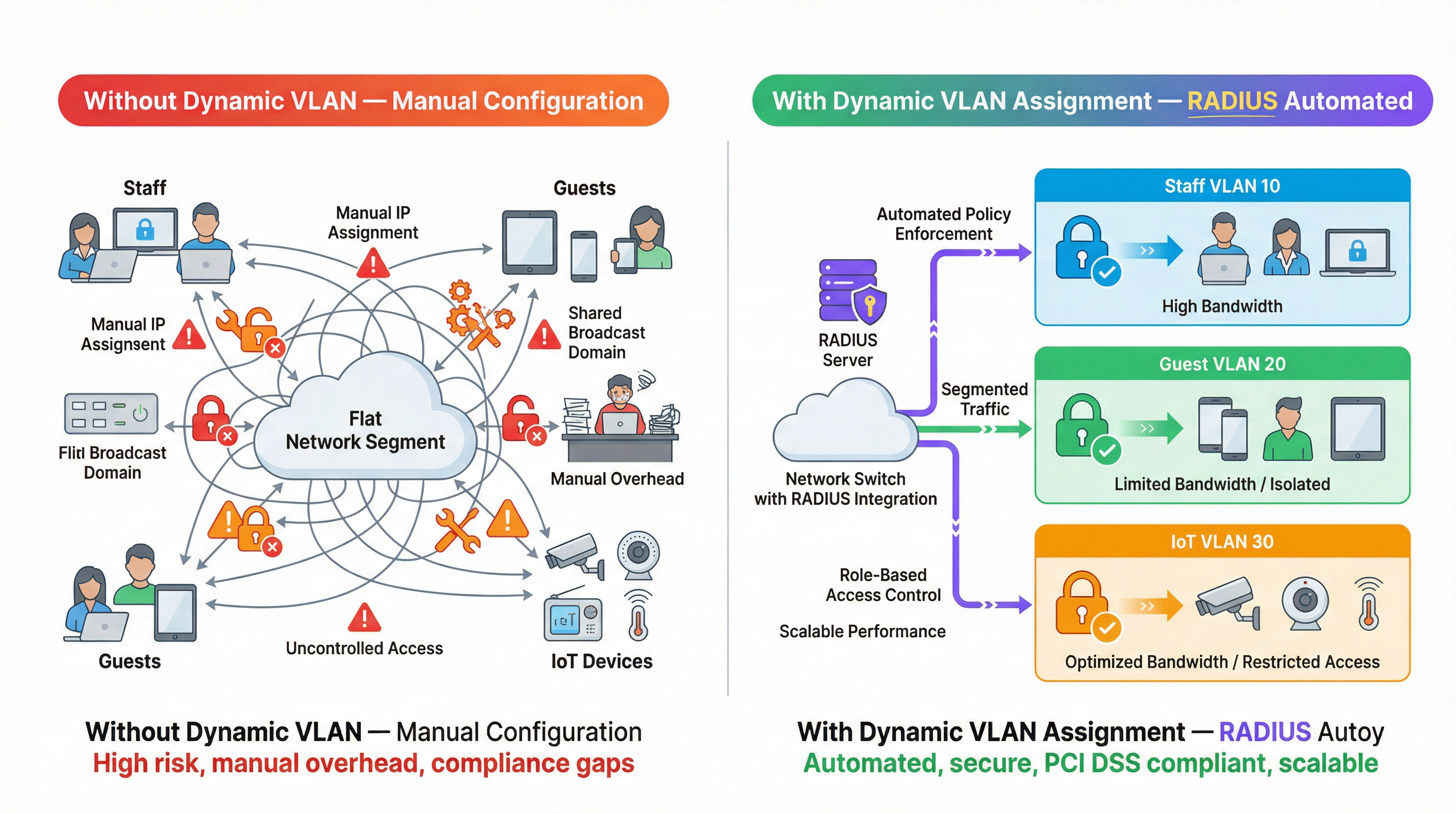
- Betriebliche Effizienz: Eliminiert die Notwendigkeit, statische VLANs pro Port manuell zu konfigurieren oder mehrere SSIDs für verschiedene Benutzergruppen auszustrahlen, was IT-Teams Stunden an administrativer Arbeit erspart.
- Erhöhte Sicherheit: Erzwingt eine strikte rollenbasierte Zugriffskontrolle und stellt sicher, dass kompromittierte Geräte oder unbefugte Benutzer von kritischen Geschäftssystemen isoliert sind. Dies ist für die Einhaltung von Standards wie PCI DSS in Einzelhandelsumgebungen unerlässlich.
- Verbesserte Benutzererfahrung: Bietet ein nahtloses Authentifizierungserlebnis für Mitarbeiter und Gäste, da sie sich mit einer einzigen SSID verbinden können und automatisch die entsprechenden Netzwerkzugriffsberechtigungen erhalten.
Hören Sie sich unseren technischen Briefing-Podcast für weitere Einblicke an:
Weitere Informationen zur Sicherung Ihres Netzwerks finden Sie in unserem Leitfaden zu 802.1X-Authentifizierung: Sicherung des Netzwerkzugriffs auf modernen Geräten .
Schlüsselbegriffe & Definitionen
Dynamic VLAN Assignment
The process of automatically assigning a device to a specific Virtual Local Area Network (VLAN) based on its identity or role during authentication, rather than its physical connection point.
Essential for scalable network segmentation in enterprise environments, eliminating the need for manual port configuration.
RADIUS (Remote Authentication Dial-In User Service)
A networking protocol that provides centralized Authentication, Authorization, and Accounting (AAA) management for users who connect and use a network service.
The core engine that evaluates credentials and dictates network policy, including VLAN assignment.
802.1X
An IEEE Standard for port-based Network Access Control (PNAC), providing an authentication mechanism to devices wishing to attach to a LAN or WLAN.
The framework that allows devices to securely transmit credentials to the network infrastructure before gaining access.
Tunnel-Private-Group-ID
RADIUS Attribute 81, used to specify the VLAN ID or VLAN name that the authenticator should assign to the user's session.
The specific data field in the RADIUS response that dictates the network segment.
MAC Authentication Bypass (MAB)
A technique used to authenticate devices that do not support 802.1X (like printers or IoT sensors) by using their MAC address as their identity.
Crucial for integrating headless devices into a dynamically segmented network architecture.
Authenticator
The network device (such as a wireless access point or switch) that facilitates the authentication process between the client and the RADIUS server.
The device responsible for enforcing the VLAN assignment policy returned by the RADIUS server.
Access-Accept
The RADIUS message sent to the authenticator indicating that the user's credentials are valid and access should be granted.
This packet carries the crucial VLAN assignment attributes.
AAA Override
A configuration setting on many authenticators (like Cisco WLCs) that allows the RADIUS server to override the default VLAN or policy configured on the device.
Must be enabled for dynamic VLAN assignment to function correctly.
Fallstudien
A 500-room luxury hotel needs to segment its network for guests, staff, and IoT devices (smart thermostats and door locks). They currently broadcast 5 different SSIDs, causing significant co-channel interference and confusing guests. How can dynamic VLAN assignment solve this?
The hotel should consolidate to two SSIDs: 'Hotel_Guest' (Open/Captive Portal) and 'Hotel_Secure' (802.1X). For 'Hotel_Secure', staff authenticate using their corporate credentials. The RADIUS server verifies the credentials against Active Directory and returns Tunnel-Private-Group-ID = '10' (Staff VLAN). For IoT devices, which cannot use 802.1X, the network uses MAC Authentication Bypass (MAB). The RADIUS server recognizes the MAC addresses of the thermostats and locks, returning Tunnel-Private-Group-ID = '30' (IoT VLAN). Guests connect to 'Hotel_Guest' and are placed in VLAN 20 via standard captive portal workflows, potentially integrated with Purple's Hospitality solutions.
A large retail chain is deploying point-of-sale (POS) terminals across 50 locations. To comply with PCI DSS, these terminals must be strictly isolated from the corporate and guest networks. How can dynamic VLAN assignment ensure compliance even if a terminal is moved to a different port?
The IT team configures the network switches to require 802.1X authentication on all edge ports. The POS terminals are configured with certificates for EAP-TLS authentication. When a terminal connects to any port, it authenticates with the RADIUS server. The RADIUS server verifies the certificate and returns Tunnel-Private-Group-ID = '40' (PCI VLAN). The switch dynamically assigns the port to VLAN 40, applying strict ACLs that only allow communication with the payment processing gateways.
Szenarioanalyse
Q1. You are deploying dynamic VLAN assignment across a university campus. The RADIUS server is successfully sending the Access-Accept message with Tunnel-Private-Group-ID set to '50' for faculty members. However, faculty devices are still being placed in the default VLAN (VLAN 1) configured on the SSID. What is the most likely cause?
💡 Hinweis:Check the configuration on the wireless access point or controller.
Empfohlenen Ansatz anzeigen
The most likely cause is that the authenticator (the Wireless LAN Controller or Access Point) does not have 'AAA Override' (or the equivalent setting, such as 'Enable RADIUS assigned VLAN') enabled for that specific SSID. Even if the RADIUS server sends the correct attributes, the authenticator will ignore them and use the default configuration unless explicitly instructed to process dynamic assignments.
Q2. A hospital needs to connect hundreds of new smart infusion pumps to the network. These devices do not support 802.1X supplicants. How can the IT team ensure these devices are automatically placed into a secure, isolated clinical IoT VLAN?
💡 Hinweis:Consider how devices without 802.1X capabilities can be identified by the network.
Empfohlenen Ansatz anzeigen
The IT team should implement MAC Authentication Bypass (MAB). The MAC addresses of all infusion pumps must be added to the RADIUS server's database. When a pump connects to the network, the switch or AP will use its MAC address as the identity for authentication. The RADIUS server will recognize the MAC address and return an Access-Accept message containing the Tunnel-Private-Group-ID for the clinical IoT VLAN.
Q3. Your enterprise network relies heavily on dynamic VLAN assignment. During a scheduled maintenance window, the primary and secondary RADIUS servers become temporarily unreachable. What configuration must be in place to ensure business-critical devices maintain some level of connectivity?
💡 Hinweis:Look for features related to authentication failure or fallback scenarios on the switch or AP.
Empfohlenen Ansatz anzeigen
The network infrastructure must be configured with a 'Critical VLAN' or 'Fallback VLAN'. When the authenticator detects that the RADIUS servers are dead (unreachable), it automatically places connecting devices into this pre-defined Critical VLAN. This VLAN should have strict ACLs applied, perhaps only allowing internet access or access to essential remediation services, ensuring basic connectivity without exposing the internal network.
Wichtigste Erkenntnisse
- ✓Dynamic VLAN assignment automates network segmentation based on user role or device identity.
- ✓It relies on 802.1X authentication and specific RADIUS attributes (Tunnel-Type, Tunnel-Medium-Type, Tunnel-Pvt-Group-ID).
- ✓This approach eliminates the need for manual port configuration and reduces SSID bloat.
- ✓MAC Authentication Bypass (MAB) is essential for segmenting headless IoT devices.
- ✓Global standardisation of VLAN IDs is critical for successful multi-site deployments.
- ✓Always configure fallback mechanisms (Critical VLAN) to handle RADIUS server outages.




