

IPSK erklärt: Identity Pre-Shared Keys für den WiFi-Zugang
This guide provides IT managers, network architects, and venue operations directors with a definitive technical reference on Identity Pre-Shared Keys (IPSK) for WiFi access — explaining the architecture, comparing it against standard PSK and 802.1X Enterprise, and delivering actionable deployment guidance for hospitality, retail, events, and public-sector environments. It addresses the critical operational challenge of providing secure, individually-managed WiFi access across mixed-device fleets — including IoT and headless devices — without the infrastructure overhead of a full 802.1X deployment. Purple's platform is positioned as the orchestration layer that automates IPSK key lifecycle management at scale.
🎧 Diesen Leitfaden anhören
Transkript anzeigen

Executive Summary
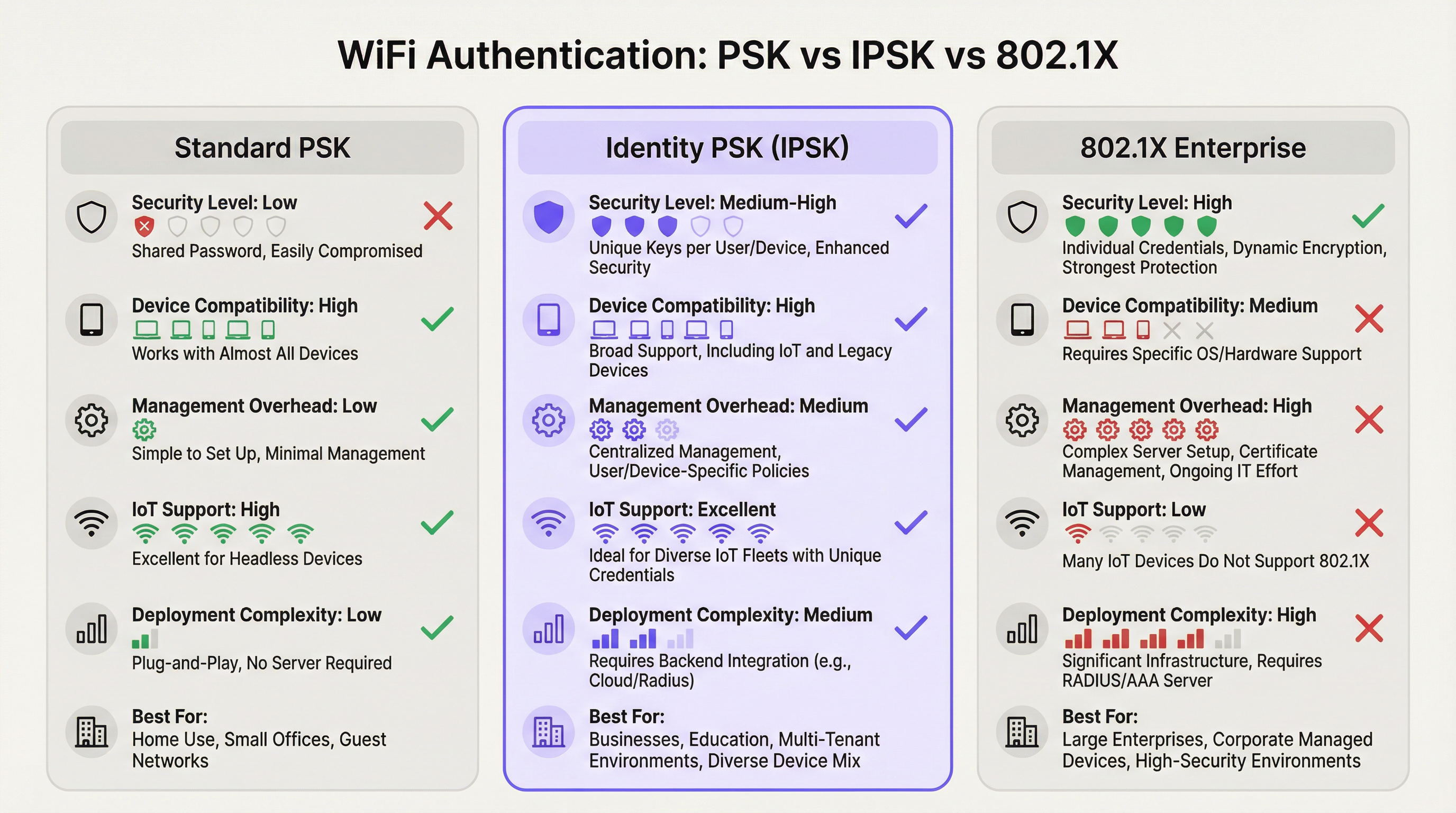
Die WiFi-Authentifizierung über Identity Pre-Shared Keys (IPSK) löst das langjährige Spannungsfeld zwischen Netzwerksicherheit und operativer Einfachheit in Multi-User- und Mixed-Device-Umgebungen. Während das standardmäßige WPA2-Personal (Shared PSK) zwar benutzerfreundlich ist, aber keinerlei individuelle Nachvollziehbarkeit bietet, und WPA2/WPA3-Enterprise (802.1X) granulare Kontrolle liefert, jedoch einen erheblichen Teil moderner Geräte ausschließt, bildet IPSK den pragmatischen Mittelweg: Jeder Benutzer oder jedes Gerät erhält einen eindeutigen kryptografischen Schlüssel, alle verbinden sich mit derselben SSID, und die Durchsetzung von Richtlinien pro Verbindung erfolgt über RADIUS.
Für Betreiber von Veranstaltungsorten – Hotels, Einzelhandelsketten, Konferenzzentren und öffentliche Gebäude – wird IPSK zunehmend zur Standardarchitektur für das Gäste- und Mitarbeiter-WiFi. Es beseitigt den operativen Aufwand der Verwaltung gemeinsamer Passwörter, unterstützt das gesamte Spektrum an Consumer- und IoT-Geräten und bietet die für PCI DSS- und GDPR-Compliance-Frameworks erforderliche Auditierbarkeit. In Kombination mit einer automatisierten Lifecycle-Management-Plattform wie Purple skaliert IPSK von einem Boutique-Hotel mit 50 Zimmern bis hin zu einem Stadion mit 10.000 Sitzplätzen, ohne dass der IT-Aufwand proportional steigt.
Die Entscheidung für den Einsatz von IPSK sollte von drei Kriterien geleitet werden: einer gemischten Geräteflotte, die Headless- oder IoT-Endpunkte umfasst; der Anforderung an einen individuellen Zugriffs-Widerruf ohne netzwerkweite Unterbrechungen; und einer Nutzerbasis, die ein reibungsloses Verbindungserlebnis wie zu Hause erwartet. Treffen alle drei Punkte zu, ist IPSK die richtige Architektur.
Technischer Deep-Dive
Die Authentifizierungsarchitektur
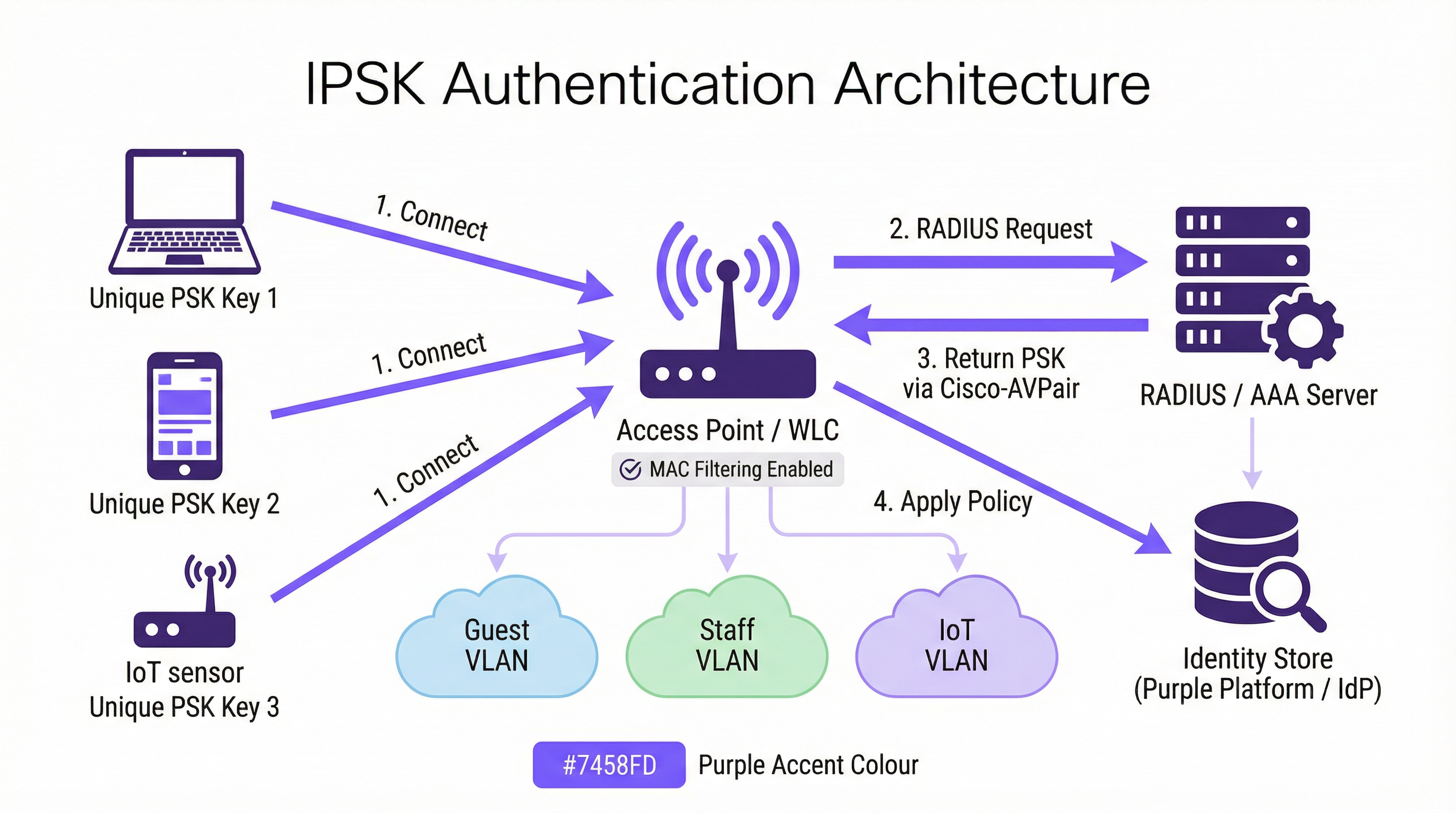
IPSK arbeitet innerhalb des WPA2-Personal-Sicherheitsframeworks, erweitert dieses jedoch um eine RADIUS-gestützte Identitätsschicht. Der Authentifizierungsablauf gestaltet sich wie folgt: Wenn ein Client-Gerät eine Verbindung mit einer IPSK-fähigen SSID initiiert, erfasst der Wireless LAN Controller (WLC) – oder der Access Point in controllerlosen Bereitstellungen – die MAC-Adresse des Geräts und leitet sie als Teil eines MAC Authentication Bypass (MAB) oder einer standardmäßigen 802.1X-Anfrage an einen konfigurierten RADIUS-Server weiter. Der RADIUS-Server fragt seinen Identitätsspeicher ab, lokalisiert den mit dieser MAC-Adresse verknüpften Datensatz und gibt eine Access-Accept-Antwort zurück, die ein Cisco Attribute-Value Pair (AVP) enthält – spezifisch cisco-av-pair = psk-mode=ascii und cisco-av-pair = psk=<unique_passphrase>. Der WLC extrahiert diese gerätespezifische Passphrase und verwendet sie, um den vom Client präsentierten WPA2-Four-Way-Handshake zu validieren. Stimmt die Passphrase überein, wird die Verbindung abgeschlossen und das Gerät seinem zugewiesenen VLAN mit den entsprechenden Bandbreiten- und Zugriffsrichtlinien zugeordnet.
Diese Architektur bedeutet, dass das Client-Gerät nie wissen muss, dass es IPSK anstelle von Standard-PSK verwendet. Das Nutzererlebnis ist identisch: Passphrase eingeben, verbinden. Die Intelligenz liegt vollständig auf der Serverseite.
Hersteller-Implementierungen
Die drei dominierenden Anbieter von Enterprise-Wireless-Lösungen implementieren identitätsbasiertes PSK jeweils unter unterschiedlichen Produktnamen, obwohl die funktionale Architektur konsistent ist:
| Anbieter | Produktname | RADIUS-Attributformat |
|---|---|---|
| Cisco | iPSK (Identity PSK) | cisco-av-pair = psk=<passphrase> |
| Aruba / HPE | MPSK (Multi-PSK) | Aruba-MPSK-Passphrase |
| Ruckus / CommScope | DPSK (Dynamic PSK) | Proprietäre DPSK-Engine oder RADIUS |
| Meraki | IPSK mit RADIUS | Standard-Cisco-AVP-Format |
Alle vier Implementierungen unterstützen die VLAN-Zuweisung und die Bereitstellung von QoS-Richtlinien über RADIUS-Attribute, was eine gerätespezifische Netzwerksegmentierung über eine einzige SSID ermöglicht.
Private Area Networks und Layer-2-Isolation
Eine entscheidende Fähigkeit von IPSK in mandantenfähigen Bereitstellungen ist das Private Area Network (PAN). Da der Datenverkehr jedes Geräts mit einem eindeutigen Schlüssel verschlüsselt wird, ist die Layer-2-Isolation zwischen den Benutzern in der Architektur inhärent. Ein Gast in Zimmer 412 kann die Geräte eines Gastes in Zimmer 413 weder sehen noch mit ihnen interagieren, obwohl beide mit derselben Hotel-Guest SSID verbunden sind. Dies ist eine grundlegende Sicherheitsverbesserung gegenüber Shared-PSK-Netzwerken, bei denen sich alle Geräte dieselbe Broadcast-Domäne teilen und ein entschlossener Angreifer unverschlüsselten Datenverkehr abfangen kann.
In Kombination mit mDNS-Reflection – einer Funktion, die auf den meisten Enterprise-Grade-Controllern verfügbar ist – ermöglicht IPSK die Geräteerkennung innerhalb des eigenen privaten Segments eines Benutzers. Ein Gast kann Medien auf seinen eigenen Chromecast streamen oder auf seinem tragbaren Drucker drucken, ohne diese Geräte dem restlichen Netzwerk auszusetzen. Dies ist das „Home-away-from-home“-Konnektivitätsmodell, das Betreiber im Gastgewerbe zunehmend als Differenzierungsmerkmal nutzen.
WPA3-Kompatibilität
WPA3-SAE (Simultaneous Authentication of Equals) ersetzt den WPA2-Four-Way-Handshake durch einen Dragonfly-Schlüsselaustausch, was die Art und Weise ändert, wie gerätespezifische Schlüssel validiert werden. Die meisten modernen Controller unterstützen IPSK im WPA2/WPA3-Übergangsmodus (Transition Mode), was Abwärtskompatibilität für ältere Geräte bietet, während WPA3-fähige Clients vom stärkeren Handshake profitieren. Eine reine WPA3-only SSID mit IPSK erfordert Controller-Firmware-Unterstützung, die ab 2025 auf den Plattformen Cisco Catalyst 9800, Aruba CX und Ruckus One verfügbar ist.
IEEE-Standards-Kontext
IPSK arbeitet innerhalb des IEEE 802.11 Wireless-LAN-Standards und nutzt das IEEE 802.1X-Authentifizierungsframework für seine RADIUS-Kommunikation, auch wenn der clientseitige Authentifizierungsmechanismus PSK und nicht EAP ist. Das RADIUS-Protokoll selbst ist in RFC 2865 und RFC 2868 definiert. Das Cisco-AVP-Format, das zur Bereitstellung gerätespezifischer Passphrasen verwendet wird, ist eine Herstellererweiterung des Standard-RADIUS-Attributsatzes. Aus diesem Grund ist IPSK keine formal standardisierte IEEE-Spezifikation – es handelt sich um eine herstellerimplementierte Funktion, die auf standardisierten Protokollen aufbaut.
Implementierungsleitfaden
Phase 1: Infrastruktur-Assessment
Bevor Sie einen einzigen Access Point konfigurieren, sollten Sie ein gründliches Infrastruktur-Assessment in vier Bereichen durchführen. Erstens: Bestätigen Sie, dass Ihr Wireless-Controller IPSK unterstützt – prüfen Sie die Firmware-Versionsanforderungen für Ihre spezifische Plattform. Zweitens: Evaluieren Sie Ihre RADIUS-Infrastruktur. Verfügen Sie über einen bestehenden RADIUS-Server (Cisco ISE, Microsoft NPS, FreeRADIUS) oder werden Sie einen cloudbasierten RADIUS-Dienst nutzen? Drittens: Identifizieren Sie Ihren Identity Provider (IdP) – Microsoft Entra ID, Okta, Google Workspace – und bestätigen Sie die API-Konnektivität für die automatisierte Schlüsselbereitstellung. Viertens: Auditieren Sie Ihre Geräteflotte, um ältere Geräte zu identifizieren, die möglicherweise Probleme mit MAC-Randomisierung oder ein nicht standardmäßiges WPA2-Handshake-Verhalten aufweisen.
Phase 2: RADIUS-Konfiguration
Konfigurieren Sie Ihren RADIUS-Server mit den folgenden Elementen. Erstellen Sie einen Identitätsspeicher – eine Datenbank mit MAC-Adressen, die eindeutigen Passphrasen und VLAN-Zuweisungen zugeordnet sind. Bei einer Hotelbereitstellung wird dieser Speicher dynamisch über eine PMS-Integration gefüllt; bei einer Einzelhandelsbereitstellung über ein HR-System oder eine MDM-Integration. Erstellen Sie Autorisierungsprofile, die die entsprechenden Cisco-AVP-Attribute (psk-mode und psk-password) zusammen mit VLAN-Zuweisungsattributen (Tunnel-Type = VLAN, Tunnel-Medium-Type = 802, Tunnel-Private-Group-ID = <VLAN_ID>) zurückgeben. Konfigurieren Sie Richtlinienregeln, die eingehende MAC-Adressanfragen dem richtigen Autorisierungsprofil zuordnen.
Phase 3: WLC-/Controller-Konfiguration
Erstellen Sie auf dem Wireless-Controller die IPSK SSID mit WPA2-PSK-Sicherheit und aktiviertem MAC-Filtering. Konfigurieren Sie den RADIUS-Server als Authentifizierungsserver für diese SSID und aktivieren Sie AAA Override, damit die von RADIUS zurückgegebenen VLAN-Zuweisungen das Standard-VLAN der SSID überschreiben können. Legen Sie einen Standard-PSK für die SSID fest – dieser dient als Fallback für Geräte, die nicht im RADIUS-Identitätsspeicher gefunden werden, und sollte eine starke, zufällig generierte Passphrase sein, die nicht an Benutzer verteilt wird. Aktivieren Sie Protected Management Frames (PMF) für eine verbesserte Sicherheitslage.
Phase 4: Automatisierung des Key-Lifecycles
Manuelles Schlüsselmanagement skaliert nicht. Für jede Bereitstellung, die über eine Handvoll Geräte hinausgeht, sollten Sie den gesamten Key-Lifecycle mithilfe einer Orchestrierungsplattform automatisieren. Die Plattform von Purple integriert sich in Ihren IdP und Ihr PMS, um Schlüssel beim Onboarding bereitzustellen und beim Offboarding zu widerrufen, ohne dass ein manueller IT-Eingriff erforderlich ist. Der Bereitstellungs-Workflow sollte Folgendes umfassen: Schlüsselgenerierung (kryptografisch zufällig, mindestens 12 Zeichen), Schlüsselverteilung (per E-Mail, SMS oder gedrucktem Material) und Schlüsselregistrierung im RADIUS-Identitätsspeicher. Der Offboarding-Workflow sollte beinhalten: sofortiger Schlüsselwiderruf im RADIUS-Speicher, Bestätigung, dass die Verbindung des Geräts getrennt wurde, und einen Audit-Log-Eintrag für Compliance-Zwecke.
Phase 5: Mitigation von MAC-Randomisierung
Konfigurieren Sie Ihre SSID so, dass sie eine Netzwerkrichtlinie enthält, die Clients auffordert, ihre permanente MAC-Adresse zu verwenden. Unter iOS wird dies erreicht, indem die „Private WLAN-Adresse“ für das spezifische Netzwerk in den WiFi-Einstellungen des Geräts deaktiviert wird – ein Schritt, der den Benutzern während des Onboardings kommuniziert werden kann. Für verwaltete Geräte, die in einem MDM registriert sind, pushen Sie ein WiFi-Konfigurationsprofil, das DisableAssociationMACRandomization = true setzt. Für nicht verwaltete Geräte sollten Sie Hinweise zur MAC-Randomisierung in Ihre Onboarding-Kommunikation für Benutzer aufnehmen.
Best Practices
Erzwingen Sie die Eindeutigkeit von Schlüsseln und eine Mindestentropie. Jede IPSK-Passphrase sollte kryptografisch zufällig sein und aus mindestens 12 Zeichen bestehen, die Groß- und Kleinbuchstaben, Ziffern und Symbole kombinieren. Vermeiden Sie Wörter aus dem Wörterbuch, fortlaufende Muster oder jegliche Ableitung von benutzeridentifizierbaren Informationen. Die Schlüsselgenerierungs-Engine von Purple erzeugt standardmäßig Passphrasen, die den Entropieanforderungen der NIST SP 800-63B entsprechen.
Segmentieren Sie nach Funktion, nicht nur nach Benutzer. Nutzen Sie die VLAN-Zuweisungsfunktion von IPSK, um die Netzwerksegmentierung nach Gerätefunktion durchzusetzen. IoT-Geräte – Thermostate, Sensoren, Smart Locks – sollten sich in einem dedizierten IoT-VLAN mit eingeschränktem Internetzugang und ohne laterale Bewegungsmöglichkeit in andere VLANs befinden. Gästegeräte sollten sich in einem Gäste-VLAN befinden, das nur über Internetzugang verfügt. Mitarbeitergeräte sollten sich in einem Mitarbeiter-VLAN mit Zugriff auf interne Ressourcen entsprechend ihrer Rolle befinden. Diese Segmentierung ist eine PCI DSS-Anforderung für jedes Netzwerk, das Zahlungskartendaten überträgt.
Implementieren Sie RADIUS-Server-Redundanz. Konfigurieren Sie mindestens zwei RADIUS-Server – primär und sekundär – mit automatischem Failover auf dem WLC. Testen Sie das Failover-Verhalten vierteljährlich. Ziehen Sie einen in der Cloud gehosteten RADIUS-Dienst für Bereitstellungen in Betracht, bei denen eine On-Premises-Serverredundanz operativ nicht praktikabel ist.
Überprüfen Sie die Schlüsselnutzung regelmäßig. RADIUS-Accounting-Logs bieten eine vollständige Aufzeichnung darüber, welche MAC-Adressen sich wann und von welchem Access Point aus authentifiziert haben. Überprüfen Sie diese Logs monatlich auf Anomalien – Geräte, die sich zu ungewöhnlichen Zeiten authentifizieren, Geräte, die in mehreren VLANs auftauchen, oder Authentifizierungsfehler, die auf einen Brute-Force-Versuch hindeuten könnten. Das Analytics-Dashboard von Purple macht diese Muster automatisch sichtbar.
Stimmen Sie die Schlüsselrotation auf User-Lifecycle-Ereignisse ab. Schlüssel sollten an natürlichen Lifecycle-Grenzen rotiert werden: am Ende eines Gastaufenthalts, bei Beendigung eines Arbeitsvertrags, am Ende einer Veranstaltung. Implementieren Sie keine zeitbasierte Schlüsselrotation nach einem festen Zeitplan (z. B. alle 90 Tage) ohne einen automatisierten Rotationsmechanismus – manuelle Rotation in großem Maßstab ist fehleranfällig und schafft Sicherheitslücken.
Dokumentieren Sie Ihre IPSK-Architektur für Compliance-Zwecke. Die PCI DSS-Anforderung 1.3 verlangt die Dokumentation aller Netzwerkverbindungen und Segmentierungskontrollen. Pflegen Sie ein aktuelles Netzwerkdiagramm, das die IPSK SSID-Konfiguration, VLAN-Zuweisungen, die RADIUS-Server-Topologie und die Integrationspunkte des Identitätsspeichers zeigt. Diese Dokumentation ist für PCI DSS-Assessments erforderlich und eine bewährte Methode für das Verzeichnis von Verarbeitungstätigkeiten gemäß Artikel 30 GDPR.
Fehlerbehebung & Risikominderung
Authentifizierungsfehler
Die häufigste Ursache für IPSK-Authentifizierungsfehler ist eine Nichtübereinstimmung der MAC-Adresse zwischen dem Gerät, das sich beim WLC meldet, und der im RADIUS-Identitätsspeicher registrierten MAC-Adresse. Dies wird fast immer durch MAC-Adressen-Randomisierung verursacht. Überprüfen Sie die MAC-Adresse des Geräts anhand der Client-Association-Logs des WLC und vergleichen Sie sie mit dem RADIUS-Identitätsspeicher. Wenn das Gerät eine randomisierte MAC präsentiert, leiten Sie den Benutzer an, die private Adresse für das Netzwerk zu deaktivieren, oder implementieren Sie ein Vorregistrierungsportal, das die permanente MAC-Adresse des Geräts vor dem ersten Verbindungsversuch erfasst.
Der zweithäufigste Fehler ist ein falsches oder fehlendes Cisco AVP im RADIUS-Autorisierungsprofil. Stellen Sie sicher, dass das AVP-Format mit der von Ihrem Controller erwarteten Syntax übereinstimmt – cisco-av-pair = psk-mode=ascii gefolgt von cisco-av-pair = psk=<passphrase> – und dass AAA Override auf der SSID aktiviert ist.
Nichtverfügbarkeit des RADIUS-Servers
Wenn der RADIUS-Server nicht erreichbar ist, greift der WLC auf den auf der SSID konfigurierten Standard-PSK zurück. Dieser Standard-PSK sollte nur als Notfallzugriffsmechanismus behandelt und nicht an Benutzer verteilt werden. Überwachen Sie die Verfügbarkeit des RADIUS-Servers mit Ihren Standard-Tools zur Infrastrukturüberwachung und konfigurieren Sie Warnmeldungen für RADIUS-Timeout-Ereignisse auf dem WLC.
IoT-Gerätekompatibilität
Einige ältere IoT-Geräte implementieren ein nicht standardmäßiges WPA2-Handshake-Verhalten, das zu zeitweiligen Authentifizierungsfehlern bei IPSK führen kann. Wenn ein bestimmter Gerätetyp durchgehend fehlschlägt, testen Sie ihn isoliert auf einer Standard-PSK SSID, um die grundlegende WPA2-Fähigkeit des Geräts zu bestätigen. Wenn das Gerät WPA2-PSK überhaupt nicht unterstützt, sollte es über einen kabelgebundenen Port oder eine dedizierte Legacy-SSID mit entsprechender Netzwerkisolation verbunden werden.
Kompromittierung von Schlüsseln
Wenn ein Gerät verloren geht, gestohlen wird oder der Verdacht auf eine Kompromittierung besteht, widerrufen Sie dessen IPSK-Schlüssel sofort im RADIUS-Identitätsspeicher. Der WLC wird die Verbindung des Geräts beim nächsten Re-Authentifizierungsversuch (typischerweise innerhalb von Minuten) trennen. Generieren Sie einen neuen Schlüssel für das Ersatzgerät des Benutzers und stellen Sie ihn über den Standard-Onboarding-Workflow bereit. Dokumentieren Sie den Vorfall in Ihrem Security-Incident-Log für Compliance-Zwecke.
ROI & Business Impact
Quantifizierbare Ergebnisse
Der Business Case für IPSK gegenüber Shared PSK ist in drei Dimensionen überzeugend. Die erste ist die Senkung der Betriebskosten. In einem Hotel mit 200 Zimmern, das mit einem Shared-PSK-Modell arbeitet, bearbeitet das Rezeptionsteam durchschnittlich 15-20 WiFi-bezogene Supportanfragen pro Tag – Passwort-Resets, Probleme bei der Geräteverbindung, Captive Portal-Timeouts. IPSK mit automatisiertem Onboarding reduziert dies auf nahezu null und entlastet die Rezeptionsmitarbeiter für umsatzgenerierende Aktivitäten. Bei einer konservativen Schätzung von 10 Minuten pro Support-Interaktion und Personalkosten von 15 £ pro Stunde spart ein Hotel mit 200 Zimmern etwa 750 bis 1.000 £ pro Monat an direkten Arbeitskosten.
Die zweite Dimension ist die Vermeidung von Kosten durch Sicherheitsvorfälle. Eine Verletzung eines Shared-PSK-Netzwerks – bei der sich ein böswilliger Akteur Zugang zum gemeinsamen Passwort verschafft – kann alle Geräte im Netzwerk dem Abfangen von Datenverkehr und Lateral-Movement-Angriffen aussetzen. Die durchschnittlichen Kosten einer Datenschutzverletzung im Gastgewerbe übersteigen laut dem „Cost of a Data Breach Report“ von IBM 3,5 Millionen £, wenn behördliche Geldstrafen, Behebungskosten und Reputationsschäden einbezogen werden. Die gerätespezifische Isolation von IPSK bedeutet, dass ein kompromittierter Schlüssel nur ein einziges Gerät gefährdet, nicht das gesamte Netzwerk.
Die dritte Dimension betrifft die Gästezufriedenheit und die Auswirkungen auf den Umsatz. Im Gastgewerbe wird die WiFi-Qualität in Online-Bewertungen durchweg als einer der drei wichtigsten Faktoren genannt. Unterkünfte, die von Captive Portal-basiertem WiFi zu IPSK wechseln, verzeichnen messbare Verbesserungen bei den WiFi-bezogenen Bewertungsergebnissen, mit entsprechenden Verbesserungen bei den Gesamtbewertungen der Unterkunft. Eine Verbesserung des TripAdvisor-Scores eines Hotels um einen Punkt korreliert laut der Hospitality-Forschung der Cornell University mit einer durchschnittlichen Steigerung des Umsatzes pro verfügbarem Zimmer (RevPAR) um 11 %.
Total Cost of Ownership
Der TCO-Vergleich zwischen IPSK und 802.1X Enterprise fällt für Veranstaltungsort-Umgebungen deutlich zugunsten von IPSK aus. Eine vollständige 802.1X-Bereitstellung erfordert eine PKI-Infrastruktur, Tools für das Zertifikatsmanagement und fortlaufende Prozesse zur Zertifikatserneuerung – was bei einem mittelgroßen Veranstaltungsort typischerweise 15.000 bis 40.000 £ an anfänglichen Bereitstellungskosten und 5.000 bis 15.000 £ an jährlicher Wartung verursacht. IPSK erfordert einen RADIUS-Server (der oft bereits in der Infrastruktur vorhanden ist) und eine Orchestrierungsplattform wie Purple. Für Unternehmen ohne bestehenden RADIUS-Server sind in der Cloud gehostete RADIUS-Dienste ab 200 bis 500 £ pro Monat verfügbar, was IPSK auch für kleinere Betreiber von Veranstaltungsorten zugänglich macht.

Dieser Leitfaden wird von Purple, der Enterprise-WiFi-Intelligence-Plattform, herausgegeben. Für ein technisches Architektur-Review und ein IPSK-Deployment-Assessment kontaktieren Sie das Solutions-Team von Purple unter purple.ai .
Schlüsselbegriffe & Definitionen
IPSK (Identity Pre-Shared Key)
A WiFi authentication mechanism that assigns a unique WPA2 passphrase to each individual user or device, while all devices connect to the same SSID. The unique key is delivered to the Wireless LAN Controller by a RADIUS server at the time of authentication, enabling per-device policy enforcement without requiring 802.1X certificate infrastructure.
IT teams encounter IPSK when evaluating authentication options for mixed-device environments — hotels, retail, events — where 802.1X is too complex and shared PSK is too insecure. It is the recommended architecture for guest and staff WiFi in multi-tenant venue environments.
RADIUS (Remote Authentication Dial-In User Service)
A networking protocol (RFC 2865) that provides centralised Authentication, Authorisation, and Accounting (AAA) management for users connecting to a network. In IPSK deployments, the RADIUS server is the intelligence layer that maps device MAC addresses to unique passphrases and network policies.
IT teams interact with RADIUS when configuring the authentication backend for IPSK. Common RADIUS server implementations include Cisco ISE, Microsoft NPS, FreeRADIUS, and cloud-hosted services. RADIUS availability is critical to IPSK operation — if the RADIUS server is unreachable, new device authentications will fail.
MAC Authentication Bypass (MAB)
An authentication mechanism that uses a device's MAC address as its identity credential, rather than requiring the device to present a username/password or certificate. IPSK leverages MAB to identify devices at the point of RADIUS lookup, enabling headless devices with no user interface to authenticate based solely on their hardware address.
IT teams use MAB in IPSK deployments to support IoT devices, smart TVs, gaming consoles, and other headless endpoints that cannot present user credentials. MAB is the mechanism that makes IPSK compatible with 100% of WiFi-capable devices.
Cisco Attribute-Value Pair (AVP)
A vendor-specific RADIUS attribute format used by Cisco (and compatible) wireless controllers to exchange configuration parameters between the RADIUS server and the WLC. In IPSK deployments, the AVPs `cisco-av-pair = psk-mode=ascii` and `cisco-av-pair = psk=<passphrase>` deliver the per-device unique passphrase from the RADIUS server to the WLC.
IT teams need to understand AVP syntax when configuring RADIUS authorisation profiles for IPSK. Incorrect AVP formatting is the most common cause of IPSK authentication failures during initial deployment.
Private Area Network (PAN)
A virtual network segment created around a specific user's devices within a shared WiFi infrastructure. In IPSK deployments, each user's unique key creates cryptographic isolation from other users on the same SSID, while mDNS reflection allows the user's own devices to discover each other within their private segment.
IT teams deploy PAN capability in hospitality and multi-tenant residential environments to provide guests or residents with a home-like device ecosystem — casting, printing, gaming — without exposing their devices to other users on the shared infrastructure.
WPA2-SAE / WPA3 (Simultaneous Authentication of Equals)
The authentication handshake mechanism introduced in WPA3 that replaces the WPA2 four-way handshake with a Dragonfly key exchange, providing stronger resistance to offline dictionary attacks. WPA3-SAE changes how per-device keys are validated in IPSK deployments and requires specific controller firmware support.
IT teams evaluating WPA3 migration need to confirm their controller's IPSK support in WPA3 or transition mode. As of 2025, Cisco Catalyst 9800, Aruba CX, and Ruckus One platforms support IPSK in WPA2/WPA3 transition mode, enabling gradual migration without breaking legacy device compatibility.
AAA Override
A WLC configuration setting that allows RADIUS-returned attributes — including VLAN assignment, QoS policy, and ACLs — to override the SSID's default configuration on a per-client basis. AAA Override must be enabled on the SSID for IPSK's per-device VLAN assignment to function correctly.
IT teams must enable AAA Override when configuring IPSK SSIDs. Without it, all devices connecting to the SSID will be placed on the SSID's default VLAN regardless of what the RADIUS server returns, negating the segmentation benefits of IPSK.
MAC Address Randomisation
A privacy feature in modern operating systems (iOS 14+, Android 10+, Windows 11) that causes devices to present a randomly generated MAC address when scanning for or connecting to WiFi networks, rather than their permanent hardware MAC address. This feature is designed to prevent device tracking across networks but creates a conflict with IPSK's MAC-based identity lookup.
IT teams must address MAC randomisation in every IPSK deployment plan. The mitigation strategy depends on the device management model: MDM configuration profiles for managed devices, and user-facing guidance (disable Private Wi-Fi Address for the specific network) for unmanaged personal devices.
Key Lifecycle Management
The operational process of provisioning, distributing, rotating, and revoking cryptographic keys throughout their useful life. In IPSK deployments, key lifecycle management encompasses the automated generation of unique passphrases at user onboarding, their delivery to users, their registration in the RADIUS identity store, and their immediate revocation when the user's access should be terminated.
IT teams and venue operations directors must treat key lifecycle management as a core operational process, not an afterthought. Unrevoked keys — belonging to former guests, ex-employees, or decommissioned devices — represent an ongoing security risk. Automation via a platform such as Purple is the only viable approach at scale.
Fallstudien
A 350-room full-service hotel is running a shared WPA2-PSK network across all guest floors, the lobby, restaurant, and conference facilities. The network password is printed on key card folders and changed quarterly. Guests regularly complain that their Chromecasts and smart speakers cannot connect, and the front desk fields 20+ WiFi support calls per day. The IT manager needs to modernise the WiFi architecture without replacing the existing Cisco Catalyst 9800 controller infrastructure. What is the recommended approach?
The recommended architecture is IPSK with Purple platform orchestration integrated with the hotel's Property Management System (PMS). The deployment proceeds in five stages.
Stage 1 — Infrastructure preparation: Confirm Cisco Catalyst 9800 firmware is at 17.3 or later (required for full iPSK support). Deploy or configure a RADIUS server — Cisco ISE or a cloud-hosted RADIUS service — with the hotel's PMS as the upstream identity source. Configure the RADIUS authorisation profile to return cisco-av-pair = psk-mode=ascii and cisco-av-pair = psk=<unique_key> along with VLAN assignment attributes for Guest VLAN (internet-only) and Conference VLAN (with access to AV systems).
Stage 2 — SSID configuration: Create a single Hotel-Guest SSID with WPA2-PSK security, MAC filtering enabled, and AAA Override enabled. Set a strong default PSK (not distributed to users) as the fallback. Enable mDNS reflection to support Chromecast and AirPlay within each guest's private segment.
Stage 3 — PMS integration: Configure Purple's platform to receive check-in events from the PMS via API. On check-in, Purple generates a unique 16-character alphanumeric passphrase, registers it in the RADIUS identity store against the guest's registered device MAC addresses, and triggers delivery via the hotel's chosen channel — email, SMS, or printed on the key card folder. On check-out, Purple automatically revokes the key.
Stage 4 — MAC randomisation handling: Include a one-step instruction in the guest WiFi welcome communication: 'To connect your smart TV or streaming device, please disable Private Wi-Fi Address for the Hotel-Guest network in your device settings.' For guests connecting smartphones, the randomised MAC issue is resolved by the device presenting its permanent MAC after the first manual connection.
Stage 5 — Staff WiFi: Create a separate Hotel-Staff SSID using the same IPSK architecture, with keys provisioned via integration with the hotel's HR system. Staff keys are tied to employee records and automatically revoked on termination.
Expected outcomes: WiFi support calls reduced by 85% within 30 days of deployment. Guest Chromecast and smart device connectivity issues eliminated. Network security posture improved — no shared password to leak or rotate. PCI DSS compliance for the conference centre's payment processing network maintained through VLAN segmentation.
A national retail chain with 85 stores is running a mixed network environment: each store has WPA2-PSK WiFi for staff handhelds and tablets, a separate open guest WiFi network, and wired POS terminals. The IT security team has flagged that the shared staff WiFi password is the same across all 85 stores and has not been changed in 18 months. A recent PCI DSS assessment identified the staff WiFi as a compliance risk due to lack of individual authentication. The CTO wants a solution that improves security posture, maintains PCI DSS compliance, and can be deployed across all 85 stores within a single quarter without requiring store-level IT resources.
The recommended architecture is a centralised IPSK deployment managed through Purple's platform, with keys provisioned via integration with the retailer's existing Microsoft Entra ID (Azure AD) directory.
Architecture design: Deploy a single Staff-WiFi SSID across all 85 stores using IPSK. Each store's access points connect to a centralised cloud-managed WLC (Cisco Meraki or Aruba Central) or to store-level controllers managed from a central NOC. A cloud-hosted RADIUS service — configured with Microsoft Entra ID as the identity source — handles authentication for all stores from a single management plane.
Key provisioning: Purple's platform monitors Entra ID group membership. When a staff member is added to the RetailStaff-WiFi security group, Purple automatically generates a unique IPSK passphrase, registers it in the RADIUS identity store, and delivers it to the staff member via their corporate email. When a staff member leaves or is removed from the group — triggered by the HR offboarding workflow — Purple immediately revokes the key across all stores simultaneously.
PCI DSS compliance: The IPSK architecture, combined with VLAN segmentation (staff devices on VLAN 20, POS terminals on VLAN 30 with no wireless access, guest WiFi on VLAN 40), provides the network segmentation required by PCI DSS Requirement 1.3. Each staff member's unique key provides the individual authentication audit trail required by PCI DSS Requirement 8.2. Document the architecture in the network segmentation diagram for the QSA.
Deployment at scale: The centralised management architecture means store-level deployment requires only access point firmware updates and SSID reconfiguration — tasks that can be pushed remotely via the cloud management platform. No store-level IT resources are required. Target deployment timeline: 85 stores in 8 weeks, with a phased rollout of 10-12 stores per week.
Expected outcomes: Shared password eliminated across all 85 stores. Individual staff authentication audit trail established for PCI DSS compliance. Key revocation time reduced from days (manual password change across 85 stores) to seconds (automated RADIUS revocation). Estimated reduction in IT helpdesk tickets related to WiFi access: 60%.
Szenarioanalyse
Q1. A 500-bed student accommodation provider is evaluating WiFi authentication options for their new development. The student population brings an average of 7 devices each — smartphones, laptops, gaming consoles, smart speakers, and tablets. The operator wants individual access control (so that access can be revoked if a student's tenancy ends early), seamless device connectivity (including gaming consoles and Chromecasts), and a management overhead that can be handled by a two-person IT team. Which authentication architecture should they deploy, and what are the key configuration requirements?
💡 Hinweis:Consider the device fleet composition — specifically the proportion of headless devices — and the operational capacity of the IT team when evaluating 802.1X versus IPSK.
Empfohlenen Ansatz anzeigen
IPSK is the correct architecture for this deployment. The presence of gaming consoles and smart speakers in the device fleet immediately eliminates 802.1X as a viable option — these headless devices cannot support certificate-based authentication. Standard PSK is eliminated by the individual access control requirement. IPSK satisfies all three criteria: it supports 100% of the device fleet, enables individual key revocation when a tenancy ends, and — with automated lifecycle management via Purple integrated with the accommodation's tenancy management system — can be operated by a two-person IT team. Key configuration requirements: single SSID with IPSK, RADIUS server with tenancy system integration, mDNS reflection enabled for Private Area Networks (allowing students to use their own Chromecasts and printers within their private segment), MAC randomisation guidance included in the student onboarding pack, and automated key revocation triggered by tenancy end date in the management system.
Q2. An IT security manager at a conference centre is preparing for a major three-day industry event with 2,000 registered attendees. The event requires: secure WiFi for attendees (with access revoked after the event ends), a separate secure network for exhibitors with access to the venue's AV systems, and a dedicated network for the event management team with access to internal booking systems. The venue's existing infrastructure is Aruba-based. What IPSK architecture would you recommend, and how would you handle key provisioning at scale?
💡 Hinweis:Focus on the key provisioning workflow for 2,000 attendees — how keys are generated, distributed, and revoked — and how VLAN segmentation achieves the three-network requirement from a single physical infrastructure.
Empfohlenen Ansatz anzeigen
Deploy three logical network segments from a single physical infrastructure using Aruba MPSK (Aruba's implementation of IPSK). Create one SSID — Event-WiFi — with MPSK enabled. The RADIUS authorisation profiles return different VLAN assignments based on the user's registration category: attendees on VLAN 10 (internet-only), exhibitors on VLAN 20 (internet plus AV systems), event management on VLAN 30 (internet plus internal booking systems). For key provisioning at scale: integrate Purple's platform with the event registration system. At registration, each attendee receives a unique MPSK passphrase via email confirmation, along with a QR code for easy device configuration. Exhibitors receive their keys via the exhibitor portal at least 48 hours before the event. Event management keys are provisioned via the venue's HR/staff system. At event end, Purple triggers bulk revocation of all attendee and exhibitor keys simultaneously. The event management keys remain active until manually revoked. This architecture eliminates the need for a captive portal (which would be impractical for 2,000 attendees), provides individual audit trails for all connections, and achieves the three-network segmentation requirement without creating three separate SSIDs.
Q3. A regional NHS trust is deploying WiFi across a new outpatient facility. The network must support: clinical staff with managed Windows laptops (enrolled in Intune MDM); nurses and allied health professionals with personal smartphones (BYOD); medical IoT devices including infusion pumps, patient monitors, and fall detection sensors; and a patient guest WiFi network. The trust's information governance team has flagged that all clinical data must remain on an isolated network segment, and that the IoT medical devices must be on a dedicated segment with no internet access. What authentication architecture would you recommend for each user/device category?
💡 Hinweis:This scenario requires a hybrid architecture — not all user categories are best served by the same authentication mechanism. Consider which categories warrant 802.1X and which are better served by IPSK.
Empfohlenen Ansatz anzeigen
This scenario requires a hybrid authentication architecture. Clinical staff on managed Windows laptops should use WPA3-Enterprise with 802.1X (EAP-TLS with certificates deployed via Intune MDM) — these are fully managed endpoints where the certificate infrastructure is already in place and the stronger security posture is warranted for clinical data access. BYOD smartphones for nursing and AHP staff should use IPSK — these are unmanaged personal devices where certificate deployment is not operationally viable, but individual access control and VLAN assignment (to a clinical staff VLAN with access to clinical applications but not raw clinical data) is required. Medical IoT devices should use IPSK with MAC-based authentication — these headless devices cannot support any user-interactive authentication, and IPSK places them on a dedicated IoT VLAN with no internet access and no lateral movement to other VLANs. Patient guest WiFi should use a separate SSID with a captive portal for consent capture (required for GDPR compliance) and standard PSK or IPSK depending on the trust's guest data collection requirements. The IPSK components (BYOD staff and IoT devices) should be managed through Purple's platform with integration to the trust's Active Directory for staff key lifecycle management and a dedicated IoT device registry for medical device key management.
Wichtigste Erkenntnisse
- ✓IPSK assigns a unique WPA2 passphrase to every user or device on a shared SSID, delivering per-device security and policy enforcement without the certificate infrastructure required by 802.1X Enterprise.
- ✓The authentication flow relies on RADIUS: the WLC forwards the device's MAC address to the RADIUS server, which returns the unique passphrase via Cisco Attribute-Value Pairs, enabling the WLC to validate the device's connection and assign it to the correct VLAN.
- ✓IPSK is the correct architecture when three conditions are simultaneously present: a mixed or unmanaged device fleet (including IoT/headless devices), a requirement for individual access revocation, and a user base that cannot or should not be asked to configure certificates.
- ✓Key lifecycle automation is non-negotiable at scale — integrate IPSK with your identity provider (Microsoft Entra ID, Okta) or property management system to provision and revoke keys automatically at onboarding and offboarding events.
- ✓MAC address randomisation in iOS 14+, Android 10+, and Windows 11 is the most common source of IPSK deployment failures — plan for it explicitly with MDM configuration profiles for managed devices and user-facing guidance for personal devices.
- ✓The business case for IPSK over shared PSK is compelling: reduced helpdesk overhead, improved security incident containment (compromised key affects one device, not the entire network), and measurable improvements in guest satisfaction scores in hospitality environments.
- ✓Purple's platform provides the orchestration layer that makes IPSK operationally viable at scale — automating key generation, distribution, lifecycle management, and compliance reporting across hotel, retail, events, and public-sector deployments.




