

Okta und RADIUS: Erweiterung Ihres Identity Providers auf die WiFi-Authentifizierung
Dieser Leitfaden bietet eine umfassende technische Referenz für IT-Administratoren in Okta-zentrierten Organisationen, die ihren Cloud-Identity-Provider mithilfe des Okta RADIUS-Agenten auf die WiFi-Authentifizierung ausweiten möchten. Er deckt die gesamte Authentifizierungsarchitektur, Abwägungen bei der MFA-Erzwingung, dynamische VLAN-Zuweisung über RADIUS-Attribut-Mapping und die kritische Entscheidung zwischen passwortbasiertem EAP-TTLS und zertifikatsbasiertem EAP-TLS ab. Betreiber von Veranstaltungsorten und IT-Teams in Unternehmen finden hier praxisnahe Bereitstellungsanleitungen, Fallstudien aus dem Gastgewerbe und dem Einzelhandel sowie einen klaren Rahmen für die Integration von Okta RADIUS neben dedizierten Gast-WiFi-Lösungen.
🎧 Diesen Leitfaden anhören
Transkript anzeigen

Executive Summary
Für IT-Teams in Unternehmen, die verteilte Standorte verwalten – von Hotelketten bis hin zu Stadien – ist die Vereinheitlichung der Netzwerkzugriffskontrolle mit einem Cloud-Identity-Provider ein entscheidender Schritt in Richtung Zero Trust. Der Okta RADIUS-Agent schließt die Lücke zwischen moderner Cloud-Identität und traditioneller 802.1X WiFi-Infrastruktur und ermöglicht es Unternehmen, veraltete lokale RADIUS-Server und Active Directory-Infrastrukturen für die Netzwerkauthentifizierung abzulösen.
Dieser Leitfaden beschreibt detailliert, wie der Okta RADIUS-Agent für die WiFi-Authentifizierung in Unternehmen bereitgestellt wird. Er behandelt die Proxy-Architektur, MFA-Erzwingungsmechanismen und die Abwägungen zwischen passwortbasiertem EAP-TTLS und zertifikatsbasiertem EAP-TLS. Zudem bietet er praxisorientierte Anleitungen zum Mapping von Okta-Gruppenmitgliedschaften auf RADIUS-Attribute für die dynamische VLAN-Zuweisung – eine Funktion, die PCI DSS-Netzwerksegmentierungsanforderungen direkt unterstützt. Durch die Integration von Okta für die Mitarbeiterauthentifizierung neben Guest WiFi -Lösungen können Betreiber von Standorten eine einheitliche, sichere und konforme Zugriffsebene erreichen, ohne die Identitätsinfrastruktur zu duplizieren.
Technische Vertiefung
Funktionsweise des Okta RADIUS-Agenten
Der Okta RADIUS-Agent ist ein leichtgewichtiger Systemdienst, der als Proxy zwischen Network Access Servern (NAS) – wie Wireless Access Points (WAPs) oder Wireless LAN Controllern (WLCs) – und der Okta-Cloud fungiert. Er wird in der Regel auf einem Windows- oder Linux-Server vor Ort oder in einer Cloud-VPC bereitgestellt und nach der Erstinstallation vollständig über die Okta Admin Console verwaltet.
Der Authentifizierungsfluss folgt einem standardmäßigen 802.1X-Proxy-Modell. Das Gerät eines Benutzers (der Supplicant) verbindet sich mit einer Enterprise-SSID und gibt Anmeldedaten an. Der WAP oder WLC (der Authenticator) leitet einen RADIUS Access-Request über den UDP-Port 1812 an den Okta RADIUS-Agenten weiter. Der Agent tunnelt diese Anfrage sicher über einen HTTPS-API-Aufruf an die Okta-Cloud, wo die Policy-Engine von Okta die Anmeldedaten mit dem Benutzerverzeichnis und den konfigurierten Anmelderichtlinien abgleicht. Wenn die Authentifizierung erfolgreich ist, sendet der Agent eine RADIUS Access-Accept-Nachricht an den Authenticator zurück, optional inklusive RADIUS-Attributen für die Autorisierung, wie z. B. die VLAN-Zuweisung. Wenn MFA erforderlich ist, sendet der Agent einen RADIUS Access-Challenge an den Client zurück und fordert einen zweiten Faktor an, bevor die endgültige Entscheidung übermittelt wird.
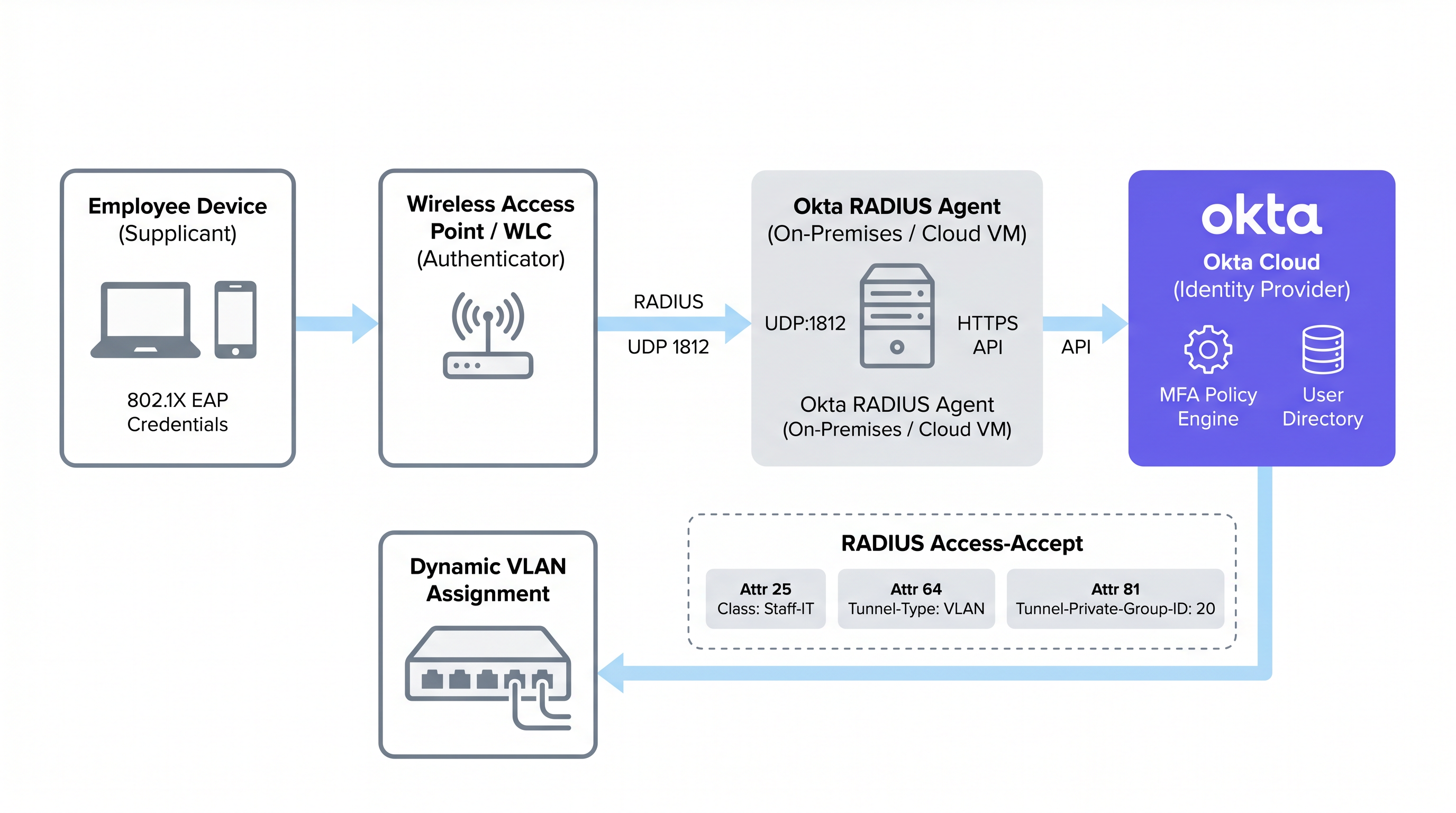
Dieses Proxy-Modell bedeutet, dass der Okta RADIUS-Agent keine Benutzeranmeldedaten lokal speichern muss. Die gesamte Authentifizierungslogik, Richtlinienbewertung und Audit-Protokollierung erfolgt in der Okta-Cloud, was Administratoren eine zentrale Oberfläche für die Identitätsverwaltung über Cloud-Anwendungen und Netzwerkzugriffe hinweg bietet.
Unterstützte EAP-Protokolle und kritische Einschränkungen
Eine grundlegende architektonische Einschränkung des Okta RADIUS-Agenten ist die Abhängigkeit vom Password Authentication Protocol (PAP) für die primäre Authentifizierung. Während PAP Passwörter auf der inneren Ebene im Klartext überträgt, wird dies durch den äußeren TLS-Tunnel des Extensible Authentication Protocol (EAP) gekapselt und geschützt. Die unterstützten äußeren Protokolle sind EAP-TTLS (mit PAP als innerer Methode) und EAP-GTC. Einen detaillierteren Vergleich der EAP-Methoden finden Sie im Referenzleitfaden Vergleich der EAP-Methoden: PEAP, EAP-TLS, EAP-TTLS und EAP-FAST .
Wichtig: PEAP-MSCHAPv2 wird nicht unterstützt. Dies ist das Standard-802.1X-Protokoll für Windows-Clients und viele ältere Unternehmensumgebungen. Organisationen, die von einem herkömmlichen NPS/Active Directory RADIUS-Setup migrieren, müssen ihre Client-Supplicants auf EAP-TTLS mit PAP umstellen – eine Änderung, die in der Regel ein über MDM oder Gruppenrichtlinien verteiltes Wireless-Profil erfordert. Die Nichtbeachtung dieses Punktes ist die häufigste Ursache für fehlgeschlagene Okta RADIUS-Bereitstellungen.
EAP-TLS, das vollständig auf gegenseitiger zertifikatsbasierter Authentifizierung basiert, wird vom Okta RADIUS-Agenten ebenfalls nicht nativ unterstützt. Organisationen, die EAP-TLS benötigen, müssen eine dedizierte PKI- oder Cloud-RADIUS-Lösung implementieren, die über SAML oder OIDC mit Okta als IdP integriert wird, anstatt den Okta RADIUS-Agenten direkt zu verwenden.
Erzwingung von MFA bei WiFi-Verbindungen
Der Okta RADIUS-Agent unterstützt MFA für den WiFi-Zugriff, bringt jedoch Herausforderungen für die Benutzererfahrung mit sich, die vor der Bereitstellung sorgfältig abgewogen werden müssen. Wenn eine MFA-Richtlinie ausgelöst wird, sendet der Agent einen RADIUS Access-Challenge an den Client. Okta unterstützt mehrere Faktoren für RADIUS-Anwendungen:
| MFA-Faktor | PAP | EAP-TTLS | Hinweise |
|---|---|---|---|
| Okta Verify Push | Unterstützt | Unterstützt | Out-of-Band gesendet; Benutzer tippt auf dem Mobilgerät auf „Genehmigen“ |
| TOTP (Okta Verify / Google Auth) | Unterstützt | Unterstützt | Benutzer hängt OTP an das Passwort an (z. B. Pass123,456789) |
| SMS / E-Mail / Sprache | Unterstützt | Unterstützt | Benutzer sendet zuerst einen Trigger-String (SMS, EMAIL, CALL) |
| Duo Push / SMS / Passcode | Unterstützt | Unterstützt | Duo-Passcode nur für EAP-TTLS |
| YubiKey / U2F / Windows Hello | Nicht unterstützt | Nicht unterstützt | Hardware-Token inkompatibel mit dem RADIUS-Protokoll |
Die praktische Einschränkung ist das Roaming. In Umgebungen des Gastgewerbes kann das Tablet einer Reinigungskraft während einer Schicht dutzende Male zwischen Access Points wechseln, was jedes Mal eine erneute Authentifizierung auslöst. Die Anforderung einer Push-Benachrichtigung bei jedem Roaming-Vorgang ist betrieblich nicht tragbar. Für das allgemeine Mitarbeiter-WiFi werden in der Regel strenge Passwortrichtlinien in Kombination mit Oktas Device Trust- und Netzwerkzonen-Richtlinien gegenüber aktiven MFA-Abfragen bevorzugt. MFA über WiFi sollte administrativen SSIDs oder Szenarien mit hochprivilegiertem Zugriff vorbehalten bleiben.
Passwortbasierte vs. zertifikatsbasierte Authentifizierung
Die Wahl zwischen passwortbasiertem RADIUS ("über den Okta RADIUS-Agenten) und zertifikatsbasiertes EAP-TLS ist eine der folgenreichsten Entscheidungen bei einer WiFi-Bereitstellung in Unternehmen. Die Abwägung betrifft nicht nur die Sicherheit; sie umfasst auch die Komplexität der Bereitstellung, den Reifegrad der Geräteverwaltung und den betrieblichen Aufwand.
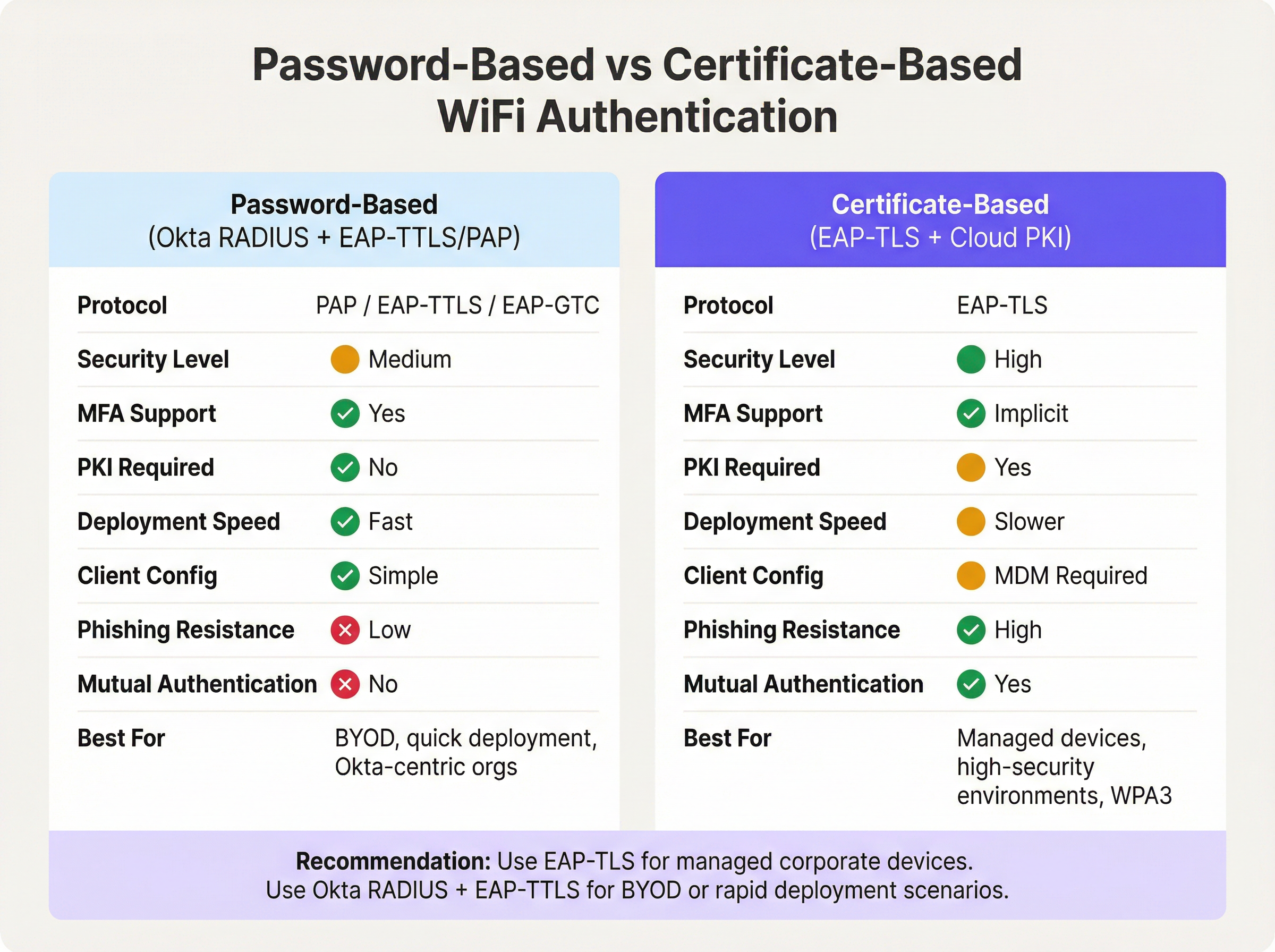
Die passwortbasierte Authentifizierung über den Okta RADIUS-Agenten bietet einen schnellen Weg zu einer einheitlichen Identität. Wenn Ihr Unternehmen bereits Benutzer in Okta verwaltet, kann die Bereitstellung in Stunden statt in Wochen abgeschlossen werden. Es muss keine PKI aufgebaut, keine Zertifikate verteilt werden und es besteht keine MDM-Abhängigkeit. Der Nachteil ist, dass Passwörter die primären Anmeldedaten bleiben und das Fehlen einer gegenseitigen Authentifizierung bedeutet, dass der Client die Identität des Netzwerks nicht kryptografisch verifizieren kann – ein Vektor für Evil-Twin-Angriffe in Hochrisikoumgebungen.
Zertifikatsbasiertes EAP-TLS eliminiert Passwörter vollständig aus der WiFi-Authentifizierungsgleichung. Der Client präsentiert ein Gerätezertifikat und der RADIUS-Server ein Serverzertifikat, was eine gegenseitige Authentifizierung ermöglicht. Dies ist der empfohlene Ansatz für IEEE 802.1X in WPA3-Enterprise-Netzwerken, insbesondere in Umgebungen, die PCI DSS oder NCSC Cyber Essentials Plus unterliegen. Voraussetzung ist eine funktionierende PKI – entweder eine lokale Microsoft ADCS-Bereitstellung oder ein Cloud-PKI-Dienst – und eine MDM-Plattform, die Zertifikate an alle verwalteten Endpunkte verteilen kann. Für Retail -Umgebungen mit Hunderten von verwalteten Point-of-Sale-Geräten ist diese Investition durchaus gerechtfertigt. Für BYOD-lastige Umgebungen oder schnelle Bereitstellungen ist Okta RADIUS mit EAP-TTLS die pragmatische Wahl.
RADIUS-Attribut-Mapping für dynamische VLAN-Zuweisung
Die dynamische VLAN-Zuweisung ist der Bereich, in dem die Okta RADIUS-Integration ihren greifbarsten betrieblichen Nutzen entfaltet. Durch das Mapping der Okta-Gruppenmitgliedschaft auf RADIUS-Attribute können Netzwerkadministratoren eine rollenbasierte Netzwerksegmentierung erzwingen, ohne separate VLAN-Richtlinien pro Gerät oder Standort pflegen zu müssen.
Okta übergibt Gruppenmitgliedschaftsdaten in der RADIUS-Access-Accept-Nachricht unter Verwendung eines von drei Attributen, die in den erweiterten RADIUS-Einstellungen der Okta-Anwendung konfiguriert werden können:
- Attribut 11 (Filter-Id): Ein String-Attribut, das den Gruppennamen enthält. Weit verbreitet bei verschiedenen Herstellern.
- Attribut 25 (Class): Ein opakes Attribut, das zur Autorisierung verwendet wird. Unterstützt von Cisco ISE, Aruba ClearPass und Fortinet.
- Attribut 26 (Vendor-Specific): Ermöglicht herstellerspezifische Sub-Attribute für eine detailliertere Steuerung.
Der Netzwerk-Controller (WLC, NAC-Appliance) empfängt den Okta-Gruppennamen im gewählten Attribut und ordnet ihn den Standard-RADIUS-Tunnelattributen zu, die für die VLAN-Zuweisung erforderlich sind:
| RADIUS-Attribut | Wert | Zweck |
|---|---|---|
| 64 (Tunnel-Type) | 13 (VLAN) | Spezifiziert VLAN-Tunneling |
| 65 (Tunnel-Medium-Type) | 6 (802) | Spezifiziert IEEE 802-Medium |
| 81 (Tunnel-Private-Group-ID) | z. B. 40 |
Die Ziel-VLAN-ID |
Beispiel: Ein Benutzer in der Okta-Gruppe Retail-POS-Staff würde Class: Retail-POS-Staff im Access-Accept zurückgegeben bekommen. Die WLC-Richtlinie würde dies auf Tunnel-Private-Group-ID: 40 mappen und das Gerät in VLAN 40 platzieren – das isolierte POS-Netzwerk. Ein Benutzer in Store-Management würde in VLAN 50 platziert werden. Diese Logik wird am Netzwerkrand erzwungen, nicht in Okta, wird aber vollständig durch die Okta-Gruppenmitgliedschaft gesteuert.
Implementierungsleitfaden
Schritt 1: Bereitstellung des Okta RADIUS-Agenten (Hochverfügbarkeit)
Stellen Sie den Okta RADIUS-Agenten auf mindestens zwei Servern bereit – entweder lokal oder in einer Cloud-VPC –, um Hochverfügbarkeit zu gewährleisten. Bereitstellungen mit nur einem Agenten stellen ein kritisches Risiko dar: Wenn der Server für Patches nicht verfügbar ist oder ein Fehler auftritt, schlägt die gesamte 802.1X WiFi-Authentifizierung im gesamten Bestand fehl. Konfigurieren Sie Ihren WLC oder Ihre NAC-Appliance so, dass RADIUS-Anfragen zwischen beiden Agenten lastverteilt werden.
Während der Installation fordert der Agent zur Anmeldung eines Okta-Administrators auf, um den Agenten zu autorisieren und mit dem Okta-Tenant zu verknüpfen. Nach der Autorisierung erscheint der Agent in der Okta-Admin-Konsole unter Settings > Downloads > RADIUS Agent Status, wo Zustand und Konnektivität überwacht werden können.
Schritt 2: Konfigurieren der RADIUS-Anwendung in Okta
- Navigieren Sie in der Okta-Admin-Konsole zu Applications > Applications und suchen Sie im App-Katalog nach RADIUS Application.
- Fügen Sie die Anwendung hinzu, vergeben Sie einen aussagekräftigen Namen (z. B.
Corporate-WiFi-Staff) und klicken Sie auf Next. - Konfigurieren Sie unter der Registerkarte Sign On den RADIUS Port (Standard 1812) und generieren Sie ein starkes, zufällig erzeugtes Shared Secret mit mindestens 32 Zeichen.
- Aktivieren Sie unter Advanced RADIUS Settings die Option Accept password and security token in the same login request, wenn Sie TOTP zusätzlich zu Passwörtern unterstützen möchten.
- Aktivieren Sie optional Permit Automatic Push for Okta Verify Enrolled Users für nahtloses Push-basiertes MFA.
- Weisen Sie die Anwendung den relevanten Okta-Gruppen zu, die Ihre Mitarbeiter repräsentieren.
Schritt 3: Konfigurieren der gruppenbasierten VLAN-Zuweisung
- Klicken Sie in den Sign On-Einstellungen der RADIUS-Anwendung im Abschnitt Advanced RADIUS Settings auf Edit.
- Aktivieren Sie Include groups in RADIUS response.
- Wählen Sie das RADIUS-Attribut aus: 25 Class wird für Aruba- und Cisco-Umgebungen empfohlen; 11 Filter-Id für Fortinet und andere.
- Fügen Sie die spezifischen Okta-Gruppennamen hinzu (z. B.
Retail-POS-Staff,Store-Management,IT-Admins). - Erstellen Sie auf Ihrem WLC oder Ihrer NAC-Appliance Durchsetzungsrichtlinien, die jeden Gruppennamen den entsprechenden VLAN-Tunnelattributen zuordnen.
Schritt 4: Konfigurieren der Client-Supplicants
Da PEAP-MSCHAPv2 nicht unterstützt wird, müssen Client-Geräte so konfiguriert werden, dass sie EAP-TTLS mit PAP als innere Methode verwenden. Stellen Sie ein WLAN-Netzwerkprofil über Ihre MDM-Plattform (z. B. Microsoft Intune, Jamf Pro) oder über Group Policy Objects (GPO) für in die Windows-Domäne eingebundene Geräte bereit. Das Profil sollte geben Sie Folgendes an:
- SSID: Ihr Enterprise-SSID-Name
- Sicherheit: WPA2-Enterprise oder WPA3-Enterprise
- EAP-Methode: EAP-TTLS
- Innere Authentifizierung: PAP
- Serverzertifikatsvalidierung: Aktiviert (an den Serverzertifikats-CN Ihres RADIUS-Agenten binden)
Schritt 5: RADIUS-Timeouts festlegen
Erhöhen Sie das RADIUS-Timeout auf Ihrem WLC vom Standardwert von 3-5 Sekunden auf 30-60 Sekunden. Dies ist entscheidend, wenn MFA-Push-Benachrichtigungen verwendet werden, da der Benutzer ausreichend Zeit haben muss, die Benachrichtigung auf seinem Gerät zu bestätigen, bevor der WLC den Authentifizierungsversuch abbricht.
Best Practices
Die Bereitstellung von Okta RADIUS für die WiFi-Authentifizierung ist unkompliziert, aber einige bewährte betriebliche Verfahren unterscheiden eine belastbare Produktionsumgebung von einem fragilen Proof-of-Concept.
Segmentieren Sie Gast- und Mitarbeiter-Traffic auf SSID-Ebene. Okta RADIUS ist ein Tool für die Identität der Belegschaft. Für den Besucher- und Gastzugang sollten Sie eine dedizierte Captive Portal-Lösung einsetzen. Dies verhindert, dass die Okta-Lizenzkosten mit dem Gastaufkommen skalieren, und sorgt für eine saubere Trennung der Zuständigkeiten. Purple-Unternehmenskunden können Guest WiFi auf einer separaten SSID bereitstellen, während sie Okta RADIUS für die Mitarbeiterauthentifizierung auf derselben physischen Infrastruktur nutzen.
Verwenden Sie eine NAC-Appliance für komplexe Richtlinienumgebungen. Wenn Ihre Umgebung einen bedingten Zugriff basierend auf dem Gerätestatus, der MAC-Adressfilterung oder dem Zertifikatsstatus neben der Benutzeridentität erfordert, setzen Sie eine zwischengeschaltete NAC-Appliance (Aruba ClearPass, Cisco ISE oder Portnox) ein, um Anfragen an den Okta RADIUS-Agenten weiterzuleiten. Die NAC-Appliance kann die RADIUS-Antwort mit zusätzlichen Tunnelattributen anreichern, die der Okta-Agent allein nicht generieren kann.
Überwachung über das Okta-Systemprotokoll. Jedes Authentifizierungsereignis — Erfolg, Fehler, MFA-Herausforderung und Faktortyp — wird im Okta-Systemprotokoll aufgezeichnet. Konfigurieren Sie Log-Streaming an Ihr SIEM für Echtzeit-Warnungen bei Authentifizierungsanomalien. Dies ist besonders wertvoll für Organisationen im Gesundheitswesen und im öffentlichen Sektor, die Prüfungsanforderungen unterliegen.
Shared Secrets turnusmäßig rotieren. Das Shared Secret zwischen der Okta RADIUS-Anwendung und Ihrem NAS ist ein kritischer Sicherheitsnachweis. Implementieren Sie einen Rotationsplan (vierteljährlich wird empfohlen) und aktualisieren Sie sowohl die Okta-Anwendung als auch die WLC/NAC-Konfiguration gleichzeitig.
RADIUS-Serviceadressen einschränken. Beschränken Sie in der Konfiguration des Okta RADIUS-Agenten, welche IP-Adressen RADIUS-Anfragen senden dürfen. Dies verhindert, dass unbefugte NAS-Geräte versuchen, sich gegenüber Ihrem Okta-Tenant zu authentifizieren.
Informationen zum breiteren Kontext der Netzwerkarchitektur finden Sie unter Die wichtigsten SD-WAN-Vorteile für moderne Unternehmen und Definition von Wireless Access Points: Ihr ultimativer Leitfaden 2026 .
Fehlerbehebung & Risikominimierung
Die folgende Tabelle fasst die häufigsten Fehlermodi bei Okta RADIUS WiFi-Bereitstellungen und deren empfohlene Behebungsmaßnahmen zusammen.
| Fehlermodus | Ursache | Abhilfe |
|---|---|---|
| Authentifizierungs-Timeouts | WLC RADIUS-Timeout zu kurz für Okta API oder MFA-Antwort | WLC RADIUS-Timeout auf 30-60 Sekunden erhöhen |
| Windows-Clients abgelehnt | Windows verwendet standardmäßig PEAP-MSCHAPv2, was Okta RADIUS ablehnt | EAP-TTLS/PAP-Wireless-Profil über MDM oder GPO pushen |
| Benutzer im falschen VLAN | Okta-Gruppenname stimmt nicht überein oder fehlende Tunnelattribute auf dem WLC | Überprüfen, ob der WLC Class/Filter-Id auf Tunnel-Private-Group-ID abbildet; Okta-Systemprotokoll prüfen |
| Agent nicht erreichbar | Server offline, API-Token abgelaufen oder Firewall blockiert HTTPS zu Okta | Redundante Agenten bereitstellen; Agentenstatus in der Okta Admin Console überwachen; ausgehendes HTTPS prüfen |
| MFA-Push nicht zugestellt | Benutzer nicht bei Okta Verify registriert oder Mobilgerät offline | Registrierungsrichtlinie für Okta Verify erzwingen; TOTP als Fallback in Betracht ziehen |
| Zertifikatsvalidierungsfehler | Client kann RADIUS-Serverzertifikat nicht validieren | Serverzertifikats-CN im Wireless-Profil des Clients binden; sicherstellen, dass die CA-Kette vertrauenswürdig ist |
| VLAN-Attribute nicht gesendet | Okta-Gruppe nicht in der RADIUS-Antwortkonfiguration enthalten | Sicherstellen, dass die Gruppe in den erweiterten RADIUS-Einstellungen aufgeführt ist; Mitgliedschaft des Benutzers in der Gruppe in Okta bestätigen |
Für das Transportwesen und Umgebungen im öffentlichen Sektor, in denen die Netzwerkverfügbarkeit geschäftskritisch ist, sollten Sie ein synthetisches Monitoring implementieren, das die RADIUS-Authentifizierung regelmäßig durchgängig testet und bei Fehlern warnt, bevor Benutzer betroffen sind.
ROI & geschäftliche Auswirkungen
Das Business Case für die Okta RADIUS WiFi-Authentifizierung stützt sich auf drei Säulen: operative Effizienz, Verbesserung des Sicherheitsstatus und Compliance-Bereitschaft.
Operative Effizienz. Durch die Konsolidierung der WiFi-Authentifizierung in Okta entfällt die Notwendigkeit, an jedem Standort eine separate lokale RADIUS-Infrastruktur (NPS-Server, lokales AD) zu unterhalten. Für eine Hotelkette mit 50 Standorten kann dies eine erhebliche Reduzierung der Infrastrukturkosten pro Standort und des IT-Supportaufwands bedeuten. Die Bereitstellung und Deaktivierung von Benutzern erfolgt atomar: Das Hinzufügen eines Benutzers zur richtigen Okta-Gruppe gewährt gleichzeitig Anwendungszugriff und den entsprechenden WiFi-VLAN-Zugriff. Wenn ein Mitarbeiter das Unternehmen verlässt, entzieht die Deaktivierung seines Okta-Kontos sofort den WiFi-Zugriff an allen Standorten.
Sicherheitsstatus. Das Ersetzen von gemeinsam genutzten PSK-WiFi-Passwörtern durch eine benutzerbezogene 802.1X-Authentifizierung eliminiert die Weitergabe von Anmeldedaten, ein häufiger Vektor für Insider-Bedrohungen und unbefugten Zugriff. In Kombination mit der dynamischen VLAN-Zuweisung wird das Prinzip der geringsten Privilegien auf der Netzwerkschicht durchgesetzt. Das Okta-Systemprotokoll bietet einen vollständigen, manipulationssicheren Audit-Trail für jedes WiFi-Authentifizierungsereignis, was für die Reaktion auf Vorfälle unerlässlich ist.
Compliance-Bereitschaft. Die PCI DSS 4.0-Anforderung 8.3 schreibt MFA für jeden administrativen Zugriff vor, der nicht über die Konsole erfolgt. Anforderung 1.3 erfordert eine Netzwerksegmentierung zwischen der Umgebung für Karteninhaberdaten und anderen Netzwerken. Okta RADIUS mit gruppenbasierter VLAN-Zuweiserfüllt beide Anforderungen direkt. Für die GDPR-Compliance liefert das Okta-Systemprotokoll die Zugriffsprotokolle, die erforderlich sind, um angemessene technische Kontrollen über Systeme zur Verarbeitung personenbezogener Daten nachzuweisen. Für Standorte, die Modern Hospitality WiFi Solutions einsetzen, ist dieser einheitliche Ansatz für Identitäts- und Netzwerkzugriff zunehmend eine Voraussetzung für die Beschaffung im Unternehmen.
Organisationen, die diese Integration abgeschlossen haben, berichten in der Regel von einer Reduzierung der WiFi-bezogenen IT-Support-Tickets (weniger Anfragen zur Passwortzurücksetzung, weniger Vorfälle aufgrund von VLAN-Fehlkonfigurationen) und einer messbaren Verbesserung der Ergebnisse bei Sicherheitsaudits. Die Investition in die Bereitstellung und Konfiguration des Okta-RADIUS-Agenten – die bei einer Bereitstellung an einem einzelnen Standort in der Regel eher in Tagen als in Wochen gemessen wird – liefert laufende betriebliche Einsparungen, die sich über einen verteilten Bestand hinweg summieren.
Schlüsselbegriffe & Definitionen
Okta RADIUS Agent
A lightweight on-premises or cloud-hosted proxy service that translates RADIUS authentication requests from network infrastructure (access points, WLCs) into Okta API calls, enabling the Okta cloud to serve as the authentication backend for 802.1X WiFi.
IT teams encounter this when deploying enterprise WiFi authentication backed by Okta. It is the critical bridge component between legacy RADIUS-based network infrastructure and modern cloud identity.
802.1X
An IEEE standard for port-based Network Access Control (NAC) that defines an authentication framework for wired and wireless networks. It uses the Extensible Authentication Protocol (EAP) to carry authentication credentials between the supplicant (device), authenticator (AP/switch), and authentication server (RADIUS).
802.1X is the foundation of enterprise WiFi security. Any deployment using WPA2-Enterprise or WPA3-Enterprise is using 802.1X. IT teams must understand the three-party model (supplicant, authenticator, authentication server) to troubleshoot connectivity issues.
EAP-TTLS (Extensible Authentication Protocol - Tunnelled Transport Layer Security)
An EAP method that establishes a TLS tunnel using only a server-side certificate, then carries a simpler inner authentication protocol (such as PAP) inside the tunnel. This protects the inner credentials from eavesdropping while requiring only server-side certificate infrastructure.
EAP-TTLS with PAP is the recommended protocol for Okta RADIUS WiFi authentication. It is more secure than bare PAP but does not require client-side certificates, making it practical for BYOD and mixed-device environments.
EAP-TLS (Extensible Authentication Protocol - Transport Layer Security)
An EAP method that uses mutual certificate-based authentication — both the client and the server present digital certificates. It is the most secure 802.1X method, providing phishing-resistant, password-free authentication.
EAP-TLS is the gold standard for managed corporate device environments. It requires a PKI infrastructure and MDM for certificate distribution. The Okta RADIUS agent does not natively support EAP-TLS; a dedicated cloud PKI or RADIUS service is required.
PAP (Password Authentication Protocol)
A simple authentication protocol that transmits usernames and passwords in plaintext. In the context of 802.1X, PAP is used as the inner authentication method inside an EAP-TTLS tunnel, where the outer TLS layer provides encryption.
PAP is the primary authentication mechanism supported by the Okta RADIUS agent. IT teams must understand that PAP alone is insecure, but PAP inside EAP-TTLS is acceptable for enterprise WiFi when the server certificate is properly validated.
Dynamic VLAN Assignment
A network access control technique where a RADIUS server returns VLAN assignment attributes in the Access-Accept message, causing the wireless controller or switch to place the authenticated client on a specific VLAN based on their identity or group membership, rather than a static per-SSID VLAN.
Dynamic VLAN assignment is essential for network segmentation in multi-role environments (e.g., separating POS terminals from general staff devices). It is configured by returning RADIUS attributes 64, 65, and 81 in the Access-Accept message.
RADIUS Attribute 25 (Class)
A standard RADIUS attribute used to pass arbitrary authorisation data from the authentication server to the NAS. Okta uses this attribute to return Okta group membership information to the wireless controller, which can then use it for VLAN assignment or access policy decisions.
IT teams configuring Okta group-based VLAN assignment will configure the WLC to read the Class attribute value and map it to a VLAN ID. The exact attribute to use (11, 25, or 26) depends on the WLC vendor's documentation.
NAS (Network Access Server)
In RADIUS terminology, the NAS is the network device that receives the user's connection request and forwards it to the RADIUS server for authentication. In WiFi deployments, the NAS is typically the wireless access point or wireless LAN controller.
The NAS is the authenticator in the 802.1X model. IT teams must configure the NAS with the RADIUS server IP address, port, and shared secret. The NAS IP address should be whitelisted in the Okta RADIUS agent's service address filtering configuration.
Shared Secret
A pre-shared password used to authenticate RADIUS messages between the NAS (WLC/AP) and the RADIUS server (Okta RADIUS agent). It is used to compute a Message-Authenticator hash that verifies the integrity of RADIUS packets.
The shared secret must be identical on both the Okta RADIUS application configuration and the WLC/NAC RADIUS server entry. It should be at least 32 characters, randomly generated, and rotated on a regular schedule. A mismatch is a common cause of RADIUS authentication failures.
MFA Challenge (RADIUS Access-Challenge)
A RADIUS message type sent by the authentication server to the NAS when additional authentication factors are required. The NAS relays the challenge to the client, which must respond with the appropriate factor (e.g., OTP, push approval) before authentication can complete.
The Access-Challenge mechanism is how Okta enforces MFA over RADIUS. IT teams must ensure the WLC supports the challenge-response exchange and that the RADIUS timeout is long enough for the user to complete the MFA step.
Fallstudien
A 150-property hotel chain currently uses on-premises NPS servers at each property for 802.1X staff WiFi authentication. Each NPS server is joined to a local Active Directory domain. The IT team wants to centralise identity management in Okta and eliminate the per-property NPS infrastructure. How should they approach the migration?
The recommended approach is a phased migration using the Okta RADIUS agent deployed in a centralised cloud VPC rather than at each property. Phase 1: Deploy two Okta RADIUS agent instances in a cloud VPC (e.g., AWS or Azure) in the same region as the majority of properties. Configure the agents to listen on UDP 1812. Phase 2: For each property, add the Okta RADIUS agent IPs as secondary RADIUS servers on the WLC, keeping the existing NPS as primary. This allows parallel operation and testing without disrupting live authentication. Phase 3: Migrate users from local AD to Okta. Use Okta's AD agent to sync existing accounts initially, then progressively move to Okta as the authoritative source. Phase 4: For each property, configure the WLC to use EAP-TTLS/PAP and push the new wireless profile to staff devices via MDM. Phase 5: Once all devices are confirmed on EAP-TTLS, switch the WLC RADIUS priority to the Okta agents as primary and decommission the NPS servers. Configure Okta groups (Front-Desk, Housekeeping, F&B, Management, IT-Admins) and enable group-based VLAN assignment using Attribute 25 (Class). Map each group to the appropriate VLAN on the WLC. Increase WLC RADIUS timeout to 45 seconds to accommodate Okta API latency.
A national retail chain with 320 stores needs to achieve PCI DSS 4.0 compliance for its staff WiFi. Store associates use handheld devices for inventory management, and a separate set of devices handles point-of-sale transactions. The chain uses Okta for all workforce identity. How do they implement VLAN segmentation using Okta RADIUS to satisfy PCI DSS network segmentation requirements?
Create three Okta groups: POS-Staff (for employees who operate POS terminals), Inventory-Staff (for warehouse and shop floor associates), and Store-Management. In the Okta RADIUS application, enable 'Include groups in RADIUS response' and select Attribute 25 (Class). Add all three groups to the response configuration. On the wireless controller at each store (or centrally via a cloud WLC), create three enforcement policies: (1) If Class = POS-Staff, assign Tunnel-Private-Group-ID = 40 (the POS VLAN, which is in scope for PCI DSS and has firewall rules restricting access to only the payment processor). (2) If Class = Inventory-Staff, assign Tunnel-Private-Group-ID = 50 (the inventory VLAN, out of PCI scope). (3) If Class = Store-Management, assign Tunnel-Private-Group-ID = 60 (the management VLAN with access to store management systems). Devices connecting with credentials of a user in the POS-Staff group are automatically placed on VLAN 40. If a store associate's role changes, updating their Okta group membership immediately changes their VLAN assignment on next connection — no WLC reconfiguration required. Document the Okta group-to-VLAN mapping in the network segmentation diagram for the PCI DSS QSA audit.
Szenarioanalyse
Q1. A mid-size conference centre uses Okta for all staff identity management. They want to deploy 802.1X WiFi for staff using their existing Cisco Meraki access points. Their Windows laptops are managed via Microsoft Intune. The IT manager wants to enforce Okta Verify push MFA for all WiFi connections. What are the three most critical configuration steps they must complete, and what is the most likely failure mode if they skip any of them?
💡 Hinweis:Consider the EAP protocol compatibility between Okta RADIUS and Windows defaults, the RADIUS timeout setting, and the client wireless profile configuration.
Empfohlenen Ansatz anzeigen
The three critical steps are: (1) Deploy a wireless profile via Intune that configures Windows clients to use EAP-TTLS with PAP as the inner method — Windows defaults to PEAP-MSCHAPv2, which the Okta RADIUS agent does not support, causing all authentication attempts to be rejected. (2) Increase the Cisco Meraki RADIUS timeout from the default 5 seconds to at least 45-60 seconds — without this, the authentication request will time out before the user can approve the Okta Verify push notification. (3) Enable 'Permit Automatic Push for Okta Verify Enrolled Users' in the Okta RADIUS application's Advanced RADIUS Settings — without this, users may be prompted to manually select their MFA factor rather than receiving an automatic push. The most likely failure mode if step 1 is skipped is a complete authentication failure for all Windows devices. If step 2 is skipped, authentication will intermittently fail for users who take more than 5 seconds to approve the push. If step 3 is skipped, users will experience a confusing challenge prompt rather than a seamless push notification.
Q2. A large retail chain's security team has flagged that their current Okta RADIUS WiFi deployment uses a single RADIUS agent server. During a recent patching window, the server was offline for 45 minutes, causing WiFi authentication to fail across all 80 stores. What architectural changes should the IT team implement to prevent this, and what are the two deployment options for the agents?
💡 Hinweis:Consider both the agent deployment topology and the WLC configuration required to support redundancy.
Empfohlenen Ansatz anzeigen
The IT team should deploy a minimum of two Okta RADIUS agent instances and configure the WLC at each store to use both agents. There are two deployment options: Option A (Centralised Cloud VMs) — deploy both agents in a cloud VPC (e.g., AWS or Azure), ideally in different availability zones. The WLC at each store points to both cloud IPs, with one as primary and one as secondary (or with load balancing enabled). This minimises per-site infrastructure but introduces WAN dependency. Option B (On-Premises Redundant Pair) — deploy two agent servers at a central data centre or co-location facility, with the WLC using RADIUS failover. On the WLC, configure the primary RADIUS server as Agent 1 and the secondary as Agent 2, with a failover timeout of 3-5 seconds. Enable 'Dead Server Detection' if supported by the WLC vendor. Additionally, the IT team should configure health monitoring in the Okta Admin Console and set up alerting if an agent goes offline. For stores with local servers, a local agent can serve as a tertiary fallback for resilience against WAN outages.
Q3. An enterprise organisation is evaluating whether to use the Okta RADIUS agent with EAP-TTLS/PAP or to invest in a cloud PKI solution for EAP-TLS for their corporate WiFi. They have 2,000 managed Windows and macOS devices enrolled in Microsoft Intune, and they are subject to PCI DSS 4.0. What is the recommended approach and what is the primary security justification?
💡 Hinweis:Consider the PCI DSS requirements, the device management maturity (all devices are MDM-enrolled), and the security properties of each authentication method.
Empfohlenen Ansatz anzeigen
The recommended approach is to invest in EAP-TLS with a cloud PKI solution. The primary security justification is mutual authentication: EAP-TLS requires both the client and the RADIUS server to present digital certificates, meaning the device cryptographically proves its identity to the network and the network proves its identity to the device. This eliminates the risk of evil twin attacks (where a rogue AP impersonates the corporate SSID) and removes passwords from the WiFi authentication equation entirely, eliminating credential theft and phishing as attack vectors. For PCI DSS 4.0, EAP-TLS satisfies Requirement 8.3 (MFA for non-console admin access) implicitly through certificate-based authentication, and it supports WPA3-Enterprise 192-bit mode (Requirement 4.2.1 for strong cryptography). The prerequisite — all 2,000 devices enrolled in Intune — is already met, making certificate distribution via Intune SCEP profiles straightforward. The Okta RADIUS agent with EAP-TTLS/PAP would be an acceptable interim solution during the PKI build-out, but given the PCI DSS scope and the fully managed device estate, EAP-TLS is the correct long-term architecture. The additional investment in a cloud PKI service (typically $3-8 per device per year) is justified by the security uplift and reduced credential management overhead.
Wichtigste Erkenntnisse
- ✓The Okta RADIUS agent proxies 802.1X WiFi authentication requests from network infrastructure to the Okta cloud via HTTPS, enabling cloud identity to govern network access without on-premises directory servers.
- ✓The agent supports EAP-TTLS with PAP and EAP-GTC, but does NOT support PEAP-MSCHAPv2 (the Windows default) or EAP-TLS — client supplicants must be reconfigured via MDM or GPO before deployment.
- ✓MFA on WiFi is technically supported (Okta Verify push, TOTP, SMS) but requires increasing the WLC RADIUS timeout to 30-60 seconds; it is best reserved for administrative SSIDs rather than general staff WiFi due to roaming friction.
- ✓Dynamic VLAN assignment is achieved by enabling 'Include groups in RADIUS response' in Okta and mapping the returned Class (Attribute 25) or Filter-Id (Attribute 11) to VLAN tunnel attributes (64, 65, 81) on the WLC or NAC appliance.
- ✓Always deploy a minimum of two Okta RADIUS agent instances for high availability — a single agent is a critical single point of failure for all WiFi authentication across the estate.
- ✓For fully managed device environments subject to PCI DSS or high-security requirements, EAP-TLS with a cloud PKI is the superior long-term architecture; Okta RADIUS with EAP-TTLS/PAP is the pragmatic choice for BYOD or rapid deployment scenarios.
- ✓Okta RADIUS is a workforce identity tool — deploy a dedicated guest WiFi captive portal solution for visitor access to avoid Okta licence scaling costs and maintain clean separation between staff and guest network access.




