

Walled-Garden-Konfiguration für Gäste-WiFi
This guide provides a comprehensive, vendor-neutral technical reference for configuring walled gardens in enterprise guest WiFi deployments. It covers the architecture of pre-authentication access, the critical role of dynamic DNS resolution, social login domain whitelisting, OS captive portal probe requirements, and compliance considerations under PCI DSS and GDPR. Aimed at IT managers, network architects, and venue operations directors, it delivers actionable implementation guidance with real-world case studies from hospitality, retail, and events environments.
🎧 Diesen Leitfaden anhören
Transkript anzeigen
Executive Summary
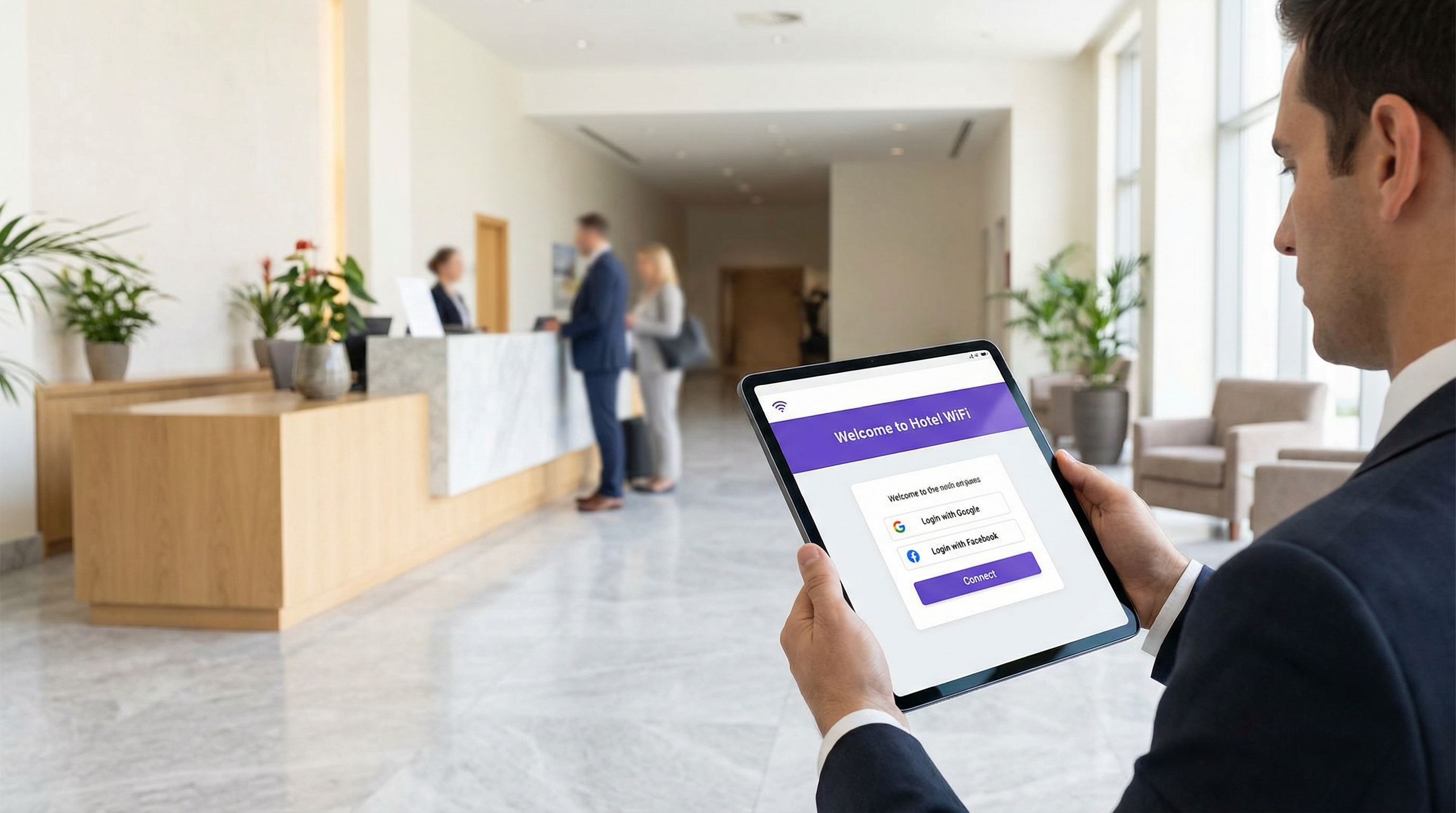
Ein Walled Garden ist ein grundlegender Bestandteil jeder sicheren und benutzerfreundlichen Gäste-WiFi-Bereitstellung. Er definiert die begrenzte Auswahl an Netzwerkressourcen, auf die ein Gastgerät zugreifen kann, bevor die Authentifizierung über ein Captive Portal abgeschlossen ist. Eine fehlerhafte oder unvollständige Walled-Garden-Konfiguration ist die Hauptursache für fehlgeschlagene Gast-Logins in Enterprise-Umgebungen – was zu einer schlechteren User Experience, mehr Helpdesk-Tickets und messbaren Reputationsschäden im Gastgewerbe und Einzelhandel führt. Für IT-Manager und Netzwerkarchitekten ist die Beherrschung der Walled-Garden-WiFi-Konfiguration nicht nur eine technische Aufgabe; sie ist ein entscheidender Schritt zur Minderung von Sicherheitsrisiken, zur Gewährleistung der Compliance mit Standards wie PCI DSS v4.0 und GDPR sowie zur Maximierung des ROI einer Gäste-WiFi-Infrastruktur. Dieser Leitfaden bietet ein herstellerneutrales, praxisorientiertes Framework für das Design, die Implementierung und die Wartung eines robusten Walled Gardens, der moderne Authentifizierungsmethoden unterstützt – einschließlich Social Logins via OAuth 2.0, Payment Gateways und Captive Portal-Erkennung auf Betriebssystemebene – für Enterprise-Umgebungen wie Gastgewerbe, Einzelhandel, Events und den öffentlichen Sektor.
Technischer Deep-Dive
Die Anatomie des Pre-Authentication-Zugriffs
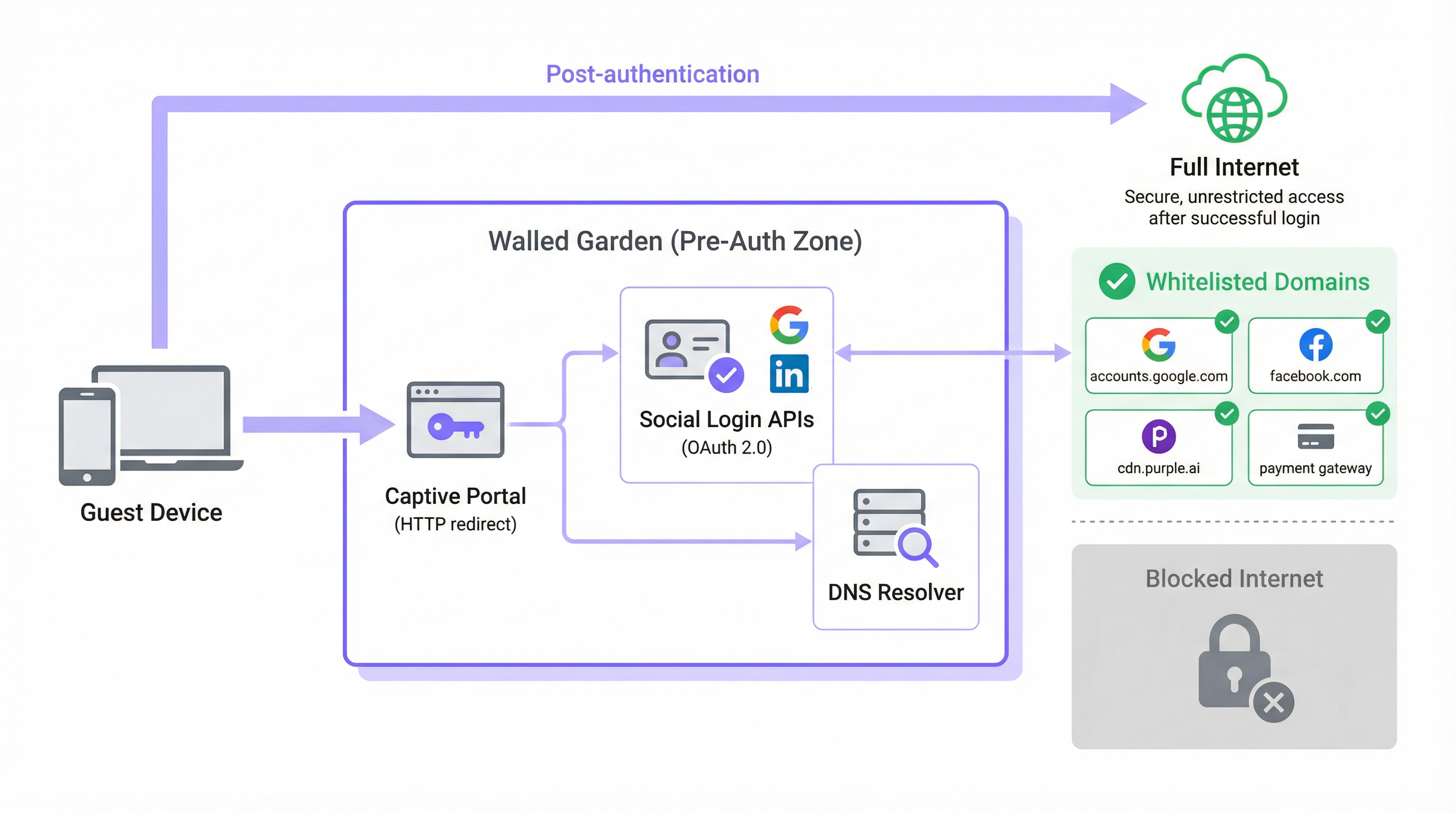
In einer typischen Gäste-WiFi-Architektur wird dem Gerät eines Nutzers, wenn es sich mit einer offenen SSID verbindet, per DHCP eine IP-Adresse zugewiesen und vom Netzwerk-Controller in eine Pre-Authentication-Rolle oder ein isoliertes VLAN verschoben. In diesem Zustand fängt der Controller den gesamten ausgehenden HTTP- und HTTPS-Traffic ab und leitet ihn auf die Splash-Page des Captive Portal um. Dies ist der Mechanismus, der den Browser des Gastes auf den Login-Bildschirm zwingt. Der Walled Garden ist die ausdrückliche Ausnahme von dieser Interception-Regel: eine kuratierte Whitelist externer Domains und IP-Adressbereiche, mit denen das Gerät während der Pre-Authentication-Phase frei kommunizieren darf.
Ohne einen korrekt konfigurierten Walled Garden werden genau die Dienste blockiert, die für den Abschluss der Authentifizierung erforderlich sind. Moderne Captive Portals sind keine monolithischen, in sich geschlossenen Anwendungen. Sie setzen sich aus Microservices und Drittanbieter-APIs zusammen. Die eigenen Assets des Portals – HTML, CSS, JavaScript und Bilder – werden möglicherweise über ein Content Delivery Network (CDN) bereitgestellt, das völlig getrennt von der lokalen Infrastruktur des Controllers ist. Die Social-Login-Funktionalität ist darauf angewiesen, OAuth 2.0-Endpunkte bei Google, Facebook, Apple oder Microsoft zu erreichen. Wenn ein kostenpflichtiger WiFi-Tarif angeboten wird, muss das Portal mit einem Zahlungsabwickler wie Stripe oder PayPal kommunizieren. Analytics- und Marketing-Plattformen laden möglicherweise Tracking-Skripte von ihren eigenen CDN-Ursprüngen. Jede dieser Abhängigkeiten stellt eine Domain dar, die im Walled Garden explizit zugelassen werden muss, da der Authentifizierungsprozess sonst stillschweigend oder mit einer verwirrenden Fehlermeldung fehlschlägt.
Das Problem der DNS-Auflösung
Der technisch nuancierteste Aspekt der Walled-Garden-Konfiguration ist die Diskrepanz zwischen domainbasierter Verwaltung und IP-basierter Durchsetzung. Während Netzwerkadministratoren den Walled Garden mit menschenlesbaren Domainnamen (z. B. accounts.google.com) konfigurieren, setzen die meisten Netzwerk-Controller diese Regeln auf der IP-Ebene durch. Wenn eine Domain zur Whitelist hinzugefügt wird, führt der Controller einen DNS-Lookup durch, um sie in eine oder mehrere IP-Adressen aufzulösen, und fügt diese IPs einer temporären Access Control List (ACL) hinzu.
Dies birgt ein erhebliches operationelles Risiko bei großen Cloud-Anbietern. Google, Meta, Apple und die führenden CDNs nutzen Anycast-Routing und dynamische IP-Adresszuweisung. Die IP-Adresse, in die accounts.google.com zum Zeitpunkt der Konfiguration aufgelöst wird, kann sich völlig von der Adresse unterscheiden, in die sie sechs Monate später oder in einem anderen Netzwerksegment aufgelöst wird. Eine statische IP-Whitelist ist daher keine nachhaltige Konfiguration; sie wird mit der Zeit unbrauchbar, da CDN-IP-Bereiche rotieren.
Die korrekte Lösung ist die dynamische DNS-Auflösung, bei der der Netzwerk-Controller jede auf der Whitelist stehende Domain regelmäßig neu auflöst und seine ACLs entsprechend aktualisiert. Die meisten Enterprise-Controller von Cisco, Aruba, Ruckus und Fortinet unterstützen dies nativ. Wenn Ihr Controller dies nicht tut, arbeiten Sie mit einer Konfiguration, die zeitweilige Ausfälle verursacht, welche schwer zu diagnostizieren sind und sich im Laufe der Zeit verschlimmern werden.
HTTPS-Interception und TLS-Compliance
Eine weitere Komplexitätsebene ergibt sich aus der Verbreitung von HTTPS. Wenn ein Gastgerät im Pre-Authentication-Zustand versucht, eine nicht auf der Whitelist stehende HTTPS-Ressource zu laden, muss der Controller entscheiden, wie er die Anfrage behandelt. Es gibt zwei gängige Ansätze, die beide erhebliche Nachteile mit sich bringen, wenn sie nicht korrekt verwaltet werden.
Der erste Ansatz ist ein Silent Drop, bei dem der Controller die Verbindung einfach blockiert. Der Browser des Gastes zeigt einen generischen Fehler "Website ist nicht erreichbar" an, der keine nützliche Hilfestellung bietet und oft eher als Netzwerkfehler denn als Portal-Aufforderung interpretiert wird. Der zweite Ansatz ist die HTTPS-Interception, bei der der Controller versucht, eine Weiterleitung zum Captive Portal zu präsentieren. Dies erfordert, dass der Controller als Man-in-the-Middle (MITM)-Proxy agiert und sein eigenes TLS-Zertifikat präsentiert. Wenn das Gerät des Gastes diesem Zertifikat nicht vertraut – was in einem öffentlichen Gästenetzwerk fast nie der Fall ist –, zeigt der Browser eine Sicherheitswarnung an, die Nutzer beunruhigt und in regulierten Umgebungen ein Compliance-Problem darstellen kann.
Der korrekte architektonische Ansatz besteht darin, sicherzustellen, dass alle für den Authentifizierungsprozess erforderlichen Domains auf der Whitelist stehen, sodass ihr HTTPS-Traffic unangetastet passieren kann. Die Weiterleitung zum Captive Portal sollte durch den Probe-Mechanismus auf Betriebssystemebene und nicht durch HTTPS-Interception ausgelöst werden. Dadurch wird das Problem des Zertifikatsvertrauens vollständig beseitigt. Moderne Browser implementieren zudem HTTP Strict Transport Security (HSTS) und in einigen Fällen Certificate Pinning. Beide Mechanismen führen dazu, dass HTTPS-Interception bei wichtigen Domains komplett fehlschlägt und eine unterbrochene Verbindung anstelle einer Weiterleitung erzeugt – ein weiteres starkes Argument für einen korrekt konfigurierten Walled Garden anstelle einer breit angelegten HTTPS-Interception-Richtlinie.
Captive Network Assistant (CNA) und OS-Probe-Domains
Einer der am häufigsten übersehenen Aspekte der Walled-Garden-Konfiguration ist der Mechanismus, mit dem moderne Betriebssysteme das Vorhandensein eines Captive Portal erkennen. Alle gängigen Betriebssysteme – iOS, iPadOS, macOS, Android und Windows – implementieren einen Captive Network Assistant (CNA), der unmittelbar nach der Verbindung mit einem neuen WiFi-Netzwerk einen bekannten HTTP-Endpunkt abfragt. Weicht die Antwort vom erwarteten Wert ab, schließt das Betriebssystem daraus, dass es sich hinter einem Captive Portal befindet, und öffnet automatisch ein Browserfenster, um den Login abzuwickeln.
Die von den jeweiligen Plattformen verwendeten Probe-Endpunkte sind wie folgt:
| Betriebssystem | Probe-Domain | Erwartete Antwort |
|---|---|---|
| Apple (iOS, macOS) | captive.apple.com |
HTTP 200 mit spezifischem Body |
| Android (Google) | connectivitycheck.gstatic.com |
HTTP 204 No Content |
| Windows | www.msftconnecttest.com |
HTTP 200 mit spezifischem Body |
| Firefox / Mozilla | detectportal.firefox.com |
HTTP 200 mit spezifischem Body |
Wenn eine dieser Probe-Domains durch den Walled Garden blockiert wird, erkennt das Betriebssystem das Captive Portal niemals. Aus Sicht des Gastes hat das WiFi-Netzwerk schlichtweg keinen Internetzugang. Dies ist einer der häufigsten Konfigurationsfehler, die in Produktionsumgebungen beobachtet werden, und lässt sich durch die Aufnahme dieser Domains in die Basis-Whitelist vollständig vermeiden.
Implementierungsleitfaden
Schritt 1: Ermittlung der Basis-Domains
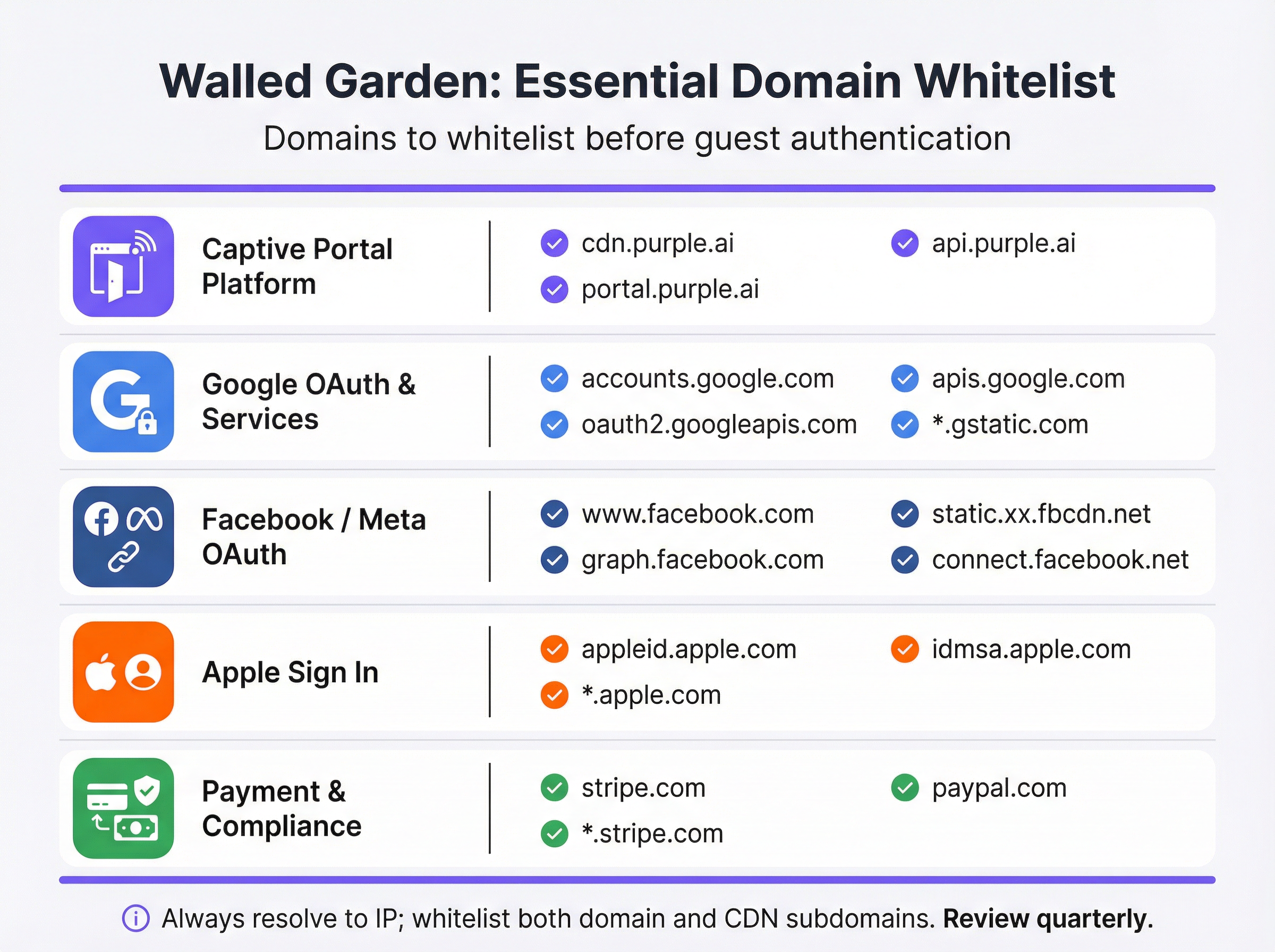
Bevor Sie Ihre Controller-Konfiguration anpassen, sollten Sie ein gründliches Audit aller externen Dienste durchführen, von denen Ihr Captive Portal abhängig ist. Dies gelingt am besten, indem Sie das Portal in einem Browser mit geöffneten Entwicklertools laden und den Netzwerk-Tab überprüfen, um alle Anfragen an externe Ressourcen zu identifizieren. Die resultierende Liste sollte wie folgt kategorisiert werden:
| Kategorie | Zweck | Essenzielle Domains |
|---|---|---|
| Captive Portal-Plattform | Stellt Splash-Page-Assets bereit und verarbeitet die Auth-Logik. | *.purple.ai, cdn.your-vendor.com |
| Google OAuth | Ermöglicht Google Sign-In. | accounts.google.com, oauth2.googleapis.com, apis.google.com, *.gstatic.com |
| Facebook / Meta OAuth | Ermöglicht Facebook Login. | www.facebook.com, graph.facebook.com, connect.facebook.net, *.fbcdn.net |
| Apple Sign In | Ermöglicht Sign in with Apple. | appleid.apple.com, idmsa.apple.com, *.apple.com |
| OS Captive Portal Probes | Ermöglicht die automatische Portal-Erkennung. | captive.apple.com, connectivitycheck.gstatic.com, www.msftconnecttest.com |
| Payment Gateways | Verarbeitet Zahlungen für Premium-Tarife. | *.stripe.com, *.paypal.com |
| Analytics / Marketing | Lädt Tracking- und Analytics-Skripte. | Anbieterspezifisch (z. B. *.segment.com, *.mixpanel.com) |
Schritt 2: Controller-Konfiguration
Die Implementierung variiert je nach Anbieter, aber die zugrunde liegenden Prinzipien sind universell. Navigieren Sie zur Captive Portal- oder Splash-Page-Konfiguration in der Management-Oberfläche Ihres Netzwerk-Controllers – in Cisco Meraki finden Sie dies unter Wireless > Configure > Splash Page; in Aruba Central ist es das Captive Portal Profile; in Fortinet befindet es sich unter Security Policies > Captive Portal. Suchen Sie den Bereich für Pre-Authentication-Zugriff oder die Walled-Garden-Whitelist und gehen Sie wie folgt vor:
- Domains nach Kategorie eingeben: Fügen Sie jede Domain aus Ihrem Audit systematisch hinzu und arbeiten Sie sich durch jede Kategorie. Verwenden Sie Wildcards (
*.gstatic.com), sofern Ihr Controller diese unterstützt und das Risikoprofil akzeptabel ist. In Hochsicherheitsumgebungen sollten explizite Subdomains gegenüber breiten Wildcards bevorzugt werden. - Dynamische DNS-Auflösung aktivieren: Stellen Sie sicher, dass Ihr Controller so konfiguriert ist, dass er auf der Whitelist stehende Domains regelmäßig neu auflöst, anstatt eine statische IP-Liste im Cache zu speichern. Konsultieren Sie die Dokumentation Ihres Anbieters, um zu überprüfen, ob dies aktiv ist. Legen Sie für Walled-Garden-Einträge eine DNS-TTL von 60 Sekunden oder weniger fest.
- Dual-Stack-Regeln konfigurieren: Wenn Ihr Netzwerk IPv6 unterstützt – was angesichts der Erschöpfung des IPv4-Adressraums der Fall sein sollte –, stellen Sie sicher, dass Ihre Walled-Garden-ACLs sowohl für IPv4- als auch für IPv6-Traffic gelten. Ein Gastgerät mit einer IPv6-Adresse umgeht reine IPv4-ACLs.
- Auf Gäste-SSID anwenden: Verknüpfen Sie das Captive Portal-Profil und seinen Walled Garden ausschließlich mit der Gäste-SSID. Wenden Sie Walled-Garden-Richtlinien auf Gästeebene niemals auf Unternehmens-SSIDs an.

Schritt 3: Pre-Go-Live-Testprotokoll
Tests sind nicht verhandelbar und müssen mit echten Geräten in einem echten Pre-Authentication-Zustand durchgeführt werden – nicht mit Administratorkonten, die möglicherweise über erweiterte Zugriffsrechte verfügen, und nicht mit Geräten, die zuvor mit dem Netzwerk verbunden waren und möglicherweise Anmeldeinformationen zwischengespeichert haben.
Führen Sie für jede Geräteplattform (iOS, Android, Windows, macOS) Folgendes durch:
- Netzwerk ignorieren auf dem Testgerät, um sicherzustellen, dass kein Status zwischengespeichert ist.
- Mit der Gäste-SSID verbinden und beobachten, ob das Captive Portal automatisch über den CNA-Mechanismus gestartet wird.
- Jede Login-Methode testen, die auf dem Portal angeboten wird – E-Mail-Registrierung, Google Sign-In, Facebook Login, Apple Sign In – und bestätigen, dass jede erfolgreich abgeschlossen wird.
- Den Zahlungsablauf testen, falls ein kostenpflichtiger Tarif angeboten wird, unter Verwendung einer Testkartennummer aus der Sandbox-Umgebung Ihres Payment Gateways.
- Die Browser-Konsole überprüfen bei jedem fehlgeschlagenen Test. Der Netzwerk-Tab identifiziert die genaue Domain, die blockiert wird, sodass Sie diese präzise zur Whitelist hinzufügen können.
Dokumentieren Sie die Ergebnisse dieses Testprotokolls in einem Konfigurationsdatensatz, der zu Compliance-Zwecken aufbewahrt wird.
Best Practices
Das Principle of Least Privilege (Prinzip der geringsten Rechte) ist die Grundregel für die Walled-Garden-Konfiguration. Setzen Sie nur die Domains auf die Whitelist, die nachweislich für die Funktion des Authentifizierungsprozesses erforderlich sind. Vermeiden Sie breite Wildcards wie *.google.com oder *.facebook.com, es sei denn, die Implementierung Ihres Controllers erfordert diese; bevorzugen Sie spezifische Subdomains. Jede zusätzliche Domain auf der Whitelist stellt eine potenzielle Angriffsfläche in der Pre-Authentication-Zone dar.
Ein vierteljährlicher Überprüfungsrhythmus ist unerlässlich, um einen funktionsfähigen Walled Garden dauerhaft aufrechtzuerhalten. Social-Login-Anbieter und CDNs aktualisieren ihre Infrastruktur regelmäßig. Apple hat seine Sign-In-Domainstruktur im Jahr 2023 geändert. Google hat seinem OAuth-Flow mehrfach neue Subdomains hinzugefügt. Ein Walled Garden, der bei der Bereitstellung korrekt war, wird ohne aktive Wartung innerhalb von Monaten abweichen. Integrieren Sie eine vierteljährliche Überprüfung in Ihren operativen Kalender und gleichen Sie Ihre Whitelist mit der aktuellen Dokumentation der jeweiligen Anbieter ab.
Compliance-Ausrichtung erfordert, dass Ihre Walled-Garden-Konfiguration nicht versehentlich gegen die Anforderungen geltender Standards verstößt. Gemäß PCI DSS v4.0 muss jedes Netzwerk, das Karteninhaberdaten verarbeitet, speichert oder überträgt, strenge Zugriffskontrollen aufrechterhalten. Wenn Ihr Gäste-WiFi einen kostenpflichtigen Tarif umfasst, muss der Walled Garden TLS 1.2- oder höhere Verbindungen zu Ihrem Zahlungsabwickler ohne Interception zulassen. Gemäß GDPR muss die Datenschutzerklärung für Gäste zugänglich sein, bevor sie personenbezogene Daten angeben – das bedeutet, dass der Link zu Ihrer Datenschutzrichtlinie innerhalb des Walled Gardens erreichbar sein muss, noch vor der Authentifizierung.
Change-Management-Dokumentation ist eine professionelle Verpflichtung für jede Änderung an einem Produktionsnetzwerk. Jede Änderung am Walled Garden – sei es das Hinzufügen einer neuen Domain, das Entfernen einer veralteten oder die Aktualisierung einer Wildcard – sollte mit einem Zeitstempel, dem Grund für die Änderung und dem verantwortlichen Techniker protokolliert werden. Dieser Audit-Trail ist von unschätzbarem Wert für die Fehlerbehebung bei zeitweiligen Ausfällen und für den Nachweis der Sorgfaltspflicht bei einem Compliance-Audit.
Fehlerbehebung & Risikominderung
Die folgende Tabelle ordnet die häufigsten Fehlermodi ihren Ursachen und empfohlenen Maßnahmen zur Risikominderung zu:
| Symptom | Ursache | Maßnahme |
|---|---|---|
| Portal startet nicht automatisch unter iOS/Android | OS-Captive Portal-Probe-Domains sind blockiert. | Fügen Sie captive.apple.com und connectivitycheck.gstatic.com zum Walled Garden hinzu. |
| Google Sign-In-Button reagiert nicht | Eine oder mehrere Google OAuth- oder CDN-Domains fehlen. | Fügen Sie accounts.google.com, oauth2.googleapis.com, apis.google.com und *.gstatic.com hinzu. |
| Facebook Login schlägt mit einem CORS-Fehler fehl | Facebook CDN-Subdomains (*.fbcdn.net) stehen nicht auf der Whitelist. |
Fügen Sie Wildcard-Einträge für *.fbcdn.net und *.facebook.com hinzu. |
| Login funktioniert anfangs, schlägt aber zeitweise fehl | Statische IP-Whitelist; CDN-IP-Adressen sind rotiert. | Aktivieren Sie die dynamische DNS-Auflösung auf dem Controller. |
| Gäste sehen TLS-Zertifikatswarnungen | Controller fängt HTTPS-Traffic zu nicht auf der Whitelist stehenden Domains ab. | Setzen Sie alle erforderlichen Domains auf die Whitelist, damit HTTPS ununterbrochen passieren kann. |
| Zahlungsseite wird nicht geladen | Payment Gateway CDN- oder API-Domains stehen nicht auf der Whitelist. | Fügen Sie entsprechend *.stripe.com oder *.paypal.com hinzu. |
| IPv6-Nutzer können nicht auf das Portal zugreifen | Walled-Garden-ACLs sind nur für IPv4. | Erweitern Sie alle Walled-Garden-Regeln, um IPv6-Adressbereiche abzudecken. |
Risikominderung: Over-Whitelisting ist ein reales und unterschätztes Risiko. Wenn zeitweilige Ausfälle auftreten, ist die verlockende Reaktion, zunehmend breitere Wildcard-Einträge hinzuzufügen, bis das Problem verschwindet. Dieser Ansatz kann zu einem Walled Garden führen, der faktisch offen ist und nicht authentifizierten Gästen den Zugriff auf große Teile des Internets ermöglicht, ohne den Login-Prozess abzuschließen. Dies verfehlt den Zweck des Captive Portal, untergräbt die Datenerfassung für Marketingzwecke und kann eine Haftung gemäß GDPR nach sich ziehen, wenn Gäste auf das Netzwerk zugreifen können, ohne den Allgemeinen Geschäftsbedingungen zuzustimmen. Diagnostizieren Sie immer die spezifische blockierte Domain, bevor Sie Einträge hinzufügen.
ROI & Business Impact
Ein korrekt implementierter Walled Garden liefert messbaren geschäftlichen Mehrwert in mehreren Dimensionen. Im Gastgewerbe korreliert ein nahtloses Gäste-WiFi-Login-Erlebnis direkt mit den Werten der Gästezufriedenheit. Untersuchungen von J.D. Power identifizieren die WiFi-Performance beständig als einen der wichtigsten Treiber für die Zufriedenheit von Hotelgästen. Ein Portal, das nicht geladen wird – weil der Walled Garden falsch konfiguriert ist –, erzeugt einen negativen ersten Eindruck, der das gesamte Aufenthaltserlebnis beeinträchtigt.
Für Einzelhandelsbetreiber ist der Walled Garden das Tor zum Treueprogramm. Jeder Gast, der sich erfolgreich über das Captive Portal anmeldet, liefert eine verifizierte Identität, die mit dem Kaufverhalten verknüpft werden kann, was personalisierte Marketingkampagnen mit nachweislich höheren Konversionsraten als bei anonymer Werbung ermöglicht. Ein falsch konfigurierter Walled Garden, der den Login verhindert, reduziert direkt das Volumen der erfassten First-Party-Daten, mit quantifizierbaren Auswirkungen auf den Marketing-ROI.
Im Eventsektor – Stadien, Konferenzzentren, Messehallen – muss der Walled Garden auf Skalierbarkeit ausgelegt sein. Bei Spitzenlast versuchen Zehntausende von Geräten gleichzeitig, sich zu authentifizieren. Ein Walled Garden, der sich auf einen langsamen oder überlasteten DNS-Resolver verlässt, erzeugt einen Engpass, der sich in einem langsamen oder nicht reagierenden Portal äußert, selbst wenn die zugrunde liegende Netzwerkinfrastruktur korrekt dimensioniert ist. Die Bereitstellung eines lokalen, zwischenspeichernden DNS-Resolvers, der für Walled-Garden-Domains autoritativ ist, ist eine Standardpraxis für High-Density-Bereitstellungen.
Für Organisationen des öffentlichen Sektors ist der Walled Garden auch ein Compliance-Instrument. Gemäß den britischen Network and Information Systems (NIS) Regulations und dem breiteren GDPR-Rahmenwerk müssen Organisationen nachweisen, dass der Zugriff auf öffentlich zugängliche Netzwerke kontrolliert und auditierbar ist. Ein ordnungsgemäß konfigurierter Walled Garden, kombiniert mit einem konformen Captive Portal, bildet die technische Grundlage für diesen Audit-Trail.
Die Kosten eines falsch konfigurierten Walled Gardens sind nicht nur technischer Natur. Sie messen sich am Helpdesk-Anrufvolumen, an den Werten der Gästezufriedenheit, an verlorenen Marketingdaten und an potenziellen regulatorischen Risiken. Die Investition in die Konfiguration und Wartung eines robusten Walled Gardens ist im Verhältnis zu diesen Risiken bescheiden, und der Ertrag – in Form von höheren Portal-Adoptionsraten, umfangreicheren First-Party-Daten und reduzierter operativer Reibung – ist sowohl messbar als auch signifikant.
Schlüsselbegriffe & Definitionen
Walled Garden
A controlled set of pre-approved domains and IP address ranges that a guest device can access on a WiFi network before completing authentication. All traffic to domains outside this list is blocked or redirected to the captive portal.
This is the foundational mechanism that allows a captive portal to function. Without it, the portal itself — and all social login providers it depends on — would be unreachable by unauthenticated devices.
Captive Portal
A web page that intercepts the internet traffic of a newly connected WiFi user and requires them to complete an action — such as logging in, accepting terms, or making a payment — before granting full network access.
The captive portal is the primary point of interaction for guests. It is the mechanism through which operators collect first-party data, enforce terms of service, and manage paid access tiers.
OAuth 2.0
An open authorisation standard that allows users to grant a third-party application limited access to their account on another service, without sharing their password. It is the protocol underpinning 'Login with Google' and 'Login with Facebook'.
Every social login option on a captive portal relies on OAuth 2.0. Each provider's OAuth endpoints must be whitelisted in the walled garden for the login flow to complete successfully.
Dynamic DNS Resolution
A network controller feature that periodically re-resolves whitelisted domain names to their current IP addresses and updates the enforcement ACLs accordingly, rather than using a static IP list.
This is essential for walled garden reliability. Without it, the IP addresses cached at deployment time will become stale as CDNs rotate their infrastructure, causing intermittent and hard-to-diagnose login failures.
Content Delivery Network (CDN)
A geographically distributed network of servers that delivers web content to users from the nearest available location, improving performance and availability.
Captive portals and social login providers rely on CDNs to serve scripts, fonts, and images. CDN subdomains (e.g., *.gstatic.com for Google, *.fbcdn.net for Facebook) must be included in the walled garden.
Captive Network Assistant (CNA)
A built-in feature of modern operating systems (iOS, Android, Windows, macOS) that automatically detects the presence of a captive portal by probing a known HTTP endpoint after connecting to a new WiFi network.
The CNA is what causes the portal login window to pop up automatically on a guest's device. If the probe domain is blocked by the walled garden, the CNA cannot detect the portal and the guest sees no login prompt.
Pre-Authentication ACL
An Access Control List applied to a network session before the user has authenticated. It defines which traffic is permitted (the walled garden) and which is blocked or redirected.
This is the technical implementation of the walled garden on enterprise network controllers. IT teams configure Pre-Authentication ACLs in the captive portal settings of their wireless controllers.
PCI DSS
The Payment Card Industry Data Security Standard is a set of security standards designed to ensure that all companies that accept, process, store, or transmit credit card information maintain a secure environment.
Relevant to any guest WiFi deployment with a paid access tier. The walled garden must permit TLS 1.2+ connections to the payment gateway without interception, and the guest network must be segmented from any cardholder data environment.
HTTP Strict Transport Security (HSTS)
A web security policy mechanism that instructs browsers to only interact with a server using HTTPS, preventing protocol downgrade attacks and cookie hijacking.
HSTS causes HTTPS interception by a captive portal controller to fail outright for major domains, as the browser refuses to accept a certificate it does not trust. This reinforces the case for a correctly configured walled garden over an HTTPS interception approach.
Fallstudien
A 500-room luxury hotel is deploying a new guest WiFi network using Cisco Meraki hardware and the Purple platform. They need to support Google and Facebook logins, and offer a paid premium-speed tier via Stripe. What is the minimum set of domains that must be whitelisted in the Meraki walled garden, and how should they be configured?
The following domains must be entered into the Meraki dashboard under Wireless > Configure > Splash Page > Walled Garden Ranges:
- Purple Platform: *.purple.ai (covers cdn, portal, and api subdomains)
- Google OAuth: accounts.google.com, oauth2.googleapis.com, apis.google.com, *.gstatic.com
- Facebook OAuth: www.facebook.com , graph.facebook.com, connect.facebook.net, *.fbcdn.net
- Stripe Payments: *.stripe.com
- OS Probes: captive.apple.com, connectivitycheck.gstatic.com, www.msftconnecttest.com
Cisco Meraki performs dynamic DNS resolution natively for walled garden entries, so no additional configuration is required for IP resolution. The hotel should also ensure their privacy policy URL is accessible from within the walled garden to comply with GDPR. Post-deployment, the IT team should test with a factory-reset iOS device and a factory-reset Android device to verify the full login flow for both social login methods.
A national retail chain with 200 stores is experiencing intermittent Google login failures on their guest WiFi. The failures are random — some stores are unaffected, others see failures on certain days or at certain times. The network uses Fortinet FortiGate controllers. What is the most likely root cause and how would you resolve it?
The most likely root cause is that the FortiGate walled garden is using a static IP list for Google's OAuth domains, and Google's CDN has rotated its IP addresses at some locations. The intermittent, location-specific nature of the failures is a classic indicator of CDN IP rotation — some stores' cached IP lists are still valid, others have become stale.
Resolution steps:
- Log into the FortiGate management console at an affected store and navigate to the captive portal walled garden configuration.
- Verify whether the Google OAuth domains are configured as domain names or as static IP addresses.
- If static IPs are present, replace them with domain-based entries: accounts.google.com, oauth2.googleapis.com, apis.google.com, *.gstatic.com.
- Enable the FortiGate's FQDN-based address objects with a short refresh interval (recommended: 60 seconds) to ensure dynamic DNS resolution is active.
- Roll this configuration change out to all 200 stores via FortiManager to ensure consistency.
- Monitor the affected stores for 48 hours post-change to confirm resolution.
Szenarioanalyse
Q1. You are designing the guest WiFi for a new international airport terminal. The requirements include login via Google, Apple, and WeChat, plus a premium access tier sold via PayPal. What unique challenges does this scenario present for your walled garden configuration, and how would you address them?
💡 Hinweis:Consider the geographical and application-specific nature of WeChat's login flow, and the implications of a globally diverse user base for CDN IP resolution.
Empfohlenen Ansatz anzeigen
Three unique challenges arise. First, WeChat login: unlike standard web-based OAuth, WeChat's login flow on mobile devices often attempts to open the native WeChat app via a deep link rather than completing the flow in a web browser. This can break the captive portal flow entirely. The solution is to configure the portal to force a web-based QR code flow and whitelist the specific Tencent domains that serve the QR code and handle the authentication handshake (e.g., open.weixin.qq.com, wx.qq.com). Second, global CDN resolution: an international airport serves users from every region. Dynamic DNS resolution is critical, as Google, Apple, and PayPal serve their content from geographically distributed CDN nodes. The controller must re-resolve walled garden domains frequently to ensure the correct regional IP addresses are whitelisted. Third, PayPal localisation: PayPal uses country-specific domains and CDNs for localised payment experiences. In addition to *.paypal.com, you may need to whitelist *.paypalobjects.com and regional variants. A thorough audit of the PayPal checkout flow from multiple device locales is recommended before go-live.
Q2. A 60,000-seat stadium is experiencing widespread portal login failures during the first 15 minutes of every event, after which performance normalises. The infrastructure is correctly sized for the user load. What is the likely bottleneck and how would you resolve it?
💡 Hinweis:Think about what happens when 60,000 devices all attempt to connect and resolve the same domains simultaneously.
Empfohlenen Ansatz anzeigen
The bottleneck is almost certainly DNS resolution. When 60,000 devices connect simultaneously, they all attempt to resolve the same walled garden domains (portal CDN, Google OAuth, Apple Sign In, etc.) at the same time. If the upstream DNS resolver — typically the ISP's recursive resolver or a cloud DNS service — cannot handle this burst of queries, resolution latency spikes, causing the portal to appear slow or unresponsive even though the network itself is performing correctly. The performance normalises after the initial rush because the resolver's cache warms up and subsequent queries are served from cache. The solution is to deploy a local, caching DNS resolver (e.g., Unbound or a dedicated appliance) within the stadium's network infrastructure. This resolver should be pre-seeded with the walled garden domains before the event begins, so that all DNS queries for those domains are answered from local cache with sub-millisecond latency. The controller's DHCP configuration should point guest devices to this local resolver.
Q3. Your company is acquiring a chain of boutique hotels that uses a competitor's captive portal platform. You are tasked with migrating them to Purple. The existing IT team has no documentation of their current walled garden configuration. How would you approach the migration to ensure no guest-facing disruption?
💡 Hinweis:Before you build the new, you must understand the old. Consider both technical discovery and business requirements.
Empfohlenen Ansatz anzeigen
The migration should proceed in four stages. Stage 1 — Discovery: Connect a laptop to the existing guest WiFi in an unauthenticated state and use a packet capture tool (Wireshark) to record all DNS queries and HTTP/HTTPS requests made during the authentication flow. This produces a definitive list of every domain the existing portal depends on, regardless of what is or is not documented. Stage 2 — Categorisation: Map the discovered domains to the standard categories (portal platform, OAuth, CDN, OS probes, payments). Identify any non-standard domains — these may indicate custom integrations (e.g., a loyalty programme API, a local marketing platform) that must be preserved in the new configuration. Stage 3 — Parallel Deployment: Configure the Purple platform with the discovered domain list and deploy it on a test SSID alongside the existing portal. Run the full test protocol on both SSIDs simultaneously to validate that the Purple configuration is functionally equivalent. Stage 4 — Cutover: Once validated, migrate the production SSID to Purple during a low-traffic period (e.g., 3am on a weeknight). Monitor portal adoption rates and helpdesk tickets for the following 48 hours to confirm a clean cutover.
Wichtigste Erkenntnisse
- ✓A walled garden is the whitelist of domains accessible before guest WiFi authentication — it is the mechanism that allows the captive portal itself to function.
- ✓Incorrect walled garden configuration is the leading cause of guest login failures; the most common omission is OS captive portal probe domains (captive.apple.com, connectivitycheck.gstatic.com).
- ✓Every social login method (Google, Facebook, Apple) requires its own set of OAuth and CDN domains to be whitelisted — missing even one will cause silent failures.
- ✓Always use dynamic DNS resolution for walled garden domains; static IP lists will degrade over time as CDN providers rotate their infrastructure.
- ✓Test every login path with real, factory-reset devices before go-live — administrator accounts and previously connected devices will not reveal misconfiguration.
- ✓Schedule a quarterly review of your walled garden whitelist; OAuth providers and CDNs change their domain structures regularly without notice.
- ✓A correctly configured walled garden directly increases portal adoption rates, first-party data capture, and guest satisfaction — making it a measurable driver of marketing and operational ROI.




