

Configuração de Walled Garden para Guest WiFi
This guide provides a comprehensive, vendor-neutral technical reference for configuring walled gardens in enterprise guest WiFi deployments. It covers the architecture of pre-authentication access, the critical role of dynamic DNS resolution, social login domain whitelisting, OS captive portal probe requirements, and compliance considerations under PCI DSS and GDPR. Aimed at IT managers, network architects, and venue operations directors, it delivers actionable implementation guidance with real-world case studies from hospitality, retail, and events environments.
🎧 Ouça este Guia
Ver Transcrição
Resumo Executivo
Um walled garden é um componente fundamental de qualquer implementação segura e intuitiva de WiFi para convidados. Define o conjunto limitado de recursos de rede a que um dispositivo de convidado pode aceder antes de concluir a autenticação através de um Captive Portal. Uma configuração incorreta ou incompleta do walled garden é a principal causa de falhas de início de sessão de convidados em implementações empresariais — resultando numa experiência de utilizador degradada, no aumento de pedidos de assistência e em danos de reputação mensuráveis em ambientes de hotelaria e retalho. Para gestores de TI e arquitetos de redes, dominar a configuração do walled garden de WiFi não é apenas uma tarefa técnica; é um passo crítico para mitigar riscos de segurança, garantir a conformidade com normas como o PCI DSS v4.0 e o GDPR, e maximizar o retorno do investimento de uma infraestrutura de WiFi para convidados. Este guia fornece uma estrutura prática e independente de fornecedores para conceber, implementar e manter um walled garden robusto que suporte métodos de autenticação modernos — incluindo inícios de sessão sociais via OAuth 2.0, gateways de pagamento e deteção de Captive Portal ao nível do sistema operativo — em ambientes empresariais, incluindo hotelaria, retalho, eventos e organizações do setor público.
Análise Técnica Aprofundada
A Anatomia do Acesso Pré-Autenticação
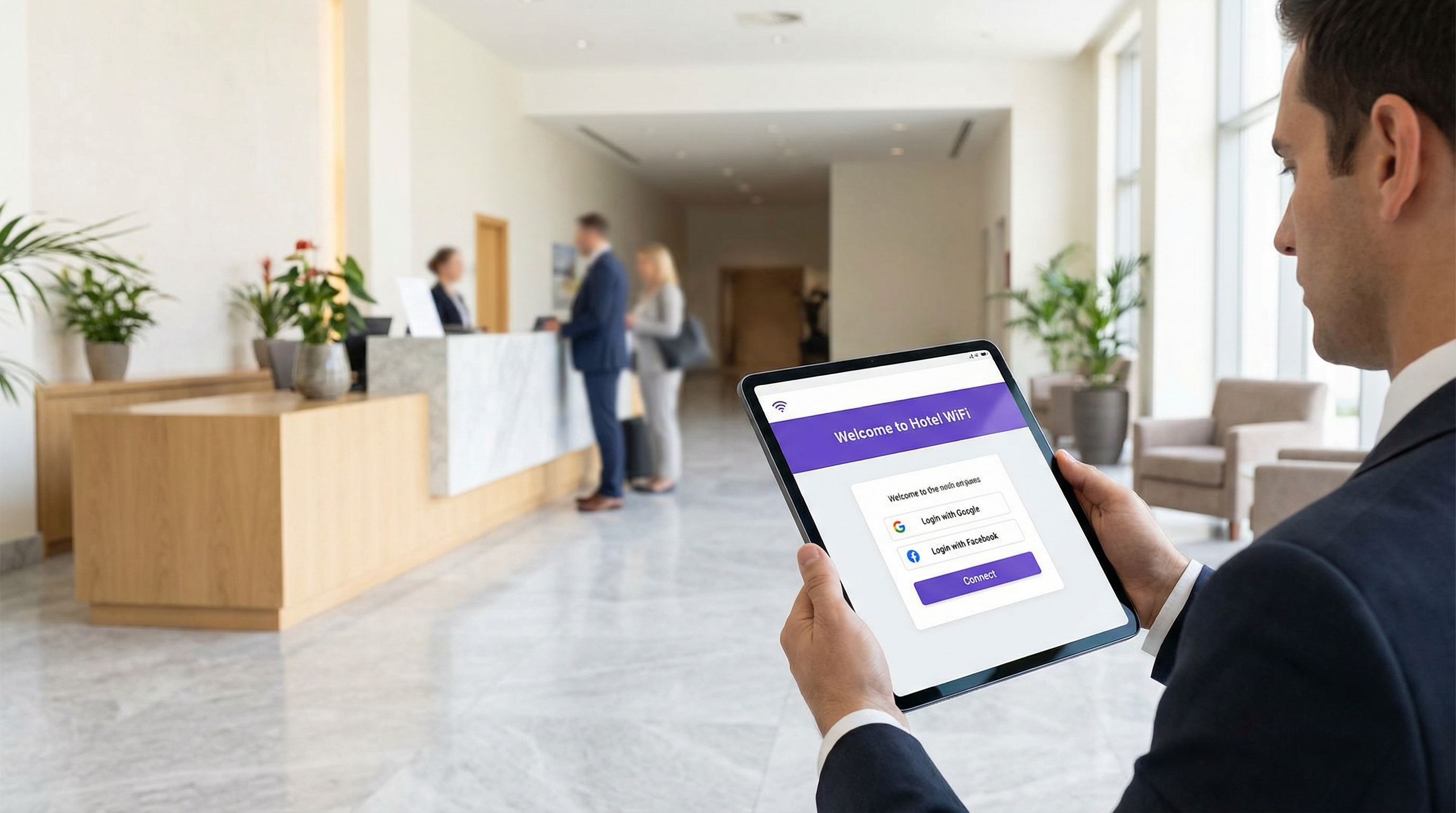
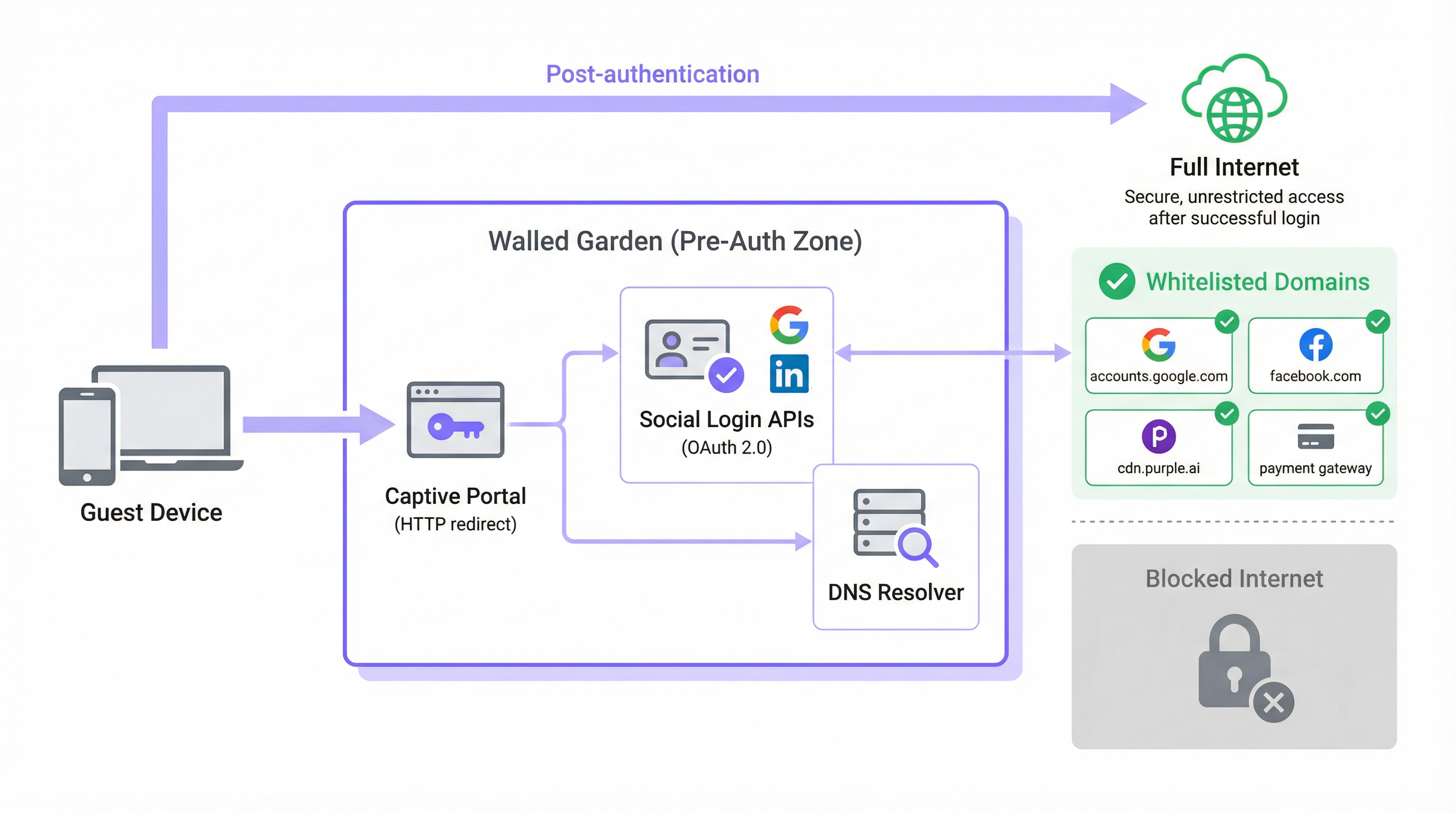
Numa arquitetura típica de WiFi para convidados, quando o dispositivo de um utilizador se associa a um SSID aberto, é-lhe atribuído um endereço IP via DHCP e é colocado numa função de pré-autenticação ou VLAN isolada pelo controlador de rede. Neste estado, o controlador interceta todo o tráfego HTTP e HTTPS de saída e redireciona-o para a página inicial do Captive Portal. Este é o mecanismo que força o browser do convidado a apresentar o ecrã de início de sessão. O walled garden é a exceção explícita a esta regra de interceção: uma lista de permissões (whitelist) selecionada de domínios externos e intervalos de endereços IP com os quais o dispositivo tem permissão para comunicar livremente durante a fase de pré-autenticação.
Sem um walled garden devidamente configurado, os próprios serviços necessários para concluir a autenticação são bloqueados. Os Captive Portals modernos não são aplicações monolíticas e autónomas. São compostos por microsserviços e APIs de terceiros. Os próprios ativos do portal — HTML, CSS, JavaScript e imagens — podem ser fornecidos por uma Content Delivery Network (CDN) totalmente separada da infraestrutura local do controlador. A funcionalidade de início de sessão social depende do acesso a endpoints OAuth 2.0 na Google, Facebook, Apple ou Microsoft. Se for oferecido um nível de WiFi pago, o portal deve comunicar com um processador de pagamentos, como o Stripe ou o PayPal. As plataformas de análise e marketing podem carregar scripts de rastreamento a partir das suas próprias origens de CDN. Cada uma destas dependências representa um domínio que deve ser explicitamente permitido no walled garden, caso contrário, o fluxo de autenticação falhará silenciosamente ou apresentará um erro confuso.
O Problema da Resolução de DNS
O aspeto tecnicamente mais complexo da configuração do walled garden é a lacuna entre a administração baseada em domínios e a aplicação baseada em IP. Embora os administradores de rede configurem o walled garden utilizando nomes de domínio legíveis por humanos (por exemplo, accounts.google.com), a maioria dos controladores de rede aplica estas regras na camada IP. Quando um domínio é adicionado à lista de permissões, o controlador executa uma pesquisa de DNS para resolvê-lo num ou mais endereços IP e adiciona esses IPs a uma lista de controlo de acesso (ACL) temporária.
Isto cria um risco operacional significativo com os principais fornecedores de cloud. A Google, a Meta, a Apple e as principais CDNs utilizam encaminhamento anycast e atribuição dinâmica de endereços IP. O endereço IP para o qual accounts.google.com é resolvido no momento da configuração pode ser totalmente diferente do endereço para o qual será resolvido seis meses depois, ou mesmo num segmento de rede diferente. Uma lista de permissões de IP estática não é, portanto, uma configuração sustentável; degradar-se-á ao longo do tempo à medida que os intervalos de IP da CDN rodam.
A solução correta é a resolução dinâmica de DNS, onde o controlador de rede volta a resolver periodicamente cada domínio na lista de permissões e atualiza as suas ACLs em conformidade. A maioria dos controladores de nível empresarial da Cisco, Aruba, Ruckus e Fortinet suporta esta funcionalidade nativamente. Se o seu controlador não o fizer, estará a operar com uma configuração que produzirá falhas intermitentes difíceis de diagnosticar e que se agravarão ao longo do tempo.
Interceção de HTTPS e Conformidade TLS
Uma camada adicional de complexidade surge da prevalência do HTTPS. Quando um dispositivo de convidado no estado de pré-autenticação tenta carregar um recurso HTTPS que não está na lista de permissões, o controlador deve decidir como lidar com o pedido. Existem duas abordagens comuns, ambas com desvantagens significativas se não forem geridas corretamente.
A primeira abordagem é o descarte silencioso (silent drop), onde o controlador simplesmente bloqueia a ligação. O browser do convidado apresenta um erro genérico de "não é possível aceder ao site", que não fornece qualquer orientação útil e é frequentemente interpretado como uma falha de rede em vez de um pedido do portal. A segunda abordagem é a interceção de HTTPS, onde o controlador tenta apresentar um redirecionamento para o Captive Portal. Isto exige que o controlador atue como um proxy man-in-the-middle (MITM), apresentando o seu próprio certificado TLS. Se este certificado não for de confiança para o dispositivo do convidado — o que quase nunca acontece numa rede pública de convidados — o browser apresentará um aviso de segurança, o que é alarmante para os utilizadores e, em ambientes regulamentados, pode constituir um problema de conformidade.
A abordagem arquitetónica correta é garantir que todos os domínios necessários para o fluxo de autenticação estão na lista de permissões, permitindo que o seu tráfego HTTPS passe intacto. O redirecionamento do Captive Portal deve ser acionado pelo mecanismo de sondagem (probe) ao nível do sistema operativo, em vez da interceção de HTTPS. Isto elimina totalmente o problema de confiança do certificado. Os browsers modernos também implementam o HTTP Strict Transport Security (HSTS) e, em alguns casos, o certificate pinning. Ambos os mecanismos farão com que a interceção de HTTPS falhe completamente para os principais domínios, produzindo uma ligação quebrada em vez de um redirecionamento — outro forte argumento a favor de um walled garden corretamente configurado em detrimento de uma política ampla de interceção de HTTPS.
Captive Network Assistant (CNA) e Domínios de Sondagem do SO
Um dos aspetos mais frequentemente negligenciados na configuração do walled garden é o mecanismo pelo qual os sistemas operativos modernos detetam a presença de um Captive Portal. Todos os principais sistemas operativos — iOS, iPadOS, macOS, Android e Windows — implementam um Captive Network Assistant (CNA) que sonda um endpoint HTTP conhecido imediatamente após a ligação a uma nova rede WiFi. Se a resposta divergir do valor esperado, o SO deduz que está atrás de um Captive Portal e inicia automaticamente uma janela do browser para processar o início de sessão.
Os endpoints de sondagem utilizados por cada plataforma são os seguintes:
| Sistema Operativo | Domínio de Sondagem | Resposta Esperada |
|---|---|---|
| Apple (iOS, macOS) | captive.apple.com |
HTTP 200 com corpo específico |
| Android (Google) | connectivitycheck.gstatic.com |
HTTP 204 No Content |
| Windows | www.msftconnecttest.com |
HTTP 200 com corpo específico |
| Firefox / Mozilla | detectportal.firefox.com |
HTTP 200 com corpo específico |
Se algum destes domínios de sondagem for bloqueado pelo walled garden, o SO nunca detetará o Captive Portal. Do ponto de vista do convidado, a rede WiFi simplesmente não tem acesso à Internet. Esta é uma das falhas de configuração incorreta mais comuns observadas em implementações de produção e é totalmente evitável ao incluir estes domínios na lista de permissões de base.
Guia de Implementação
Passo 1: Descoberta de Domínios de Base
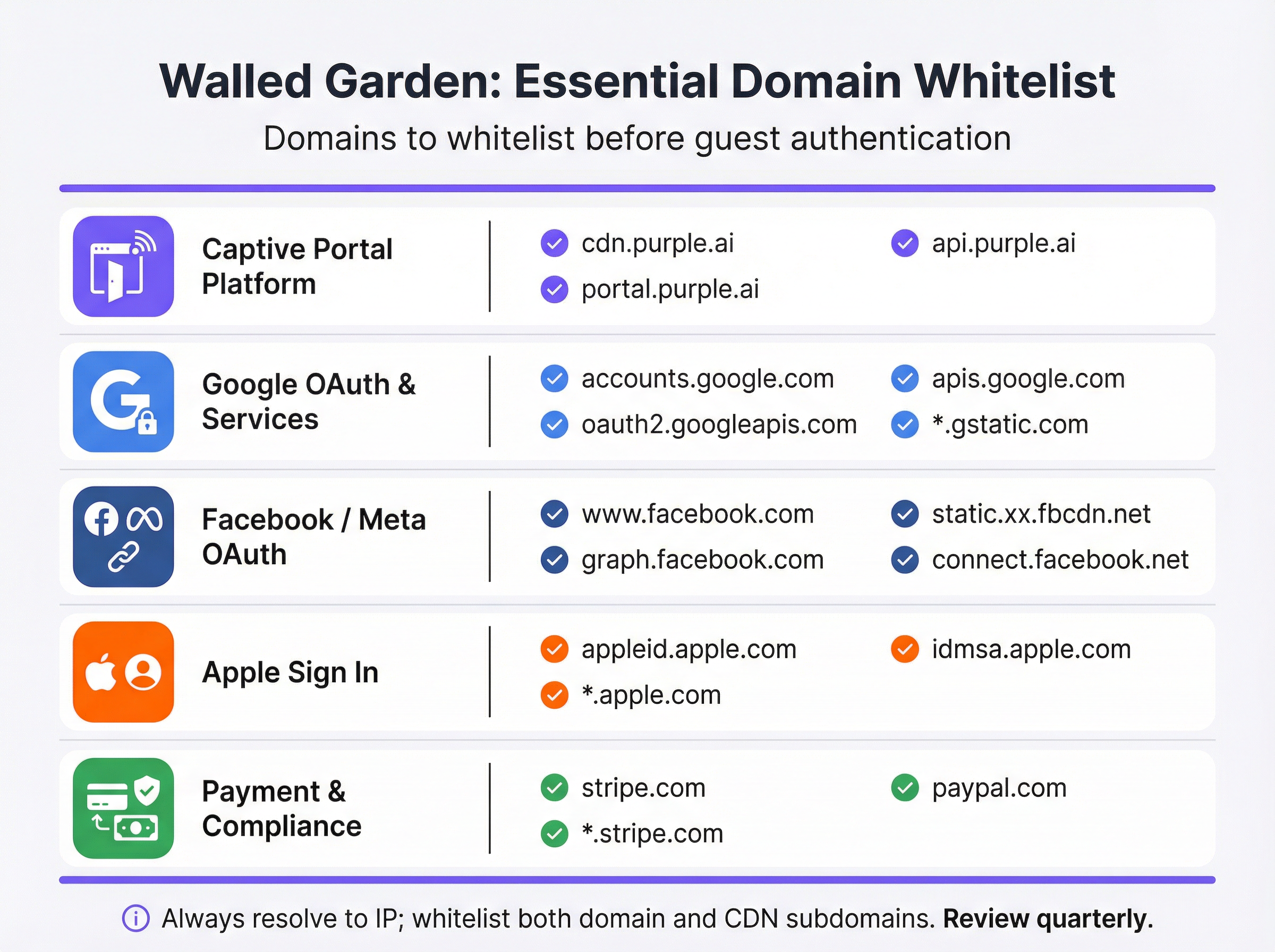
Antes de alterar a configuração do seu controlador, realize uma auditoria exaustiva a todos os serviços externos dos quais o seu Captive Portal depende. A melhor forma de o fazer é carregar o portal num browser com as ferramentas de programador abertas e inspecionar o separador de rede para identificar todos os pedidos de recursos externos. A lista resultante deve ser categorizada da seguinte forma:
| Categoria | Objetivo | Domínios Essenciais |
|---|---|---|
| Plataforma de Captive Portal | Fornece ativos da página inicial e gere a lógica de autenticação. | *.purple.ai, cdn.your-vendor.com |
| Google OAuth | Permite o Início de Sessão com o Google. | accounts.google.com, oauth2.googleapis.com, apis.google.com, *.gstatic.com |
| Facebook / Meta OAuth | Permite o Início de Sessão com o Facebook. | www.facebook.com, graph.facebook.com, connect.facebook.net, *.fbcdn.net |
| Apple Sign In | Permite o Início de Sessão com a Apple. | appleid.apple.com, idmsa.apple.com, *.apple.com |
| Sondagens de Captive Portal do SO | Permite a deteção automática do portal. | captive.apple.com, connectivitycheck.gstatic.com, www.msftconnecttest.com |
| Gateways de Pagamento | Processa pagamentos para níveis premium. | *.stripe.com, *.paypal.com |
| Análise / Marketing | Carrega scripts de rastreamento e análise. | Específico do fornecedor (ex., *.segment.com, *.mixpanel.com) |
Passo 2: Configuração do Controlador
A implementação varia consoante o fornecedor, mas os princípios subjacentes são universais. Navegue até à configuração do Captive Portal ou da página inicial na interface de gestão do seu controlador de rede — no Cisco Meraki, encontra-se em Wireless > Configure > Splash Page; no Aruba Central, é o Captive Portal Profile; na Fortinet, está em Security Policies > Captive Portal. Localize a secção de acesso de pré-autenticação ou a lista de permissões do walled garden e proceda da seguinte forma:
- Introduzir Domínios por Categoria: Adicione cada domínio da sua auditoria sistematicamente, trabalhando em cada categoria. Utilize wildcards (
*.gstatic.com) onde o seu controlador os suportar e onde o perfil de risco for aceitável. Para ambientes de alta segurança, prefira subdomínios explícitos a wildcards amplos. - Ativar a Resolução Dinâmica de DNS: Confirme que o seu controlador está configurado para voltar a resolver periodicamente os domínios na lista de permissões, em vez de armazenar em cache uma lista de IP estática. Consulte a documentação do seu fornecedor para verificar se esta opção está ativa. Defina um TTL de DNS de 60 segundos ou inferior para as entradas do walled garden.
- Configurar Regras Dual-Stack: Se a sua rede suportar IPv6 — e deveria, dado o esgotamento do espaço de endereços IPv4 — certifique-se de que as suas ACLs do walled garden se aplicam tanto ao tráfego IPv4 como ao IPv6. Um dispositivo de convidado com um endereço IPv6 irá contornar as ACLs exclusivas de IPv4.
- Aplicar ao SSID de Convidados: Associe o perfil do Captive Portal e o seu walled garden apenas ao SSID de convidados. Nunca aplique políticas de walled garden ao nível de convidados a SSIDs corporativos.

Passo 3: Protocolo de Testes Antes da Entrada em Produção
Os testes são inegociáveis e devem ser realizados com dispositivos reais num estado genuíno de pré-autenticação — não com contas de administrador que possam ter acesso elevado, nem com dispositivos que se tenham ligado anteriormente à rede e possam ter credenciais em cache.
Para cada plataforma de dispositivo (iOS, Android, Windows, macOS), execute o seguinte:
- Esquecer a rede no dispositivo de teste para garantir que não existe estado em cache.
- Ligar ao SSID de convidados e observar se o Captive Portal é iniciado automaticamente através do mecanismo CNA.
- Tentar todos os métodos de início de sessão oferecidos no portal — registo por e-mail, Início de Sessão com o Google, Início de Sessão com o Facebook, Início de Sessão com a Apple — e confirmar que cada um é concluído com êxito.
- Testar o fluxo de pagamento se for oferecido um nível pago, utilizando um número de cartão de teste do ambiente sandbox do seu gateway de pagamento.
- Inspecionar a consola do browser em qualquer teste que falhe. O separador de rede identificará o domínio exato que está a ser bloqueado, permitindo-lhe adicioná-lo à lista de permissões com precisão.
Documente os resultados deste protocolo de testes num registo de configuração que seja retido para fins de conformidade.
Melhores Práticas
O Princípio do Menor Privilégio é a regra fundamental para a configuração do walled garden. Adicione à lista de permissões apenas os domínios que são comprovadamente necessários para que o fluxo de autenticação funcione. Evite wildcards amplos, como *.google.com ou *.facebook.com, a menos que a implementação do seu controlador os exija; prefira subdomínios específicos. Cada domínio adicional na lista de permissões representa uma potencial superfície de ataque na zona de pré-autenticação.
A Cadência de Revisão Trimestral é essencial para manter um walled garden funcional ao longo do tempo. Os fornecedores de início de sessão social e as CDNs atualizam a sua infraestrutura regularmente. A Apple modificou a sua estrutura de domínios de Sign In em 2023. A Google adicionou novos subdomínios ao seu fluxo OAuth em várias ocasiões. Um walled garden que era preciso na implementação ficará desajustado em poucos meses sem manutenção ativa. Integre uma revisão trimestral no seu calendário operacional, cruzando a sua lista de permissões com a documentação atual de cada fornecedor.
O Alinhamento de Conformidade exige que a configuração do seu walled garden não viole inadvertidamente os requisitos das normas aplicáveis. Ao abrigo do PCI DSS v4.0, qualquer rede que processe, armazene ou transmita dados de titulares de cartões deve manter controlos de acesso rigorosos. Se o seu WiFi de convidados incluir um nível pago, o walled garden deve permitir ligações TLS 1.2 ou superior ao seu processador de pagamentos sem interceção. Ao abrigo do GDPR, o aviso de privacidade deve estar acessível aos convidados antes de fornecerem quaisquer dados pessoais — o que significa que a ligação para a sua política de privacidade deve estar acessível a partir do walled garden, mesmo antes da autenticação.
A Documentação de Gestão de Alterações é uma obrigação profissional para qualquer alteração de rede em produção. Cada modificação no walled garden — seja a adição de um novo domínio, a remoção de um obsoleto ou a atualização de um wildcard — deve ser registada com um carimbo de data/hora, o motivo da alteração e o engenheiro responsável. Este rasto de auditoria é inestimável para a resolução de falhas intermitentes e para demonstrar a devida diligência numa auditoria de conformidade.
Resolução de Problemas e Mitigação de Riscos
A tabela seguinte mapeia os modos de falha mais comuns para as suas causas principais e mitigações recomendadas:
| Sintoma | Causa Principal | Mitigação |
|---|---|---|
| O portal não é iniciado automaticamente no iOS/Android | Os domínios de sondagem do Captive Portal do SO estão bloqueados. | Adicione captive.apple.com e connectivitycheck.gstatic.com ao walled garden. |
| O botão de Início de Sessão com o Google não responde | Faltam um ou mais domínios Google OAuth ou CDN. | Adicione accounts.google.com, oauth2.googleapis.com, apis.google.com e *.gstatic.com. |
| O início de sessão no Facebook falha com um erro de CORS | Os subdomínios da CDN do Facebook (*.fbcdn.net) não estão na lista de permissões. |
Adicione entradas wildcard para *.fbcdn.net e *.facebook.com. |
| O início de sessão funciona inicialmente, mas falha intermitentemente | Lista de permissões de IP estática; os endereços IP da CDN rodaram. | Ative a resolução dinâmica de DNS no controlador. |
| Os convidados veem avisos de certificado TLS | O controlador está a intercetar tráfego HTTPS para domínios que não estão na lista de permissões. | Adicione todos os domínios necessários à lista de permissões para que o HTTPS passe ininterruptamente. |
| A página de pagamento não carrega | Os domínios da CDN ou da API do gateway de pagamento não estão na lista de permissões. | Adicione *.stripe.com ou *.paypal.com, conforme apropriado. |
| Os utilizadores de IPv6 não conseguem aceder ao portal | As ACLs do walled garden são exclusivas de IPv4. | Estenda todas as regras do walled garden para abranger os intervalos de endereços IPv6. |
Mitigação de Riscos: Excesso de Permissões (Over-Whitelisting) é um risco real e subestimado. Quando ocorrem falhas intermitentes, a resposta tentadora é adicionar entradas wildcard progressivamente mais amplas até que o problema desapareça. Esta abordagem pode resultar num walled garden que está efetivamente aberto, permitindo que convidados não autenticados acedam a grandes partes da Internet sem concluírem o fluxo de início de sessão. Isto anula o propósito do Captive Portal, prejudica a recolha de dados para fins de marketing e pode criar responsabilidade ao abrigo do GDPR se os convidados puderem aceder à rede sem consentirem com os termos e condições. Diagnostique sempre o domínio bloqueado específico antes de adicionar entradas.
ROI e Impacto no Negócio
Um walled garden corretamente implementado proporciona um valor de negócio mensurável em várias dimensões. No setor da hotelaria, uma experiência de início de sessão de WiFi de convidados perfeita está diretamente correlacionada com os índices de satisfação dos hóspedes. A pesquisa da J.D. Power identifica consistentemente o desempenho do WiFi como um dos principais impulsionadores da satisfação dos hóspedes de hotéis. Um portal que não carrega — porque o walled garden está mal configurado — cria uma primeira impressão negativa que afeta toda a experiência de estadia.
Para os operadores de retalho, o walled garden é a porta de entrada para o programa de fidelização. Cada convidado que inicia sessão com sucesso através do Captive Portal fornece uma identidade verificada que pode ser associada ao comportamento de compra, permitindo campanhas de marketing personalizadas com taxas de conversão comprovadamente superiores às da publicidade anónima. Um walled garden mal configurado que impede o início de sessão reduz diretamente o volume de dados primários (first-party data) capturados, com um impacto quantificável no ROI de marketing.
No setor de eventos — estádios, centros de conferências, pavilhões de exposições — o walled garden deve ser concebido para a escala. Em momentos de pico de carga, dezenas de milhares de dispositivos tentarão autenticar-se em simultâneo. Um walled garden que dependa de um resolvedor de DNS lento ou sobrecarregado criará um estrangulamento que se manifesta como um portal lento ou sem resposta, mesmo que a infraestrutura de rede subjacente esteja corretamente dimensionada. A implementação de um resolvedor de DNS local com cache, que seja autoritativo para os domínios do walled garden, é uma prática padrão para implementações de alta densidade.
Para as organizações do setor público, o walled garden é também um instrumento de conformidade. Ao abrigo dos Regulamentos de Redes e Sistemas de Informação (NIS) do Reino Unido e do quadro mais amplo do GDPR, as organizações devem demonstrar que o acesso a redes voltadas para o público é controlado e auditável. Um walled garden devidamente configurado, combinado com um Captive Portal em conformidade, fornece a base técnica para este rasto de auditoria.
O custo de errar na configuração do walled garden não é meramente técnico. Mede-se no volume de chamadas para o serviço de assistência, nos índices de satisfação dos convidados, na perda de dados de marketing e na potencial exposição regulamentar. O investimento na configuração e manutenção de um walled garden robusto é modesto em relação a estes riscos, e o retorno — sob a forma de taxas de adoção do portal mais elevadas, dados primários mais ricos e redução do atrito operacional — é simultaneamente mensurável e significativo.
Termos-Chave e Definições
Walled Garden
A controlled set of pre-approved domains and IP address ranges that a guest device can access on a WiFi network before completing authentication. All traffic to domains outside this list is blocked or redirected to the captive portal.
This is the foundational mechanism that allows a captive portal to function. Without it, the portal itself — and all social login providers it depends on — would be unreachable by unauthenticated devices.
Captive Portal
A web page that intercepts the internet traffic of a newly connected WiFi user and requires them to complete an action — such as logging in, accepting terms, or making a payment — before granting full network access.
The captive portal is the primary point of interaction for guests. It is the mechanism through which operators collect first-party data, enforce terms of service, and manage paid access tiers.
OAuth 2.0
An open authorisation standard that allows users to grant a third-party application limited access to their account on another service, without sharing their password. It is the protocol underpinning 'Login with Google' and 'Login with Facebook'.
Every social login option on a captive portal relies on OAuth 2.0. Each provider's OAuth endpoints must be whitelisted in the walled garden for the login flow to complete successfully.
Dynamic DNS Resolution
A network controller feature that periodically re-resolves whitelisted domain names to their current IP addresses and updates the enforcement ACLs accordingly, rather than using a static IP list.
This is essential for walled garden reliability. Without it, the IP addresses cached at deployment time will become stale as CDNs rotate their infrastructure, causing intermittent and hard-to-diagnose login failures.
Content Delivery Network (CDN)
A geographically distributed network of servers that delivers web content to users from the nearest available location, improving performance and availability.
Captive portals and social login providers rely on CDNs to serve scripts, fonts, and images. CDN subdomains (e.g., *.gstatic.com for Google, *.fbcdn.net for Facebook) must be included in the walled garden.
Captive Network Assistant (CNA)
A built-in feature of modern operating systems (iOS, Android, Windows, macOS) that automatically detects the presence of a captive portal by probing a known HTTP endpoint after connecting to a new WiFi network.
The CNA is what causes the portal login window to pop up automatically on a guest's device. If the probe domain is blocked by the walled garden, the CNA cannot detect the portal and the guest sees no login prompt.
Pre-Authentication ACL
An Access Control List applied to a network session before the user has authenticated. It defines which traffic is permitted (the walled garden) and which is blocked or redirected.
This is the technical implementation of the walled garden on enterprise network controllers. IT teams configure Pre-Authentication ACLs in the captive portal settings of their wireless controllers.
PCI DSS
The Payment Card Industry Data Security Standard is a set of security standards designed to ensure that all companies that accept, process, store, or transmit credit card information maintain a secure environment.
Relevant to any guest WiFi deployment with a paid access tier. The walled garden must permit TLS 1.2+ connections to the payment gateway without interception, and the guest network must be segmented from any cardholder data environment.
HTTP Strict Transport Security (HSTS)
A web security policy mechanism that instructs browsers to only interact with a server using HTTPS, preventing protocol downgrade attacks and cookie hijacking.
HSTS causes HTTPS interception by a captive portal controller to fail outright for major domains, as the browser refuses to accept a certificate it does not trust. This reinforces the case for a correctly configured walled garden over an HTTPS interception approach.
Estudos de Caso
A 500-room luxury hotel is deploying a new guest WiFi network using Cisco Meraki hardware and the Purple platform. They need to support Google and Facebook logins, and offer a paid premium-speed tier via Stripe. What is the minimum set of domains that must be whitelisted in the Meraki walled garden, and how should they be configured?
The following domains must be entered into the Meraki dashboard under Wireless > Configure > Splash Page > Walled Garden Ranges:
- Purple Platform: *.purple.ai (covers cdn, portal, and api subdomains)
- Google OAuth: accounts.google.com, oauth2.googleapis.com, apis.google.com, *.gstatic.com
- Facebook OAuth: www.facebook.com , graph.facebook.com, connect.facebook.net, *.fbcdn.net
- Stripe Payments: *.stripe.com
- OS Probes: captive.apple.com, connectivitycheck.gstatic.com, www.msftconnecttest.com
Cisco Meraki performs dynamic DNS resolution natively for walled garden entries, so no additional configuration is required for IP resolution. The hotel should also ensure their privacy policy URL is accessible from within the walled garden to comply with GDPR. Post-deployment, the IT team should test with a factory-reset iOS device and a factory-reset Android device to verify the full login flow for both social login methods.
A national retail chain with 200 stores is experiencing intermittent Google login failures on their guest WiFi. The failures are random — some stores are unaffected, others see failures on certain days or at certain times. The network uses Fortinet FortiGate controllers. What is the most likely root cause and how would you resolve it?
The most likely root cause is that the FortiGate walled garden is using a static IP list for Google's OAuth domains, and Google's CDN has rotated its IP addresses at some locations. The intermittent, location-specific nature of the failures is a classic indicator of CDN IP rotation — some stores' cached IP lists are still valid, others have become stale.
Resolution steps:
- Log into the FortiGate management console at an affected store and navigate to the captive portal walled garden configuration.
- Verify whether the Google OAuth domains are configured as domain names or as static IP addresses.
- If static IPs are present, replace them with domain-based entries: accounts.google.com, oauth2.googleapis.com, apis.google.com, *.gstatic.com.
- Enable the FortiGate's FQDN-based address objects with a short refresh interval (recommended: 60 seconds) to ensure dynamic DNS resolution is active.
- Roll this configuration change out to all 200 stores via FortiManager to ensure consistency.
- Monitor the affected stores for 48 hours post-change to confirm resolution.
Análise de Cenários
Q1. You are designing the guest WiFi for a new international airport terminal. The requirements include login via Google, Apple, and WeChat, plus a premium access tier sold via PayPal. What unique challenges does this scenario present for your walled garden configuration, and how would you address them?
💡 Dica:Consider the geographical and application-specific nature of WeChat's login flow, and the implications of a globally diverse user base for CDN IP resolution.
Mostrar Abordagem Recomendada
Three unique challenges arise. First, WeChat login: unlike standard web-based OAuth, WeChat's login flow on mobile devices often attempts to open the native WeChat app via a deep link rather than completing the flow in a web browser. This can break the captive portal flow entirely. The solution is to configure the portal to force a web-based QR code flow and whitelist the specific Tencent domains that serve the QR code and handle the authentication handshake (e.g., open.weixin.qq.com, wx.qq.com). Second, global CDN resolution: an international airport serves users from every region. Dynamic DNS resolution is critical, as Google, Apple, and PayPal serve their content from geographically distributed CDN nodes. The controller must re-resolve walled garden domains frequently to ensure the correct regional IP addresses are whitelisted. Third, PayPal localisation: PayPal uses country-specific domains and CDNs for localised payment experiences. In addition to *.paypal.com, you may need to whitelist *.paypalobjects.com and regional variants. A thorough audit of the PayPal checkout flow from multiple device locales is recommended before go-live.
Q2. A 60,000-seat stadium is experiencing widespread portal login failures during the first 15 minutes of every event, after which performance normalises. The infrastructure is correctly sized for the user load. What is the likely bottleneck and how would you resolve it?
💡 Dica:Think about what happens when 60,000 devices all attempt to connect and resolve the same domains simultaneously.
Mostrar Abordagem Recomendada
The bottleneck is almost certainly DNS resolution. When 60,000 devices connect simultaneously, they all attempt to resolve the same walled garden domains (portal CDN, Google OAuth, Apple Sign In, etc.) at the same time. If the upstream DNS resolver — typically the ISP's recursive resolver or a cloud DNS service — cannot handle this burst of queries, resolution latency spikes, causing the portal to appear slow or unresponsive even though the network itself is performing correctly. The performance normalises after the initial rush because the resolver's cache warms up and subsequent queries are served from cache. The solution is to deploy a local, caching DNS resolver (e.g., Unbound or a dedicated appliance) within the stadium's network infrastructure. This resolver should be pre-seeded with the walled garden domains before the event begins, so that all DNS queries for those domains are answered from local cache with sub-millisecond latency. The controller's DHCP configuration should point guest devices to this local resolver.
Q3. Your company is acquiring a chain of boutique hotels that uses a competitor's captive portal platform. You are tasked with migrating them to Purple. The existing IT team has no documentation of their current walled garden configuration. How would you approach the migration to ensure no guest-facing disruption?
💡 Dica:Before you build the new, you must understand the old. Consider both technical discovery and business requirements.
Mostrar Abordagem Recomendada
The migration should proceed in four stages. Stage 1 — Discovery: Connect a laptop to the existing guest WiFi in an unauthenticated state and use a packet capture tool (Wireshark) to record all DNS queries and HTTP/HTTPS requests made during the authentication flow. This produces a definitive list of every domain the existing portal depends on, regardless of what is or is not documented. Stage 2 — Categorisation: Map the discovered domains to the standard categories (portal platform, OAuth, CDN, OS probes, payments). Identify any non-standard domains — these may indicate custom integrations (e.g., a loyalty programme API, a local marketing platform) that must be preserved in the new configuration. Stage 3 — Parallel Deployment: Configure the Purple platform with the discovered domain list and deploy it on a test SSID alongside the existing portal. Run the full test protocol on both SSIDs simultaneously to validate that the Purple configuration is functionally equivalent. Stage 4 — Cutover: Once validated, migrate the production SSID to Purple during a low-traffic period (e.g., 3am on a weeknight). Monitor portal adoption rates and helpdesk tickets for the following 48 hours to confirm a clean cutover.
Principais Conclusões
- ✓A walled garden is the whitelist of domains accessible before guest WiFi authentication — it is the mechanism that allows the captive portal itself to function.
- ✓Incorrect walled garden configuration is the leading cause of guest login failures; the most common omission is OS captive portal probe domains (captive.apple.com, connectivitycheck.gstatic.com).
- ✓Every social login method (Google, Facebook, Apple) requires its own set of OAuth and CDN domains to be whitelisted — missing even one will cause silent failures.
- ✓Always use dynamic DNS resolution for walled garden domains; static IP lists will degrade over time as CDN providers rotate their infrastructure.
- ✓Test every login path with real, factory-reset devices before go-live — administrator accounts and previously connected devices will not reveal misconfiguration.
- ✓Schedule a quarterly review of your walled garden whitelist; OAuth providers and CDNs change their domain structures regularly without notice.
- ✓A correctly configured walled garden directly increases portal adoption rates, first-party data capture, and guest satisfaction — making it a measurable driver of marketing and operational ROI.




