

Was ist RADIUS-Authentifizierung und wie funktioniert sie?
This guide provides a definitive technical reference on RADIUS authentication for IT leaders managing enterprise and guest WiFi deployments. It demystifies the AAA protocol, explains how 802.1X and EAP methods work together, and details how Purple's cloud-based platform simplifies deployment for hotels, retail chains, stadiums, and public-sector organisations. Readers will leave with a clear implementation roadmap, real-world case studies, and the decision frameworks needed to migrate from insecure pre-shared keys to a robust, identity-driven network access control architecture.
🎧 Diesen Leitfaden anhören
Transkript anzeigen

Executive Summary
Für IT-Leiter an Standorten mit mehreren Niederlassungen – Hotels, Einzelhandelsketten, Stadien und Konferenzzentren – ist die Bereitstellung eines sicheren und zuverlässigen WiFi-Zugangs für Tausende von täglichen Nutzern ein geschäftskritischer Service, der erhebliche betriebliche und regulatorische Risiken birgt. Der veraltete Ansatz, einen einzigen Pre-Shared Key (PSK) für Gäste- und Mitarbeiternetzwerke zu verwenden, ist als Sicherheitskonzept nicht mehr vertretbar. Er setzt Unternehmen Compliance-Verstößen gemäß PCI DSS und GDPR, Betriebsstörungen und Reputationsschäden durch potenzielle Sicherheitsverletzungen aus.
Die moderne, branchenübliche Lösung besteht darin, die Netzwerkzugriffskontrolle über das RADIUS-Protokoll (Remote Authentication Dial-In User Service) zu zentralisieren. RADIUS bietet ein robustes Framework für die drei Säulen der Netzwerksicherheit – Authentifizierung, Autorisierung und Accounting (AAA) – und erzwingt einen identitätsbasierten Zugriff für jeden Benutzer und jedes Gerät. Durch die Integration in ein bestehendes Identitätsverzeichnis wie Azure AD, Google Workspace oder Okta stellt RADIUS sicher, dass sich nur autorisierte Personen verbinden können und ihr Zugriff genau auf ihre Rolle abgestimmt ist.
Dieser Leitfaden bietet einen praktischen, umsetzbaren Überblick über RADIUS, den zugrunde liegenden IEEE 802.1X-Standard und darüber, wie die WiFi-Intelligence-Plattform von Purple die Komplexität der Bereitstellung abstrahiert. Er richtet sich an Netzwerkarchitekten und IT-Manager, die Implementierungsentscheidungen in diesem Quartal und nicht erst im nächsten Jahr treffen müssen.
Technischer Deep-Dive
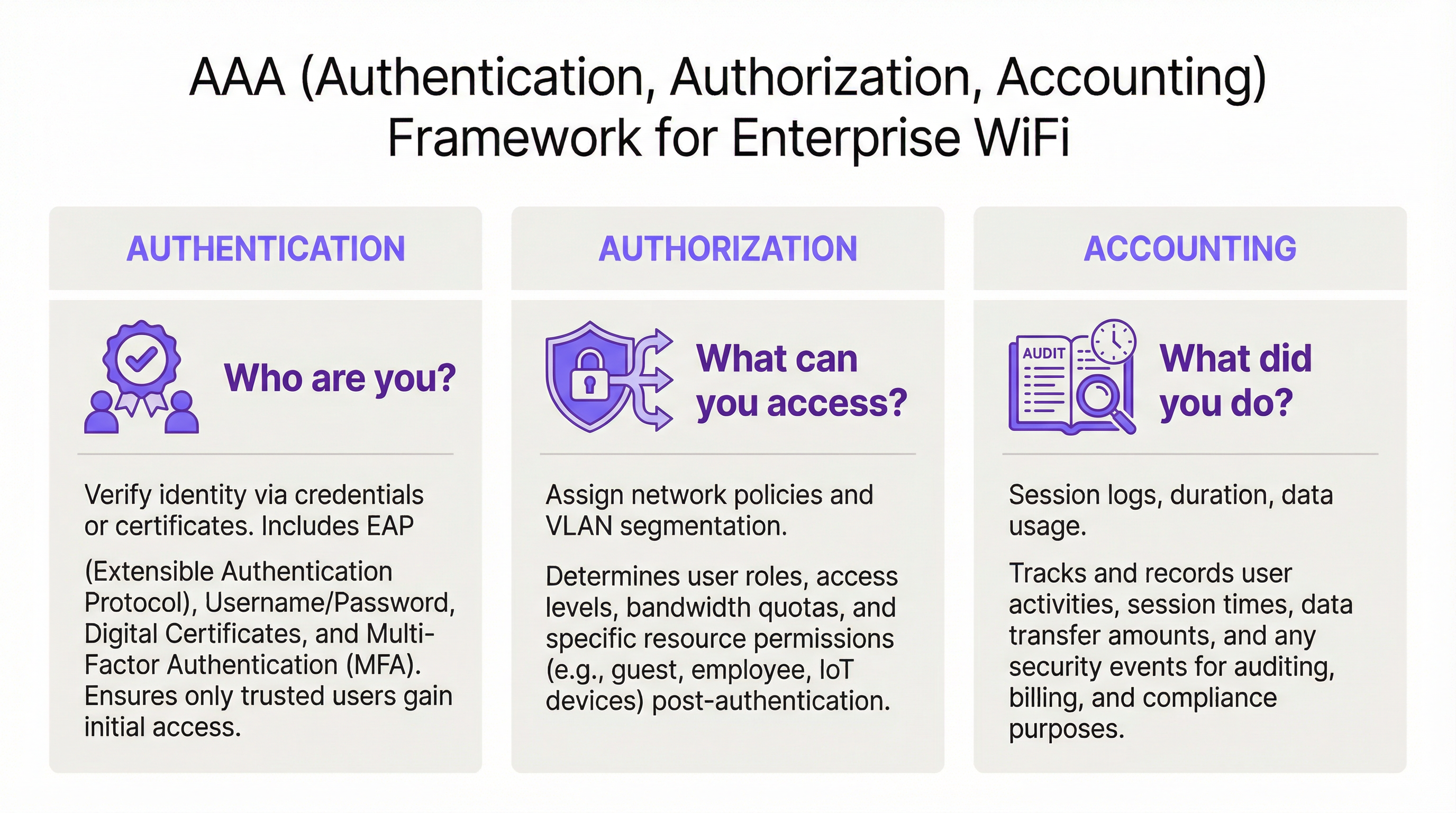
Das AAA-Framework: Authentifizierung, Autorisierung und Accounting
RADIUS basiert auf dem Client-Server-Modell und ist um das AAA-Framework aufgebaut, ein grundlegendes Konzept der Netzwerksicherheit. Das Verständnis jeder einzelnen Komponente ist für eine erfolgreiche Bereitstellung unerlässlich.
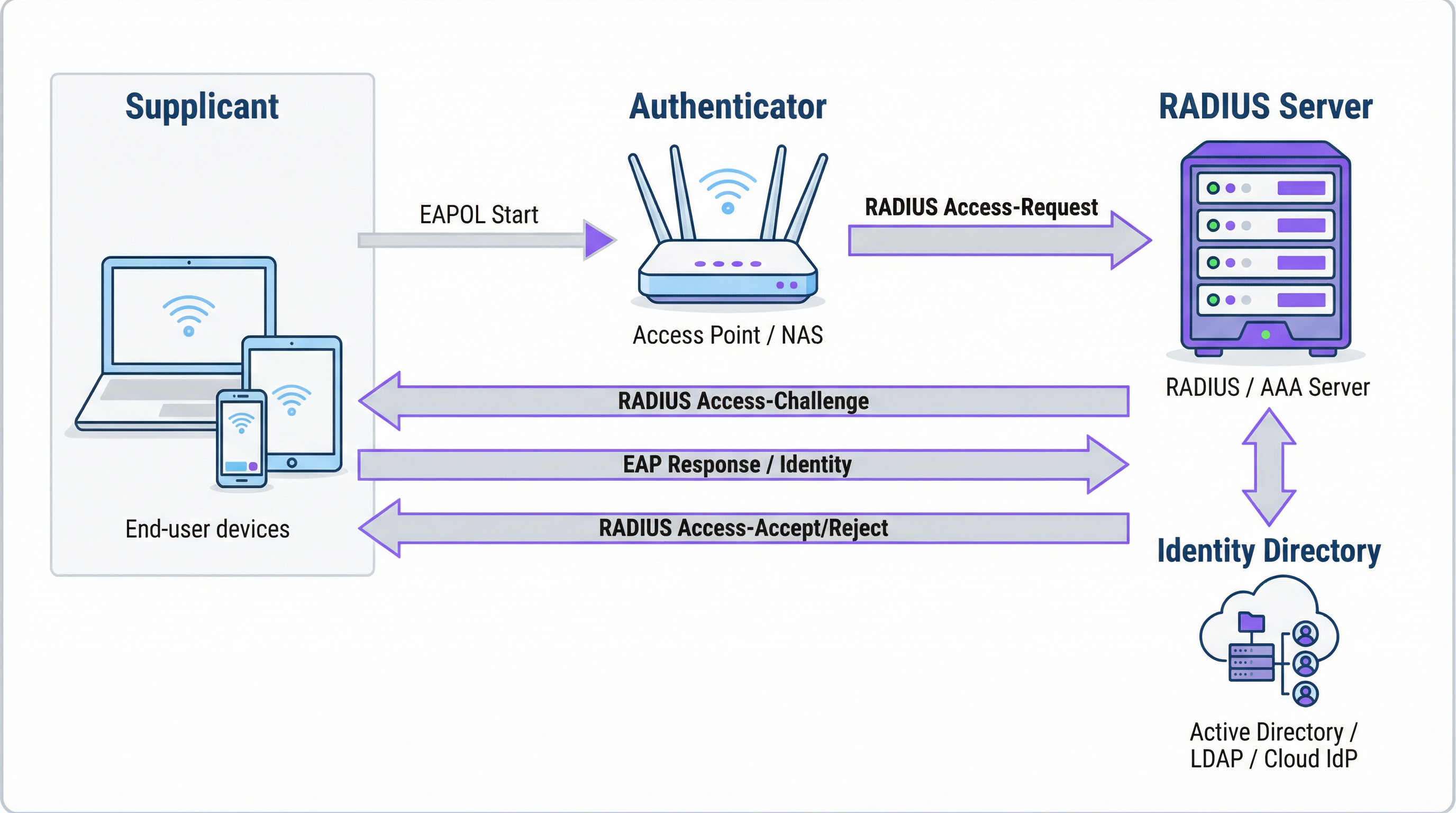
Authentifizierung ist der Prozess der Überprüfung der Identität eines Benutzers. Wenn ein Benutzer versucht, sich mit einem durch WPA2/WPA3-Enterprise gesicherten WiFi-Netzwerk zu verbinden, sendet sein Gerät – der Supplicant – Anmeldeinformationen an den Wireless Access Point – den Authenticator. Der Authenticator trifft die Zugriffsentscheidung nicht selbst; er leitet die Anfrage an den RADIUS-Server weiter. Der RADIUS-Server validiert diese Anmeldeinformationen gegen eine konfigurierte Identitätsquelle: Microsoft Active Directory, einen Cloud-IdP wie Okta oder eine lokale Benutzerdatenbank. Die Validierung kann eine Kombination aus Benutzername und Passwort verwenden oder, für eine deutlich höhere Sicherheit, ein digitales Zertifikat über eine EAP-Methode wie EAP-TLS.
Autorisierung bestimmt, was ein authentifizierter Benutzer tun darf. Basierend auf den vom Netzwerkadministrator definierten Richtlinien gibt der RADIUS-Server spezifische Attribute an den Authenticator zurück. Diese Attribute diktieren die VLAN-Zuweisung (Trennung von Gäste- und Unternehmensdatenverkehr), Bandbreitenbeschränkungen und tageszeitabhängige Zugriffsbeschränkungen. Diese granulare, dynamische Durchsetzung von Richtlinien ist einer der Hauptvorteile von RADIUS gegenüber statischen PSK-basierten Systemen.
Accounting protokolliert die Benutzeraktivität während der gesamten Sitzung. Der RADIUS-Server protokolliert Verbindungszeitstempel, Sitzungsdauer, übertragene Daten und MAC-Adressen der Geräte. Dieser Audit-Trail ist von unschätzbarem Wert für die Fehlerbehebung, Kapazitätsplanung und Compliance-Berichterstattung. Unter PCI DSS 4.0 ist die Protokollierung und Überwachung aller Zugriffe auf Netzwerkressourcen eine obligatorische Kontrollmaßnahme.
Wie RADIUS und 802.1X zusammenarbeiten
Der IEEE 802.1X-Standard definiert die portbasierte Netzwerkzugriffskontrolle. Im WiFi-Kontext ermöglicht 802.1X einem Access Point, den gesamten Datenverkehr von einem Gerät – mit Ausnahme von Authentifizierungsnachrichten – zu blockieren, bis der RADIUS-Server die Autorisierung bestätigt hat. Die Kommunikation zwischen dem Supplicant und dem Authenticator verwendet das Extensible Authentication Protocol (EAP), das über das LAN als EAPOL (EAP over LAN) übertragen wird. Der Authenticator leitet dies dann über das RADIUS-Protokoll an den RADIUS-Server weiter.
Die Wahl der EAP-Methode ist eine kritische Sicherheitsentscheidung:
| EAP-Methode | Authentifizierungstyp | Sicherheitsniveau | Empfohlener Anwendungsfall |
|---|---|---|---|
| EAP-TLS | Zertifikatsbasiert | Höchstes | Vom Unternehmen verwaltete Geräte – Goldstandard |
| PEAP-MSCHAPv2 | Anmeldeinformationsbasiert | Mittel | Windows-lastige Umgebungen beim Übergang zu Zertifikaten |
| EAP-TTLS/PAP | Anmeldeinformationsbasiert | Mittel | Gemischte OS-Umgebungen mit Unterstützung für Legacy-Geräte |
Für Unternehmensgeräte ist EAP-TLS der Zielzustand. Es verwendet eine gegenseitige Zertifikatsauthentifizierung – sowohl der Client als auch der Server legen Zertifikate vor –, wodurch Passwörter und die damit verbundenen Risiken von Diebstahl von Anmeldeinformationen und Phishing vollständig eliminiert werden.
RADIUS-Ports und Transport
Standardmäßig verwendet RADIUS den UDP-Port 1812 für Authentifizierung und Autorisierung sowie den UDP-Port 1813 für Accounting. Einige ältere Bereitstellungen verwenden die Ports 1645 und 1646. Seit RFC 6613 kann RADIUS auch über TCP mit TLS (RadSec) betrieben werden, was zunehmend in Cloud-Bereitstellungen für verbesserte Transportsicherheit eingesetzt wird.
Implementierungsleitfaden
Übergang von PSK zu RADIUS: Eine Roadmap in fünf Schritten
Schritt 1: Auswahl Ihrer RADIUS-Infrastruktur. Wählen Sie zwischen einem On-Premise-Server (Microsoft NPS für Windows-Umgebungen, FreeRADIUS für Open-Source-Bereitstellungen) oder einem cloudbasierten RADIUS-Dienst. Für Unternehmen mit mehreren Standorten ist eine Cloud-RADIUS-Plattform wie die von Purple fast immer die richtige Wahl. Sie bietet integrierte Hochverfügbarkeit, geografische Redundanz und eliminiert den betrieblichen Aufwand der Serververwaltung.
Schritt 2: Integration Ihrer Identitätsquelle. Verbinden Sie den RADIUS-Server mit dem maßgeblichen Identitätsverzeichnis Ihres Unternehmens. Moderne Cloud-RADIUS-Plattformen unterstützen die direkte Integration mit Azure AD, Google Workspace und Okta über SAML oder LDAP. Für Gastbenutzer ist die Identitätsquelle in der Regel ein CRM, ein Property Management System (PMS) oder eine speziell entwickelte Gäste-WiFi-Plattform.
Schritt 3: Konfiguration der Netzwerk-Hardware. Erstellen Sie auf Ihrem Wireless LAN Controller oder Ihren Access Points eine neue SSID, die für WPA2-Enterprise oder WPA3-Enterprise konfiguriert ist. Verweisen Sie die SSID auf die IP-Adresse Ihres RADIUS-Servers und konfigurieren Sie das Shared Secret – ein Passwort, das die Kommunikation zwischen dem Access Point und dem RADIUS-Server verschlüsselt. Dieser Wert muss auf beiden Seiten exakt übereinstimmen; eine Abweichung ist eine der häufigsten Ursachen für anfängliche Bereitstellungsfehler.
Schritt 4: Definition von Autorisierungsrichtlinien. Erstellen Sie Regeln auf dem RADIUS-Server, die Benutzergruppen Netzwerkrichtlinien zuordnen. Ein typisches Richtlinien-Set für ein Hotel könnte Folgendes umfassen: Mitarbeiter in VLAN 10 mit vollem internen Zugriff; Auftragnehmer in VLAN 30 mit eingeschränktem Zugriff und einer Bandbreitenbegrenzung von 50 Mbit/s; Gäste in VLAN 20 mit reinem Internetzugang und einem Sitzungslimit von 8 Stunden.
Schritt 5: Onboarding von Benutzern und Geräten. Stellen Sie für Unternehmensmitarbeiter WiFi-Profile mit 802.1X-Einstellungen über Ihre MDM-Plattform bereit. Stellen Sie für Gäste ein Captive Portal bereit. Die Plattform von Purple automatisiert den Onboarding-Prozess für Gäste – mit Unterstützung für Social-Media-Logins, Registrierungsformulare und Gutscheincodes – und erstellt temporäre RADIUS-Benutzerkonten, die automatisch ablaufen.

Best Practices
Einführung von WPA3-Enterprise. Sofern die Hardware dies unterstützt, bietet WPA3-Enterprise erhebliche Sicherheitsverbesserungen gegenüber WPA2-Enterprise, einschließlich Protected Management Frames (PMF) und einer stärkeren Verschlüsselung über den 192-Bit-Sicherheitsmodus. Führen Sie ein Hardware-Audit durch, um Access Points zu identifizieren, die Firmware-Updates oder einen Austausch erfordern.
Implementierung von EAP-TLS für Unternehmensgeräte. Die zertifikatsbasierte Authentifizierung eliminiert das Passwort als Schwachstelle. Integrieren Sie Ihren RADIUS-Server in Ihre PKI oder verwenden Sie eine cloudbasierte Zertifikatsmanagement-Lösung. Automatisieren Sie die Zertifikatsbereitstellung über MDM, um den IT-Aufwand zu minimieren.
Durchsetzung der VLAN-Segmentierung. Die dynamische VLAN-Zuweisung über RADIUS ist für die PCI-DSS-Compliance und die Zero-Trust-Architektur nicht verhandelbar. Stellen Sie sicher, dass Ihre Netzwerk-Switches und Firewalls Inter-VLAN-Routing-Richtlinien durchsetzen, die verhindern, dass der Datenverkehr von Gästen auf Unternehmensressourcen zugreift.
Bereitstellung einer redundanten RADIUS-Infrastruktur. Konfigurieren Sie mindestens einen primären und einen sekundären RADIUS-Server auf Ihren Access Points. Cloud-RADIUS-Plattformen bieten dies in der Regel automatisch. Testen Sie das Failover regelmäßig.
Fehlerbehebung und Risikominderung
| Fehlermodus | Grundursache | Lösung |
|---|---|---|
| Alle Benutzer abgelehnt | Shared Secret stimmt zwischen AP und RADIUS-Server nicht überein | Überprüfen Sie das Shared Secret sowohl in der AP- als auch in der RADIUS-Server-Konfiguration |
| Zertifikatsfehler auf Client-Geräten | RADIUS-Serverzertifikat wird vom Client nicht vertraut | Installieren Sie das Root-CA-Zertifikat auf allen Client-Geräten über MDM |
| Sporadische Authentifizierungsfehler | RADIUS-Server überlastet oder nicht erreichbar | Implementieren Sie einen sekundären RADIUS-Server; überprüfen Sie die Serverkapazität |
| Gastportal leitet nicht weiter | Fehlkonfiguration des Walled Garden | Stellen Sie sicher, dass die Portal-URL und die Domains der Social-Login-Anbieter im Walled Garden enthalten sind |
| Benutzer können sich nach Ablauf der Sitzung nicht wieder verbinden | Accounting-Sitzung nicht ordnungsgemäß beendet | Überprüfen Sie die RADIUS-Accounting-Konfiguration; prüfen Sie auf veraltete Sitzungen |
ROI und geschäftliche Auswirkungen
Der Business Case für die RADIUS-Bereitstellung ist in mehrfacher Hinsicht überzeugend. Die Reduzierung von Sicherheitsrisiken ist der unmittelbarste Vorteil: Der Ersatz eines gemeinsamen PSK durch identitätsbasierten Zugriff eliminiert den häufigsten Vektor für WiFi-basierte Netzwerkeinbrüche und vermeidet potenziell Kosten für Sicherheitsverletzungen, die sich für britische Unternehmen auf durchschnittlich 3,4 Millionen Pfund belaufen. Die Sicherstellung der Compliance gemäß PCI DSS, GDPR und branchenspezifischen Vorschriften wird durch die Kombination aus identitätsbasierter Zugriffskontrolle und umfassenden Accounting-Protokollen erreicht. Die Gewinne bei der betrieblichen Effizienz sind in großen Bereitstellungen erheblich – zentralisiertes Richtlinienmanagement bedeutet, dass das Onboarding eines neuen Benutzers oder der Entzug des Zugriffs für einen ausscheidenden Mitarbeiter eine einzige Aktion im Identitätsverzeichnis ist und keine manuelle Neukonfiguration über Dutzende von Access Points hinweg erfordert. Schließlich liefern die von RADIUS generierten Accounting-Daten verwertbare Erkenntnisse für die Kapazitätsplanung, sodass Entscheidungen über Infrastrukturinvestitionen auf tatsächlichen Nutzungsdaten statt auf Schätzungen basieren können.
Schlüsselbegriffe & Definitionen
RADIUS (Remote Authentication Dial-In User Service)
A networking protocol, standardised in RFC 2865, that provides centralised Authentication, Authorization, and Accounting (AAA) management for users connecting to a network service. It operates on a client-server model, where the Network Access Server (NAS) is the client and the RADIUS server is the decision-making authority.
This is the core engine of enterprise WiFi security. When an IT manager talks about 'moving to 802.1X', they are almost always talking about deploying a RADIUS server.
802.1X
An IEEE standard for port-based Network Access Control (PNAC). It defines the encapsulation of the Extensible Authentication Protocol (EAP) over IEEE 802 networks, enabling an authenticator (e.g., a WiFi access point) to enforce authentication before granting network access.
This is the standard that makes RADIUS work for WiFi. When configuring an SSID for 'WPA2-Enterprise', you are enabling 802.1X on that SSID.
AAA (Authentication, Authorization, Accounting)
A security framework for intelligently controlling access to computer resources, enforcing policies, and auditing usage. Authentication verifies identity, Authorization determines permitted actions, and Accounting records activity.
RADIUS servers are often called 'AAA servers'. Understanding this framework is the conceptual foundation for all network access control design.
Supplicant
In the 802.1X framework, the Supplicant is the client device — a laptop, smartphone, or IoT device — that is requesting access to the network. The supplicant software on the device handles the EAP authentication exchange.
When troubleshooting authentication failures, the supplicant configuration (e.g., the WiFi profile on a laptop) is often the source of the problem.
Authenticator
In the 802.1X framework, the Authenticator is the network device — typically a wireless access point or an Ethernet switch — that enforces access control. It relays EAP messages between the Supplicant and the Authentication Server but does not make the authentication decision itself.
The access point is a relay, not a decision-maker. This is a critical distinction: the AP's job is to forward the request to RADIUS and then act on the response.
EAP (Extensible Authentication Protocol)
An authentication framework defined in RFC 3748 that supports multiple authentication methods. EAP itself does not define a specific authentication mechanism; instead, it provides a standard format for negotiating and carrying various EAP methods (e.g., EAP-TLS, PEAP, EAP-TTLS).
When configuring 802.1X, you must choose an EAP method. The choice between EAP-TLS (certificates) and PEAP (passwords) is one of the most consequential security decisions in a WiFi deployment.
EAP-TLS (EAP Transport Layer Security)
A certificate-based EAP method that provides mutual authentication between the client and the RADIUS server using X.509 digital certificates. It is widely regarded as the most secure EAP method, as it eliminates passwords entirely.
EAP-TLS is the gold standard for corporate device authentication. Deploying it requires a Public Key Infrastructure (PKI) to issue and manage client certificates, which is why cloud-based certificate management solutions are increasingly popular.
Captive Portal
A web page that intercepts a user's connection to a public WiFi network, requiring them to complete an action — such as accepting terms of service, entering credentials, or authenticating via a social media account — before internet access is granted.
Captive portals work in conjunction with RADIUS for guest WiFi. The portal is the user-facing interface; RADIUS is the back-end authentication engine that validates the user's session and enforces access policies.
VLAN (Virtual Local Area Network)
A logical network segment created within a physical network infrastructure. VLANs allow network administrators to segregate traffic from different user groups — such as guests, staff, and IoT devices — even when they share the same physical hardware.
Dynamic VLAN assignment via RADIUS is the mechanism that enables network segmentation in enterprise WiFi. It is a fundamental requirement for PCI DSS compliance and Zero Trust architecture.
Shared Secret
A password configured on both the RADIUS client (the access point) and the RADIUS server to authenticate their communication and encrypt RADIUS attribute values. It must be identical on both sides.
A shared secret mismatch is one of the most common causes of RADIUS authentication failures during initial deployment. Always copy-paste rather than manually type this value.
Fallstudien
A 500-room hotel needs to provide secure WiFi for guests, conference attendees, and staff. Guests should have a frictionless onboarding experience, while staff require secure access to internal property management and point-of-sale systems. The hotel uses Oracle OPERA as its Property Management System (PMS).
Deploy Purple's cloud RADIUS platform integrated with the hotel's Oracle OPERA PMS. Provision three separate SSIDs: 'Hotel-Guest', 'Conference-WiFi', and 'Staff-Internal'. The 'Staff-Internal' SSID is configured for WPA3-Enterprise with EAP-TLS. Digital certificates are deployed to all hotel-owned devices via an MDM platform (e.g., Jamf or Microsoft Intune), enabling passwordless, seamless authentication for staff. The 'Hotel-Guest' SSID uses a branded captive portal integrated with OPERA. At check-in, OPERA automatically creates a temporary RADIUS user account with credentials valid for the duration of the guest's stay. The guest receives a QR code or a welcome email with a direct connection link. The 'Conference-WiFi' SSID uses a voucher-based system within Purple's platform, allowing event coordinators to generate unique, time-limited access codes for their attendees. All three SSIDs use dynamic VLAN assignment to enforce strict traffic segmentation.
A retail chain with 200 stores across the UK wants to replace its insecure, shared-password guest WiFi network. The marketing team requires opt-in demographic data from store visitors to support targeted campaigns. The IT team uses Azure Active Directory for all corporate identity management.
Deploy Purple's cloud RADIUS and guest WiFi platform across all 200 stores using a centralised, templated configuration. For guest access, configure a branded captive portal on a dedicated guest SSID. The portal offers authentication via social media accounts (Facebook, Google) or a simple registration form, capturing opt-in marketing consent in compliance with GDPR. Purple's platform aggregates this data into a centralised analytics dashboard, providing the marketing team with visitor demographics, dwell times, and repeat visit rates. For corporate staff, integrate the RADIUS server with the existing Azure AD tenant. Staff connect to a separate 'Staff' SSID using their Azure AD credentials via PEAP, with a phased migration plan to EAP-TLS with certificates for the highest-risk roles. All guest traffic is isolated on a dedicated VLAN with no access to the store's internal network or EPOS systems, meeting PCI DSS network segmentation requirements.
Szenarioanalyse
Q1. You are the IT architect for a large conference centre. A major technology company is renting your venue for a three-day conference with 5,000 attendees. The client has a hard requirement that attendees can connect to a secure, high-performance WiFi network without manually entering a password each day. The client uses Okta as their identity provider. How would you design the authentication solution?
💡 Hinweis:Consider how to provide a seamless, passwordless experience for a large number of users from a single external organisation. Think about certificate-based authentication and how to integrate with a third-party identity provider for a time-limited event.
Empfohlenen Ansatz anzeigen
The optimal solution is to provision a dedicated SSID for the conference configured for WPA3-Enterprise with EAP-TLS. Integrate your cloud RADIUS platform with the client's Okta tenant via SAML federation for the duration of the event. Before the conference opens, attendees are directed to a one-time onboarding portal where they authenticate with their Okta credentials. Upon successful authentication, a unique digital certificate is generated and installed on their device. For the remainder of the conference, their device automatically and securely connects to the SSID without any further user interaction. The certificates are issued with a validity period matching the conference duration and are automatically revoked at close. This delivers a seamless, passwordless experience while maintaining strong security, and it leverages the client's existing identity infrastructure rather than creating a separate credential system.
Q2. A private hospital needs to provide WiFi for patients and visitors, but must ensure this traffic is completely isolated from the network used for clinical systems, electronic health records, and medical devices, to comply with HIPAA and NHS DSP Toolkit requirements. What RADIUS feature is most critical to achieving this isolation, and how would you configure it?
💡 Hinweis:Focus on the Authorization pillar of the AAA framework. The key is not just authenticating users, but controlling what they can reach after authentication. Consider how RADIUS communicates network policy to the access point.
Empfohlenen Ansatz anzeigen
The most critical feature is dynamic VLAN assignment via RADIUS authorization policies. You would create a dedicated 'Patient-Guest' VLAN (e.g., VLAN 50) on the network infrastructure, configured with firewall rules that permit only internet access and explicitly deny all traffic to the clinical network VLANs. On the RADIUS server, create an authorization policy that assigns any user authenticating to the patient WiFi SSID to VLAN 50, regardless of their credentials. The RADIUS server communicates this assignment to the access point via the Tunnel-Type, Tunnel-Medium-Type, and Tunnel-Private-Group-ID attributes in the Access-Accept message. The access point then places the user's traffic into VLAN 50 at the point of connection. This ensures that even if a patient's device is compromised, it has no network path to clinical systems — a fundamental requirement for HIPAA compliance and clinical network security.
Q3. Your organisation has deployed 802.1X with RADIUS across its corporate estate. An employee reports that they cannot connect to the corporate WiFi from their new laptop, but they can connect successfully from their smartphone and from their previous laptop. The IT helpdesk has confirmed the employee's account is active in Azure AD. What is your diagnostic approach, and what are the three most likely root causes?
💡 Hinweis:The issue is device-specific, not user-specific — the user can authenticate from other devices. This narrows the problem to the device configuration, the device's certificate, or the device's supplicant settings. Start with the RADIUS server logs.
Empfohlenen Ansatz anzeigen
The diagnostic approach is to first examine the RADIUS server's authentication logs for Access-Reject messages corresponding to the MAC address of the new laptop. The rejection reason code will identify the root cause. The three most likely causes are: (1) Missing or invalid client certificate — if the deployment uses EAP-TLS, the new laptop may not yet have had a certificate provisioned via MDM. Check whether the device is enrolled in the MDM platform and whether the certificate deployment policy has been applied. (2) Incorrect WiFi profile — the new laptop may have the wrong 802.1X supplicant settings, such as the wrong EAP method, an incorrect RADIUS server certificate trust configuration, or the wrong username format. Verify the WiFi profile matches the standard corporate template. (3) Device not yet registered in the identity directory — some RADIUS policies perform a device compliance check against Azure AD. If the new laptop has not yet completed Azure AD join and device registration, it may fail this check even though the user's account is active.
Wichtigste Erkenntnisse
- ✓RADIUS is the industry-standard protocol for centralised network access control, implementing the AAA (Authentication, Authorization, Accounting) framework to manage who can access your WiFi, what they can do, and to log all activity.
- ✓It replaces insecure pre-shared keys (PSKs) with robust, identity-based authentication, ensuring every user and device has a unique, verifiable identity on the network.
- ✓IEEE 802.1X is the standard that enables RADIUS to work with WiFi access points, blocking all network traffic from a device until the RADIUS server has confirmed authorisation.
- ✓EAP-TLS (certificate-based authentication) is the gold standard for corporate devices, eliminating passwords entirely and providing the strongest protection against credential theft and phishing.
- ✓Dynamic VLAN assignment via RADIUS authorization policies is the mechanism that enforces network segmentation — a mandatory control for PCI DSS compliance and a cornerstone of Zero Trust architecture.
- ✓For guest WiFi, RADIUS works in conjunction with a captive portal: the portal handles the user-facing onboarding experience, while RADIUS manages the back-end authentication and session policy enforcement.
- ✓Cloud-based RADIUS platforms such as Purple simplify deployment, provide built-in high availability, and integrate directly with modern identity providers (Azure AD, Google Workspace, Okta), making enterprise-grade network access control accessible for organisations of all sizes.




