
RadSec: How RADIUS over TLS Improves WiFi Authentication Security
This authoritative technical reference explains how RadSec (RFC 6614) secures enterprise WiFi authentication by wrapping traditional RADIUS traffic in TLS encryption. Designed for IT managers and network architects, it covers architecture, deployment strategies, and practical steps to mitigate the risks of unencrypted UDP RADIUS traffic across corporate and guest networks.
Video overview
Listen to this guide
View podcast transcript
Part of our core series: Enterprise WiFi Security Guide →
RadSec Architecture Advisor: RADIUS over TLS Evaluator
Model TCP port 2083 TLS encapsulation overhead against legacy UDP RADIUS across WAN circuits. Calculate EAP-TLS handshake latencies, eliminate packet fragmentation black holes, and audit RFC 6614 trust.
Protocol Architecture: RadSec (RFC 6614) vs Legacy RADIUS (RFC 2865)
| Security & Network Vector | RadSec (RFC 6614 / TLS 1.3) | Legacy RADIUS (RFC 2865 / UDP) |
|---|---|---|
| Transport & Port | TCP Port 2083 (Stateful stream) | UDP Ports 1812 / 1813 (Stateless datagrams) |
| Payload Cryptography | TLS 1.3 Mutual Authentication (mTLS) with AEAD ciphers | Pre-Shared Key with MD5 hashing (RFC 2865 BlastRADIUS exposure) |
| MTU & Packet Fragmentation | TCP PMTU Discovery eliminates UDP fragmentation black holes | Large EAP-TLS certificate chains fragment over 1500 bytes and drop on WAN |
| Firewall Traversal & NAT | Single outbound TCP connection; state table persists cleanly | Requires bi-directional UDP NAT pinholes prone to 30s timeout aging |
| Packet Loss Recovery | TCP fast retransmission within 1 to 2 RTTs (~70 ms) | Controller retry timeout (typically 3,000 to 5,000 ms per drop) |
| Connection Model | Long-lived persistent TCP connection pool with keep-alive | Per-packet datagrams with independent identifier tracking |
The BlastRADIUS vulnerability exploits MD5 collisions in standard RFC 2865 Access-Request packets to forge an Access-Accept without the shared secret. RadSec protects the entire RADIUS protocol inside TLS 1.3 encryption, rendering man-in-the-middle packet injection impossible across untrusted internet WAN links.
Migrating Enterprise WiFi to Cloud RADIUS & RadSec?
Purple Cloud RADIUS delivers turnkey RFC 6614 RadSec termination, automated Intune and Jamf SCEP certificate enrolment, and zero on-prem server maintenance.
Executive Summary
Traditional RADIUS over UDP (ports 1812/1813) was not designed for the modern enterprise threat landscape. Relying solely on a shared secret and MD5 hashing, it leaves authentication credentials and session attributes vulnerable to interception, particularly when traversing public networks or large distributed estates like hospitality and retail chains. RadSec (RADIUS over TLS, RFC 6614) solves this fundamental security gap by encapsulating RADIUS traffic within a TCP-based TLS 1.3 tunnel over port 2083.
For CTOs and network architects, deploying RadSec is no longer just a best practice - it is a critical requirement for protecting corporate wifi, maintaining PCI DSS 4.0 compliance, and participating in modern federated roaming frameworks like OpenRoaming. This guide details the architecture, implementation patterns, and operational requirements for securing your authentication infrastructure.
Technical Deep-Dive: RADIUS vs. RadSec
The Vulnerability in Traditional RADIUS
In a standard 802.1X deployment, the access point (authenticator) forwards client credentials to the RADIUS server (authentication server). In traditional RADIUS, this payload is sent over UDP. The only protection is a pre-shared key (PSK) used to obfuscate the password via MD5.
This architecture presents three critical risks:
- Lack of Transport Encryption: User attributes, MAC addresses, and session data are transmitted in cleartext.
- Cryptographic Weakness: MD5 is vulnerable to offline dictionary attacks if an attacker captures the traffic.
- No Mutual Authentication: The access point cannot cryptographically verify it is talking to the legitimate RADIUS server, enabling rogue server attacks.
The RadSec Architecture (RFC 6614)
RadSec addresses these flaws by shifting the transport layer from UDP to TCP and wrapping the entire payload in TLS.
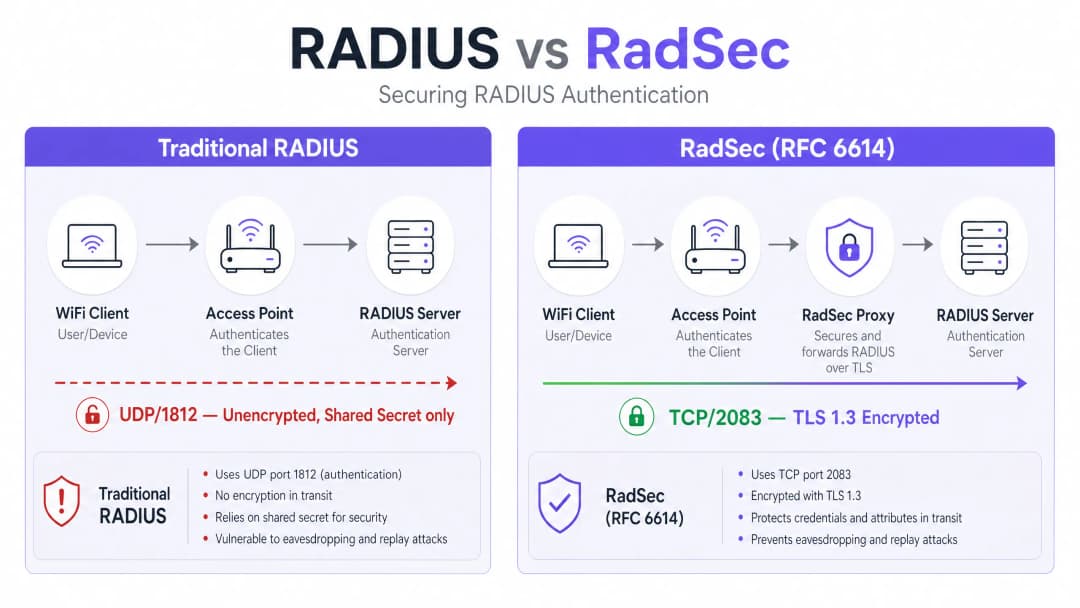
- Transport: TCP Port 2083 ensures reliable delivery and stateful connections, improving performance in high-latency environments.
- Encryption: TLS 1.2 or 1.3 provides robust, end-to-end encryption of all RADIUS attributes.
- Mutual Authentication: Both the RADIUS client (or proxy) and the server must present valid X.509 certificates issued by a trusted Certificate Authority (CA). The shared secret is retained only for backwards compatibility; TLS provides the actual security. This architecture is essential for distributed environments, such as Retail chains or Hospitality venues, where access points backhaul authentication requests over the public internet to a central or cloud-hosted RADIUS server.
Got questions about your specific setup?
Our team works with venue operators, IT managers, and network engineers across 80,000 venues. Book a 20-minute call and we will show you how others like you solved it.
Implementation Guide
Deploying RadSec typically follows one of two patterns: Native Support or Proxy-based.
Pattern 1: Native RadSec
If your infrastructure supports it natively (e.g., FreeRADIUS 3.0+, Cisco ISE, Aruba ClearPass), you configure TLS certificates directly on the RADIUS server and the access points/controllers. This provides true end-to-end encryption from the edge to the core.
Pattern 2: The RadSec Proxy
Many legacy RADIUS servers (notably Microsoft NPS) do not natively support RadSec. In these environments, a proxy (such as radsecproxy) is deployed.
- Local Leg: The AP sends standard UDP RADIUS to the local proxy.
- WAN Leg: The proxy encapsulates the traffic in TLS and sends it over TCP 2083 to the upstream server.
This pattern allows you to secure wide-area traffic without replacing legacy infrastructure.
Integration with Purple
Purple's Guest WiFi and WiFi Analytics platforms integrate seamlessly with enterprise RADIUS infrastructure. Under the Connect licence, Purple acts as a free identity provider for OpenRoaming, where RadSec is a mandatory requirement for securing federation traffic between venues and the central hub.
Best Practices
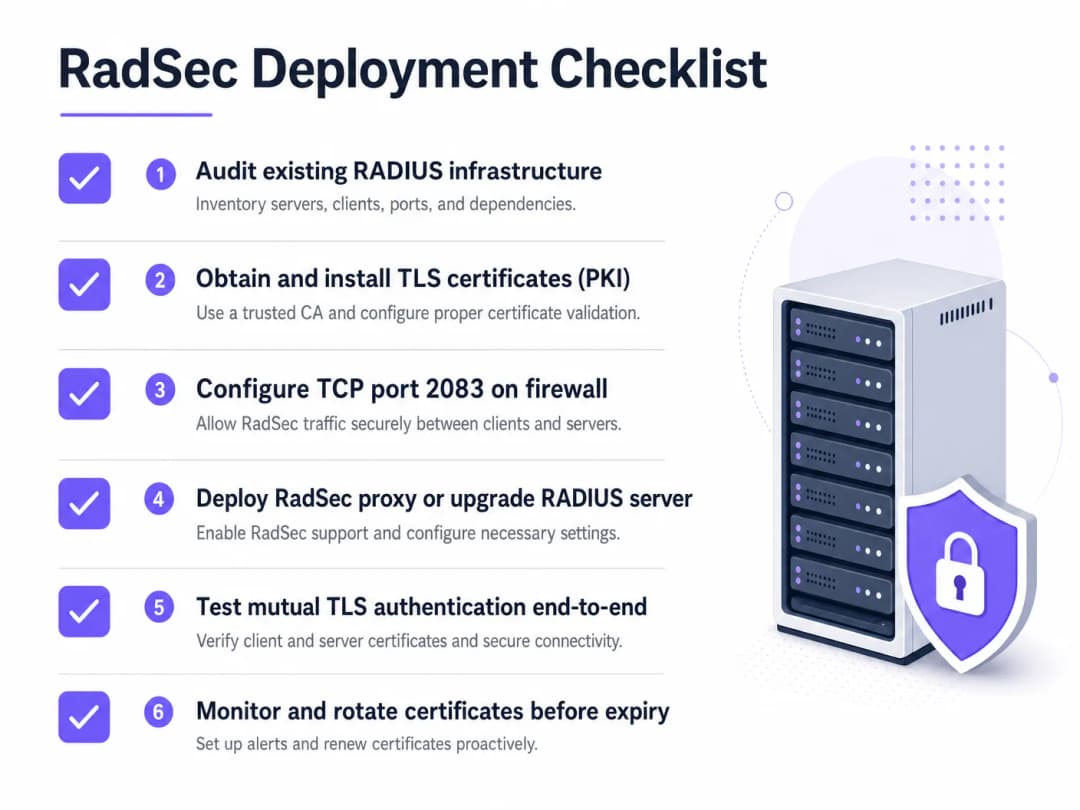
- Certificate Lifecycle Management: Mutual TLS relies on valid certificates. Implement automated renewal (e.g., via ACME) and strict monitoring. An expired certificate will cause a total authentication outage.
- Firewall Configuration: Ensure TCP port 2083 is explicitly allowed both outbound from the venue and inbound to the RADIUS server. Do not assume existing UDP 1812 rules will apply.
- Prioritise High-Risk Traffic: Begin deployment on links that traverse the public internet or untrusted WANs before moving to local management VLANs.
For more on securing the edge, read our guide on Access Point Security: Your 2026 Enterprise Guide.
Troubleshooting & Risk Mitigation
When RadSec fails, it is rarely an authentication issue; it is almost always a TLS or TCP issue.
- Symptom: Access points show as disconnected from the RADIUS server.
- Check: Firewall rules for TCP 2083. Traditional RADIUS uses UDP; network teams frequently forget to open the TCP port.
- Symptom: TCP connection establishes, but authentication fails immediately.
- Check: Certificate validation. Verify that the Common Name (CN) or Subject Alternative Name (SAN) matches, the certificate has not expired, and the client trusts the signing CA. Use
openssl s_client -connect <server>:2083to debug the handshake.
- Check: Certificate validation. Verify that the Common Name (CN) or Subject Alternative Name (SAN) matches, the certificate has not expired, and the client trusts the signing CA. Use
Ensure your network fundamentals are solid. Review our advice on Protect Your Network with Strong DNS and Security.
ROI & Business Impact
Implementing RadSec is a risk mitigation investment. The ROI is measured in the avoidance of data breaches, compliance fines (PCI DSS, GDPR), and reputational damage. Furthermore, it enables participation in modern roaming federations like OpenRoaming, which can significantly enhance the guest experience in Healthcare and Transport environments.
Listen to the Briefing
For a deeper dive into the operational realities of deploying RadSec, listen to our 10-minute technical briefing:
For specific configuration steps on client devices, refer to How to Set Up Enterprise WiFi on iOS and macOS with 802.1X.
Key Definitions
RadSec
An extension to the RADIUS protocol that encapsulates RADIUS traffic within a TLS tunnel over TCP port 2083.
Used to secure authentication traffic when traversing untrusted networks, preventing credential interception.
Mutual TLS (mTLS)
A security process where both the client and the server present X.509 certificates to verify each other's identity before establishing an encrypted connection.
The core authentication mechanism of RadSec, replacing reliance on static shared secrets.
802.1X
The IEEE standard for port-based network access control, used to authenticate devices attempting to connect to a LAN or WLAN.
The framework that relies on RADIUS (and by extension, RadSec) to validate user credentials against a directory.
radsecproxy
An open-source daemon that acts as a proxy, converting standard UDP RADIUS traffic into RadSec (TLS over TCP) and vice versa.
Deployed when native RadSec support is missing from access points or legacy RADIUS servers like Microsoft NPS.
OpenRoaming
A federation standard developed by the WiFi Alliance that allows users to seamlessly and securely connect to participating WiFi networks globally.
OpenRoaming mandates the use of RadSec to secure authentication traffic between venues and identity providers.
Shared Secret
A static text string used in traditional RADIUS to obfuscate passwords and verify the source of requests.
While still technically present in RadSec configurations for backward compatibility, it is superseded by TLS encryption.
FreeRADIUS
A widely deployed open-source RADIUS server that provides native support for RadSec.
Often used in enterprise environments and roaming federations due to its flexibility and native TLS capabilities.
PKI (Public Key Infrastructure)
The framework of roles, policies, and software needed to create, manage, distribute, and revoke digital certificates.
A prerequisite for deploying RadSec, as you must issue and manage certificates for all RADIUS clients and servers.
Worked Examples
A 200-property hotel group uses Microsoft NPS centrally for staff authentication. Access points at each hotel currently send RADIUS requests over the public internet via UDP 1812. The CTO mandates encryption for all authentication traffic, but replacing NPS is not an option this year.
Deploy a RadSec proxy (e.g., radsecproxy) at each hotel site and a corresponding proxy in the central data centre in front of the NPS servers. The local APs send UDP RADIUS to the local proxy. The local proxy establishes a mutual TLS tunnel over TCP 2083 across the internet to the central proxy. The central proxy terminates the TLS tunnel and forwards standard UDP RADIUS to the NPS server.
A large university is deploying OpenRoaming across its campus to allow seamless access for visiting academics. They are running FreeRADIUS 3.0.
Enable native RadSec within FreeRADIUS. Generate X.509 certificates from a CA trusted by the OpenRoaming federation. Configure the campus firewall to allow inbound and outbound TCP 2083 traffic to the federation hubs. Configure the wireless LAN controllers to use RadSec for all federation-bound authentication requests.
Practice Questions
Q1. Your team has deployed native RadSec between your remote branch access points and your central FreeRADIUS server. The APs can ping the server, but authentication requests are timing out completely, and no traffic is hitting the RADIUS logs.
Hint: RadSec uses a different transport protocol and port than traditional RADIUS.
View model answer
The firewall is likely blocking TCP port 2083. Network teams accustomed to traditional RADIUS often only permit UDP ports 1812/1813. You must explicitly allow TCP 2083 outbound from the branch and inbound to the RADIUS server.
Q2. You are auditing a retail client's WiFi architecture. They use Microsoft NPS centrally. Their store APs send authentication requests over the internet via an IPsec VPN. Is RadSec required here?
Hint: Consider the layers of encryption already in place.
View model answer
While RadSec is best practice, the IPsec VPN is already providing transport layer encryption for the UDP RADIUS traffic over the untrusted internet. Deploying RadSec here would provide defence-in-depth but is less urgent than if the traffic were traversing the internet natively.
Q3. A week after a successful RadSec proxy deployment, all WiFi authentication across the enterprise fails simultaneously at 09:00 AM on a Monday. The network team confirms firewall rules are unchanged.
Hint: What is the primary authentication mechanism for the TLS tunnel itself?
View model answer
The X.509 certificates used for mutual TLS authentication have likely expired. When certificates expire, the TLS handshake fails, the TCP connection drops, and RADIUS traffic cannot flow. Implement automated certificate monitoring and rotation to prevent this.
Frequently asked questions
What is RadSec (RFC 6614) and how does it differ from legacy RADIUS?
RadSec encapsulates standard RADIUS authentication, authorization, and accounting (AAA) datagrams inside a secure TLS 1.3 tunnel over TCP port 2083. Legacy RADIUS (RFC 2865) relies on connectionless UDP ports 1812 and 1813 with MD5-hashed shared secrets, exposing packets to eavesdropping, packet alteration, and UDP fragmentation. RadSec introduces mutual TLS (mTLS) certificate validation, connection keep-alives, and encrypted WAN transport between wireless controllers and cloud RADIUS servers.
How does RadSec protect enterprise WiFi against the BlastRADIUS vulnerability?
BlastRADIUS (CVE-2024-3596) exploits MD5 cryptographic collisions in legacy RFC 2865 Access-Request packets, enabling attackers on the WAN path to forge valid Access-Accept responses without knowing the shared secret. Because RadSec wraps the entire RADIUS session inside an authenticated, encrypted TLS 1.3 stream, attackers cannot inspect or manipulate packet payloads or attributes, neutralizing MD5 forgery and man-in-the-middle attacks.
Why does RadSec eliminate EAP-TLS packet fragmentation issues across WAN links?
In certificate-based 802.1X EAP-TLS authentications, client and intermediate certificate chains frequently exceed the standard 1500-byte Ethernet MTU. Over UDP, fragmented RADIUS packets are regularly dropped by intermediate internet service providers, corporate firewalls, and carrier NAT gateways. RadSec utilizes TCP Path MTU Discovery (PMTU) and TCP segmentation, ensuring large certificate chains transfer seamlessly without packet loss or controller timeouts.
How does persistent TCP connection pooling in RadSec reduce authentication latency?
Rather than performing a fresh TCP three-way handshake and TLS key exchange for every authentication request, modern enterprise controllers and RadSec proxies establish persistent connection pools. Once established, multiple 802.1X authentications reuse the open TLS socket. If a packet is dropped on the WAN, TCP selective acknowledgment (SACK) retransmits the lost segment within 1 to 2 round trips (~70ms), avoiding the multi-second application timeout stalls common in UDP RADIUS.
What mutual certificate authentication (mTLS) is required to deploy RadSec?
RFC 6614 mandates bidirectional X.509 certificate validation. The wireless access controller verifies the server certificate Subject Alternative Name (SAN) against the Cloud RADIUS FQDN (radius1.purplewifi.net) using a trusted enterprise CA bundle. In reverse, the Cloud RADIUS server verifies the controller client certificate and private key, ensuring only authorized network hardware can submit authentication requests.
What firewall rules and network ports are necessary for RadSec deployment?
Network administrators must allow outbound TCP port 2083 traffic from wireless LAN controllers or edge access points to Cloud RADIUS endpoints. Unlike legacy UDP RADIUS, which requires stateful NAT pinholes on UDP 1812 and 1813 that frequently age out after 30 seconds of inactivity, RadSec utilizes a single outbound TCP stream maintained by automated application-layer keep-alive probes.
Continue reading in this series
CIPA compliance: compliance checklist for venue operators
You will be able to decide whether CIPA binds your WiFi, then segment networks, route DNS through Purple Shield and close bypass routes. You will also know what evidence to keep for Form 486 or Form 479 certification. The checklist assigns every requirement an owner, so your next funding year certification has nothing missing.
WPA3 transition mode connection failures: a deployment checklist for Cisco Meraki, HPE Aruba and Ruckus
Use this checklist to diagnose why devices fail on a WPA3 SAE transition mode SSID and fix it on Cisco Meraki, HPE Aruba or Ruckus. You will match 802.11 status codes to causes, isolate PMF, 802.11r and 6GHz issues, and decide when to move to a WPA3-only SSID.
Best DNS filtering: a comprehensive guide for businesses
This technical reference guide explains how enterprise DNS filtering secures public networks by blocking malicious domains at the resolution layer - before a connection is ever established. It gives IT directors, network architects, and venue operations teams the deployment architecture, firewall configuration, and compliance context they need to protect Guest WiFi across hospitality, retail, and public-sector environments. Purple Shield blocks malware, botnets, and inappropriate content at the DNS level across 80,000+ live venues.
Got questions about your specific setup?
Our team works with venue operators, IT managers, and network engineers across 80,000 venues. Book a 20-minute call and we will show you how others like you solved it.