
RadSec: RADIUS over TLS 如何提升 WiFi 认证安全性
本权威技术指南介绍了 RadSec (RFC 6614) 如何通过将传统 RADIUS 流量封装在 TLS 加密中,从而保障企业级 WiFi 认证的安全。本书专为 IT 经理和网络架构师设计,涵盖了架构、部署策略以及降低企业和访客网络中未加密 UDP RADIUS 流量风险的实用步骤。
收听本指南
查看播客转录
核心系列的一部分:Enterprise WiFi Security Guide →
执行摘要
传统的基于 UDP 的 RADIUS(端口 1812/1813)并非针对现代企业威胁环境而设计。它仅依赖共享密钥和 MD5 哈希,这导致身份验证凭据和会话属性极易被拦截,尤其是在穿越公共网络或诸如酒店和零售连锁等大型分布式资产时。RadSec(基于 TLS 的 RADIUS,RFC 6614)通过在端口 2083 上将 RADIUS 流量封装在基于 TCP 的 TLS 1.3 隧道内,解决了这一根本性的安全缺陷。
对于首席技术官(CTO)和网络架构师而言,部署 RadSec 不再仅仅是一项最佳实践 - 它是保护企业 WiFi、保持 PCI-DSS 4.0 合规性以及参与 OpenRoaming 等现代联盟漫游框架的关键要求。本指南详细介绍了确保身份验证基础设施安全的安全架构、实施模式和运行要求。
技术深度剖析:RADIUS 对比 RadSec
传统 RADIUS 的漏洞
在标准的 802.1X 部署中,接入点(身份验证器)将客户端凭证转发给 RADIUS 服务器(身份验证服务器)。在传统的 RADIUS 中,此有效载荷是通过 UDP 发送的。唯一的保护是通过预共享密钥(PSK)并使用 MD5 来混淆密码。
这种架构带来了三个关键风险:
- 缺乏传输加密: 用户属性、MAC 地址和会话数据均以明文形式传输。
- 密码学弱点: 如果攻击者捕获了流量,MD5 很容易受到离线字典攻击。
- 无双向身份验证: 接入点无法通过密码学方式验证其是否正在与合法的 RADIUS 服务器通信,从而导致流氓服务器攻击。
RadSec 架构 (RFC 6614)
RadSec 通过将传输层从 UDP 转移到 TCP,并将整个有效载荷包装在 TLS 中,解决了这些缺陷。
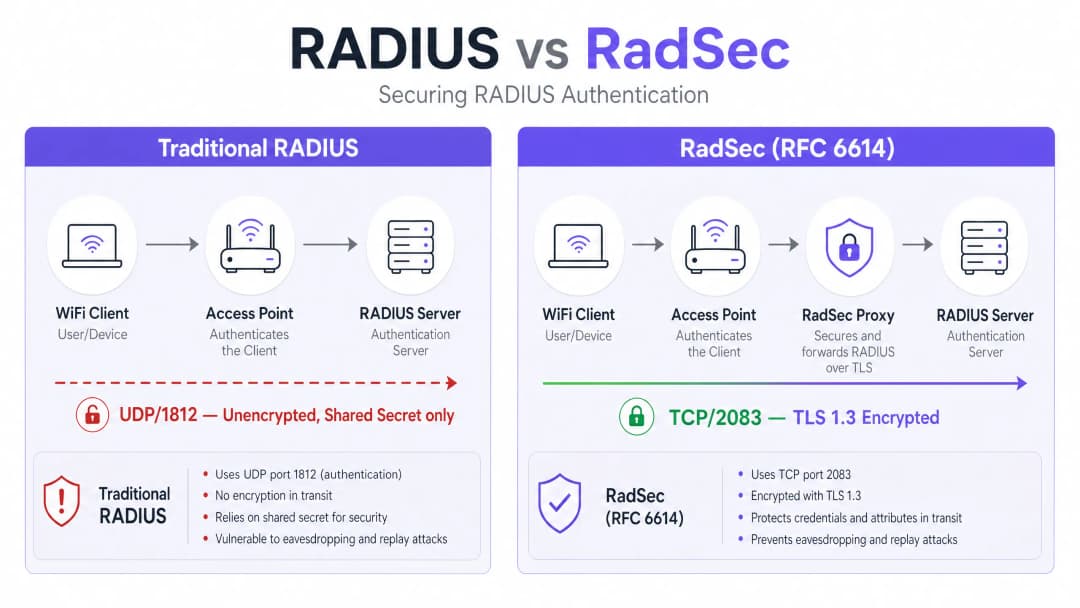
- 传输: TCP 端口 2083 可确保可靠的交付和有状态连接,从而提高高延迟环境中的性能。
- 加密: TLS 1.2 或 1.3 对所有 RADIUS 属性提供强大的端到端加密。
- 双向身份验证: RADIUS 客户端(或代理)和服务器都必须出示由受信任的证书颁发机构(CA)颁发的有效 X.509 证书。保留共享密钥仅用于向后兼容;TLS 提供了实际的安全性。 这种架构对于分布式环境至关重要,例如 零售 连锁店或 酒店 场所。在这些环境中,接入点通过公共互联网将身份验证请求回传至中央或云端托管的 RADIUS 服务器。
实施指南
部署 RadSec 通常遵循以下两种模式之一:原生支持或基于代理。
模式 1:原生 RadSec
如果您的基础设施原生支持它(例如 FreeRADIUS 3.0+、Cisco ISE、Aruba ClearPass),您可以直接在 RADIUS 服务器和接入点/控制器上配置 TLS 证书。这提供了从边缘到核心的真实端到端加密。
模式 2:RadSec 代理
许多传统 RADIUS 服务器(尤其是 Microsoft NPS)原生不支持 RadSec。在这些环境中,会部署一个代理(例如 radsecproxy)。
- 本地端: AP 向本地代理发送标准 UDP RADIUS。
- 广域网端: 代理将流量封装在 TLS 中,并通过 TCP 2083 将其发送到上游服务器。
这种模式使您能够在不更换传统基础设施的情况下保护广域网流量。
与 Purple 集成
Purple 的 Guest WiFi 和 WiFi Analytics 平台与企业级 RADIUS 基础设施无缝集成。在 Connect 许可下,Purple 作为 OpenRoaming 的免费身份提供商,而 RadSec 是保护场所与中央枢纽之间联合流量的强制性要求。
最佳实践
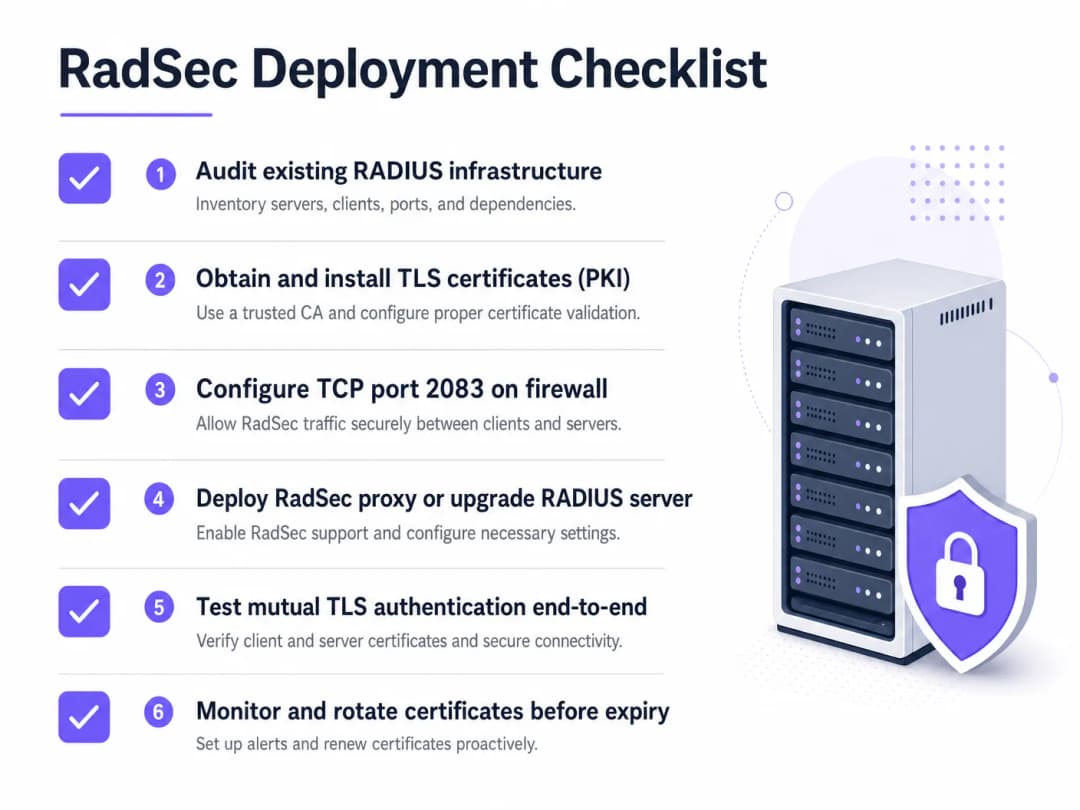
- 证书生命周期管理: 双向 TLS 依赖于有效的证书。实施自动化更新(例如通过 ACME)和严格的监控。证书过期将导致整个身份验证服务中断。
- 防火墙配置: 确保明确允许 TCP 端口 2083 从场所出站以及入站到 RADIUS 服务器。不要假设现有的 UDP 1812 规则会自动适用。
- 优先处理高风险流量: 在移动到本地管理 VLAN 之前,先在跨越公共互联网或不受信任的广域网的链路上开始部署。
有关保护边缘安全角色的更多信息,请阅读我们的指南:接入点安全:您的 2026 企业指南。
故障排除与风险缓解
当 RadSec 失败时,很少是身份验证问题;它几乎总是 TLS 或 TCP 问题。
- 症状: 接入点显示与 RADIUS 服务器断开连接。
- 检查: TCP 2083 的防火墙规则。传统的 RADIUS 使用 UDP;网络团队经常忘记开放 TCP 端口。
- 症状: TCP 连接已建立,但身份验证立即失败。
- **检查:**证书验证。验证通用名称 (CN) 或使用者 alternative 名称 (SAN) 是否匹配、证书是否已过期以及客户端是否信任签署的 CA。使用
openssl s_client -connect <server>:2083调试握手过程。
- **检查:**证书验证。验证通用名称 (CN) 或使用者 alternative 名称 (SAN) 是否匹配、证书是否已过期以及客户端是否信任签署的 CA。使用
确保您的网络基础架构稳固。阅读我们的建议:通过强大的 DNS 和安全保护您的网络。
投资回报率与业务影响
实施 RadSec 是一项风险规避投资。其投资回报率体现在避免数据泄露、合规性罚款 (PCI DSS、GDPR) 以及声誉受损上。此外,它还支持参与现代漫游联盟(如 OpenRoaming),这可以显著提升 医疗服务 和 交通运输 环境中的访客体验。
收听简报
要深入了解部署 RadSec 的实际运行情况,请收听我们 10 分钟的技术简报:
有关客户端设备上的具体配置步骤,请参阅 如何在 iOS 和 macOS 上通过 802.1X 设置企业级 WiFi 或葡萄牙语版本Como Configurar WiFi Corporativo em iOS e macOS com 802.1X。
关键定义
RadSec
RADIUS 协议的一种扩展,可在 TCP 端口 2083 上将 RADIUS 流量封装在 TLS 隧道内。
用于在跨越不受信任的网络时保护认证流量,防止凭证被拦截。
双向 TLS (mTLS)
一种安全过程,客户端和服务器在建立加密连接之前,都出示 X.509 证书以验证对方的身份。
RadSec 的核心认证机制,替代了对静态共享密钥的依赖。
802.1X
基于端口的网络访问控制的 IEEE 标准,用于对尝试连接到局域网或无线局域网 (WLAN) 的设备进行身份验证。
依赖 RADIUS(延伸为 RadSec)对目录中的用户凭证进行验证的框架。
radsecproxy
一种充当代理的开源守护程序,可将标准的 UDP RADIUS 流量转换为 RadSec (TLS over TCP),反之亦然。
当接入点或旧版 RADIUS 服务器(如 Microsoft NPS)缺少原生 RadSec 支持时部署。
OpenRoaming
由无线宽带联盟开发的联盟标准,允许用户在全球范围内无缝且安全地连接到参与其中的 WiFi 网络。
OpenRoaming 强制要求使用 RadSec 来保护场所与身份提供商之间的认证流量。
共享密钥
在传统 RADIUS 中使用的一个静态文本字符串,用于混淆密码并验证请求源。
尽管为了向后兼容,在 RadSec 配置中仍存在该配置,但它已被 TLS 加密所取代。
FreeRADIUS
一种广泛部署的开源 RADIUS 服务器,提供对 RadSec 的原生支持。
由于其灵活性和原生 TLS 功能,通常在企业环境和漫游联盟中使用。
PKI (公钥基础设施)
创建、管理、分发和撤销数字证书所需的角色、策略和软件框架。
部署 RadSec 的先决条件,因为您必须为所有 RADIUS 客户端和服务器签发并管理证书。
应用实例
一个拥有 200 家酒店的集团使用中央 Microsoft NPS 进行员工身份验证。目前,每家酒店的接入点都通过 UDP 1812 在公共互联网上发送 RADIUS 请求。首席技术官 (CTO) 要求对所有认证流量进行加密,但今年无法替换 NPS 这一选项。
在每个酒店网点部署一个 RadSec 代理(例如 radsecproxy),并在中央数据中心、NPS 服务器前端部署相应的代理。本地 AP 向本地代理发送 UDP RADIUS 流量。本地代理通过互联网在 TCP 2083 上与中央代理建立双向 TLS (mTLS) 隧道。中央代理终止 TLS 隧道,并将标准 UDP RADIUS 转发给 NPS 服务器。
一所大型大学正在其校园内部署 OpenRoaming,以便为来访的学术人员提供无缝访问。他们正在运行 FreeRADIUS 3.0。
在 FreeRADIUS 内启用原生 RadSec。由 OpenRoaming 联盟信任的证书颁发机构 (CA) 生成 X.509 证书。配置校园防火墙,允许指向联盟中心的入站和出站 TCP 2083 流量。配置无线局域网控制器,对所有发往联盟的认证请求使用 RadSec。
练习题
Q1. 您的团队在远程分支机构接入点与中央 FreeRADIUS 服务器之间部署了原生 RadSec。AP 可以 ping 通服务器,但身份验证请求完全超时,且 RADIUS 日志中没有任何流量记录。
提示:RadSec 使用与传统 RADIUS 不同的传输协议和端口。
查看标准答案
防火墙很可能阻止了 TCP 端口 2083。习惯于传统 RADIUS 的网络团队通常只允许 UDP 端口 1812/1813。您必须显式允许从分支机构出站以及到 RADIUS 服务器入站的 TCP 2083 流量。
Q2. 您正在审计一家零售客户的 WiFi 架构。他们集中使用 Microsoft NPS。其门店 AP 通过 IPsec VPN 在互联网上发送身份验证请求。这里需要 RadSec 吗?
提示:考虑已经到位的加密层。
查看标准答案
虽然使用 RadSec 是最佳实践,但 IPsec VPN 已经为在不受信任的互联网上传输的 UDP RADIUS 流量提供了传输层加密。在此处部署 RadSec 将提供深度防御,但与流量原生跨越互联网的情况相比,其紧迫性较低。
Q3. 在成功部署 RadSec 代理一周后,整个企业的 WiFi 身份验证在周一上午 09:00 同时失败。网络团队确认防火墙规则未发生变化。
提示:TLS 隧道本身的主要身份验证机制是什么?
查看标准答案
用于双向 TLS 身份验证的 X.509 证书可能已过期。当证书过期时,TLS 握手失败,TCP 连接断开,RADIUS 流量无法传输。实施自动化证书监控和轮换以防止此问题。
继续阅读本系列
如何安全地隔离员工与宾客 WiFi 网络:企业局域网的最佳实践
本指南为 IT 经理和网络架构师提供了一套独立于厂商的技术蓝图,旨在通过正确隔离员工和宾客 WiFi 流量来保障企业局域网的安全。内容涵盖 802.1X 认证、云 RADIUS、VLAN 隔离以及消除共享密码和保护企业资产所需的凭据生命周期管理。
最佳 DNS filtering:面向企业用户的全面指南
本技术参考指南阐述了企业级 DNS filtering 如何通过在解析层(即在建立连接之前)拦截恶意域名来保障公共网络的安全。它为 IT 总监、网络架构师和场所运营团队提供了在酒店、零售和公共部门环境中保护宾客 WiFi 所需的部署架构、防火墙配置以及合规性背景信息。Purple Shield 在 DNS 级别为超过 80,000 个实时场所拦截恶意软件、僵尸网络和不当内容。
了解 Cisco SUDI:安全网络准入控制中的硬件锚定身份
本指南阐述了 Cisco SUDI 如何为企业网络基础设施提供硬件锚定且加密安全的身份。了解如何使用不可更改的 802.1AR 证书取代易受欺骗的 MAC 地址,以保障您场所的网络准入控制安全。
对您的具体配置有疑问吗?
我们的团队与 80,000 多个场所的运营方、IT 经理和网络工程师保持合作。预约 20 分钟的通话,我们将为您展示同行是如何解决类似问题的。