
RadSec: TLS पर RADIUS किस प्रकार WiFi ऑथेंटिकेशन सुरक्षा को बेहतर बनाता है
यह आधिकारिक तकनीकी संदर्भ बताता है कि कैसे RadSec (RFC 6614) पारंपरिक RADIUS ट्रैफ़िक को TLS एन्क्रिप्शन में लपेटकर एंटरप्राइज WiFi ऑथेंटिकेशन को सुरक्षित करता है। IT प्रबंधकों और नेटवर्क आर्किटेक्ट्स के लिए डिज़ाइन किया गया, यह कॉर्पोरेट और गेस्ट नेटवर्क पर अनएन्क्रिप्टेड UDP RADIUS ट्रैफ़िक के जोखिमों को कम करने के लिए आर्किटेक्चर, डिप्लॉयमेंट रणनीतियों और व्यावहारिक कदमों को कवर करता है।
इस गाइड को सुनें
पॉडकास्ट ट्रांसक्रिप्ट देखें
हमारी मुख्य श्रृंखला का हिस्सा: Enterprise WiFi Security Guide →
कार्यकारी सारांश
UDP (पोर्ट 1812/1813) पर पारंपरिक RADIUS को आधुनिक एंटरप्राइज सुरक्षा खतरों को ध्यान में रखकर डिज़ाइन नहीं किया गया था। केवल एक शेयर्ड सीक्रेट और MD5 हैशिंग पर निर्भर रहने के कारण, यह ऑथेंटिकेशन क्रेडेंशियल्स और सेशन एट्रिब्यूट्स को इंटरसेप्शन के प्रति संवेदनशील बनाता है, विशेष रूप से तब जब वे सार्वजनिक नेटवर्क या हॉस्पिटैलिटी और रिटेल चेन जैसे बड़े वितरित परिसरों से होकर गुजरते हैं। RadSec (TLS पर RADIUS, RFC 6614) पोर्ट 2083 पर TCP-आधारित TLS 1.3 टनल के भीतर RADIUS ट्रैफ़िक को एनकैप्सुलेट करके इस बुनियादी सुरक्षा अंतर को समाप्त करता है।
CTO और नेटवर्क आर्किटेक्ट्स के लिए, RadSec को तैनात करना अब केवल एक सर्वोत्तम अभ्यास नहीं है—यह कॉर्पोरेट WiFi की सुरक्षा करने, PCI DSS 4.0 अनुपालन बनाए रखने और OpenRoaming जैसे आधुनिक फेडरेटेड रोमिंग फ्रेमवर्क में भाग लेने के लिए एक महत्वपूर्ण आवश्यकता है। यह गाइड आपके ऑथेंटिकेशन इन्फ्रास्ट्रक्चर को सुरक्षित करने के लिए आर्किटेक्चर, इम्प्लीमेंटेशन पैटर्न और परिचालन आवश्यकताओं का विवरण देती है।
तकनीकी गहन विश्लेषण: RADIUS बनाम RadSec
पारंपरिक RADIUS में संवेदनशीलता
एक मानक 802.1X डिप्लॉयमेंट में, एक्सेस पॉइंट (ऑथेंटिकेटर) क्लाइंट क्रेडेंशियल्स को RADIUS सर्वर (ऑथेंटिकेशन सर्वर) पर फॉरवर्ड करता है। पारंपरिक RADIUS में, यह पेलोड UDP पर भेजा जाता है। एकमात्र सुरक्षा एक प्री-शेयर्ड की (PSK) है जिसका उपयोग MD5 के माध्यम से पासवर्ड को अस्पष्ट करने के लिए किया जाता है।
यह आर्किटेक्चर तीन महत्वपूर्ण जोखिम प्रस्तुत करता है:
- ट्रांसपोर्ट एन्क्रिप्शन की कमी: यूजर एट्रिब्यूट्स, MAC एड्रेस और सेशन डेटा क्लियरटेक्स्ट में प्रसारित होते हैं।
- क्रिप्टोग्राफिक कमजोरी: यदि कोई हमलावर ट्रैफ़िक को कैप्चर कर लेता है, तो MD5 ऑफलाइन डिक्शनरी हमलों के प्रति संवेदनशील होता है।
- कोई म्यूचुअल ऑथेंटिकेशन नहीं: एक्सेस पॉइंट क्रिप्टोग्राफिक रूप से यह सत्यापित नहीं कर सकता कि वह वैध RADIUS सर्वर से बात कर रहा है, जिससे नकली सर्वर के हमलों का खतरा बढ़ जाता है।
RadSec आर्किटेक्चर (RFC 6614)
RadSec ट्रांसपोर्ट लेयर को UDP से TCP पर स्थानांतरित करके और पूरे पेलोड को TLS में लपेटकर इन कमियों को दूर करता है।
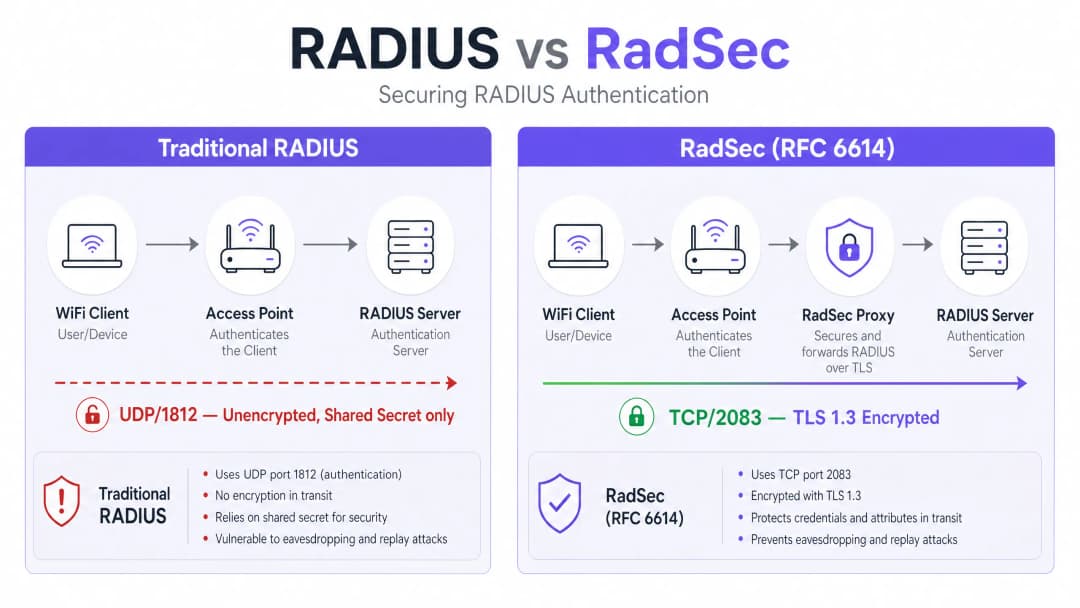
- ट्रांसपोर्ट: TCP पोर्ट 2083 विश्वसनीय डिलीवरी और स्टेटफुल कनेक्शन सुनिश्चित करता है, जिससे उच्च-लेटेंसी वाले वातावरण में प्रदर्शन में सुधार होता है।
- एन्क्रिप्शन: TLS 1.2 या 1.3 सभी RADIUS एट्रिब्यूट्स का मजबूत, एंड-टू-एंड एन्क्रिप्शन प्रदान करता है।
- म्यूचुअल ऑथेंटिकेशन: RADIUS क्लाइंट (या प्रॉक्सी) और सर्वर दोनों को एक विश्वसनीय सर्टिफिकेट अथॉरिटी (CA) द्वारा जारी किए गए वैध X.509 सर्टिफिकेट प्रस्तुत करने होंगे। शेयर्ड सीक्रेट को केवल बैकवर्ड कम्पैटिबिलिटी के लिए रखा गया है; वास्तविक सुरक्षा TLS प्रदान करता है। यह आर्किटेक्चर वितरित वातावरणों के लिए आवश्यक है, जैसे कि रिटेल चेन या हॉस्पिटैलिटी स्थल, जहाँ एक्सेस पॉइंट सार्वजनिक इंटरनेट पर ऑथेंटिकेशन अनुरोधों को एक केंद्रीय या क्लाउड-होस्टेड RADIUS सर्वर पर बैकहॉल करते हैं।
अपने विशिष्ट सेटअप को लेकर कोई सवाल हैं?
हमारी टीम 80,000 से अधिक वेन्यू में वेन्यू ऑपरेटरों, IT मैनेजरों और नेटवर्क इंजीनियरों के साथ काम करती है। 20 मिनट का कॉल बुक करें और हम आपको दिखाएंगे कि आपके जैसे अन्य लोगों ने इसे कैसे हल किया।
इम्प्लीमेंटेशन गाइड
RadSec को तैनात करना आमतौर पर दो पैटर्न में से एक का अनुसरण करता है: नेटिव सपोर्ट या प्रॉक्सी-आधारित।
पैटर्न 1: नेटिव RadSec
यदि आपका इन्फ्रास्ट्रक्चर इसे नेटिव रूप से सपोर्ट करता है (जैसे, FreeRADIUS 3.0+, Cisco ISE, Aruba ClearPass), तो आप सीधे RADIUS सर्वर और एक्सेस पॉइंट्स/कंट्रोलर्स पर TLS सर्टिफिकेट कॉन्फ़िगर करते हैं। यह एज से लेकर कोर तक वास्तविक एंड-टू-एंड एन्क्रिप्शन प्रदान करता है।
पैटर्न 2: RadSec प्रॉक्सी
कई पुराने RADIUS सर्वर (विशेष रूप से Microsoft NPS) नेटिव रूप से RadSec का समर्थन नहीं करते हैं। इन वातावरणों में, एक प्रॉक्सी (जैसे कि radsecproxy) तैनात की जाती है।
- लोकल लेग: AP स्थानीय प्रॉक्सी को मानक UDP RADIUS भेजता है।
- WAN लेग: प्रॉक्सी ट्रैफ़िक को TLS में एनकैप्सुलेट करता है और इसे TCP 2083 पर अपस्ट्रीम सर्वर पर भेजता है।
यह पैटर्न आपको पुराने इन्फ्रास्ट्रक्चर को बदले बिना वाइड-एरिया ट्रैफ़िक को सुरक्षित करने की अनुमति देता है।
Purple के साथ एकीकरण
Purple के गेस्ट WiFi और WiFi एनालिटिक्स प्लेटफॉर्म एंटरप्राइज RADIUS इन्फ्रास्ट्रक्चर के साथ सहजता से एकीकृत होते हैं। Connect लाइसेंस के तहत, Purple, OpenRoaming के लिए एक मुफ्त पहचान प्रदाता के रूप में कार्य करता है, जहाँ स्थलों और केंद्रीय हब के बीच फेडरेशन ट्रैफ़िक को सुरक्षित करने के लिए RadSec एक अनिवार्य आवश्यकता है।
सर्वोत्तम अभ्यास
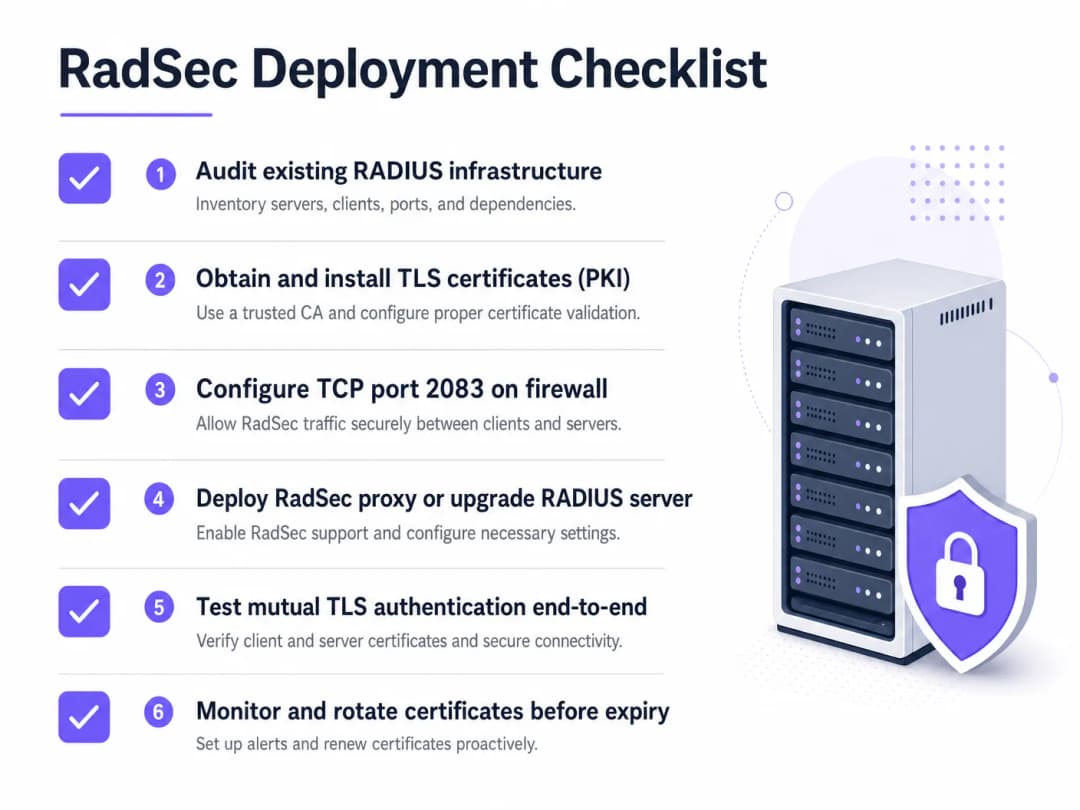
- सर्टिफिकेट लाइफसाइकिल मैनेजमेंट: म्यूचुअल TLS वैध सर्टिफिकेट पर निर्भर करता है। स्वचालित नवीनीकरण (जैसे, ACME के माध्यम से) और सख्त निगरानी लागू करें। एक समाप्त सर्टिफिकेट पूर्ण ऑथेंटिकेशन आउटेज का कारण बनेगा।
- फ़ायरवॉल कॉन्फ़िगरेशन: सुनिश्चित करें कि TCP पोर्ट 2083 को स्थल से आउटबाउंड और RADIUS सर्वर पर इनबाउंड दोनों के लिए स्पष्ट रूप से अनुमति दी गई है। यह न मान लें कि मौजूदा UDP 1812 नियम लागू होंगे।
- उच्च-जोखिम वाले ट्रैफ़िक को प्राथमिकता दें: स्थानीय प्रबंधन VLANs पर जाने से पहले उन लिंक्स पर डिप्लॉयमेंट शुरू करें जो सार्वजनिक इंटरनेट या अविश्वसनीय WANs से होकर गुजरते हैं।
एज को सुरक्षित करने के बारे में अधिक जानकारी के लिए, हमारी गाइड एक्सेस पॉइंट सुरक्षा: आपकी 2026 एंटरप्राइज गाइड पढ़ें।
समस्या निवारण और जोखिम न्यूनीकरण
जब RadSec विफल होता है, तो यह शायद ही कभी ऑथेंटिकेशन की समस्या होती है; यह लगभग हमेशा TLS या TCP की समस्या होती है।
- लक्षण: एक्सेस पॉइंट्स RADIUS सर्वर से डिस्कनेक्टेड दिखाई देते हैं।
- जांचें: TCP 2083 के लिए फ़ायरवॉल नियम। पारंपरिक RADIUS, UDP का उपयोग करता है; नेटवर्क टीमें अक्सर TCP पोर्ट खोलना भूल जाती हैं।
- लक्षण: TCP कनेक्शन स्थापित हो जाता है, लेकिन ऑथेंटिकेशन तुरंत विफल हो जाता है।
- जांचें: सर्टिफिकेट सत्यापन। सत्यापित करें कि कॉमन नेम (CN) या सब्जेक्ट अल्टरनेटिव नेम (SAN) मेल खाता है, सर्टिफिकेट समाप्त नहीं हुआ है, और क्लाइंट साइनिंग CA पर भरोसा करता है। हैंडशेक को डीबग करने के लिए
openssl s_client -connect <server>:2083का उपयोग करें।
- जांचें: सर्टिफिकेट सत्यापन। सत्यापित करें कि कॉमन नेम (CN) या सब्जेक्ट अल्टरनेटिव नेम (SAN) मेल खाता है, सर्टिफिकेट समाप्त नहीं हुआ है, और क्लाइंट साइनिंग CA पर भरोसा करता है। हैंडशेक को डीबग करने के लिए
सुनिश्चित करें कि आपके नेटवर्क की बुनियादी बातें मजबूत हैं। मजबूत DNS और सुरक्षा के साथ अपने नेटवर्क की रक्षा करें पर हमारी सलाह की समीक्षा करें।
ROI और व्यावसायिक प्रभाव
RadSec को लागू करना एक जोखिम न्यूनीकरण निवेश है। ROI को डेटा ब्रीच, अनुपालन जुर्माने (PCI DSS, GDPR), और प्रतिष्ठा के नुकसान से बचने के रूप में मापा जाता है। इसके अलावा, यह OpenRoaming जैसे आधुनिक रोमिंग फेडरेशन में भागीदारी को सक्षम बनाता है, जो हेल्थकेयर और ट्रांसपोर्ट वातावरण में अतिथि अनुभव को महत्वपूर्ण रूप से बढ़ा सकता है।
ब्रीफिंग सुनें
RadSec को तैनात करने की परिचालन वास्तविकताओं के बारे में अधिक जानने के लिए, हमारी 10 मिनट की तकनीकी ब्रीफिंग सुनें:
क्लाइंट डिवाइस पर विशिष्ट कॉन्फ़िगरेशन चरणों के लिए, 802.1X के साथ iOS और macOS पर एंटरप्राइज WiFi कैसे सेट अप करें या पुर्तगाली संस्करण Como Configurar WiFi Corporativo em iOS e macOS com 802.1X देखें।
मुख्य परिभाषाएं
RadSec
RADIUS प्रोटोकॉल का एक विस्तार जो TCP पोर्ट 2083 पर एक TLS टनल के भीतर RADIUS ट्रैफ़िक को एनकैप्सुलेट करता है।
अविश्वसनीय नेटवर्क से गुजरते समय ऑथेंटिकेशन ट्रैफ़िक को सुरक्षित करने के लिए उपयोग किया जाता है, जिससे क्रेडेंशियल इंटरसेप्शन को रोका जा सके।
Mutual TLS (mTLS)
एक सुरक्षा प्रक्रिया जहाँ क्लाइंट और सर्वर दोनों एक एन्क्रिप्टेड कनेक्शन स्थापित करने से पहले एक-दूसरे की पहचान सत्यापित करने के लिए X.509 सर्टिफिकेट प्रस्तुत करते हैं।
RadSec का मुख्य ऑथेंटिकेशन तंत्र, जो स्थिर शेयर्ड सीक्रेट्स पर निर्भरता को प्रतिस्थापित करता है।
802.1X
पोर्ट-आधारित नेटवर्क एक्सेस कंट्रोल के लिए IEEE मानक, जिसका उपयोग LAN या WLAN से कनेक्ट करने का प्रयास करने वाले उपकरणों को ऑथेंटिकेट करने के लिए किया जाता है।
वह फ्रेमवर्क जो किसी डायरेक्टरी के विरुद्ध यूजर क्रेडेंशियल्स को सत्यापित करने के लिए RADIUS (और विस्तार से, RadSec) पर निर्भर करता है।
radsecproxy
एक ओपन-सोर्स डेमन जो एक प्रॉक्सी के रूप में कार्य करता है, मानक UDP RADIUS ट्रैफ़िक को RadSec (TCP पर TLS) में और इसके विपरीत परिवर्तित करता है।
तब तैनात किया जाता है जब एक्सेस पॉइंट्स या Microsoft NPS जैसे पुराने RADIUS सर्वरों में नेटिव RadSec सपोर्ट गायब होता है।
OpenRoaming
WiFi Alliance द्वारा विकसित एक फेडरेशन मानक जो उपयोगकर्ताओं को विश्व स्तर पर भाग लेने वाले WiFi नेटवर्क से सहज और सुरक्षित रूप से कनेक्ट करने की अनुमति देता है।
OpenRoaming स्थलों और पहचान प्रदाताओं के बीच ऑथेंटिकेशन ट्रैफ़िक को सुरक्षित करने के लिए RadSec के उपयोग को अनिवार्य करता है।
Shared Secret
पारंपरिक RADIUS में पासवर्ड को अस्पष्ट करने और अनुरोधों के स्रोत को सत्यापित करने के लिए उपयोग की जाने वाली एक स्थिर टेक्स्ट स्ट्रिंग।
हालांकि बैकवर्ड कम्पैटिबिलिटी के लिए तकनीकी रूप से अभी भी RadSec कॉन्फ़िगरेशन में मौजूद है, लेकिन इसे TLS एन्क्रिप्शन द्वारा प्रतिस्थापित कर दिया गया है।
FreeRADIUS
एक व्यापक रूप से तैनात ओपन-सोर्स RADIUS सर्वर जो RadSec के लिए नेटिव सपोर्ट प्रदान करता है।
अपनी लचीलापन और नेटिव TLS क्षमताओं के कारण अक्सर एंटरप्राइज वातावरण और रोमिंग फेडरेशन में उपयोग किया जाता है।
PKI (Public Key Infrastructure)
डिजिटल सर्टिफिकेट बनाने, प्रबंधित करने, वितरित करने और निरस्त करने के लिए आवश्यक भूमिकाओं, नीतियों और सॉफ़्टवेयर का ढांचा।
RadSec को तैनात करने के लिए एक पूर्वापेक्षा, क्योंकि आपको सभी RADIUS क्लाइंट और सर्वर के लिए सर्टिफिकेट जारी और प्रबंधित करने होंगे।
हल किए गए उदाहरण
एक 200-संपत्ति वाला होटल समूह कर्मचारियों के ऑथेंटिकेशन के लिए केंद्रीय रूप से Microsoft NPS का उपयोग करता है। प्रत्येक होटल के एक्सेस पॉइंट्स वर्तमान में UDP 1812 के माध्यम से सार्वजनिक इंटरनेट पर RADIUS अनुरोध भेजते हैं। CTO सभी ऑथेंटिकेशन ट्रैफ़िक के लिए एन्क्रिप्शन को अनिवार्य करता है, लेकिन इस वर्ष NPS को बदलना कोई विकल्प नहीं है।
प्रत्येक होटल साइट पर एक RadSec प्रॉक्सी (जैसे, radsecproxy) और NPS सर्वर के सामने केंद्रीय डेटा सेंटर में एक संबंधित प्रॉक्सी तैनात करें। स्थानीय APs स्थानीय प्रॉक्सी को UDP RADIUS भेजते हैं। स्थानीय प्रॉक्सी इंटरनेट के माध्यम से केंद्रीय प्रॉक्सी के लिए TCP 2083 पर एक म्यूचुअल TLS टनल स्थापित करती है। केंद्रीय प्रॉक्सी TLS टनल को समाप्त करती है और NPS सर्वर पर मानक UDP RADIUS फॉरवर्ड करती है।
एक बड़ा विश्वविद्यालय आने वाले शिक्षाविदों के लिए निर्बाध पहुंच की अनुमति देने के लिए अपने पूरे परिसर में OpenRoaming तैनात कर रहा है। वे FreeRADIUS 3.0 चला रहे हैं।
FreeRADIUS के भीतर नेटिव RadSec सक्षम करें। OpenRoaming फेडरेशन द्वारा विश्वसनीय CA से X.509 सर्टिफिकेट जनरेट करें। फेडरेशन हब के लिए इनबाउंड और आउटबाउंड TCP 2083 ट्रैफ़िक की अनुमति देने के लिए कैंपस फ़ायरवॉल को कॉन्फ़िगर करें। सभी फेडरेशन-बाउंड ऑथेंटिकेशन अनुरोधों के लिए RadSec का उपयोग करने के लिए वायरलेस LAN कंट्रोलर्स को कॉन्फ़िगर करें।
अभ्यास प्रश्न
Q1. आपकी टीम ने आपके रिमोट ब्रांच एक्सेस पॉइंट्स और आपके केंद्रीय FreeRADIUS सर्वर के बीच नेटिव RadSec तैनात किया है। APs सर्वर को पिंग कर सकते हैं, लेकिन ऑथेंटिकेशन अनुरोध पूरी तरह से टाइम आउट हो रहे हैं, और कोई भी ट्रैफ़िक RADIUS लॉग्स तक नहीं पहुंच रहा है।
संकेत: RadSec पारंपरिक RADIUS की तुलना में एक अलग ट्रांसपोर्ट प्रोटोकॉल और पोर्ट का उपयोग करता है।
मॉडल उत्तर देखें
फ़ायरवॉल संभवतः TCP पोर्ट 2083 को ब्लॉक कर रहा है। पारंपरिक RADIUS के आदी नेटवर्क टीमें अक्सर केवल UDP पोर्ट 1812/1813 की अनुमति देती हैं। आपको शाखा से आउटबाउंड और RADIUS सर्वर पर इनबाउंड TCP 2083 को स्पष्ट रूप से अनुमति देनी होगी।
Q2. आप एक रिटेल क्लाइंट के WiFi आर्किटेक्चर का ऑडिट कर रहे हैं। वे केंद्रीय रूप से Microsoft NPS का उपयोग करते हैं। उनके स्टोर APs IPsec VPN के माध्यम से इंटरनेट पर ऑथेंटिकेशन अनुरोध भेजते हैं। क्या यहाँ RadSec की आवश्यकता है?
संकेत: पहले से मौजूद एन्क्रिप्शन की परतों पर विचार करें।
मॉडल उत्तर देखें
हालांकि RadSec सर्वोत्तम अभ्यास है, लेकिन IPsec VPN पहले से ही अविश्वसनीय इंटरनेट पर UDP RADIUS ट्रैफ़िक के लिए ट्रांसपोर्ट लेयर एन्क्रिप्शन प्रदान कर रहा है। यहाँ RadSec को तैनात करना गहन सुरक्षा प्रदान करेगा, लेकिन यह उसकी तुलना में कम जरूरी है यदि ट्रैफ़िक नेटिव रूप से इंटरनेट से गुजर रहा होता।
Q3. एक सफल RadSec प्रॉक्सी डिप्लॉयमेंट के एक सप्ताह बाद, पूरे एंटरप्राइज में सभी WiFi ऑथेंटिकेशन सोमवार को सुबह 09:00 बजे एक साथ विफल हो जाते हैं। नेटवर्क टीम पुष्टि करती है कि फ़ायरवॉल नियम अपरिवर्तित हैं।
संकेत: स्वयं TLS टनल के लिए प्राथमिक ऑथेंटिकेशन तंत्र क्या है?
मॉडल उत्तर देखें
म्यूचुअल TLS ऑथेंटिकेशन के लिए उपयोग किए जाने वाले X.509 सर्टिफिकेट संभवतः समाप्त हो गए हैं। जब सर्टिफिकेट समाप्त हो जाते हैं, तो TLS हैंडशेक विफल हो जाता है, TCP कनेक्शन टूट जाता है, और RADIUS ट्रैफ़िक प्रवाहित नहीं हो पाता है। इसे रोकने के लिए स्वचालित सर्टिफिकेट निगरानी और रोटेशन लागू करें।
इस श्रृंखला में आगे पढ़ें
स्टाफ और गेस्ट WiFi नेटवर्क को सुरक्षित रूप से कैसे खंडित करें: एंटरप्राइज LANs के लिए सर्वोत्तम अभ्यास
यह गाइड IT प्रबंधकों और नेटवर्क आर्किटेक्ट्स को स्टाफ और गेस्ट WiFi ट्रैफ़िक को ठीक से खंडित करके एंटरप्राइज LANs को सुरक्षित करने के लिए एक विक्रेता-तटस्थ, तकनीकी खाका प्रदान करती है। इसमें 802.1X प्रमाणीकरण, क्लाउड RADIUS, VLAN आइसोलेशन और साझा पासफ़्रेज़ को समाप्त करने और कॉर्पोरेट संपत्तियों की सुरक्षा के लिए आवश्यक क्रेडेंशियल लाइफसाइकल मैनेजमेंट शामिल है।
सर्वश्रेष्ठ DNS फ़िल्टरिंग: व्यवसायों के लिए एक व्यापक गाइड
यह तकनीकी संदर्भ गाइड बताती है कि कैसे उद्यम DNS फ़िल्टरिंग रिज़ॉल्यूशन परत पर दुर्भावनापूर्ण डोमेन को ब्लॉक करके सार्वजनिक नेटवर्क को सुरक्षित करती है - इससे पहले कि कोई कनेक्शन स्थापित हो। यह IT निदेशकों, नेटवर्क आर्किटेक्ट्स और वेन्यू ऑपरेशंस टीमों को परिनियोजन आर्किटेक्चर, फ़ायरवॉल कॉन्फ़िगरेशन और अनुपालन संदर्भ प्रदान करता है जिसकी उन्हें हॉस्पिटैलिटी, रिटेल और सार्वजनिक क्षेत्र के वातावरण में Guest WiFi की सुरक्षा के लिए आवश्यकता होती है। Purple Shield 80,000 से अधिक लाइव वेन्यू में DNS स्तर पर मैलवेयर, बॉटनेट और अनुपयुक्त सामग्री को ब्लॉक करता है।
Cisco SUDI को समझना: सुरक्षित नेटवर्क एक्सेस कंट्रोल में हार्डवेयर-एंकर वाली पहचान
यह गाइड बताती है कि Cisco SUDI एंटरप्राइज़ नेटवर्क इंफ्रास्ट्रक्चर के लिए हार्डवेयर-एंकर वाली, क्रिप्टोग्राफ़िक रूप से सुरक्षित पहचान कैसे प्रदान करता है। सीखें कि अपने स्थान के नेटवर्क एक्सेस कंट्रोल को सुरक्षित करने के लिए स्पूफ़ किए जा सकने वाले MAC पते को अपरिवर्तनीय 802.1AR प्रमाणपत्रों से कैसे बदलें।
अपने विशिष्ट सेटअप को लेकर कोई सवाल हैं?
हमारी टीम 80,000 से अधिक वेन्यू में वेन्यू ऑपरेटरों, IT मैनेजरों और नेटवर्क इंजीनियरों के साथ काम करती है। 20 मिनट का कॉल बुक करें और हम आपको दिखाएंगे कि आपके जैसे अन्य लोगों ने इसे कैसे हल किया।